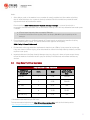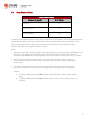
1
3.
Deploy at least one secondary DSM node.
This is always recommended to be deployed for redundancy. No more than 3 DSM nodes are
recommended.
See Configure Multi-Node Managers.
Multi-node deployment is not meant to address geographic dispersion. Therefore, DSM nodes
and the DB must be in same network segment (i.e. NO DSM1/DB in London with DSM2 in Paris
connected via WAN.
B. Other Recommendations
1.
Maximum Memory for the DSM installer
The installer is configured to use 1GB of contiguous memory by default. If the installer fails and you receive
a "java.lang.OutOfMemoryError" error during installation, you may need to configure the installer to use
less memory.
Refer to http://esupport.trendmicro.com/solution/en-US/1098020.aspx for more details.
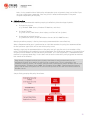
2. Load Balancer Support
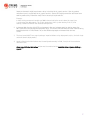
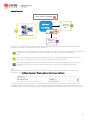
Deep Security Manager can now specify a hostname and port that supersede the defaults in order to put
a load balancer in front of:
The manager user interface port (4119)
The manager heartbeat port (4120)
The relay port (4122)
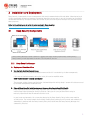
To configure load balancers, go to DSM > Administration > System Settings > Advanced > Load Balancers
This setup is recommended for Multi-Tenant (Service Provider) environments (especially in the cloud).
Using a load balancer allows the following:
•
•
Tunneling for 4119, 4120 and 4122 traffic over 443 (three load balancers with 3 addresses).
Ability to add and remove DSM nodes on demand, without generating update traffic going to each
DSA and DSVA in the environment.
Load balancers can be configured to use different ports for different traffic. If the load balancer supports
port re-direction, it can be used to expose all of the required protocols over port 443 (using 3 load
balancers).
12