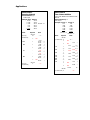
1
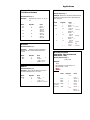
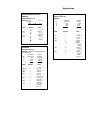
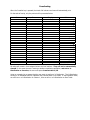
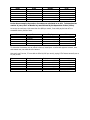
Convert Decimal to HH.MM Equivalent
Enter
Press
Display
8.50
Print
8.50
8 30
M ↔ Dec
8 30
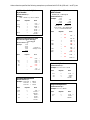
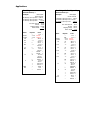
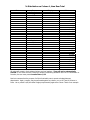
Compute Hours Worked
Example: An employee starts work at 8:30am, takes a 45 minute break for lunch at 12:00, a 15 minute
coffee break at 3:00pm and leaves work at 5:00pm. Determine how many hours this employee worked.
Enter
8.30
12.00
12.45
3.00
3.15
5.00
Press
Start
Change Sign
End
Change Sign
Start
Change Sign
End
Change Sign
Start
Change Sign
End
Compute
Display
-
Print
8 30
12.00
12 00
12.45
12.45
3.00
3.00
3.15
3.15
5.00
5.00
7.30
8 30
12 00 P
12 45 P
3 00 P
3 15 P
5 00 P
7.30
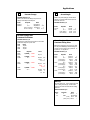
This employee worked 7 hours and 30 minutes. If you wish to convert the 7 hours and 30 minutes to the
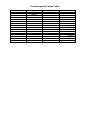
decimal equivalent to enable multiplying it by an hourly rate, perform the following key depressions.
Enter
Press
HH.MM
M ↔ Dec
Display
Print
7 30
7.50
7 30
7.50
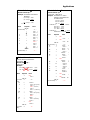
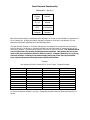
The alternate method of computing the number of hours worked in the above example would be to use
the adding machine in conjunction with the special function keys.
Enter
8.30
5.00
.45
.15
Press
Start
Change Sign
End
Compute
+
*
HH.MM
M ↔ Dec
Display
-
Print
8 30
5.00
5.00
8.30
8.30
.45
.15
7.30
7 30
7.50
8 30
5 00 P
8.30
8.30*+
.45 .15 7.30 *
7 30
7.50