
1
Installing the Software
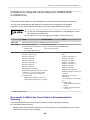
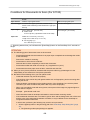
System Requirements
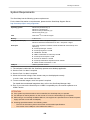
The ScanSnap has the following system requirements.
For the latest information on requirements, please visit the ScanSnap Support Site at:
http://scansnap.fujitsu.com/g-support/en/
Operating system
Windows 8 (32-bit/64-bit) (*1)
Windows 7 (32-bit/64-bit)
Windows Vista (32-bit/64-bit) (*2)
Windows XP (32-bit) (*3)
CPU
Intel® Core™ i5 2.5 GHz or higher
Memory
4 GB or more
Display resolution (*4)
Windows 8: 1024 × 768 pixels or higher
Windows 7/Windows Vista/Windows XP: 800 × 600 pixels or higher
Disk space
Free space required to install the software bundled with the ScanSnap is as
follows:(*5)
l ScanSnap Manager: 700 MB
l ScanSnap Organizer: 670 MB
l CardMinder: 660 MB
l ABBYY FineReader for ScanSnap: 620 MB
l ScanSnap Online Update: 10 MB
l Evernote for Windows: 150 MB
l ScanSnap SV600 Basic Operation Guide: 200 MB
l Adobe Acrobat XI Standard: 1.5 GB
USB port
USB3.0(*6)/USB2.0/USB1.1
*1: The software bundled with the ScanSnap operates as a desktop application.
*2: Service Pack 2 or later is required.
*3: Service Pack 3 or later is required.
*4: When the font size is large, some screens may not be displayed correctly.
In such a case, use a smaller font size.
*5: To save scanned images, more free space is required.
For details about estimated image data size, refer to the ScanSnap Manager Help.
*6: Even if you connect the ScanSnap to a USB3.0 compatible port, the scanner operates as a
USB2.0 device.
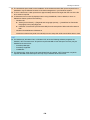
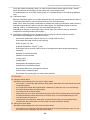
ATTENTION
l If the system requirements above are not satisfied, the ScanSnap may not operate.
l If a USB port on the keyboard or on the monitor is in use, the ScanSnap may not operate.
l When using a commercially available USB hub, use a type that is powered from an electrical power
supply (and that comes with an adapter).
l Scanning speed decreases in the following cases:
-
The CPU or the memory does not meet the recommended specifications.
-
The version of the USB port or the USB hub is USB 1.1.
129









































































![3. Clique no botão [OK]](http://vs1.manualzilla.com/store/data/006085780_1-1e963248ed17cdf0be3b5a5218e98297-150x150.png)
![3. Clique no botão [Aplicar]](http://vs1.manualzilla.com/store/data/006085959_1-abc442ce88b6545b36fcdec1f957320c-150x150.png)
![3. Cliccare il tasto [OK]](http://vs1.manualzilla.com/store/data/006155166_1-66b7bb98c98d41f6181cd20c0b775e39-150x150.png)