1
SINGLE-PLAYER CAMPAIGN
Infinity Blade features a single-player campaign mode, pitting your lone knight against a legion of
Titans in your quest to defeat the God-King.
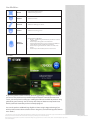
NAVIGATION
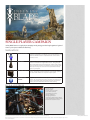
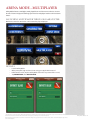
HEALTH POTIONS
As you engage in combat, your health will drain – collect
potions to revitalize your knight. Tap the info button, and
then the Health Potion Icon (bottom left corner of the
screen) to use.
GOLD BAGS
Be on the lookout for bags of gold, plundered by the
Titans and hidden throughout the castle. The gold you
find, along with that earned through combat, will enable
you to buy new weapons and items (in the in-game store
menu) to make your character more powerful and help
you on your quest.
TREASURE CHESTS
On occasion, you will come across treasure chests in the
castle - these may contain weapons, gold, health potions,
or other items which can aid you on your quest.
INFORMATION
BUTTON
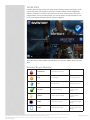
As you explore the Dark Citadel, you will encounter
Titans. As you approach a Titan, you will see a button appear in the lower right that, when pressed, tells you the
name, level and elemental abilities of the enemy.
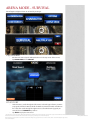
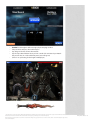
HUD & CONTROLS
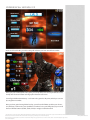
1 - Enemy’s Health
2 - Heroes’ Health
3 - Enemy Stunned Symbol
4 - Pause Button (Menu)
5 - Shield Button/Indicator
6 - Dodge Left Button
7 - Dodge Right Button
8 - Spellcasting Button/Magic Meter
9 - Super Attack Button/Power Meter
10 - Combat Feedback Indicator
© 2012, Epic Games, Inc., Epic, Epic Games, Infinity Blade, Infinity Blade II, ClashMob, Unreal and Unreal Engine are trademarks or registered trademarks of Epic Games, Inc. in the
United States of America and elsewhere. All other trademarks are the property of their respective owners. Privacy Notice
Apple, the Apple logo, iPhone, iPod touch, and iTunes are trademarks of Apple Inc., registered in the U.S. and other countries. iPad is a trademark of Apple Inc. App Store is a
service mark of Apple Inc.
Infinity Blade: Manual - 3