1
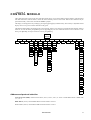
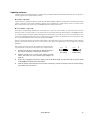
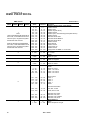
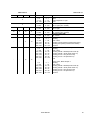
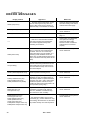
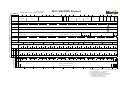
section 4 C ONTROL MODU LE The 4-digit LED control panel on the side of the MAC 600/E allows you to set the address and personalities, read lamp hours and other information, calibrate effects, control the fixture manually, and run a test routine. Most of these functions may be performed remotely via the serial link with the MPBB1 Uploader. The display can be flipped for easy reading by pressing the [↑] and [↓] keys simultaneously. The intensity is adjustable and the display can be set to go out 2 minutes after the last key-press. The DMX or Martin address, depending on the protocol setting, and any error messages are displayed when the MAC 600/E is turned on. To enter the menu, press [MENU]. Use the [↑] and [↓] keys to move within the menu. To select a function or submenu, press [ENTER]. To escape a function or menu, press [MENU]. $GGUHVV2 0HVVDJHV 36(7 G$GU 0$GU 7,0( $G- &$/ 3$7, 0$1 G0;/ 3R#+ 567 3#2) 6:$3 567 53R+ /#21 7#2) 3,19 /$#+ /R)) G#2) 7,19 5/$+ +($G /675 $// G,0 &<$1 0$* <(/ &2/ %64 %65 6+87 5/67 3$7, 76(4 3763 ()63 02G( 9(5 63(& 67&2 &38 G,63 /#21 &+#3 )(E$ G,17 /R)) 1111 G,63 G/2) ) 6+87 &+46 0#2) G,0 $/21 <#2) &<$1 )(E$ G5(6 0$* G)6( <(/ )$&7 &864 &865 &866 &2/ %64 %65 3$1 7,/7 G)2) $872 83/G $6+7 7(03 E$6( +($G )$1 3&E7 6&87 )767 ())E 75$& 02G( &$/ Address and protocol selection Protocol selection (PSET): Switch between MART, DMX1, DMX2, DMX3, or DMX4 to enable Martin mode or DMX mode 1, 2, 3, or 4. DMX address (dAdr): Set the DMX address between channel 1 and 512. Martin address (MAdr): Set the Martin address between channel 1 and 31. User Manual 9