1
Cleaning the fans
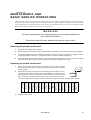
To ensure proper cooling of the fixture it is important that the fans are free of dust. Clean the fans with a vacuum or damp cloth
if they are dirty.
Replacing the lamp
The risk of lamp explosion increases with lamp hours as the quartz envelope gradually weakens. It is recommended that lamp
usage not exceed 125 percent of the lamp’s rated average life.
The procedure for installing the lamp is described on page 3. After installing the lamp, reset the RLAH and RLST counters
under the TIME menu as described page 11.
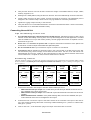
Optimizing lamp alignment
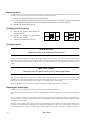
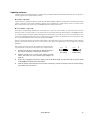
The lamp alignment is set at the factory. If, however, the distribution of light does not appear even, lamp alignment can be
adjusted.
1.
Switch on the MAC 600/E and allow it to reset.
2.
Using either a controller or the control module, turn on the lamp and aim the light towards a flat surface.
3.
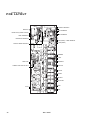
Center the hot-spot (the brightest part of the beam) using the 3 allen-head (3 mm) adjustment screws.
Turn one screw at a time to drag the hot-spot diagonally across the projected image. If you cannot
detect a hot-spot, adjust the lamp until the light is even.
4.
To reduce a hot-spot, pull the lamp in by turning all three screws clockwise 1/4-turn at a time until the
light is evenly distributed.
5.
If the light is brighter around the edge than it is in the center, or if light output is low, the lamp is too far
back in the reflector. “Push” the lamp out by turning the screws counterclockwise 1/4-turn at a time
until the light is bright and evenly distributed.
C h a n g i n g vo l t ag e a n d f r e q u e n cy s e t t in g s
The voltage and frequency settings must match the local AC power supply! These settings are printed on the serial number
label on the bottom of the base. Using the wrong setting can cause overheating, fixture damage, and/or poor performance.
M AC 6 0 0 ( m a g n e t i c b a l l a s t )
1.
Disconnect the MAC 600 from AC power. Remove the top covers.
2.
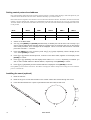
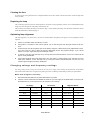
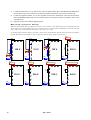
Find the correct transformer and ballast terminals for your AC supply in the table below. Consult a qualified electrician if you do not know the AC frequency and voltage.
AC Supply
Transformer
Magnetic Ballast
Frequency
Voltage
Voltage
Terminal
Setting
Terminal
50 Hz
200-210 V
210 V
4
200 V / 50 Hz
7
50 Hz
210-220 V
210 V
4
230 V / 50 Hz
10
50 Hz
220-235 V
230 V
6
230 V / 50 Hz
10
50 Hz
235-240 V
230 V
6
245 V / 50 Hz
12
50 Hz
240-260 V
250 V
8
245 V / 50 Hz
12
60 HZ
200-217 V
210 V
4
208 V / 60 Hz
4
60 HZ
217-240 V
230 V
6
227 V / 60 Hz
7
User Manual
15