1
Tutorial
GATB
Tutorial
Chapter
5
This tutorial provides examples illustrating two common applications of GATB; occupant
modeling and pedestrian modeling.
Creating GATB events involves the following basic steps:
•
Create the humans.
•
Create the vehicles.
•
Create the environment.
•
Create and execute the GATB event.
Once the event has been executed, output reports can be viewed in the Playback Editor.
These reports were discussed in Chapter 3 of this manual.
The basic procedure for creating GATB events is described in detail in this tutorial.
L
NOTE: It is assumed that HVE is up and running, and
that the user is familiar with HVE’s basic features.
The purpose of this tutorial is to illustrate these
features while setting up and executing a GATB
event.
L
NOTE: Environments are not required in the creation
of a GATB event and will not be discussed in this
manual. Review the HVE User’s Manual if you have
questions regarding the creation of enviroments.
Manual printed October 30, 2003
5-1
Tutorial
Getting Started
The first step is to set the user parameters.
L
NOTE: Most options simply affect the appearance in
a viewing window during Event or Playback mode.
However, some options affect the data used in the
analysis. For example, if AutoPosition is On, the
vehicle position conforms to the local surface;
otherwise, the position is set by the Position/Velocity
dialog.
L
NOTE: Some of the following options are “Toggles”
that switch between two different modes. Make sure
these options are set correctly.
To set the initial user options, choose the following from the Options Menu:
% Show Key Results
% Hide Axes
% Show Contacts
% Show Belt Anchors
% Hide Velocity Vectors
% Show Skid marks
% Hide Targets
% Turn AutoPosition On
% Units equals US
% Hide Grid
% Render Options:
Show Humans and Vehicles as Actual.
Phong Render Shading Mode.
Complexity equals Object.
Render Quality equals 5.
Texture Quality equals 1.
Anti-Aliasing equals 1.
% Set Playback to 0.0333 sec
The remaining options will automatically initialize to their default conditions. We’re now
ready to proceed with the tutorial.
5-2
Manual printed October 30, 2003
Tutorial
Creating the Humans
To create the human occupant in the collision, perform the following steps:
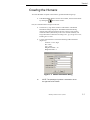
% If the HVE Human Editor is not the current editor, choose Human Mode
by clicking the
button on the tool bar..
First, let’s add the human occupant to the case.
% Click on the (+) sign in the tool bar to add a human. The Human
Information dialog is displayed. The Human Information dialog
includes option buttons allowing the user to select a seat position
within the vehicle (alternatively, Pedestrian could be selected), and
assign the human’s attributes according to Sex, Age, Weight Percentile,
and Height Percentile.
% Use the option buttons to choose the following human attributes
(Figure 5-1).
Location = Front, Right
Sex = Male
Age = Adult
Weight Percentile = 50
Height Percentile = 5
Figure 5-1: Human Information dialog
L
NOTE: The passenger’s position is assumed to be on
the right side of the vehicle.
Manual printed October 30, 2003
5-3
Tutorial
L
NOTE: Notice the human comes into the editor in a
seated position. If Pedestrian had been selected as
the Location for the human, then the human would
appear in a standing position.
L
NOTE: If you are having difficulty in completing this
portion of the tutorial, the file GATBcreateHuman in
your /HVE/supportFiles/case directory contains all
necessary information up to this point.
Creating the Vehicles
Now that we have our human, let’s add our vehicles.
% Choose Vehicle Mode by clicking on the
button on the tool bar..
The Vehicle Editor is displayed.
% Click the (+) sign on the tool bar to add a vehicle. The Vehicle
Information dialog is displayed. The Vehicle Information dialog allows
the user to select the basic vehicle attributes according to Type, Make,
Model, Year, and Body Style.
L
NOTE: The Vehicle Information dialog also allows you
to edit the Driver Location, Engine Location, Number
of Axles, and Drive Axle(s). These options affect the
basic vehicle configuration and do not need to be
changed for our tutorial.
% Using the Option buttons, click each button to choose the following
vehicle from the database:
Type = Passenger Car
Make = Buick
Model = Skylark
Year = 1985-1991
Body Style = 4-Door
% Click OK to add Buick Skylark 4-Dr to the active vehicles list.
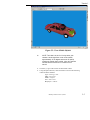
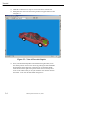
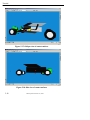
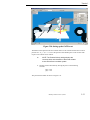
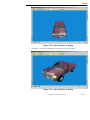
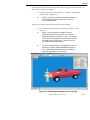
% Manipulate the view in the 3D viewing window to appear similar to that
in Figure 5-2.
5-4
Manual printed October 30, 2003
Tutorial
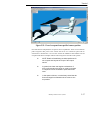
Figure 5-2: View of Buick Skylark
L
NOTE: This view is in the 2 o’clock position, (the
camera is at the right front corner of the vehicle,
approximately 10-15 degrees above the XY plane)
making the vehicle clearly visible. Now, let’s add the
second vehicle involved in our collision for this
tutorial.
% Click the (+) sign on the tool bar to add another vehicle.
% Using the Option buttons, click each button to choose the following
vehicle from the database:
Type = Passenger Car
Make = Chevrolet
Model = Caprice
Year = 1991-1997
Body Style = 4-Door
Manual printed October 30, 2003
5-5
Tutorial
% Click OK to add Chevrolet Caprice 4-Dr to the active vehicles list.
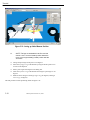
% Manipulate the view in the 3D viewing window to appear similar to that
in Figure 5-3.
Figure 5-3: View of Chevrolet Caprice
% Next, with the hand manipulator selected from the right toolbar, move
the camera position closer to the vehicle by pushing the left and middle
mouse buttons at the same time. Alternatively, use the dolly thumb
wheel located on the right lower portion of the viewer to slowly move
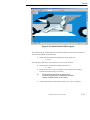
closer to the vehicle until you are just inside the outer shell or mesh of
the vehicle. Your view will look similar to Figure 5-4.
5-6
Manual printed October 30, 2003
Tutorial
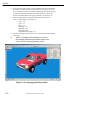
Figure 5-4: Close-up view of vehicle interior
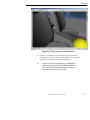
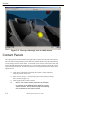
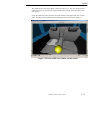
% Adjust the zoom slider located on the bottom right portion of the
viewing window or enter a number of approximately 100 to generate a
wide angle view inside the vehicle similar to Figure 5-5.
L
NOTE: If you are having difficulty in completing this
portion of the tutorial, the file GATBcreateVehicles in
your /HVE/supportFiles/case directory contains all
necessary information up to this point.
Manual printed October 30, 2003
5-7
Tutorial
Figure 5-5: Close-up, wide-angle view of vehicle interior
Contact Panels
The contact panels will be entered for the right front seat position in this Chevrolet Caprice.
This can be done using numerical values from the computer mesh if it has been measured in
a CAD package such as AutoCAD®. AutoCAD® can be used to examine the mesh and
extract detailed measurements of the interior or it can be done visually, which is the way we
will proceed in this tutorial. We will first position a contact panel for the seat cushion on the
right front seat.
% Click on the yellow ball representing the vehicle’s center of mass by
using the pointer mouse icon.
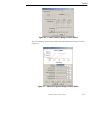
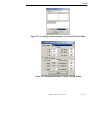
% Select Contact Surfaces. This brings up the Contact Surfaces dialog
box as shown in Figure 5-6.
% Click on Add to add a contact surface.
L
5-8
NOTE: The contact surface properties are selected
by pressing on the Material button while the contact
surface is listed. Do this after naming and selecting
the coordinates of the contact surface.
Manual printed October 30, 2003
Tutorial
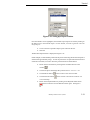
Figure 5-6: Contact Surfaces dialog in Vehicle Editor
The contact surface properties for this example will be the default vehicle material, as shown
in Figure 5-7.
Figure 5-7: Material Properties dialog in Vehicle Editor
Manual printed October 30, 2003
5-9
Tutorial
L
NOTE: The material values may not be exactly the
same, but choose the default material.
% Enter the name RF Seat Cushion. Hit Enter.
% To create the surface for the right front seat cushion, the following three
points generate a surface with the correct orientation when viewed from
the top:
Left front corner :
x = -2
y=2
z = -2
Left rear corner:
x = -18
y=2
z=1
Right rear corner:
x = -18
y = 22
z=1
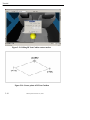
See Figures 5-8 and 5-9.
Figure 5-8: Setting up RF Seat Cushion contact surface
5-10
Manual printed October 30, 2003
Tutorial
Figure 5-9: Contact Surface corners and selection order
L
NOTE: These corners must be entered in a counterclockwise order in order to create the positive side of
the surface facing upward. The positive side of the
surface is the side of the surface that will be pushing
the object.
L
NOTE: There are other combinations that would
produce a correctly oriented contact panel.
See Figures 5-10 through 5-12 for differing views of the contact panel just created.
Manual printed October 30, 2003
5-11
Tutorial
Figure 5-10: RF Seat Cushion contact surface
Figure 5-11: RF Seat Cushion contact surface
5-12
Manual printed October 30, 2003
Tutorial
Figure 5-11: RF Seat Cushion contact surface
It is obvious that this first attempt at making the Right Front Seat Cushion contact panel
creates a surface that is too narrow and does not extend rearward enough. This panel is also
slightly above the seat cushion. By modifying one of the corner positions at a time, the
correct seat panel can be determined visually.
% Adjust the following corner coordinates to make the panel appear
similar to Figure 5-13 and 5-14.
Left front corner:
x = -3
y=2
z = -1
Left rear corner:
x = -20
y=2
z = 1.5
Right rear corner:
x = -20
y = 26
z = 1.5
Manual printed October 30, 2003
5-13
Tutorial
Figure 5-13: Editing RF Seat Cushion contact surface
Figure 5-14: Corner points of RF Seat Cushion
5-14
Manual printed October 30, 2003
Tutorial
The visualization of the contact panel is shown in Figure 5-15. You can see that the flat
contact panel does an adequate job of approximating the complex surface geometry of the
seat cushion.
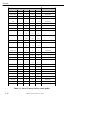
Create the remaining contact panels in the same manner as the Right Front Seat Cushion
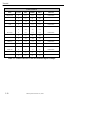
panel. The names and coordinates for the remaining panels can be found in Table 5-1.
Figure 5-15: Revised RF Seat Cushion contact surface
Manual printed October 30, 2003
5-15
Tutorial
Contact Surfaces
Name
Coord
First
Middle
Third
Material
RF Seat Back
X
-20.0
-20.0
-28.0
Default Vehicle
Y
26.0
2.0
2.0
Z
1.5
1.5
-25.0
X
45.0
-30.0
-30.0
Y
-32.0
-32.0
32.0
Z
8.5
8.5
8.5
X
34.0
30.0
30.0
Y
-32.0
-32.0
32.0
Z
2.0
8.5
8.5
X
44.0
44.0
-40.0
Y
32.0
32.0
32.0
Z
-12.0
8.5
8.5
X
7.5
12.75
12.75
Y
-31.0
-31.0
31.0
Z
-8.0
-2.5
-2.5
X
8.5
7.5
7.5
Y
-31.0
-31.0
31.0
Z
-15.5
-8.0
-8.0
X
20.0
8.5
8.5
Y
-31.0
-31.0
31.0
Z
-16.0
-15.5
-15.5
X
2.25
34.0
33.25
Y
0
0
16.0
Z
-30.75
-15.5
-15.5
X
1.5
33.25
30.15
Y
16.0
16.0
26.0
Z
-30.75
-15.5
-15.5
X
-2.0
28.0
-30.0
Y
26.0
35.0
35.0
Z
-31.0
-15.0
-15.0
Floor
Toe Pan
Rt. Side
Lower Dash
Middle Dash
Top Dash
Windshield 1
Windshield 2
Side Window
Default Vehicle
Default Vehicle
Default Vehicle
Default Vehicle
Default Vehicle
Default Vehicle
Default Vehicle
Default Vehicle
Default Vehicle
Table 5-1: List of Contact Surface corner points
5-16
Manual printed October 30, 2003
Tutorial
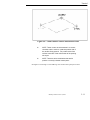
L
NOTE: The 3 points entered for each contact surface
define a parallelogram contact surface. For example,
the side window contact surface in this example is not
rectangular in shape.
L
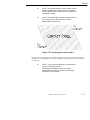
NOTE: The GATB program will not calculate a force if
the contact occurs in the areas of no contact
demonstrated in Figure 5-16.
Figure 5-16: Parallelogram contact surface
For purposes of illustrating the contact panels we have set the vehicle geometry to
NoBody.h3d. Two different views of these completed contact panels are shown in Figures
5-17 and 5-18.
L
NOTE: If you are having difficulty in completing this
portion of the tutorial, the file
GATBcreateContactPanels file in your /HVE/
supportFiles/case directory contains all necessary
information up to this point.
Manual printed October 30, 2003
5-17
Tutorial
Figure 5-17: Oblique view of contact surfaces
Figure 5-18: Side view of contact surfaces
5-18
Manual printed October 30, 2003
Tutorial
Creating and executing the Events
We will now create the simulations necessary for a head-on collision. The collision pulse
needed can be directly obtained by using the EDSMAC4 collision simulator.
L
NOTE: If you don’t have EDSMAC4 on your HVE
system, you may skip the EDSMAC4 event. The
collision pulse for this event is shipped with GATB,
and may be loaded by selecting GATBTutorialPulse1
from the Collision Pulse File Selection dialog.
% Choose Event Editor by clicking on the
button on the tool bar..
% Click on the (+) sign on the tool bar to add an event. The Event
Information dialog is displayed. See Figure 5-19.
% Select Buick Skylark 4-Dr and the Chevrolet Caprice 4-Dr from the
Active Vehicles list.
% Select EDSMAC4 from the Calculation Method options list.
% Enter a name for the event, Frontal Impact. The Event Information
dialog should look similar to Figure 5-19.
L
NOTE: HVE will append the name of the calculation
method to the event name, thus the complete event
name will become “EDSMAC4, Frontal Impact”.
% Press OK to display the Event Editor.
Figure 5-19: Setting up EDSMAC4 event
Manual printed October 30, 2003
5-19
Tutorial
Now we’re ready to set up the event.
% Using the Event Editor dialog, select Buick Skylark 4-Dr from the Event
Humans & Vehicles list.
% Choose Set-up from the menu bar.
% Select Position/Velocity and click Initial. The Buick is displayed at the
earth-fixed origin.
% In the Set Initial Position/Velocity dialog for the Buick Skylark, enter
the following data in the appropriate fields:
x (ft) = 30
y (ft) = -6
yaw (deg) = 180
% Click the Velocity is Assigned box in the Set Initial Position/Velocity
dialog and enter:
Total (mph) = 25
% Select Chevrolet Caprice 4-Dr from the Event Humans & Vehicles list.
% Choose Set-up from the menu bar.
% Select Position/Velocity and click Initial. The Chevrolet is displayed at
the earth-fixed origin.
% In the Set Initial Position/Velocity dialog for the Chevrolet Caprice,
enter the following data in the appropriate fields:
x (ft) = 15
y (ft) = -6
yaw (deg) =0
% Click the Velocity is Assigned box in the Set Initial Position/Velocity
dialog and enter:
Total (mph) = 30
5-20
Manual printed October 30, 2003
Tutorial
% Choose Simulation Controls from the Options menu and change the
following options:
Output time interval (s) = 0.002
Vehicle trajectory (s) = 0.001
Vehicle separation (s) = 0.001
Maximum time (s) = 0.5
L
NOTE: We reduced the output interval because we’re
going to use the acceleration output from this
simulation as the collision pulse for our occupant
simulation. Because we want more detail we select
the smaller output interval. This provides the
acceleration at 0.002 second increments rather than
the default value, 0.1 second.
L
NOTE: The entire duration of a collision is only about
0.1 second, so the default interval might actually skip
over the entire collision!
% Using the Event Controller, click
on the tool bar to execute the
event. Allow the event to run until just after the vehicles separate; then
click
on the tool bar to end the event.
L
NOTE: The complete EDSMAC4 printouts for this
tutorial are found in Appendix A.
L
NOTE: If you are having difficulty in completing this
portion of the tutorial, the file GATBcreateEDSMAC4
in your /HVE/supportFiles/case directory contains all
necessary information up to this point.
Manual printed October 30, 2003
5-21
Tutorial
Occupant Simulation
The EDSMAC4 event has provided us with the collision pulse. Now, let’s use GATB to
study the passenger’s behavior during impact.
% Click the (+) sign on the tool bar to add an event. The Event
Information dialog is displayed.
% Select Chevrolet Caprice 4-Dr and the Male Adult Passenger from the
Active Vehicles list and Active Human list, respectively.
% Select GATB from the Calculation Methods options list as shown in
Figure 5-20.
% Enter the name: RF Passenger for the event.
% Press OK to display the event editor.
Now, let’s set up and execute the occupant simulation event using GATB.
% Using the Event Editor dialog, select Chevrolet Caprice 4-Dr from the
Event Humans & Vehicles list.
% Select Set-up from the menu bar.
% Select Position/Velocity and click Initial. The Chevrolet is displayed at
the earth-fixed origin.
% In the Set Initial Position/Velocity dialog for the Chevrolet Caprice, enter
the following data in the appropriate fields:
x (ft) = 15
y (ft) = -6
yaw (deg) = 0
% Click the Velocity is Assigned box in the Set Initial Position/Velocity
dialog and enter:
Total (mph) = 0
L
NOTE: Be sure to press <Enter> to apply the values
displayed in the Position/Velocity dialog.
% Select Male Adult Human from the Event Humans & Vehicles list.
% Choose Position/Velocity, Initial, from the Edit menu.
5-22
Manual printed October 30, 2003
Tutorial
Figure 5-20: Setting up the GATB event
The human will be placed in the environment relative to the vehicle and will have an initial
position of x =0, y = 0, z = 0. This is the position of the human pelvis center of mass with
respect to the vehicle center of mass.
L
NOTE: The Position/Velocity dialog displays the
current position and orientation of the human relative
to the vehicle-fixed coordinate system.
% Initially position the human by moving the pelvis to the following
location:
x (in) = -14.0
y (in) = 16.0
This positions the human as shown in Figure 5-21.
Manual printed October 30, 2003
5-23
Tutorial
Figure 5-21: Setting up Initial Human Position
L
NOTE: The legs are embedded in the floor and the
human is not in a normal seated position where the
torso is in an approximately parallel position with the
seat back.
% Change the pitch angle of the pelvis to 25 degrees.
% Select the Left Upper Leg of the human by using the mouse pointer icon
to click on the ellipsoid.
% Enter a pitch angle of 80 degrees in the dialog box.
% Select the Left Lower Leg of the human and change its pitch angle to -50
degrees.
% Make the same changes to the Right Upper Leg (80 degrees) and Right
Lower Leg (-50 degrees).
This will produce an initial positioning similar to Figure 5-22.
5-24
Manual printed October 30, 2003
Tutorial
Figure 5-22: Initial Position of RF Occupant
Notice that the pelvis is embedded in the seat cushion and that it needs to be moved upward.
To correct this problem, do the following:
% Select the pelvis ellipsoid and change the vertical position to:
z = -4.6 in.
Notice the pelvis and chest are also forward or in front of the seat back.
% Select the pelvis ellipsoid and change its position to:
x = -16 in.
% Select the Velocity Is Assigned checkbox in the Position/Velocity dialog,
and enter a forward velocity of 0.0 in/sec.
L
NOTE: Because the human is defined as an
occupant (as opposed to a pedestrian), the initial
velocity is defined relative to the vehicle.
% Adjust the pitch angle of the Right and Left Upper Legs to 75 degrees.
Manual printed October 30, 2003
5-25
Tutorial
Let’s attach a camera to the vehicle to better see the human.
L
NOTE: This tip really helps while positioning
occupants because it allows you to move the camera
relative to the vehicle, thus you can quickly focus on
the interaction between the human and the seat
cushion, an important part of placing the human in an
equilibrium position.
% Choose Set Camera from the View menu. The Set Camera dialog is
displayed.
% Click the View From option list and choose Chevrolet Caprice 4-Dr.
% Enter the following coordinates in the available fields:
Camera Coordinates:
Picture Center:
Depth of Field:
Focal Length
x = -1.0
y = -10.0
z = -1.0
x = 0.0
y = 0.0
z = -1.0
near = 2.0
far = 5000
50mm
The new view of the vehicle and occupant for the vehicle affixed camera is shown in Figure
5-23.
% Choose Simulation Controls from the Options menu and change the
following fields:
Output Interval Time (sec) = 0.002
Maximum Time (sec) = 0.25
5-26
Manual printed October 30, 2003
Tutorial
Figure 5-23: View of occupant from specified camera position
Once this has been completed, the occupant is close to equilibrium. There is no acceleration
pulse assigned at this point so the vehicle will travel at a continuous speed with no
acceleration or deceleration. We can now execute the simulation and examine how the
occupant limbs move and adjust with the interacting forces from the contact panels.
L
NOTE: Details of establishing an initial equilibrium for
the occupant are beyond the scope of this simple
tutorial.
L
In general, the linear and angular accelerations of
every mass segment should be as small as possible
in comparison to the acceleration pulse that will be
used.
L
In low speed collisions, it is absolutely critical that the
linear and angular accelerations be as close to zero
as possible.
Manual printed October 30, 2003
5-27
Tutorial
The basic equilibrium requirement is that any motion caused by being slightly out of
equilibrium is negligible compared to the motion caused by the crash.
As a practical matter, the user will never be able to produce exact equilibrium (i.e. - All linear
and angular accelerations are equal to zero).
Every analysis is different and there are no strict guidelines that define when the human
position is close enough to equilibrium. In general, compare the linear acceleration for all
the human segments to the linear acceleration of the crash pulse and ensure the human
accelerations are much smaller.
In addition, the linear acceleration of all segments should be at least under 0.5 g’s with the
possible exception of the feet which should be at least under 1.0 g’s.
L
NOTE: On humans with small abdomens, it may not
be possible to achieve 0.5 g’s. In this case make it
as low as possible, but certainly under 1.0 g’s.
The basic procedure for establishing equilibrium are as follows:
% Position the vehicle so that the roll, pitch, yaw and acceleration pulses
are all zero.
% Set the initial velocity of the vehicle to zero.
% Click the
button on the tool bar to execute the program for one or
two time steps.
L
NOTE: The exact termination time is not critical.
% Go to the Playback Editor by clicking the
button on the tool bar..
% Click on the (+) sign on the tool bar to add a preview window.
The Report Window dialog will then appear with the active events shown.
L
NOTE: If you have not run the EDSMAC4 simulation,
the active events list will not include EDSMAC4.
The GATB, RF Passenger event will be highlighted. This is shown in Figure 5-24.
5-28
Manual printed October 30, 2003
Tutorial
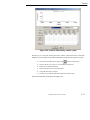
Figure 5-24: Setting up a Report Window
Once the GATB event is highlighted, the available output reports are listed by clicking on
the button next to the selected output. For this tutorial, we want to generate a Results
Output Report.
% Click on the list of possible output reports and select Results.
% Click OK.
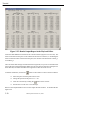
The Results Output Window is displayed in Figure 5-25.
In this example, our initial human position has the pelvis accelerating downward in the positive
Z direction at approximately 0.62 g’s. In order to position the occupant where this downward
acceleration is smaller, we want to move the pelvis downward a small amount.
% Return to the Event Editor by clicking the Event Editor button on the
tool bar,
.
% Click on the pelvis and change the Z position from z = -4.6 to z = -4.5.
% Click the Reset button
% Click the Execute button
on the tool bar to clear the event data.
on the tool bar to execute the event for one
or two timesteps.
% Return to the Playback Editor by clicking on the Playback Editor button
on the tool bar and view the Results window again. See Figure 526.
Manual printed October 30, 2003
5-29
Tutorial
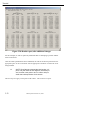
Figure 5-25: Results Output Report in the Playback Editor
Notice the small differences between the two results windows (Figures 5-25 and 5-26). The
linear acceleration for the pelvis in the Z direction has lowered. However, in examining the
linear acceleration in the X direction for the pelvis, the value has increased from 0.145181 g’s
to 0.160636 g’s.
There are other small changes with all of the mass segments, but you can see the effect that
moving the pelvis downward slightly affects not only the linear acceleration of the pelvis in
the Z direction, but affects the other mass segments in other directions as well.
To further confirm this, click on the
button on the toolbar to return to the Event Editor..
% Select the pelvis with the pointer mouse icon.
% Change the position of the pelvis to z = -4.0.
% Clear the event data by clicking the
button on the tool bar..
% Execute the event for one or two timesteps.
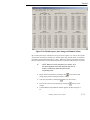
Return to the Playback Editor and view the Output Results window. It should look like
Figure 5-26.
5-30
Manual printed October 30, 2003
Tutorial
Figure 5-26: Results report, after changes to Human Position
By reviewing this figure compared to the previous two figures, you can see the angular
accelerations for the legs and feet have become quite large and the linear accelerations
particularly for the feet have become very large. Effectively, what we have done by moving
the pelvis downward is position the feet into the floor so the floor will push back very hard.
L
NOTE: When you move the pelvis on a human, all of
the other segments move also because they are all
linked in a hierarchy where the pelvis is the
dominating mass.
% Return to the Event Editor by clicking on the
on the tool bar and
change the Z position of the pelvis back to -4.6.
% Clear the event data by clicking the
button on the tool bar..
% Execute the event for two timesteps by clicking the
button on the
tool bar.
% Confirm that the Output Results window appears the same as Figure 525.
Manual printed October 30, 2003
5-31
Tutorial
Figure 5-28: Results report, after additional changes
For this example, we will not spend any additional effort in attempting to produce smaller
linear accelerations.
Once the initial equilibrium has been established, the vehicle can then be positioned to the
appropriate place in the environment with the appropriate orientation to match the event
being modeled.
L
NOTE: Recall that we changed the initial angles, roll,
pitch, and yaw values to zero degrees, the velocity to
zero, and the crash pulse to zero in order to help us
obtain the initial equilibrium of this human.
The next step is to apply a crash pulse to the vehicle. This involves two parts.
5-32
Manual printed October 30, 2003
Tutorial
Figure 5-28: Collision Pulse dialog, without a pulse
The first part is to setup the initial speed of the vehicle to match that of the crash being
simulated. In this example, recall from the EDSMAC4 run that the initial speed is 30 mph.
% Go to the Event Editor by clicking on the
button on the tool bar..
% Choose the Chevrolet Caprice 4-Dr from the vehicles list.
% Select Set-up from the menu bar.
% Select Position/Velocity and click Initial.
% Assign the Velocity to 30 mph.
% Choose Set-up from the menu bar and select Collision Pulse.
The Collision Pulse dialog will appear like Figure 5-28.
Manual printed October 30, 2003
5-33
Tutorial
At this point, you may be prompted that warnings exist. If you choose to look at those
warnings, they indicate that the yaw acceleration is higher than normal. Accept these as
possiblewarningsandwhenHVEasksyoutoseethemagain,justclCancel.
ick
You will
return to the Event Editor where you can now execute the event which demonstrates occupant
motion in a frontal car crash.
A side view from the left side of the vehicle helps you to visualize the forward motion. The
camera setup for the left side view has the camera attached to the Chevrolet Caprice with the
following camera coordinates:
Camera Coordinates:
x = -1
y = -10
z = -1
Picture Center:
x=0
y=0
z = -1
Depth of Field:
near = 2.0
far = 5000
Focal Length:
50 mm
Another view that is helpful to demonstrate the side motion which occurs is positioned with
the camera attached to the Chevrolet Caprice as follows:
5-34
Camera Coordinates:
x = -5
y=2
z = -10
Picture Center:
x=0
y=2
z = -1
Depth of Field:
near = 2.0
far = 5000
Focal Length:
50 mm
Manual printed October 30, 2003
Tutorial
To explain how the principal direction of force affects occupant motion, return to the
EDSMAC4 event in the Event Editor.
% Select the Buick Skylark 4-Dr from the Event Humans & Vehicles list.
% Choose Edit form the menu bar.
% Select Position/Velocity and select Initial.
% Change the following values:
x (ft) = 23
y (ft) = 3.5
yaw (deg) = 270
% Clear the calculation by pressing the
button on the tool bar..
% Execute the EDSMAC4 event.
% Return to the GATB event.
% Select the Chevrolet Caprice 4-Dr vehicle.
% Choose Set-up from the menu bar and select Collision Pulse from the
drop down menu.
% Select the new collision pulse, EDSMAC4, Frontal Impact.
L
If you do not have EDSMAC4 or were not able to
execute the EDSMAC event, open the filename,
GATBTutorialPulse2.
% Press OK to select the GATBTutorialPulse2 collision pulse.
L
If you are having difficulty in completing this portion of
the tutorial, the file GATBcreateGATBpassenger in
the /HVE/supportFiles/case directory contains all
necessary information up to this point.
This completes the examples of the occupant simulation.
You may wish to modify the crash pulse by rerunning the EDSMAC4 event and changing
the direction of the crash pulse and then importing it as previously described. You can also
change the camera positions and explore other aspects of the occupant motion.
Manual printed October 30, 2003
5-35
Tutorial
Pedestrian Simulation
Using GATB to simulate a pedestrian impact is very similar to the previous occupant
simulation.
% Select File from the menu bar and save any previous work you would
like to keep.
To create the human pedestrian in this example, perform the following steps:
% If the HVE Human Editor is not the current editor, choose Human Mode
by clicking the
button on the tool bar..
% Click the (+) sign on the tool bar to add a human. The Human
Information dialog is displayed. The Human Information dialog
includes option buttons allowing the user to select a seat position
within the vehicle (alternatively, Pedestrian could be selected), and
assign the human’s attributes according to Sex, Age, Weight Percentile
and Height Percentile.
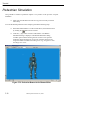
Figure 5-29: Pedestrian Human in the Human Editor
5-36
Manual printed October 30, 2003
Tutorial
Using these option buttons, click each one to choose the following human attributes:
L
L
Location = Pedestrian
Sex = Male
Age = Adult
Weight Percentile = 50
Height Percentile = 50
NOTE: Make sure the moment of inertia data for the
right and left upper legs are:
Ixx (lb-sec2-inch) = 1.3599
Jy y (lb-sec2-inch) = 1.4348
Kzz (lb-sec2-inch) = 0.3769
NOTE: If you are having difficulty completing this
portion of the tutorial, the GATBcreatePedestrian file
in your /HVE/supportFiles/case directory contains all
necessary information up to this point.
Creating the Vehicle
% Choose Vehicle Mode by clicking the
button on the tool bar. The
Vehicle Editor is displayed.
% Click the (+) sign on the toolbar to add a vehicle. The Vehicle
Information dialog is displayed. The Vehicle Information dialog allows
the user to select the basic vehicle attributes according to Type, Make,
Model, Year, and Body Style.
% Using the Option buttons, click each button to choose the following
vehicle from the database:
Type = Pickup
Make = Dodge
Model = Dakota
Year = 1987-1996
Body Style = Fleetside 4x4
% Click OK to add Dodge Dakota 4x4 to the active vehicles list.
% Create the exterior contact panels using the data from Table 5-2.
L
NOTE: Make sure to select Location: Exterior when
creating your contact surfaces or your pedestrian
simulation will generate an error.
L
If you are having difficulty in completing this portion of
the tutorial, the file GATBcreateDodgeContacts in
your /HVE/supportFiles/case directory contains all
necessary information up to this point.
Manual printed October 30, 2003
5-37
Tutorial
Contact Surfaces
Name
Coord
First
Middle
Third
Material
Bumper-Front
X
80.5
80.5
77.0
Default Vehicle
Y
0.0
0.0
-25.0
Z
-4.0
3.0
3.0
X
77.7
77.7
74.5
Y
0.0
0.0
-25.0
Z
-15.0
-2.0
-2.0
X
74.5
77.0
73.8
Y
0.0
0.0
-25.0
Z
-19.0
-15.0
-15.0
X
30.0
74.0
70.5
Y
0.0
0.0
-25.0
Z
-22.5
-18.7
-18.2
X
1.0
-1.0
-1.0
Y
0.0
0.0
1.0
Z
0.0
0.0
0.0
Grill
Hood-Front
Hood-Top
GROUND
Default Vehicle
Default Vehicle
Default Vehicle
Default Vehicle
Table 5-2: Contact Surfaces to use in Pedestrian impact example
5-38
Manual printed October 30, 2003
Tutorial
Figure 5-30: Contact Surfaces on pickup
See Figures 5-30 and 5-31 for different views of the exterior contact panels.
Figure 5-31: Contact Surfaces on pickup
Manual printed October 30, 2003
5-39
Tutorial
Creating the Event
% Select the Event Editor by clicking the
button on the tool bar..
% Click the (+) sign on the tool bar to add an event. The Information
Dialog is displayed in Figure 5-32.
% Choose the Dodge Dakota 4x4 and the Male Adult, 50% Wt., 50% Ht.
from the Active Vehicles list and Active Humans list, respectively.
% Select GATB from the Calculation Methods options list.
% Edit the Event name: Pickup/Pedestrian Impact.
% Press OK to display the event editor.
% Select Options from the menu bar and then Simulation Controls from
the drop down menu. Change the following options:
Simulation Output Time Interval (sec) = 0.002
Simulation Maximum Time (sec) = 1.0
Using the Event Editor dialog, select the Dodge Dakota 4x4 from the Event Humans & Vehicles
list, then select Edit from the menu bar, choose Position/Velocity and click Initial. The vehicle
is displayed at the earth fixed origin.
Now, let’s set up and execute the pedestrian simulation event using GATB.
% Enter the following values in the appropriate boxes of the Position/
Velocity, Initial dialog. See Figure 5-33.
x ( ft) = 15.0
y (ft) = -5.0
z (ft) = -2.094
Roll (deg) = 0.0
Pitch (deg) = 0.0
Yaw (deg) = 0.0
Assigned Velocity (mph) = 15.0
5-40
Manual printed October 30, 2003
Tutorial
Figure 5-32: Creating the Pedestrian impact event in the HVE Event Editor
Figure 5-33: Setting Initial Position / Velocity of Dodge Pickup
Manual printed October 30, 2003
5-41
Tutorial
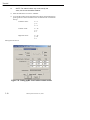
% Using the Event Editor dialog, select the Human from the Event Humans
& Vehicles list, then select Set-up from the menu bar, choose Position/
Velocity and click Initial. The human is displayed at the vehicle’s origin
(notice the human is half buried in the vehicle geometry; this occurs
because AutoPosition does not apply to humans). See Figure 5-34.
% Enter the following data in the appropriate fields in the Position/
Velocity, Initial dialog. See Figure 5-35.
x ( ft) = 7.15
y (ft) = -1.5
z (ft) = -1.0
Roll (deg) = 0.0
Pitch (deg) = 0.0
Yaw (deg) =120.0
Assigned Velocity (mph) = 1.0
% Execute 1 timestep, rewind to time 0.0 sec., and examine the foot-ground
interaction.
L
NOTE: Total weight of the pedestrian (173.5 lbs in
this example) should be approximately equal to total
force of both feet interacting with the ground.
Figure 5-34: Setting up pedestrian position
5-42
Manual printed October 30, 2003
Tutorial
Figure5-36 shows total force from feet-ground contacts to be approximately 810 lbs. We
must move the pedestrian up slightly.
% Change the Z position of the pedestrian to -1.056 feet. Results of this
change is shown in Figure 5-37.
L
NOTE: You may find it helpful to edit the language.rsc
in the /HVE/supportFiles/sys directory in order to
show 3 decimal digits.
We will use the collision pulse to approximate the vehicle braking.
% Enter the following collision pulse for the Dodge Dakota 4x4. See
Table 5-3.
L
NOTE: This crash pulse is available in the file
GATBTutorialPulse3. Execute the run to analyze
pedestrian behavior in this type of crash. The speeds
of the vehicle and pedestrian can be modified, as well
as braking effort on the pickup. Results of this run
are shown in the following figures.
L
If you are having difficulty in completing this portion of
the tutorial, the file GATBcreatePedestrianImpact in
your /HVE/supportFiles/case directory contains all
necessary information up to this point.
Figure 5-35: Positioning the human in front of pickup
Manual printed October 30, 2003
5-43
Tutorial
Collision Pulse
Time
Forward Acceleration (g's)
0.0
-0.75
0.2
-0.75
0.4
-0.75
0.6
-0.75
0.8
-0.75
1.0
0.0
1.2
0.0
1.4
0.0
1.6
0.0
Table 5-3: Collision pulse to approximate hard braking by pickup
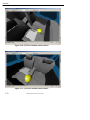
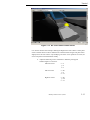
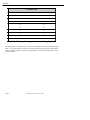
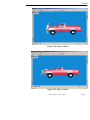
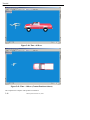
Examine Figures 5-38 through 5-41 for views of the pedestrian interaction with the pickup
truck. Try several different scenarios, increasing and decreasing the speed of the pickup.
Also try changing the initial velocity of the pedestrian to study how the motion across the
vehicle changes.
5-44
Manual printed October 30, 2003
Tutorial
Figure 5-38: Time = 0.05 sec.
Figure 5-39: Time = 0.10 sec.
Manual printed October 30, 2003
5-45
Tutorial
Figure 5-40: Time = 0.50 sec.
Figure 5-41: Time = 1.00 sec. (Contact Panels not shown)
This completes the examples of the pedestrian simulation.
5-46
Manual printed October 30, 2003