1
QUICK START GUIDE
BERNINA EditorPlus
BERNINA DesignerPlus
COPYRIGHT 1997-2009 BY WILCOM PTY LTD. ALL RIGHTS RESERVED.
No parts of this publication or the accompanying software may be copied or distributed, transmitted,
transcribed, stored in a retrieval system or translated into any human or computer language, in any form or by
any means, electronic, mechanical, magnetic, manual, or otherwise, or disclosed to any third party without the
express written permission of:
Wilcom Pty Ltd. (A.B.N. 43 001 971 919)
146-156 Wyndham Street, Alexandria (Sydney)
New South Wales, 2015, Australia
PO Box 581, Alexandria, 1435
Phone: +61 2 9578 5100
Fax: +61 2 9578 5108
Email: [email protected]
Web: http://www.wilcom.com.au
NOTE
The screen illustrations in this publication are intended to be representations, not exact duplicates of the
screen layouts generated by the software.
PRINTED USER MANUAL
Registered owners of BERNINA® Embroidery Software are permitted to create one (1) copy of the BERNINA®
Embroidery Software User Manual for their personal use. This can be printed with a personal printer or through
a commercial printing company.
LIMITED WARRANTY
BERNINA International AG warrants for a period of 90 days, commencing from the date of delivery of the
software to you, that the products are free from defects in materials and workmanship. Your exclusive remedy
for breach of warranty is to return the products together with proof of purchase to BERNINA or its authorized
dealers within the warranty period, and they will be replaced free of charge. You are responsible for the cost of
shipping and insurance, and bear the risk of loss, damage and misplacement of ‘the products’.
The purchaser relies on their own skill and judgement in selecting the software for their own use and assumes
the entire risk as to the results and performance of the software. Subject to warranties and conditions imposed
by law, BERNINA International AG expressly disclaims all other warranties and conditions, whether express or
implied, including without limitation, warranties and conditions of merchantability, fitness for a particular
purpose, title and non infringement. BERNINA International AG specifically does not warrant that the software
will meet the purchaser’s requirements or run without interruption or error, or appear precisely as described in
the accompanying documentation.
LIMITATIONS OF LIABILITY
To the maximum extent permitted by applicable law, in no event will BERNINA International AG or its
developers, officers, employees or affiliates be liable to you for any consequential, incidental, or indirect
damages (including damages for loss of business profits, business interruption, loss of business information
and the like), whether foreseeable, or unforeseeable, arising out of the use of or inability to use the software or
accompanying security device and cable, and accompanying documentation, regardless of the basis of the
claim and even if BERNINA or an authorized BERNINA representative has been advised of the possibility of
such damages.
Some states or jurisdictions do not allow the exclusion of incidental, consequential or special damages, so the
above limitation or exclusion may not apply to you.
TERMINATION
Your License to use the BERNINA® Embroidery Software is effective as long as you comply with the terms and
conditions of the License Agreement. This License will terminate automatically without notice from BERNINA
International AG if you fail to comply with any of the terms of the License Agreement.
You may terminate this License at any time by returning the BERNINA® Embroidery Software and all copies
thereof, the dongle security device, cable and all accompanying documentation to BERNINA International AG.
CONTACT
If you have any questions, please contact your BERNINA distributor, or
BERNINA International AG
CH-8266 Steckborn/Switzerland
Tel: (41) 52-762 11 11
Fax: (41) 52-762 16 11
Rev 1
May
2009
CHAPTER 1
INTRODUCTION
Welcome to BERNINA® Embroidery Software, the
leading embroidery design application for home
users. This is an MS Windows®-based product
incorporating many of the conventions with which
most PC users are already familiar.
BERNINA® Embroidery Software is unique in
providing seamless integration with
CorelDRAW® Essentials 4 by the Corel
Corporation, the most popular vector-based
drawing package for home users. This combination
offers a more efficient, user-friendly approach to
embroidery design by combining the embroidery
capabilities of BERNINA Embroidery Software with graphical capabilities of
CorelDRAW®. It also allows users to create not just embroidery, but true,
multi-medium designs.
Note CorelDRAW® Essentials 4 and its sister product, Corel
PHOTO-PAINT® Essentials 4 can also be run as standalone applications. For a
full description of the CorelDRAW® Essentials 4 tools, refer to the electronic
User Guide available via the Windows Start > Programs group. Alternatively,
use the onscreen help available from the Graphics mode Help menu.
First-time users
If you are new to BERNINA® Embroidery
Software, you’ll be pleased with its flexible
digitizing capabilities, the ease with which you
can create and edit designs, and how simple it
is to add or create your own lettering. However,
before you begin working with the product, read
the Introduction to Embroidery Digitizing in the
Onscreen Manual. This chapter presents an
overview of the basic concepts of digitizing with
BERNINA Embroidery Software and provides
you with important guidelines on how to use this
software to achieve the best results.
You should also familiarize yourself with Basic
Procedures. Here you will learn how to start the
application, create or open a design, print
designs, and how to use some of the essential
tools and features that BERNINA Embroidery
Software provides. The chapter Viewing Designs
in the Onscreen Manual also provides an
overview of the design viewing modes in
BERNINA Embroidery Software.
Update users
BERNINA Embroidery Software is an enhanced
version of our earlier products. It has many new
BERNINA® Embroidery Software : Quick Start Guide
1
Chapter 1 : Introduction
and expanded features. Read the chapter
Introduction to Embroidery Digitizing in the
Onscreen Manual to familiarize yourself quickly
with the scope of these improvements.
BERNINA® Embroidery Software
product levels
There are two BERNINA® Embroidery Software
product levels:
BERNINA EditorPlus
BERNINA DesignerPlus.
BERNINA DesignerPlus
BERNINA DesignerPlus offers powerful features
for digitizing, editing and lettering, combining
both automatic and manual digitizing tools and
methods for maximum control and quality.
Specifically, with this system you can:
Use scanned or imported artwork to digitize
designs on-screen
In addition to the automatic digitizing tools,
use specialized digitizing tools, plus a wide
range of artistic, decorative fill patterns
Create appliqué with Auto Appliqué
Convert any Windows TrueType font to an
embroidery alphabet
Save all your favorite settings to templates.
Caution The product levels are controlled by
the security device. This device is the most
important and valuable part of your system and
should be treated with care.
Note BERNINA Embroidery Software users can
purchase software upgrades directly from the
Internet.
BERNINA EditorPlus
With BERNINA EditorPlus, you can edit existing
designs and add lettering. You can also create
attractive designs with a minimum of fuss from
scanned artwork. Use powerful automatic
digitizing features such as Auto Digitizer, Magic
Wand and PhotoSnap. In addition you can:
Change color sequence for better stitchouts
Edit individual stitches to fine-tune your
designs to a perfect finish
Use Auto Digitizer to create attractive
embroidery automatically from scanned
artwork
For greater control, use Magic Wand to
convert shapes in pictures to stitches
Use PhotoSnap to turn photographs into line
stitching.
Note To identify features relevant to your
specific model, see the BERNINA Embroidery
Software Product Feature List in the Onscreen
Manual.
BERNINA® Embroidery Software
documentation
BERNINA Embroidery Software provides you
with a number of ways to access information
about your software and how to use it, both in
printed form and onscreen via the Help menu.
Caution Screen illustrations in the user
documentation are intended to be
representations, not exact duplicates of the
screen layouts generated by the software.
Procedural descriptions may be at slight
variance from particular installations depending
on which default system settings are activated.
Printed documentation
Depending on your product level, together with
your BERNINA Embroidery Software installation
BERNINA® Embroidery Software : Quick Start Guide
2
Chapter 1 : Introduction
DVD you will have received the following printed
documentation:
Quick Start Guide
The BERNINA Embroidery Software Quick Start
Guide contains installation instructions as well
as an introduction to your BERNINA Embroidery
Software. There is also a Quick Reference
section which lists all the commands and
shortcut keys used in the software. In addition,
the guide provides a fully worked sample
project. Additional tutorials are provided in the
onscreen Quick Start Guide.
Tip For detailed procedures covering all
features of the BERNINA Embroidery Software
(all product levels) and BERNINA Portfolio
applications, refer to the Onscreen Manual
which can be accessed via the Help menu. To
identify sources of information relevant to your
specific model, see the BERNINA Embroidery
Software Product Feature List in the Onscreen
Manual.
Onscreen documentation
Onscreen documentation is provided in two
formats – HTML Help and Adobe Acrobat.
Depending on your product level,
documentation components will include some or
all of the following:
Release Notes
A set of Release Notes is included with the
software installation. These provide detailed
information about new and improved features
as well as direct links to the relevant sections of
the Onscreen Manual.
Quick Start Guide
The BERNINA Embroidery Software Quick Start
Guide is also provided in onscreen form. This
provides additional information about product
upgrades and updates. Additional tutorials are
also provided in the onscreen Quick Start Guide.
While the tutorials do not cover all product
features, they provide a useful introduction for
all product levels.
Onscreen Manual
The Onscreen Manual provides detailed
procedures covering all features of the BERNINA
Embroidery Software and BERNINA Portfolio
applications. It contains hundreds of
step-by-step instructions together with samples
and screen images. The BERNINA Cross Stitch
and BERNINA Quilter applications are
documented in separate supplementary
manuals described below.
Onscreen Help
Onscreen Help provides quick access to general
information on BERNINA Embroidery Software
features and step-by-step instructions.
Supplementary user manuals
With your BERNINA Embroidery Software
installation DVD you will have also received the
following supplementary onscreen user
manuals:
BERNINA Cross Stitch Onscreen
Manual
This manual supplement documents the
capabilities of the special BERNINA Cross Stitch
application. Cross stitching is a popular
technique for filling large areas with low stitch
counts. It can also be used for outlines and
borders. It is suitable for homeware,
tablecloths, children’s clothes and folk designs.
Cross stitch is sometimes combined with
appliqué.
BERNINA Quilter Onscreen Manual
This manual supplement documents the
capabilities of the special BERNINA Quilter
application. Patchwork is a popular technique
for designing and sewing patches into blocks.
BERNINA Quilter can be used to design
BERNINA® Embroidery Software : Quick Start Guide
3
Chapter 1 : Introduction
patchwork quilts, either from existing designs or
patterns, or from designs of your own making.
Use BERNINA Quilter to experiment with
patches and colors enabling you create
beautiful, personalized quilts.
Conventions used in the manual
Shortcut
Description
C+S
While holding down the Control key
(Ctrl), press the lowercase letter S
key.
C+V+H
While holding down the Control key
(Ctrl), press Shift and the H key.
For a complete list of keyboard shortcuts, refer to the
Quick Reference Guide.
The following conventions are adopted and used
throughout the manual.
Viewing information onscreen
Commands
In this manual, commands on a menu or
submenu are referred to by both the menu and
command names. For example the ‘Show All’
command in the ‘View’ menu is referred to as
View > Show All.
Dialog boxes
Dialog boxes are referred to as ‘dialogs’ and are
shown in the manual only if they provide
important information on using BERNINA®
Embroidery Software. The screen images
provided are intended to be representations,
not exact duplicates of the layouts generated by
the software.
Keyboard conventions
Select Help Topics (Help menu) to view onscreen
help.
Select Onscreen Manual (Help menu) to view the
onscreen manual.
Select Bernina International Home Page (Help menu)
to view the Bernina International Web Page.
Select Bernina of America Home Page (Help menu)
to view the Bernina of America Web Page.
Select Embroidery Online (Help menu) to view the
Embroidery Online Web Page.
Onscreen user documentation is provided in the
form of an Onscreen Manual and Onscreen Help.
Viewing Onscreen Help
Instruction
Symbol
Action
Click
[
Click the left mouse button.
Right-click
]
Click the right mouse button.
Double-click
.
Click the mouse button
twice without moving the
mouse.
To view Onscreen Help
Click OK with the mouse or
press the Enter key on the
keyboard to complete the
action.
2 Click Contents to display the main list of
Click OK
[or j
Onscreen Help provides quick access to general
information on BERNINA Embroidery Software
features and step-by-step instructions.
1 Select Help > Help Topics to open the main
Help window.
topics.
Topics are grouped under high-level
headings with ‘book’ icons.
BERNINA® Embroidery Software : Quick Start Guide
4
Chapter 1 : Introduction
3 Double-click a book to view the list of topics,
then double-click a topic.
Tip Alternatively, click Find and enter
keywords to search on a specific subject.
Viewing the Onscreen Manual
You can read the Onscreen Manual using Adobe
Acrobat™ Reader. This application is not
supplied with your BERNINA Embroidery
Software but it is freely available from the
Adobe web site. Using the Onscreen Manual you
can quickly search for the information you need,
using standard Adobe Acrobat™ Reader
features.
You are directly connected to the BERNINA®
homepage at:
Bernina International http://www.bernina.com/
Bernina of America http://www.berninausa.com/
Embroidery Online http://www.embroideryonline.com
To view the Onscreen Manual
Select Help > Onscreen Manual.
Note If BERNINA Embroidery Software is
not running, you can open the Onscreen
Manual directly from Windows Explorer. To
do this, navigate to the ..\Program
Files\BERNINA\Embroidery Software 6\bin
folder, and double-click UserManual.pdf.
Linking to the BERNINA® websites
You can access sales and support information
about the products easily from within the
software.
Note You must have a correctly configured web
browser on your system together with web
access.
To link to the BERNINA® website
Connect to your Internet Service Provider
(ISP).
Select Help > BERNINA Web Page.
BERNINA® Embroidery Software : Quick Start Guide
5
CHAPTER 2
INSTALLATION AND SETUP
The BERNINA Embroidery Software V6.0 kits
include some or all of the following components:
Item
Minimum Requirements
BERNINA® Embroidery Software
Installation DVD
Internet Connection
Optional: Internet connection for
access to regular product information
Internet
Browser
Internet Explorer 6.x
System Memory
1GB for running multiple applications
USB dongle with tag attached
BERNINA® Embroidery Software Quick Start
Guide
Note The BERNINA Embroidery Software
installation DVD includes software for all
products, including BERNINA DesignerPlus,
BERNINA EditorPlus, BERNINA Portfolio,
BERNINA Cross Stitch and BERNINA Quilter.
System requirements
Hard Disk Size 30GB available before installation
Free Disk
Space
2GB or more than 10% of the Hard
Drive Size, whichever is greater
Data Drives
DVD-ROM drive for software installation
Graphics Card Support for High Color (16 bit) and
high resolution (1024 x 768)
Monitor
15” or larger for on-screen digitizing
You need to ensure that the following
pre-requisite system requirements are met in
order to run the BERNINA Embroidery Software.
USB Ports
Dedicated USB port for security
device. Additional USB ports for
Bernina Reader/Writer Box or direct
machine connection.
PC specifications
Serial Ports
Check that your PC meets the system
requirements. Check CPU/RAM as well as hard
disk space. The table below provides minimum
system requirements.
Additional serial port for artista
Reader/Writer Serial Box connection
(optional)
Scanner
MS Windows® XP compatible
Printer
MS Windows® XP compatible
Mouse
MS Windows® XP compatible
Sound cards
Not required
Item
Minimum Requirements
CPU
Single Core 1GHz or greater processor
Operating
System
Windows XP® SP2 (Home or Professional)
BERNINA® Embroidery Software : Quick Start Guide
6
Chapter 2 : Installation and Setup
Security device
BERNINA Embroidery
Software is controlled
by a security device
or ‘dongle’ attached
to the computer, in
conjunction with
security access codes
entered into the
software. Each dongle
USB Port Dongle
has a serial number
and identity code so
your system can be uniquely recognized.
Caution Do not attach your dongle until
prompted by the software installation.
Otherwise the generic USB drivers will be used
and will prevent the correct working of the
security system.
All purchases of the latest software release,
whether new or updates, are shipped with a
USB type dongle – parallel port dongles are no
longer provided. Whenever you update your
software, you will be prompted to carry out a
‘brain transplant’ from your previous dongle to
the latest one.
Caution If the dongle is removed or loses
connection while you are working in BERNINA
Embroidery Software, error messages will
display. Cancel the messages, then exit. You will
lose any unsaved changes to your design.
Re-attach the dongle to your computer, making
sure that it is firmly secured, then restart
BERNINA Embroidery Software.
Installation options
The Installation procedure lets you choose:
where the software and sample designs will
be installed on your PC or network
which components will be installed – e.g.
additional languages, BERNINA Portfolio
which documentation files will be installed.
Note The BERNINA Embroidery Software
checkbox is always selected. The Extra
Languages checkbox may not be present,
depending on the software release you have
purchased.
Merging software versions
You may choose to merge with an already
installed version of software. Existing ‘assets’
are handled as follows:
Patterns
BERNINA Embroidery Software allows you to
add patterns to any of the pre-defined pattern
sets and may also create new ones. There may
also be changes to the latest factory versions of
these files. The installation examines all existing
patterns on your PC and merges them with the
new software installation.
Templates
BERNINA Embroidery Software also allows you
to modify installed templates as well as create
new ones. There may also be changes to the
latest factory versions of these files. The
installation examines all templates in the
BERNINA® Embroidery Software : Quick Start Guide
7
Chapter 2 : Installation and Setup
system and merges them with the new software
installation.
Thread charts
If you have adjusted any settings in the thread
charts, these are preserved.
Appliqué fabrics
Sample appliqué fabrics are now used both by
BERNINA Embroidery Software and BERNINA
Quilter applications. You may have added or
modified fabrics in an existing BERNINA Quilter
installation. When installing fabrics, the
BERNINA Embroidery Software installation
checks the existing fabrics file and merges it
with the new installation.
When you install the software, your
computer will be rebooted automatically to
ensure successful installation of the
software. Make sure that you save any files
and close all applications beforehand. The
installation will prompt you before restarting.
If you have removed BERNINA Embroidery
Software using Programs > ... > Uninstall
or Add/Remove Programs, the uninstall
process may leave some files in the
installation folder. You need to manually
delete this folder and its contents using
Windows Explorer.
Installing BERNINA Embroidery
Software
Note Any changes that you may have made to
your current BERNINA Quilter fabric library will
be merged with the latest installation.
The installation procedure lets you choose:
Dos and Donts
which components will be installed – e.g.
additional languages, BERNINA Portfolio
Never remove an existing BERNINA
Embroidery Software installation manually
by selecting program file folders and
pressing the Delete key. This is true for all
Windows applications.
Avoid removing an existing BERNINA
Embroidery Software installation by
choosing Programs > BERNINA
Embroidery Software > Uninstall from
the Windows Start menu, or by using
Add/Remove Programs from the Windows
Control Panel. Both of these methods will
remove all of the files known to BERNINA
Embroidery Software and you will lose all
your user-defined settings.
Instead, let the BERNINA Embroidery
Software installation procedure uninstall the
previous version as you update your
software. This way, the installation program
will merge all of the user-defined settings
with the new settings.
where the software and sample designs will
be installed on your PC or network
which documentation files will be installed.
Caution If you are updating your software, do
not uninstall the current version. Let the
installation procedure do this for you. See also
Merging software versions.
To install BERNINA Embroidery
Software
1 Ensure your computer meets the technical
requirements for BERNINA Embroidery
Software. See System requirements for
details.
2 Close all Windows applications but leave
Windows running.
Caution Do not attach your dongle until
prompted by the software installation.
BERNINA® Embroidery Software : Quick Start Guide
8
Chapter 2 : Installation and Setup
Otherwise the generic USB drivers will be
used and will prevent the correct working of
the security system.
software, choose the Install extra
languages checkbox as required.
3 Insert the BERNINA Embroidery Software
Installation DVD-ROM.
The installation program should start within
30 seconds and a Welcome screen
displayed.
4 Click Next.
5 Choose which products to install and click
Next.
6 Click Next.
The License Agreement screen is
displayed. The Next button is grayed out
unless the radio button ‘I accept the terms of
the license agreement’ is selected.
8 Choose which components to install and click
Next.
The Choose Installation Folder screen is
displayed.
Tip You can print the License Agreement by
means of the Print button.
7 Select to accept and click Next.
The Select Components screen is
displayed. The BERNINA Embroidery
Software checkbox is always selected. If you
are installing a multi-language version of the
To accept the default folder, click Next.
To change the location, click Browse,
specify an existing folder or create a new
one and click Next.
BERNINA® Embroidery Software : Quick Start Guide
9
Chapter 2 : Installation and Setup
Caution If there is an existing installation in
the chosen folder, the system displays this
warning.
Note Your own designs are neither removed
nor overwritten during installation, but old
sample designs may be overwritten by new
sample designs of the same name.
10 Click Next.
If your PC already contains one or more older
versions of BERNINA Embroidery Software:
9 When the Choose Destination Location
screen is displayed, choose the design folder
where you want your designs to be saved.
You will be prompted to uninstall the
earlier version(s). If you choose to, the
earlier software is uninstalled.
The older version will be merged with the
new when the PC reboots.
11 Click Next.
The Ready to Install screen opens.
12 Click Install to proceed.
You are prompted to attach your dongle.
The default location is My Designs Embroidery Software 6. Sample designs
included with the software are stored in this
folder.
If you have an update kit, you will be
prompted to attach your old dongle as well.
To accept the default folder, click Next.
To change the location, click Browse –
specify an existing folder or create a new
one and click Next.
If you choose to install the software into the
same folder as an earlier version, the new
version is installed over the old and
simultaneously merged.
BERNINA® Embroidery Software : Quick Start Guide
10
Chapter 2 : Installation and Setup
13 Click Next.
The Setup Status screen keeps you
informed of the progress of the installation.
CorelDRAW® Essentials 4 is installed as part
of the normal BERNINA Embroidery Software
installation.
Any changes that you may have made to
your old BERNINA Quilter fabric library will
now be merged with the latest installation.
The installation also merges any
user-defined patterns or motifs. See Merging
software versions for details.
Modifying an existing installation
After the installation has run, an
Installation Complete dialog appears.
14 Click Finish to complete the installation.
You are given the option to restart with the
new installation. The recommended action is
to restart immediately. Shortcut icons are
placed on the Windows Desktop and in the
Start Menu Program Group.
Whether you are updating your current
BERNINA® Embroidery Software software or
wanting to uninstall it, you follow the same
procedure. When you run the installation
program again, it will automatically detect if
there is an existing copy of BERNINA®
Embroidery Software on your system and give
you to option to modify, repair or remove it. This
will prevent the installation of more than one
release version of BERNINA® Embroidery
Software on your computer.
To modify an existing installation
1 Close all Windows applications but leave
Windows running.
2 Insert the BERNINA® Embroidery Software
Installation DVD-ROM.
If you are updating from an earlier version,
the merging process may take some time –
up to 15 minutes – and a DOS screen may
appear.
BERNINA® Embroidery Software : Quick Start Guide
11
Chapter 2 : Installation and Setup
If BERNINA® Embroidery Software software
is already installed on the computer, the
following Welcome screen will appear.
4 Select the features and languages to add or
deselect to remove.
5 Click Next.
The Ready to Install screen appears.
6 Click Install.
Upon successful installation of the software
and any additional Windows files that need
updating, the Maintenance Complete
screen appears.
Note If you have selected Repair as your
installation option, currently installed
components will be reinstalled.
7 Click Finish.
3 Choose the option you require—Modify,
Repair, Remove—and click Next.
Modify: changes selection of installed
components
Repair: reinstalls the same components
as already installed
Remove: uninstalls the software.
If you choose to modify your current
installation, the Select Components screen
appears.
Upgrades and access codes
BERNINA Embroidery Software is controlled by
a security device or ‘dongle’ attached to the
computer, in conjunction with ‘access codes’
entered into the software. The Dongle Number
is the most important number. It consists of a
unique 7-character number appearing on the
tag attached to your dongle. As well as the
dongle number, each dongle has a unique
Serial Number and Identity Code stored
inside it so your system can be uniquely
recognized. The identity code can be obtained
via the BERNINA® Embroidery Software
application. You may upgrade your software
directly via the internet.
Identifying your security device
When referring to your system in
correspondence or by telephone, you need to
quote your Dongle Number. You may also
need to quote the Serial Number and Identity
Code. This information is found on the dongle
itself, as well as both the Access Code Order
BERNINA® Embroidery Software : Quick Start Guide
12
Chapter 2 : Installation and Setup
Form and the Security Device dialog. See also
Ordering access codes from your dealer.
Code of your security device display at
the top of the dialog.
To identify your security device
Inspect the tag attached to your dongle. for
the dongle number – this consists of a
unique 7-character number starting with the
letter ‘A’.
Front: Shows product level
or updated product level
Unique # printed here
Back: Dongle Number quote this to your dealer
Check the Serial Number and Identity
Code by either of the following means:
Select Help > Access Codes Order
Form.
The Access Code Order Form opens.
The Serial Number and Identity Code
of your security device display at the top
of the form.
Select Settings > Security to open the
Security Device dialog.
The Set Security Device Options dialog
opens. The Serial Number and Identity
Note The Serial Number field displays the
dongle’s internal serial number (before the
hyphen). This is a unique number that is
read from the dongle attached to your
computer. It is different to the number on the
dongle tag or dongle itself. We recommend
recording this number for support purposes.
Upgrading BERNINA® Embroidery
Software online
US and Canadian BERNINA Embroidery
Software users can now purchase software
upgrades directly via the internet. Online
upgrades are accessed via the Purchase
Upgrades on the Internet command in the
Help menu. If the command is enabled and
selected, the system launches Internet Explorer
and accesses an OESD website dedicated to this
function. The website offers you a choice of
upgrade relevant to the current level of your
dongle. If your dongle is at BERNINA EditorPlus
level, the website will offer an upgrade to
BERNINA DesignerPlus.
To upgrade BERNINA® Embroidery
Software online
1 Make sure your internet connection is
activated.
2 Select Help > Purchase Upgrades on the
Internet.
You are connected to the OESD website.
BERNINA® Embroidery Software : Quick Start Guide
13
Chapter 2 : Installation and Setup
3 Follow the instructions on the website to
choose your upgrade requirement.
The website will offer you a payment
method. If you pay for the chosen upgrade:
The website sends you an email
confirming the sale and asking you to wait
for a second email before clicking the
Install Upgrade button.
The website then sends you a second
email informing you that the access codes
are ready.
Access Code Order Form. This can be
completed, printed out and sent to your dealer,
or simply emailed directly. You need to obtain
an email address from your dealer before
placing orders by this means.
To order access codes from your
dealer
1 Select Help > Access Codes Order Form.
The Access Code Order Form opens.
4 After notification by email, select Help >
Install Upgrade.
The Bernina Upgrader dialog opens.
5 Click OK.
The access codes are downloaded to your
dongle and the software upgraded.
6 When the upgrade process is complete, click
OK.
BERNINA® Embroidery Software is restarted
at its new level.
Note If you have any problems, contact
your dealer.
2 Enter your details.
Note Make sure you enter all 7 characters of
your dongle number. If there are only 6
characters, add a 0 to the beginning.
3 Select the type of access code required.
Ordering access codes from your
dealer
If you are unable to upgrade via the internet for
any reason, you can order access codes from
your dealer. The easiest way to do so is via the
BERNINA® Embroidery Software : Quick Start Guide
14
Chapter 2 : Installation and Setup
4 Do not enter dealer information – this
section will be completed by the dealer
themselves.
5 Choose whether to Print the order from or
Email direct.
If the former, you will need to send the
order form by normal post. The dealer will
send back a letter containing the printed
access codes. These will need to be input
manually. See Entering access codes for
details.
Tip You can also enter access codes by
importing them from a text file. This saves time
and helps avoid typing errors. See Importing
access codes for details.
To enter access codes
1 Select Settings > Security.
The Set Security Device Options dialog
opens.
If the latter, the Email dialog opens.
6 Enter the dealer email address.
You need to obtain this from your dealer
before you send the email.
7 Enter a message for the dealer and click the
Send button.
Your access codes will be sent to you as an
email attachment. Save the file to a safe
location on your hard drive – e.g. your PC
desktop. Now you can import the access
codes. See Importing access codes for
details.
2 Check that the Serial Number and
Identity Code match those on the email
containing the new access codes text file.
The two codes must be identical.
3 Enter the access codes in the fields using
Tab or Enter to move between them.
Tip When you open the Access Code Order
Form, BERNINA® Embroidery Software
creates a special access codes folder at
..\Program Files\BERNINA\Embroidery
Software 6\ACCESSCODES. For
safekeeping, you can store your access
codes file in this location.
Entering access codes
If for any reason you are unable to upgrade your
software online, you can enter security access
codes manually to upgrade to new options or
software releases. Your dealer will supply these
codes. See also Ordering access codes from
your dealer.
ABCDABCD
EFGHEFGH
Tip When keying in your access codes,
BERNINA® Embroidery Software adds a
space between each four-character set
automatically. You don’t have to key spaces
manually.
4 Click OK.
A message displays indicating that the
access codes were successfully entered.
5 Restart BERNINA® Embroidery Software.
BERNINA® Embroidery Software : Quick Start Guide
15
Chapter 2 : Installation and Setup
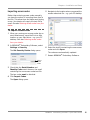
5 Navigate to the location where you saved the
Importing access codes
Rather than entering access codes manually,
you have the option of importing them from a
text file. This saves time and helps avoid typing
errors. Your dealer will supply the text file by
email. See also Ordering access codes from your
dealer.
access codes text file – e.g. your PC desktop.
To import access codes
1 When you receive your access codes (as an
email attachment), save the file to a safe
location on your hard drive – e.g. your PC
desktop. See also Ordering access codes
from your dealer.
2 In BERNINA® Embroidery Software, select
Settings > Security.
The Set Security Device dialog opens.
6 Select the text file containing the new access
codes and click Open.
The codes are automatically updated.
7 Restart BERNINA® Embroidery Software.
Click to
import
codes
3 Check that the Serial Number and
Identity Code match those on the email
containing the new access codes text file.
The two codes must be identical.
4 Click Import Codes.
The Open dialog opens.
BERNINA® Embroidery Software : Quick Start Guide
16
PART I
THE BASICS
Designs created in BERNINA Embroidery Software are composed of
‘embroidery objects’. They are called ‘objects’ because they are discrete
entities which can be manipulated independently of each other. Each object
has certain defining characteristics or ‘properties’ such as color, size,
position, and so on. The most important property of an embroidery object
is its stitch type.
Introduction to embroidery digitizing
BERNINA Embroidery Software provides embroiderers with a fast, flexible
way of creating and editing embroidery designs. This section provides an
overview of the embroidery digitizing process as it applies to BERNINA®
Embroidery Software. See Introduction to Embroidery Digitizing in the
Onscreen Manual for details.
Basic procedures
This section describes how to start BERNINA Embroidery Software and
access the available commands and tools. It covers basic procedures to do
with opening, creating and saving design files. It explains how to activate
hoops and grids and it covers accessing object properties. See Basic
Procedures for details.
Viewing designs
This section explains the design viewing modes available in BERNINA
Embroidery Software as well as the various design viewing settings. It
describes zooming and panning as well as how to view the stitching
sequence. It covers displaying design backdrops and changing
backgrounds. It also explains how to obtain information about your designs.
See Viewing Designs for details.
Selecting objects
This section describes how to select objects using the selection tools and
keyboard. It also shows how to select color blocks or individual objects using
the Color Film. See Selecting Objects for details.
BERNINA® Embroidery Software : Quick Start Guide
17
The Basics
Hooping designs
This section describes how to choose and display hoops in BERNINA
Embroidery Software. It covers creating and modifying custom hoops. It
also deals with hooping large designs. See Hooping Designs in the Onscreen
Manual for details.
Hardware and software setup
This section describes how to set up embroidery machines, and scanners
and describes how to calibrate the monitor. It also deals with changing grid
spacing and hoop options. The setting of general options – such as
automatic save, pointer position display options, etc – is also covered. See
Hardware and Software Setup in the Onscreen Manual for details.
BERNINA® Embroidery Software : Quick Start Guide
18
CHAPTER 3
BASIC PROCEDURES
To start using BERNINA Embroidery
Software, you need to know the
basic procedures, such as starting
up, opening and creating designs,
and saving. Once you start BERNINA
Embroidery Software, you use
commands or icons, and dialogs to
complete your tasks. You select
commands in the same way as other
MS Windows® applications – from
menus or toolbars.
BERNINA Embroidery Software
opens a range of native ART files, as well as some other embroidery file
formats, from computer hard disk, floppy disk or CD-ROM. BERNINA
Embroidery Software gives you a wide range of standard factory-supplied
hoops to select from. Grid lines help you accurately align or size embroidery
objects. The most important dialog in BERNINA Embroidery Software is the
Object Properties dialog. This and the Effects dialog are ‘modeless’, meaning
that they stay on the Design Window as long as you need them.
Note This section describes how to start BERNINA Embroidery Software and
access the available commands and tools. It covers basic procedures to do with
opening, creating and saving design files. It explains how to activate hoops and
grids and it covers accessing object properties.
BERNINA® Embroidery Software : Quick Start Guide
19
Chapter 3 : Basic Procedures
BERNINA Embroidery Software
interface
toolbars in the BERNINA DesignerPlus
product. Depending on your product level,
BERNINA Embroidery Software integrates with
CorelDRAW® Essentials 4 into a single
application, allowing users to create, not just
embroidery, but true, multi-medium designs.
The application has one workspace or ‘Design
Window’ but you interact with it in separate
operating modes: Art Canvas and
Embroidery Canvas. A third mode, Hoop
Layout, is available for multi-hooping large
designs. See also Viewing modes in the
Onscreen Manual.
Starting BERNINA Embroidery
Software
Double-click to start BERNINA® Embroidery
Software.
BERNINA Embroidery Software can be opened
via the desktop icon or MS Windows® Start
menu. It defaults to Embroidery Canvas
mode. This mode allows you to create and edit
embroidery objects using the embroidery
digitizing toolset.
To start BERNINA Embroidery
Software
Double-click the BERNINA Embroidery
Software shortcut icon on the MS Windows®
desktop or select it via the Windows Start >
Programs group.
BERNINA Embroidery Software opens in
Embroidery Canvas mode with a new,
blank design (Design1). The screen image
below displays an exploded view of all
BERNINA® Embroidery Software : Quick Start Guide
20
Chapter 3 : Basic Procedures
you will have access to some or all of these
options.
Title bar
Menu bar
General toolbar
Stitch and Color Bar
Edit toolbar
Digitize toolbar
Arrange toolbar
Craft Stitch toolbar
Design Window
View Mode toolbar
Status bar
Note Toolbars are dockable left, right, top
and bottom, and can be ‘floated’ anywhere in
the Design Window. While the Stitch and
Color Bar can be docked vertically, the
Outline and Fill dropdown lists are not
displayed. Therefore, it is advisable to dock
the bar only horizontally. See also BERNINA
Embroidery Software Quick Reference.
Canvas has docking panes for Color Film,
Carving Stamps, Morphing Effects, and an
Overview Window. All panes are dockable at
the right side of the Design Window.
Nested dockers
Customize the Design Window by showing or
hiding the grid, changing the grid
dimensions, as well as showing and hiding
toolbars. See Displaying the grid for details.
Docking panes
BERNINA Embroidery Software includes
‘dockers’ for key functions. Embroidery
BERNINA® Embroidery Software : Quick Start Guide
21
Chapter 3 : Basic Procedures
Dockers can be ‘nested’ to increase available
workspace. When nested, tab buttons for each
dialog appear to the side. All dockers can be
fixed or minimized. By hovering the mouse over
the tab, a minimized docker will ‘fly out’,
allowing you to access its functions. It
automatically minimizes when not in use.
Dockers may also be ‘floated’ by dragging the
caption bar to the Design Window or
double-clicking it when ‘pinned’ in place.
Status bar
A Status Bar at the bottom of the Embroidery
Canvas Design Window provides continuous
display of current cursor position status as well
as instructions for use of selected tools.
Measurement indicators:
X, Y, L and A
Prompt message
Design width and height
Stitch count
File type
Zoom factor
Information displayed includes:
Prompt message: guides you through use of
selected functions
Design width and height
Coordinates of current needle position (X/Y),
and length (L) and angle (A) of current
stitch. See also Measuring distances
onscreen.
Stitch count: total number of stitches in
design
Working with design files
By default BERNINA Embroidery Software saves
designs to its native ‘ART’ file format. This
format contains all information necessary both
for stitching a design and for later modification.
BERNINA Embroidery Software opens a range of
native ART files, as well as some other
embroidery file formats, from computer hard
disk, floppy disk or CD-ROM. You can save
designs in ART as well as other file formats. See
Reading and Writing Design Files in the
Onscreen Manual for details.
Caution You cannot open ART files created with
a later version of the software to the one you are
running. If you attempt to, you will be prompted
to update your system to the current version.
Opening designs
Use Open (General toolbar) to open an existing design.
BERNINA Embroidery Software opens a range of
embroidery files in addition to its own ART
format. Native ART designs are classified in four
grades depending on how the file was created.
See also Starting BERNINA Embroidery
Software.
Note By default, designs are automatically
grouped upon opening or insertion into another
design. See Setting other general options in the
Onscreen Manual for details.
Zoom factor
To open a design
File type: indicates grade of ART design –
BERNINA Embroidery Software native ART
designs are classified in four grades
depending on how the file was created. See
Embroidery design formats in the Onscreen
Manual for details.
1 Click the Open icon.
BERNINA® Embroidery Software : Quick Start Guide
22
Chapter 3 : Basic Procedures
The Open dialog opens.
Starting new designs
Use New (General toolbar) to start a new
design with the NORMAL template.
Native ART design
2 Select a folder from the Look In list.
Note You can read designs stored on floppy
disk or CD as well as computer hard disk.
3 If the design is not in ART format, select a file
type from the Files of Type list.
4 Select a design or designs.
To select a range, hold down Shift as you
click.
To select multiple items, hold down Ctrl
as you click.
When you start BERNINA Embroidery Software,
a new file – Design1 – is automatically created,
ready for you to start digitizing. By default,
Design1 is based on the NORMAL template.
Templates contain pre-set styles, defaults or
objects, to make digitizing quicker and easier.
When you create a file based on a template, the
template’s values are copied to the new design.
You can also select a custom template to base
your new design on. See also Object Properties
and Templates in the Onscreen Manual.
To start a new design
Click the New icon.
A blank design opens in the Design Window
based on the NORMAL template.
To use a custom template, select File >
New.
If there are templates additional to the
default, the New dialog will appear.
5 Select the Preview checkbox to preview the
design (for supported file formats) together
with design data. This includes stitch and
color numbers, design height and width, and
software version number.
6 Click Open.
Note You can also read designs from your
embroidery machine memory or BERNINA
design card. If you have a Magic Box, you
can read from other design cards as well.
See Reading and Writing Design Files in the
Onscreen Manual for details.
Select required
template
Select a template from the list and click OK.
See also Object Properties and Templates in
the Onscreen Manual.
Saving designs
Use Save (General toolbar) to save the current design.
BERNINA Embroidery Software designs can be
saved in pure ART format as well as a number of
BERNINA® Embroidery Software : Quick Start Guide
23
Chapter 3 : Basic Procedures
non-native formats. Saving a design records its
file name, location and format, and updates it
with any changes you make. When you save an
existing design under a new name, to a different
location or format, you create a copy of the
original design. See also Reading and Writing
Design Files in the Onscreen Manual.
Tip Save your designs early and often. Do not
wait until you finish working. To save changes to
an existing file but preserve the original, use
Save As. Once you have saved a design, every
time you click Save on the toolbar the file will
be updated.
To save a design
1 Click the Save icon.
If this is the first time you have saved the
design, the Save As dialog opens.
Note You can also write designs to your
embroidery machine memory or BERNINA
design card. If you have a Magic Box, you
can write to other design cards as well. See
Reading and Writing Design Files in the
Onscreen Manual for details.
Sample designs and artwork
BERNINA Embroidery Software contains
hundreds of ready-to-stitch designs including
many new attractive ornaments, samples and
digitizing backdrops. Design files (ART files) and
images (BMP, JPG, and WMF files) can be found
in your My Designs - Embroidery Software 6
folder. See also Digitizing with Backdrops and
Viewing design information in the Onscreen
Manual.
Folder
containing
design
Design
name
Format list
2 Select the folder where you want to save the
design from the Save In list.
3 Enter a name for the design in the File name
BERNINA Portfolio displays embroidery design
thumbnails and limited design information. You
can filter the contents of the display window to
show only certain embroidery file types. See
field.
4 Select a file format from the Save as type
list. See also Supported embroidery file
formats in the Onscreen Manual.
5 Click Save.
BERNINA® Embroidery Software : Quick Start Guide
24
Chapter 3 : Basic Procedures
Browsing designs in folders in the Onscreen
Manual for details.
Hoops and grids
Fabrics should be hooped before stitching out on
the machine. BERNINA Embroidery Software
gives you a wide range of standard
factory-supplied hoops to select from. Grid lines
help you accurately align or size embroidery
objects.
Displaying the hoop
Click Show Hoop (General toolbar) to view the
hoop. Right-click to change settings.
CorelDRAW® Essentials 4 itself is packaged
with a selection of clipart which can be used as
digitizing backdrops or converted directly into
embroidery. See also Browsing clipart in the
Onscreen Manual.
Whenever you create a new design, a single
hoop representing the one you attach to your
embroidery machine appears by default in the
Design Window. As you position objects, the
hoop position adjusts automatically so that it is
always centered around objects in the window.
See also Hooping Designs in the Onscreen
Manual.
To display the hoop
Click the Show Hoop icon to turn on the
hoop display.
Caution Included artwork (clipart) and
embroidery designs can only be used for
personal use – i.e. they cannot be commercially
sold in any form. Changing the medium – i.e.
clipart to embroidery or embroidery to clipart –
does not remove copyright protection.
BERNINA® Embroidery Software : Quick Start Guide
25
Chapter 3 : Basic Procedures
Click the Show Hoop icon again to turn off
the hoop display.
Displaying the grid
Click Show Grid (General toolbar) to show or
hide the grid. Right-click to change the Grid
settings.
Use grid lines to help accurately align or size
embroidery objects. You can show or hide the
grid.
Tip You can change the grid spacing, select a
reference point and turn Snap to Grid on or off
in the Options dialog. See Setting grid options
in the Onscreen Manual for details.
To display the grid
Click the Show Grid icon to turn on the grid
display.
Measuring distances onscreen
Measure the distance between two points in the
Design Window using the Measure command.
This command displays coordinates, distance
and angle of the mouse pointer from a point
corresponding to the center of a hoop in an
empty design. View the measurements in the
Status Bar or in a tooltip. See Interpreting
pointer position values in the Onscreen Manual
for details.
Tip For more accurate results, zoom in before
you measure. The measurement is always the
actual size, and is not affected by the zoom
factor.
To measure a distance onscreen
1 Select View > Measure or press M.
2 Click the start point.
3 Move the pointer to the end point and hold
the mouse still.
The following information displays in the
Status Bar:
Position coordinates of the end point (X=,
Y=).
Length of the measured line (L=).
Angle of the line relative to the horizontal
(A=).
Measurements are shown in millimeters or
inches, depending on the option selected in
the MS Windows® Control Panel. See your
Click the Show Grid icon again to turn off
the grid display.
BERNINA® Embroidery Software : Quick Start Guide
26
Chapter 3 : Basic Procedures
MS Windows® documentation for more
information.
Measurements
appear as tooltip
or in Status bar
Tip If activated, length and angle
measurements will also appear in a tooltip.
See Setting other general options in the
Onscreen Manual for details.
4 Press Esc to finish.
Using commands and tools
Once you start BERNINA Embroidery Software,
you use commands or icons, and dialogs to
complete your tasks. You select commands in
BERNINA Embroidery Software in the same way
as other MS Windows® applications – from
menus or toolbars. Keyboard shortcuts are also
available for the most frequently used
commands. See Keyboard Shortcuts for details.
Selecting commands from toolbars
Toolbars provide quick and easy access to
BERNINA Embroidery Software commands.
Click a toolbar button to activate a command or,
where applicable, right-click to set its
properties.
To select commands from toolbars
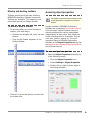
Rest the pointer over an icon to see its name
in a ‘tooltip’.
Click the icon to activate the command.
Right-click to adjust settings or activate the
secondary command.
If the icon has both left and right-click
commands, the name is split with a slash
(/). For example, the Scale by 20%
Down/Up icon lets you scale objects
down by 20% when you click it, or scale
objects up by 20% when you right-click.
For many tools, right-click accesses
current command settings. For example,
left-click Lettering/Values selects
Lettering as the input method, while
right-click accesses the Object
Properties dialog.
Note Object properties can be modified
with or without objects selected. The
former affects only selected objects. The
latter affects current settings. See also
Applying and managing object properties in
the Onscreen Manual.
Undoing and redoing commands
Use Undo (General toolbar) to undo a command.
Use Redo (General toolbar) to reapply a command which has been ‘undone’.
You can undo the effects of most commands. If
you change your mind, you can redo them
again. BERNINA Embroidery Software
remembers the last few commands you used.
To undo and redo a command
To undo a command, click the Undo icon.
When BERNINA Embroidery Software cannot
remember more commands, Undo is
dimmed.
Click the Redo icon to re-apply an ‘undone’
command.
BERNINA® Embroidery Software : Quick Start Guide
27
Chapter 3 : Basic Procedures
Moving and docking toolbars
Toolbars provide quick and easy access to
BERNINA Embroidery Software commands.
Toolbars are ‘dockable’. This means you can
move them around the Design Window.
To move or dock a toolbar
To move a toolbar to a more convenient
location, click and drag it:
Toolbars are dockable left, right, top and
bottom.
They can be ‘floated’ anywhere in the
Design Window.
Accessing object properties
Use Object Properties (General toolbar) to set
current properties or properties of selected
objects.
Designs created in BERNINA Embroidery
Software are composed of ‘embroidery objects’.
They are called ‘objects’ because they are
discrete entities which can be manipulated
independently of each other. Each object has
certain characteristics or ‘properties’ such as
color, size, position, and so on. The most
important dialog in BERNINA Embroidery
Software is the Object Properties dialog. See
also Applying and managing object properties in
the Onscreen Manual.
To access object properties
Open the Object Properties dialog by any
of the following means:
Click the Object Properties icon.
Select Settings > Object Properties.
Double-click or right-click any object in
the Design Window.
To dock it in its normal position, double-click
the toolbar title.
BERNINA® Embroidery Software : Quick Start Guide
28
Chapter 3 : Basic Procedures
Select a tab to access the object property set
you want to adjust.
Use fields, dropdown lists, radio buttons,
checkboxes, and slider controls to key in or
adjust settings.
Click the Effects button to access a separate
set of more specialized object property
settings such as Underlay, Textured Edge,
Gradient Fill, etc.
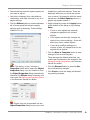
feedback on particular settings. These are
displayed whenever you hover the mouse
over a control. For example, with the mouse
placed over the Stitch Spacing control, a
graphic tip appears beside it.
Apply settings by means of the Apply button
at the bottom of the dialog or by pressing
Enter.
If one or more objects are selected,
changes are applied to all relevant
objects.
If no objects are selected, changes are
made to the current settings – these will
affect any newly created objects.
If you have modified settings on a
number of tabs, all changes that can be
applied will be applied.
Click the Save to Template button to save
settings to the current template.
These become the defaults whenever you
create new files based on this template. See
Managing design templates in the Onscreen
Manual for details.
Note This dialog, in turn, includes a
Properties button which opens the Object
Properties dialog. You can choose to close
the Object Properties dialog automatically
whenever the Effects dialog is opened, and
vice versa. See Setting other general options
in the Onscreen Manual for details.
Click the Discard button or press the Esc
key to discard any changes.
Click Close to close the dialog and discard
any pending changes.
Tip Graphic tips are incorporated into the
Object Properties dialog to give you visual
BERNINA® Embroidery Software : Quick Start Guide
29
CHAPTER 4
VIEWING DESIGNS
BERNINA Embroidery Software provides many viewing features to make it
easier to work with your design. Zoom in on an area to see more detail or view
the design at actual size. Show or hide various design elements with the
available display settings. Preview an existing design in different colors on
different fabrics.
When working with embroidery designs, you need to understand the stitching
sequence. You can check a design’s stitching sequence in BERNINA Embroidery
Software by ‘traveling’ through it stitch-by-stitch. You can also check the
sequence by simulating the design stitchout onscreen.
BERNINA Embroidery Software also provides information about designs in a
variety of ways and formats. Before even opening BERNINA Embroidery
Software or your design, you can check some design information for ART files
directly from MS Windows® Explorer. You can view stitching details about a
design in the Design Properties dialog. Also the Print Preview provides essential
design information, including a design preview, the size of the design, color
sequence and any special instructions.
This section explains the design viewing modes available in BERNINA
Embroidery Software as well as the various design viewing settings. It
describes zooming and panning as well as how to view the stitching sequence.
It covers displaying design backdrops and changing backgrounds. It also
explains how to obtain information about your designs.
BERNINA® Embroidery Software : Quick Start Guide
30
Chapter 4 : Viewing Designs
Viewing modes
many sophisticated techniques for drafting
outlines and shapes onscreen.
While digitizing, different viewing modes are
available for different purposes. Depending on
your product level, BERNINA Embroidery
Software provides a number of viewing modes
which are accessed via the View Mode toolbar.
The application has one workspace or ‘Design
Window’ but you interact with it in separate
modes.
Art Canvas mode
Load, edit and save graphics as a
backdrops for embroidery digitizing. Includes entire suite of
CorelDRAW® Essentials 4 drawing tools. In addition, it provides
capabilities to convert vectors
and vector text directly to embroidery objects.
In Art Canvas mode, the View
Mode toolbar includes the Show
Embroidery button to toggle
embroidery display on or off.
Below is a screen image of the Art Canvas
workspace which is accessed via the View
Mode toolbar. This mode allows you to create
and edit vector graphics using the
CorelDRAW® Essentials 4 toolset which offer
In addition to the CorelDRAW® Essentials 4
toolset, Art Canvas provides capabilities to
convert vectors and vector text directly to
embroidery objects. Vector graphics or text
created or imported into the Art Canvas can be
converted directly to embroidery designs. You
can use Art Canvas to insert or paste
third-party vector graphics such as clipart for
use in embroidery designs. Alternatively, insert,
paste or scan bitmap artwork for use as
digitizing templates or ‘backdrops’. See Loading
pictures in the Onscreen Manual for details.
Note For a full description of the
CorelDRAW® Essentials 4 tools, refer to the
electronic User Guide available via the Windows
Start > Programs group. Alternatively, use the
onscreen help available from the Graphics
mode Help menu.
BERNINA® Embroidery Software : Quick Start Guide
31
Chapter 4 : Viewing Designs
Embroidery Canvas mode
Hoop Layout mode
Digitize and edit embroidery
designs. Show embroidery
shapes as well as graphics. View
designs realistically in simulated
3D.
View and edit multi-hoopings. If
embroidery is too large or contains multiple designs spaced
around an article, split into multiple hoopings.
Below is a screen image of the Embroidery
Canvas workspace which is accessed via the
View Mode toolbar. This mode allows you to
create and edit embroidery objects using the
embroidery digitizing toolset. See also BERNINA
Embroidery Software interface.
Below is a screen image of the Hoop Layout
workspace which is accessed via the View
Mode toolbar. If your embroidery is too large or
contains a number of designs spaced around an
article, you can split it into multiple hoopings.
This means you can create embroidery designs
that are larger than it is possible to stitch out on
a single hoop. Hoop Layout allows you to set
up the position and sequence of each hoop. See
Hooping large designs for details.
Use this mode when you want to create
embroidery from digitizing ‘backdrops’. Various
types of image file can be loaded in BERNINA
Embroidery Software. See also Digitizing with
Backdrops in the Onscreen Manual.
Embroidery Canvas also offers a graphical
representation of what the final embroidery will
look like. Use Show Artistic View together
with a background fabric to see how your design
will look when stitched out. See also Changing
backgrounds.
Design viewing settings
You can show or hide design elements in
Embroidery Canvas with a variety of display
settings. See a graphical representation of the
final embroidery. Show or hide needle
penetration points and stitches themselves. Or
show/hide selected colors.
BERNINA® Embroidery Software : Quick Start Guide
32
Chapter 4 : Viewing Designs
Viewing simulated embroidery
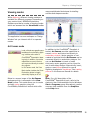
Click Show Artistic View (General toolbar) to
toggle artistic or ‘stitchout’ view on/off.
With Artistic View, you can see a graphical
representation of the final embroidery.
To view simulated embroidery
To view simulated embroidery (Artistic
View), toggle the Show Artistic View icon
on.
Viewing needle points
Select Needle Points (View menu) to show or hide the
needle points in a design.
In Embroidery Canvas, you can show or hide
needle points. For example, you may want to
view needle points to select stitches for editing.
See also Editing Stitches in the Onscreen
Manual.
To view needle points
To show or hide needle points, select View >
Needle Points.
Needle points ON
To view embroidery stitches (Stitch View),
toggle the Show Artistic View icon off.
Viewing stitches and outlines
Click Show Stitches (General toolbar) to toggle stitch view on/off.
You can show or hide stitches and object
outlines in any viewing mode as you work. Hide
stitches to see outlines more clearly when
reshaping. See Reshaping and Editing Objects in
the Onscreen Manual for details.
BERNINA® Embroidery Software : Quick Start Guide
33
Chapter 4 : Viewing Designs
The Select By Color dialog opens.
To view stitches and outlines
Click the Show Stitches icon to turn
stitches on or off.
3 Select the colors you want to view.
Stitches ON
Stitches OFF
Viewing objects by color
Select By Color (View menu) to isolate design elements by color.
To help you isolate individual design elements
for checking or manipulation, the View By
Color function lets you view objects by color.
This is particularly useful when you are
resequencing objects by color. See also
Resequencing objects by color in the Onscreen
Manual.
Note You will need to ungroup the design
before you can view object by color.
To view objects by color
1 Create or open a design.
To select a range, hold down Shift as you
click.
To select multiple items, hold down Ctrl
as you click.
4 Click OK.
The design appears with only those colors
you selected in view.
Two colors
selected
5 To view all colors in the design, select View
> By Color again and click All Colors.
6 Click OK.
Tip The Color Film provides another way to
view design objects. See Viewing and
selecting color blocks for details.
Zooming and panning
2 Select View > By Color.
Use the Overview Window and Zoom
functions to quickly examine your design at
different degrees of magnification.
BERNINA® Embroidery Software : Quick Start Guide
34
Chapter 4 : Viewing Designs
2 To zoom in or out, click the Zoom button on
Tip The Status Bar displays the current ‘zoom
factor’. See Starting BERNINA Embroidery
Software for details.
Viewing designs in overview
Use the Overview Window to view design
thumbnails. The window updates whenever you
make a change and can be used to zoom into or
pan across the Design Window.
the Overview Window and drag a bounding
box around the area to zoom and drop.
Drag and drop a
bounding box
around area to
zoom
To view designs in overview
1 Select View > Overview Window.
The Overview Window opens.
Click to activate
zoom box
3 To pan across the design, move the cursor
inside the zoom box – it changes to a
four-way arrow cursor – and drag and drop.
Drag zoom box
to area to pan
BERNINA® Embroidery Software : Quick Start Guide
35
Chapter 4 : Viewing Designs
Zooming in and out
Click Zoom Box (General toolbar) to zoom in
and out of the Design Window. Use it also to
zoom in on bounded areas of the screen.
Click Show All (General toolbar) to show the
whole design.
Click Show 1:1 (General toolbar) to show the
design at the correct size.
Magnify your view of the design by zooming in
on individual stitches or details, or zoom out to
display more of the design in the window. The
current zoom factor is shown at the lower right
corner of the screen. See also Keyboard
Shortcuts.
Note To make sure your design is being
displayed at the correct size, calibrate your
monitor. See Calibrating the monitor in the
Onscreen Manual for details.
Tip The Status Bar displays the current
‘zoom factor’. See Starting BERNINA
Embroidery Software for details.
Left-click in the Design Window to zoom in –
the view zooms to twice the previous screen
magnification, centered at the point you
clicked.
Left- or right-click-and-drag a bounding box
around the zoom area. Release the mouse to
view the entire boxed area in the Design
Window.
Click-and-drag
To zoom in and out
Click the Zoom Box icon or press shortcut
letter B.
The cursor becomes a magnifying glass.
Right-click in the Design Window to zoom out
– the view zooms out to half the previous
screen magnification, centered at the point
you clicked.
Right-click
Note All bitmap images, regardless of
context, maintain the same zoom scale as
embroidery. Bitmaps are used in a number of
contexts:
As a backdrop or guide picture for
digitizing: See Digitizing with Backdrops
in the Onscreen Manual for details.
As a background to simulate the stitchout
fabric: See Changing backgrounds for
details.
BERNINA® Embroidery Software : Quick Start Guide
36
Chapter 4 : Viewing Designs
As a fabric patch for appliqués: See
Digitizing for Appliqué in the Onscreen
Manual for details.
To display the whole design, click Show All.
Alternatively, select View > Show All, or
press 0.
To display the design at actual size, click
Zoom 1:1.
To display the design at a particular scale,
press F on the keyboard. Enter a scale as a
percentage of the actual size, and click OK.
Enter scale
Traveling by object and color block
Use the keyboard shortcuts to travel through
designs by object or color block. This technique
is useful if you need to locate a specific object in
order to delete it or insert another object at that
point the stitching sequence. See also Keyboard
Shortcuts.
To travel by object or color block
To travel to the end of the design, press the
End key.
The white cross is located at the last stitch
and the design displayed in the selected
thread colors.
Start point
Press Esc, Enter or Spacebar keys to exit
Zoom mode.
Viewing the stitching sequence
When working with embroidery designs, you
need to understand the stitching sequence. You
can check a design’s stitching sequence by
‘traveling’ through it by stitches, colors or
objects. You can also check the sequence by
simulating the design stitchout onscreen.
BERNINA Embroidery Software simulates
stitching out by changing stitches from black to
their allocated thread colors as they are
‘stitched’. See also Viewing and selecting color
blocks.
White cross current needle
position marker
To travel to the start of the design, press the
Home key.
The white cross is located at the first stitch
and the entire design displayed in dark gray.
White cross current needle
position marker
End point
BERNINA® Embroidery Software : Quick Start Guide
37
Chapter 4 : Viewing Designs
To travel to the next object, press Ctrl+T.
To travel by stitches
1 Select Edit > Stitch Edit or press Esc.
White cross current needle
position marker
2 Ensure that Select Object is not selected,
then press the arrow keys to travel by 1 or
10 stitches.
- 10
To travel to the previous object, press
Shift+T.
To travel to the next color, press the
Page Down key.
-1
+1
+ 10
Press the left or right arrow key to travel
1 stitch backward or forward.
Press the up or down arrow key to travel
10 stitches backward or forward.
White cross current needle
position marker
To travel to the previous color, press the
Page Up key.
Tip With the Select Object tool activated,
you can select objects while traveling
through the stitching sequence. See
Selecting objects by Tab key for details.
Traveling by stitches
Use the stitch travel tools or shortcut keys to
travel through the design one or more stitches
at a time. The current needle position is
indicated by a large white cross or ‘needle
position marker’. Initially, this is located at the
end of the design. When you travel through
stitches, the needle position marker moves
accordingly. The current stitch number appears
in the Status Bar.
3 Press the + or - keys located on the keypad
to travel by 100 stitches. The + key moves
you forward, while the - key moves you
backwards.
Travel backwards
one stitch
Tip If you travel outside the visible area,
press the C key to center the current stitch
on the screen.
Simulating design stitchouts
The Slow Redraw function lets you simulate
the actual embroidery design stitchout
onscreen. Use it to view design stitching and
color sequence in slow motion. Redrawing can
be started from any stitch in the design. Hide
previously stitched parts of the design as
required. With larger designs, you can choose to
BERNINA® Embroidery Software : Quick Start Guide
38
Chapter 4 : Viewing Designs
scroll automatically so that the area being
stitched remains onscreen.
The Slow Redraw dialog opens.
Play
Back to Start
Pause
Stop
3 To redraw only a section of the design,
specify the start and end stitch in the Stitch
Range field.
4 Use the slider bar to set the redraw speed.
5 Click the Play button.
The design is redrawn onscreen according to
stitching sequence and selected speed.
6 Adjust control buttons as required:
Because Slow Redraw emulates the
movements of the embroidery machine, you are
able to make decisions about how to optimize
your design in order to lessen the load on the
machine. This is particularly important if you
intend to make multiple stitchouts of the same
design. It is good practice to perform Slow
Redraw on completed designs for this reason.
To simulate the design stitchout
Button
Function
Speed
Use the slider bar to adjust the redraw
speed in ‘real time’.
Pause
Pauses the redraw, letting you resume
where you left off.
Stop
Stops the redraw and returns to the
beginning of the design.
Back to
Start
Redraws from the beginning of the
design.
1 Switch to Stitch View.
Note Slow Redraw cannot be used with
Artistic View.
2 Select View > Slow Redraw or press
Shift+R.
Backdrops and backgrounds
You can display a backdrop while you digitize.
Hide it temporarily while you work, or dim it for
easier stitch viewing. You can also change the
BERNINA® Embroidery Software : Quick Start Guide
39
Chapter 4 : Viewing Designs
background color of the Design Window to
match the color of your fabric.
Pictures icon. See also Importing images
into BERNINA Embroidery Software.
With Show Pictures ON
Viewing backdrops
Use Show Pictures (General toolbar) to toggle
backdrops on/off.
With Show Pictures OFF
Note The drawing appears dimmed if Dim
Picture is selected.
To dim a backdrop, click the Dim Artwork
icon.
Use Dim Artwork (General toolbar) to dim
backdrops in order to show stitches more
clearly when digitizing.
Use Show Vectors (General toolbar) to toggle
on/off display of vector graphics.
Use Show Appliqué Fabric (General toolbar)
to toggle appliqué fabrics/colors on/off.
You can display a backdrop, bitmap or vector,
while you digitize, or hide it temporarily. Hiding
backdrops does not delete them from the
design. You can also dim backdrops to make it
easier to view stitches. See also Digitizing with
Backdrops.
To view backdrops
Original bitmap image
Dimmed bitmap image
Note To return to full color, click the Dim
Picture icon again.
To toggle backdrop vector graphics on/off,
click Show Vectors icon.
To toggle backdrop pictures on/off – both
bitmap and vector graphics – click the Show
BERNINA® Embroidery Software : Quick Start Guide
40
Chapter 4 : Viewing Designs
Click the Show Appliqué Fabric icon to
show appliqué fabrics/colors. See also
Digitizing for Appliqué.
The Display dialog opens.
Select
background
color or fabric
With Show Appliqué
Fabric ON
With Show Appliqué
Fabric OFF
Tip You can also access this dialog using
Settings > Thread Colors or clicking the
link in the Color Palette dialog. Then
double-click BKG in the Thread Colors tab.
See Thread Colors and Charts in the
Onscreen Manual for details.
To hide the fabrics/colors, click the Show
Appliqué Fabric icon again.
Changing backgrounds
Select Fabric Display (Settings menu) to change
background color and fabrics.
Use the Show Appliqué Fabric tool (General
toolbar) to toggle fabric display on or off.
In BERNINA Embroidery Software, you can
change the background color of the Design
Window to match the color of your fabric. Or you
can select a background fabric for more realistic
previews and presentations. The background is
saved with the design.
Click to access
Thread Colors
Double-click to
change background
2 Select the background type you want:
Option
Purpose
Color
Select a background color.
Fabric
Select a background fabric.
3 Select the color or fabric you want to use:
Tip Use the Show Appliqué Fabric toggle to
turn appliqué fabrics/colors display on/off. See
Placing fabrics in Auto Appliqué designs in the
Onscreen Manual for details.
To change backgrounds
1 Select Settings > Fabric Display.
BERNINA® Embroidery Software : Quick Start Guide
41
Chapter 4 : Viewing Designs
To select a background color, click Edit
and select a color from the Color dialog.
4 Click OK.
Yellow background
To select a fabric, click Browse and select
a fabric from the Load Picture dialog.
Fabrics are located in the ..\Program
Files\BERNINA\Embroidery
Software 6\fabrics folder.
Denim background
Note The background is saved with the
design.
Viewing design information
BERNINA Embroidery Software provides
information about designs in a variety of ways
and formats. Before even opening BERNINA
Embroidery Software or your design, you can
check some design information for ART files
directly from MS Windows® Explorer. You can
view stitching details in the Design Properties
dialog. The Print Preview tool provides
essential design information, including a design
preview, the size of the design, color sequence
and any special instructions.
Tip If you choose fabric, you can center or
tile the image in the Design Window. If the
bitmap is large enough to fill the entire
window, select Center. Otherwise, select
Tile.
Select tiled or
centered
Viewing design properties
Use Design Properties (File menu) to view stitching
details about a design.
You can check software version number and
other design information through the Design
Properties dialog. Stitching details are also
provided. Most of the fields cannot be modified
directly.
BERNINA® Embroidery Software : Quick Start Guide
42
Chapter 4 : Viewing Designs
To view design properties
1 Select File > Design Properties.
The Design Properties > Design dialog
opens. This tab contains information about
height and width and stitch count and colors.
The data is extracted from the design and
cannot be modified.
4 Click OK.
Viewing design information in
Windows Explorer
Before opening ART files, you can view design
thumbnails and details via MS Windows®
Explorer. The Properties dialog displays a
design preview together with design information
such as stitch count, number of stops and color
changes. You can also view general file
information, such as file size and modification
dates. See also Design Management.
Note This same dialog can be accessed from
within the Open dialog in BERNINA Embroidery
Software. See also Opening designs.
To view design information in
Windows Explorer
2 Select the Summary tab to view or enter
summary information about the design.
1 In Windows Explorer, select the folder you
are interested in.
Design thumbnails are displayed in the
Windows Explorer window.
3 Click a field and enter any text which will
help you identify the design at a later date.
Note Information from this tab is included
on the Print Preview as well as the
Summary tab of the Windows Properties
dialog. See Viewing design information in
Windows Explorer and Previewing designs
for details.
2 Right-click a file and select Properties from
the popup menu.
BERNINA® Embroidery Software : Quick Start Guide
43
Chapter 4 : Viewing Designs
The design preview displays in a preview
window.
The Properties dialog opens.
Click to print
design
Click to display
one or two pages
Click to set print
options
ART design
details available
in Windows
Properties dialog
3 Check the design information, or click the
other tabs for general file information.
Tip The Summary tab provides some of the
same information entered in the Design
Properties > Summary tab in BERNINA
Embroidery Software. See Viewing design
properties for details.
4 Click OK.
Previewing designs
Click Print Preview (General toolbar) to preview the print preview onscreen.
The Print Preview contains a design preview
and essential design information, including the
size of the design, color sequence and any
special instructions. See also Printing designs in
the Onscreen Manual.
Design
Design information
2 Adjust the view as required:
To change the orientation of the paper,
click Landscape or Portrait.
To change the information that displays,
and set printing preferences, click
Options. See also Setting print options
for embroidery in the Onscreen Manual.
Click Zoom In to read the design
information or view the design preview
more closely. Large designs may be
displayed over a number of pages.
To print the design, click Print.
To close the print preview, click Close.
To preview designs
1 Click the Print Preview icon.
BERNINA® Embroidery Software : Quick Start Guide
44
CHAPTER 5
SELECTING OBJECTS
BERNINA Embroidery Software
provides various means for selecting
the objects comprising an embroidery
design. These include techniques such
as point and click, bounding box
selection, and multiple object
selection. You can select all objects in
a design or individual ones for precise
modification. BERNINA Embroidery
Software allows selection of object
outlines or fill stitches.
Note Designs must be ungrouped
before objects can be selected. See
Ungrouping objects in the Onscreen
Manual for details.
This section describes how to select objects using the selection tools and
keyboard. It also shows how to select color blocks or individual objects using
the Color Film.
Selecting objects by point and click
Click Select Object (Edit toolbar) as necessary
(generally activated by default), and click
objects to select.
The simplest way to select objects is by pointing
and clicking with the mouse with the Select
Object tool activated. Using Shift and Ctrl
keys, you can select multiple objects. Both
outlines and/or filled areas can be selected.
Clicking an outline selects an object even if
another is above it. Where you have a mixture
of closed objects, you can select object outlines
or fill stitches.
Note With low-density stitching and/or at high
zooms, it is actually possible to click between
stitches and not select the object.
To select objects by point and click
Click the Select Object icon.
BERNINA® Embroidery Software : Quick Start Guide
45
Chapter 5 : Selecting Objects
Click an outline to select the object.
To select multiple items, hold down Ctrl as
you click.
Click an object
Click the fill behind a outline object to select
the filled object.
Ctrl +
Select a range of objects by holding down
Shift while you click the first and last objects
in the range.
Click first object
Click the fill to select an object even if it lies
within the bounds of a larger object.
Hold down Ctrl and
click another object
Hold down Shift and
click last object
Shift +
Selecting objects by bounding box
Use Select Object (Edit toolbar) and drag a
bounding box around the object to select.
With the Select Object tool activated, you can
select objects by dragging a bounding box
around them.
To select objects by bounding box
Tip To select an object which is behind
another object, zoom in and click the outline.
Alternatively, position the pointer over the
object, hold down the 2 key, and click until
the object is selected. Each click selects the
next overlapping object.
1 Click the Select Object icon.
2 Drag a bounding box around the objects you
want to select.
BERNINA® Embroidery Software : Quick Start Guide
46
Chapter 5 : Selecting Objects
Objects are selected when you release the
mouse button.
Drag a bounding box
around the objects
Objects are
selected
Note Unless they have already been
grouped, only objects completely within the
bounding box will be selected when you
release the mouse button. See also Grouping
objects in the Onscreen Manual.
Selecting objects by Polygon Select
Use Polygon Select (Edit toolbar) to select
objects with a bounding box.
3 Press Enter to select.
Mark reference points
around object/s to select
Selecting objects by Tab key
Click Select Object (Edit toolbar) and press
Tab or Shift + Tab to tab between objects.
With the Select Object tool activated, you can
select the first or last object in the design
sequence using the Tab key. If an object is
selected, you can select the object before or
after it in the stitching sequence. See also
Reshaping next or previous objects in the
Onscreen Manual.
Use Polygon Select to select objects with a
bounding box.
To select objects by Tab key
To select objects by Polygon Select
With an object selected, do one of the
following:
1 Click the Polygon Select icon.
2 Mark reference points around the object/s
you want to select.
The objects you want to select must be
completely within the outline.
Click the Select Object icon.
Press Tab to select the next object in the
stitching sequence.
Press Shift+Tab to select the previous
object.
Shift + Tab
Tab
BERNINA® Embroidery Software : Quick Start Guide
47
Chapter 5 : Selecting Objects
With no objects selected, do one of the
following:
Press Tab to select the first object in the
stitching sequence.
Deselecting objects
You can cancel all selections in the design, or
remove individual objects from a group of
selected objects.
Press Shift+Tab to select the last object.
To deselect objects
Tip Hold down the Ctrl key to select multiple
items as you tab between them.
Cancel a selection using any of the following
methods.
Press Esc.
Selecting all objects in a design
Select another object.
Click an empty area of the background.
Select Edit > Deselect All.
Select all objects to apply changes to a whole
design. See also Keyboard Shortcuts.
To select all objects in a design
Select Edit > Select All or press Ctrl+A.
Sizing handles appear around the entire
design.
Remove an object from a selection by
holding down Ctrl and clicking the object to
deselect.
Deleting objects
Select Delete (Edit menu) to delete selected objects.
Various methods are available for deleting
objects. See also Sequencing objects with Color
Film in the Onscreen Manual.
To delete objects
Select the object/s to delete, and do one of
the following:
Press Delete.
No objects selected
All objects selected
To deselect, select Edit > Deselect All,
press X or Esc.
Select Edit > Delete.
Right-click object/s in the Color Film and
select Delete from the popup menu. See
Viewing and selecting color blocks for
details.
Deselecting and deleting objects
Deselecting and deleting objects are basic
operations which rapidly become
second-nature. See also Combining objects in
the Onscreen Manual.
Viewing and selecting color blocks
Click Color Film (General toolbar) to view all
color blocks and objects in a design.
BERNINA® Embroidery Software : Quick Start Guide
48
Chapter 5 : Selecting Objects
Click Show Individual Objects (Color Film toolbar) to view individual objects in order of
stitching sequence.
To select multiple items, hold down Ctrl
as you click.
The Color Film tool provides a sequential list of
objects grouped by color. Use it to select and
manipulate ‘color blocks’ – consecutive objects
of the same color. In addition, you can display,
select, modify and sequence individual objects.
Color Film is synchronized with the Design
Window and vice versa. It dynamically updates
whenever you select, modify or delete objects,
or create new ones. See also Sequencing
objects with Color Film in the Onscreen Manual.
To view and select color blocks
Click the Color Film icon.
The Color Film toolbar opens displaying all
color blocks in the design in order of stitching
sequence.
Consecutive objects of
same color form single
color block
Select color
block or
object in
Color Film
Manipulate the color blocks as required. See
also Sequencing objects with Color Film in
the Onscreen Manual.
You can quickly access popup menu
commands for manipulating selected color
blocks or objects by right-clicking their icons.
See also Combining objects in the Onscreen
Manual.
All objects comprising
color blocks shown in
their stitching order
Click the Show Individual Objects toggle
to view individual objects.
Use popup menu to
cut, copy, paste
objects as required
All objects within a color block are displayed
in stitching order.
Click an icon to select the color block or
object.
To select a range, hold down Shift as you
click.
BERNINA® Embroidery Software : Quick Start Guide
49
Chapter 5 : Selecting Objects
Tip To enlarge thumbnail images of color
blocks or objects, click and drag the edge of
the dialog.
Drag edge to enlarge
thumbnails
BERNINA® Embroidery Software : Quick Start Guide
50
PART II
TUTORIALS
This part of the Quick Start Guide provides a number of fully worked
tutorials to help you get started with BERNINA Embroidery Software.
Generally speaking, any project that can be done in a lower level product
can also be done in a higher level one. But not vice versa. The tutorials
assume a certain familiarity with basic techniques such as zooming and
displaying stitches. Read through Part I of the Quick Start Guide before
starting. For further details of procedures used here, you are referred to the
Onscreen Manual. It’s a good idea also to familiarize yourself with the Quick
Reference. See Quick Reference for details.
Lettering tutorial
This introductory tutorial involves adding a decorative border to lettering for
use on an article of clothing, table napkin or other item. It will show you just
how simple and fun it is creating projects in BERNINA Embroidery Software.
See Lettering Tutorial for details.
Editing tutorial
In this tutorial you will learn how to check a design and not only look for
actual errors but potential errors which may affect the quality and
appearance of the stitchout. You will explore methods to detect and correct
errors, optimize designs and familiarize yourself with the powerful features
of BERNINA Embroidery Software that enable you to accomplish these
tasks. See Editing Tutorial in the Onscreen Manual for details.
Auto-Digitizing tutorial
In this tutorial you will not only learn how to automatically digitize a design
but also how to enhance the embroidery automatically created. You will also
check and adjust the stitching sequence to optimize the design for stitchout.
See Auto-Digitizing Tutorial in the Onscreen Manual for details.
Digitizing tutorial
In this tutorial you will use a combination of manual and automatic digitizing
techniques to create an embroidery design from scratch. See Digitizing
Tutorial in the Onscreen Manual for details.
BERNINA® Embroidery Software : Quick Start Guide
51
Tutorials
Monogramming tutorial
With BERNINA Embroidery Software, it is very easy to create monograms
for a variety of purposes. The Monogramming feature integrates the three
basic elements of a monogram – lettering, ornaments and borders. In this
tutorial you will use the Monogramming tool and discover how to embellish
designs to create simple and elegant monograms in a fraction of the time it
takes to manually digitize the same design. See Monogramming Tutorial in
the Onscreen Manual for details.
Appliqué tutorial
Expand your creative potential with appliqué. BERNINA Embroidery
Software has a wide selection of fabrics to use in appliqué projects to help
you visualize designs onscreen. In this tutorial you will learn how to
implement the open-object appliqué technique in digitizing the giraffe
artwork included in your software installation. See Appliqué Tutorial in the
Onscreen Manual for details.
Multi-medium tutorial
In this tutorial we explore the powerful support BERNINA Embroidery
Software provides for multi-medium design. Here you will combine digital
print with embroidery to create a multi-medium design. See Multi-Medium
Tutorial for details.
BERNINA® Embroidery Software : Quick Start Guide
52
CHAPTER 6
LETTERING TUTORIAL
This introductory tutorial involves
adding a decorative border to lettering
for use on an article of clothing, table
napkin or other item. It will show you
just how simple and fun it is creating
projects in BERNINA Embroidery
Software. In this tutorial you will learn
how to take a simple design element
and add lettering to it using the
alphabet and thread colors of your
choice. We will also check the design
for stitchout. The tutorial is designed
to be used with all levels of BERNINA
Embroidery Software.
Note All steps required to complete
the quick-start project are provided here. For further information, however,
you are referred to the Onscreen Manual.
Getting started
To create this project, we’re going to use one of the sample designs
packaged with your BERNINA Embroidery Software installation. Your
BERNINA Embroidery Software comes with a range of artwork and
embroidery designs that you can use as a starting point for your own
projects. In addition to the packaged sample designs, you will find a
dedicated ‘Tutorials’ folder which contains all the files you need to complete
this and other tutorials. The final result of this and other projects is also
located in this folder. You may want to view the completed project file before
and/or after completing the tutorial. See also Working with design files.
BERNINA® Embroidery Software : Quick Start Guide
53
Chapter 6 : Lettering Tutorial
Open the design sample
Use Art Canvas to load, edit and save pictures as a backdrop for
embroidery digitizing.
Use Embroidery Canvas mode to create and edit embroidery designs.
Show embroidery shapes as well as graphics. View designs realistically in Artistic View.
Use Open (General toolbar) to open an existing design.
Your BERNINA Embroidery Software system comes with a range of designs
that you can use as a starting point for your own projects. For this project
we will use a sample border which will form the basis of our monogram
design. See also Working with design files.
To open the design sample
1 Double-click the BERNINA Embroidery Software shortcut icon on the
MS Windows® desktop.
BERNINA Embroidery Software opens with a new, blank design (Design1)
with the default hoop selected.
2 Choose Embroidery Canvas mode.
Choose Embroidery
Canvas
3 Click the Open icon.
The Open dialog opens.
Preview panel
Design data
Preview on/off
BERNINA® Embroidery Software : Quick Start Guide
54
Chapter 6 : Lettering Tutorial
4 Navigate to the My Designs - Embroidery Software 6 folder and
select the Tutorials > Lettering folder.
5 Select the ‘Lettering_Start.Art60’ file and click Open.
The design opens in the Design Window.
Change views
Digitize and edit embroidery designs. Show embroidery shapes as well as
graphics. View designs realistically in simulated 3D.
Click Show Artistic View (General toolbar) to toggle artistic or
‘stitchout’ view on/off.
BERNINA Embroidery Software lets you open and edit all your designs in
Embroidery Canvas. Artistic View shows what your design will look like after
stitchout. All editing commands are also available in Artistic View. See
Viewing modes for details.
Note To ensure your design is displayed in real size, you may need to
calibrate your monitor. See Calibrating the monitor in the Onscreen Manual
for details.
To change views
1 Choose Embroidery Canvas mode and click the Show Artistic View
icon to view the design realistically in simulation.
BERNINA® Embroidery Software : Quick Start Guide
55
Chapter 6 : Lettering Tutorial
The design appears more realistically than in normal view though it is
generally harder to edit in this mode.
Normal View
Artistic View
2 Magnify your view of the design by zooming in on individual stitches or
details, or zoom out to display more of the design in the window. See
Zooming and panning for details.
Tip The current zoom factor is shown at the lower right corner of the
screen.
Select the hoop
Click Show Hoop (General toolbar) to turn hoop display on or off. Right-click
to change hoop settings.
\
Use Zoom Box (General toolbar) to zoom in and out of the Design Window by
clicking and right-clicking. Use it also to zoom in on bounded areas of the
screen.
The hoop in the Design Window represents the embroidery hoop that you
connect to your BERNINA home embroidery machine. The hoop stabilizes
the fabric and will ideally be just big enough to fit the design to ensure the
BERNINA® Embroidery Software : Quick Start Guide
56
Chapter 6 : Lettering Tutorial
least amount of stretch and distortion. From the range of available hoop
types and sizes, select the smallest hoop which will accommodate the whole
design. See also Hooping Designs in the Onscreen Manual.
To select the hoop
1 Right-click the Show Hoop icon.
The Options > Hoop dialog opens.
Select artista
255 x 145 Oval
2 Select ‘artista 255 x 145 Oval’ from the Hoop list.
3 Click OK.
artista 255 x
145 Oval
4 Zoom out to better view the hoop – select the Zoom Box tool and
right-click the design once.
BERNINA® Embroidery Software : Quick Start Guide
57
Chapter 6 : Lettering Tutorial
Tip Once you have selected a hoop you can toggle it on or off by clicking
the Show Hoop icon.
Save the design
It is a good time to save your work. You should make it a habit to save from
time-to-time so as not to lose changes you have made. See also Saving
designs.
To save the design
1 Select File > Save As.
The Save As dialog appears.
Enter suitable
name and save
Tip The Save As dialog opens to the same location the original file is
stored.
2 Enter a suitable name – ‘LetteringTutorial’ – in the File Name field.
3 Click Save.
Tip Subsequently, you only have to click the Save button or Ctrl+S to
save any changes.
BERNINA® Embroidery Software : Quick Start Guide
58
Chapter 6 : Lettering Tutorial
Creating the design border
We will now take the design element we’ve just opened, and duplicate and
transform it into a border for our design.
Scale and rotate the first border
Use Select Object (Edit toolbar) to select a design element.
Click Scale by 20% Down/Up (Edit toolbar) to reduce selected objects by 20%.
Right-click to increase selected objects by 20%.
Click Rotate 45° CCW/CW (Edit toolbar) to rotate an object or design
counter-clockwise by 45°. Right-click to rotate clockwise by 45°.
First we need to reduce our design border a little. You can scale it by
dragging the selection handles with the mouse or specifying the exact
dimensions. As an object is scaled, the stitch count changes to preserve the
current stitch density. We’ll also rotate our border by 45°. See also
Arranging and Transforming Objects in the Onscreen Manual.
To scale and rotate the first border
1 Click the Select Object icon and select the object.
Note By default, designs are automatically grouped upon opening or
insertion into another design. See Setting other general options in the
Onscreen Manual for details.
2 Left-click the Scale Down/Up icon once.
This will scale the object down by 20%.
3 Now right-click the Rotate icon.
BERNINA® Embroidery Software : Quick Start Guide
59
Chapter 6 : Lettering Tutorial
This will rotate the object clockwise by 45°.
Rotated and
scaled by 20%
Create a second border
Click Mirror Vertical (Edit toolbar) to flip an object or design vertically.
Now we will take the rotated border and use it to create a second border.
First we clone the original and then flip it vertically. We then nudge it into
position. See Combining objects in the Onscreen Manual for details. See also
Mirroring objects in the Onscreen Manual.
To create a second border
1 Press Ctrl+D to duplicate with the object selected.
The duplicate object is placed directly on top of the original object and
selected.
Duplicate object
mirrored and selected
on top of original object
2 Click the Mirror Vertical icon.
The duplicate is mirrored vertically.
BERNINA® Embroidery Software : Quick Start Guide
60
Chapter 6 : Lettering Tutorial
3 Click and drag the duplicate downwards leaving a small gap between tips
as shown.
Second object dragged
into the position leaving
small gap between tips
Tip For precise positioning, hold down the Ctrl and Shift keys while
dragging – movement is constrained to X or Y axes.
Create the second side
Click Mirror Horizontal (Edit toolbar) to flip an object or design horizontally.
We will now take the first side of the border we have created, duplicate it,
and then mirror it in the horizontal direction. See Combining objects in the
Onscreen Manual for details. See also Mirroring objects in the Onscreen
Manual.
Tip Save your design frequently so you don’t lose your work in the event
of a power or system failure. See also Saving designs.
BERNINA® Embroidery Software : Quick Start Guide
61
Chapter 6 : Lettering Tutorial
To create the second side
1 Select Edit > Select All or press Ctrl+A.
Both objects are selected.
Right-click and
drag
2 Right-click and drag the objects to the new position and release the
mouse.
A duplicate border is created at the release point. See Cloning objects in
the Onscreen Manual for details.
Tip For precise positioning, hold down the Ctrl key while dragging –
movement is constrained to X or Y axes.
3 Click the Horizontal Mirror icon.
BERNINA® Embroidery Software : Quick Start Guide
62
Chapter 6 : Lettering Tutorial
The selected objects are flipped horizontally.
Duplicate
objects mirrored
4 Use the left or right arrow keys on the keyboard to ‘nudge’ the duplicate
objects into position.
5 Deselect all objects by pressing the Esc key.
Adding lettering to the design
We’ll now add some lettering to our monogram. You can add lettering by
typing it directly into the Design Window or entering it in the Lettering
dialog.
Tip Save your design frequently so you don’t lose your work in the event
of a power or system failure. See also Saving designs.
Add lettering
Use Lettering (Digitize toolbar) to add lettering directly onscreen.
We’ll add our lettering by typing it directly in the Design Window. When you
first create lettering, it may be too big or too small. Size can be adjusted in
various ways. See also Adding lettering to embroidery designs in the
Onscreen Manual.
BERNINA® Embroidery Software : Quick Start Guide
63
Chapter 6 : Lettering Tutorial
To add lettering
1 Click the Lettering icon.
2 Click the approximate center of the design.
This is where we want to place our lettering.
3 Type the letter ‘B’.
An outline of the letter appears in the Design Window.
Click and key in the letter
4 Press Enter.
Stitches are generated and selection handles appear around the letter.
Change the alphabet
BERNINA Embroidery Software provides an alphabet range suitable for
many applications. The alphabet you select depends on the context the
lettering is to be used in. If you are embroidering on a lady’s nightdress, for
example, you might use an elegant script like Anniversary. See Alphabet
Samples in the Onscreen Manual for details.
Note Check the Onscreen Manual for the minimum/maximum
recommendations for each alphabet. Stay within those recommendations
for best results.
BERNINA® Embroidery Software : Quick Start Guide
64
Chapter 6 : Lettering Tutorial
To change the alphabet
1 Double-click or right-click the lettering object.
The Object Properties > Lettering dialog opens.
Select Anniversary
Enter 40
2 Select the Anniversary alphabet and enter 40 mm (1.57") in the
Height field.
3 Click Apply to accept the changes and click OK to close.
Lettering object resized,
font changed and
positioned in the center
BERNINA® Embroidery Software : Quick Start Guide
65
Chapter 6 : Lettering Tutorial
4 Click and drag the lettering object to the center of your design or use the
arrow keys to ‘nudge’ it into position.
Setting up thread colors
At this point, we’ve almost finished our monogram design. But first we’ll
change the thread colors to something more neutral. We’ll also add a color
to the Color Palette.
Tip Save your design frequently so you don’t lose your work in the event
of a power or system failure. See also Saving designs.
Assign thread colors
Use Color (Stitch and Color Bar) to set up thread colors.
There are many thread brands and each brand has its own color chart. You
can use a preset thread chart or create your own. For the exercise, we will
use the Isacord 40 wt-numerical thread chart. See also Thread Colors
and Charts in the Onscreen Manual.
Note Due to the differences in computer monitors and computer video
cards, the approximate colors displayed should be used only as guides.
Threads should always be matched to the appropriate physical color card.
To assign thread colors
1 Click the Color icon.
The Color Palette opens.
Click to open
Color Palette
2 Click the Thread Colors link.
BERNINA® Embroidery Software : Quick Start Guide
66
Chapter 6 : Lettering Tutorial
The Design Properties dialog opens with the Thread Colors tab
active. The colors in the current design appear in the Threads in Design
panel.
All colors
currently in
the design
3 Select ‘Isacord 40 wt-numerical’ from the Thread Chart list.
4 Select the first design color in Threads in Design list.
5 Select the Code option and in the Search field, enter ‘0771’.
The system searches for the thread and highlights it in the list.
Select color
Select Isacord
40 wt-numerical
Click to
assign
Search color
highlighted
Enter code
Select to search on ‘Code’
6 Click Assign or double-click the thread.
The selected color in the Threads in Design list is replaced by the
highlighted thread color.
7 Assign the next three colors as follows:
Color 2: 1141
Color 3: 1161
Color 4: 1252.
BERNINA® Embroidery Software : Quick Start Guide
67
Chapter 6 : Lettering Tutorial
8 Click Apply to accept the changes and click OK to close.
Add a color to the design
Use Color (Stitch and Color Bar) to set up thread colors.
You can add colors to thread charts using colors from other charts or colors
you mix yourself. We will add another color to the Color Palette which we will
apply to our lettering object. See also Creating custom thread charts in the
Onscreen Manual.
To add a color to the design
1 Click the Color icon.
The Color Palette opens.
Click to open
Color Palette
2 Click the Thread Colors link.
BERNINA® Embroidery Software : Quick Start Guide
68
Chapter 6 : Lettering Tutorial
The Design Properties dialog opens with the Thread Colors tab
active. The colors in the current design appear in the upper Threads in
Design panel.
Enter 5 as
the number
of threads
Select Color 5
Click to
assign
Search color
highlighted
Enter code
Select to search on ‘Code’
3 In the Threads in Design field, enter ‘5’ as the number of threads to
use in the design and click Apply.
4 Select the newly added Color 5.
5 In the Search field, enter ‘1565’.
The system searches for the thread and highlights it in the list.
6 Click Assign or double-click the thread.
The selected color in the Threads in Design list is replaced by the
highlighted thread color.
7 Click Apply to accept the changes and click OK to close.
The newly assigned color now appears in the Color Palette.
BERNINA® Embroidery Software : Quick Start Guide
69
Chapter 6 : Lettering Tutorial
8 Select the lettering object and select C5 from the Color Palette.
Select C5
Tip Use Artistic View together with a background fabric to see how your
design will look when stitched out. See Changing backgrounds for
details.
Finalizing the design
We’re now almost ready to output our design. But first we’ll carry out a final
check of the design properties to get a better idea of how it will stitch out.
Tip Save your design frequently so you don’t lose your work in the event
of a power or system failure. See also Saving designs.
BERNINA® Embroidery Software : Quick Start Guide
70
Chapter 6 : Lettering Tutorial
Carry out a final check
Finally we will carry out a final check to see how the design will stitch out.
To carry out a final check
1 Select File > Design Properties.
The Design Properties > Design dialog opens. The Design tab
contains information about height and width and stitch count and colors.
The data is extracted from the design and cannot be modified.
2 Observe the following details:
Stitch count: approx. 19,600 stitches
Color changes: 16
Colors: 5.
Note This represents a lot of color changes for a design with only five
threads. If you are using BERNINA EditorPlus or BERNINA DesignerPlus,
you can resequence objects and consolidate color blocks in order to
reduce the number of changes. See Optimizing thread colors in the
Onscreen Manual for details.
3 In Embroidery Canvas, select View > Slow Redraw or press Shift+R.
BERNINA® Embroidery Software : Quick Start Guide
71
Chapter 6 : Lettering Tutorial
The Slow Redraw dialog opens.
Adjust speed
Click to slow redraw
4 Click the Go button.
The design will stitch out on your machine exactly as you see it here. See
Outputting Designs in the Onscreen Manual for details.
Tip The final result of this project is located in the ‘Tutorials’ folder. You
may want to compare it at this point with your own completed design. A
resequenced final design is also included in the folder.
Output the design
Use Print Preview (General toolbar) to preview a design before printing.
Use Write to Machine (General toolbar) to send a design directly to the BERNINA home embroidery machine ready to stitch.
We’re now able to output our design. We can do that in various ways
including printing or sending to machine. Use Print Preview to view a
stitching worksheet. Check it as you need to know the sewing sequence
before stitching out. You can create a hard copy of your designs using
default or custom printer options. See also Outputting Designs in the
Onscreen Manual.
To output the design
1 Click the Print Preview icon.
BERNINA® Embroidery Software : Quick Start Guide
72
Chapter 6 : Lettering Tutorial
The design opens as it will be printed. See also Printing designs in the
Onscreen Manual.
2 Change printing options by clicking the Options button. See Setting
print options for embroidery in the Onscreen Manual for details.
Note Large designs may be displayed over a number of pages if printed
at actual size. Use Next Page, Previous Page or Two Pages to view
multiple pages.
3 Click Close to exit the print preview.
4 Use Write to Machine to send your design directly to your BERNINA®
Embroidery Software home embroidery machine ready to stitch. See
Stitching out designs in the Onscreen Manual for details. See also
detailed instructions provided in your embroidery machine
documentation.
Tip Magic Box allows you to convert between designs saved in a variety
of ‘non-native’ formats. You can read a design from any supported design
card into BERNINA Embroidery Software and edit it. Contact your dealer
or OESD for information on using your specific Magic Box with BERNINA
Embroidery Software. See Storing designs with Magic Box in the
Onscreen Manual for details.
BERNINA® Embroidery Software : Quick Start Guide
73
Chapter 6 : Lettering Tutorial
Where to go from here?
Modern computer-controlled machine embroidery is an exciting and
challenging craft. A huge variety of high-quality designs which previously
could only be achieved in industrial settings, is now achievable by the home
user. BERNINA Embroidery Software can provide results which are
comparable to the best in commercial embroidery.
Make sure you read the Introduction to Embroidery Digitizing for an
overview of all the capabilities of your BERNINA Embroidery Software.
See Introduction to Embroidery Digitizing in the Onscreen Manual for
details.
To identify sources of information relevant to your specific model, see the
BERNINA Embroidery Software Product Feature List.
For a description of the other tutorials available to you, depending on
your particular product level, see Tutorials.
Lastly, it’s a good idea also to familiarize yourself with the Quick
Reference. See Quick Reference for details.
Remember, perfect results are arrived at through a combination of good
design, good digitizing, and good machine practice.
BERNINA® Embroidery Software : Quick Start Guide
74
CHAPTER 7
EDITING TUTORIAL
In this tutorial you will learn
how to check a design and not
only look for actual errors but
potential errors which may
affect the quality and
appearance of the stitchout.
You will explore methods to
detect and correct errors,
optimize designs and
familiarize yourself with the
powerful features of BERNINA
Embroidery Software that
enable you to accomplish
these tasks. The tutorial can
be completed with BERNINA
EditorPlus or BERNINA
DesignerPlus.
Before we begin editing, we
need to know how to view the design as well as select objects within it.
When we start, we will check individual objects in the design and make
appropriate changes. We will then look at thread colors and stitching
sequence, and explore and apply best practices to optimize designs. By the
end of the tutorial you will have grasped some of the basic concepts of
design editing that will allow you to create better-looking, quality designs
that use your machine to the best of its capabilities.
Note All steps required to complete the project are provided here. For
further information, however, you are referred to the Onscreen Manual.
Getting started
Use Art Canvas to load, edit and save pictures as a backdrop for
embroidery digitizing.
BERNINA® Embroidery Software : Quick Start Guide
75
Chapter 7 : Editing Tutorial
Use Embroidery Canvas mode to create and edit embroidery designs.
Show embroidery shapes as well as graphics. View designs realistically in Artistic View.
Use Open (General toolbar) to open an existing design.
For the purposes of this tutorial, we will take an existing design and resize
it to fit a chest pocket. The original design was created for stitchout on a
light fabric. We are going to change it to stitch out on denim which is a heavy
woven fabric. As our starting point, we’re going to use one of the sample
designs packaged with the software.
Tip Your BERNINA Embroidery Software comes with a range of artwork and
embroidery designs that you can use as a starting point for your own
projects. In addition to the packaged sample designs, you will find a
dedicated ‘Tutorials’ folder which contains all the files you need to complete
this and other tutorials. The final result of this and other projects is also
located in this folder. You may want to view the completed project file before
and/or after completing the tutorial. See also Working with design files.
To get started
1 Double-click the BERNINA Embroidery Software shortcut icon on the
MS Windows® desktop.
BERNINA Embroidery Software opens with a new, blank design (Design1)
with the default hoop selected.
2 Choose Embroidery Canvas mode.
3 Click the Open icon.
BERNINA® Embroidery Software : Quick Start Guide
76
Chapter 7 : Editing Tutorial
The Open dialog opens.
Preview panel
Design data
Preview on/off
4 Navigate to the My Designs - Embroidery Software 6 folder and
select the Tutorials > Editing folder.
5 Select the ‘Editing_Start.Art60’ file and click Open.
The design opens in the Design Window.
6 Double-click or right-click the design to open the Object Properties
dialog, and select the General tab.
Enter dimensions as
absolute values or as a
percentage
Note By default, designs are automatically grouped upon opening or
insertion into another design. See Setting other general options for
details.
7 Enter ‘65’ into Width and/or Height percentage fields respectively.
BERNINA® Embroidery Software : Quick Start Guide
77
Chapter 7 : Editing Tutorial
The actual design size is approximately 97 x 94 mm, which is the
required size. See also Scaling objects using object properties in the
Onscreen Manual.
Tip Use the Proportional Scaling checkbox to maintain proportional
scaling of original object.
8 Click OK.
The whole design is reduced to 65% of the original size.
9 Right-click the Show Hoop icon.
The Options > Hoop dialog opens.
Select artista
130 x 100
10 Select ‘artista 130 x 100’ from the Hoop list and click OK.
artista 130 x
100 Hoop
BERNINA® Embroidery Software : Quick Start Guide
78
Chapter 7 : Editing Tutorial
11 Zoom out to better view the hoop – select the Zoom Box tool and
right-click the design once.
Tip Once you have selected a hoop you can toggle it on or off by clicking
the Show Hoop icon.
12 Select File > Save As.
The Save As dialog opens.
Tip The Save As dialog opens to the same location where the original
file is stored.
13 Enter a suitable name – ‘EditingTutorial’ – in the File name field.
14 Click Save.
Tip Subsequently, you only have to click the Save button or Ctrl+S to
save any changes.
Inspecting the design
Click Show Artistic View (General toolbar) to toggle artistic or ‘stitchout’ view
on/off.
Before starting we should do a quick visual check and view the design
properties. Most errors will be revealed during the course of these checks.
BERNINA® Embroidery Software : Quick Start Guide
79
Chapter 7 : Editing Tutorial
When we digitize or edit a design, we need to keep in mind that at the end
of it all, a machine will have to carry out our instructions to sew it.
To inspect the design
1 Click the Show Artistic View icon to view the design realistically in
simulation.
The design appears more realistically than in Stitch View though it is
generally harder to edit in this mode.
Stitch View
Artistic View
2 Magnify the dolphin, especially the belly and the back fin, by using either
zooming tools or Overview Window to study the outlines more closely.
See Zooming and panning for details.
BERNINA® Embroidery Software : Quick Start Guide
80
Chapter 7 : Editing Tutorial
Note that the outlines do not align properly with the underlying fill
stitches.
Click to activate
zoom box
Outlines not
aligned properly
Tip The current zoom factor is shown at the lower right corner of the
screen.
3 Select File > Design Properties.
The Design Properties > Design dialog opens. This contains design
information such as height, width, stitch count and colors. This data
cannot be modified.
Not only are there too many stitches in this design and the numbers of
colors and color changes seem too great. We will explore ways to reduce
these which should in turn improve stitchout efficiency and quality.
BERNINA® Embroidery Software : Quick Start Guide
81
Chapter 7 : Editing Tutorial
4 Click the Thread Colors tab.
Enter 13 to
remove unused
colors from the
thread list
Click to expand
thread list
5 Enter ‘13’ into the Threads In Design field to remove unused colors
from the list and click Apply.
Unused colors are removed from the chart. Notice that some colors are
very similar. There is an opportunity to see if we can apply the same color
to one or more objects to lessen the total number of color changes and
threads required.
6 Click OK to close.
7 In Stitch View, select View > Slow Redraw or press Shift+R. See
Simulating design stitchouts for details.
BERNINA® Embroidery Software : Quick Start Guide
82
Chapter 7 : Editing Tutorial
The Slow Redraw dialog opens.
Adjust speed
Click to slow redraw
8 Use the slider bar to set the redrawing speed.
9 Click the Play button.
The design is redrawn onscreen according to the stitching sequence.
Because Slow Redraw emulates the movements of the embroidery
machine, you are able to make decisions about how to optimize your
design to reduce the load on the machine. Note the following problems:
Some of the dolphin’s outlines do not align with the corresponding
filled areas.
The text spacing or ‘kerning’ needs adjustment.
The text is too far away from the rest of the design.
BERNINA® Embroidery Software : Quick Start Guide
83
Chapter 7 : Editing Tutorial
10 Click the Color Film icon. See Viewing and selecting color blocks for
details.
Click to toggle between
color blocks and objects
Individual objects
Color blocks
The Color Film shows the color changes in the design as well as
individual objects in order of stitchout. The number of colors and color
changes can be significantly reduced. For example, colors 2 and 3 are
nearly the same and so are 1 and 12. If we use the same color for each
pair we will reduce the number of thread colors required.
Optimizing thread colors
When checking the design properties, we noticed that our design contains a
number of very similar thread colors. It is possible to limit these without
compromising stitchout quality to any appreciable extent. But first we
should define the fabric we want to stitch out on.
Tip Save your design frequently so you don’t lose your work in the event
of a power or system failure. See also Saving designs.
BERNINA® Embroidery Software : Quick Start Guide
84
Chapter 7 : Editing Tutorial
To optimize thread colors
1 Select the design if not already selected.
2 Select Settings > Fabric Settings.
The Fabric Settings dialog opens.
Select fabric type
Select to use
standard settings
3 Select ‘Woven Heavy Weight’ from the Fabric Type list.
4 Accept the standard settings and click OK.
Stitch settings are adjusted according to the fabric selected. We are
using denim.
5 Select the design if not already selected.
6 Click Arrange > Ungroup or press Ctrl+U to ungroup the objects.
7 Click the Color Film icon.
BERNINA® Embroidery Software : Quick Start Guide
85
Chapter 7 : Editing Tutorial
The Color Film toolbar opens displaying all color blocks in the design in
order of stitching sequence.
Design contains a
number of similar
colors
8 Select Color Block 3 from the Color Film and, holding down the Ctrl key,
click the Color Block 11 to select both.
These are currently assigned to the dolphin belly and the fill of the small
fish.
9 Click the Color icon in the Stitch and Color Bar and select C2 in the
Color Palette.
BERNINA® Embroidery Software : Quick Start Guide
86
Chapter 7 : Editing Tutorial
Color Blocks 3 and 11 now take the same color as Color Block 2 thereby
reducing the number of thread colors and color changes by 2.
Color block 3
Color block 11
Select C2 in the
Color Palette
10 Change the following thread colors in the same way:
Change Color Block 13 (lettering object) to C10.
Change Color Block 1 (lighter color wave objects) to C12.
Number of colors
reduced but still
too many color
changes
11 Click the Color Film icon.
BERNINA® Embroidery Software : Quick Start Guide
87
Chapter 7 : Editing Tutorial
The Color Film toolbar opens displaying all color blocks in the design in
order of stitching sequence.
Number of color
changes reduced
12 Drag and drop the second Color Block 2 on top of the first. See
Sequencing objects with Color Film in the Onscreen Manual for details.
Tip You can also use Sequence to Start and Sequence to End tools
at the top of the Color Film to help you.
13 Repeat for Color Blocks 8, 10, and 12.
You should end up with a shorter color list as shown on the above right.
The number of color changes has been reduced without compromising
the quality of the stitchout.
14 Open the Color Film and click the Show Individual Objects icon.
The Color Film toolbar opens displaying individual objects in the design
in order of stitching sequence.
BERNINA® Embroidery Software : Quick Start Guide
88
Chapter 7 : Editing Tutorial
15 Select the bottom wave either in the Design Window or in the Color
Film.
Click to send
to the top
16 Click the Sequence to Start icon.
The selected wave object moves to the top.
17 Select each of the other wave objects in turn and drag them into the
correct stitching order, working your way from bottom to top.
5
4
2
3
1
18 Select Settings > Thread Colors.
BERNINA® Embroidery Software : Quick Start Guide
89
Chapter 7 : Editing Tutorial
The Design Properties > Thread Colors dialog opens.
Select thread to
change
Click to match
Click to assign
19 Select the Color 7 and click Match button.
The closest available thread is highlighted at the top of the Thread Color
list. See Matching and assigning threads in the Onscreen Manual for
details.
Tip If you know the exact description or code, search and assign it. See
Searching and assigning threads in the Onscreen Manual for details.
20 Select a darker thread (try Apricot) and double-click or click the Assign
button.
The selected color in the Threads in Design list is replaced by the new
color.
21 Click Apply to accept the changes and click OK to close.
BERNINA® Embroidery Software : Quick Start Guide
90
Chapter 7 : Editing Tutorial
Editing design objects
Now that we’ve corrected the ‘gross’ errors in our design, we can start to
look at improving the details. Specifically, we’ll change the stitch types of
smaller objects to make them sew better. At the same time, we’ll correct the
outlines we noted at the start which do not align properly with their
corresponding fills. This will improve both the appearance and efficiency of
the final stitchout.
Tip Save your design frequently so you don’t lose your work in the event
of a power or system failure. See also Saving designs.
To edit the design objects
1 Select View > Measure or press M.
2 Measure the small fish height. See Measuring distances onscreen for
details.
Note that the fish height is less than 6 mm, which is small enough for
Satin.
Cursor changed and
measurement tooltip
displayed
3 Zoom in and select the dolphin’s belly and, holding down the Ctrl key,
select:
the white stripes and fins of the larger orange fish
the fill of the small fish, and
BERNINA® Embroidery Software : Quick Start Guide
91
Chapter 7 : Editing Tutorial
the fill of the bubbles.
Select Satin
4 In the Stitch and Color Bar, click the Fill icon and select Satin from the
list.
Satin stitch is applied to the selected objects using current settings.
Satin stitch
applied
5 Deselect the objects by pressing Esc key.
BERNINA® Embroidery Software : Quick Start Guide
92
Chapter 7 : Editing Tutorial
6 Double-click or right-click the dolphin belly to open the Object
Properties dialog, and select the Fill Stitch tab.
Apply Satin Special to
dolphin’s belly
7 Select Satin Special in the Satin Type panel and click Apply.
While Satin Special is used primarily to prevent long stitches in wide
shapes, it can also be used as an alternative to Step fill. Satin Special
looks more Satin-like and works well with turning stitches, creating soft
lines and a little more depth. See Splitting long stitches in Satin fills in
the Onscreen Manual for details.
8 Select the outline of the dolphin’s right fin and click the Reshape Object
icon.
Reshape nodes appear on the outline.
Move towards the fin
Change into curve
points and move
Remove unnecessary
reshape nodes
9 Edit the reshape nodes by clicking and dragging, deleting, and/or
changing reshape node type – e.g. corner to curve – and press Enter to
apply changes. See Reshaping objects using reshape nodes in the
Onscreen Manual for details.
BERNINA® Embroidery Software : Quick Start Guide
93
Chapter 7 : Editing Tutorial
Tip Drag the reshape nodes until they slightly overlap the fill where the
outline is perpendicular to the fill’s stitch angle – this is where the fabric
tends to pull away from the outline most.
10 Switching to Artistic View in order to view better the white stitching, do
the same for the belly outline. See Viewing modes for details.
Change into curve
points and move
Move towards the fin
Tip To edit the next object in a sequence press Tab. To edit the previous
object, press Shift+Tab. See Reshaping next or previous objects in the
Onscreen Manual for details.
Adjusting letter spacing
Click Reshape Object (Edit toolbar) to adjust letter spacing.
Note that the kerning of the word ‘Friends’ needs adjustment – the spaces
between ‘F’ and ‘R’, and ‘R’ and ‘I’ are too wide. Even with automatic kerning
you may find that you will need to manually modify letter spacing. See
Adjusting spacings in the Onscreen Manual for details.
To adjust letter spacing
1 Select the lettering object by clicking it.
BERNINA® Embroidery Software : Quick Start Guide
94
Chapter 7 : Editing Tutorial
2 Click the Reshape Object icon.
3 Right-click the diamond control point of the letter ‘r’ and drag towards ‘F’
and release it when the spacing is narrow enough.
All letters to the end of the line move as one. See Adjusting individual
letter spacing on-screen in the Onscreen Manual for details.
Right-click diamond
control point and drag
4 Do the same for the letter ‘i’.
5 Press Esc to exit Reshape Object mode.
6 Select the lettering object and drag it closer to the other objects.
BERNINA® Embroidery Software : Quick Start Guide
95
Chapter 7 : Editing Tutorial
Finalizing the design
We’re now almost ready to output our design but there are a few last details
to attend to. First we’ll check the entry and exit points of certain objects to
see if they are properly aligned. We’ll also carry out a final check of the
design properties as we did at the very start of the process, as well as view
the design against a background fabric to get a better idea of how it will look
upon stitchout.
Tip Save your design frequently so you don’t lose your work in the event
of a power or system failure. See also Saving designs.
To finalize the design
1 Select the first (bottom-most) wave and click the Reshape Object icon.
8
7
6
5
3
4
2
Entry Point.
Exit Point
1
2 Click and drag the entry points (diamond symbols) and exit points (cross
symbols) according to the composite image shown above.
3 To jump to the next object press Tab. To reshape the previous object
press Shift+Tab.
4 Press Enter to apply changes and press Esc to finish.
5 Repeat for the remaining wave objects.
Tip Use Start and End to position the first and last stitches of the entire
design. This makes it easy to position the needle before stitching, and
reduces the chance of the needle hitting the side of the hoop. See Setting
automatic start and end points in the Onscreen Manual for details.
6 Right-click the Auto Underlay icon.
BERNINA® Embroidery Software : Quick Start Guide
96
Chapter 7 : Editing Tutorial
The Effects > Underlay dialog opens.
Select first
underlay stitch type
Select second
underlay stitch type
Note The type of underlay you choose is determined by the purpose it
is to serve. Not all underlay types are applicable to all selected objects.
The default value for Stitch Spacing is 3.00 mm.
7 Select the dolphin’s body.
8 Select the Apply Underlay 1 checkbox and select Edge Walk underlay
from the list.
When you select the Apply Underlay 1 option, the Apply Underlay 2
checkbox becomes active. All underlay types available for Underlay 1 are
also available for Underlay 2.
9 Select the Apply Underlay 2 checkbox and select Step underlay from
the list.
10 Accept the default Stitch Spacing.
11 Click Apply to accept the changes.
12 Repeat for the other objects in the design according to the settings
shown in the table:
Object
Underlay 1
Underlay 2
Stitch
Spacing
Dolphin Belly
Edge Walk
Step
3 mm
Dolphin Rt Fin
Edge Walk
Step
4 mm
Foreground Coral
Edge Walk
Step
4 mm
Large Rear Coral
Edge Walk
Step
4 mm
Small Rear Coral
Edge Walk
None
n/a
BERNINA® Embroidery Software : Quick Start Guide
97
Chapter 7 : Editing Tutorial
Object
Underlay 1
Underlay 2
Stitch
Spacing
Fish Body
Edge Walk
Step
4 mm
Fish Forefins
Edge Walk
Step
4 mm
White Satin Fish
Stripes
Edge Walk
Zigzag †
default
Satin Dorsal and
Ventral Fins of Fish
Edge Walk
None
n/a
Tiny Fish and Bubbles
Edge Walk
None
n/a
Lettering
Zigzag
None
n/a
† Using a zigzag rather than a step underlay will result in greater
‘loft’.
13 Select File > Design Properties.
The Design Properties > Design dialog opens. This contains
information about height and width and stitch count and colors. This data
cannot be modified.
14 Observe the following details:
Stitch count: approx. 11,100 stitches.
Color changes: 8 changes. (The original contained 13 color changes.)
Colors: 9 colors. (The original contained 13 colors.)
Note These reduced numbers will greatly improve the efficiency and
quality of the stitchout.
15 Click OK to close the dialog.
16 Finally, select View > Slow Redraw or press Shift+R in Stitch View.
BERNINA® Embroidery Software : Quick Start Guide
98
Chapter 7 : Editing Tutorial
The Slow Redraw dialog opens.
Adjust speed
Click to slow redraw
17 Click the Go button.
The design will stitch out on your machine exactly as you see it here. See
Stitching out designs in the Onscreen Manual for details.
Tip The final result of this project is located in the ‘Tutorials’ folder. You
may want to compare it at this point with your own completed design.
18 Select Settings > Fabric Display.
The Fabric Display dialog opens.
Select
background
color or fabric
Click Browse
button
19 Select the Fabric button and click Browse.
BERNINA® Embroidery Software : Quick Start Guide
99
Chapter 7 : Editing Tutorial
The Load Picture dialog opens. Fabrics are all located in the ...\Program
Files\BERNINA\Embroidery Software 6\Fabrics folder.
Select Denim
20 Select ‘Denim’ from the fabrics folder and click Open.
21 Click OK to close the Fabric Display dialog and apply the background.
22 Save your design. See also Saving designs.
23 Click the Print Preview icon.
BERNINA® Embroidery Software : Quick Start Guide
100
Chapter 7 : Editing Tutorial
The design opens as it will be printed. See also Printing designs in the
Onscreen Manual.
24 Change printing options by clicking the Options button. See Setting
print options for embroidery in the Onscreen Manual for details.
Note Large designs may be displayed over a number of pages if printed
at actual size. Use Next Page, Previous Page or Two Pages to view
multiple pages.
25 Click Close to exit the print preview.
26 Use Write to Machine to send your design directly to your BERNINA®
Embroidery Software home embroidery machine ready to stitch. See
Stitching out designs in the Onscreen Manual for details. See also
detailed instructions provided in your embroidery machine
documentation.
BERNINA® Embroidery Software : Quick Start Guide
101
CHAPTER 8
AUTO-DIGITIZING TUTORIAL
BERNINA® Embroidery Software
Auto Digitizer allows you to create
embroidery quickly and easily from
different forms of artwork.
Scanned images, clipart, vector
artwork, bitmap images can all be
used. Auto Digitizer recognizes
shapes in artwork and makes
decisions about the most suitable
stitch types to use. It also
determines the stitching sequence
based on closest join.
In this tutorial you will not only
learn how to automatically digitize
a design but also how to enhance
the embroidery automatically created. You will also check and adjust the
stitching sequence to optimize the design for stitchout. The tutorial can be
completed with BERNINA EditorPlus or BERNINA DesignerPlus.
Note All steps required to complete the quick-start project are provided
here. For further information, however, you are referred to the Onscreen
Manual.
Getting started
Use Art Canvas to load, edit and save pictures as a backdrop for
embroidery digitizing.
Use Embroidery Canvas mode to create and edit embroidery designs.
Show embroidery shapes as well as graphics. View designs realistically in Artistic View.
Use Load Picture (Image toolbar) to load an image for use as a digitizing backdrop.
BERNINA® Embroidery Software : Quick Start Guide
102
Chapter 8 : Auto-Digitizing Tutorial
For the purposes of this tutorial, the design is intended for an apron pocket
approximately 120 mm x 120 mm (4.72"). It is to be stitched on a
medium-weight polycotton. When we insert the artwork, we’ll resize it to fit
the pocket, making sure we have at least a 10 mm (0.39") margin on each
side. We’ll then choose a suitable hoop to hold the design. As our starting
point, we’re going to use one of the sample designs packaged with the
software.
Tip Your BERNINA Embroidery Software comes with a range of artwork and
embroidery designs that you can use as a starting point for your own
projects. In addition to the packaged sample designs, you will find a
dedicated ‘Tutorials’ folder which contains all the files you need to complete
this and other tutorials. The final result of this and other projects is also
located in this folder. You may want to view the final project file before
and/or after completing the tutorial yourself. See also Working with design
files.
To get started
1 Double-click the BERNINA Embroidery Software shortcut icon on the
MS Windows® desktop.
BERNINA Embroidery Software opens with a new, blank design (Design1)
with the default hoop selected.
2 Switch to Art Canvas mode and click the Load Picture icon.
The Import dialog opens.
BERNINA® Embroidery Software : Quick Start Guide
103
Chapter 8 : Auto-Digitizing Tutorial
Select folder
Select required format
3 Navigate to the My Designs - Embroidery Software 6 folder and
select the Tutorials > AutoDigitizing folder.
4 Select the ‘AutoDigitizing_Start.BMP’ file and click Import.
5 Press Enter to center the imported artwork on the page.
The picture opens in the Design Window.
Make sure Proportional Sizing
toggle is activated
Enter dimensions as
absolute values or as
percentage
6 Ensuring that the Proportional Sizing toggle is activated, in the Width
(X) field of the Property Bar, enter a value of 98 mm (3.86") and press
Enter.
BERNINA® Embroidery Software : Quick Start Guide
104
Chapter 8 : Auto-Digitizing Tutorial
The width should now be 98 mm (3.86") and the height 80.4 mm
(3.18").
7 Switch to Embroidery Canvas and press Esc to deselect artwork.
8 Select Settings > Fabric Settings.
The Fabric Settings dialog opens.
Select fabric type
Select to use
standard settings
9 In the Fabric Type dropdown list, select ‘Woven Medium Weight’.
10 Accept the standard settings and click OK.
These fabric settings will be applied to all newly created objects in the
design.
11 Right-click the Show Hoop icon.
The Options > Hoop dialog opens.
Select artista
130 x 100
12 Select ‘artista 130 x 100’ from the Hoop list.
BERNINA® Embroidery Software : Quick Start Guide
105
Chapter 8 : Auto-Digitizing Tutorial
13 Click OK.
artista 130 x
100 Hoop
14 Zoom out to better view the hoop – select the Zoom Box tool and
right-click the design once.
Tip Once you have selected a hoop you can toggle it on or off by clicking
the Show Hoop icon.
15 Select File > Save As.
The Save As dialog opens.
Tip The Save As dialog opens to the same location where the original
file is stored.
BERNINA® Embroidery Software : Quick Start Guide
106
Chapter 8 : Auto-Digitizing Tutorial
16 Enter a suitable name – ‘AutoDigitizingTutorial’ – in the File Name field.
17 Click Save.
Tip Subsequently, you only have to click the Save button or Ctrl+S to
save any changes.
Processing the design
Use Image Preparation (Edit toolbar) to sharpen outlines and reduce noise in
outlined images.
Use Auto Digitizer (Digitize toolbar) to create embroidery designs directly from
imported images.
Now that we’ve sized the artwork and selected a suitable hoop, we can
auto-digitize the design. First, however, we need to prepare the artwork for
automatic digitizing.
To process the design
1 In Embroidery Canvas mode, select the image.
2 Click the Image Preparation icon.
The Image Preparation dialog opens with the image in the preview
panel.
Check the number
of colors in image
Key in 9
BERNINA® Embroidery Software : Quick Start Guide
107
Chapter 8 : Auto-Digitizing Tutorial
3 Note that there are 9 available colors in the image which the software
wants to reduce to 6. Since we do not actually want to reduce the number
of colors in this artwork, key ‘9’ into the Reduce to field.
4 Click OK.
The image is ready for automatic digitizing.
5 Click the Auto Digitizer icon and click the image as prompted.
The Auto Digitizer dialog opens. Image information is given in the top
panel, including width and height values as well as the number of image
colors.
Design size
Number of thread colors
Select Auto as the
fill stitch type
Omit the
background white
6 In the Fills dropdown list, select Auto.
This means that the software will automatically decide which stitch types
to use for fills. These can be edited after processing.
7 Click the Omitted Colors button.
The image colors are displayed in the dialog. You can choose to omit
selected colors from the operation.
8 Select the white color block to omit and click OK.
BERNINA® Embroidery Software : Quick Start Guide
108
Chapter 8 : Auto-Digitizing Tutorial
Auto Digitizer converts the artwork to embroidery objects and generates
stitches. The software attempts to match colors from the current
(default) palette. We will change this in a subsequent step.
White background
omitted
Fixing the design
Click Show Artistic View (General toolbar) to toggle artistic or ‘stitchout’ view
on/off.
Use Show Pictures (General toolbar) to toggle backdrops on/off.
Click Color Film (General toolbar) to view all color blocks and objects in a
design.
Use Magic Wand (Digitize toolbar) to digitize filled shapes in your artwork.
All embroidery objects in the design, except for the neck ring and body, have
been automatically generated. We will now edit the design to improve its
appearance and stitchout efficiency.
Tip Save your design frequently so you don’t lose your work in the event
of a power or system failure. See also Saving designs.
To fix the design
1 Activate Artistic View to check the design.
2 Press O (zero) on the keyboard to view the design full-screen.
BERNINA® Embroidery Software : Quick Start Guide
109
Chapter 8 : Auto-Digitizing Tutorial
3 Click the Show Pictures icon to hide the artwork backdrop to clearly see
the generated stitches.
Smaller objects automatically
filled with Satin stitch
Larger objects
automatically filled with
Step stitch
No white embroidery
object generated for
the body or neck
Note Because we omitted the white background from the auto-digitizing
operation, no embroidery objects have been generated for the body or
neck. We will use the Magic Wand to create them.
4 Press Shift-R to invoke Slow Redraw and click the Go button to view
the stitchout simulation. See Simulating design stitchouts for details.
Adjust speed
Click to slow redraw
Although all the embroidery objects are fully formed, there are
improvements that can be made to the stitching sequence. Similarly
colored objects should be stitched out at the same time to minimize
BERNINA® Embroidery Software : Quick Start Guide
110
Chapter 8 : Auto-Digitizing Tutorial
thread changes. Adjacent objects should be stitched out in succession to
minimize travels, tie-ins and tie-offs.
5 Click the Color Film icon.
The Color Film toolbar opens displaying all color blocks in the design in
order of stitching sequence. See Viewing and selecting color blocks for
details.
Click to toggle between
color blocks and objects
Individual objects
Color blocks
Note The stitching sequence proceeds from top to bottom. It is good
practice to visually check the Color Film for potential problems like two
blocks of the same color unnecessarily separated. This would mean that
you will need to change threads twice while you are stitching out your
design.
6 Click the Show Individual Objects icon and check the objects
one-by-one from top-to-bottom.
Notice that the object you click in the Color Film is simultaneously
selected in the design. As you click your way down the list, check whether
the current object is adjacent or near to the previous object.
7 Press Esc to ensure no objects are selected.
Click to open
Color Palette
BERNINA® Embroidery Software : Quick Start Guide
111
Chapter 8 : Auto-Digitizing Tutorial
8 Click the Color icon on the Stitch and Color Bar and select the white
thread color from the Color Palette. See Changing thread colors in the
Onscreen Manual for details.
9 Click the Fill icon and select Step from the fill stitch type list. See
Selecting or changing stitches in the Onscreen Manual for details.
Select Step fill
stitch
Note If the Magic Wand tool is not activated, make sure Show
Pictures icon is toggled on.
10 Select the Magic Wand tool, click the body of the duck, and press Enter.
See also Digitizing with Magic Wand in the Onscreen Manual.
The shape is filled with Step stitches with the current stitch settings.
Click with
Magic Wand
tool
11 Now select Satin from the fill stitch type list, click the duck’s neck and
press Enter.
The shape is filled with Satin stitches with the current stitch settings.
BERNINA® Embroidery Software : Quick Start Guide
112
Chapter 8 : Auto-Digitizing Tutorial
12 Press 0 (zero) on the keyboard to view the entire design and check your
work in Artistic View.
Neck stitched
in Satin fill
Body stitched
in Step fill
Note The neck is now circled with a white, glossy Satin stitch and the
body is filled with Step fill. We will improve the appearance of this fill by
contouring it to the body shape.
13 Click the Color Film icon.
The Color Film dialog opens displaying all color blocks in the design in
order of stitching sequence. See Viewing and selecting color blocks for
details.
14 Drag and drop the Color Block #14 (white) below the Color Block #2 in
the Color Film.
This means that the neck and body will now be stitched before the wing
and tail and will lie beneath the outline.
Drag and drop
color block
BERNINA® Embroidery Software : Quick Start Guide
113
Chapter 8 : Auto-Digitizing Tutorial
Note The Color Film is synchronized with the Design Window and vice
versa. It dynamically updates whenever you select, modify or delete
objects, or create new ones.
15 Click the Color icon.
The Color Palette opens.
Click to open
Color Palette
16 Click the Thread Colors link.
The Design Properties dialog opens with the Thread Colors tab
active. The colors in the current design appear in the Threads in Design
panel. See Assigning thread colors in the Onscreen Manual for details.
Select color to
match from the
design
Select Isacord 40
wt-numerical
Threads in selected
thread chart
Click to match
Click to assign
17 Select the first design color in Threads in Design list.
18 Select ‘Isacord 40 wt-numerical’ from the Thread Chart list.
All the threads in the selected chart are displayed and the Match button
is enabled.
19 Click Match.
The closest available thread is highlighted at the top of the Thread Color
list.
20 Click the Assign button or double-click the thread.
BERNINA® Embroidery Software : Quick Start Guide
114
Chapter 8 : Auto-Digitizing Tutorial
The selected color in the Threads in Design list is replaced by the
closest matching thread.
21 Repeat until all colors in the design have been assigned.
All design colors
matched to
available threads
Tip Alternatively, simply click the Match & Assign All button. The
closest matching thread in the selected thread chart is found for each
color and replaced automatically.
22 Click Apply to accept the changes and click OK to close.
Tip If, after applying the selected colors, you decide you don’t like the
effect, select a color of your choice and reassign it.
23 Press Esc to deselect all objects.
Editing stitch settings
Use Color Blending (Edit toolbar) to create shading and perspective effects.
The default stitch types look rather plain. We can improve their appearance
by applying any one of a range of fancy stitch types and effects.
To edit stitch settings
1 Select the duck’s top beak and the head, and select Satin from the fill
stitch dropdown list.
BERNINA® Embroidery Software : Quick Start Guide
115
Chapter 8 : Auto-Digitizing Tutorial
Satin fill stitches are applied to the head and beak objects with current
settings.
Satin fill stitches
applied
Select Satin
Note Notice the change to both head and beak – instead of a flat Step
stitch pattern, they now take on a sleeker, glossier appearance. However,
the head is quite large and Satin stitches may be too loose on stitchout.
We can solve this problem by applying Satin Special stitch which splits
long stitches into shorter segments. See also Splitting long stitches in
Satin fills in the Onscreen Manual.
2 Press Esc or click away to deselect all objects.
3 Double-click or right-click the duck head to open the Object Properties
dialog, and select the Fill Stitch tab.
Satin Special
applied
Select Satin Special
4 Select Satin Special in the Satin Type panel.
5 Click Apply to accept the changes and click OK to close.
BERNINA® Embroidery Software : Quick Start Guide
116
Chapter 8 : Auto-Digitizing Tutorial
6 Double-click or right-click the wing to open the Object Properties
dialog, and select the Fill Stitch tab.
Fancy Fill applied
Select Fancy Fill
Choose pattern
Adjust settings
7 Select Fancy in the Stitch Type list and choose a pattern from the list
– e.g. 030 Shell (90).
8 To avoid long stitches causing loops, we’ll reduce the size of the pattern
a little as follows:
Size X: 6.00 mm
Size Y: 3.00 mm
Rotation Angle: 90°
Column Spacing: 6.00 mm
Row Spacing: 3.00 mm
Row Offset: 3.00 mm.
9 Click Apply to accept the changes and click OK to close.
BERNINA® Embroidery Software : Quick Start Guide
117
Chapter 8 : Auto-Digitizing Tutorial
10 Double-click or right-click the breast to open the Object Properties
dialog, and select the Fill Stitch tab.
Step pattern applied
Select Step pattern
11 Select Step Pattern 25.
12 Click Apply to accept the changes and click OK to close.
13 Double-click or right-click the body to open the Object Properties
dialog, and select the Fill Stitch tab.
Step pattern applied
Select Step pattern
14 Select Step Pattern #21.
15 Click Apply to accept the default stitch settings.
Note The following Wave Effect feature is not available in BERNINA
EditorPlus. If you are using this product level, proceed to the next topic.
BERNINA® Embroidery Software : Quick Start Guide
118
Chapter 8 : Auto-Digitizing Tutorial
16 Click the Effects button to open the Effects dialog and select the Star
& Wave Fill tab. See also Creating wave effects in the Onscreen Manual.
Wave Effect applied
Select Wave Effect
17 Select the Wave Effect checkbox and click Apply.
The angle of the wave effect can be improved to follow the contour of the
body.
18 Close the dialog, select the object and select the Reshape Object tool.
The reshape nodes of the object as well as the wave angle are now
visible. See also Reshaping objects in the Onscreen Manual.
Click and drag
downwards
19 Click and drag the center point of the wave angle downwards so it inverts
the curve and follows the contour of the body.
BERNINA® Embroidery Software : Quick Start Guide
119
Chapter 8 : Auto-Digitizing Tutorial
20 Press Enter to apply changes.
Wave Effect applied
reshaped
21 Select the water object and click the Color Blending tool.
The Color Blending dialog opens. See also Creating color blending
effects in the Onscreen Manual.
Select spacing
effect
Select bottom
layer color
Select top
layer color
Color Blending
applied
22 In the Profiles panel, select a profile for top and bottom layers as
shown.
23 Select color C2 for Bottom Layer and C14 for Top Layer.
24 Click OK to accept the default stitch spacing settings.
BERNINA® Embroidery Software : Quick Start Guide
120
Chapter 8 : Auto-Digitizing Tutorial
The water object is duplicated and ‘blended’ according to your chosen
settings.
Finalizing the design
Use Auto Underlay (General toolbar) to strengthen and stabilize embroidery
designs with automatic underlay.
Click Show Stitches (General toolbar) to toggle stitch view on/off.
Use Show Pictures (General toolbar) to toggle backdrops on/off.
We’re now almost ready to output our design but there are a few last details
to attend to. First we’ll add underlay to our embroidery to help stabilize the
fabric and adjust pull compensation to reduce distortion. We’ll also carry out
a final check of the design properties to get a better idea of how it will stitch
out.
To finalize the design
1 Right-click the Auto Underlay icon.
The Effects > Underlay dialog opens. See also Stabilizing with
underlays in the Onscreen Manual.
Select first
underlay stitch type
Select second
underlay stitch type
Accept default
settings
Note The type of underlay you choose is determined by the purpose it
is to serve. Not all underlay types are applicable to all selected objects.
2 Select the duck’s head.
3 Select the Apply Underlay 1 checkbox and select Edge Walk underlay
from the list.
BERNINA® Embroidery Software : Quick Start Guide
121
Chapter 8 : Auto-Digitizing Tutorial
When you select the Apply Underlay 1 option, the Apply Underlay 2
checkbox becomes active. All underlay types available for Underlay 1 are
also available for Underlay 2.
4 Select the Apply Underlay 2 checkbox and select Step underlay from
the list.
5 Click Apply accepting the default stitch length settings.
6 Repeat for the other objects in the design according to the settings
shown in the table:
Object
Underlay 1
Grass
Edge Walk
Head
Edge Walk
Top Beak
Edge Walk
Neck ring
Edge Walk
Breast
Edge Walk
Underlay 2
Step
Step
Body
Edge Walk
Step
Wing
Edge Walk
Step
Tail
Edge Walk
Water †
None
Note † If you are using BERNINA EditorPlus to create this project, you
will need to add an underlay to the water object. Recommended settings
are Edge Walk and Step for Underlays 1 & 2 respectively.
7 Close the dialog and press Esc to deselect all objects.
8 Select all objects by pressing Ctrl+A.
9 Holding down Ctrl key, click the color blocks 2 and 7 in the Color Film.
All objects except the pond and grass objects are selected.
10 Click the Object Properties icon.
The Object Properties dialog opens.
11 Click the Effects button.
BERNINA® Embroidery Software : Quick Start Guide
122
Chapter 8 : Auto-Digitizing Tutorial
The Effects dialog opens.
Set overstitch
allowance of 0.4 mm
12 Select the Others tab and enter an overstitch allowance of 0.4 mm in
the Pull Compensation field.
13 Click Apply to accept the changes.
This will result in a better looking outline stitch which, if too narrow, can
result in gaps forming between outline and fill objects.
14 Deactivate Show Stitches, activate Show Pictures, select the
backdrop image, and press Delete.
Select backdrop
image and delete
BERNINA® Embroidery Software : Quick Start Guide
123
Chapter 8 : Auto-Digitizing Tutorial
Note If you have opened a design saved with a backdrop image, you
need to ungroup the design after re-opening before you can select and
delete the image.
15 Click Show Stitches again and select File > Design Properties.
The Design Properties > Design dialog opens. The Design tab
contains information about height and width and stitch count and colors.
The data is extracted from the design and cannot be modified.
16 Observe the following details:
Design Property
BERNINA EditorPlus
BERNINA DesignerPlus
Stitch count
Approx. 12,100 stitches Approx. 10,500 stitches
Color changes
8
8
Colors
9
9
Note We have one less color changes than colors. This is good because
the number of trims, tie-ins and tie-offs are reduced to a minimum. Each
color is only stitched once.
17 Select View > Slow Redraw or press Shift+R.
BERNINA® Embroidery Software : Quick Start Guide
124
Chapter 8 : Auto-Digitizing Tutorial
The Slow Redraw dialog opens.
Adjust speed
Click to slow redraw
18 Click the Go button.
The design will stitch out on your machine exactly as you see it here. See
Stitching out designs in the Onscreen Manual for details.
Tip The final result for this project is located in the ‘Tutorials’ folder. In
fact, there are two final ART60 files – one for BERNINA DesignerPlus and
one for BERNINA EditorPlus. Both files can be found in the folder. You
may want to compare it at this point with your own completed design.
19 Click the Print Preview icon.
BERNINA® Embroidery Software : Quick Start Guide
125
Chapter 8 : Auto-Digitizing Tutorial
The design displays as it will be printed. See Printing designs in the
Onscreen Manual for details.
20 Change printing options by clicking the Options button. See Setting
print options for embroidery in the Onscreen Manual for details.
Note Large designs may be displayed over a number of pages if printed
at actual size. Use Next Page, Previous Page or Two Pages to view
multiple pages.
21 Click Close to exit the print preview.
22 Use Write to Machine to send your design directly to your BERNINA®
Embroidery Software home embroidery machine ready to stitch. See
Stitching out designs in the Onscreen Manual for details. See also
detailed instructions provided in your embroidery machine
documentation.
BERNINA® Embroidery Software : Quick Start Guide
126
CHAPTER 9
DIGITIZING TUTORIAL
In this tutorial we will be using a
combination of manual and automatic
digitizing techniques to create an
embroidery design from scratch. We start
with an artwork backdrop and see how to
size it to the correct dimensions. We then
choose our thread colors and select the
fabric type we are going to work with. We
then start digitizing basic shapes with fills
and outlines and explore best practices as
we go along. We look at some specialist
techniques such as cutting and filling
holes in objects. Finally, we look at
applying underlay to our design and
printing out a worksheet. The tutorial can
be completed with BERNINA
DesignerPlus.
Note All steps required to complete the quick-start project are provided
here. For further information, however, you are referred to the Onscreen
Manual.
Getting started
Use Art Canvas to load, edit and save pictures as a backdrop for
embroidery digitizing.
Use Embroidery Canvas mode to create and edit embroidery designs.
Show embroidery shapes as well as graphics. View designs realistically in Artistic View.
Use Load Picture (Image toolbar) to load an image for use as a digitizing backdrop.
For the purposes of this tutorial, our design is to be stitched on the front of
a children’s light-weight knit T-shirt, approximately 80 mm x 90 mm (3.15"
BERNINA® Embroidery Software : Quick Start Guide
127
Chapter 9 : Digitizing Tutorial
x 3.54"). When we insert the artwork, resize it to fit the T-shirt, and choose
a suitable hoop to hold the design. As our starting point, we’re going to use
one of the sample designs packaged with the software.
Tip Your BERNINA Embroidery Software comes with a range of artwork and
embroidery designs that you can use as a starting point for your own
projects. In addition to the packaged sample designs, you will find a
dedicated ‘Tutorials’ folder which contains all the files you need to complete
this and other tutorials. The final result of this and other projects is also
located in this folder. You may want to view the completed project file before
and/or after completing the tutorial. See also Working with design files.
To get started
1 Double-click the BERNINA Embroidery Software shortcut icon on the
MS Windows® desktop.
BERNINA Embroidery Software opens with a new, blank design (Design1)
with the default hoop selected.
2 Switch to Art Canvas mode and click the Load Picture icon.
The Import dialog opens.
Select folder
Select required format
BERNINA® Embroidery Software : Quick Start Guide
128
Chapter 9 : Digitizing Tutorial
3 Navigate to the My Designs - Embroidery Software 6 folder and
select the Tutorials > Digitizing folder.
4 Select the ‘Digitizing_Start.PNG’ file and click Import.
5 Press Enter to center the imported artwork on the page.
The picture opens in the Design Window.
Make sure Proportional Sizing
toggle is activated
Enter dimensions as
absolute values or as
percentage
6 Ensuring that the Proportional Sizing toggle is activated, in the Width
(X) field of the Property Bar, enter a value of 80 mm (3.86") and press
Enter.
The width should now be 80 mm (3.15") and the height approximately
92.3 mm (3.63").
7 Switch to Embroidery Canvas and press Esc to deselect artwork.
8 Select Settings > Fabric Settings.
The Fabric Settings dialog opens.
Select fabric type
Select to use
standard settings
9 In the Fabric Type dropdown list, select ‘Knit Light Weight’.
10 Accept the standard settings and click OK.
These fabric settings will be applied to all newly created objects in the
design.
11 Right-click the Show Hoop icon.
BERNINA® Embroidery Software : Quick Start Guide
129
Chapter 9 : Digitizing Tutorial
The Options > Hoop dialog opens.
Select artista
130 x 100
12 Select ‘artista 130 x 100’ from the Hoop list.
13 Click OK.
Artista 130 x
100 hoop
14 Zoom out to better view the hoop – select the Zoom Box tool and
right-click the design once.
Tip Once you have selected a hoop you can toggle it on or off by clicking
the Show Hoop icon.
15 Select File > Save As.
BERNINA® Embroidery Software : Quick Start Guide
130
Chapter 9 : Digitizing Tutorial
The Save As dialog opens.
Tip The Save As dialog opens to the same location where the original
file is stored.
16 Enter a suitable name – ‘DigitizingTutorial’ – in the File Name field.
17 Click Save.
Tip Subsequently, you only have to click the Save button or Ctrl+S to
save any changes.
Preparing for digitizing
Use Image Preparation (Edit toolbar) to sharpen outlines and reduce noise in
outlined images.
Now that we’ve sized the artwork and selected a suitable hoop, we can
digitize the design. First, however, we need to prepare the artwork for
automatic digitizing and set up our Color Palette.
To prepare for digitizing
1 In Embroidery Canvas mode, select the image.
2 Click the Image Preparation icon.
BERNINA® Embroidery Software : Quick Start Guide
131
Chapter 9 : Digitizing Tutorial
The Image Preparation dialog opens with the image in the preview
panel.
Check the number
of colors in image
Key in 6
3 Note that there are 6 available colors in the image which the software
wants to reduce to 5. Since we do not actually want to reduce the number
of colors in this artwork, key ‘6’ into the Reduce to field.
4 Click OK.
The image is ready for automatic digitizing.
5 Click the Color icon.
The Color Palette opens.
Click to open
Color Palette
6 Click the Thread Colors link.
BERNINA® Embroidery Software : Quick Start Guide
132
Chapter 9 : Digitizing Tutorial
The Design Properties dialog opens with the Thread Colors tab
active. The colors in the current design appear in the upper Threads in
Design panel.
Enter 6 as
the number
of threads
Click to
expand thread
list
7 In the Threads in Design field, enter ‘6’ as the number of threads to
use in the design and click Apply.
8 Select ‘Isacord 40 wt-numerical’ from the Thread Chart list.
Tip In practice, you can select the thread chart for the brand of thread
you have at home, or select a chart which includes colors you like, or a
chart which you have added yourself. You can even mix and match
threads from different brands. See Creating custom thread charts in the
Onscreen Manual for details.
9 Select the first design color in the Threads in Design list.
10 Select the Code option and enter ‘0015’ in the Search field.
BERNINA® Embroidery Software : Quick Start Guide
133
Chapter 9 : Digitizing Tutorial
The system searches for the thread and highlights it in the list.
Select color
Select thread
chart
Searched color
highlighted
Click to
assign
Enter code
Select to search on ‘Code’
11 Click Assign or double-click the thread.
The selected color in the Threads in Design list is replaced by the
highlighted thread color.
12 Assign the rest of colors with the threads shown in the table:
Color #
Isacord 40 code
Description
1
0015
White
2
0020
Black
3
0101
Eggshell
4
1800
Wildfire
5
5722
Green Grass
6
5374
Forest Green
BERNINA® Embroidery Software : Quick Start Guide
134
Chapter 9 : Digitizing Tutorial
13 Click Apply to accept the changes and click OK to close.
All colors
assigned to
available
threads
Note Selected color settings only apply to the current design and are
part of the ‘design properties’. They are saved with the design.
Digitizing the design
Click Show Stitches (General toolbar) to toggle stitch view on/off.
Click Show Artistic View (General toolbar) to toggle artistic or ‘stitchout’ view
on/off.
Use Magic Wand (Digitize toolbar) to digitize filled shapes in your artwork.
Use Closed Object (Digitize toolbar) to digitize irregular closed shapes.
We can now start digitizing the main objects in the design. For the purposes
of the exercise, we’ll be using a combination of automatic and manual
techniques. The background and foreground grass objects can be
auto-digitized with the Magic Wand tool. For more precise work on the
stems and caps where overlaps are important to prevent gaps occurring,
we’ll be using manual digitizing techniques.
Tip Before doing any manual digitizing, make sure you are familiar with the
concept of reference points and reshape nodes. See Digitizing tools for
details.
BERNINA® Embroidery Software : Quick Start Guide
135
Chapter 9 : Digitizing Tutorial
To digitize the design
1 In Stitch View or Artistic View, press B on the keyboard to click and
drag a zoom box around the background grass (dark-green). See
Zooming and panning for details.
Select Satin
Select Forest
Green
2 Select Satin from the Fill stitch type list. See Selecting or changing
stitches in the Onscreen Manual for details.
3 Click the Color icon and select C6 (Forest Green) from the Color
Palette. See Changing current colors in the Onscreen Manual for details.
4 Select the Magic Wand tool, click the background grass shape
(dark-green), and press Enter to generate the object.
Stitches are generated according to current Satin stitch settings.
Satin stitch generated
5 Do the same with the other dark green grass shapes.
BERNINA® Embroidery Software : Quick Start Guide
136
Chapter 9 : Digitizing Tutorial
6 Press 0 (zero) on the keyboard to view the entire design and check your
work in Artistic View.
Note The larger dark-green grass objects are a little too wide for Satin.
We will fix this later.
7 Select Satin from the Fill stitch type list. See Selecting or changing
stitches in the Onscreen Manual for details.
8 Click the Color icon and select C3 (Eggshell) from the Color Palette.
See Changing current colors in the Onscreen Manual for details.
Select Satin
Select
Eggshell
9 Select the Closed Object tool and digitize the right stem.
Pinpoint accuracy is not required because we will edit the reshape nodes
later. Make sure the stitching overlaps the red caps and ignore grass
details at the bottom. See Digitizing closed shapes in the Onscreen
Manual for details.
Create stitching
overlap
Ignore grass details when
digitizing stems
BERNINA® Embroidery Software : Quick Start Guide
137
Chapter 9 : Digitizing Tutorial
Tip Follow the prompts in the Status Bar to help you digitize. If you
make a mistake, press Backspace to delete the last reference point,
then continue adding reference points or press Esc to delete all the
points so you can start again.
10 Press Enter to finish.
Stitches are generated immediately.
11 Digitize the center and left stems in the same manner.
Overlap stitching
created
Grass details Ignored
Tip Press 0 (zero) on the keyboard to view the entire design and check
your work in Artistic View. Note that the stems are a little too wide for
plain Satin. We will fix this later.
BERNINA® Embroidery Software : Quick Start Guide
138
Chapter 9 : Digitizing Tutorial
12 In Stitch View or Artistic View, press B on the keyboard to click and
drag a zoom box around the foreground grass (light-green). See
Zooming and panning for details.
Select Green
Grass
Select Step
13 Select Step from the Fill stitch type list. See Selecting or changing
stitches in the Onscreen Manual for details.
14 Click the Color icon and select C5 (Green Grass) from the Color
Palette. See Changing current colors in the Onscreen Manual for details.
15 Select the Magic Wand tool, click the foreground grass shape
(light-green), and press Enter to generate the object.
Stitches are generated according to current Step stitch settings.
Step stitch generated
16 Press 0 (zero) on the keyboard to view the entire design and check your
work in Artistic View.
Note The foreground grass does not look very ‘grass-like’. We will
improve the appearance later.
BERNINA® Embroidery Software : Quick Start Guide
139
Chapter 9 : Digitizing Tutorial
17 Select Step from the Fill stitch type list. See Selecting or changing
stitches in the Onscreen Manual for details.
18 Click the Color icon and select C4 (Wildfire) from the Color Palette. See
Changing current colors in the Onscreen Manual for details.
Select Wildfire
Select Step
19 Select the Closed Object tool and digitize all the mushroom caps.
Because they are roundish objects, you will be using mostly curve points
by right-clicking.
Right-click for
curve points
20 Press Enter to finish.
BERNINA® Embroidery Software : Quick Start Guide
140
Chapter 9 : Digitizing Tutorial
Stitches are generated immediately.
Step stitch generated
21 Press 0 (zero) on the keyboard to view the entire design and check your
work in Artistic View.
Note Depending on how careful you have been while digitizing, the
outline of the mushroom caps may not quite align with the artwork
shapes. This is easily fixed with the aid of the Reshape Object tool.
Editing the grass, stems, and caps
Click Reshape Object (Edit toolbar) to view the reshape nodes of a selected
object.
When we inspected our newly digitized objects in Artistic View, we noticed
a few minor problems with a few of them. We will now edit the grass and
stem objects which are a little wide for straight Satin stitch. We will also fix
the outlines of the mushroom cap objects.
Tip Save your design frequently so you don’t lose your work in the event
of a power or system failure. See also Saving designs.
Edit the grass and stems
1 Select the largest background grass object and click the Reshape
Object icon.
BERNINA® Embroidery Software : Quick Start Guide
141
Chapter 9 : Digitizing Tutorial
2 Click and drag one point of the stitch angle to set it to approximately 80°,
and press Enter to regenerate stitches. See Adjusting stitch angles in
the Onscreen Manual for details.
Set stitch angle to 80°
3 Similarly, adjust the stitch angle of the remaining background grass
objects so that it is more or less perpendicular to their length.
4 Press M on the keyboard and measure the largest background grass
object. See Measuring distances onscreen for details.
Notice that it is a little wide for Satin stitch. Use Satin Special when the
object is greater than 10 mm in width.
Object too
wide for Satin
stitch
5 Double-click or right-click the largest background grass object to open
the Object Properties dialog, and select the Fill Stitch tab.
BERNINA® Embroidery Software : Quick Start Guide
142
Chapter 9 : Digitizing Tutorial
6 Select Satin Special and click Apply.
Satin Special applied
Select Satin Special
7 Select the light-green grass object.
The Object Properties > Fill Stitch tab changes to show Step Fill
options.
Step Pattern
applied
Select Step pattern
8 Select the Step Pattern #14 for a more grassy appearance. See also
Applying Step patterns in the Onscreen Manual.
9 Click Apply to accept the changes and click OK to close.
10 Press 0 (zero) on the keyboard to view the entire design, and check your
work in Artistic View.
Note The foreground grass object has now taken on a more grassy
appearance but we can improve it further with the addition of an outline
to emphasize the contour of the shape.
11 Select a stem object and holding the Ctrl key, click the other stems.
BERNINA® Embroidery Software : Quick Start Guide
143
Chapter 9 : Digitizing Tutorial
12 Double-click or right-click the stems to open the Object Properties
dialog, and select the Fill Stitch tab.
13 Select Satin Special.
Satin Special applied
Select Satin Special
14 Click Apply to accept the changes and click OK to close.
15 Press 0 (zero) on the keyboard to view the entire design, and check your
work in Artistic View.
Note The appearance of the stems is improved with the application of
Satin Special but they can be improved further with the addition of a
dark outline. We’ll add this shortly.
16 Select the largest mushroom cap object.
Tip It’s easier to see the outlines of the stitching and the artwork in
Stitch View.
17 Click the Reshape Object tool.
BERNINA® Embroidery Software : Quick Start Guide
144
Chapter 9 : Digitizing Tutorial
Reshape nodes and stitch angle line appear.
Click and drag node
points to adjust
Outline diverges
from artwork
18 Click and drag, add and delete the reshape nodes as required and press
Enter to accept the changes. See Reshaping objects using reshape
nodes in the Onscreen Manual for details.
19 Press Esc to finish.
Outline aligned
to artwork
20 Repeat the same for other mushroom caps.
21 Press 0 (zero) on the keyboard to view the entire design, and check your
work in Artistic View.
Note The white spots of the mushroom caps are covered by the red
stitching. We will cut holes in the caps shortly and fill them with white
stitching. We can also emphasize their appearance with the addition of a
dark outline.
BERNINA® Embroidery Software : Quick Start Guide
145
Chapter 9 : Digitizing Tutorial
Finishing the mushroom caps
Use Add Holes (Edit toolbar) to cut holes in objects.
We noted that the red stitching of the mushroom caps entirely covers the
white spots. One solution would be to add a white circle object, clone it, and
then cut out the underlying stitching. Alternatively, we can cut the holes first
and use those holes to automatically generate fill objects.
Note We demonstrate this technique in relation to a single mushroom cap.
Repeat the same procedure for the other mushroom caps. Or experiment
with the technique first mentioned. See Cutting holes and removing
overlaps in the Onscreen Manual for details.
To finish the mushroom caps
1 Switch to Stitch View and select the largest mushroom cap.
2 Click the Add Holes tool.
Reference points display around the object outline.
Digitize circles by
right-clicking three points
3 Digitize a circle shape by right-clicking three points over the white spots.
Tip Follow the prompts in the Status Bar.
4 Press Enter once to close the circle.
BERNINA® Embroidery Software : Quick Start Guide
146
Chapter 9 : Digitizing Tutorial
5 Repeat for other white spots and press Enter to complete the operation.
Holes cut
6 Press 0 (zero) on the keyboard to view the entire design and check your
work in Artistic View.
Note With all the holes cut over the white spots, we now need to fill
them with white stitching.
7 Select the mushroom cap you have just been working with.
8 Click Arrange > Fill Holes.
The Fill Holes dialog opens.
Select to fill with
new objects
Enter 0.5 in
Underlap field
9 Select Fill Holes with New Objects and type in 0.5 (mm) in the
underlap field.
10 Click OK.
BERNINA® Embroidery Software : Quick Start Guide
147
Chapter 9 : Digitizing Tutorial
Objects are generated to fill all holes in the mushroom caps. They all use
the same color and stitch type as the mushroom cap has.
Select White
New objects created with
same color and stitch type
Select Satin
11 Select Satin from the Fill stitch type list. See Selecting or changing
stitches in the Onscreen Manual for details.
12 Click the Color icon and select C1 (White) from the Color Palette. See
Changing current colors in the Onscreen Manual for details.
Note Note that the newly created white objects are before the red cap
object in the stitching sequence. We will change the stitching sequence
next.
New white objects
are created before
the cap object in the
stitching sequence
Stitch type and color of
new objects changed
13 Press 0 (zero) on the keyboard to view the entire design and check your
work in Artistic View.
14 Click the Color Film icon.
The Color Film toolbar opens displaying all color blocks in the design in
order of stitching sequence. See Viewing and selecting color blocks for
details.
BERNINA® Embroidery Software : Quick Start Guide
148
Chapter 9 : Digitizing Tutorial
15 Click the Show Individual Objects icon.
Click to toggle between
color blocks and objects
Place red cap object
before white objects
in stitching
sequence
Stitch type and color of
new objects changed
16 Drag and drop the red cap object before the new white objects.
Note The technique described above relates to a single mushroom cap.
Repeat for the other mushroom caps as well. When you have finished,
group all the white spots together using the Color Film as shown below.
This means they will all be stitched together, reducing the number of
color changes.
Click to toggle
between color
blocks and objects
All white spots
grouped together to
reduce color
changes
BERNINA® Embroidery Software : Quick Start Guide
149
Chapter 9 : Digitizing Tutorial
Digitizing outlines
Use Open Object (Digitize toolbar) to digitize open shapes.
We noted previously that the foreground grass, stems and caps could be
improved with the addition of a dark outline. We’ll do that now.
Tip Save your design frequently so you don’t lose your work in the event
of a power or system failure. See also Saving designs.
To digitize the outlines
1 Right-click and drag the foreground grass object (light-green) to create
a cloned copy. See Cloning objects in the Onscreen Manual for details.
2 Select Triple from the Outline stitch type list. See Selecting or changing
stitches in the Onscreen Manual for details.
BERNINA® Embroidery Software : Quick Start Guide
150
Chapter 9 : Digitizing Tutorial
3 Click the Color icon and select ‘C6’ (Forest Green) from the Color
Palette. See Changing current colors in the Onscreen Manual for details.
Select
Triple
Select Forest
Green color
4 With the outline object selected, select the foreground grass object
holding down the Ctrl key to select both.
5 Click the Align Centers icon.
The outline object is aligned to the grass object.
Darker outline is
created by cloning
and aligned to the
grass object
6 Press 0 (zero) on the keyboard to view the entire design and check your
work in Artistic View.
BERNINA® Embroidery Software : Quick Start Guide
151
Chapter 9 : Digitizing Tutorial
7 With no object selected, click the Object Properties icon and select the
Outline Stitch tab.
Set Satin width
to 1.5 mm
8 Select Satin from the Outline stitch type list and set the Satin Width
to 1.5 mm. See Selecting or changing stitches in the Onscreen Manual
for details.
9 Click Apply to accept the changes and click OK to close.
The new setting automatically applies to any new objects created in the
current design.
10 Click the Color icon and select ‘C2’ (Black) from the Color Palette. See
Changing current colors in the Onscreen Manual for details.
11 Click the Open Object icon.
Select Satin
Select Black
BERNINA® Embroidery Software : Quick Start Guide
152
Chapter 9 : Digitizing Tutorial
12 Digitize all stem outlines followed by the caps. See Digitizing open
shapes in the Onscreen Manual for details.
Satin outlines
created for caps and
stems
Tip If you make a mistake you can easily correct them using the
Reshape Object tool. See Reshaping objects in the Onscreen Manual for
details.
13 Press 0 (zero) on the keyboard to view the entire design and check your
work in Artistic View.
Finalizing the design
We’re now almost ready to output our design but there are a few last details
to attend to. First we’ll add underlay to our embroidery to help stabilize the
fabric and reduce distortion. We’ll also carry out a final check of the design
properties to get a better idea of how it will stitch out.
Tip Save your design frequently so you don’t lose your work in the event
of a power or system failure. See also Saving designs.
To finalize the design
1 Right-click the Auto Underlay icon.
BERNINA® Embroidery Software : Quick Start Guide
153
Chapter 9 : Digitizing Tutorial
The Effects > Underlay dialog opens.
Select first
underlay stitch type
Select second
underlay stitch type
Accept default
settings
Note The type of underlay you choose is determined by the purpose it
is to serve. Not all underlay types are applicable to all selected objects.
2 Select the largest background grass object.
3 Select the Apply Underlay 1 checkbox and select Edge Walk underlay
from the list.
When you select the Apply Underlay 1 option, the Apply Underlay 2
checkbox becomes active. All underlay types available for Underlay 1 are
also available for Underlay 2.
4 Select the Apply Underlay 2 checkbox and select Step underlay from
the list.
5 Click Apply accepting the default stitch length settings.
Edge Walk
underlay
Step underlay
Tip Check the underlay stitching, hiding artwork and zooming in on an
area in Stitch View. See Viewing backdrops and Zooming and panning.
BERNINA® Embroidery Software : Quick Start Guide
154
Chapter 9 : Digitizing Tutorial
6 Repeat for the other objects in the design according to the settings
shown in the table:
Object
Underlay 1
Underlay 2
Large dark green grass
Edge Walk
Step
Dark green blades of grass Edge Walk
Light-green grass object
Edge Walk
Step
Mushroom stems
Edge Walk
Step
Mushroom caps
Edge Walk
Step
Cap spots
Edge Walk
7 Select all the foreground grass objects.
8 Click the Object Properties icon to open the Object Properties dialog.
9 Click the Effects button and select the Others tab.
Set overstitch
allowance of 0.4 mm
10 Enter an overstitch allowance of 0.4 mm the Pull Compensation field
and click Apply.
This will result in a better looking outline stitch which, if too narrow, can
result in gaps forming between outline and fill objects.
11 Select File > Design Properties.
BERNINA® Embroidery Software : Quick Start Guide
155
Chapter 9 : Digitizing Tutorial
The Design Properties > Design dialog opens. The Design tab
contains information about height and width and stitch count and colors.
The data is extracted from the design and cannot be modified.
12 Observe the following details:
Stitch count: approx. 13,900 stitches
Color changes: 6
Colors: 6.
Note We have as many color changes as we have colors. This is good
because it means we have reduced the number of trims, tie-ins and
tie-offs to a minimum. The only color that is stitched twice is the forest
green – first for the background grass and then for the outline of the
foreground grass.
13 In Stitch View, select View > Slow Redraw or press Shift+R.
The Slow Redraw dialog opens.
Adjust speed
Click to slow redraw
BERNINA® Embroidery Software : Quick Start Guide
156
Chapter 9 : Digitizing Tutorial
14 Click the Go button.
The design will stitch out on your machine exactly as you see it here. See
Outputting Designs in the Onscreen Manual for details.
Tip The final result of this project is located in the ‘Tutorials’ folder. You
may want to compare it at this point with your own completed design.
15 Click the Print Preview icon.
The design displays as it will be printed. See Printing designs in the
Onscreen Manual for details.
16 Change printing options by clicking the Options button. See Setting
print options for embroidery in the Onscreen Manual for details.
Note Large designs may be displayed over a number of pages if printed
at actual size. Use Next Page, Previous Page or Two Pages to view
multiple pages.
17 Click Close to exit the print preview.
18 Use Write to Machine to send your design directly to your BERNINA
home embroidery machine ready to stitch. See Stitching out designs in
the Onscreen Manual for details. See also detailed instructions provided
in your embroidery machine documentation.
BERNINA® Embroidery Software : Quick Start Guide
157
CHAPTER 10
MONOGRAMMING TUTORIAL
With BERNINA Embroidery Software,
it is very easy to create monograms
for a variety of purposes. The
Monogramming feature integrates the
three basic elements of a monogram –
lettering, ornaments and borders. In
this tutorial you will use the
Monogramming tool and discover how
to create simple and elegant
monograms in a fraction of the time it
takes to manually digitize the same
design.
Monogram designs are often used for
stitching on a variety of fabrics such as
toweling, linen, satin, and velvet
among others. You will learn how to
set the fabric type to ensure a quality stitchout. At the end we check the
stitching sequence to make sure thread color changes are minimized. The
tutorial can be completed with BERNINA EditorPlus or BERNINA
DesignerPlus.
Note All steps required to complete the quick-start project are provided
here. For further information, however, you are referred to the Onscreen
Manual.
BERNINA® Embroidery Software : Quick Start Guide
158
Chapter 10 : Monogramming Tutorial
Getting started
Use Art Canvas to load, edit and save pictures as a backdrop for
embroidery digitizing.
Use Embroidery Canvas mode to create and edit embroidery designs.
Show embroidery shapes as well as graphics. View designs realistically in Artistic View.
Use Load Picture (Image toolbar) to load an image for use as a digitizing backdrop.
For the purposes of this tutorial, our design is to be stitched at the ends of
a linen table runner measuring approximately 40 cm (15.75") in width. The
design itself will measure approximately 140 mm x 140 mm (5.5") and will
be stitched in the center at both ends of the table runner. We’ll need to
choose a suitable hoop to hold the design.
Note While this design requires no artwork to begin digitizing, the final
result is located in the ‘Tutorials’ folder. You may want to view the completed
project file before and/or after completing the tutorial. See also Working
with design files.
To get started
1 Double-click the BERNINA Embroidery Software shortcut icon on the
MS Windows® desktop.
BERNINA Embroidery Software opens with a new, blank design (Design1)
with the default hoop selected.
2 Choose Embroidery Canvas mode.
3 Right-click the Show Hoop icon.
The Options > Hoop dialog opens.
Select artista
255 x 145 Oval
BERNINA® Embroidery Software : Quick Start Guide
159
Chapter 10 : Monogramming Tutorial
4 Select ‘artista 255 x 145 Oval’ from the Hoop list.
5 Click OK.
Tip Once you have selected a hoop you can toggle it on or off by clicking
the Show Hoop icon.
6 Select Settings > Fabric Settings.
The Fabric Settings dialog opens.
Select fabric type
Select to use
standard settings
7 Select ‘Woven Medium Weight’ from the Fabric Type list.
8 Accept the standard settings and click OK.
Stitch settings are adjusted according to the fabric selected, in this case,
linen.
Tip When stitching out you will also need a suitable backing to stop gaps
from forming. Two pieces of tear-away backing are recommended for use
with linen.
9 Select File > Save As.
The Save As dialog opens.
Enter suitable
name
BERNINA® Embroidery Software : Quick Start Guide
160
Chapter 10 : Monogramming Tutorial
10 Navigate to the My Designs - Embroidery Software 6 folder and
select the Tutorials > Monogramming folder.
11 Enter a suitable name – e.g. ‘MonogrammingTutorial’ – in the File Name
field and click Save.
Tip Subsequently, you only have to click the Save button or Ctrl+S to
save any changes.
Setting up the color palette
When we open a new design, a default color palette is available for use.
These colors, however, do not correspond to actual threads in a commercial
thread chart. It is best to set up our color palette before we begin and select
among available threads. We will be using two colors in our monogram
design. See Assigning thread colors in the Onscreen Manual for details.
To set up the color palette
1 Select Settings > Thread Colors or click the link in the Color Palette
dialog.
The Design Properties > Thread Colors dialog opens. All colors in the
current design appear in the Threads in Design panel.
Enter ‘2’
Default
colors
Select Isacord
40 wt-numerical
2 In the Threads in Design field, enter ‘2’ and click Apply.
You should now have only two colors in the Threads in Design list.
3 Select the first color in Threads in Design list.
BERNINA® Embroidery Software : Quick Start Guide
161
Chapter 10 : Monogramming Tutorial
4 Select ‘Isacord 40 wt-numerical’ from the Thread Chart list.
Select color
Search color
highlighted
Click to
assign
Enter description
Select to search on ‘Description’
5 Scrolling down the Thread Chart, select the threads to use in the
project:
Select ‘Cream’ for Color 1 and double-click or click Assign.
Select ‘Espresso’ for Color 2 and assign.
Your color palette is now ready for use.
6 Click Apply to accept the changes and click OK to close.
Creating the monogram lettering
Use Auto Underlay (General toolbar) to strengthen and stabilize embroidery
designs with automatic underlay.
Use Monogramming (Digitize toolbar) to create personalized monograms
using a selection of pre-defined monogramming styles, border shapes and
ornaments.
Click Reshape Object (Edit toolbar) to view the reshape nodes of a selected
object.
The Monogramming dialog has three tabs – Lettering, Ornaments and
Borders. In this tutorial we will use all three types of monogramming
element. Whether you are making a single, 2-letter or conventional 3-letter
monogram, you will need to select an appropriate alphabet and color. With
a 2- or 3-letter monogram, you can also select a special layout that will save
you a lot of time. See Creating monogramming designs in the Onscreen
Manual for details.
BERNINA® Embroidery Software : Quick Start Guide
162
Chapter 10 : Monogramming Tutorial
To create the monogram lettering
1 Click the Auto Underlay icon to apply underlay to new objects
automatically.
2 Click the Monogramming icon.
The Monogramming dialog opens with the Lettering tab selected. The
Initials option is selected by default.
Enter ‘E’, ‘G’ and ‘B’
Accept default
layout
Select ‘Erica’
Enter ‘25’
Select C2
Click to change the
lettering stitch settings
Use Zoom buttons to zoom in or out
3 Select C2 in the Color field.
4 Enter the initials ‘E’, ‘G’, and ‘B’ in the three fields provided.
The letters instantly appear the Design Window.
Tip Use the Zoom controls at the bottom to better view your design.
The current zoom factor is shown in the Status Bar on the right. See
Zooming and panning for details.
5 Select ‘Erica’ in the Alphabet list.
If ‘Erica’ is not available in your product level, choose another script
alphabet such as ‘Empress’ or even ‘Times Roman’.
6 Enter 25 mm (1.0") in the Letter Height field.
Notice that the letter ‘E’ is spaced a little too far from the other letters.
7 Click OK.
8 Click the Reshape Object icon. See Adjusting spacings in the Onscreen
Manual for details.
BERNINA® Embroidery Software : Quick Start Guide
163
Chapter 10 : Monogramming Tutorial
Control points appear around the lettering object.
Click and drag
diamond handle
9 Click and drag the diamond handle in the letter ‘E’ to close the gap.
10 Press Esc to finish.
Adding the ornaments
We will enhance our 3-letter monogram by adding ornaments. BERNINA
Embroidery Software contains a selection of ornaments created especially
for monograms. See also Adding ornaments to monograms in the Onscreen
Manual.
To add the ornaments
1 Double-click or right-click the monogram design.
The Monogramming dialog opens with the Lettering tab selected.
2 Select the Ornaments tab.
Click to add
ornament set
3 Click the Add button.
BERNINA® Embroidery Software : Quick Start Guide
164
Chapter 10 : Monogramming Tutorial
The Select Source dialog appears.
Select ‘From
Patterns’
4 Click the From Patterns button.
The Select Pattern dialog appears.
Select Monogram
Ornaments
Select M011b
5 In the Patterns list, select ‘Monogram Ornaments’.
6 Select ‘M011b’ and click OK to accept.
New ornament set is added to the list box.
New ornament
set added
7 Select positions 8 and 2, in that order.
BERNINA® Embroidery Software : Quick Start Guide
165
Chapter 10 : Monogramming Tutorial
Other options become available and the design is updated automatically.
Tick Resize
Proportionally
Enter 60
Enter 2
Select positions
2 and 8
Select Mirrors
Select C2
8 Adjust ornament settings as follows:
Width: 60 mm (2.4") – the Resize Proportionally checkbox must be
ticked.
Distance from Lettering: 2.0 mm
Layout Style: Mirrors
See also Creating multi-ornament layouts in the Onscreen Manual.
Tip The height field automatically updates proportionally to width.
9 Click OK.
BERNINA® Embroidery Software : Quick Start Guide
166
Chapter 10 : Monogramming Tutorial
Tip Use the Zoom controls at the bottom to better view your design.
The current zoom factor is shown in the Status Bar on the right. See
Zooming and panning for details.
Adding the borders
We want to enhance our design with two border elements. One will be a fill
and one will be an outline. See also Adding borders to monograms in the
Onscreen Manual.
To add the borders
1 Double-click or right-click the monogram design.
The Monogramming dialog opens with the Ornaments tab selected.
2 Select the Borders tab.
Click to add
border set
3 Click the Add button.
The Select Border dialog appears.
Select Diamond
Borders
Select D0014
4 In the Patterns list, select ‘Diamond Borders’.
BERNINA® Embroidery Software : Quick Start Guide
167
Chapter 10 : Monogramming Tutorial
5 Select ‘D0014’ and click OK.
A new border set is created using the selected border and a new entry
added to the list box.
New border
set added
Enter ‘3’
Select Pattern Fill
Select C1
Click to change
fill stitch
settings
6 Adjust border settings as follows:
Offset: 3.0 mm (0.12")
Color: C1.
7 Click the Fill icon and select ‘Pattern Fill’ from the dropdown list.
8 Click the View Properties button.
The Object Properties > Fill Stitch dialog opens.
Click Select
9 Click the pattern Select button.
BERNINA® Embroidery Software : Quick Start Guide
168
Chapter 10 : Monogramming Tutorial
The Select Pattern dialog opens.
Select Heirloom
Select 710
10 In the Patterns list, select ‘Heirloom’.
11 Select ‘710’ and click OK.
12 In the Object Properties dialog accepting the changes.
Size X: 16
Size Y: 8
Col Spacing: 16
Row Spacing: 8
Tip Use the Zoom controls at the bottom to better view your design.
The current zoom factor is shown in the Status Bar on the right. See
Zooming and panning for details.
13 Click Add.
BERNINA® Embroidery Software : Quick Start Guide
169
Chapter 10 : Monogramming Tutorial
A new Satin border is created using current settings.
New border
set added
Enter ‘0’
Click to change
border stitch
settings
Note The new Satin border does not fully cover the edge of the existing
filled border and also looks a little thin. We will need to adjust the offset
and border width.
14 Change the offset to 0 mm.
The Satin border now overlaps filled border.
Borders don’t overlap
Borders overlap
Tip Switch to Stitch View and use the Zoom tools to study the area
where the two borders overlap. Make sure there is a sufficient overlap to
cover the edge of the filled border. See also Zooming and panning.
15 Click the View Properties button.
BERNINA® Embroidery Software : Quick Start Guide
170
Chapter 10 : Monogramming Tutorial
The Object Properties > Fill Stitch dialog opens.
Enter ‘3.5’
16 Enter ‘3.5’ in the Satin Width field and click OK.
We have completed our simple but elegant monogram design in a few
simple steps.
Finalizing the design
We’re now almost ready to output our design but first we’ll carry out a final
check of the design properties to study how our design will stitch out. We’ll
also view the design against a background fabric to get a better idea of how
it will look.
Tip Save your design frequently so you don’t lose your work in the event
of a power or system failure. See also Saving designs.
To finalize the design
1 Select File > Design Properties.
BERNINA® Embroidery Software : Quick Start Guide
171
Chapter 10 : Monogramming Tutorial
The Design Properties > Design dialog opens. The Design tab
contains information about height and width and stitch count and colors.
The data is extracted from the design and cannot be modified.
2 Observe the following details:
Stitch count: approx. 9,200 stitches
Color changes: 1
Colors: 2.
Note We have two colors and only one color change. This means that
the stitching sequence has been automatically optimized for the most
efficient stitchout.
3 Click OK.
4 In Stitch View, select View > Slow Redraw or press Shift+R.
The Slow Redraw dialog opens.
Adjust speed
Click to slow redraw
5 Click the Go button.
The design will stitch out on your machine exactly as you see it here. See
Outputting Designs in the Onscreen Manual for details.
BERNINA® Embroidery Software : Quick Start Guide
172
Chapter 10 : Monogramming Tutorial
Note Lettering underlay has been applied automatically.
6 Select Settings > Fabric Display.
The Fabric Display dialog opens.
Select
background
fabric
Click to
browse
7 Select the Fabric button and click Browse.
The Load Picture dialog opens. Fabrics are all located in the
C:..\Program Files\BERNINA\Embroidery Software 6\Fabrics folder.
Fabric preview
8 Select ‘Aida’ from the fabrics folder and click Open.
Note We use Aida for appearance only to create the impression of linen
fabric onscreen.
BERNINA® Embroidery Software : Quick Start Guide
173
Chapter 10 : Monogramming Tutorial
9 Click OK.
10 Save your design. See also Saving designs.
Tip The final result of this project is located in the ‘Tutorials’ folder. You
may want to compare it at this point with your own completed design.
11 Click the Print Preview icon.
BERNINA® Embroidery Software : Quick Start Guide
174
Chapter 10 : Monogramming Tutorial
The design displays as it will be printed. See Printing designs in the
Onscreen Manual for details.
12 Change printing options by clicking the Options button. See Setting
print options for embroidery in the Onscreen Manual for details.
Note Large designs may be displayed over a number of pages if printed
at actual size. Use Next Page, Previous Page or Two Pages to view
multiple pages.
13 Click Close to exit the print preview.
14 Use Write to Machine to send your design directly to your BERNINA
home embroidery machine ready to stitch. See Stitching out designs in
the Onscreen Manual for details. See also detailed instructions provided
in your embroidery machine documentation.
BERNINA® Embroidery Software : Quick Start Guide
175
CHAPTER 11
APPLIQUÉ TUTORIAL
Expand your creative potential with
appliqué. BERNINA Embroidery Software
has a wide selection of fabrics to use in
appliqué projects to help you visualize
designs onscreen. In this tutorial you will
learn how to implement the open-object
appliqué technique in digitizing the giraffe
artwork included in your software
installation. Tips, hints and suggestions
provided here will help you along the way
in understanding the techniques used to
create professional-looking appliqué with
your BERNINA home embroidery machine.
We will begin by inserting a digitizing
backdrop. We’ll then digitize the cover
stitching and check the object sequence.
We’ll then use the Advanced Appliqué tool
to generate the necessary stitching. We’ll
also select from a range of fabrics and apply them to the design. The tutorial
can be completed with BERNINA DesignerPlus.
Note All steps required to complete the quick-start project are provided
here. For further information, however, you are referred to the Onscreen
Manual.
Getting started
Use Art Canvas to load, edit and save pictures as a backdrop for
embroidery digitizing.
Use Embroidery Canvas mode to create and edit embroidery designs.
Show embroidery shapes as well as graphics. View designs realistically in Artistic View.
BERNINA® Embroidery Software : Quick Start Guide
176
Chapter 11 : Appliqué Tutorial
Use Load Picture (Image toolbar) to load an image for use as a digitizing backdrop.
Click Show Hoop (General toolbar) to view the hoop. Right-click to change settings.
For the purposes of this tutorial, the design is intended for a baby bib
approximately 190 mm x 200 mm (7.48" x 7.87"). It is to be stitched on
medium weight cotton Terry Towling. When we insert the artwork, we’ll
resize it to fit these dimensions. We’ll then choose a suitable hoop to hold
the design. As our starting point, we’re going to use one of the sample
designs packaged with the software.
Tip Your BERNINA Embroidery Software comes with a range of artwork and
embroidery designs that you can use as a starting point for your own
projects. In addition to the packaged sample designs, you will find a
dedicated ‘Tutorials’ folder which contains all the files you need to complete
this and other tutorials. The final result of this and other projects is also
located in this folder. You may want to view the completed project file before
and/or after completing the tutorial. See also Working with design files.
To get started
1 Double-click the BERNINA Embroidery Software shortcut icon on the
MS Windows® desktop.
BERNINA Embroidery Software opens with a new, blank design (Design1)
with the default hoop selected.
2 Switch to Art Canvas mode and click the Load Picture icon.
The Import dialog opens.
Select folder
Select file
Select all
picture files
BERNINA® Embroidery Software : Quick Start Guide
177
Chapter 11 : Appliqué Tutorial
3 Navigate to the My Designs - Embroidery Software 6 folder and
select the Tutorials > Applique folder.
4 Select the ‘Applique_Start.BMP’ file and click Import.
5 Press Enter to center the imported artwork on the page.
Notice that the image is approximately 205 mm x 280 mm (8.07" x
11.02").
Make sure Proportional
Sizing toggle is activated
Enter dimension as
percentage
6 Enter ‘45’ into Width percentage field and, making sure Proportional
Sizing toggle is activated, press Enter.
The image is reduced to 45% of the original size – approximately 92 mm
x 126 mm (3.62" x 4.96").
7 Switch to Embroidery Canvas and press Esc to deselect artwork.
8 Select Settings > Fabric Settings.
The Fabric Settings dialog opens.
Select ‘Terry
Medium Weight’
9 In the Fabric Type dropdown list select ‘Terry Medium Weight’.
10 Accept the standard settings and click OK.
These fabric settings will be applied to all newly created objects in the
design.
11 Right-click the Show Hoop icon.
BERNINA® Embroidery Software : Quick Start Guide
178
Chapter 11 : Appliqué Tutorial
The Options > Hoop dialog opens.
Select artista
130 x 100
12 Select ‘artista 130 x 100’ from the Hoop list and click OK.
Artista 130 x
100 hoop
13 Zoom out to better view the hoop – select the Zoom Box tool and
right-click the design once.
Tip Once you have selected a hoop you can toggle it on or off by clicking
the Show Hoop icon. See Displaying the hoop in the Onscreen Manual
for details.
14 Select File > Save As.
BERNINA® Embroidery Software : Quick Start Guide
179
Chapter 11 : Appliqué Tutorial
The Save As dialog opens.
Tip The Save As dialog opens to the same location where the original
file is stored.
15 Enter a suitable name – ‘AppliqueTutorial’ – in the File name field.
16 Click Save.
Tip Subsequently, you only have to click the Save button or Ctrl+S to
save any changes.
Digitizing the cover stitches
Use Open Object (Digitize toolbar) to digitize open shapes.
Use Closed Object (Digitize toolbar) to digitize irregular closed shapes.
In this tutorial, we will use the imported artwork as a guide while we
manually digitize the objects that will make up the cover stitching of the
appliqué. For the purposes of this design, we will be using the special
Advanced Appliqué tool which allows us to generate ‘open-object
appliqué’ from one or more source or ‘primary’ objects. These objects form
the cover stitching of the resulting appliqué. There is a specific order in
which we must stitch the objects so that the intersecting objects together
form ‘allowable boundaries’:
Ears and horns
BERNINA® Embroidery Software : Quick Start Guide
180
Chapter 11 : Appliqué Tutorial
Forehead piece
Neck patches
Neck, face, and nose
Eyes and nostrils.
We will digitize these objects using default green single run stitches in order
to visualize the stitches in Stitch View more clearly. The stitches will be
converted to black Satin once all objects comprising our cover stitching are
complete. See also Digitizing Methods in the Onscreen Manual.
Tip Before proceeding with manual digitizing, it’s a good idea to familiarize
yourself with the concept of reference points and reshape nodes in BERNINA
Embroidery Software. See Digitizing tools for details.
To digitize the cover stitches
1 Click the Color icon.
The Color Palette opens.
Click to open
Color Palette
2 Click the Thread Colors link.
BERNINA® Embroidery Software : Quick Start Guide
181
Chapter 11 : Appliqué Tutorial
The Design Properties dialog opens with the Thread Colors tab
active. The colors in the current design appear in the upper Threads in
Design panel.
Enter ‘2’
Select color
Select thread
chart
Click to
assign
Select Black
3 Enter ‘2’ in the Threads in Design field.
4 Select C2 in the Threads in Design panel.
Note We will retain the first color – default green – for digitizing over
the artwork. The artwork has black outlines and the green color will make
it easier to see what we are doing.
5 Select ‘Isacord 40 wt-numerical’ from the Thread Chart list.
6 In the thread chart list, select ‘Black’ and double-click or click Assign.
7 Click Apply to accept the changes and click OK to close.
BERNINA® Embroidery Software : Quick Start Guide
182
Chapter 11 : Appliqué Tutorial
8 Press B on the keyboard and drag a zoom box around the giraffe’s left
ear. See Zooming and panning for details.
Select
Single
Select green
9 Select Single from the Outline stitch type list. See Selecting or
changing stitches in the Onscreen Manual for details.
10 Click the Color icon and select C1 (Default Green) from the Color
Palette. See Changing current colors in the Onscreen Manual for details.
11 Click the Open Object tool and digitize the left ear – left-click for corner
points and right-click for curve points. See Digitizing open shapes in the
Onscreen Manual for details.
Tip Using the artwork as a guide, make sure the entry and exit points
of the ear shape overlap the head outline, otherwise, the whole will not
be converted to an Advanced Appliqué object. See Creating open-object
appliqué design in the Onscreen Manual for details.
BERNINA® Embroidery Software : Quick Start Guide
183
Chapter 11 : Appliqué Tutorial
12 Digitize the left horn, right horn and then right ear in the same manner,
as shown.
Exit 2
Entry 2
Exit 3
Entry 3
Entry 4
Exit 1
Exit 4
Entry 1
Tip While you should digitize the objects in the order shown, it is not
essential to digitize entry and exit points in any particular order as long
as the Apply Closest Join (the default) option is activated. This method
automatically calculates the closest join between objects while digitizing.
See Setting other general options for details.
13 Click the Open Object tool and digitize the forehead patch starting from
the right-hand side.
Exit
Entry
Note Again, make sure the entry and exit points overlap the head
outline.
BERNINA® Embroidery Software : Quick Start Guide
184
Chapter 11 : Appliqué Tutorial
14 Now digitize the neck patches as shown, first the left side, then the right.
Entry
Exit
Exit
Entry
15 Next, digitize the neck.
Exit
Entry
BERNINA® Embroidery Software : Quick Start Guide
185
Chapter 11 : Appliqué Tutorial
16 Now digitize the face.
Entry
Exit
17 Click the Closed Object tool and digitize the nose as shown. See
Digitizing closed shapes in the Onscreen Manual for details.
Entry and exit
BERNINA® Embroidery Software : Quick Start Guide
186
Chapter 11 : Appliqué Tutorial
18 Press 0 (zero) to see all digitized run stitches.
19 Press B on the keyboard to click and drag a zoom box around the eyes.
See Zooming and panning for details.
Select Satin
Select black
20 Select Satin from the Fill stitch type list. See Selecting or changing
stitches in the Onscreen Manual for details.
21 Click the Color icon and select C2 (Black) from the Color Palette. See
Changing current colors in the Onscreen Manual for details.
BERNINA® Embroidery Software : Quick Start Guide
187
Chapter 11 : Appliqué Tutorial
22 Select the Block Digitizing tool.
4
6
8
2
7
1
3
5
23 Digitize the left eye by marking reference points on alternate sides. See
Digitizing columns of varying width in the Onscreen Manual for details.
24 Press Esc to deselect the tool and select the eye object.
25 Click the Mirror-Merge Horizontal icon. See Mirror-merging objects in
the Onscreen Manual for details.
Move the mouse to the right
Mirrored image
26 Move the mouse to the right until the duplicate is positioned above the
right eye of the image and click to complete.
27 Zooming in on the nose area, select Satin from the Outline stitch type
list.
Select Satin
28 Using the Open Object tool, digitize the right nostril. See Creating Satin
outlines in the Onscreen Manual for details.
29 Press Esc to deselect the tool and select the nostril object.
BERNINA® Embroidery Software : Quick Start Guide
188
Chapter 11 : Appliqué Tutorial
30 Use the Mirror-Merge Horizontal tool to create the other nostril.
Mirrored image
Note The nostril is rather thick – we’ll adjust the width later.
31 Move the mouse to the left until the duplicate is positioned above the left
nostril of the image and click to complete.
32 Press 0 (zero) to see all digitized objects.
Editing the results
Click Reshape Object (Edit toolbar) to view the reshape nodes of a selected
object.
Before we can apply Advanced Appliqué to our cover stitching, we need to
check the objects carefully to make sure that all boundaries overlap. We’ll
also change the stitch color to black and stitch type to Satin for the final
cover stitching.
To edit the results
1 Select the left ear and click the Reshape Object icon.
BERNINA® Embroidery Software : Quick Start Guide
189
Chapter 11 : Appliqué Tutorial
Reshape nodes appear around the object. See Reshaping objects using
reshape nodes in the Onscreen Manual for details.
Check that first and
last reshape nodes
intersect the head
outline
2 Click the Zoom Box icon or press B on the keyboard to click and drag a
zoom box around the giraffe’s left ear.
Adjusted to be
intersecting
Not intersecting
3 Check that the first and last reshape nodes intersect the head outline:
Click and drag the red cross exit point out of the way.
Click and drag the reshape nodes to intersect if necessary.
Drag the exit point back to its original position.
4 Repeat the same for all other joins.
Note You will find a design file in your tutorial folder completed to this
point in the tutorial. You may open it to compare it with your work. The
filename is ‘DigitizedRunStitches’.
BERNINA® Embroidery Software : Quick Start Guide
190
Chapter 11 : Appliqué Tutorial
5 Click the Color Film icon and click the Show Individual Objects
toggle. See Viewing and selecting color blocks for details.
Click to toggle
between color
blocks and
objects
Select all cover
stitch objects
Tip For a better view, toggle the Show Pictures icon off.
BERNINA® Embroidery Software : Quick Start Guide
191
Chapter 11 : Appliqué Tutorial
6 Click the first object in the list, and holding down the Shift key, click the
last green object.
Select Satin
Select Black
(C2)
All cover stitching
converted to black
Satin
7 Select Satin from the Outline stitch type list. See Selecting or changing
stitches in the Onscreen Manual for details.
8 Click the Color icon and select C2 (black) from the Color Palette. See
Changing current colors in the Onscreen Manual for details.
All cover stitching for the appliqué is now black satin. However, the horn
and the nostril objects are too thick.
9 Press Esc to deselect everything.
10 Select the horns and nostrils and double-click or right-click.
BERNINA® Embroidery Software : Quick Start Guide
192
Chapter 11 : Appliqué Tutorial
The Object Properties > Outline Stitch dialog opens.
Enter ‘2’
11 Enter 2 mm in the Satin Width field and click Apply.
Tip You will find a design file in your tutorial folder completed to this
point in the tutorial. You may open it to compare it with your work. The
filename is ‘ReadyForApplique’.
Creating open-object appliqué
Use Advanced Appliqué (Digitize toolbar) to generate open-object appliqué from one or more source objects.
Open-object appliqué is generated from one or more source or ‘primary’
objects. Several types of primary object can be used, including any outline
stitch type – Single Run, Satin Outline, etc – any closed or block-digitized
object. When open-object appliqué is created, ‘secondary objects’ are
generated to hold down fabric patches. These may include some or all of the
following:
Placement lines: These are, optionally, the first appliqué layer to be
stitched. Placement lines are used to position pre-cut appliqué patches
on the background material.
Cutting lines: Again optionally, cutting lines form a guide when
trimming the fabric of an appliqué patch ‘in situ’.
BERNINA® Embroidery Software : Quick Start Guide
193
Chapter 11 : Appliqué Tutorial
Tackdown: This is a zigzag stitch placed after placement and cutting
lines, and used to fix appliqué patches to the background fabric before
cover stitching is applied.
Each ‘boundary segment’ will generate a placement line, cutting line and/or
tackdown depending on current settings.
Secondary objects –
placement line, cutting
line and/or tackdown
stitches – generated for
each ‘boundary segment’
To create open-object appliqué
1 Select all objects except the eyes and the nostrils in the Color Film. See
Viewing and selecting color blocks for details.
Caution If you saved your work and re-opened the saved file, your
design will be grouped by default. You will need to ungroup it before
proceeding. See Grouping and splitting objects in the Onscreen Manual
for details.
2 Click the Advanced Appliqué icon.
BERNINA® Embroidery Software : Quick Start Guide
194
Chapter 11 : Appliqué Tutorial
The Appliqué Properties dialog opens. Areas enclosed marked with
hashing in white. See Creating open-object appliqué in the Onscreen
Manual for details.
Click to place
fabric and color
in patches
Enclosed areas
marked with white
hashing
3 Click the Place Fabric and Color in Patches option.
The dialog changes to display the Place Fabric in Patches panel.
Click node to
expand
White outline
appears
Hover cursor
over swatch
4 Click the BENARTEX node – the fabric list expands – and open the ‘Nancy
Kirk’s Civil War Collection 2’.
5 Hover the cursor over the swatches – a tooltip shows the number – and
select ‘322-7’.
BERNINA® Embroidery Software : Quick Start Guide
195
Chapter 11 : Appliqué Tutorial
6 Place the cursor over the giraffe’s head – a white outline appears – and
click.
The head is filled with the selected fabric and a swatch added to the Used
Fabrics palette.
Fabric applied
Fabric swatch
added
Note Notice that the eyes appear above the fabric.
7 Repeat the same for all other light-colored areas.
8 From the same fabric collection, select ‘320-70’ and apply it to all the
dark areas of the giraffe.
Place cursor
over giraffe’s
head
Hover the
cursor over
Tip Drag and drop a fabric swatch from the fabrics tree over an entry in
the Used Fabrics palette to replace that entry.
BERNINA® Embroidery Software : Quick Start Guide
196
Chapter 11 : Appliqué Tutorial
9 Click Back when complete.
All areas filled
with fabric
Tip Advanced Appliqué objects can be selected and manipulated in the
same way as a grouped object – i.e. they can be moved, resized, skewed
or rotated, using the same click and drag method applying to all objects.
Reshaping of Advanced Appliqué objects, however, is not possible. Nor is
there any way to select individual objects, primary or secondary, within
open-object appliqué unless the object is first broken apart. See Splitting
into component objects in the Onscreen Manual for details.
10 In the root menu of the Applique Properties dialog, click the Merge
Patches Together option.
The Merge Patches Together panel is displayed.
Merge Patches
Together panel
displayed.
Left ear and
face selected
to be merged
11 Click the left ear and the face – these patches are now merged.
Note You can only merge two patches at a time.
BERNINA® Embroidery Software : Quick Start Guide
197
Chapter 11 : Appliqué Tutorial
12 Do the same with the right ear and the neck.
13 For the dark patches, the forehead and the right horn can likewise be
merged.
14 Click Back when complete.
Finalizing the design
Use Show Appliqué Fabric (General toolbar) to toggle appliqué fabrics/colors on/off.
We’re now almost ready to output our design. But first we’ll carry out a final
check of the stitching sequence to get a better idea of how it will stitch out.
Tip Save your design frequently so you don’t lose your work in the event
of a power or system failure. See also Saving designs.
BERNINA® Embroidery Software : Quick Start Guide
198
Chapter 11 : Appliqué Tutorial
To finalize the design
1 Click the Show Pictures and Show Appliqué Fabric icons to hide
image and fabrics. See Placing fabric in patches in the Onscreen Manual
for details.
2 Press the End key to travel to the end and the Home key to the start of
the design.
Upon pressing the End key, the white cross (current needle position
marker) is located at the last stitch (red cross). Upon pressing Home,
the white cross is located at the first stitch (green ring).
White cross - current
needle position marker at
the last stitch
End points
Start points
White cross - current
needle position marker
at the first stitch
3 Press the Page Down key to jump to the first placement stitch (pink).
Press again to jump to the first cutting line stitch (sky blue).
First placement
stitch ‘stop’ – this is
where you apply the
first patch
First cutting
stitch ‘stop’ – this
is where you trim
the fabric
BERNINA® Embroidery Software : Quick Start Guide
199
Chapter 11 : Appliqué Tutorial
4 Press Page Down again to jump to the second placement stitch (pink).
Second
placement stitch
Second placement
stitch ‘stop’ – this is
where you apply the
second patch
Tip Press the Page Up key to jump back to the previous color change.
5 Continue traveling through the color changes and rehearse in your mind
exactly where the fabric patches are to be placed and where they are to
be trimmed.
BERNINA® Embroidery Software : Quick Start Guide
200
Chapter 11 : Appliqué Tutorial
6 Once all patches have been positioned and cut, you will see the tackdown
stitch being applied. Press Page Down again to view the cover stitching.
Cover stitching
applied last
Tackdown stitching
applied on top of
placement and
cutting line stitches
Tip The final result of this project is located in the ‘Tutorials’ folder. You
may want to compare it at this point with your own completed design.
7 Click the Print Preview icon.
BERNINA® Embroidery Software : Quick Start Guide
201
Chapter 11 : Appliqué Tutorial
The design displays as it will be printed. See Printing designs in the
Onscreen Manual for details.
8 Double-check the Color Sequence – it will show you when the machine
will stop to allow you to assemble your appliqué.
9 Change printing options by clicking the Options button. See Setting
print options for embroidery in the Onscreen Manual for details.
Note Large designs may be displayed over a number of pages if printed
at actual size. Use Next Page, Previous Page or Two Pages to view
multiple pages.
10 Click Close to exit the print preview.
11 Use Write to Machine to send your design directly to your BERNINA
home embroidery machine ready to stitch. See Stitching out designs in
the Onscreen Manual for details. See also detailed instructions provided
in your embroidery machine documentation.
BERNINA® Embroidery Software : Quick Start Guide
202
CHAPTER 12
MULTI-MEDIUM TUTORIAL
In this tutorial we explore the powerful support BERNINA Embroidery
Software provides for multi-medium design. Here you will combine digital
print with embroidery to create a multi-medium design. It is intended to be
both digitally printed and embroidered in the center of a white T-shirt.
For the purposes of the tutorial, we assume the use of transfer paper and a
normal color printer. With transfer paper, images have to be reversed during
printing, and the transfer then ironed onto the garment. If the printer driver
has an option to select the paper type as T-shirt transfer paper, it
automatically mirrors the image for you. Otherwise, the driver will generally
have a mirror function. Check the available options and use one that lets you
reverse the image.
All steps required to complete the project are provided here. For further
information, however, you are referred to the Onscreen Manual.
BERNINA® Embroidery Software : Quick Start Guide
203
Chapter 12 : Multi-Medium Tutorial
Getting started
Use Art Canvas to load, edit and save pictures as a backdrop for
embroidery digitizing.
Use Embroidery Canvas mode to create or edit embroidery designs.
Use New (General toolbar) to start a new design with the NORMAL template.
This design is intended for the front a T-shirt, to cover an area of
approximately 148 mm x 105 mm (5.83" x 4.13"). When we insert the
artwork, we’ll resize it to fit these dimensions. As our starting point, we’re
going to use one of the sample designs packaged with the software. See also
Basic Procedures.
Tip Your BERNINA Embroidery Software comes with a range of artwork and
embroidery designs that you can use as a starting point for your own
projects. In addition to the packaged sample designs, you will find a
dedicated ‘Tutorials’ folder which contains all the files you need to complete
this and other tutorials. The final result of this and other projects is also
located in this folder. You may want to view the final project file before
and/or after completing the tutorial yourself. See also Working with design
files.
To get started
1 Double-click the BERNINA Embroidery Software shortcut icon on the
MS Windows® desktop.
BERNINA Embroidery Software opens with a new, blank design (Design1)
with the default hoop selected.
2 Switch to Art Canvas. See also Viewing modes.
Click to switch to Graphics mode
BERNINA® Embroidery Software : Quick Start Guide
204
Chapter 12 : Multi-Medium Tutorial
3 Choose A6 for the canvas size from dropdown list and click Landscape
for the canvas orientation.
Choose A6
Select Landscape
4 Switch back to Embroidery Canvas and select File > Save As.
The Save As dialog opens.
5 Enter a suitable name – e.g. ‘MyMultiMediumProject’ – in the File name
field and click Save.
Subsequently, you only have to click the Save button or press Ctrl+S to
save any changes.
Note If you close the project and re-open during the course of this
tutorial, make sure you ungroup all embroidery objects on re-opening.
Importing and placing clipart
Use Load Picture (Image toolbar) to load an image for use as a digitizing backdrop.
Once in Art Canvas mode, we’re going to start building our design by
importing clipart graphics.
BERNINA® Embroidery Software : Quick Start Guide
205
Chapter 12 : Multi-Medium Tutorial
To import and place clipart
1 First, click Load Picture on the Image toolbar. See also Importing
images into BERNINA Embroidery Software in the Onscreen Manual.
The Import dialog opens.
Choose artwork
to import
Navigate to
Tutorials >
MultiMedium
folder
2 Navigate to the My Designs - Embroidery Software 6 folder and
select the Tutorials > MultiMedium folder.
3 Select the ‘Grand Piano.CDR’ file and click Import.
4 Press Enter to center the imported artwork on the page.
Note size of
artwork
Tip The size of the artwork is shown in the Object(s) Size fields of the
Property Bar.
BERNINA® Embroidery Software : Quick Start Guide
206
Chapter 12 : Multi-Medium Tutorial
5 This clipart is too large for our design, so using the sizing handles, click
and drag to rescale the artwork within the paper border as shown. See
also Scaling objects in the Onscreen Manual.
Click and drag to
resize artwork
Use Center control
handle to position
artwork
Converting artwork to embroidery
Use Art Toolbox > Ellipse to draw elliptical shapes.
Use Art Toolbox > Convert Vectors to Embroidery to convert selected vectors
to fill or outline stitches.
Click Show Hoop (General toolbar) to view the hoop. Right-click to change settings.
We’re now going to create a picture frame for our photograph and convert
it into embroidery.
To convert artwork to embroidery
1 Choose the Ellipse tool from the Art Toolbox.
Choose
Ellipse
2 Draw an ellipse as shown below.
BERNINA® Embroidery Software : Quick Start Guide
207
Chapter 12 : Multi-Medium Tutorial
This will be used as the embroidered picture frame for our photo.
Adjust size
Use Center control
handle to position
artwork
Tip Adjust the shape by entering the exact size in the Property Bar.
3 Make a copy of the ellipse by using the Edit > Copy/Paste functions.
The object will be duplicated on top of itself. This will be used later as a
‘PowerClip’ frame to position the photo exactly within our embroidered
picture frame.
Duplicated ellipse
shows as two curves
in the Object
Manager
Tip Check the Object Manager to make sure the ellipse has been
duplicated.
BERNINA® Embroidery Software : Quick Start Guide
208
Chapter 12 : Multi-Medium Tutorial
4 Before converting to embroidery, color your picture frame and size it
using object properties as shown.
Set width and
color of picture
frame
Tip Color the duplicate outline the same color as the picture frame.
When the artwork prints out, the printed outline will match the thread.
5 To convert to embroidery, select the picture frame and click Convert
Vectors to Embroidery on the Art Toolbox toolbar.
BERNINA Embroidery Software switches to Embroidery Canvas and
automatically converts the selected object to embroidery. See also
Digitizing with vector graphics in the Onscreen Manual.
Modify stitch type
Adjust color
6 Adjust stitch type and thread color from the Stitch and Color Bar as
desired. See also Thread Colors and Charts in the Onscreen Manual.
BERNINA® Embroidery Software : Quick Start Guide
209
Chapter 12 : Multi-Medium Tutorial
Tip You can search for a thread by code or description and assign it to
a selected design color slot. See Searching and assigning threads in the
Onscreen Manual for details.
7 Use the Settings > Fabric Display to choose a suitable background
color to match the fabric you are printing to. See also Changing
backgrounds in the Onscreen Manual.
Select
background
color or fabric
8 Right-click the Show Hoop icon to choose a suitable hoop for the design.
In this case, we are using the default ‘artista 255 x 145 Oval’ hoop. See
also Selecting hoops in the Onscreen Manual.
Tip By default, the hoop will center itself around the embroidery. If you
want to include the artwork within the hoop, use the Manual > Set
Hoop Center option to manually center the hoop. See Setting hoop
centers in the Onscreen Manual for details.
9 Click the Show Hoop icon to turn off the hoop display. See also Hoops
and grids in the Onscreen Manual.
BERNINA® Embroidery Software : Quick Start Guide
210
Chapter 12 : Multi-Medium Tutorial
Adding text to design
Use Lettering (Digitize toolbar) to add lettering directly onscreen.
Use Reshape Object (Edit toolbar) to reshape lettering baselines.
We’re now ready to add some text to the design.
To add text to the design
1 In the Embroidery Canvas, right-click the Lettering tool.
The Object Properties dialog opens.
Add text
Choose font
Choose
baseline
2 Enter the text – in this case ‘I am a musician!’ – and choose a font from
the Alphabet dropdown. See also Adding lettering to embroidery
designs in the Onscreen Manual.
3 Choose Any Shape for the baseline and click Apply. See also Applying
lettering baselines in the Onscreen Manual.
BERNINA® Embroidery Software : Quick Start Guide
211
Chapter 12 : Multi-Medium Tutorial
4 Start digitizing the baseline. Press Enter to finish.
Digitize baseline and
press Enter
5 Use the Reshape Object tool to adjust the baseline. See also Reshaping
baselines in the Onscreen Manual.
Use Reshape
Object tool to adjust
baseline
Tip Use the arrow keys to ‘nudge’ lettering into position. See Positioning
objects in the Onscreen Manual for details.
Inserting the design
o
Click Color Film (General toolbar) to open the Color Film. Resequence by
dragging and dropping objects in the list.
Click Show Individual Objects (Color Film toolbar) to view individual objects in
order of stitching sequence. Drag and drop object icons to resequence.
Now we’re going to insert some pre-digitized embroidery objects into our
design to further embellish it.
BERNINA® Embroidery Software : Quick Start Guide
212
Chapter 12 : Multi-Medium Tutorial
To insert the design
1 Still in Embroidery Canvas, go to the File menu and select Insert
Design.
The Open dialog opens.
Choose file type
2 Navigate again to the Tutorials > MultiMedium folder and choose the
‘Music_Notes’ embroidery file.
3 Click Open.
The grouped design opens in the Design Window.
Press Ctrl + U to
ungroup objects
BERNINA® Embroidery Software : Quick Start Guide
213
Chapter 12 : Multi-Medium Tutorial
4 Press Ctrl + U to ungroup the objects and drag them into postion as
shown.
Use control handles to
change size, orientation,
and position
Tip Use control handles to change size, orientation, and position. See
Arranging and Transforming Objects in the Onscreen Manual for details.
5 Change colors as desired.
Use Color Film to
sequence objects
as shown
6 Finally, check the design object sequence using the Color Film tool and
sequence as shown. See also Sequencing objects with Color Film in the
Onscreen Manual.
BERNINA® Embroidery Software : Quick Start Guide
214
Chapter 12 : Multi-Medium Tutorial
Inserting the photo
Use Image > Load Picture to Load graphics – bitmap and vector – into BERNINA Embroidery Software.
In Art Canvas mode, the View Mode toolbar includes the Show Embroidery
button to toggle embroidery display on or off.
Now we are ready to insert our photo and position it within our embroidery
picture frame.
To import the photo
1 Switch to Art Canvas.
2 Click the Load Picture icon on the Image toolbar.
The Import dialog opens.
Select photo
3 Navigate again to the Tutorials > MultiMedium folder and choose the
‘Young Musician’ photo.
4 Click Import.
The picture is placed in the Design Window.
BERNINA® Embroidery Software : Quick Start Guide
215
Chapter 12 : Multi-Medium Tutorial
5 Use the sizing handles to resize the photo or enter the exact proportions
into the Property Bar.
Click and drag
sizing handles to
resize
Enter exact proportions
or ratio
To place photo in the layout
1 Toggle the embroidery display off using the Show Embroidery button
on the View Mode toolbar.
2 With the photo selected, go to the Effects menu, and select PowerClip
> Place Inside Container.
Select to place the
photo inside container
3 Point to the picture frame and click.
BERNINA® Embroidery Software : Quick Start Guide
216
Chapter 12 : Multi-Medium Tutorial
The photo is automatically inserted and centered.
Point to picture
frame and click
4 If you notice that the photo isn’t nicely cropped, go to Effects >
PowerClip > Edit Contents and resize or reposition as required.
Drag picture to
reposition
5 Once you are satisfied with the result, go to Effects > PowerClip >
Finish Editing This Level.
BERNINA® Embroidery Software : Quick Start Guide
217
Chapter 12 : Multi-Medium Tutorial
6 Toggle the embroidery display back on with the Show Embroidery
button and check the result.
Drag photo in front
of piano artwork
Tip Use the Object Manager if necessary to click and drag the photo
in front of the piano artwork.
Aligning embroidery and digital print
Use Print Preview (General toolbar) to preview a design before printing.
Use Print (General toolbar) to print a design.
To ensure you get a perfect alignment between embroidery and digital print,
you need to tell BERNINA Embroidery Software where to start sewing the
embroidery part of the design. To do this, you will need to print off a
worksheet and align the printed fabric on the hoop with the design center.
See also Printing designs in the Onscreen Manual.
To align embroidery and digital print
1 Switch back to Embroidery Canvas.
Note While the vector graphics display, the photo in the ‘PowerClip’
frame does not display.
BERNINA® Embroidery Software : Quick Start Guide
218
Chapter 12 : Multi-Medium Tutorial
2 Turn off Artistic View and check the start and end points by traveling
through the design using the Travel functions or Slow Redraw tool.
See Viewing the stitching sequence in the Onscreen Manual for details.
3 Click the Print Preview icon.
The Print Preview dialog opens.
Select Landscape
view
4 Choose Landscape view and click the Options button.
BERNINA® Embroidery Software : Quick Start Guide
219
Chapter 12 : Multi-Medium Tutorial
The Print Options dialog opens.
Print whole
design or
selected objects
Select
embroidery
elements to print
5 Select the options you require and click OK.
In this case, we will accept the defaults. See Setting print options for
embroidery in the Onscreen Manual for details.
6 Click the Print Now button to print out a copy of the worksheet.
Use this worksheet to align the printed fabric on the hoop with the design
center.
Sending design to production
We’re now at the stage where we can send the design to production. This is
fun but also a bit tricky. We first need to print the graphical part of the
design. For the purposes of the tutorial, we assume the use of transfer paper
and a normal color printer. The image must be reversed when printed and
then ironed onto the garment. Then the printed design must be correctly
aligned and centered in the hoop for the embroidery stitchout. With a bit of
practice, you’ll be an expert in no time.
Tip For a more professional result, you may consider enlisting the services
of a digital-print or screen-print shop for direct-to-garment (DTG) printing.
Printing the graphical part of the design
Use Art Canvas > View Mode > Show Embroidery to toggle embroidery object
display on/off.
BERNINA® Embroidery Software : Quick Start Guide
220
Chapter 12 : Multi-Medium Tutorial
Use Standard > Print to print a design from Art Canvas.
Use General > Show Vectors to toggle on/off display of vector graphics.
Use General > Show Hoop to toggle the hoop display on/off.
To send the design to production, you first need to print the digital art design
of the background. To do this, you first need to hide the embroidery because
you don’t want it printing on the digital art printer. If transfer paper is used,
images must be reversed when printed. Check the available options on your
printer driver and use one to reverse the image on the transfer paper.
Tip If you don’t have a digital printer of your own, you can save the
print-ready design as a file to take to a professional print shop using the File
> Export > Save As Type > ... option.
To print the graphical part of the design
1 Switch back to Art Canvas and toggle off the Show Embroidery icon.
The graphics-only part of the design displays in the Design Window.
Print-only part of
design displays
Toggle Show
Embroidery icon
BERNINA® Embroidery Software : Quick Start Guide
221
Chapter 12 : Multi-Medium Tutorial
2 Click the Print icon on the Standard toolbar to open the Print dialog.
Click to preview printable
parts of design
Click to access printer driver
for your installed printer
3 For a realistic view click the Preview button.
4 Using the standard CorelDRAW® print options, you can now digitally
print the design onto transfer paper or, if you have access to a
direct-to-garment printer, the garment itself.
Tip If you are using transfer paper, click the Properties button to
access the printer driver of your installed printer. If there is an option to
select T-shirt transfer paper, the image is automatically mirrored. If not,
it will generally have a mirror function you can use.
Stitching out the embroidery part of the design
Use Show Vectors (General toolbar) to toggle on/off display of vector graphics.
Use General > Write to Machine to send a design to machine.
BERNINA® Embroidery Software : Quick Start Guide
222
Chapter 12 : Multi-Medium Tutorial
Now comes the exciting part – sewing out the embroidery over top of the
printed image. For this you need to make sure the graphical part of the
design is centered exactly in the middle of the hoop as per the worksheet.
Overlay worksheet to make
sure graphical part of design
is centered exactly in the
middle of the hoop
To stitch out the embroidery part of the design
1 Switch to Embroidery Canvas and toggle off Show Vectors.
The embroidery-only part of the design is displayed in the Design
Window.
Embroidery-only part
of design displayed
BERNINA® Embroidery Software : Quick Start Guide
223
Chapter 12 : Multi-Medium Tutorial
2 Hoop the printed design in the chosen hoop and align the artwork with
the center of the hoop using the printed worksheet.
Align artwork with
center of hoop
3 To sew out the design, click Write to Machine on the General toolbar.
If the machine connection is working, the Write to Embroidery
System dialog opens. The name and the thumbnail of your design are
displayed. See Stitching out designs in the Onscreen Manual for details.
4 Click Stitch out Selected Design.
The Writing file(s) to device dialog displays, followed by a
confirmation message. The design is sent to your embroidery machine
ready for stitching.
Stitching should align
perfectly with digitally printed
part of design
Note If you have aligned the needle with the exact center of the design,
the stitching should align perfectly on the garment with the digitally
printed part of the design.
BERNINA® Embroidery Software : Quick Start Guide
224
CHAPTER 13
MULTI-HOOPING TUTORIAL
Fabrics must of course be hooped before
stitching out on the machine. BERNINA
Embroidery Software lets you select
from a wide range of standard
factory-supplied hoops. If your project
contains a large design or a number of
smaller designs, you may need to use
multiple hoopings.
In this tutorial we explore the powerful
support BERNINA Embroidery Software
provides for multiple hoopings. The
software provides a dedicated Hoop
Layout mode which allows you to create
multiple hoopings. This means you can create embroidery designs that are
larger than can be stitched out in a single hooping. Simply split such designs
into components that can each be accommodated on a single hoop. These
are then stitched consecutively to form the whole design. They can be sent
directly to machine or saved to file.
All steps required to complete the project are provided here. For further
information, however, you are referred to the Onscreen Manual.
Getting started
Use Embroidery Canvas mode to create and edit embroidery designs.
Show embroidery shapes as well as graphics. View designs realistically in Artistic View.
Use Hoop Layout (View Mode toolbar) to switch to Hoop Layout mode.
Use Open (General toolbar) to open an existing design.
Click Show Hoop (General toolbar) to view the hoop. Right-click to change settings.
BERNINA® Embroidery Software : Quick Start Guide
225
Chapter 13 : Multi-Hooping Tutorial
For the purposes of this tutorial, the design is to be stitched out on an
‘artista 130 x 100 Normal’ hoop. This hoop is a little too small for our design
which measures approximately 156 x 197 mm. This will necessitate multiple
hoopings.
Tip Your BERNINA Embroidery Software comes with a range of artwork and
embroidery designs that you can use as a starting point for your own
projects. In addition to the packaged sample designs, you will find a
dedicated ‘Tutorials’ folder which contains all the files you need to complete
this and other tutorials. The final result of this and other projects is also
located in this folder. You may want to view the completed project file before
and/or after completing the tutorial. See also Working with design files.
To get started
1 Double-click the BERNINA Embroidery Software shortcut icon on the
MS Windows® desktop.
BERNINA Embroidery Software opens with a new, blank design (Design1)
with the default hoop selected.
2 Choose Embroidery Canvas mode.
3 Click the Open icon on the General toolbar.
The Open dialog opens.
Select folder
Select file
4 Navigate to the My Designs - Embroidery Software 6 folder and
select the Tutorials > MultiHooping folder.
5 Select Art Files from the Files of type to view BERNINA Embroidery
Software Designs in the folder.
6 Select the ‘MultiHoopDesign - Start.ART’ file and click Open.
BERNINA® Embroidery Software : Quick Start Guide
226
Chapter 13 : Multi-Hooping Tutorial
The embroidery design opens in the Design Window.
Select artista
130 x 100
7 Right-click the Show Hoop icon.
The Options > Hoop dialog opens.
Note Each design can only use one size of hoop, so normally you would
try to choose one to cover the largest object in the design.
8 Check that ‘artista 130 x 100 Normal’ is selected.
9 Zoom out to better view the hoop – select the Zoom Box tool and
right-click the design once.
Tip Once you have selected a hoop, you can toggle it on or off by clicking
the Show Hoop icon. See Displaying the hoop in the Onscreen Manual
for details.
10 Select File > Save As.
BERNINA® Embroidery Software : Quick Start Guide
227
Chapter 13 : Multi-Hooping Tutorial
The Save As dialog opens.
Tip The Save As dialog opens to the same location where the original
file is stored.
11 Enter a suitable name – e.g. ‘MultiHoopTutorial’ – in the File name field
and click Save.
Tip Subsequently, you only have to click the Save button or Ctrl+S to
save any changes.
Multi-hooping concepts
Before we start laying out our hoop positions, a bit of theory may be called
for. You will probably want to come back and re-read this section once you
have completed the project because you will then have a more practical
grasp of the issues. But here goes ...
When BERNINA Embroidery Software calculates multiple hoopings, it
attempts to split whole objects between sequential hoopings. Where one
BERNINA® Embroidery Software : Quick Start Guide
228
Chapter 13 : Multi-Hooping Tutorial
object overlaps another, the overlapped object must be stitched before the
overlapping object.
Check object
sequence prior to
hooping
Three hoop
positions but five
‘hoopings’
Bearing this in mind, try to ensure that:
Each successive hoop position overlaps a previously stitched hoop
position.
Hoops are placed as near as possible to the order of the actual design
object sequence. This will minimize the number of eventual hoopings.
Note ‘Hooping’ is not the same thing as ‘hoop position’ – you can have more
hoopings than hoop positions but you can never have less. In other words,
a single hoop position may involve more than one hooping in order to
preserve the design sequence.
Hooping sequence
When a large design requires multiple hoopings, it is important to establish
the stitching order so that objects in the foreground are sewn after those in
the background. BERNINA Embroidery Software allows you to set up the
BERNINA® Embroidery Software : Quick Start Guide
229
Chapter 13 : Multi-Hooping Tutorial
position and sequence of each hoop. Multiple hoops are color-coded as
follows, according to their position in the sequence:
Hoop Color
1
Dark Green
2
Blue
3
Red
4
Brown
5
Orange
6
Purple
7
Teal
8
Aqua
In the unlikely event that you use more than eight hoopings, the color
sequence is repeated, as long as none of the previously created hoop
positions is deleted.
Checking the design sequence
Knowing the design object sequence helps you place hoops in the best
possible hooping sequence. A good technique is to use the Color Film tool
in object mode as shown above. As you select objects from the list, they are
highlighted in the design. This will help you understand the order in which
objects are sewn, and hence the order in which they should be hooped. See
also Viewing and selecting color blocks in the Onscreen Manual.
Check stitching
sequence of objects
that cross hooping
overlaps
Another useful tool is Slow Redraw. When you run Slow Redraw, you are
checking to see if the start and end point of a particular object may have a
BERNINA® Embroidery Software : Quick Start Guide
230
Chapter 13 : Multi-Hooping Tutorial
bearing on the number of hoopings. For example, if you split a large object
but the first half is in the second hoop, this may result in an additional
hooping. With Slow Redraw, you are aiming to make sure that any split
objects are split between adjacent hoops (both in terms of position and
hoop placement sequence) and that the object starts stitching in the earlier
hoop. See also Simulating design stitchouts in the Onscreen Manual.
Adjusting the design sequence
While correct hoop placements reduce the number of calculated hoopings,
sometimes the design object sequence may not be ideal for multi-hooping.
You may find, as you gain experience, that the only way to reduce the
number of hoopings is to re-sequence the design itself. This, however, is
beyond the scope of this tutorial. As a general guideline, bear in mind the
following:
Stock designs which have been created for a single hoop are generally
sequenced by color in order to reduce the number of color changes. This
is important for single needle machines.
Enlarging a stock design to the point where it requires multiple hoopings
may require the design sequence to be changed in order to reduce the
number of hoopings.
Since a given stitchout can use only one size of hoop, choose a hoop that
will cover the largest object in the design.
Always try to place hoops as near as possible to the order of the actual
design object sequence.
As you gain experience, your own judgement in these issues will be your
best guide.
Note For the purposes of this project, using the hoop we are using and the
size of design as is, five (5) hoopings is the best we can get without design
re-sequencing.
Hooping calculations
While BERNINA Embroidery Software always preserves the original stitching
sequence, hoop placements which follow the design object sequence reduce
the number of calculated hoopings.
The time taken to calculate design hoopings is dependent more on the
number of objects and hoop positions than stitch count. Designs converted
from EXP, PES, HUS, etc will, in general, result in a larger number of objects
than a native BERNINA Embroidery Software design. Hence, these designs
will take longer to calculate. However, even with pure ART files, if the design
is complex, large, and contains many hoop positions, calculation can take
time.
BERNINA® Embroidery Software : Quick Start Guide
231
Chapter 13 : Multi-Hooping Tutorial
Defining multiple hoop positions
Use Hoop Layout (View Mode toolbar) to switch to Hoop Layout mode.
Use Selection On (Multi-Hooping toolbar) to select hoops in Design Window.
Use Add Hoop (Multi-Hooping toolbar) to center new hoop in Design Window
in upright orientation.
Use Add Hoop Right (Multi-Hooping toolbar) to place new hoop directly to right
of selected hoop with 10 mm overlap between sewing fields.
Use Add Hoop Up (Multi-Hooping toolbar) to place new hoop directly above
selected hoop.
Click Rotate Hoop (Multi-Hooping toolbar) with left or right mouse buttons to
rotate selected hoop 45° in either direction.
BERNINA Embroidery Software provides a dedicated Hoop Layout mode
which allows you to create multiple hoopings. This means you can stitch out
embroidery designs that are larger than can be accommodated within a
single hoop. Hoop Layout mode allows you to define multiple hoop
positions. The aim is to add hoops and move them around until you get the
least number of hoopings necessary to accommodate the entire design.
These are then stitched out consecutively. See also Hooping large designs
in the Onscreen Manual.
To define multiple hoop positions
1 Switch to Hoop Layout mode. See Viewing modes for details.
BERNINA® Embroidery Software : Quick Start Guide
232
Chapter 13 : Multi-Hooping Tutorial
When you enter Hoop Layout, covered objects – those that fit wholly
within a hoop – display as green stitches. Uncovered objects – those that
do not fit – display as black stitches.
Note No embroidery object can be selected or manipulated in Hoop
Layout.
2 Click the Selection On icon, click the hoop outline, and drag it till it
covers the hindquarters of the cow in the design.
Design not covered,
more hoopings
needed
3 Use the Add Hoop tools to add more hoops:
Click the Add Hoop icon to add a new hoop to the Design Window in
an upright orientation.
Use the Add Hoop Right tool to place a new hoop directly to the right
of a selected hoop with a 10 mm overlap between sewing fields.
BERNINA® Embroidery Software : Quick Start Guide
233
Chapter 13 : Multi-Hooping Tutorial
Similarly, use the Add Hoop Up tool to place a new hoop directly
above a selected hoop.
Re-position
center point
Drag rotation
handle
4 Re-position the additional hoops and rotate as necessary so that they
completely cover all objects in the design.
Click the Rotate Hoop icon with left or right mouse buttons to rotate
a selected hoop 45° in either direction.
Alternatively, click the hoop again and rotate hoops by means of
rotation handles and rotation center-point.
5 Nudge selected hoops into final position using the arrow keys.
In this case, we should be able to accommodate the whole design within
three hoop positions.
All objects lie
within hoopings
BERNINA® Embroidery Software : Quick Start Guide
234
Chapter 13 : Multi-Hooping Tutorial
Note Notice, however, that while our design is entirely covered by
separate hoop positions, some objects remain uncovered, as indicated by
the black stitching. If you try to output at this stage, you will receive the
message that some objects are still not covered. We will deal with this in
the next step.
Splitting objects between hoopings
Use Splitting Guide (Multi-Hooping toolbar) to digitize one or more split lines in
multi-hooped design prior to outputting to file, machine or memory card.
Use Reshape Splitting Guide (Multi-Hooping toolbar) to reshape split lines in
Design Window.
Use Calculate Hoopings (Multi-Hooping toolbar) to evaluate hoopings that will
result from current hoop layout.
The Splitting Guide tool allows you to stitch out objects that would not
otherwise fit within a hooping. In effect, it allows you to digitize one or more
split lines in a multi-hooped design prior to outputting to file, machine or
memory card. Although split lines are only visible in Hoop Layout, they are
maintained when switching to other modes. Split lines do not affect object
integrity and you can still reshape and transform split objects as before. See
also Splitting objects between hoopings in the Onscreen Manual.
To split objects between hoopings
1 Select Hoop Layout mode.
BERNINA® Embroidery Software : Quick Start Guide
235
Chapter 13 : Multi-Hooping Tutorial
While our design is entirely covered by three separate hoopings, objects
which are not covered by a single hooping continue to display as black
stitching.
2 Select the Splitting Guide tool.
You are prompted to enter the starting point of the split line within
sewing field overlaps.
Digitize split lines
as open curve
objects
3 Digitize split lines just as you would open curve objects, using right-clicks
for curves and left-clicks for corner points.
BERNINA® Embroidery Software : Quick Start Guide
236
Chapter 13 : Multi-Hooping Tutorial
As long as splits occur within the sewing field of overlapping hoopings,
the resultant ‘split objects’ become covered and are displayed in green.
Lines that completely cross over objects that are not already covered will
be split on output. The split will not necessarily be along the digitized
line. Instead, it will be made as inconspicuous as possible. The resulting
objects will preserve their original object type, stitch angle, parameters
and color.
4 Repeat as necessary or press Enter to complete.
BERNINA® Embroidery Software : Quick Start Guide
237
Chapter 13 : Multi-Hooping Tutorial
5 Finally, click the Calculate Hoopings icon to evaluate the hoopings that
will result from the current hoop layout.
We are now ready to save the design to one or more files or send it
directly to machine. We will also print a copy of the design showing the
hoop positions to help stitch it in the correct hooping order.
Note For the purposes of this project, using the hoop we are using and
the size of design as is, five (5) hoopings is the best we can get without
design re-sequencing.
Printing multi-hooped designs
If there is more than one hooping in the design, you have the option of
printing hoops in multi-hooping view in their correct color sequence. The
Hooping Sequence option allows you to print a Color Film type printout
showing the objects in each hooping. See also Creating multi-hoop designs.
To print a multi-hooped design
1 Select File > Print Preview.
2 Click Options icon.
The Print Options dialog opens.
BERNINA® Embroidery Software : Quick Start Guide
238
Chapter 13 : Multi-Hooping Tutorial
3 Select the Hooping Sequence checkbox.
Select Actual Size
option
Check to print
hooping sequence
4 Select the Actual Size option and click OK.
The following information is included on the next page, showing the
objects in each hooping. This information is the same as shown in the
BERNINA® Embroidery Software : Quick Start Guide
239
Chapter 13 : Multi-Hooping Tutorial
Hooping Sequence dialog. See Saving and outputting multi-hooped
designs for details.
5 Click Print.
6 Lay the printout over your fabric, and use the information on it to mark
the hoop centers with chalk or a washable ink.
Mark hoops
centers with chalk
1
2
3
Also mark center
lines with chalk
2
Tip With multiple hoopings, you may have a lot of registration marks
which can be potentially confusing. It may be a good idea to number
BERNINA® Embroidery Software : Quick Start Guide
240
Chapter 13 : Multi-Hooping Tutorial
them as you go with small stickers. Use these to correlate the marks with
the correct template on page 2 of your worksheet.
Saving and outputting multi-hooped designs
When a multi-hooped design is output, each part is stitched separately after
the fabric has been re-hooped. When saving or sending such designs to
machine, multi-hoopings and split lines are applied. Hooping Sequence
mode is activated, showing the separate hoopings.
Tip When using the multi-hooping feature, we recommend you use a
sticky-back or iron-on, tear-away stabilizer. Make sure it is heavy enough
that the stabilizer doesn’t tear when the registration marks are stitched.
Saving your multi-hooped design
If more than one hooping is needed to cover your design, you may split it
into separate files for each one. The software automatically calculates which
files are to be saved out and shows how they will look. See also Outputting
multi-hooped designs in the Onscreen Manual.
To save your multi-hooped design
1 Switch to Hoop Layout mode.
2 Select File > Save As.
BERNINA® Embroidery Software : Quick Start Guide
241
Chapter 13 : Multi-Hooping Tutorial
A standard MS Windows® Save As dialog appears allowing you to
browse to any folder, choose any name for the exported file, and choose
a file format from a dropdown list.
3 Change the file name as required, and choose a destination folder and/or
file format, and click Save.
You are prompted to split the design into multiple files, or export
everything to a single file.
4 Click Yes.
The system checks that all embroidery objects are covered. You will be
warned if they are not. Otherwise, all hoopings needed to stitch the
BERNINA® Embroidery Software : Quick Start Guide
242
Chapter 13 : Multi-Hooping Tutorial
design are calculated and displayed in the Hooping Sequence dialog.
Hoopings are named as files with the chosen file extension.
Save, Save All
and Cancel
buttons displayed
Hoopings shown
as file names
with extensions
5 Select a hooping and click Save.
All embroidery objects associated with the chosen hooping are saved to
file as named in the list. Alternatively, click Save All. All files in the list,
named as shown, are saved.
6 Click Close.
BERNINA Embroidery Software exits Hooping Sequence mode and
displays the design in the Design Window in its original state - with split
lines but with objects un-split.
BERNINA® Embroidery Software : Quick Start Guide
243
Chapter 13 : Multi-Hooping Tutorial
Sending your multi-hooped design to machine
Use Write to Machine (General toolbar) to send a design to machine.
With a multi-hooped design, you can send one or more stitch files to sewing
machine or memory card. The software automatically calculates which files
are to be sent and shows you how they will look. The process is similar to
saving multi-hooped designs to separate files. See also Hooping large
designs in the Onscreen Manual.
To send your multi-hooped design to machine
1 Switch to Hoop Layout mode.
2 Ensure that the embroidery machine or reader box have been correctly
attached.
3 Click the Write to Machine icon.
BERNINA® Embroidery Software : Quick Start Guide
244
Chapter 13 : Multi-Hooping Tutorial
The system checks that all objects are covered. All hoopings needed to
stitch the design are displayed in Hooping Sequence mode.
List of hoopings
in current
design
Hoop position
colors match
display colors of
hoops
Objects already sewn shown
as dark grey outlines
Objects to be sewn
next appear as light
grey outlines
Objects to be sewn
now shown in
actual stitch colors
Note Registration marks are red for the first file and green for any
additional files.
4 Select any hooping in the list.
The newly selected hooping is shown as a dotted line surrounded by a
solid line, while the other hoop positions are shown as dotted lines only.
Objects within the selected hooping are shown in their actual stitch
colors. Objects to be stitched before or after are shown as mid- and
light-grey outlines respectively.
5 Click the Send Now button.
The system outputs a file containing everything to be stitched within the
current hooping.
Tip As you stitch out each hooping, note the registration marks that are
sewn with the last color change to help you align the next hooping.
BERNINA® Embroidery Software : Quick Start Guide
245
Chapter 13 : Multi-Hooping Tutorial
6 Repeat this process as many times as necessary to send all hoopings.
Align hoop center with
chalked registration
mark
1
Use chalked
center lines to help
align hoop
2
3
When positioning your current hooping:
Use the chalked marking in conjunction with the Bernina hoop
template to locate the exact center of the hooping you are about to
stitch out.
Use the chalked center lines to correctly align the hoop on the fabric.
Tip With each hooping, place it on the embroidery machine and stitch
the first color change. This will be a set of registration marks. Make sure
these line up with the registration marks already sewn out with any
preceding hooping. This is a further check that your hoopings correctly
align.
BERNINA® Embroidery Software : Quick Start Guide
246
PART III
PRODUCT FEATURE LIST
BERNINA® Embroidery Software : Quick Start Guide
247
BERNINA Embroidery Software Product Feature List
Capability
Feature Name
EditorPlus
DesignerPlus Relevant topic in Onscreen Manual
Basics
Open designs from PC
Open multiple designs
Create designs (templates)
Save designs
Display the hoop and grid
Measure distances onscreen
Undo/redo commands
Move/dock toolbars
Access object properties
Basic Procedures
Undo/Redo
z
z
z
z
z
z
z
z
z
z
z
z
z
z
z
z
z
z
Opening designs
Opening designs
Starting new designs
Saving designs
Hoops and grids
Measuring distances onscreen
Undoing and redoing commands
Moving and docking toolbars
Accessing object properties
¿
¿
¿
¿
Art Canvas mode
Embroidery Canvas mode
z
z
z
z
z
z
z
z
z
z
z
z
z
z
¿
z
z
z
z
z
z
z
z
z
z
z
z
z
z
Hoop Layout mode
Viewing simulated embroidery
Viewing simulated embroidery
Viewing needle points
Viewing stitches and outlines
Viewing objects by color
Viewing designs in overview
Zooming in and out
Traveling by object and color block
Traveling by stitches
Simulating design stitchouts
Viewing backdrops
Changing backgrounds
Viewing design properties
Previewing designs
View designs
Viewing Designs
Select objects
Select objects by point and click
Selecting Objects
Select Object
z Included as standard ¿ New/improved feature/option
z
z
Selecting objects by point and click
BERNINA Embroidery Software Product Feature List
BERNINA® Embroidery Software : Quick Start Guide
View designs in Art Canvas mode
Art Canvas
View designs in Embroidery Canvas mode Embroidery
Canvas
View designs in Hoop Layout mode
Hoop Layout
View simulated embroidery
Artistic View
View embroidery stitches
Stitch View
View needle points
View stitches and outlines
View design objects by color
View designs in overview
Overview Window
Zoom in/out
Travel by object/color block
Travel by stitches
View simulated design stitchout
Slow Redraw
View/hide backdrops
Change background colors/fabrics
View design information
Preview designs
248
Capability
Select objects with bounding box
Select objects with Polygon Select
Select objects by Tab key
Select all objects in design
Deselect objects
View and select color blocks
Feature Name
Polygon Select
Color Film
EditorPlus
DesignerPlus Relevant topic in Onscreen Manual
z
z
z
z
z
z
z
z
z
z
z
z
Selecting objects by bounding box
Selecting objects by Polygon Select
Selecting objects by Tab key
Selecting all objects in a design
Deselecting objects
Viewing and selecting color blocks
z
z
¿
¿
z
z
Selecting hoops
Creating multi-hoop designs
Splitting objects between hoopings
Defining custom hoops
Modifying custom hoops
z
z
z
z
z
z
¿
z
z
z
z
z
z
Calibrating the monitor
Setting grid options
Setting auto scroll options
Setting hoop options
Setting Auto Appliqué options
Setting Remove Overlaps options
Setting automatic save
Setting pointer position display options
Setting other general options
z
z
Switching between fill and outline digitizing
methods
Digitizing open shapes
Digitizing closed shapes
Digitizing columns of varying width
Digitizing circles and ovals
Digitizing squares and rectangles
Working with hoops
Display hoops
Create multi-hooped designs
Split objects between hoopings
Create custom hoops
Modify custom hoops
Hooping Designs
Hoop Layout
Splitting Guide
z
z
System setup
Hardware and Software Setup
z
z
¿
z
Auto Appliqué
Remove Overlaps
Digitizing methods
Digitizing Methods
Switch between fill and outline methods
Digitize open shapes
Digitize closed shapes
Digitize columns of varying width
Digitize circles and ovals
Digitize squares and rectangles
z
z
z
z
z
Open Object
Closed Object
Block Digitizing
Circle/Oval
Rectangle
Outline and fill stitches
Select outline stitches
Select fill stitches
z Included as standard ¿ New/improved feature/option
Outline and Fill Stitches
z
z
z
z
Selecting outline stitches
Selecting fill stitches
BERNINA Embroidery Software Product Feature List
BERNINA® Embroidery Software : Quick Start Guide
Calibrate monitor
Set grid options
Set automatic scrolling
Set hoop options
Set closed-object appliqué options
Set Remove Overlaps options
Set automatic save
Set pointer position display options
Set other general options
249
Capability
Feature Name
EditorPlus
DesignerPlus Relevant topic in Onscreen Manual
Create Single/Triple outlines
Single/Triple
z
z
Create Satin outlines
Create Blanket outlines
Create Satin fills
Create Step fills
Change Step patterns
Satin
Blanket
Satin Fill
Step Fill
Step Pattern
z
z
z
z
z
z
z
z
z
z
Thread colors and thread charts
Thread Colors and Charts
z
z
z
z
¿
z
z
Change current colors
Recolor selected objects
Search and assign threads
Match and assign threads
Change colors in entire design
Modify thread charts
Create custom thread charts
z
z
z
z
¿
z
z
Object properties and templates
Changing current colors
Recoloring selected objects
Searching and assigning threads
Matching and assigning threads
Changing entire design colors
Modifying thread charts
Creating custom thread charts
Object Properties and Templates
z
z
z
z
z
z
z
Improving stitch quality
Setting current object properties
Changing properties of selected objects
Changing default object properties
Creating design templates
Modifying design templates
Saving current properties to a template
Reverting to the NORMAL template
Improving Stitch Quality
Auto Jump
Auto Start/End
z
z
z
z
z
z
z
z
z
z
z
z
Digitizing with backdrops
Scan bitmap images
Load bitmap and vector pictures
Crop images for digitizing
z Included as standard ¿ New/improved feature/option
Adjusting fabric settings
Stabilizing with underlays
Compensating for fabric stretch
Preserving long stitches
Adjusting tie-in/off settings
Setting automatic start and end points
Digitizing with Backdrops
¿
¿
z
¿
¿
z
Scanning artwork
Loading pictures
Cropping images for digitizing
BERNINA Embroidery Software Product Feature List
BERNINA® Embroidery Software : Quick Start Guide
z
z
z
z
z
z
z
Set current object properties
Change object properties
Change default object properties
Create design templates
Modify design templates
Save current properties to template
Revert to NORMAL template
Adjust fabric settings
Apply automatic underlays
Apply automatic pull compensation
Preserve long stitches
Adjust tie-in/off settings
Set automatic start and end points
Creating outlines with Single and Triple
stitch
Creating outlines with Satin stitch
Creating outlines with Blanket stitch
Creating fills with Satin fill
Creating fills with Step fill
Applying Step patterns
250
Capability
Feature Name
Reshape cropped images
Edit images in a graphics application
Save backdrops as separate files
Prepare non-outlined images
Reshape Object
Touch Up Picture
Prepare outlined images
Image
Preparation
Outlined Image
Preparation
EditorPlus
DesignerPlus Relevant topic in Onscreen Manual
z
¿
z
¿
z
¿
z
¿
Reshaping cropped images
Editing images in graphics applications
Saving backdrops as separate files
Preparing non-outlined images
¿
¿
Preparing outlined images
¿
¿
Converting vectors to embroidery
¿
Converting embroidery to vectors
z
z
z
¿
z
z
z
z
¿
z
Digitizing fills automatically
Digitizing outlines automatically
Digitizing whole images automatically
Creating automatic outlines and borders
Digitizing with PhotoSnap
z
z
z
z
z
z
z
¿
z
z
z
z
z
z
z
z
¿
z
Inserting designs
Copying and pasting objects
Duplicating objects
Cloning objects
Grouping and splitting objects
Splitting into component objects
Sequencing objects
Sequencing objects with Color Film
Auto-sequencing entire designs
z
z
z
z
z
z
z
z
z
z
Positioning objects
Aligning objects
Scaling objects
Rotating objects
Skewing objects
Automatic digitizing
Convert vectors to embroidery
Convert embroidery to vectors
Digitize filled shapes automatically
Digitize outlines automatically
Digitize whole images automatically
Create automatic outlines and borders
Create designs from photographs
Automatic Digitizing
Convert to
Embroidery
Convert Selected
Embroidery to Art
Vectors
Magic Wand
Magic Wand
Auto Digitizer
Auto Digitizer
PhotoSnap
Combining and Sequencing Objects
Quick Clone
Group/Ungroup
Break Apart
Color Film
Stitch Sequence
Arranging and transforming objects
Position objects
Align objects
Scale objects
Rotate objects
Skew objects
z Included as standard ¿ New/improved feature/option
Arranging and Transforming Objects
BERNINA Embroidery Software Product Feature List
BERNINA® Embroidery Software : Quick Start Guide
Combining and sequencing objects
Insert designs
Copy and paste objects
Duplicate objects
Clone objects
Group/ungroup objects
Break objects apart
Resequence objects
Manipulate color blocks and objects
Sequence entire designs automatically
251
Capability
Feature Name
Mirror objects
Mirror-merge objects
Create wreaths
EditorPlus
DesignerPlus Relevant topic in Onscreen Manual
z
z
z
z
z
z
Mirroring objects
Mirror-merging objects
Creating wreaths
z
¿
z
z
¿
z
Reshaping objects
Adjusting stitch angles
Adjusting entry and exit points
Reshaping and editing objects
Reshape objects
Adjust stitch angles
Change entry and exit points
Reshaping and Editing Objects
Reshape Object
Stitch editing
Editing Stitches
z
z
z
z
Select stitches
Insert stitches
Move stitches
Delete stitches
z
z
z
z
Selecting stitches
Inserting stitches
Moving stitches
Deleting stitches
¿
Creating freehand embroidery
z
z
z
z
¿
z
Reinforcing outlines
Cutting holes in objects
Removing underlying stitching
Filling holes in objects
Creating outlines and borders
Creating buttonholes
Specialized digitizing techniques
Create freehand embroidery
Add Holes
Remove Overlaps
Fill Holes
Outline Design
Add Buttonhole
z
z
Artistic stitch effects
Create contour fills
Create fancy fills
Create cross stitch fills
Create textured edges
Create wave effects
Creating star fills
Create gradient fills
Create open fills
Create color blending effects
Create morphing effects
Artistic Stitch Effects
Contour
Fancy Fill
Cross Stitch
Textured Edge
Wave Effect
Star Fill
Gradient Fill
Travel on Edges
Color Blending
Morphing
z Included as standard ¿ New/improved feature/option
z
z
z
z
¿
z
¿
z
z
¿
z
z
z
z
Creating contour fills
Creating fancy fills
Creating cross stitch fills
Creating textured edges
Creating wave effects
Creating star fill effects
Creating gradient fills
Creating open fills
Creating color blending effects
Creating morphing effects
BERNINA Embroidery Software Product Feature List
BERNINA® Embroidery Software : Quick Start Guide
Reinforce outlines
Cut holes in objects
Remove underlying stitching
Fill holes in objects
Create outlines and borders
Create buttonholes
Specialized Digitizing Techniques
Freehand Draw
Embroidery
252
Capability
Feature Name
EditorPlus
DesignerPlus Relevant topic in Onscreen Manual
Pattern runs and fills
Add pattern stamps
Create pattern runs
Create pattern fills
Create your own pattern sets
Create stitch patterns with carving stamps
Patterned Stamps, Runs and Fills
Pattern Stamp
Pattern Run
Pattern Fill
z
z
Carving Stamp
z
z
z
z
¿
Craft stitch borders and fills
Create blackwork outlines
Create backstitch outlines
Create stemstitch outlines
Create candlewicking outlines
Create blackwork fills
Create candlewicking fills
Create lacework fills
Create ripple fills
Create stippling fills
Craft Stitch Borders and Fills
Blackwork Border
Backstitch
Stemstitch
Candlewicking
Border
Blackwork Fill
Candlewicking Fill
Lacework
Ripple
Stipple
z
z
z
z
Creating blackwork outlines
Creating backstitch outlines
Creating stemstitch outlines
Creating candlewicking outlines
z
z
z
¿
¿
Creating blackwork fills
Creating candlewicking fills
Creating lacework fills
Creating ripple fills
Creating stippling fills
Digitizing for Appliqué
z
z
z
Creating closed-object appliqué
Creating partial cover appliqué
Creating open-object appliqué
z
z
z
z
z
z
z
z
z
z
z
z
z
z
Adding lettering to embroidery designs
Creating horizontal baselines
Creating vertical baselines
Creating circular baselines
Creating predefined baselines
Creating custom baselines
Formatting lettering
z
z
Adjusting spacings
z
z
Editing lettering text
Auto Appliqué
Partial Appliqué
Advanced
Appliqué
Embroidery lettering
Add lettering to embroidery designs
Create horizontal baselines
Create vertical baselines
Create circle baselines
Create multiple baselines
Create custom baselines
Format lettering (italics, bolding,
justification)
Adjust letter spacing (overall, individual,
line)
Edit lettering text
z Included as standard ¿ New/improved feature/option
Embroidery Lettering
BERNINA Embroidery Software Product Feature List
BERNINA® Embroidery Software : Quick Start Guide
Appliqué
Create appliqué
Create partial cover appliqué
Create open-object appliqué
Adding pattern stamps
Creating pattern outlines
Creating pattern fills
Managing patterns
Creating stitch patterns with carving stamps
253
Capability
Feature Name
Scale lettering
Remove underlay from small lettering
Transform lettering objects (rotate, skew)
Adjusting individual letters (reposition,
transform, reshape)
Add stitch angles to letters
Recolor letters
EditorPlus
DesignerPlus Relevant topic in Onscreen Manual
z
z
z
z
z
z
z
¿
Scaling lettering
Removing underlay from small lettering
Transforming lettering objects
Adjusting individual letters
z
z
z
z
Adding stitch angles to letters
Recoloring letters
Embroidery lettering – special
Embroidery Lettering
Convert text to embroidery
Convert TrueType fonts to embroidery
Add special characters and symbols
Special alphabets
Create special effects with Elastic Lettering Elastic Lettering
z
z
z
¿
z
z
z
z
Converting text to embroidery
Converting fonts to embroidery
Adding special characters
Using special alphabets
Creating special effects with Elastic
Lettering
¿
¿
z
z
z
z
Creating monogram lettering with initials
Creating monogram lettering with names
Adding ornaments to monograms
Creating multi-ornament layouts
Adding borders to monograms
Creating custom borders
Monogramming
Monogramming
Monogramming
¿
¿
z
z
z
Design processing
Print designs
Set print options for embroidery
Print appliqué patterns
Print Color Film
Print multi-hooped designs
Print thread charts
Save designs as images
Stitch out designs
Output multi-hooped designs
Open stitch files with object conversion
Open stitch files without object conversion
Read designs from machine
z Included as standard ¿ New/improved feature/option
Design Processing & Output
z
z
z
z
¿
z
z
z
z
z
z
z
z
z
z
¿
z
z
z
¿
z
z
z
Previewing and printing worksheets
Setting print options for embroidery
Printing appliqué patterns
Printing Color Film
Printing multi-hooped designs
Printing thread charts
Saving designs as images
Stitching out designs
Outputting multi-hooped designs
Opening files with conversion
Opening files without conversion
Reading designs from machine
BERNINA Embroidery Software Product Feature List
BERNINA® Embroidery Software : Quick Start Guide
Create monogram lettering with initials
Create monogram lettering with names
Add ornaments to monograms
Create ornament layouts
Add borders to monograms
Create your own borders
254
Capability
Feature Name
Write designs to machine
Write designs to USB stick
Store designs with Magic Box
Save designs in PES format
EditorPlus
DesignerPlus Relevant topic in Onscreen Manual
z
z
z
z
z
z
z
z
Writing designs to machine
Writing designs directly to USB stick
Storing designs with Magic Box
Saving designs in PES format
z
z
z
z
z
z
z
z
z
z
z
z
z
z
z
z
z
z
z
z
z
z
z
z
z
z
Browsing designs in folders
Viewing archived designs
Locating missing files
Changing locale
Opening designs in BERNINA Embroidery
Software
Creating designs with custom templates
Sorting files in folders
Printing designs with BERNINA Portfolio
Printing design catalogs
Stitching out designs
Converting design files
Archiving design files
Organizing designs in folders
Design management
z Included as standard ¿ New/improved feature/option
Design Management
BERNINA Embroidery Software Product Feature List
BERNINA® Embroidery Software : Quick Start Guide
Browse for designs in folders
View zipped designs in folders
Locate missing files
Change locale
Open designs in BERNINA Embroidery
Software
Create designs with custom templates
Run simple and complex sorts
Print designs
Print design catalogs
Stitch out designs
Convert design files
Archive design files
Organize designs in folders
255
PART IV
QUICK REFERENCE
BERNINA® Embroidery Software : Quick Start Guide
256
BERNINA Embroidery Software
Quick Reference
Digitize and edit embroidery designs.
Show embroidery shapes as well as
graphics. View designs realistically in
simulated 3D.
BERNINA Embroidery Software integrates with
CorelDRAW® Essentials 4 into a single
application. The application has one workspace
or ‘Design Window’ but you interact with it in
separate operating modes: Art Canvas and
Embroidery Canvas. A third mode is available
for multi-hooping large designs. This Quick
Reference Guide details all menu options and
toolbars available in Embroidery Canvas
mode. Not all options described here are
relevant to all product levels. See also Product
Feature List in the Onscreen Manual.
Embroidery Canvas Design Window
The screen image below displays an exploded
view of all toolbars in the BERNINA
DesignerPlus Embroidery Canvas Design
Window.
Title bar
Menu bar
General toolbar
Stitch and Color Bar
Edit toolbar
Digitize toolbar
Arrange toolbar
Craft Stitch toolbar
Design Window
View Mode toolbar
Status bar
Art Canvas
Load, edit and save graphics as a
backdrops for embroidery digitizing.
Includes entire suite of
CorelDRAW® Essentials 4 drawing
tools. In addition, provides capabilities to convert vectors and vector text
directly to embroidery objects.
Below is a screen image of the Art Canvas
workspace. This replaces the old ‘Picture Mode’
and includes the entire suite of CorelDRAW®
drawing tools which offer many sophisticated
BERNINA® Embroidery Software : Quick Start Guide
257
BERNINA Embroidery Software Quick Reference
techniques for drafting outlines and shapes
onscreen.
In addition to the CorelDRAW® Essentials 4
toolset, Art Canvas provides capabilities to
convert vectors and vector text directly to
embroidery objects. Vector graphics or text
created or imported into the Art Canvas can be
converted directly to embroidery designs. You
can use Art Canvas to insert or paste
third-party vector graphics such as clipart for
use in embroidery designs. Alternatively, insert,
paste or scan bitmap artwork for use as
digitizing templates or ‘backdrops’.
Note For a full description of the CorelDRAW®
tools, refer to the electronic User Guide
available via the Windows Start > Programs
group. Alternatively, use the onscreen help
available from the Graphics mode Help menu.
Hoop Layout
View and edit multi-hoopings. If
embroidery is too large or contains
multiple designs spaced around an
article, split into multiple hoopings.
Below is a screen image of the Hoop Layout
workspace, previously known as
Multi-Hooping View. If your embroidery is too
large or contains a number of designs spaced
around an article, you can split it into multiple
hoopings. Hoop Layout allows you to set up
the position and sequence of each hoop. See
BERNINA® Embroidery Software : Quick Start Guide
258
BERNINA Embroidery Software Quick Reference
Hooping large designs in the Onscreen Manual
for details.
Embroidery Canvas menu bar
The Embroidery Canvas menu bar contains
the pulldown menus described below. Not all
commands are relevant to all product levels.
Some are also available as toolbar buttons.
Note Standard MS Windows® Alt key shortcuts
apply. Use the Alt key with the letter underlined
in the menu. To cancel an operation, press Esc
twice.
Portfolio
Start BERNINA Portfolio and select
design.
Cross Stitch
Start cross stitch program.
Quilter
Start Quilter program.
Insert Design
Insert existing design.
Save
Save current design.
Save As
Save current design with a different
name, location or format.
Save Design
As Image
Save design images in Stitch View or
Artistic View. The resulting image is
exactly as it appears in the Design
Window.
Design Properties
Show information about a design
such as size or number of stitches,
and add comments about design for
printing on worksheet.
File menu
New
Open new empty design.
Open
Open design.
Close
Close current Design Window.
BERNINA® Embroidery Software : Quick Start Guide
259
BERNINA Embroidery Software Quick Reference
Print
Print design.
Print Preview
Show design worksheet. Print worksheet from this window.
Smooth
Curves
Apply curve ‘smoothing’ to embroidery objects. Selecting it opens the
Smooth Curves dialog.
Card /
Read (open) design from BERNINA
Machine Read Embroidery Software Design Card or
BERNINA home embroidery
machine.
Lettering
Change lettering settings.
Elastic Lettering
Apply special effects to lettering
objects to make them bulge or arch,
stretch or compress.
Card /
Write (save) design to BERNINA
Machine Write Embroidery Software Design Card or
BERNINA home embroidery
machine.
Monogramming
Create personalized monograms
with a selection of pre-defined monogramming styles, border shapes and
ornaments.
Write to Magic Write (save) design to Design Card
Box
in Magic Box.
Touch Up Picture
Open a third-party paint program to
edit a selected bitmap graphic.
Read from
Magic Box
Read (open) design from Design
Card in Magic Box.
Crop Image
Crop a bitmap graphic for use with
PhotoSnap.
Recent File
List
List most recently used files. Select
to open a file.
Exit
Close all open designs and exit
BERNINA Embroidery Software program.
Edit menu
View menu
By Color
Show only selected colors in design.
Needle Points
Show/hide needle points.
Picture
Show/hide background picture.
Overview Win- Show/hide design thumbnails.
dow
Undo
Cancel last command.
Redo
Re-apply cancelled commands.
Cut
Deletes selection and places it on
clipboard.
Copy
Copy selection to clipboard.
Center Current Center currently selected stitch in
Stitch
Design Window. Shortcuts C and F6
also available.
Paste
Paste contents of clipboard to
Design Window.
Previous View Return to previous view. Shortcuts V
and F5 also available.
Duplicate
Duplicate selection and place it on
current selection.
Zoom Out 2X
Delete
Delete selection without placing it on
clipboard.
Display design at 50% of current
view. Shortcuts Shift+Z and F10 also
available.
Zoom In 2X
Select All
Select all objects in design.
Display design at 200% of current
view. Shortcut Z also available.
Deselect All
Deselect all selected objects in
design.
Zoom
Stitch Edit
Move insert point to selected point in
design.
Zoom in and out of the Design Window and zoom in on bounded areas
to full window size. Shortcut F8 also
available.
Show 1:1
Show design at actual size.
Show All
Show whole design.
BERNINA® Embroidery Software : Quick Start Guide
260
BERNINA Embroidery Software Quick Reference
Zoom Factor
Display design to scale as percentage of actual size. Shortcuts F and
F3 also available.
Redraw
Redraw design.
Slow Redraw
Redraw design slowly to show stitching sequence.
Remove Over- Remove underlying layers of stitchlaps
ing in overlapping objects.
Hoop
Show/hide hoop and set hoop size
and position.
Add Holes
Remove stitching from shape (leaving hole).
Grid
Show/hide grid and set grid size and
spacing.
Fill Holes
Fill holes in single objects.
Add Buttonhole
Add buttonhole to design.
Measure
Measure design size.
Lock / Unlock
All
Lock and unlock objects to protect
them during digitizing or editing.
Shortcut keys K and Shift+K also
available.
Pattern Stamp Place single patterns in the design.
Arrange menu
Close Object
Close any open object with the
option of using straight or curved
points.
Start and End
Set start and end points in design.
Stitch
Sequence
Automatically arrange the stitch
sequence to minimize hoopings,
color changes and trims.
Sequence as
Selected
Set stitching sequence for selected
objects in order of selection.
Thread Colors Assign thread colors for use in
design.
Sequence to
Start
Place selected object at start of
stitching sequence.
Fabric Settings
Sequence to
End
Place selected object at end of
stitching sequence.
Fabric Display Select background fabrics and colors.
Sequence by
Color
Set stitching sequence of objects in
selected color order.
Object Proper- Adjust properties for selected
ties
shapes.
Color Film
Open Color Film dialog.
Options
Adjust settings for display window.
Mirror Horizontal
Mirror selected object/s horizontally
about center.
Security
Enter codes when upgrading or adding optional features.
Mirror Vertical
Mirror selected object/s vertically
about center.
Display Setup
Calibrate screen.
Group
Group selected objects into one
object.
Create Pattern Create and name patterns.
Ungroup
Separate grouped object into component objects.
Break Apart
Split monograms, appliqués, lettering, and Blackwork runs into component objects.
Settings menu
Adjust fabric types and settings.
Scanner Setup Set scanner options.
Create Border Create and name borders.
BERNINA® Embroidery Software : Quick Start Guide
261
BERNINA Embroidery Software Quick Reference
Window menu
Cascade
Display any open windows in a ‘cascaded’ or stair-stepped fashion.
Tile Horizontally
Display any open windows in a horizontally ‘tiled’ (non-overlapping)
fashion.
Tile Vertically
Display any open windows in a vertically ‘tiled’ (non-overlapping) fashion.
(Title of Open
Window)
Choose from a list of open windows
titles in the order in which they are
stacked.
Help menu
Help Topics
List onscreen help topics.
Onscreen
Manual
Onscreen documentation in Adobe
Acrobat PDF format.
Note: depending on your product
level, documentation components
may vary.
Quick Start
Guide
Release Notes
About
Show BERNINA Embroidery Software version information.
Show Design
Warning
Displays a warning when opening a
design that should not be scaled.
BERNINA®
International
Home Page
Open BERNINA® International web
site.
BERNINA® of Open BERNINA® of America web
America Home site.
Page
Embroidery
Online
Open Embroidery Online web site.
Access Code
Order Form
Open Access Code online order
form.
Purchase
Upgrade on
the Internet
Purchase software upgrades directly
from the internet.
Install
Upgrade
Downloads access codes to your
dongle after email notification of successfully processed online upgrade
purchase.
Viewing modes
There are three View Mode buttons in
BERNINA Embroidery Software. The different
modes display different toolbars.
Load, edit and save graphics as a
backdrops for embroidery digitizing. Includes entire suite of
CorelDRAW® Essentials 4 drawing tools. In addition, provides
capabilities to convert vectors
and vector text directly to embroidery objects.
Digitize and edit embroidery
designs. Show embroidery
shapes as well as graphics. View
designs realistically in simulated
3D.
View and edit multi-hoopings. If
embroidery is too large or contains multiple designs spaced
around an article, split into multiple hoopings.
In Art Canvas mode, the View
Mode toolbar includes the Show
Embroidery button.
BERNINA Embroidery Software
window toolbars
The Design Window contains the toolbars
described below. Not all tools are relevant to all
levels of product. Some are shortcuts to the
pulldown menu commands.
BERNINA® Embroidery Software : Quick Start Guide
262
BERNINA Embroidery Software Quick Reference
General toolbar
This toolbar is available in Embroidery Canvas
mode.
New
Same as File > New.
Open
Same as File > Open.
Save
Same as File > Save.
Print
Prints design using current print
settings.
Print Preview
Same as File > Print Preview.
Write to
Machine
Same as File > Card / Machine
Write.
Read from
Magic Box
Read designs from design
cards using Magic Box.
Write to Magic Save designs to design cards
Box
using Magic Box.
Cut
Same as Edit > Cut.
Copy
Same as Edit > Copy.
Paste
Same as Edit > Paste.
Undo
Same as Edit > Undo.
Redo
Same as Edit > Redo.
Show Grid
Same as View > Grid.
Show Hoop
Same as View > Hoop.
Show Pictures
Same as View > Picture.
Dim Artwork
Dim backdrops to show stitches
more clearly when digitizing.
Show Vectors Toggle on/off display of vector
graphics.
Show Artistic
View
Toggle artistic view on/off.
Show Appliqué Fabric
Toggle appliqué fabrics/colors
on/off.
Object Properties
Same as Settings > Object
Properties.
Auto Underlay Add automatic underlay.
Textured
Edge
Add textured edge to object.
Color Film
Same as Arrange > Color Film.
Carving
Stamp
Define a pattern of needle penetrations using a ‘carving
stamp’ as a template.
Morphing
Effect
Create transformed object outlines and stitches.
Zoom Box
Same as View > Zoom Box.
Show 1:1
Same as View > Show 1:1.
Show All
Same as View > Show All.
Image toolbar
This toolbar is available in Art Canvas mode.
Load Picture
Load graphics – bitmap and
vector – into BERNINA Embroidery Software for use as a digitizing backdrop or other.
Scan Picture
Scan images into BERNINA
Embroidery Software.
Touch Picture Touch up bitmap images in
Corel
PHOTO-PAINT® Essentials 4.
Save Picture
Save backdrop as graphics file
– bitmap or vector.
Show Stitches Toggle stitch view on/off.
BERNINA® Embroidery Software : Quick Start Guide
263
BERNINA Embroidery Software Quick Reference
Art toolbox
Double Run
Repeat stitches in selected
objects.
Remove
Overlaps
Same as Arrange > Remove
Overlaps.
Add Holes
Same as Arrange > Add Holes.
Fill Holes
Same as Arrange > Fill Holes.
Break Apart
Same as Arrange > Break
Apart.
Color Blending
Digitize blended objects.
This toolbar is available in Art Canvas mode.
Convert Vectors to
Embroidery
Convert selected vectors to fill
or outline stitches.
Convert Text Convert text objects to Satin
to Embroidery embroidery lettering with turning stitching.
Note For a full description of the
CorelDRAW® Essentials 4 tools, refer to the
electronic User Guide available via the Windows
Start > Programs group. Alternatively, use the
onscreen help available from the Graphics
mode Help menu.
Edit toolbar
This toolbar is available in Embroidery Canvas
mode.
Select Object Select embroidery object for
sizing, moving, mirroring or
rotating.
Polygon
Select
Select irregular areas or
shapes.
Reshape
Object
Mirror Horizontal
Convert
Convert selected embroidery
Selected
objects to vectors.
Embroidery to
Art Vectors
Digitize toolbar
This toolbar is available in Embroidery Canvas
mode.
Auto Digitizer Digitize prepared bitmap
images automatically.
Magic Wand
Digitize single shape in design.
Reshape selected embroidery
and lettering objects.
PhotoSnap
Turn grayscale or color photograph into embroidery.
Same as Arrange > Mirror Horizontal.
Open Object
Draw and digitize open shapes.
Mirror Vertical Same as Arrange > Mirror Vertical.
Rotate 45°
CCW / CW
Image Prepa- Prepare bitmap artwork for
ration
automatic digitizing.
Rotate selected objects in 45°
increments. Click to rotate
counter clockwise. Right-click
to rotate clockwise.
Scale by 20% Scale selected object in 20%
Down / Up
increments. Click to reduce
object/s. Right-click to increase
object/s.
Closed Object Draw and digitize closed
shapes.
Free Hand
Embroidery Open Object
Draw embroidery outlines
directly onscreen and view a
stitch simulation as you draw.
Free Hand
Draw freehand filled embroiEmbroidery - dery objects onscreen.
Closed Object
Block Digitizing
Digitize columns with turning
stitches.
BERNINA® Embroidery Software : Quick Start Guide
264
BERNINA Embroidery Software Quick Reference
Circle / Oval
Draw and digitize ovals or circles.
Backstitch
Digitize backstitch borders.
Rectangle
Draw and digitize rectangles or
squares.
Stemstitch
Digitize stemstitch borders.
Ripple
Create spiral stitching from the
center of any filled object.
Lettering / Fill Create lettering and change letValues
tering properties.
Monogramming
Create personalized monograms using a selection of
pre-defined styles, border
shapes and ornaments.
Auto Appliqué Digitize closed-object appliqué.
Partial Appliqué
Create appliqué objects with
partial cover stitching.
Advanced
Appliqué
Generate open-object appliqué
from one or more source
objects.
Outline
Design
Stitch around groups of objects
with Single, Triple or Satin Line.
Cross Stitch
Same as File > Cross Stitch.
Quilter
Same as File > Quilter.
Craft Stitch toolbar
This toolbar is available in Embroidery Canvas
mode.
Blackwork
Run
Automatically sequence
selected embroidery objects.
Blackwork
Border
Digitize blackstitch borders.
Stitch and Color Bar
This toolbar is available in Embroidery Canvas
mode.
Outline
Show outline stitch types
for selection.
Fill
Digitize candlewick borders.
Candlewicking Fill
Digitize special candlewick
effects.
Lacework
Digitize special lacey effects.
Stipple Run
Digitize special stippled effects.
Select fill stitch for new
and selected objects.
Show fill stitch types for
selection.
Stitch
Add stitch angles to
Angles / Val- closed objects with or
ues
without holes.
Remove
Stitch
Angles
Remove stitch angles
from closed objects with
turning stitches.
Star Fill
Generate radial turning
stitching in several stitch
types such as Satin and
Tatami stitch.
Wave Fill
Contour fill stitches along
a digitized guideline
maintaining uniform density and needle penetration patterns.
Color list
List available thread colors.
Blackwork Fill Digitize fill blackwork designs.
Candlewicking Border
Select outline stitch for
new and selected
objects.
BERNINA® Embroidery Software : Quick Start Guide
265
BERNINA Embroidery Software Quick Reference
Arrange toolbar
Color Film
This toolbar is available in Embroidery Canvas
mode.
This toolbar is available in Embroidery Canvas
mode.
Show Individual Objects
View individual objects in order
of stitching sequence. Drag
and drop object icons to resequence.
Lock selected object/s into
position for protection.
Sequence As
Selected
Resequence selected objects.
Unlock
Unlock selected locked object/s
to remove protection.
Sequence By
Color
Resequence objects by color.
Align Left
(Vertical)
Left-align selected objects.
Sequence to
Start
Place selected object at start of
stitching sequence.
Sequence to
End
Place selected object at end of
stitching sequence.
Group
Same as Arrange > Group.
Ungroup
Same as Arrange > Ungroup.
Lock
Align Centers Vertically align centers of
(Vertical)
selected objects.
Align Right
(Vertical)
Right-align selected objects.
Align Top
(Horizontal)
Aligns top of selected objects.
Multi-Hooping toolbar
This toolbar is available in Hoop Layout mode.
Align Centers Horizontally align centers of
(Horizontal)
selected objects.
Selection On
Select hoops in the Design
Window.
Align Bottom
(Horizontal)
Reshape
Splitting
Guide
Reshape split lines in the
Design Window.
Add Hoop
Center a new hoop in the
Design Window in an upright
orientation.
Add Hoop
Right
Place a new hoop directly to the
right of a selected hoop with a
10 mm overlap between sewing fields.
Align bottoms of selected
objects.
Align Centers Align centers of selected
objects to design center.
Mirror- Merge Mirror-merge horizontally.
Horizontal
Mirror- Merge Mirror-merge vertically.
Vertical
Mirror- Merge Mirror-merge horizontally & verHorizontal
tically.
& Vertical
Wreath
Duplicate objects around a central point.
Kaleidoscope Mirror objects around a central
axis.
Add Hoop Up Place a new hoop directly
above a selected hoop.
Add Four
Adjacent
Hoops
Automatically add four hoopings around a selected hoop’s
perimeter.
Add Eight
Adjacent
Hoops
Automatically add eight hoopings around a selected hoop’s
perimeter.
BERNINA® Embroidery Software : Quick Start Guide
266
BERNINA Embroidery Software Quick Reference
Splitting
Guide
Digitize one or more split lines
in a multi-hooped design prior
to outputting to file, machine or
memory card.
Delete Hoop
Remove selected hoops from
the Design Window.
Rotate Hoop
Click left or right mouse buttons
to rotate selected hoop 45° in
either direction.
Calculate
Hoopings
Evaluate hoopings that will
result from current hoop layout.
BERNINA® Embroidery Software : Quick Start Guide
267
Keyboard Shortcuts
Keyboard Shortcuts
To
You select commands in BERNINA Embroidery
Software in the same way as other
MS Windows® applications – from menus or
toolbars. Keyboard shortcuts are also available
for the most frequently used commands.
Specify zoom factor
Center current stitch
Return to previous view
Redraw the screen
Show/hide picture
Show/hide vectors
Turn on/off Artistic View
Show needle points
General functions
To
Press
Start new design
Open existing design
Save design
Print design
Undo command
Redo command
Cancel command
Exit the program
C+n
C+o
C+s
C+p
C+z
C+y
E
A+4
To
Press
o
C+a
E or x
2+[
C+[
V+[
T
V+T
C+T
C+V+T
View designs
Press
z
V+z
b then [
1
f
0 (zero)
V
f
3
c
6
v
5
r
4
d
V+d
T
. (period or full
stop)
Show selected objects only
V+S
Measure
M
Show outlines (BERNINA Quil- V+L
ter only)
Press
To travel
Activate Select Object tool
Select all objects
Deselect all objects
Select object underneath
Select multiple objects
Select a range of objects
Select next object
Select previous object
Add next object to selection
Add previous object to selection
Zoom in 2x
Zoom out 2x
Zoom (box)
Zoom to 1:1 scale (100%)
Zoom factor
Show whole design
Show previous view
Or
View stitching sequence
Select objects
To
Press
Or
To the start of a design
To the end of a design
To next color
To previous color
To next object
To next selected object
To previous object
To previous selected object
1 stitch forward
1 stitch backward
10 stitches forward
10 stitches backward
100 stitches forward
100 stitches backward
1 segment forward
1 segment backward
Activate Slow Redraw
†
†
†
†
Keyb’rd
Keypad*
h
e
d
u
C+t
T
V+t
V+T
r
l
b
t
7
1
9
3
6
4
2
8
+
-
C+r
C+l
V+r
* Num Lock OFF † Select Object tool OFF
0
8
3
2
5
BERNINA® Embroidery Software : Quick Start Guide
268
Keyboard Shortcuts
Digitizing & lettering
To
Activate Double Run
Delete the last input point
Finish digitizing an object
Turn underlay on/off
Display the lettering dialog
To
Press
V+b
* B
* R or s
u
a
Press
Reinforce an outline
C+b
Delete selected object(s) or the D
last object
* BERNINA DesignerPlus only
Manipulate objects and stitches
To
Press or click
Nudge selected designs
tblr
Move an object horizontally or :+C
vertically
Drag the object
Maintain an object’s propor- † VL+:
tions while resizing
Drag corner handle
Reshape selected object
h
Change reshape node type
[+M
Select reshape node
and press spacebar
Group selected objects
C+g
Ungroup selected objects
C+u
Regroup ungrouped objects * C+R
Lock selected objects
K
Unlock selected objects
V+K
Bring object to front
* V+u
Bring object forward
* u
Send object to back
* V+d
Send object backward
* d
Activate Stitch edit
e
† Use Alt+Drag with BERNINA Quilter * BERNINA Quilter only
Cut & paste objects
To
Press
Cut object
Copy object
Paste object
Duplicate object
Clone object
C+x
C+c
C+v
C+d
]+:
BERNINA® Embroidery Software : Quick Start Guide
269
INDEX
A
access codes 15
entering manually 15
importing 16
Add Holes tool 146
Add Hoop
Right tool 232
tool 232
Up tool 232
adding
colors 68
Advanced Appliqué tool 193
alphabets
changing 64
Art Canvas mode 31
Artwork Preparation tool 107,
131
Auto Digitizer tool 107
Auto Start and End
tool 220
Auto Underlay tool 121, 163
B
basics
saving designs 23
starting 20
using commands 27
BERNINA Embroidery Software,
starting 20
Bernina International Web
Page 4
Bernina of America Web Page 4
bounding box, selecting
objects 46
C
Calculate Hoopings
dialog 232
tool 235
changing
views 55
Closed Object tool 135, 180
Color Blending
tool 115
Color dialog 41
Color Film
dialog 49
selecting color blocks 48
tool 48, 109, 212
Color Film toolbar
Show Individual Objects 49,
212
Color tool 66, 68
colors
adding 68
traveling by 37
commands
selecting 27
toolbars 27
current
needle position marker 38
custom templates
selecting 23
D
Delete command 48
deselecting objects 48
design information
viewing 37, 42
viewing in Windows
Explorer 43
Design Properties command 42
Design Properties dialog
Design 43
Summary 43
Thread Color 41
designs
adding colors 68
creating new 22
opening 22, 54
opening multiple 22
previewing 44
saving 23
saving multi-hooped 241
scaling 59
sending to machine 73, 101,
126
starting 22
dialogs
Calculate Hoopings 232
Color 41
Color Film 49
Design Properties 41, 43
Display 41
Effects 28
Hooping Sequence 238
Load Picture 41
Multiple Hoopings 241
New 23
Object Not Covered 241, 244
Object Properties 28
Open 22
Print Options 238
Properties 43
Select By Color 34
Slow Redraw 39
Zoom Factor 36
Digitize toolbar
Advanced Appliqué 193
Auto Digitizer 107
Closed Object 135, 180
Magic Wand 109, 135
Open Object 150, 180
Dim Artwork tool 40
Display dialog 41
displaying
hoops 25
dongle, see security device
BERNINA® Embroidery Software : Quick Start Guide
270
Index
E
Edit menu
Delete 48
Edit toolbar
Add Holes 146
Artwork Preparation 107, 131
Color Blending 115
Lettering 63, 211
Mirror Horizontal 61
Mirror Vertical 60
Monogramming 163
Polygon Select 47
Reshape Object 163, 211
Rotate CCW/CW 59
Scale by 20% Down/Up 59
Select Object 45–47, 59
Effects dialog 28
Embroidery Canvas mode 32
Embroidery Online Web Page 4
F
Fabric Display command 41
File menu
Design Properties 42
G
General toolbar
Auto Underlay 121, 163
Color Film 48, 109, 212
Dim Artwork 40
New 23, 204
Object Properties 28
Open 22, 54, 76, 225
Print 218
Print Preview 44, 72, 218
Redo 27
Save 23
Show 1-1 36
Show All 36
Show Appliqué Fabric 40, 41,
198
Show Artistic View 33, 55, 79,
109, 135
Show Grid 26
Show Hoop 25, 56, 177, 207,
225
Show Pictures 40, 109, 121
Show Stitches 33, 121, 135
Show Vectors 40, 221, 222
Undo 27
Write to Machine 72, 222, 244
Zoom Box 36, 56
generating stitches 22
Graphics tool 207
grid
displaying 26
H
Help menu
Bernina International Web
Page 4
Bernina of America Web Page 4
Embroidery Online Web Page 4
Help Topics 4
Online Manual 4
Help Topics command 4
help, view Onscreen Manual 5
help, viewing 4
hiding
stitches 33
hiding outlines 33
Hoop Layout mode 32
hooped designs
outputting 241
outputting,split lines 241
sending to machine 240
hooping sequence 229
Hooping Sequence dialog 238
hooping sequence, printing 238
hoops
changing display 25
displaying 25
hiding on screen 25
selecting 56
showing on screen 25
I
identity code 12, 14
Image toolbar
Load Picture 102, 127, 159,
177, 205
individual stitches, viewing 55
information, viewing online 4
internet, link to website 5
K
keyboard shortcuts 268
L
lettering
adjusting overall spacing 94
Lettering tool 63, 211
Load Picture
dialog 41
Load Picture tool 102, 127, 159,
177, 205
M
machine, sending multi-hooped
designs 240
Magic Wand tool 109, 135
magnifying design views 55
manipulating designs, using the
Color Film 48
measure distance on-screen 26
menu bar
General 263
Mirror Horizontal tool 61
Mirror Vertical tool 60
modes
Art Canvas 31
Embroidery Canvas 32
Hoop Layout 32
viewing 31
modifying objects
viewing by color 34
Monogramming tool 163
multi-hooped designs
outputting 241
outputting with split lines 241
printing 238
BERNINA® Embroidery Software : Quick Start Guide
271
Index
saving as 241
sending to machine 240
Multi-Hooping toolbar
Add Hoop 232
Add Hoop Right 232
Add Hoop Up 232
Calculate Hoopings 235
Reshape Splitting Guide 235
Rotate Hoop 232
Selection On 225, 232
Splitting Guide 235
Multiple Hoopings dialog 241
N
needle points
displaying 33
hiding 33
Needle Points command 33
needle position marker 38
new designs, creating 22
New dialog 23
New tool 23, 204
NORMAL template
using 23
O
Object Not Covered dialog 241,
244
Object Properties dialog 28
Object Properties tool 28
objects
deselecting 48
traveling by 37
Online Manual command 4
onscreen help, viewing 4
onscreen information 4
Open dialog 22
Open Object tool 150, 180
Open tool 22, 54, 76, 225
opening designs 22, 54
options, enter access codes 15
outlines
displaying 33
selecting objects with 46
Overview Window 34
P
Polygon Select tool 47
preview designs 44
Print Options dialog 238
Print Preview
tool 44, 218
Print Preview tool 72
Print tool 218
properties
of objects 28
Properties dialog 43
proportional scaling,
maintain 78
R
Redo tool 27
Reshape Object tool 94, 163, 211
Reshape Splitting Guide tool 235
Rotate CCW/CW tool 59
Rotate Hoop tool 232
S
Save tool 23
saving
designs 23, 58
Scale by 20% Down/Up tool 59
scaling
design elements 59
security
entering access codes 15
identifying device 12
Select By Color dialog 34
Select Object tool 45–47, 59
selecting objects
bounding box 46
by color blocks 48
cancelling a selection 48
selecting first and last 45
selecting multiple objects 45
selecting the next or previous
object 45
using Color Film 48
using point and click 45
with Polygon Select 47
Selection On tool 225, 232
selection tools
Polygon Select 47
Select Object 45
sequence of hoops, printing 238
serial number, identifying 12, 14
Settings menu
Fabric Display 41
shortcut keys 268
Show 1-1 tool 36
Show All tool 36
Show Appliqué Fabric tool 40, 41,
198
Show Artistic View tool 33, 55,
79, 109, 135
Show Embroidery tool 31, 215
Show Grid tool 26
Show Hoop tool 25, 56, 177, 207,
225
Show Individual Objects tool 49,
212
Show Pictures tool 40, 109, 121
Show Stitches tool 33, 121, 135
Show Vectors tool 40, 221, 222
Slow Redraw dialog 39
Splitting Guide tool 235
Standard toolbar
Auto Start and End 220
Stitch to Stitch Manager 221
TrueView 215, 221
Stitch and Color bar
Color 66, 68
Stitch to Stitch Manager
tool 221
stitches
displaying 33
generating 22
traveling by 38
stitchouts, simulation 38
system security, access codes 16
T
templates
using 23
toolbars
hiding 28
BERNINA® Embroidery Software : Quick Start Guide
272
Index
showing 28
using 28
tools
on Arrange toolbar 266
on Digitize toolbar 264
on Edit toolbar 264
on General toolbar 263
selecting commands 27
traveling
by 1 stitch 38
by 10 stitches 38
by color 37
by stitches 38
to end of design 37
to start of design 37
TrueView
tool 215, 221
W
website, link to 5
Windows Explorer
viewing design information 43
Write to Machine tool 72, 222,
244
Z
Zoom Box tool 36, 56
Zoom Factor dialog 36
zooming in on details 55
U
Undo tool 27
Universal Embroidery toolbar
Convert 207
Graphics 207
V
View
By Color command 34
View menu
By Color 34
Needle Points 33
View Mode toolbar
Art Canvas 31
Embroidery Canvas 32
Hoop Layout 32
Show Embroidery 31, 215
viewing
information online 3
objects by color 34
viewing designs
needle points 33
outlines and stitches 33
views, changing 55
BERNINA® Embroidery Software : Quick Start Guide
273