1
Device Initialization User Manual
User Interface
Sample Screenshot
2.2. Inspector Dialog Box
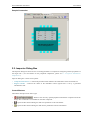
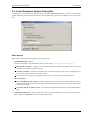
The Inspector dialog box allows the user to modify parameters of components configuring internal peripherals of
the target CPU. ( For more details on the peripheral components, please see 3.1 Peripheral Initialization
Components.)
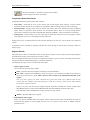
Inspector dialog box consists of two panels:
• Component Parameters - Contains the parameters that influence the initialization of the selected device.
• Register Details - Contains the values of the individual control registers that is set by a generated
initialization code.
Control Buttons
The buttons description from left to right:
•
- Removes the currently opened peripheral initialization component from the
design. This command is not available for the CPU component.
•
- Opens the file selection dialog box and saves parameters to the selected file.
•
- Opens the file selection dialog box and restores parameters from the selected file.
- 10 -