1
The Prototype
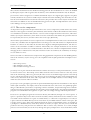
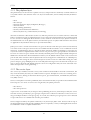
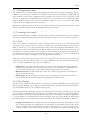
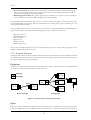
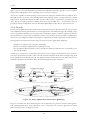
which will bring him to the group chat room. The test cases presented here have this screen as starting
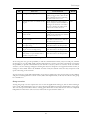
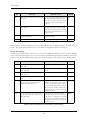
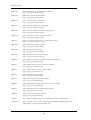
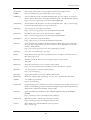
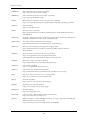
point, and is summarized in Table 7-7.
No.
Test case
Desired result
Result
T-5.1
Click NEW in the group chat screen.
The “New Message” screen with a
text box and the possibility to click
SEND and CANCEL appears.
OK
T-5.2
Click MENU in the group chat
screen.
A menu with the options “Change
group”, “Setup” and “Exit” appears.
OK
T-5.3
Write a message and click SEND
The name of the user and the message
will appear on the screen. The maximum number of messages printed to
the screen depends on the value set in
setup or the default value (3). The
message is sent to the group, and the
application returns to the contact list
view.
OK
T-5.4
Receive a message from another user
in the same group (for example send
from another emulator)
The name of the other user (the
sender) and the message will appear
on the screen.
OK
T-5.5
Click OK in the group chat with a
empty message-string.
An error message is displayed, and the
user returns to the message send
screen.
OK
T-5.6
Write a message that contains more
than 256 characters.
Not possible. The user will not be
allowed to type more characters than
256.
OK
T-5.7
Write a message and then click CANCEL.
The public communication screen
appears without sending the message
just written.
OK
T-5.8
Select “Setup” in the menu and click
OK.
The user enters the “Setup” screen,
NOK
but does not leave the group. The
group is only left if the user alters variables in relation to the network, like
relay-address and port.
T-5.9
Select “Change group” in the menu
and click OK.
The user leaves the group and enters
the group list screen that lists the
available groups, if any.
OK
T-5.10
Select “Exit” in the menu and click
OK.
The application closes.
OK
T-5.11
Click BACK when in the menu.
The user is still participating in the
same group, and the screen for public
communication appears.
OK
Table 7-7 Test Specification and results for group chat (public mode)
T-5.8 was not passed since the prototype never leaves a group upon exiting the “Setup” screen since the
variables for relay address and port is never checked for changes. As of today, the user will always be
member of the group until he actively leaves the group.
Contact overview (private mode)
Testing the contact overview requires the user to start the application and log in private mode, with or
without other changes to the setup. From the group overview, the user must select a group to join, and
90