1
DevCom2000 Mobile User Manual
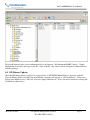
The default location for the saved configuration files is the directory “\My Documents\HART Configs”. Simply
highlight the desired files and copy to your PC. Once on the PC, they can be viewed or imported to many different
software packages.
6.8 DD Library Updates
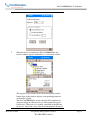
When the DD library update is installed, it is placed in the “C:\HCF\DDL\Mobile\Library” directory on the PC.
Copy the Library folder to the SD Card on the Mobile so that the path appears as “SD Card\Library”. Please note
that on some Mobile devices “SD Card” may have slightly different text. (Note: You will overwrite the existing SD
Card\Library subdirectory.)
MAN-1017 8/9/2011
Our Quality Management System is
ISO 9001:2008 Certified
Page 37