1
es EleSof
USER
MANUAL
®
89+E UPro
5
11
Copying from one device to another
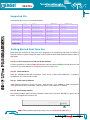
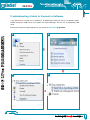
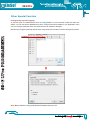
You may wish to copy content from one programmed IC to another. For this process, first select device and
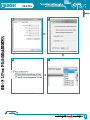
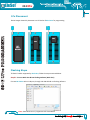
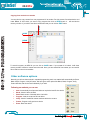
Insert Master IC from which you want to copy program then click on READ button. It will read device
memory to buffer. If you wish to see what content was read you can click on EDIT button.
EDIT
89+E UPro PROGRAMMER
SAVE
READ
To save this memory as HEX file you can click on SAVE button. If your master IC is locked, it will show
memory as 0xFF means its content cannot be read. Once you have saved file from master you can use this
file to load into new microcontrollers.
Other software options
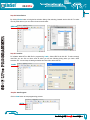
Normally you will use Auto method in repeated programming task. Auto method will automatically do Erase
Blank Check, Program, Verify & Protect. We have given other options like Blank, Read, Program, Verify,
Protect & Erase, that can be used individually if you wish.
Following are methods you can use
•
•
•
•
•
•
•
Auto: Automatically do all process below as required to load file into device
Blank: Check if device is blank
Read: Read content of inserted device into buffer
Program: Load the content of file into device
Verify: Check if loaded file content matches with device content
Protect: Program config options to device
Erase: Erase the device.