1
However, Simulink parameters are a fixed data type at run time. If you
modify a LabVIEW control whose data type does not match the parameter
data type, the parameter cannot receive parameter updates from LabVIEW.
Simulink generates an error and stops running.
For simulation models running on an RT target, the parameters are a fixed
data type. If the control data types do not match the parameter data types,
the simulation model cannot run. You must know the data type of the
connected parameters when configuring the controls.
Refer to Chapter 5, Building the Block Diagram, of the LabVIEW User
Manual for more information about LabVIEW data types. Refer to
The MathWorks documentation for more information about Simulink
parameter data types.
Specifying the Model
After creating the VI, you need to specify with which model you want the
VI to communicate. Using the SIT Connection Manager dialog box, you
can specify this model. Complete the following steps to select the
SineWave model.
1.
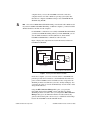
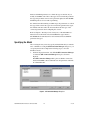
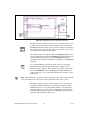
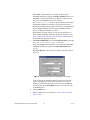
On the front panel menu bar, select Tools»SIT Connection Manager
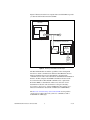
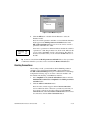
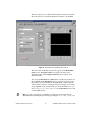
to launch the SIT Connection Manager dialog box, shown in
Figure 6.
The SIT Connection Manager dialog box establishes connections
between LabVIEW controls and indicators and parameters and sinks
in a Simulink model.
Figure 6. SIT Connection Manager Dialog Box
LabVIEW Simulation Interface Toolkit User Guide
12
ni.com