1
ST9 USER GUIDE
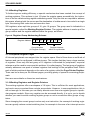
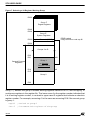
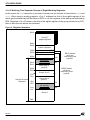
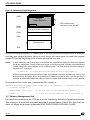
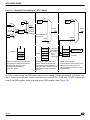
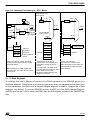
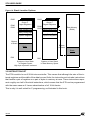
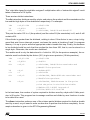
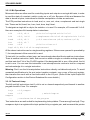
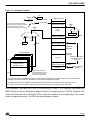
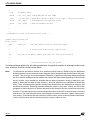
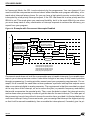
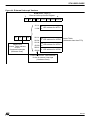
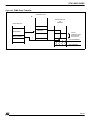
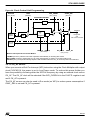
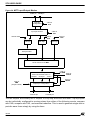
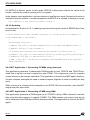
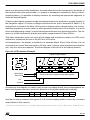
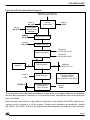
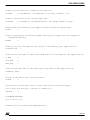
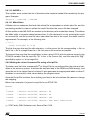
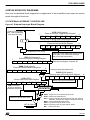
Figure 9. Selecting Page Registers
R255
Group F
Paged Registers
PPR loaded using
instruction code spp #3.
Page 3
R240
R239
Group E System Registers
R234
Page Pointer Register (PPR)
R224
Groups 0 to D
R00
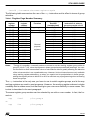
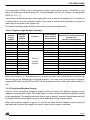
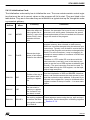
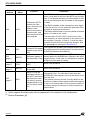
As with the working registers, if a subroutine or an interrupt routine needs to access a peripheral that uses paged registers (which is very likely), you must save (or push) the register
pointer PPR at the beginning of the routine and restore it on exit.
Notes:
In both assembly and C languages, include files are supplied with symbolic names pre-defined
for all the peripherals. These names are unique for each peripheral; however several different
names relate to the same register, but in a different page. You must bear in mind that writing for
example (in C language):
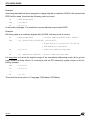
S_ISR = 0; /* clear serial peripheral error register */
does not automatically select the proper page; this statement must be preceded by another one
that selects the SCI page. Since no predefined C statement exists for this, a convenient way is
to define an assembler statement under the form of a macro that will read nicely in the C source.
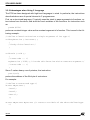
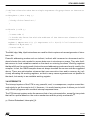
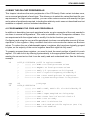
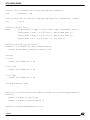
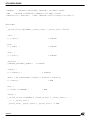
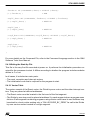
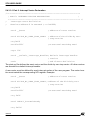
An example of the correct way to access the SCI register is:
#define SelectPage(Page) asm ("spp %0":: "i" (Page)) ; /* pseudo function
to select a page */
SelectPage( SCI1_PG );
/* Select the serial peripheral page */
S_ISR = 0 ;
/* Clear serial peripheral error register */
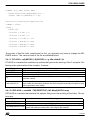
3.1.7 Memory Management Unit
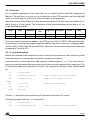
Like most microcontrollers, the ST9 has a bus for interfacing internal and external memories.
This allows you to store both programs and data. A special feature of the ST9 is that it can address a 4 Mbyte single space to address ROM, RAM, EPROM, EEPROM, FLASH.
22/146