1
Chapter 4
Configuring the PA-FE-TX or PA-FE-FX
Checking the Configuration
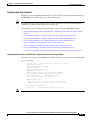
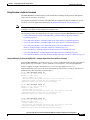
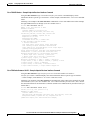
Cisco 7000 Series Routers—Example Output of the show interfaces Command
Using the show interfaces type interface-processor-slot-number/module-slot-number/
interface-port-number command displays the status information about a specific type of interface
—in this example, a FDDI interface—on a Cisco 7000 series router.
Following is an example showing of the show interfaces command with a VIP2. In this example, the
eight interfaces (0 to 7) are on a module in slot 1 of the VIP2 in interface processor slot 3; also, most of
the status information for each interface is omitted. (Interfaces are administratively shut down until you
enable them.)
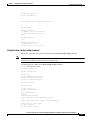
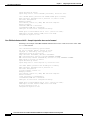
Router# show interfaces fddi 3/0/0
Fddi3/0/0 is up, line protocol is up
Hardware is cxBus FDDI, address is 0000.0c0c.4444 (bia 0060.3e47.4360)
Internet address is 14.0.0.2/8
MTU 4470 bytes, BW 100000 Kbit, DLY 100 usec, rely 255/255, load 10/255
Encapsulation SNAP, loopback not set, keepalive not set
ARP type: SNAP, ARP Timeout 04:00:00
Phy-A state is connect, neighbor is Unknown, status QLS
Phy-B state is active, neighbor is A, status SILS
ECM is in, CFM is c_wrap_b, RMT is ring_op,
Requested token rotation 5000 usec, negotiated 0 usec
Configured tvx is 2500 usec
LER for PortA = 09, LER for PortB = 0C ring operational 11:36:23
Upstream neighbor 0000.0c0c.8888, downstream neighbor 0000.0c0c.8888
Last input 00:02:22, output 00:00:06, output hang never
Last clearing of "show interface" counters 14:57:58
Output queue 0/40, 0 drops; input queue 0/75, 0 drops
5 minute input rate 3922000 bits/sec, 147 packets/sec
5 minute output rate 3962000 bits/sec, 148 packets/sec
7523044 packets input, 631964210 bytes, 0 no buffer
Received 0 broadcasts, 0 runts, 0 giants
0 input errors, 0 CRC, 0 frame, 0 overrun, 0 ignored, 0 abort
7523554 packets output, 625092443 bytes, 0 underruns
0 output errors, 0 collisions, 0 interface resets
0 output buffer failures, 0 output buffers swapped out
0 transitions, 0 traces, 0 claims, 0 beacon
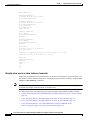
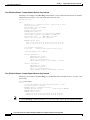
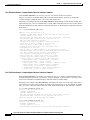
Cisco 7100 Series Routers—Example Output of the show interfaces Command
Using the show interfaces type module-slot-number/interface-port-number command displays staus
information about a specific type of interface—in these examples, a serial interface—on a Cisco 7100
series router. (Interfaces are administratively shut down until you enable them.)
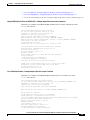
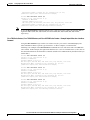
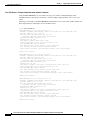
Following is an example of the show interfaces command used with a Cisco 7120 series router and a
Cisco 7140 series router. In this example, the eight serial interfaces (0 to 7) are on a module in module
slot 3 of a Cisco 7120 series router; also, most of the status information for each interface is omitted.
Router# show interfaces serial 3/0
Serial3/0 is up, line protocol is up
Hardware is M8T-RS232
Internet address is 10.0.0.0
MTU 1500 bytes, BW 1544 Kbit, DLY 20000 usec, rely 255/255, load 1/255
Encapsulation HDLC, loopback not set, keepalive set (10 sec)
[Additional display text omitted from this example]
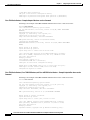
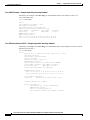
Router# show interfaces serial 3/1
Serial3/1 is up, line protocol is up
Hardware is M8T-RS232
Internet address is 10.0.0.1
MTU 1500 bytes, BW 1544 Kbit, DLY 20000 usec, rely 255/255, load 1/255
Cisco PA-FE-TX and Cisco PA-FE-FX Fast Ethernet 100BaseT Port Adapter Installation and Configuration
4-18
OL-2899-02