1
1.Run Setup.exe on the driver diskette.
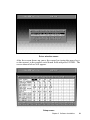
2.Select “Advantech Icom Utility” to install and configure the board,
following the on-line instructions.
3.After the Advantech Icom Utility configuration panel pops up,
please refer to the software help file for more details.
4.Following completion of the installation, restart Windows 95.
Following completion of installation, please restart your system as
prompted.
Once the board and driver have been installed and the system
restarts successfully, users can execute any ready-made applications, such as HyperTerminal to transmit/receive data, or Remote
Access Service to provide dial-up networking capability.
Configuration:
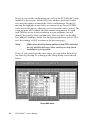
Enter the configuration program to install the device driver, or click
the Taskbar [Start] button, then select the [Programs] menu, then the
[Advantech Icom Utility] menu and then [Icom].
When the configuration panel pops up,
click the [Add Board] button to add a board.
Click the [Delete] button to remove a board.
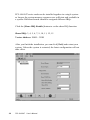
Board Type: PCL-846 or PCL-847
Base COM: Specifies the COM number of the first port. Subsequent
ports are mapped to subsequent COM numbers. For instance, if the
first port is mapped to COM10, then the second port is mapped to
COM11 sequentially.
Base Address (200H~3F8H): Specifies the base address of the first
port. Subsequent base addresses are mapped to subsequent COM
numbers. For instance, if the first port is mapped to 300H, then the
second port is mapped to 308H sequentially.
Chapter 3 Software Installation
27