1
18
A R 7 2 5 R O U T E R Q U I C K S TA RT G U I D E
Configuring a Novell IPX Network
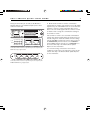
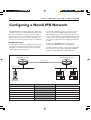
This example illustrates the steps required to configure a pair
of AR725 routers to create a Novell® IPX internetwork, using
the router’s command line interface. In this scenario, PCs at a
remote office need access to a Novell file server at the Head
Office site. The two sites are connected by a PPP link over a
wide area link—either a dedicated leased line or an ISDN call.
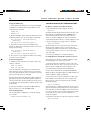
2 Connect a terminal to the console port (port 0) on each
router, as described in the AR700 Series Router Quick Install
Guide. Alternatively, you can connect a PC to the console port
and use a terminal emulation program like Windows™ Terminal,
or Telnet to the routers using a Telnet client. To use Telnet both
routers must be configured for IP. See Configuring an IP Network
for details.
BEFORE YOU START
3 Login to the MANAGER account on each router, as
described in the AR700 Series Router Quick Install Guide.
1 Ensure that the routers to be configured are connected to
the wide area link, and that the wide area link is operational.
See Getting Connected for information about connecting the
router to different physical networks.
4 Collect the information that you will need to configure IPX.
We recommend you photocopy the table below and fill in the
details. Pay particular attention to the following points:
Head Office Router
Remote Office Router
Network = 129
PPP Data Link
Network = 401
Network = 12
Remote PC
Netware
File Server
Head Office Router
eth0
802.3
401
1
ppp0
129
2
Configuration Parameter
Ethernet interface
Ethernet encapsulation
Remote PC
Remote Office Router
eth0
802.3
Novell network number for Ethernet
12
IPX circuit over Ethernet
1
PPP interface
Novell network number for PPP
IPX circuit over PPP
ppp0
129
2