1
22
A R 7 2 5 R O U T E R Q U I C K S TA RT G U I D E
ADD IPX CIRC=2 INT=PPP0 NETW=129
DEMAND=ON
SET IPX CIRC=2 RIPCHANGE=YES
SAPCHANGE=YES
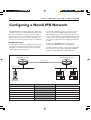
4 The routers are now configured for IPX dial on demand and
can exchange routes and service information. Save the new
dynamic configuration as a script, by entering the command:
1 Create a RIP filter that only allows information about route
changes to the file server’s internal network (network number
7500) to be included in RIP broadcasts:
ADD IPX RIP=0 NET=7500 ACTION=INCLUDE
2 Create a SAP filter that only allows information about the
file services provided by the file server (named ACCOUNTS)
to be included in SAP broadcasts:
CREATE CONFIG=IPXDOD.SCP
The link will be activated (the ISDN call will be connected)
whenever there is data waiting to be transmitted over the wide
area link, and deactivated when there has been no data
transmitted over the link for a period of time. The link will also
be activated whenever there is a change of route or service
information, to allow the exchange of RIP and SAP updates. To
improve performance, RIP and SAP filters can be configured on
the Head Office router to limit the number and size of
broadcasts which activate the ISDN call.
To configure RIP and SAP filters, follow these steps on the
Head Office router only:
ADD IPX SAP=0 SERVICE=ACCOUNTS TYPE=FILE
ACTION=INCLUDE
3 Associate the RIP and SAP filters with the IPX circuit over
the PPP link:
SET IPX CIRC=2 RIPCHANGE=YES
SAPCHANGE=YES OUTRIP=0 OUTSAP=0
4 Save the new dynamic configuration as a script, by entering
the command:
CREATE CONFIG=IPXFILT.SCP