1
CKG counting scales operation manual
CKG counting scales operation manual
REV C1, June 2012
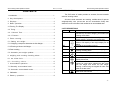
CONTENTS
1. Introduction…………………………………………….….…………..……1
1. INTRODUCTION
The CKG series of scales provides an accurate, fast and versatile
series of counting scales.
2. Key descriptions……………………….….…………………….…1
All units include automatic zero tracking, audible alarm for pre-set
3. Displays…………….………………………………………….…….2
weights/quantity, tare, pre-set tare and an accumulation facility that
4. Basic operation……………………………….………………….…2
allows the count to be stored and recalled as an accumulated total.
4.1 Zeroing The Display………………………………………………….….2
4.2 Taring…………………………………………………………………3
4.2.1 Normal Tare……………………………………………………3
4 . 2 .2 P r eta r e … …… …… … …… …… …… … …… …… … … … …… 3
5. Parts counting……………….………………………………….…4
5.1 Setting unit weight………….……………………………………4
5.1.1 Weighing a sample to determine the Unit Weight…..……………….…..4
5.1.2 Entering a Known Unit Weight……………..……………………...….5
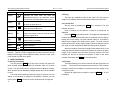
2. KEY DESCRIPTIONS
text
symbol function
CE
Used to clear the unit weight or an erroneous entry.
Hold this key can shift in weighing check alarm and
counting check alarm.
0~9 .
Numeric entry keys, used to manually enter a value
for tare weights, unit weight, and sample size.
M+
Add the current count to the accumulator. Up to 99
values or full capacity of the weight display can be
added.
MR
To recall the accumulator memory.
5.2 Parts counting……………..…………………...………...……………….5
Pst
5.3 Automatic part weight updates………………………………….6
Unit. wt.
To set the high/low limit for the weighing and
counting checking alarm.
Used to enter the weight of a sample manually.
6. weighing and counting checking alarm……………………….6
Sample
Used to input the number of items in a sample.
6.1 set hi/low limit………………………………… ……………….6
Zero
6.2 checking alarm………………………………………..6
Tare
Set the zero point for all subsequent weighing.
Display shows zero.
Tares the scale. Stores the current weight in
memory as a tare value, subtracts the tare value
from the weight and shows the Net weight.
Entering a value using the keypad will store that
value as the tare value.
To print the results to a PC or printer using the
optional RS-232 interface.
7. Accumulated operation………………………………………..…6
7.1 Manually accumulated total…………………………………….6
7.2 Automatic accumulated totals…………………………………..7
8.Calibration………………………………………………………………….7
Print
9 . B a t t e r y o p e r a t i o n … … … … … … … … … …… … … … … … … … . 8
-1-