1
ReDi 42 User Manual
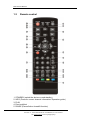
Key operations:
·
FAV : Put the selected file to play list .
·
0 : All the MP3 files in current directory will be added into MP3 play list .
·
1 : All the Image files in current directory will be added into Image play list.
·
2 :There are four kinds of sorting approaches.
-
Name (A-Z): Sorting in Alphabetical descending Order.
-
Name (Z-A): Sorting in Alphabetical ascending Order.
-
Image 1st: Sorting with image as priority
-
Music1st: Sorting with Music as priority
-
Lock: Collecting all locked channels and list in the bottom of TV
Channel List.
-
Default: Return to original setting order.
·
Yellow Key: The “Please select play list type” operation window will be shown by
pressing Yellow key. After that, the user can play the image or music by choosing the
files. If here is no file in the directory, an operation window “This type of play list
doesnot exist” will be shown.
·
INFO: Set up slide show of images.
·
Blue : To rotate among the 3 repeat modes provided as below:
Repeat Folder
The entire Random Folder
Repeat Single
·
EPG : Change the different disk.
21
Korinthou 11, 14451 Metamorfosi Τel: 210-8098700, Fax: 210-6122512
Site: www.crypto.gr, Email: [email protected]