1
56
SOFTWARE ADDENDUM
•• Formant
‘Formants’ are the peaks in the frequency spectrum of a given sound, created by a resonant body or system. Typically, they are associated with human speech, as it is largely the ways in which we alter the resonant characteristics of our mouth and nasal passages that determine the different vowel sounds.
If you would like a more in-depth explanation, please click on the following link:
http://en.wikipedia.org/wiki/FormantEnhanced Wavetable Synthesis
•• Additional Wavetables
In order to enhance the experience of the additional Wavetable functionality even further, Access have created 27 new wavetables for OS2. Each has been carefully selected to compliment the existing content, and
to exploit the characteristics of the new oscillator modes.
They come in several different flavours, including filter-like sweeps, formant morphs, harmonic inter-play, Fibonacci sequences and more.
Tips for auditioning the Wavetables
As with the majority of the Wavetable content, it is advisable to audition them at relatively low pitch (we suggest setting Oscillator Semitone to -24). This is because the lowest audible frequency (the fundamental) in
any table is always pitched to middle C3, but in many of the brighter-sounding tables, the fundamental plays
little part in the overall timbre, and the upper harmonics (often where all the action is) can be very difficult to
perceive at high pitch, or are simply filtered out altogether.
Since there are many differences between the tables in terms of their spectral dynamics, it is a good idea
to audition them all in a variety of different ways. Simply sweeping through the Index by hand is one way,
but can give very misleading impressions as to the usefulness of the table. Try first with a slow LFO (triangle
wave) and then a fast envelope sweep in both directions to get a better idea of what the table may or may
not be good for.
Remember, for those tables with several contrasting waves, subtle modulation is often the key.
Don’t forget to try them all with different settings of the new Interpolation parameter.
•• Interpolation
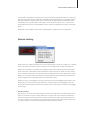
Use this parameter to determine the how smoothly the different waves in the current Wavetable are blended
into each other as the Wavetable Index of the respective oscillator is swept.
Since the number of waves differs with each Wavetable, the result of this will depend on which table you
have selected.
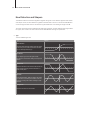
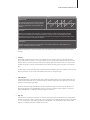
Each Wavetable refers to a selection of different original waves, through which the oscillator can sweep in realtime. At the default (0) setting of Interpolation, each of the 128 positions of the Wavetable Index represent
a unique mix of the two nearest waves, resulting in a smooth morphing of the timbre as you sweep the Index
position.