1
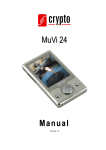
MuVi 18 S2 User Manual
2.
General Description
#
Description
1
1.8” LCD Display
2
Earphone Jack
3
Volume +
4
Menu Access
5
Previous
6
Next
7
Volume -
8
Play/ pause
9
Micro SD Slot
10
On/ Off (*See below)
11
USB Receptacle
Use the Play button to switch your device On and Off. The ON/OFF switch on the side of MuVi 18
S2 works more like a reset button. If you turn on your device using this switch you may loose your
settings (e.g. radio stations e.t.c).
________________________________________________________________________
3