1
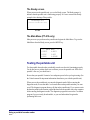
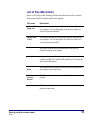
The Ready screen
When you turn on the portable unit, you see the Ready screen. The Ready prompt (>)
indicates that the portable unit is functioning properly. It’s best to return to the Ready
prompt before shutting off the portable.
Winnebago-815
(version and RAM info here)
>
PT-815
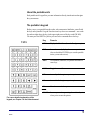
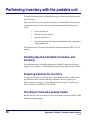
The Main Menu (PT-815 only)
Most processes you perform on the portable unit begin at the Main Menu. To get to the
Main Menu from the Ready screen, press the MENU key.
<
MAIN
1—INPUT
2—STAT
3—SEND
MENU
>
4—RECV
5—SET
6—PURGE
Testing the portable unit
Test the portable barcode reader periodically to make sure that it is functioning properly.
You do not have to perform these tests each time you use the portable unit. If this is the
portable’s first use, you should test it.
Be sure that your portable’s batteries have adequate power before you begin testing. (See
the Unitech manual for important information about battery use with the portable unit.)
When you test the portable unit, you enter the diagnostic mode. Before entering the
diagnostic mode, be sure that there’s no barcode data on the portable unit that you want
saved. The diagnostic program destroys all data in the portable unit. If you want to retain
the data the portable unit contains, upload the data from the portable unit to the computer
before entering the diagnostic mode. The diagnostic program also erases the Circulation
program if you previously downloaded it, so you need to download it again after
performing these tests.
Using a portable barcode reader
4/8/2002
7