1
Precautions for Correct Use
• For EtherCAT and EtherNet/IP, use the connection methods and cables that are specified in the
NJ/NX-series CPU Unit Built-in EtherCAT Port User’s Manual (Cat. No. W505) and the NJ/NX-series
CPU Unit Built-in EtherNet/IP Port User’s Manual (Cat. No. W506). Otherwise, communications may
be faulty.
• Use the rated power supply voltage for the Power Supply Units. Take appropriate measures to ensure
that the specified power with the rated voltage and frequency is supplied in places where the power
supply is unstable.
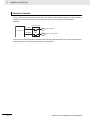
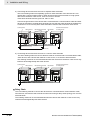
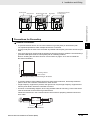
• Make sure that the current capacity of the wire is sufficient. Otherwise, excessive heat may be generated. When cross-wiring terminals, the total current for all the terminals will flow in the wire. When
wiring cross-overs, make sure that the current capacity of each of the wires is not exceeded.
• Do not touch the terminals on the Power Supply Unit immediately after turning OFF the power supply.
Residual voltage may cause electrical shock.
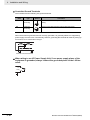
• If you use reed switches for the input contacts for AC Input Units, use switches with a current capacity
of 1 A or greater.
If the capacity of the reed switches is too low, surge current may fuse the contacts.
Error Processing
• In applications that use the results of instructions that read the error status, consider the affect on the
system when errors are detected and program error processing accordingly. For example, even the
detection of a minor error, such as Battery replacement during operation, can affect the system
depending on how the user program is written.
• If you change the event level of a Controller error, the output status when the error occurs may also
change. Confirm safety before you change an event level.
Restoring and Automatically Transferring Data
• When you edit the restore command file or the automatic transfer command file, do not change anything in the file except for the “yes” and “no” specifications for the selectable data groups. If you
change anything else in the file, the Controller may perform unexpected operation when you restore
or automatically transfer the data.
Replacing Slaves and Units
• If you replace a slave or Unit, refer to the operation manual for the slave or Unit for information on the
data required for individual slaves or Units and redo the necessary settings.
Task Settings
• If a Task Period Exceeded error occurs, shorten the programs to fit in the task period or increase the
setting of the task period.
Motion Control
• Use the system-defined variable in the user program to confirm that EtherCAT communications are
established before you attempt to execute motion control instructions. Motion control instructions are
not executed normally if EtherCAT communications are not established.
• Use the system-defined variables to monitor for errors in communications with the slaves that are
controlled by the motion control function module. Motion control instructions are not executed normally if an error occur in slave communications.
• Before you start an MC Test Run, make sure that the operation parameters are set correctly.
• Do not download motion control settings during an MC Test Run.
NX-series CPU Unit Hardware User’s Manual (W535)
23