1
3 Configuration Units
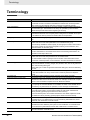
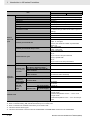
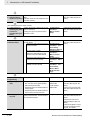
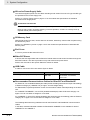
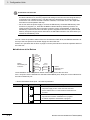
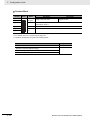
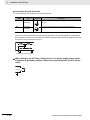
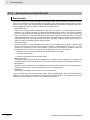
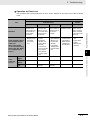
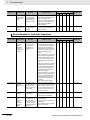
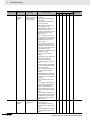
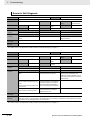
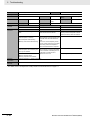
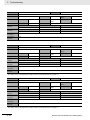
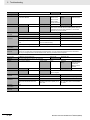
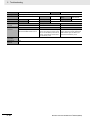
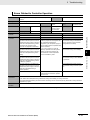
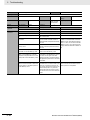
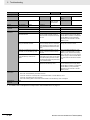
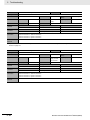
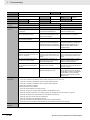
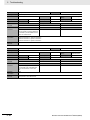
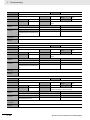
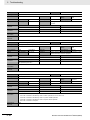
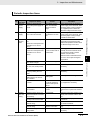
Indicator
NET ERR
Color
Red
Status
Not lit.
Flashing
Meaning
There are no Ethernet communications errors.
• The power supply is OFF or the CPU Unit was reset.
An error for which the user can recover operation occurred.
• An error occurred in TCP/IP communications or CIP communications.
• FTP server setting error, NTP server setting error, etc.
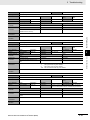
LINK/ACT
Yellow
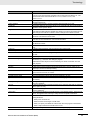
Not lit.
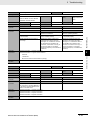
• Tag data link setting error, tag data link verification error, etc.
An error for which the user cannot recover operation occurred.
3-1 CPU Units
Lit.
• A MAC address error or communications Controller error
occurred.
A link was not established.
• The cable is not connected.
Flashing
Lit.
• The power supply is OFF or the CPU Unit was reset.
The link is established, and data communications are in progress.
The link was established.
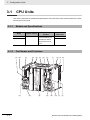
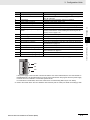
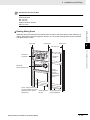
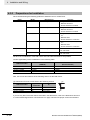
3-1-2 Part Names and Functions
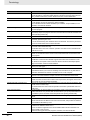
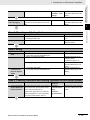
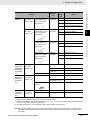
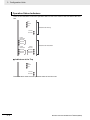
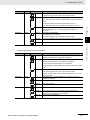
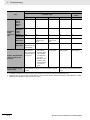
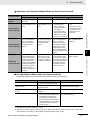
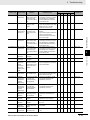
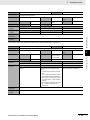
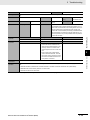
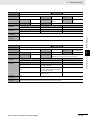
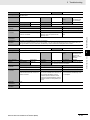
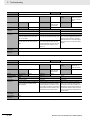
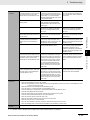
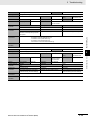
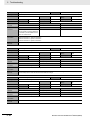
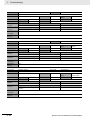
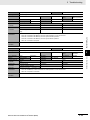
• Built-in EtherCAT Port (Port 3) Indicators
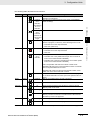
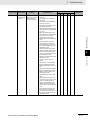
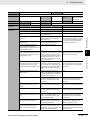
Indicator
NET RUN
Color
Green
Status
Lit.
Flashing
Meaning
EtherCAT communications are in progress.
• Inputs and outputs for I/O data are in operation.
EtherCAT communications are established.
This indicator shows either of the following conditions.
• Only message communications are in operation.
Not lit.
• Only message communications and I/O data inputs are in operation.
EtherCAT communications are stopped.
• The power supply is OFF or the CPU Unit was reset.
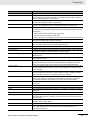
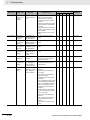
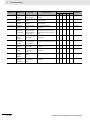
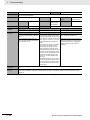
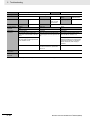
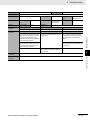
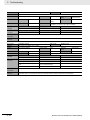
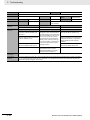
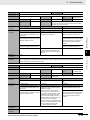
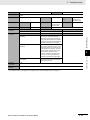
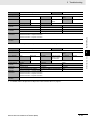
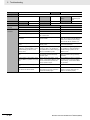
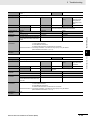
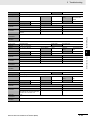
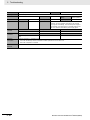
NET ERR
Red
Lit.
Flashing
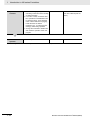
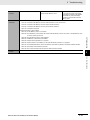
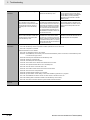
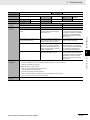
LINK/ACT
Yellow
• A MAC address error, communications Controller error, or other
error occurred.
A hardware error or unrecoverable error occurred, such as for
exception processing.
A recoverable error occurred.
Not lit.
There are no errors.
Lit.
A link is established.
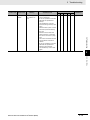
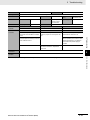
Flashing
Not lit.
NX-series CPU Unit Hardware User’s Manual (W535)
3
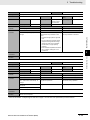
Data communications are in progress after establishing link.
Flashes every time data is sent or received.
The link was not established.
3-7