1
58
Small Vision System User Manual
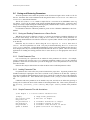
5.3.2
cmat() Function Call Reference
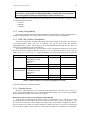
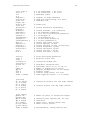
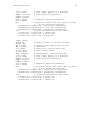
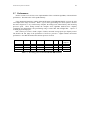
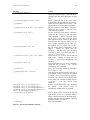
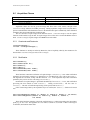
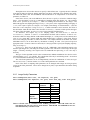
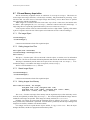
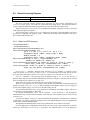
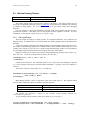
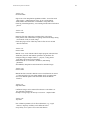
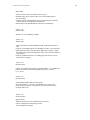
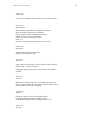
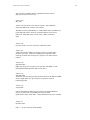
Table 5-1 is a summary of the available function calls for cmat. The source code and project for
cmat is in the samples/ directory, so it is possible to add new functions, wrapping methods from the C++
API, and making them available.
cmat Function
init
Arguments
readParamFile
File name: string
open
setSize
width, height
setRate
rate
setFrameDiv
div
setColor
left, right
setRect
on
start
getImage
[left], [right]
getDisparity
disparity
display
[which]
stop
Action
Initializes the SVS system. This must be the first call to
cmat, and it should only be done once.
Reads a parameter file in the video object. Typically this
will add calibration information.
Opens the first available stereo device. This prepares the
device to send video information.
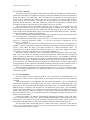
Sets the resolution of the images. Should be called after
the open call, but before video streaming is started.
Sets the frame rate of the images. Should be called after
the open call, but before video streaming is started.
Values are 30, 15, 7, and 3. These will give 30, 15, 7.5,
and 3.75 Hz for 60 Hz devices, and 25, 12.5, 6.25, and
3.125 Hz for 50 Hz devices.
Sets the frame division of the images. Should be called
after the open call, but before video streaming is started.
A value of 1 means the full frame of the imager, a value of
2 means 1/2 frame, i.e., the center subwindow of the
image.
Turns color on (1) or off (0) for the left and right images.
Should be called after the open call. Can be called
during video streaming.
Turns rectification on (1) or off (0). Should be called after
the open call. Can be called during video streaming.
Starts video streaming. Should be called after the Open
call.
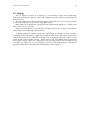
Gets the most recent stereo image, and optionally saves it
in the arrays left and right. The arrays should be the
same size as the image, with the first dimension the
number of rows, e.g., 240 x 320. For color images, use 3dimensional arrays, e.g., 240 x 320 x 3. To just return the
left image, use a single argument. To return no images,
use no arguments. Should be called after the start call
has started video streaming.
Calculates the disparity and returns it in the disparity
argument. This array should be the same size as the
image, with the first dimension the number of rows, e.g.,
240 x 320. Should be called after the getImage call has
returned an image.
Starts a display of the video from the left and right
cameras. If which is not 0, then the disparity image is
displayed instead of the right image. Display continues
until all windows, including the Debug window, are
closed.
Stops video streaming.
Table 5-2 Actions for the cmat() function in MatLab.