1
Overview of Purchasing:
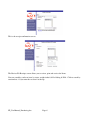
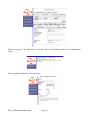
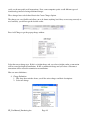
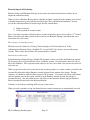
This is the Menu for Purchasing and Receiving. There are 3 main pieces:
1. Purchase Orders – You can create and update purchase orders. These will display in the
Infoportal as open purchase orders. They represent commitments to buy products from your
vendors
2. Warehouse Receipts – If you have a separate warehouse function, you can use the warehouse
receipts. The users should enter exactly what they received. When the purchase receipt is
created, you can pull in the warehouse receipt and all the items and quantities will automatically
be pulled onto the Purchase Receipt.
3. Purchase Receipts – When you receive the goods, you use the purchase receipts to enter exactly
what you have received. When you close the purchase receipt the open purchase order is
updated, inventory is updated for the quantity received, and financial transactions are created in
the general ledger for the $ amount of the inventory. Note, you do not have to have a Purchase
Orders in order to use Purchase Receipts.
The purpose of Purchase Orders are to recognize commitments to your vendors to purchase product.
The purchase Receipt process shows what you actually received and puts those items into your on hand
inventory. It also creates an obligation in your general ledger to show that you owe someone the
money.
Note if you do not want to use Purchasing and Receiving, you can get items into your inventory
through the Inventory Module. See the Inventory User Manual.
FP_UserManual_Purchasing.doc
Page 3