1
AW-HSNetAppliance
User’s Manual
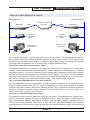
wireless), destined for the safety of the remote gateway’s firewall. At the remote firewall,
the packet arrives and is forwarded to the LAN IP address of the remote Net Appliance. The
packet is received by that Net Appliance through its Ethernet port, the encapsulation header
is removed, the packet is decrypted and then sent to its ultimate destination on the remote
network.
In actual operation, packets flow in two directions simultaneously. Packets enter a Net
Appliance as either ordinary packets needing encapsulation/encryption or as encapsulated/
encrypted packets needing to be made ordinary. Packets exit the NetAppliance destined
either for the gateway as encrypted/encapsulated packets ready for travel over the unsafe
network or exit as ordinary packets ready for the local network.
How is the data protected?
Packets sent through the tunnel are encrypted with advanced algorithms and the management
of passwords and keys within the Net Appliance is handled via a separate interface conforming
to the requirements of FIPS 140-2 Level 2.
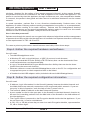
To create a point-to-point secure tunnel between two LANs, follow these steps:
Step A. Gather the required hardware and software.
You will need:
• Two AW-HSNetAppliance units.
• A Windows PC with a wired LAN port, a USB 2.0 port and a web browser.
• A copy of the AvaLAN IP Finder Utility (xTR/iTR series) that can be downloaded from
www.avalanwireless.com/downloads.php.
• A copy of the AvaLAN AW140 Crypto Module Interface Utility that can also be downloaded from the same web location.
• Ethernet cables to connect the AW-HSNetAppliance units to the PC for configuration and
to appropriate ports on their respective LANs to be linked.
• A Standard to Mini USB adapter cable (included with each AW-HSNetAppliance).
Step B. Gather the required configuration information
You will need:
• IP Address, login information for the firewall/gateway between the Main Network and
the WAN (wide area network) connection to the unsecured public network. If you are
not privy to this information, seek the help of the IT person who is.
• The external (WAN) IP address at the Main Network location.
• A port number to use for the open port in the firewall for the Main Network location to
be used for forwarding packets from the WAN side of the firewall to the LAN address of
the Net Appliance.
• The Crypto Officer’s password to the Encryption Module inside the Net Appliance. If you
do not know this, it can be reinitialized.
• A 128, 192, or 256 bit private key to enter into each Encryption Module, represented as
32, 48 or 64 hex digits.
Technical Support (650) 384-0000
PAGE 4
www.avalanwireless.com