1
User’s Manual
AW-HSNetAppliance
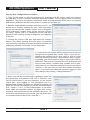
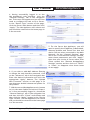
6. Once the encryption module has been programmed,
you may login to access the other features. “Self Test
Results” will simply display “Self Test Passed” in the status box. If it does not, contact AvaLAN Technical Support.
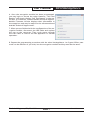
Module Firmware Version displays that information in
the status box and may be useful to the aforementioned
AvaLAN Technical Support staff.
7. When you are finished with the configuration of the encryption module, disconnect the USB cable and replace
the cap on the connector. Then cycle power through
the LAN cable to restore the Net Appliance to normal
operation.
8. Repeat the programming procedure with the other Net Appliance. its Crypto Officer password can be different if you wish, but the encryption method and key must be the same.
Technical Support (650) 384-0000
PAGE 7
www.avalanwireless.com