1
AW-HSNetAppliance
User’s Manual
Step by Step Configuration Procedure:
1. Turn off the power to the Net Appliance by unplugging its DC power cable and connect
the USB port to your computer using the USB mini B cable. Then re-apply power to the Net
Appliance. The unit’s encryption module will enter its programming mode only if a powered
USB cable is attached and the main power is cycled off and then on.
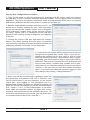
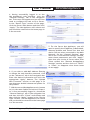
2. Run the Crypto Module Interface utility on your PC. You
should see a startup window like this, with everything
greyed out except the Connect button and a dropdown
list of COM ports. Usually there will be just one. If there
are more, repeat Step 1 to determine which COM port
applies to this radio by seeing it disappear and reappear
in the list.
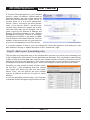
3. Choose the correct COM port and press the Connect
button. The utility window will then show a successful
connection by activating the Login and Reset choices and
displaying “Module Connected” in the status box.
4. If you know the Crypto Officer password and want to
change the encryption key, choose Login. if you are initializing the module for the first time or wish to reset
both the password and key, choose Reset. After a warning popup, you will be able to enter a new Crypto Officer
password. This must be between 8 and 32 characters and
may include letters, numbers and symbols and is casedependent. If you forget the password, there is no way to
retrieve it. You will need to reset the module and begin
again. If you know the password and have logged in, you
may change it by clicking “Change Password.”
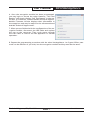
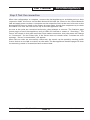
5. Next, you will be provided with a popup to enter the
encryption key and method (128, 192 or 256-bit). (You
will be forced here if you are resetting, or can choose
“Input Key” after logging in. The encryption key is a
hexadecimal number, 32 digits for 128-bit encryption, 48
digits for 192-bit and 64 digits for 256-bit. Enter the digits
as 0 - 9 and a - f or A - F (case independent). If you enter
fewer than the specified number of digits (not recommended), the remainder will be padded with zeros. (To
avoid errors and preserve your sanity, you will likely want
to cut and paste this key from a text file.)
Technical Support (650) 384-0000
PAGE 6
www.avalanwireless.com