1
Hardware Installation
Software Installation
Cable Connection
WIN ME/2000/XP and Macintosh:
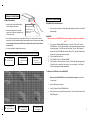
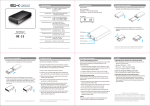
1. Insert the plug of the interface cable
into the Interface Connector.
External Power Source
2. Usually, the external drive gets the
power from USB port of computer, and
will work properly.
1.
(If the power from the
computer is poor, use the
external power)
3. If the power from computer is not enough for the drive, you should use the external
power source. Please read the guide of external power source to learn the usage. Note,
you must plug out the external drive from computer before connect the external
power source.
4. You are now ready to install the device driver.
How to install the hard disk drive into the drive case
1
Push both latches
and then release.
2
Drivers are pre -installed in these operating systems and the unit will install
automatically.
Pull out the PCB
with panel from the
case.
2
3
Insert the hard disk
drive into the
socket on the PCB
WIN 98SE:
***Do not connect the WARP Drive to the computer until you are told to do
so!***
1. Turn on your Windows 98SE computer. Insert the “Driver CD” into the
CD-ROM drive. The CD will then begin to auto play and a welcome screen
will be displayed. If the CD does not auto play, click on “My Computer”,
double click the CD-ROM that contains “Driver CD”, and then double click
“index.htm” to open the welcome screen.
2. Click “Install Device Driver.”
3. Click “USB 2.0 Driver for Windows 98SE.”
4. Click “Install” on the next screen. When a “File Download” dialog prompts
“Would you like to open the file or save it to your computer,” click Open.
The setup program will start immediately.
To Remove the USB driver from WIN 98SE
1.
Make sure the WARP DRIVE is not connected to the computer. Access the
“Control Panel.”
2.
Select “Add/Remove Programs .”
3.
Select “Hi- Speed USB-to- IDE Win98 Driver .”
4.
Select “Remove” and then follow the instructions. The driver will be removed from
WIN 98SE system.
2
4
Secure the drive to
the PCB with screws.
5
Load the PCB with
drive into the case.
6
Push the drive into
case completely.
3