1
ASCIIriber
THE JOURNAL OF THE LOWER BUCKS COMPUTER USERS GROUP
Volume 34 • Issue 6, June, 2015
Digital Photography
NEXT MEETING:
The last digital SLR I purchased was a long time ago.
It was relatively inexpensive and the two lenses that
came with it were also at the bottom of the quality
barrel.
At lot has changed in the world of digital
photography in the past few years. Probably the
biggest has been the shift to the mirror less design.
I decided to take the plunge and purchase a new
camera and a decent set of lenses to go with it,
The camera I bought was the Olympus OMD EM-5
Mark II and I am just beginning to understand all of
its capabilities.
Here are just a few nifty features I have been testing:
1. Live Time - Normally when you take a night
photo you half to guess at the exposure. Too
short an exposure and you have a picture that
is inky black with a few pinpoints of light.
Too much exposure and you have blobs of
light against a dirty grey background.
With Live Time you press the shutter and
then watch the image build on the LCD
screen. When you have the right amount of
detail you press the shutter again .and the
picture is complete.
2. High Resolution images – Although the
camera has a 16 megapixel sensor, it can take
40 megapixel pictures. Essentially it takes a
series of images, shifting the sensor ½ a pixel
each time and then combining the
information into a single image.
There’s a lot more which we can talk about at the
meeting.
See you on Sunday
SUNDAY, June 7, 2 P.M.
Whether you want to install a new operating system or keep
up to date on the developments in Windows 10, the
information is here thanks to Jim McGorry
•
•
•
•
•
•
•
Activate Hidden Admin Account
Burn Music Files in Windows 8
Packet Sniffer Reveals Local Net Traffic
RoboLinux Revealed
Win10 Build 10074
Win10 Build10122
You Beam Web Video
From: The Desk of Jim McGorryFrom: The Desk of Jim McGorry
Excerpts taken from the Windows Secrets Periodical
ACTIVATE WINDOWS' HIDDEN, MASTER ADMIN ACCOUNT
Windows' user rights can be confusing and frustrating. Whether signed in with an administrator-level
user account or evoking the Run as administrator setting, you can still run into insufficient-rights
warnings.
But Windows' built-in, separate Administrator account gives you unfettered access to virtually all parts of your
system setup — once you know how to access it.
Many Windows users don't know this account exists, primarily because it's usually hidden and inactive by
default. Here's how to enable the "master" administrator account — and use it to streamline heavy-duty system
repairs, problem-solving, and maintenance tasks in Win8, Win7, and Vista.
One master account to rule them all
Most operating systems have some sort of special-purpose master account: one that lets you control the OS
with virtually no restrictions. This type of account has various names: "superuser," "root," "supervisor," and so
forth. Windows calls it Administrator.
Windows' master account doesn't simply enhance a standard admin-level user account or serve as an elevated
version of the Run as administrator option. Administrator operates much like a normal user account, except it
has virtually unlimited permissions.
Once activated, Administrator (or Admin for short) is a separate account, complete with its own private
desktop and user files. You can set it up with its own themes, background, and other customizations, and you
can install software that's not shared with non-admin-level users.
The unfettered, full-permission access offered by the Administrator account is ideal when you need access to
the deepest parts of Windows — for example, when you're trying to resolve really thorny system problems. But
clearly, that level of control can also be dangerous. There's no safety net, so a misstep could royally screw up
your system.
That's why Microsoft hides the Admin account by default. It's not intended for full-time, routine use — the
risks are simply too great — but it's there for knowledgeable users to employ when needed.
A review of Windows' admin-level access options
As noted, Windows offers three ways to access admin-level permissions and functions. They are, from simplest
to most powerful:
Run as administrator: This option is typically used to temporarily access limited admin-level rights from
within a non-admin-level (standard) account. In some cases, tasks that require administrator-level
permissions can be run by simply right-clicking the name of an app or function and selecting the "Run as
administrator" option.
The process has a couple of speed bumps: a user account control (UAC) prompt must be acknowledged,
and you must also enter an admin-level password. This two-step process can cause problems with complex
and multi-step admin-level tasks. Also, depending on the account type (standard, guest, or child), some
admin-level tasks are simply off-limits.
Assign a user account as an administrator: Admin-level user accounts are subject to UAC controls. A
warning will pop up whenever a potentially dangerous system change is about to start — for example,
when installing new software or making system-level changes that might affect other users. The task won't
proceed until the user explicitly grants permission via a UAC prompt.
This one-step speed bump lets most admin-level tasks run to completion. However, some complex, multistep tasks might fail. This can happen when a task requires several admin-level tools working in series or
uses command lines or scripts. The process could stop because only the first tool or task received the
necessary permissions.
Sign in as Administrator: The master Admin account — the focus of this article — has full permissions
and operates with virtually no restrictions. It has none of the restrictions or drawbacks of the first two
administrator-access methods.
When you're in the Admin account, you'll likely never see a UAC prompt — any system-level task you
initiate is carried out immediately. Not only is this UAC-free operation convenient, it will also let you
complete complex tasks that would otherwise fail. Within an Admin account, you can sequentially run
multiple tools and tasks without the problem of repeatedly confirming elevated privileges.
In practice, I've found that the Admin account gives the best shot at overcoming otherwise unsolvable
Windows-permissions issues. Many tasks that can't be completed via an admin-level user account or the runas-administrator option will generally work in the Admin account.
How to reveal and activate the Admin account
There are various ways to enable the Administrator account, but two are probably the simplest: an easy pointand-click process and a quick command-line entry.
(All the following instructions assume you're starting from an admin-level user account.)
Point and click
This method uses the Local Users and Groups feature (or plugin) in Windows' Microsoft Management
Console (MMC). It's available on all but the most limited editions of Windows, such as Windows Basic and
Windows Home.
Here's how to enable the Admin account via the MMC:
Win8: From the desktop, right-click the Start icon, click Run, and then enter lusrmgr.msc (or open the
Search charm and enter lusrmgr.msc there).
Win7/Vista: Click Start, enter lusrmgr.msc into the run or search boxes, and then press Enter.
In all three versions of Windows, if a UAC prompt appears, click Yes to accept the warning.
With the Management Console open, click Users in the left pane.
In the center pane, right-click Administrator and then select Properties. The Administrator Properties
dialog box will appear.
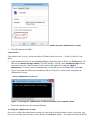
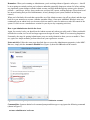
In Administrator Properties, under the General tab, clear (uncheck) the Account is disabled box (Figure
1).
Figure 1. Account is disabled checkbox reveals and enables the master administrator account.
Click OK and close the MMC.
Command line
This method works in every version and edition of Windows that I tried it on — all the way back to Vista
Basic!
Open an administrator-level (aka elevated privilege) command prompt. In Win8, type Windows key + X
and select Command Prompt (Admin). For older Windows versions, enter command prompt into the
start menu search box. When it appears in the search results, right-click it and select Run as
administrator. (For more on the command prompt, see the MS how-tos for Win8, Win7, and Vista.)
Type or copy/paste the following command (also shown in Figure 2), which reveals and enables the
Administrator account.
net user administrator /active:yes
Figure 2. Activating the Administrator account in an admin-level command window
Press Enter and then close the command Window.
Accessing the Administrator account
Once you've enabled the Administrator account via either of the preceding methods, reboot your system, sign
out of your currently open account (or select Windows' Switch user option) — the Admin-account icon should
now appear on your sign-in screen. (For more info, see the MS FAQ item, "How can I switch to a different user
account?" for Win8, Win7, and Vista.)
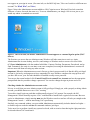
Figure 3 shows the Administrator account added to a Win7 sign-in screen. Win8 and Vista look somewhat
different, of course, but work the same way. To access Administrator, you simply click its icon, just as you
would any admin- or standard-user account.
Figure 3. Once activated, the master Administrator account appears as a normal sign-in option (Win7
shown).
The first time you access the new Admin account, Windows will take some time to set it up. Again,
Administrator has its own desktop, user files, and settings, so Windows needs to create a new user folder
(C:\Users\Administrator) with the standard subfolders: Contacts, Desktop, Documents, Downloads, and so
forth. Fortunately, the setup is a one-time event; once completed, accessing the Administrator's account will
take no more time than accessing any other account.
Important: When the Administrator account is first set up, there's no password for it. But this fully privileged
account is, obviously, too dangerous to leave unguarded. So once Windows completes the setup process and
you have full access, your first task should be to establish a really secure password.
You can use the normal method: click Control Panel/User Accounts/User Accounts and use the appropriate
prompts/links that let you add or change a password. You can also change the sign-in picture and so on.
Checking whether the Administrator account works
It's easy to verify that your new Admin account is fully privileged. Simply put, with a properly working Admin
account, you should almost never see a UAC warning.
To test this, simply begin any task that would normally trigger a UAC prompt. For example, the full
Management Console normally requires a UAC confirmation to launch from a typical user account. But once
you're in Administrator, simply entering mmc into the Windows search or run box will take you straight to the
Management Console — with no intervening UAC speed bump.
Similarly, any command window you open within Administrator automatically includes admin-level rights —
no further steps are needed to elevate the command windows' privileges.
You're now free to perform virtually any system-level task, with no worries about having the right permission
levels and without UAC interference.
Remember: When you're running as Administrator, you're working without a figurative safety net — there'll
be no warnings to remind you that you're about to undertake potentially dangerous actions. So before making
any significant system changes with the Admin account, carefully think through any actions you're about to
perform — and always, always, always make sure you have full, current, working backups. (Please don't send
me an email stating that you tried Administrator, severely damaged your system, and have no backup to
restore!)
When you're finished with a task that required the use of the Admin account, sign off (or reboot) and then sign
back in to your normal user account. (Another reminder: Many, if not most, standalone Windows users run
continuously on an admin-level user account, which can make it easier for malware to take full control of the
system. It's safer to use a standard user account for your day-to-day computing activities.)
How to put Administrator back in the closet
Again, for security's sake, you should use the Admin account only when you really need it. When you disable
and hide the account, its icon will no longer appear on the sign-in screen. Think of it as removing temptation.
Fortunately, the steps for putting Administrator away are nearly identical to those you use to enable it. There
are, again, two simple methods; perform either from your regular user account.
Point-and-click: Follow the same steps described above to access the Administrator properties via the MMC.
But now, simply tick the Account is disabled box (Figure 4); then click OK and exit the console.
Figure 4. One click quickly disables and hides the Administrator account.
Command-line: Open an admin-level command prompt and then type or copy/paste the following command
(shown in Figure 5).
net user administrator /active:no
Figure 5. Disabling the master Administrator account via a command-line window
Press Enter and close the command window.
Whichever method you use, it's really just that simple!
Automate the enable/disable-Admin process
If you think you might need to pop in and out of Administrator regularly, you can save yourself some time by
automating the command-line method.
In your normal user account, type or copy/paste the enabling command (net user administrator /active:yes)
into Notepad. Click File/Save As and navigate to the location where you want to keep the file. In the Save as
type drop-down menu, select the All Files option. Give the file an obvious name and assign it a .bat extension
instead of .txt. For example, you might call the enabling file EnableAdminAcct.bat (see Figure 6).
Figure 6. Creating command files makes it easy to enable/disable the Administrator account.
Now click New in Notepad and do the same thing for the matching disabling command
(net user administrator /active:no). Once again, click File/Save As, select All Files, give this file an equally
obvious name, and assign it a .bat extension (for example, DisableAdminAcct.bat).
When you want to enable or disable the Administrator account, right-click on the appropriate .bat file and
select Run as administrator. Accept any UAC warnings that appear; a command window will flash on the
screen as the command executes — and then vanish.
You can then reboot, sign off, or use the Switch user command: the Admin account's icon will be either
present or absent on the sign-in screen — depending on whether you ran the enable or disable command.
Ultimate power requires ultimate caution
Once again, the Administrator account is hidden by default for a very good reason: it can be dangerous if
misused. In fact, an MS TechNet page suggests that Administrator is aimed at IT-level activities such as
operating-system deployment and software auditing.
But with care, caution, and good backups, the master admin-level account can be used for complex repair and
maintenance tasks as well as to resolve stubborn permissions problems that "Run as administrator" or an
admin-level user account simply can't handle.
Weekly Download Section
from Jim McGorry
BURN MUSIC FILES IN WINDOWS 8
Betty Lou from WV sent in a question after having issues with burning music CDs in Windows 8,
wondering why her disc would play in a computer but not on a separate CD player.
The most likely issue to cause that particular problem is that the music files were burned as a data
disc, rather than as an audio disc. What’s the difference? A data disc acts like a hard drive, USB
flash drive, floppy disc etc. – it’s a collection of data you can view or transfer. While you can open
your burned MP3 or WMA files with music playing software on your computer, they won’t typically
play on any other device, like a CD player, game console, or discman (for those of you who
remember a time before the almighty MP3 player).
An audio disc on the other hand actually formats the files specifically for play back on audio devices.
Due to this formatting process, audio discs can’t hold as large a volume of music files, but they can
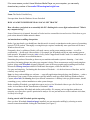
play through equipment like your car stereo. To burn an audio CD you need to use a program other
than the built-in Windows CD burning tool that you might normally use (pictured below).
Thankfully, Windows 8 already comes with a separate program that makes audio CD burning a snap
– Windows Media Player.
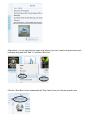
After putting in your blank CD-R, navigate to the “Burn” tab at the top-right end of the program. If you
already have a playlist saved you can simply import it by clicking the button.
Otherwise you simply need to click and drag the specific audio files you want to burn over to the
panel on the right side, at which point the pointer will display the message “Add To Burn List.”
Alternatively, you can right-click the name of an album if you don’t want to drag and drop each
individual song and click “Add To” and then “Burn List.”
Click the “Start Burn” button underneath the “Play” tab to burn your files as an audio disc.
If for some reason you don’t have Windows Media Player on your computer, you can easily
download any number of free audio CD burning tools right here.
From: The Desk of Jim McGorry
Excerpts taken from the Windows Secrets Periodical
HOW A PACKET SNIFFER REVEALS LOCAL NET TRAFFIC
How often have you looked at an ostensibly idle PC's flashing drive-access light and wondered: "What's
my computer doing?"
Some of that activity is internal, but much of it also involves external devices and services. Here's how to get a
peek at that otherwise hidden network chatter.
An introduction to sniffing data packets
Before I get into details, you should know that this article is merely an introduction to the process of examining
network TCP/IP packets. Thoroughly covering this topic requires considerably more space than will fit into a
Windows Secrets issue.
Fortunately, there's a plethora of books, self-study courses, and in-person training sessions — as well as
certifications — for the tools I discuss below. For example, the Wireshark tool has an entire training process
built around it. Wireshark University (site) is led by Laura Chappell and Gerald Combs. I've attended some of
Laura's classes, and she's an excellent instructor.
Examining the packets of data that go between your machine and another system is daunting — but it also
provides a fascinating glimpse into what your computer is doing. There are numerous tools for analyzing data
packets. Along with Wireshark (formerly Ethereal), some of the more popular packet-sniffing tools include
Microsoft's Message Analyzer and RSA NetWitness Investigator, offered on the EMC site.
For space and simplicity, I'm limiting this discussion to Wireshark — it's the best-known of the three, and it's
relatively easy to install.
Note: As always when adding new software — especially applications that poke deep into Windows — make a
full backup of your system. Packet analyzers typically install a small app called WinPcap (Windows Packet
Capture; more info) for listening in on your network connections. A backup is always good insurance, should
something go awry with an installation or other system changes.
Before installing Wireshark, you might also want to review a few Wireshark videos to get a feel for how it
works. At least start with the "Introduction to Wireshark" video.
Note: A warning about Wireshark and similar packet sniffers. We assume you're using these products on
networks you own or have specific permission to analyze. It's not just bad form to collect someone else's data,
it's likely to be illegal.
Getting started with Wireshark packet capturing
Once you have Wireshark (download page) installed, you can start packet sniffing by selecting an active
network connection and then clicking the Start button (see Figure 1).
Figure 1. Before clicking Wireshark's start button, you must select a network connection.
Be prepared for a fire hose of information on local network traffic — or, more precisely, on network packets,
as shown in Figure 2. (It helps to keep in mind that data sent and received by a device is broken into "packets."
For more on this fundamental building block of digital communications, see the related Wikipedia page.)
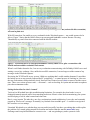
Figure 2. Wireshark's main window displays a daunting amount of packet information.
When I started learning Wireshark, I'd typically start data collection, count to ten, and then stop the session by
clicking the bright red box in Wireshark's toolbar. That way, I'd be working with a manageable amount of
information. Trying to watch a live session is generally pointless — our systems are always way too "chatty."
Once you've collected a bit of data, scroll back to the top and see whether there are any interesting captures.
(Note: With Win8, the Packet List view might be too small and not resizable. Click View in the Wireshark
toolbar and uncheck Packet Details and Packet Bytes.) I have a home-based peer-to-peer network, so
Wireshark shows packets from a server that's poking around the net, requesting information.
To sort through some of the collected packet data, it helps to know the IP addresses for the key systems on
your network. (Keep in mind that this use of Wireshark is collecting information on packets traveling across
the local network connection — those sent and received by the PC running Wireshark.)
For the IP address of the system you're examining, open a command window and type ipconfig /all at the
prompt. Hit Enter. In the resulting list, look for IPv4 Address in the Ethernet adapter section. In my case it's
192.168.1.27 (see Figure 3), but it could also be something such as 10.0.0.19. Scroll down a little farther and
look for Default Gateway and DHCP server, the addresses for your local router. In my case, they're
192.168.1.1.
(Note: Your router's management menus can also provide IP-address information on devices on the local net. It
might be under a heading similar to "Connected devices.")
Figure 3. Windows' IPConfig will display the IP address for both the PC and the connected router.
Back in Wireshark, the Packet List has IP source and destination columns. When your PC connects to a site on
the Web, the packets sent are listed in the Source column. The Destination column tells you where the packets
are going. If the destination IP address isn't a local device, you find out who owns it by Googling "whois"
followed by the IP address — or use your favorite whois tool.
For example, a sample capture (Figure 4) shows that I'm sending to and receiving from IP address
216.52.233.173, which I suspect is my LogMeIn connection. Looking that address up in ipdb.at confirms that
216.52.233.173 is indeed LogMeIn (Figure 5).
Figure 4. Wireshark shows a connection with an outside location.
Figure 5. I used ipdb.at to find the owner of a connected IP address.
You can also use Wireshark to determine whether your email clients are securely transmitting your username
and messages. With Wireshark running, launch your email client and check for new mail. In my example, I've
purposely disabled the client's SSL settings and connected to the mail server using an unsecure connection. I'm
using an IMAP-based email account hosted by GoDaddy.
After checking for new mail, I stop the Wireshark logging session and start my search for the related packets.
To make the search easier, I can click Edit/Find Packet and enter "imap" into the Filter box. Sure enough,
scrolling down the list, I find that my computer connected to the email server and started exchanging data. (I
could have also clicked Wireshark's Protocol column to re-sort the list and then scrolled down to the "IMAP"
listings.)
Typically, you'll see various "hello" strings, as the client software sets up a connection to the server. In my test
of an unsecure exchange, I can see my username and password, captured by Wireshark in plain text (Figure 6).
This is just how a hacker might steal your username and password while you're sitting at the local coffee shop
— except the packets are traveling over Wi-Fi. It demonstrates why it's so important to ensure that you have
SSL enabled for your Internet authentications.
Figure 6. With SSL disabled, Wireshark shows that my email sign-in name (redacted in this screenshot)
was sent in plain text.
With SSL turned on, I'm unable to see my credentials in the Wireshark capture — nor would anyone else be
able to. Figure 7 shows that the IMAP client set up an encrypted-handshake session. Because I'm using
Thunderbird, my email client also connected with the Mozilla website.
Figure 7. Wireshark shows an encrypted handshake with my email server, plus a connection with
Mozilla and unreadable credentials and content.
When I scroll farther down the list, I can see my workstation communicating with GoDaddy's IMAP server and
starting a server-key exchange. Also, unlike the non-SSL connection, I can no longer read the content of my
messages in the Wireshark captures.
Reviewing the TCP/IP traffic on my system, I didn't see anything that I would consider abnormal. I noted that
the backup server on my network contacted the PC periodically — a normal process of checking in. I also saw
that my workstation would periodically check Network Time Protocol servers (site) to ensure it had the correct
time. There were various system events — all normal — such as checking for system and anti-malware updates
plus other maintenance tasks.
Setting the baseline for what's 'normal'
Tools such as Wireshark have their troubleshooting limitations. For example, they don't make it easy to
distinguish normal network traffic from something malicious. Often it comes down to monitoring your system
and developing a feel for what's normal and what's not.
Here's a case in point. The other day, one of my workstations started misbehaving. It was slow and constantly
popped up "Please wait" messages. Eventually, my Outlook client wouldn't open — I couldn't even sign in to
the account to review settings.
I launched Wireshark to see whether there was any malicious traffic, but there was nothing that would explain
the problem. So I started poking around file locations and realized that the .ost file (more info) in my
Exchange email setup had ballooned to a massive size — and was grinding my entire system to a halt.
I renamed the .ost file and then reopened Outlook so it could rebuild the file (something you can do with
Exchange or Office 365 but not with a POP or IMAP setup using the .pst file format). With that done, my
workstation was back to its normal self.
The upshot? Troubleshooting tools such as Wireshark, Autoruns (WS story), Process Explorer (WS story), and
other utilities won't tell you specifically what ails your PC. But they will help narrow down possible causes. It's
typically up to you to determine what's "abnormal" on your system.
Weekly Download Section
from Jim McGorry
ROBOLINUX REVEALED: A LINUX A WINDOWS USERS CAN LOVE
We get a lot of questions about Linux-based systems. There’s a seemingly endless number of
versions (known as distros or flavors). Linda is curious about Robolinux. She writes:
What is the purpose of Robolinux? Just wondering if I need to familiarize myself with it.
Robolinux is a robust user-friendly Linux distribution oriented towards Windows users who want to
migrate to the open source Linux platform. Just like other Linux distributions, Robolinux is virus free,
customizable, secure, configures most hardware components automatically (so you won’t have to
worry about installing drivers for WiFi, printers, e.t.c) and features a user-friendly interface. Robolinux
installs everything you need to get started including Video, Wifi & Printer drivers and all current
updates within minutes. It provides access to over 30,0000 free software packages that can be
installed with a single mouse click.
A key feature includes the ability to run Windows XP or 7 inside Robolinux, simply by downloading
the Robolinux Stealth VM Software and using it to clone your Windows C: Drive. This means that
you will be able to use the applications you have been using in Windows, inside Robolinux, and also
keep the same data. So you wont have to give anything up in the migration from Windows to
Robolinux.
Another good thing about the Robolinux Stealth VM Software is that while it was developed by
Robolinux maker John Martinson for use on Robolinux, its support now extends to other Linux
distributions like Ubuntu, Linux Mint, OpenSUSE, Fedora, Debian, and 500 other distributions. So
you can use the tool with your preferred Linux distribution.
It should be noted that although RoboLinux is open source software and essentially free, the
developer asks for a donation of $19.95 for the Robolinux Stealth VM Software, which is the software
package that allows you to clone your Windows drive.
If you are migrating from Windows, you will find the transition to Robolinux smooth in that, setting up
is easy, you have access to a wide variety of applications and you won’t be forced to give up your
Windows applications as you can run them on Robolinux.
You can find out more about Robolinux on its official website, where you’ll also find the download
link. For more on the cloning process of the Windows C: Drive, you can watch this video to see the
cloning in action. You can skip to about 11 minutes in to see the walkthrough if you don’t want all
the background information on the project.
From: The Desk of Jim McGorry
Excerpts taken from the Windows Secrets Periodical
WIN10 BUILD 10074: WHAT'S NEW, WHAT'S UNKNOWN
With the recent release of build 10074, Windows 10 Technical Preview should be nearing the featurecomplete phase. But while there's lots to see in the latest build, there's also much that's still unknown.
Here's a look at what's new, what's been killed, what's likely, and what's still obscure.
Win10 Preview is starting to look like a product
If you've been staying up to date with the Windows Insider program, you should now be on build 10074.
Microsoft brought everybody up to that level — either through Win10's built-in Update & recovery tool or via
ISO downloads — late last week. (Note: In most cases, the next build will appear only when all Win10 updates
are applied.)
In broad strokes, this new build looks a lot like build 10041, which I talked about in the March 26 Top Story.
But under the covers there's a whole lotta shakin' goin' on.
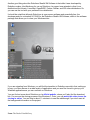
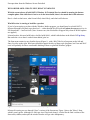
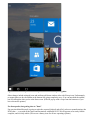
The Start menu retains its now-familiar layout (Figure 1), with a Win7-like list of programs on the left and
fancy live tiles on the right. Win8 users should recognize the tiles as Metro-style programs, but Vista and Win7
users will probably feel more comfortable thinking of them as glorified Windows gadgets.
Figure 1. Win10 build 10074's Start menu looks relatively complete.
Microsoft is testing two see-through "glass" versions of the Start menu. Figure 1 shows the "blurry" form,
which I greatly prefer. Although we won't get Aero Glass back (dang!), it looks like the final versions of the
Start menu, taskbar, and maybe the window borders will get some transparency.
Looking through the offered icons, you'll note that the new Web browser is still labeled "Project Spartan." But
at last week's Build conference, Microsoft announced that the IE replacement will be called "Microsoft Edge"
(note: not Windows Edge). It'll be the default browser in Windows 10. You'll still be able to use IE 11 if you
like, but it'll be buried in the All apps/Windows apps list.
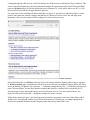
I've spent a lot of time working with Microsoft Edge (see Figure 2), and I have to admit that I like it. At this
point, it can't match the features, settings, and add-ons of Chrome or Firefox, but it's fast and light. More
important, it has correctly rendered all the webpages I've thrown down its maw.
Figure 2. Win10's new browser, code-named Project Spartan, will henceforth be called Microsoft Edge.
Since Microsoft Edge is a Windows (formerly Universal, formerly Modern, formerly Metro) app (as opposed
to Windows desktop app), it should look and run more or less the same on desktops, laptops, tablets, the Xbox,
and even Windows 10 phones. My conjecture — completely unsupported by fact — is that Microsoft chose the
name "Microsoft Edge" because they intend to transport the browser to Android, iOS, and possibly OS X.
Moving along: Cortana, Microsoft's answer to Siri and Google Now for voice-activated assistance, has
improved a bit in this latest build — though the changes are mostly cosmetic.
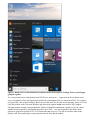
Tablet mode, shown in Figure 3, has stirred up some discussion. Apparently, some fans of the Metro side of
Windows 8.1 aren't pleased with the way Win10's tablet interface is shaking out, according to posts in the
Microsoft Community Windows Insider Program forum and various other online sites.
Figure 3. Win10 Preview's Tablet mode has become surprisingly controversial.
If you look carefully at Figures 1 and 3, you'll see that Tablet mode shifts the tiles and enlarges them slightly,
adding more space between the text entries on the left. Not so obviously, the taskbar continues to show up in
Tablet mode — whether you want it or not — as do title bars for separate windows. Both these features
represent significant changes from Windows 8.1. The Metro happy-tappers want more room for their pinkies.
The new Mail and Calendar apps are surprisingly good. They still don't have all the features of online rivals
such as Google Mail and Outlook.com, but they're light-years ahead of any free Windows mail or calendar
clients we've ever seen before — going all the way back to Windows 3.1.
There are other, smaller changes in build 10074. For example, you can have an unlimited number of separate
desktops. Also, the Notification Center (aka Action Center), which pulls out from the right like the nowdeceased Charms bar, has improved a bit; some notifications are hot and clickable. Moreover, more Windows
settings have migrated from the Control Panel to the Settings app.
Microsoft released new and improved Music and Video apps after build 10074 hit the streets. You can
download them from the "Store (Beta)" gray tile. I'm not impressed with either media app, but maybe I'm
asking too much.
Most important, build 10074 is remarkably stable — at least in my experience.
Build announcements hint at what's to come
While Win10 seems to be coming together quickly, there are numerous other parts that are just vestiges or are
still missing. For example, the contacts app, People, looks incomplete. Moreover, the Albums tool in the
Photos app doesn't seem to work, and OneDrive has been pared back, prompting complaints from various
testers about the loss of "smart files" (more info).
Though repeatedly pressed at last week's Build conference, Microsoft wouldn't divulge any specifics on
Win10's delivery date. At this point, all we know is "this summer" from Redmond and "late July," according to
AMD CEO Lisa Su's offhand comment.
On the other hand, the Build keynote speech showed off a raft — no, a fleet — of new products that are still in
the development stage. The keynote was a three-hour ordeal for conference attendees, but you can see a nineminute version that hits all the high points on The Verge website.
Windows honcho Terry Myerson predicted that within two to three years, a billion people will be running on
Windows 10 (helped, no doubt, by Microsoft's reported plan to upgrade Windows 7, 8, and 8.1 for free).
Rumor has it — still unconfirmed — that anyone currently in the Windows Insider program will be able to
continue in the program, getting all the latest updates, even if they didn't own a "genuine" copy of Windows.
We've known for some time that Microsoft is building its Universal Windows Platform (UWP; more info),
which lets developers create apps that run on the Win10 desktop, tablets, Windows 10 Phone, and even Xbox.
But as revealed at Build, Microsoft also plans to make migrating Android and iOS apps to UWP — and from
there to Windows 10 — easy for developers.
Reportedly, there's even a project that will let app developers wrap up Web-based applications (HTML, JS,
etc.) and stick them into the UWP. Microsoft is also building a bridge to migrate classic Windows programs —
the ones you and I currently use every day — to the new universal platform. If successful, it means that
Photoshop, Quicken, and any other program you might want to mention could, at least in theory, become
Windows (Universal/Metro) apps, running in their own sandbox-protected environment inside Windows 10.
Of course, the devil's in the details. We've heard all this before with Win8 releases, but this time the people
building the bridges appear to know what they're doing and have the backing to make it work — maybe.
At Build, Microsoft prestidigitator Joe Belfiore gave an amazing demo: he showed how a Windows 10 phone
could act as the brain for an entire computer system, with keyboard and mouse attached by Bluetooth and a big
monitor connected with some other technology. In five or 10 years, you might be able to take your phone to a
different office, a different building, or a different planet — where you simply plug it in and start working just
as if you were at home.
Brian Livingston, who founded the Windows Secrets newsletter, once gave a talk that predicted precisely that
capability. That was 10 years ago; it astounds me that someone is now actually demonstrating the technology.
Microsoft also showed off a new Win10 feature called Spotlight; it's supposed to help you find new Windows
features that you might otherwise overlook. (No, this isn't the return of the dreaded Clippy — info.) What
Microsoft didn't mention is that the technology might be used to attempt to sell you things. (Cough, cough.) It
appears to be an option that's enabled by default.
Finally, the much-discussed HoloLens (more info), which combines virtual and actual reality, apparently
suffers from an unexpected limitation: the field of view for the goggles is very small. So instead of walking
into a VR-augmented room, you'll be looking at a VR-augmented section of your desk. Still, it's early days.
Microsoft gives Windows Media Center the boot
With its roots going back to Windows XP, Microsoft's digital-video recording/playing app, Windows Media
Center (WMC), has had a long and particularly erratic history. It's one of those programs many users either
loved or hated, and few are using it now. Perhaps the writing was on the wall when Microsoft failed to release
a version for Windows RT. Still, it was unexpected — and for some, unwelcome — news that WMC won't
survive the jump to Windows 10.
In a May 4 tweet, Microsoft's Gabriel Aul confirmed that WMC will not be included with Win10 due to
"decreased usage." If you really want to keep this recorder/player, you'll have to stick with Win7 or possibly
add it to Win8.1 (more info). Microsoft's preference might be that you buy an Xbox device. Or just rent a DVR
from your cable/satellite company.
Peering into a (somewhat) dark crystal ball
Chief among the things we don't know about Windows 10 is how it'll be updated after its official release. We
now know that businesses — those who pay for Windows 10 — will have an option to defer updates (as they
can now), using a feature called Windows Update for Businesses. But there's been no information on how
Microsoft will release security patches for you, me, and the rest of the non-paying world.
Microsoft has made references to "Windows as a service" — a term I don't like because it could be confused
with "software as a service," which typically means renting your software.
"Windows as a service" might mean that Microsoft rolls out updates almost continuously. New features for
Windows would be released as soon as they're ready — no more service packs, no more versioning (such as
Win8.1). New versions of Windows (Universal) apps might install automatically, presumably on all platforms.
And because much of Windows 10 is, in fact, made up of Windows apps, the OS itself could change rapidly.
Those rapid changes could blur the point at which beta Win10 becomes final code. We might never hear that
Windows has hit its official "release to manufacturing." (Hardware manufacturers will, of course, need some
sort of "release" code to test and deploy on their new systems.)
Given that squishy definition of "RTM," I suspect that AMD's Lisa Su was on the money — I think Microsoft
plans to formally release Windows 10 in late July. That means those in the Insiders program will get it shortly
afterward, with a more general rollout in early August. We should see new machines with Win10 logos later in
August.
Given the many pieces that still need to fall into place, you probably think July is way too soon — and I'd have
a hard time arguing with you. On the other hand, the jump from Win8 to Win 10 isn't as wide as, say, from
Vista to Win7 or Win7 to Win8. And if the new OS ends up being a, uh, "service," there'll be no need for a
final, fully finished product.
This is the new Windows. It'll be interesting to see how it plays out.
From: The Desk of Jim McGorry
Excerpts taken from the Windows Secrets Periodical
WIN10 BUILD 10122: TWO STEPS FORWARD, ONE BACK
May's Win10 build 10122 release is a bit shaky, but many of its new features are coming into sharper
focus.
Improvements include a more functional Edge browser, a cleaner start menu, a much-improved Tablet Mode
— and even the return of an optional Win7-style backup/restore.
To start, a note on installing May's build. As of this writing, build 10122 is currently unavailable as an ISO
download. If you haven't installed Win10 Preview or if you want a completely clean setup, you'll first have to
go to the Windows 10 Insider Preview page and download the ISO for April's build 10074. You must then go
to Settings/Update & Security/Advanced options and select the Fast option. If you then select Check for
updates, you'll find build 10122, which comes from the fbl_impressive branch ("FBL" = "Feature Branch
Level").
Also, be sure all updates for build 10074 are installed before upgrading to May's build 10122. Oh, and don't be
in a rush to start testing the latest build — the download-and-install process can take an hour or so, especially if
you're running Win10 on a virtual machine.
Problems for systems using AMD graphics
Build 10074 is clearly showing some development pains as the operating system approaches its formal release
date, reportedly sometime around late July. In fact, this might be the most unstable build we've seen, based on
reports from some users who are well acquainted with Win10.
My problems with build 10074 centered on my test system's AMD graphics cards. I had a horrendous
experience — until I installed a May 22 AMD-driver update. If your Win10 test system uses AMD graphics
(either on the main chip or on a video card), be sure to immediately open Win10's Windows Update and the
drivers, along with all other pending patches. If you're not in a hurry, you can leave the system running
overnight — and the updates should be installed automatically.
Be sure to read Windows mahaguru Gabe Aul's official announcement for a quick overview of the changes in
build 10122. You should also read the "known issues" section at the bottom of the post. It mentions the
problem with AMD graphics and also notes that the upgrade to this build fails with an "error 0x80070057 —
0x20007" message.
Aul's Twitter feed should be another stop if you're having difficulty with build 10122. For example, his May 22
tweet notes the release of the AMD drivers. He also mentions a fix for failed build 10122 installs on Surface
Pro 3s. In a command window, run the following:
rundll32.exe pnpclean.dll,RunDLL_PnpClean /DRIVERS /MAXCLEAN
Changes to Start, Edge, system backup, and more
If you've been following my series of articles on Win10's unfolding, you know that the new OS's defining
feature is the reconsidered start menu, which combines Win7-like elements on the left and Win8/Metro-like
elements on the right. You can see part of the new Start in Figure 1.
Figure 1. Build 10122's start menu has key options such as File Explorer, Settings, Power, and All apps
grouped together.
Yes, some people have kvetched about build 10122's new start menu — I agree that the Power button is too
easy to accidentally click, and Start doesn't include the customization tricks we know from Win7. For example,
you can't build a tree of nested folders. But for most of the stuff I do, the new layout generally works well. And
I still like to think of the Universal Windows app tiles on the right as useful successors to Win7 gadgets.
I'm happy that the settings' Customization list window (Settings/Personalization/) appears to let you control
whether recently opened or downloaded apps show up in Start — or it will sometime in the future; those
options are grayed out in build 10122. Two features that are active are "Use full-screen Start when in the
desktop" and "Store and display recently opened items in Start and the taskbar."
The "Use full-screen …" option can be a bit confusing at first. When switched on, clicking the Start icon
displays only pinned Universal app tiles and a three-bar icon, which you click to display Start's left column.
Microsoft Edge — the future replacement for Internet Explorer — is finally starting to flesh itself out a bit.
Surprisingly quick, it replaces both the Universal Windows Reader app and the Universal Reading List app,
taking over all Windows PDF–reading responsibilities.
Edge definitely isn't Internet Explorer. ActiveX controls, Silverlight, custom toolbars, and those crappy
browser-helper objects simply don't exist anymore. Turning Flash on or off is as easy as flipping a setting.
Edge is supposed to support extensions at some point, but we might not see them until Win10 hits RTM.
The latest Edge build adds features you'd expect in any modern browser — for example, private browsing and
right-clicking to reopen a closed tab. You can drag tabs around or pin a website to the start menu. If you have
several active tabs and one of them starts playing audio, a telltale icon appears on the tab. In other words,
Microsoft's browser is slowly catching up to Chrome and Firefox — at least in some respects.
That said, some of Edge's tools are still relatively clunky. The Hub icon, for example, gives extremely basic
management tools for favorites, bookmarks (Reading list), history, and downloads. Many expected features are
still MIA, including file drag-and-drop, the ability to set a group of tabs as "home," and so on. Microsoft
obviously has much to do before Edge is ready for all Windows users.
The browser has some unfortunate "features." For example a new tab shows, by default, a list of sites chosen
according to criteria that completely escape me — plus a spot for a big ad at the bottom (see Figure 2). I
wonder how long it'll take Microsoft to sell that real estate — just as Firefox might start doing with its
suggested tiles, according to a TechCrunch
Figure 2. Edge's new-tab page oozes with opportunities to sell you something.
There are lots of other browser-UI tweaks still to come. Cortana support, for instance, is barely bolted on at this
point. How that will play out is still unknown.
System backup has taken a bit of a U-turn. With Windows 8, Microsoft tossed Win7's familiar backup-andrestore scheme to the wolves — or at least the ability to easily restore Win7 backups. The details are still
sketchy, but build 10122's Backup window includes an option to "Restore files you backed up using the
Windows 7 Backup and Restore tool." There appear to be hooks into all the old backup-and-restore routines,
including system image, system repair disk, and incremental backups — even to network locations.
It's hard to say how much of this will actually work, but at the very least Microsoft seems committed to the
ability to restore Win7 backups on Win10 machines. To check it out for yourself, click Start/Settings/Update &
security/Backup; under "Restore files from Windows 7," click the "Go to Backup and Restore (Windows 7)"
link.
Figure 3. Win10 build 10122 unexpectedly includes the backup-and-restore tool familiar to Win7 users.
It also appears that File Explorer's Win7-style, right-click option "Restore previous versions" is making a
comeback. It gives you File History's automatic backup functionality without having to launch a separate
applet — a welcome change.
New in build 10122, the Mail app now supports two-factor authentication in Outlook.com. The Calendar app
still hooks into my Google Calendar, slick as can be. The Photos app is behaving itself a little better than in
previous builds, but it's still riddled with bugs — particularly when constructing Albums. There are new Music
and Video apps, each obviously designed to get you to spend money. Neither comes close to VideoLAN's
(site) ability to play all kinds of media formats.
Creating a better touch-and-swipe experience
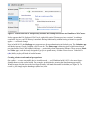
On a tablet — or on a convertible device in tablet mode — you'll find that build 10122 is far more fingerfriendly than were the earlier builds. For example, in tablet mode, pressing the Start button pops up the
Windows apps tiles but leaves the less-finger-friendly, left-hand start-menu list hidden (see Figure 4). To
reveal it, you simply tap the hamburger (three-bar) icon.
Figure 4. Tablet Mode puts back the emphasis on touch-and-swipe navigation.
Other changes include enlarged icons and uniform pull-down window titles with X stop icons. Unfortunately,
no matter what you do, the taskbar at the bottom isn't going completely away. You can auto-hide the taskbar,
but it'll still appear when you're at the Start screen. (It'll also pop up with a swipe from the bottom or if you
hover the mouse pointer.)
Far from perfect, but getting close to "done"
I'm convinced that Microsoft is going to make the expected (leaked) end-of-July release to manufacturing (aka
RTM) date — even with all the lapses and frustrations with build 10122. Win10 appears to be nearly featurecomplete, and it's fairly stable. (Drivers are a thorny issue for all new operating systems.)
But that release date needs a bit of clarification. "RTM" doesn't have much meaning, now that Microsoft
doesn't burn DVDs and stick them into boxes. With Win7, 8, and 8.1, there was a significant time gap between
RTM and general availability — time enough for Microsoft to fix the really bad problems after the software
"shipped," but before it was widely available. As with Office 2013, expect to see a slew of bug-swatting
updates immediately after RTM is signed off on.
Or maybe before RTM. Microsoft has stated that it'll send out Win10 updates as soon as they're available.
Unfortunately, the whole Win10 updating process is still largely unknown to all but Microsoft. But it's highly
likely that July's Win10 will have changed substantially by the end of the year — and again a year from now.
There are still many other unknowns. We know that "genuine" Win7 and Win8.1 machines will be offered a
free upgrade to Win10 during the first year. In his May 20 ZDNet post, Ed Bott has a good overview of what is
and isn't known about upgrades. Upgraded machines will continue to get free updates for the rest of their
natural lives. (Don't believe any article you might have read stating that you'll have to pay for updates — those
reports are just plain wrong.)
Again, we don't have a clue about how Microsoft will send out Win10 patches. It's possible that it will forcefeed updates to "free" Windows customers. But there might also be some leeway, along the lines of Windows
Update for Business. Mary Jo Foley fills in some details in her May 14 ZDNet post on Windows-as-a-service.
Paul Thurrott adds a different perspective in his aptly titled blog, "Windows as a service requires more trust
than Microsoft may deserve." If you're curious about Windows 10 updating, both of those columns are mustreads.
Personally, I detest the phrase "Windows as a service" because the OS isn't going to be anything close to the
traditional definition of "software as a service." Microsoft is redefining the phrase to suit its marketing
purposes — and that's confused the living bejesus out of everybody.
Here's my litmus-test question: Will people with "free" Windows 10 Pro be able to control when they receive
patches? Once we get a definitive answer to that question, lots of pieces will fall into place.
The other day, my wife asked me whether Win10 will be the last version of Windows. I choked on my coffee
and took a minute to let my blood pressure go back to normal. If you encounter someone who asks that
question — which has been so widely touted in the mainstream press — you can assure them that Windows
will go on for a very long time — decades.
Whether future versions of Windows will be called Windows 2020 or Windows 10.3.14.159 is meaningless
because the names are just marketing. Whether Windows will continue to improve and remain the
overwhelmingly dominant desktop and business OS will be another story.
Think of Windows 10 RTM as the "first final" build of Windows 10. There's much more to come.
Weekly Download Section
from Jim McGorry
YOUBEAM - WEB VIDEO STREAMING IN THE PALM OF YOUR HAND
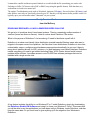
Big things come in little packages with YouBeam, a handy, free web browser device that connects to
televisions and connects to the web providing exclusive paid service ($7.99 a month) through a
unique video search engine/browser. This 9-ounce wonder acts like a media center and works to get
people to cut their cable service and instead stream content from the Web to their televisions. You
Beam has a handy handheld size, simple hardware setup, and blocks viruses, adware, spyware and
those annoying pop-up ads.
The new YouBeam gadget puts the power of movies, sports, TV shows, international TV channels,
and other video content directly in the palm of your hand at up to 1080p HD from the Web to multiple
TVs in a home. YouBeam searches and locates free movies and TV shows on the Web – and strips
all viruses, malware, etc. from them. Minimum Requirements: Windows 7 or 8, Internet Connection
with at least 1 mb/sec download, TV with HDMI input, Wifi.
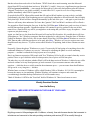
The surprisingly small package includes the main piece (Inateck BTSP-10), a micro USB changing
cable, a 3.5 mm audio cable, user manual, and handy carrying bag.
The YouBeam hardware piece contains a male HDMI port (with cover) to plug into your TV (HDMI
female) and uses the micro USB port (connected on the opposite side of HDMI port) for power.
The YouBeam hardware installation is fairly simple, but the software setup is more involved. The
device’s exclusive web browser navigates users to available content plus claims and succeeds to
block and prevent any virus, adware, or spyware.
Users must first register at http://www.youbeam.tv and download the YouBeam app before using
YouBeam. User can also disable the parental controls with a user name and password. There is a
$7.99 monthly fee. Full users can “beam” favorite videos to the TV using the YouBeam device that
connects to your TV through HDMI. Users also encounter a unique rating system in the browser
where users can rate the quality of videos they watch, and these ratings are used to improve future
search results for everyone. The company will also offer you the opportunity to sell YouBeam to your
friends and we’re in no way endorsing that.
YouBeam retails for $14.99 plus an upcoming android app that will allow you to beam videos and
control the player from your phone.