1
WaveSurfer User Manual
Popup menus
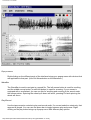
Right-clicking on the different parts of the interface brings up a popup menu with choices that
are applicable to that part. (Use Ctrl-Mousebutton on the Macintosh.)
WaveBar
The WaveBar is used to navigate in a sound file. The left mouse button is used for scrolling
and the middle mouse button (or shift-left button) is used for zooming. If your mouse is
equipped with a scrollwheel, you can use this for scrolling and zooming in the sound under
the mouse pointer: Spinning the wheel up & down will scroll, pressing Ctrl and spinning the
wheel will zoom.
Play/Record
Use the tape recorder controls to play and record audio. If a current selection exists only that
segment is played. You can use the space bar to toggle between play and pause. Rightclicking on the play button brings up a popup menu with different play options.
http://www.speech.kth.se/wavesurfer/man.html (3 de 9) [20/03/2006 11:27:56]