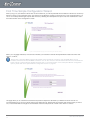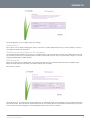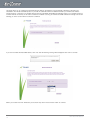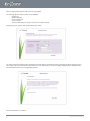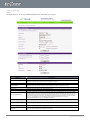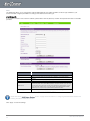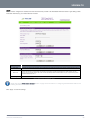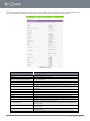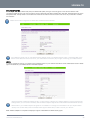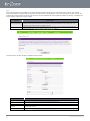
1
NetComm Smart Hub 4G USER GUIDE 3G38WV-TS Copyright Copyright©2011 NetComm Limited. All rights reserved. The information contained herein is proprietary to NetComm Limited. No part of this document may be translated, transcribed, reproduced, in any form, or by any means without prior written consent of NetComm Limited. Please note: This document is subject to change without notice. Save Our Environment When this equipment has reached the end of its useful life, it must be taken to a recycling centre and processed separately from domestic waste. The cardboard box, the plastic contained in the packaging, and the parts that make up this device can be recycled in accordance with regionally established regulations. Never dispose of this electronic equipment along with your household waste. You may be subject to penalties or sanctions under the law. Instead, ask for disposal instructions from your municipal government. Please be responsible and protect our environment. This manual covers the following products: NetComm Smart Hub 4G – 3G38WV-TS DOCUMENT VERSION 1.0 - Initial document release DATE 24/10/2011 Table 1 - Document Revision History YML38 www.netcommlimited.com Telus 3G38WV-TS User Guide 2 Table of Contents Table of Contents .......................................................................................................................................................................... 3 Overview ........................................................................................................................................................................................ 4 Introduction ................................................................................................................................................................................................... 4 Target Users.................................................................................................................................................................................................. 4 Prerequisites.................................................................................................................................................................................................. 4 Notation ........................................................................................................................................................................................................ 4 Product Introduction ..................................................................................................................................................................... 5 Product Overview .......................................................................................................................................................................................... 5 Package Contents ......................................................................................................................................................................................... 5 Product Features ........................................................................................................................................................................................... 5 Note about your SIM...................................................................................................................................................................................... 5 Physical Dimensions and Indicators ............................................................................................................................................ 6 LED Indicators ............................................................................................................................................................................................... 6 Integrated Interfaces ..................................................................................................................................................................... 6 Physical Dimensions ...................................................................................................................................................................................... 7 NetComm Smart Hub 4G Default Settings ...................................................................................................................................................... 7 Safety and Product Care ............................................................................................................................................................... 8 Transport and Handling ................................................................................................................................................................. 8 Installation and Configuration of the NetComm Smart Hub 4G................................................................................................... 9 Placement of your Smart Hub ........................................................................................................................................................................ 9 Avoid obstacles and interference .................................................................................................................................................................... 9 Cordless Phones ........................................................................................................................................................................................... 9 Choose the “Quietest” Channel for your Wireless Network .............................................................................................................................. 9 Hardware installation.................................................................................................................................................................................... 10 Connecting via a cable ................................................................................................................................................................................. 10 Connecting wirelessly .................................................................................................................................................................................. 10 First Time Simple Configuration Wizard......................................................................................................................................................... 11 Management Console Login Procedure ........................................................................................................................................................ 17 Management Console .................................................................................................................................................................................. 18 Advanced Features ...................................................................................................................................................................................... 22 Additional Product Information ................................................................................................................................................... 50 Using the NetComm Smart Hub 4G to make and receive telephone calls ...................................................................................................... 50 Technical Data ............................................................................................................................................................................. 53 Electrical Specifications................................................................................................................................................................................ 53 Environmental Specifications / Tolerances .................................................................................................................................................... 53 FAQ .............................................................................................................................................................................................. 54 Appendix A: Tables...................................................................................................................................................................... 56 Legal & Regulatory Information................................................................................................................................................... 57 Intellectual Property Rights ........................................................................................................................................................................... 57 FCC Warning ............................................................................................................................................................................................... 57 IC Important Note ........................................................................................................................................................................................ 57 Contact......................................................................................................................................................................................... 58 NetComm Smart Hub 4G User Guide 3 YML38 www.netcommlimited.com 3G38WV-TS Overview Introduction This manual provides information related to the installation, operation, and utilisation of the NetComm Smart Hub 4G. Target Users The individual reading this manual is presumed to have a basic understanding of telecommunications terminology and concepts. Prerequisites Before continuing with the installation of your router, please confirm that you comply with the minimum system requirements below. An activated TELUS SIM card. Computer with Windows, Macintosh, or Linux-based operating systems with a working Ethernet adapter with TCP/IP Protocol installed. A Web Browser such as Internet Explorer, Netscape Navigator, Mozilla Firefox, Opera, Safari etc. Wireless Computer System Requirements: o Computer with a working 802.11b, 802.11g or 802.11n wireless adapter. Notation The following symbols are utilised in this user manual: The following note requires attention The following note provides a warning The following note provides relevant information YML38 www.netcommlimited.com Telus 3G38WV-TS User Guide 4 Product Introduction Product Overview 1. Quad-Band HSPA+ (where network is available). Up to 21Mbps downlink / 5.76Mbps uplink1. 2 x Voice ports (circuit-switched) 1 x 10/100 LAN Ethernet port. 802.11n/300Mbps Wireless1 (Backward compatible with 802.11b/g). 1 x WAN Ethernet port for optional alternate Internet connectivity (ADSL/Cable/Satellite). Supports auto Internet fall back to WAN. 2 x Internal Wi-Fi antennas. Wi-Fi Protected Setup (WPS) for wireless connectivity. Browser based interface for configuration and management. Wireless security options- WEP, WPA, WPA2. Speeds are dependent on network coverage. See your MBB provider coverage maps for more details. The total number of Wi-Fi users can also affect data speeds. Maximum wireless signal rate and coverage values are derived from IEEE Standard 802.11g and 802.11n specifications. Actual wireless speed and coverage are dependent on network and environmental conditions included but not limited to volume of network traffic, building materials and construction/layout. Package Contents The NetComm Smart Hub 4G package consists of: 3G38WV-TS – NetComm Smart Hub 4G 12VDC~1.5A Power Adapter 1 x External Antenna 1 x RJ-45 LAN Cable Quick Setup Guide Wireless Security Card If any of these items are missing or damaged, please contact TELUS Client care at 1-866-558-2273 Product Features The NetComm Smart Hub 4G creates a secure Wi-Fi network, providing Internet access for up to 15 users and simultaneous phone service using the TELUS 4G network. With quick and easy setup the NetComm Smart Hub 4G provides a landline experience without the need for fixed line connections. Simply plug the NetComm Smart Hub 4G into a power outlet then insert an active TELUS SIM card into the slot on the rear panel to access a 4G Internet connection within minutes. The NetComm Smart Hub 4G incorporates a WLAN 802.11b/g/n access point, one 10/100Mbps Ethernet port, one 10/100Mbps Ethernet WAN port and two phone ports for making and receiving telephone calls. It features the latest security options such as WPA and WPA2 data encryption, SPI (Stateful Packet Inspection) Firewall and VPN pass through. Note about your SIM Your NetComm Smart Hub 4G will lock itself to a SIM card once it has been inserted. Once your NetComm Smart Hub 4G has been locked to a particular SIM card, two things will happen: You won’t be able to use the SIM card in any other device (including other NetComm Smart Hub 4Gs). You won’t be able to use other SIM cards in your NetComm Smart Hub 4G (including other TELUS SIM cards). Please note: A firmware upgrade or factory reset will not affect the SIM lock to the NetComm Smart Hub 4G. For additional support please contact TELUS Client Care on 1-866-558-2273 NetComm Smart Hub 4G User Guide 5 YML38 www.netcommlimited.com 3G38WV-TS Physical Dimensions and Indicators LED Indicators The NetComm Smart Hub 4G has been designed to be placed on a desktop. All of the cables exit from the rear for better organization. The display is visible on the front of the Smart Hub to provide you with information about network activity and the device status. See below for an explanation of each of the indicator lights. LED INDICATOR ICON DEFINITION Wi-Fi A solid blue light indicates when WLAN is enabled. The LED blinks on traffic (data transfer). WAN WAN mode: Lights up when the router is connected to the internet via a fixed line WAN connection LAN A solid blue light indicates when specific a LAN connection is established. The LED blinks on LAN port traffic throughput. 4G A solid blue light indicates when the NetComm Smart Hub 4G is connected via 4G. The LED blinks on traffic throughput. Line 1 A solid blue light indicates when the analogue telephone connected to Line 1 is off-hook. The LED blinks on an incoming call. Line 2 A solid blue light indicates when the analogue telephone connected to Line 2 is off-hook. The LED blinks on an incoming call. Power A solid amber light indicates when the device is powered on. The LED blinking during device start up. Table 2 - LED Indicators Integrated Interfaces The following integrated interfaces are available on the rear of the NetComm Smart Hub 4G: INTERFACE FUNCTION SIM Slot Insert your SIM card here (until you hear a click). Please be careful to insert the SIM with the correct orientation by viewing the printed icon. 4G Antenna Attach in the 4G Antenna here in a clockwise direction. WAN WAN Ethernet port for Fixed Line (ADSL/Cable/Satellite) connection. LAN LAN Port for wired Ethernet clients (Computers, Laptops etc.). Line 1 Phone port to enable a connection to a standard analogue telephone. Line 2 Phone port to enable a connection to a standard analogue telephone. Reset/WPS Hold this button down for over 10 seconds to reset to factory defaults. Hold and release this button for less than 10 seconds to enable the WPS push-button-connect function. Power Power connector, connects to a DC 12V 1.5A Power Adapter. Table 3 - Rear Panel Ports YML38 www.netcommlimited.com Telus 3G38WV-TS User Guide 6 Physical Dimensions The following page lists the physical dimensions of the NetComm Smart Hub 4G. Figure 1 – NetComm Smart Hub 4G Dimensions NETCOMM SMART HUB 4G Length 133 mm Height 137 mm Width 34 mm Weight 250 grams Table 4 - Device Dimensions NetComm Smart Hub 4G Default Settings The following tables list the default settings for the NetComm Smart Hub 4G. LAN (MANAGEMENT) Static IP Address: 192.168.20.1 Subnet Mask: 255.255.255.0 Default Gateway: 192.168.20.1 Table 5 - LAN Management Default Settings WAN (INTERNET) WAN mode: DHCP Table 6 - WAN Port Default Settings WIRELESS (WI-FI) SSID: (Refer to the included wireless security card) Security: WPA-PSK Security Key: (Refer to the included wireless security card) Table 7 – Wi-Fi Default Settings For security purposes, each NetComm Smart Hub 4G comes with a unique SSID that varies by a 2 digit number at the end. e.g. SSID: “TELUS_Smart_Hub_XX” NETCOMM SMART HUB 4G WEB INTERFACE ACCESS Username: Password: admin admin Table 8 - Web Interface Default Settings NETCOMM SMART HUB 4G DEFAULT APN Default APN: NetComm Smart Hub 4G User Guide 7 isp.telus.com Table 9 - Default APN Settings YML38 www.netcommlimited.com 3G38WV-TS Safety and Product Care With reference to unpacking, installation, use and maintenance of your electronic device, the following basic guidelines are recommended: Do not use or install this product near water to avoid fire or shock hazard. For example, near a bathtub, kitchen sink, laundry tub, or near a swimming pool. Also, do not expose the equipment to rain or damp areas (e.g. a wet basement). Do not connect the power supply cord on elevated surfaces. Allow it to lie freely. There should be no obstructions in its path and no heavy items should be placed on the cord. In addition, do not walk on, step on or mistreat the cord. To safeguard the equipment against overheating, make sure that all openings in the unit that offer exposure to air are unobstructed. WARNING Disconnect the power line from the device before servicing. Transport and Handling When transporting the NetComm Smart Hub 4G, it is recommended to return the product in the original packaging. This ensures the product will not be damaged. In the event the product needs to be returned, ensure it is securely packaged with appropriate padding to prevent damage during courier transport. YML38 www.netcommlimited.com Telus 3G38WV-TS User Guide 8 Installation and Configuration of the NetComm Smart Hub 4G Placement of your Smart Hub Just like your mobile phone, the NetComm Smart Hub 4G’s location will affect its signal strength to the TELUS Mobile Base Station (Cell Tower). The data speed achievable from the NetComm Smart Hub 4G is relative to this signal strength, which is affected by many environmental factors. Please keep in mind that the NetComm Smart Hub 4G will need adequate signal strength in order to provide Internet connectivity whilst choosing a location to place your NetComm Smart Hub 4G. Similarly, the wireless connection between your NetComm Smart Hub 4G and your Wi-Fi devices will be stronger the closer your connected devices are to your NetComm Smart Hub 4G. Your wireless connection and performance will degrade as the distance between your NetComm Smart Hub 4G and connected devices increases. This may or may not be directly noticeable, and is greatly affected by the individual installation environment. If you have concerns about your network’s performance that might be related to range or obstruction factors, try moving the computer to a position between three to five meters from the NetComm Smart Hub 4G in order to see if distance is the problem. Please note: While some of the items listed below can affect network performance, they will not prohibit your wireless network from functioning; if you are concerned that your network is not operating at its maximum effectiveness, this checklist may help. Please ensure that your NetComm Smart Hub’s 4G external antenna is positioned vertically (toward the ceiling). If you experience difficulties connecting wirelessly between your Wi-Fi Devices and your NetComm Smart Hub, please try the following steps: In multi-storey homes, place the NetComm Smart Hub 4G on a floor that is as close to the centre of the home as possible. This may mean placing the NetComm Smart Hub 4G on an upper floor. Try not to place the NetComm Smart Hub near a cordless telephone that operates at the same radio frequency as the NetComm Smart Hub 4G (2.4GHz). Avoid obstacles and interference Avoid placing your NetComm Smart Hub 4G near devices that may emit radio “noise,” such as microwave ovens. Dense objects that can inhibit wireless communication include: Refrigerators Washers and/or dryers Metal cabinets Large aquariums Metallic-based, UV-tinted windows If your wireless signal seems weak in some spots, make sure that objects such as those listed above are not blocking the signal’s path (between your devices and the NetComm Smart Hub 4G). Cordless Phones If the performance of your wireless network is impaired after considering the above issues, and you have a cordless phone: Try moving cordless phones away from your NetComm Smart Hub 4G and your wireless-enabled computers. Unplug and remove the battery from any cordless phone that operates on the 2.4GHz band (check manufacturer’s information). If this fixes the problem, your phone may be interfering with the NetComm Smart Hub 4G. If your phone supports channel selection, change the channel on the phone to the farthest channel from your wireless network. For example, change the phone to channel 1 and move your NetComm Smart Hub 4G to channel 11. See your phone’s user manual for detailed instructions. If necessary, consider switching to a 900MHz or 5GHz cordless phone. Choose the “Quietest” Channel for your Wireless Network In locations where homes or offices are close together, such as apartment buildings or office complexes, there may be wireless networks nearby that can conflict with your wireless network. Use the Site Survey capabilities found in the Wireless Utility of your wireless adapter to locate any other wireless networks that are available (see your wireless adapter’s user manual), and switch your Router and computers to a channel as far away from other networks as possible. NetComm Smart Hub 4G User Guide 9 YML38 www.netcommlimited.com 3G38WV-TS Experiment with more than one of the available channels, in order to find the clearest connection and avoid interference from neighbouring cordless phones or other wireless devices. Hardware installation 1. Attach the supplied antenna to the port marked 4G Antenna. [This should be attached in a clockwise direction.] 2. Insert your SIM card (until you hear a click) into the SIM slot. Please note: SIM cards are assigned specific rate plans for the NetComm Smart Hub 4G. Once activated in your NetComm Smart Hub 4G, these plans and SIM card will not work in other TELUS devices. 3. 4. 5. 6. 7. For voice functionality, connect a standard analogue telephone to the port labelled Line 1 using the RJ-11 Cable provided. Connect the power adapter to the Power socket on the back of the NetComm Smart Hub 4G. If required - To activate jacks in your home or office connect an RJ-11 cable from the port labelled Line 2 to any wall jack. Plug the power adapter into the wall socket and switch on the power. Wait approximately 60 seconds for the NetComm Smart Hub 4G to power up. Connecting via a cable 1. 2. 3. 4. 5. 6. Connect the Ethernet cable provided to the port marked LAN at the back of the NetComm Smart Hub 4G. Connect the other end of the yellow Ethernet cable to your computer. Wait approximately 30 seconds for the connection to establish. Open your Web browser and type http://192.168.20.1 into the address bar and press enter. Follow the steps to set up your NetComm Smart Hub 4G. After the setup process is completed, you will be connected to the Internet. Connecting wirelessly 1. Ensure Wi-Fi is enabled on your device (computer/laptop/Smartphone). 2. Scan for wireless networks in your area and connect to the network name that matches the Wireless network name found on the Wireless Security Card (included in the box). Figure 2 - Included Security Card Please note: For security purposes, each NetComm Smart Hub 4G has a unique SSID (such as TELUS_Smart_Hub_XX) and Wireless Security Key. The included Wireless Security Card lists these instead of the xxxxx’s shown in the screenshot above. 3. 4. 5. 6. 7. 8. When prompted for your wireless security settings, enter the Wireless security key listed on your Wireless Security Card. Wait approximately 30 seconds for the connection to establish. Open your Web browser and type http://192.168.20.1 into the address bar and press enter. Follow the steps to set up your NetComm Smart Hub 4G. After the setup process is completed, you will be connected to the Internet. To connect additional devices via Wi-Fi, repeat steps 1 through 4. YML38 www.netcommlimited.com Telus 3G38WV-TS User Guide 10 First Time Simple Configuration Wizard When you log in to your NetComm Smart Hub 4G for the first time, you will be presented with the NetComm Smart Hub 4G “Set-up Wizard” as shown in the screenshot below. This wizard can be skipped by clicking on the link shown on the screenshot below. You can re-run the Setup Wizard again anytime after first use by selecting the “Startup Wizard” option under the “Administration” tab in the Advanced View of the management console. Figure 3 - Startup Wizard Language, Time Zone and System Monitor Settings Select your Language Preference, Time Zone and whether you would like to activate the System Monitor feature and then click “Next” to continue; Please note: The System Monitor feature will regularly check the internet connection. If the specified failure count is exceeded, the device will reset the MBB connection. You can also choose a Periodic Reboot interval to force the NetComm Smart Hub 4G to reboot after the specified period of time. For more information on this and System Monitor configuration options, please refer to the System Monitor configuration section on page 46. Figure 4 - Startup Wizard - Web Configuration Username and Password Settings This page allows you to customize the username and password required to administer your NetComm Smart Hub 4G. It is recommended that you choose a unique password for added security. Please enter the username and password that you wish to use, or leave these fields unchanged to use the default username and password of admin. Click “Next” to continue. NetComm Smart Hub 4G User Guide 11 YML38 www.netcommlimited.com 3G38WV-TS Figure 5 - Startup Wizard - Wi-Fi Settings The next page allows you to configure basic Wi-Fi settings. Wireless (Wi-Fi): Wi-Fi is set to “On” by default. Changing this option to “Off” will turn off the wireless feature and you will not be able to connect to your NetComm Smart Hub 4G via Wi-Fi. SSID Broadcast Name (Maximum 32 Characters): The SSID (Service Set Identifier) is the name of your wireless network. Use a unique name to identify your wireless network so that you can easily connect from your wireless clients. This field is case sensitive and can be up to 32 characters in length. You should change the default SSID for added security. SSID Broadcast: Select the ‘Disable’ option to hide the SSID of your NetComm Smart Hub 4G. If the SSID Broadcast option is disabled, other people will not be able scan and detect your NetComm Smart Hub 4G’s SSID. Click “Next” to continue. Figure 6 - Startup Wizard - Wi-Fi Security Settings This page allows you to configure Wi-Fi security settings for your NetComm Smart Hub 4G. Setting a strong wireless security level (such as WPA-PSK - AES) can prevent unauthorized access to your wireless network. Please enter the Security Key that you wish to use, or leave this field unchanged to use the default Security Key. Click “Next” to continue. YML38 www.netcommlimited.com Telus 3G38WV-TS User Guide 12 This page allows you to configure the AssureNet service settings. AssureNet is a service offered to Business customers who subscribe to the TELUS AssureNet product. It provides an automatic failover and failback between your wireline and wireless Internet services. In the event your wireline service becomes unavailable, AssureNet automatically swaps to your wireless service to maintain Internet connectivity. In the event of a failover or failback occurring, an email and/or SMS notification message can be sent advising you of the current Internet connection conditions. Figure 7 - Startup Wizard - AssureNet Service Settings If you want to enable the AssureNet feature, click “Yes” and the following warning will be displayed. Click “Ok” to continue. Figure 8 - Startup Wizard - AssureNet Service Warning Figure 9 - Startup Wizard - AssureNet Service Settings - Location Select your location from the “Where are you located?” drop down menu and click “Next” to continue. NetComm Smart Hub 4G User Guide 13 YML38 www.netcommlimited.com 3G38WV-TS Select how you would like to be notified of a failover or failback occurring. You can select from an Email, an SMS, Both an Email and an SMS or None. Click the appropriate option for your environment. Figure 10: Startup Wizard - Assurenet Service Settings - Notification Settings Enter a name to identify the NetComm Smart Hub 4G (This name is used in the Email or SMS message) and then enter the applicable email address(es) or Mobile Telephone number(s). Click “Next” to continue. Figure 11: Startup Wizard - Assurenet Service Settings – Inbound Data Settings Enabling Inbound Data provides the ability to configure a dynamic DNS service with your current Internet IP address. If you would like to use this feature, select “Yes” and the following warning will be displayed. Click “Ok” to continue Figure 12: Startup Wizard - Assurenet Service Settings - Inbound Data Warning YML38 www.netcommlimited.com Telus 3G38WV-TS User Guide 14 Enter the appropriate dynamic DNS service account details. The following dynamic DNS providers can be selected: dyndns.org freedns.afraid.org www.zoneedit.com www.no-ip.com Custom DDNS server (for using a service not currently in the list). After entering your dynamic DNS service details, click “Next”. Figure 13: Startup Wizard - Dynamic DNS Settings The Telus Important Information page will appear recommending the router failover function be tested by disconnecting power to the modem. It also recommends the router set DHCP to On. Check that you receive an SMS message and/or notification email once the failover function has changed WAN services. Figure 14: Startup Wizard - Assurenet Service Settings - Important Information Press the Next button to continue. NetComm Smart Hub 4G User Guide 15 YML38 www.netcommlimited.com 3G38WV-TS Figure 15: Startup Wizard - Installation Summary Review your settings then click “Finish” to save configuration. Click “Back” if you want to make changes. After the Finish button has been clicked, the NetComm Smart Hub 4G will save your configuration and reboot. Please wait as this process takes about 2 minutes. You will be guided back to the management console once the process is complete. Figure 16: Startup Wizard – Reboot and Save Settings YML38 www.netcommlimited.com Telus 3G38WV-TS User Guide 16 Management Console Login Procedure After first time setup, the management console will be password protected to prevent unauthorized access to the configuration settings of your NetComm Smart Hub 4G. To log in to the management console and view the status and make changes to your NetComm Smart Hub 4G, please follow the steps below: 1. Open your web browser (e.g. Internet Explorer/Firefox/Safari) and navigate to http://192.168.20.1 2. Enter the username and password configured during the first time setup and click the submit button. Use the default username and password “admin” if the login details haven’t been customized. Click Login to continue. Please note: If you forget the username and password you selected during the NetComm Smart Hub 4G set-up process, holding the reset button for over 10 seconds will restart the unit with the original settings (username: admin / admin). Please note: In the event that your Internet connection becomes unavailable and no fail over service has been configured, the NetComm Smart Hub 4G Management console page will display when attempting to browse to an Internet site. Figure 17 - Management Console Login NetComm Smart Hub 4G User Guide 17 YML38 www.netcommlimited.com 3G38WV-TS Management Console Basic Status Overview The basic status page provides basic system related information. It can be accessed by clicking on the “Switch to Basic view” button from the top of the status page. Figure 18 - Basic View – Status The status page shows the current primary Internet connection, WAN/LAN status, MBB connection status, current Signal Strength (dBm) and the SIM Status. ITEM DEFINITION The Current Internet Route describes which connection method is currently being utilised by the router to access the Internet. This should be either MBB (Mobile Broadband) or WAN. Current Internet Route MBB means the NetComm Smart Hub 4G is currently connected via an MBB service. WAN means the NetComm Smart Hub 4G is currently connected via a wire line WAN service. LAN Port Status The current status of the LAN port connection. WAN Status The current status of the WAN based Internet connection. MBB Connection Status The current status of the MBB based Internet connection. Provider The current MBB service provider the connection is using. SIM Status The current status of your inserted SIM card. Signal Strength The current signal strength of the MBB service connection. Table 10: Basic View - Status YML38 www.netcommlimited.com Telus 3G38WV-TS User Guide 18 General Settings Figure 19 - Basic View – General Settings The General Settings page in the router’s Basic view enables you to change the username and password required to login to the Management console. The current time zone can also be changed on this page. If you make any changes to the settings, click “Save and apply changes” to save and make these settings changes active. NetComm Smart Hub 4G User Guide 19 YML38 www.netcommlimited.com 3G38WV-TS MBB Settings Figure 20 - Basic View - MBB Settings The Mobile Broadband (MBB) Settings page in Basic view enables you to select which of the configured (MBB) profiles will be used to connect to the Internet. The operating mode of the Telus connection can also be configured here. To configure your Telus connection, select the applicable Profile name and associated settings from the “Profile Name” pull down menu. You can then select from the following operation modes: Always on Off Automatic MBB Backup When using the “Automatic MBB Backup” option, pick a high availability website (such as: alive.telus.com) as the web address to test your NetComm Smart Hub 4G’s connectivity with. In the event the primary fixed line WAN connection is unavailable, if the MBB Operation mode is set to “Automatic MBB Backup” the NetComm Smart Hub 4G will automatically swap to your configured Telus connection. If you make any changes to the settings, click “Save and apply changes” to save and make these new settings active. YML38 www.netcommlimited.com Telus 3G38WV-TS User Guide 20 Wireless Figure 21 - Basic View – Wireless This wireless page in Basic view allows you to configure basic Wi-Fi settings for this device such as enabling/disabling the Wi-Fi functionality, changing the Wireless Network Name (SSID) or the Wireless Security key. If you make any changes to the settings, click “Save and apply changes” to make these changes active. OPTION DEFINITION Wireless (Wi-Fi) ON/ OFF: Changing this option to Off will turn off the Wi-Fi feature on the NetComm Smart Hub 4G and you will not be able to connect to your NetComm Smart Hib 4G wirelessly. SSID Broadcast Name (SSID): The SSID (Service Set Identifier) is the name of your wireless network. Use a unique name to identify your wireless device so that your wireless clients can easily connect to it. This field is case sensitive and can be up to 32 characters long. SSID Broadcast: Select ‘Disabled’ to hide the SSID of your NetComm Smart Hub 4G. If disabled, other people will not be able to easily see your NetComm Smart Hub 4G’s SSID. To add wireless clients with broadcast disabled, the SSID will need to be manually configured on each wireless client’s wireless settings. Security Key Type Select the type of wireless security to be used for the Wi-Fi network. For more information please see the Wireless Security chapter on page 36. Security key: Enter your chosen Wireless Security key here. The default WPA-PSK key is printed on the wireless security card and on the Product ID on the bottom of the NetComm Smart Hub 4G. Please note that whilst the key can be customized on this page, the key will revert to the default if the NetComm Smart Hub 4G is reset to factory default. WPA Algorithms Select the type of WPA encryption to use. Table 11 - Basic View - Wireless NetComm Smart Hub 4G User Guide 21 YML38 www.netcommlimited.com 3G38WV-TS Advanced Features The basic configuration interface is intended to provide access to all the settings that most people will want to use on their NetComm Smart Hub 4G. There are advanced settings available if desired which are accessible by viewing the advanced settings pages. Click “Switch to Advanced View” button while in Basic View to access and configure the advanced features of your NetComm Smart Hub 4G. Status The status page provides system related information and is displayed when you login to the NetComm Smart Hub 4G management console and switch to Advanced View. By default, the status page will show System Info, Local Network, WWAN (WAN/MBB), Connection Status and Ethernet Port Status. To view either WAN, PPPoE, PPTP status, Call-Forwarding rules or the Usage Monitor, click on their relevant links below the green menu bar. The sections are hidden by default, to view them all, click on the “All Status” link. Each section contains a breakdown of information relevant to the connection type or function. Figure 22 - Advanced View – Status Figure 23 - Advanced View - Status - Usage Monitor The Usage Monitor shows your current Internet usage and the number of incoming and outgoing telephone calls. You can utilise the Usage Monitor to keep track the amount of data sent and received or call allowances. Rebooting or resetting your NetComm Smart Hub 4G will not clear these statistics; you will need to click the “Reset Usage” link as shown above. This is to ensure your statistics are still correct in the event of an interruption to the power supply. Figure 24- Advanced View - Status - Call Forwarding Status The Call Forward section displays any active call forwarding rules you have in place. YML38 www.netcommlimited.com Telus 3G38WV-TS User Guide 22 Internet Settings WWAN This page allows you to setup your WWAN (Wireless Wide Area Network) connection. Figure 25 - Advanced View – WWAN Settings OPTION DEFINITION Profile Name A descriptive name for the profile. APN Enter the APN (Access Point Name) of the MBB provider network (Telus) you wish to connect to in this field. Please don’t edit this unless you are aware of what effect it will have. MBB NAT Enabled by Default, this option allows you to switch NAT (Network Address Translation) on or off. Interface Metric This field allows you to customize the metric of the Telus interface. This setting will have no effect for most users, but may be required for advanced routing configurations (Static Routes, RIP, VPN, etc.) Operation Mode; There are 3 Options: ‘Always ON’ Keeps the Internet connection alive, does not disconnect ‘OFF’ Does not connect to the Internet ‘Automatic MBB Backup’ The Automatic MBB Backup feature of the NetComm Smart Hub 4G is designed to provide a backup MBB Internet connection when you use the WAN connection as your primary connection type. When the primary connection fails, the Internet connection will automatically switch to your Telus 4G WAN connection. Once your WAN Internet connection is back online, the NetComm Smart Hub 4G will reconnect to your wire line WAN service. To use this feature, you will need both an Ethernet WAN connection (from an xDSL modem/ISDN/Satellite etc.) and your Telus MBB connection. Voice Roaming (Outgoing) Enable outgoing voice calls when utilising a different MBB provider. Voice Roaming (Incoming) Enable incoming voice calls when utilising a different MBB provider. Data Roaming Select to enable or disable data roaming on your Telus MBB connection SIM Status The current status of the SIM card inserted into the router. NetComm Smart Hub 4G User Guide 23 YML38 www.netcommlimited.com 3G38WV-TS PIN If the router is configured with to use a PIN number with the SIM card as a means of security, the correct 4 number PIN will need to be entered here before the SIM card can be used with the router. Confirm PIN Retype the correct PIN number into this field if PIN number security is enabled for use with the SIM card. PIN Protection The status of the PIN protection on the router. Options include Disable PIN, Enable PIN and Change PIN. Table 12 - Advanced View - Internet Settings Please note: Voice and Data Roaming are disabled by default. The Management Console page will display a message advising that Roaming is disabled if you attempt to utilise a Roaming service. Band Settings The band settings page enables you to select which frequency band the router will use for your Telus MBB connection and enable you to scan for available network operators in your area. Figure 26 - Advanced View – Band Selection The following frequency bands are available to select from: Autoband WCDMA All WCDMA 850/1900 2G All 2G 850/1900 The default setting of “Autoband” should be appropriate for the majority of users. You can also scan for available MBB service providers in your area by selecting “Manual” for the “Current Operator Selection Mode” and then clicking the scan button. Figure 27 - Advanced View – Operator Selection A list of the detected MBB service carriers in your area will be displayed. Select the your Telus MBB service from the list shown and click “Apply”. The default setting of “Automatic” should be appropriate for the majority of users and locations. YML38 www.netcommlimited.com Telus 3G38WV-TS User Guide 24 WAN The WAN page allows you to configure the optional WAN Ethernet port. Select the WAN connection type suitable for your environment and configure parameters according to the selected connection type. STATIC (fixed IP) If your WAN connection uses a static IP address, please select “STATIC (fixed IP)” and fill in the required information in the fields provided. Figure 28 - Advanced View - WAN - Static IP Settings NAME DESCRIPTION IP Address: Type in the IP address assigned to the connection by your Internet Service Provider. Netmask: Type in the Subnet mask to be used with the IP address by your Internet Service Provider. Gateway: Type in the WAN Gateway assigned to you by your Internet Service Provider. Primary/ Secondary DNS: Type in the DNS addresses assigned to you by your Internet Service Provider. MAC Clone: Please input the MAC address of your computer here if your service provider only permits computers with a certain MAC address to access the Internet. If you are using the computer which was used to connect to the Internet via a cable modem, you can simply press the ‘Default’ button. The router will then automatically detect the MAC address of your computer and populate the MAC address field with it. NAT Configuration Enable or disable Network Address Translation for this connection type Table 13 - Advanced View - WAN Settings - Static IP Please refer to the WAN Failover Backup section on page 29 for information on configuring the WAN failover feature and enabling the Failover notification function. Click ‘Apply’ to save the settings. NetComm Smart Hub 4G User Guide 25 YML38 www.netcommlimited.com 3G38WV-TS DHCP This connection will get the IP address from the Internet service provider. Use this default WAN Connection Type setting unless instructed otherwise by your Internet Service Provider. Figure 29 - Advanced View - WAN - DHCP Settings NAME DESCRIPTION Host Name Input the host name of your computer. This is optional, and is usually only required if your service provider asks you to do so. Mac Clone Input the MAC address of your computer here if your service provider only permits computers with a certain MAC address to access the Internet. If you are using a computer which was used to connect to the Internet via a cable modem, you can simply press the ‘Default’ button. The router will then automatically detect the MAC address of your computer and populate the MAC address field with it. NAT Configuration Enable or disable Network Address Translation for this connection type. Table 14 - Advanced View - WAN Settings - DHCP Please refer to the WAN Failover Backup section on page 29 for information on configuring the WAN failover feature and enabling the Failover notification function. Click ‘Apply’ to save the settings. YML38 www.netcommlimited.com Telus 3G38WV-TS User Guide 26 PPPoE (ADSL) Most ADSL/ADSL2+ services use the PPP over Ethernet protocol. Use this setting on the router if you are utilising a fixed line broadband service with a modem in bridge mode. Figure 30 - Advanced View - WAN - PPPoE Settings NAME Username/Password DESCRIPTION Type in your PPPoE account username and password. This is your broadband username and password that your Internet Service Provider assigned to you. Operation Mode; There are 3 options: ‘Always on’ Keeps the Internet connection alive, does not disconnect. ‘On Demand’ Only connects to the Internet when there is a connection attempt. ‘OFF’ Only connects to the Internet when the ‘Connect’ button on this page is pressed, and disconnects when the ‘Disconnect’ button is pressed. MAC Clone Please input the MAC address of your computer here if your service provider only permits computers with a certain MAC address to access the Internet. If you are using the computer connected via an Ethernet cable, you can simply press the ‘Default’ button. The router will then automatically detect the MAC address of the connected computer and populate the MAC address field with it. NAT Configuration Enable or disable Network Address Translation for this connection type Table 15 - Advanced View - WAN Settings - PPPoE Please refer to the WAN Failover Backup section on page 29 for information on configuring the WAN failover feature and enabling the Failover notification function. Click ‘Apply’ to save the settings. NetComm Smart Hub 4G User Guide 27 YML38 www.netcommlimited.com 3G38WV-TS PPTP This connection type enables the NetComm Smart Hub 4G to connect to a VPN server via a bridged WAN device. Any device connected to the NetComm Smart Hub 4G can then access the VPN based resources available. Figure 31 - Advanced View - WAN - PPTP Settings NAME DESCRIPTION Server IP Type in the server IP address of the VPN server assigned to you by your Internet Service Provider or network administrator. User Name/Password Type in the VPN username and password assigned to you by your Internet Service Provider or network administrator. Address Mode Select Dynamic if your service uses a DHCP server, or if you have been assigned a static IP address select Static and type in the IP address, Subnet Mask and Default Gateway assigned by your Internet Service Provider. Operation Mode; There are 3 options: ‘Always On’ Keeps the Internet connection alive, does not disconnect. ‘On Demand’ Only connects to Internet when there’s a connection attempt ‘OFF’ Only connects to the Internet when the ‘Connect’ button on this page is pressed, and disconnects when the ‘Disconnect’ button is pressed. Mac Clone Input the MAC address of your computer here if your service provider only permits computers with a certain MAC address to access the Internet. If you are using a computer connected to the router via an Ethernet cable, you can simply press the ‘Default’ button. The router will then automatically detect the MAC address of the connected computer and populate the MAC address field with it. NAT Configuration Enable or disable Network Address Translation for this connection type Table 16 - Advanced View - WAN Settings - PPTP Please refer to the WAN Failover Backup section on page 29 for information on configuring the WAN failover feature and enabling the Failover notification function. Click ‘Apply’ to save the settings. YML38 www.netcommlimited.com Telus 3G38WV-TS User Guide 28 WAN Failover Backup The WAN Failover Backup feature of NetComm Smart Hub 4G is designed to provide a backup MBB Internet connection in the event your primary Ethernet WAN connection should fail. The NetComm Smart Hub 4G sends a DNS standard query to alive.telus.com to the fixed line connection’s Primary Domain Name Server using the Ethernet WAN interface. This verifies whether the Internet connection is online and functioning correctly. The Fail Count specifies how many successive DNS standard query attempts can fail before the NetComm Smart Hub 4G fails over to the MBB WAN connection while the Success Count specifies how many DNS standard query attempts must succeed in order to reset the Failover counter. To use this feature, you will need both an Ethernet WAN connection (from an xDSL modem/ISDN/Satellite etc.) and a MBB WAN connection. To set up WAN failover on your NetComm Smart Hub 4G, first set the “Automatic MBB Backup” option to “Enable”, and complete the fields that are required for the MBB service you intend to use. Figure 32 - Advanced View - WAN Failover Settings NAME Automatic MBB Backup The default setting is “Disable”. Select “Enable” if you intend to utilise the Automatic MBB Backup function. MBB NAT Enable NAT on the MBB connection. Interface Metric The default value is 20; please enter the valid value from 1 to 9999 suitable for your network environment. Internet Host Enter an Internet address here that will be used to check the Internet Connection. The default value is alive.telus.com. Fail Count The number of DNS query attempts which can fail before the connection is considered ‘offline’. Success Count The number of DNS query attempts which must succeed before the connection is considered ‘online’. Table 17 - Advanced View - WAN Failover Settings Click “Apply” to save the settings. NetComm Smart Hub 4G User Guide 29 DESCRIPTION YML38 www.netcommlimited.com 3G38WV-TS Failover Notifications Figure 33 - Advanced View - Failover Notification Settings Failover notifications enable you to send an email or SMS to the nominated email address and/or mobile telephone number in the event that the primary Ethernet WAN connection becomes unavailable. A message will also be sent when the primary Ethernet WAN connection becomes available again. To configure the failover notification methods enter the appropriate configuration information and the enter the email addresses for each of the failover notification recipients and/or enter up to 10 destination phone numbers for the SMS message to be sent to and click “Apply” to save the settings. You can also test these settings by clicking the “Send Email” button. NAME SMS Setting DESCRIPTION Enter up to 10 mobile phone numbers to whom the failover notification message will be sent. Email Settings To: Seperator(;) Enter the email addresses of the failover notification recipients. Use a semi-colon between each email address. CC: Seperator(;) Enter the email addresses of those contacts you wish to send a copy of the failover notification recipients. Use a semi-colon between each email address. From Enter the email address for the sender. Mail Server Address (SMTP) Enter the SMTP server address of the (sending) mail server the email account uses. Mail Server Port Enter the port used by the SMTP server. The default port is 25. Username Enter the username of the SMTP mail server (if required). Password Enter the password of the SMTP mail server (if required). Confirm Password Retype the password of the SMTP mail server (if required). Table 18 - Advanced View - WAN Failover Notification Settings YML38 www.netcommlimited.com Telus 3G38WV-TS User Guide 30 LAN The LAN functionality of the NetComm Smart Hub 4G can be configured from this page. Using this page, an administrator can change the LAN Subnet, gateway IP address, DHCP settings, Static DHCP Lease settings, and many others. Figure 34 - Advanced View - LAN Settings NAME IP Address The local IP address of the NetComm Smart Hub 4G. Netmask The subnet mask for the local network. MBB IP Forwarding (Transparent Bridging) This option when enabled bridges the WAN port to the LAN port. The connected LAN device is then live on the Internet. LAN 2 This field can be used to configure a secondary LAN IP Address (optional). LAN 2 IP Address The local IP address of the secondary LAN IP Address (optional). LAN2 Subnet Mask The subnet mask of the secondary IP Address (optional). DHCP Type The default “Server” option sets the NetComm Smart Hub 4G to assign dynamic IP addresses for LAN devices. This option is usually only disabled if there is another DHCP server on the same network. Start IP Address The Start IP address of your DHCP IP Address Pool. End IP Address The End IP address of your DHCP IP Address Pool. Netmask The subnet mask of the IP Address . Primary DNS Server/ Secondary DNS Server This option allows you to manually assign DNS Servers. Gateway The default gateway IP address is the IP address of your NetComm Smart Hub 4G. Lease Time The DHCP Lease time of the DHCP Client connected to the NetComm Smart Hub 4G. Statically Assigned This feature allows you to statically assign an IP address to the MAC Address of a LAN device. The Format of MAC address is XX:XX:XX:XX:XX:XX . 802.11d Spanning Tree The default is “Disable”, select “Enable” to enable this option. The Spanning Tree protocol is used to stop loops when using wireless distribution system (WDS) links as redundant links in a distribution system. LLTD Link Layer Topology Discovery (LLTD). The default setting is “Disable”. Select “Enable” to enable this option. IGMP Proxy Internet Group Management Protocol (IGMP), The default setting is “Disable”. Select “Enable” to utilise this feature. UPnP The default option Universal Plug and Play (UPnP) is “Enabled” and is used by a network NetComm Smart Hub 4G User Guide 31 DESCRIPTION YML38 www.netcommlimited.com 3G38WV-TS device to be automatically identified by other UPnP devices. Select “Disable” to disable this option. Router Advertisement The default option is “Disable”. Select “Enable” to enable it. PPPoE relay The default option is “Disable”. Select “Enable” to enable it. DNS Proxy The default option is “Disable”. Select “Enable” to enable it. Table 19 - Advanced View - LAN Settings Click ‘Apply’ to save the settings. Advanced Routing This page allows you to configure static and dynamic routing rules for your NetComm Smart Hub 4G. Figure 35 - Advanced View - Advanced Routing Settings Advanced Routing – Static Static Routing allows computers that are connected to your NetComm Smart Hub 4G to communicate with computers on another LAN segment which are connected to it via another router. To set a rule, you need to specify the following: Destination Range – Select from Host (255.255.255.255) or Net (and then enter the appropriate subnet mask) Gateway Interface Comment to identify the route entered (optional) Advanced Routing – Dynamic Dynamic Routing uses the RIP protocol to allow the NetComm Smart Hub 4G to adapt to changes in the network. RIP enables the device to determine the best route for each packet based on the “hop count” or number of hops between Source and Destination. To enable Dynamic Routing, select Enable from the drop box and click Apply. YML38 www.netcommlimited.com Telus 3G38WV-TS User Guide 32 SNMP Settings SNMP is used to display or collect data from the NetComm Smart Hub 4G. Various system information including interface statistics, uptime, and memory usage are available when viewed with an appropriate SNMP trap monitor. Figure 17 - Advanced View - SNMP Settings OPTION DEFINITION Trap Destination The IP address of the computer or device running the SNMP Trap monitor application. Heartbeat Interval The amount of time in seconds between updates to the SNMP data shown. Trap Persistence The length of time the trap will retain its data Trap Retransmission Time The length of time between an SNMP Trap resending its data Table 20 - Advanced View - SNMP Settings DHCP Client List This page allows you to view the current DHCP clients that have obtained IP leases from your NetComm Smart Hub 4G. The MAC address, assigned IP address and the expiry period is shown for all computers who have automatically obtained addresses from the NetComm Smart Hub 4G. Please note that this list is stored in the device’s volatile memory, and is therefore cleared if the device is reset or if any changes are applied to configuration. Figure 37 – Advanced View – DHCP Client List NetComm Smart Hub 4G User Guide 33 YML38 www.netcommlimited.com 3G38WV-TS Wireless Settings Basic This page allows you to define the basic wireless settings for the NetComm Smart Hub 4G. Figure 37 – Advanced View – Wi-Fi Settings Radio On/Off: Wi-Fi is turned on by default. Changing this option to OFF will turn OFF the wireless functionality on the NetComm Smart Hub 4G and you will not be able to connect to your NetComm Smart Hub 4G wirelessly. OPTION DEFINITION Network Mode; There are 5 modes to select from: 11b/g mixed mode: Both 802.11b and 802.11g wireless devices are allowed to connect to your NetComm Smart Hub 4G. 11b only: Select this if all of your wireless clients are 802.11b. 11g only: Select this if all of your wireless clients are 802.11g. 11n only: Select this if all of your wireless clients are 802.11n. 11/b/g/n Mixed mode: Select this if 802.11b and 802.11g and 802.11n wireless devices are in your network. Network Name (SSID): The SSID (Service Set Identifier) is the name of your wireless network. Use a unique name to identify your wireless device so that your wireless clients can easily connect to it. This field is case sensitive and can be up to 32 characters long. It is recommended the default SSID be changed for added security. Frequency (Channel): This setting configures the frequency that the Wireless Radio uses for wireless connectivity. Select one channel that you wish to use from the drop down list. WDS Mode: WDS (Wireless Distribution System) is a function that enables the wireless interconnection of access points, and allows a wireless network to be expanded using multiple access points without a wired backbone to link them. Each WDS Access Point needs to be set with the same channel and encryption type. Table 21 - Advanced View - Wi-Fi Settings Click ‘Apply’ to save the settings. YML38 www.netcommlimited.com Telus 3G38WV-TS User Guide 34 Advanced This page allows you to modify the advanced wireless settings for your NetComm Smart Hub 4G. These settings should not be changed unless you are aware of what effect they will have. Figure 38 - Advanced View - Advanced Wi-Fi Settings OPTION DEFINITION Beacon Interval: The interval of time in which the wireless router broadcasts a beacon which is used to synchronize the wireless network. Data Beacon Rate (DTIM): Enter a value between 1 and 255 for the Delivery Traffic Indication Message (DTIM). A DTIM is a countdown informing clients of the next window for listening to broadcast and multicast messages. Fragment Threshold: This specifies the maximum size of a packet during the fragmentation of data to be transmitted. If you set this value too low, it will result in bad performance. RTS Threshold: When the packet size is smaller than the RTS threshold, the wireless router will not use the RTS/CTS mechanism to send this packet. AP Isolation: This feature allows you to isolate clients on your wireless network. To enable communication between the wireless clients connected to your NetComm Smart Hub 4G set this option to Disabled. To terminate the communication between the wireless clients set this option to enabled. TX Power: This determines the transmit or output power of the broadcast wireless signal. WMM Capable: The WMM (WiFi MultiMedia) option if enabled, supports QoS for experiencing better audio, video and voice in applications. WMM Parameters: Click on the WMM Configuration button to configure the WMM parameters. Broadcast Network Name (SSID): Select ‘Disabled’ to hide the SSID of your NetComm Smart Hub 4G. If disabled, other people will not be able scan and detect this product’s SSID. Table 22 - Advanced View - Advanced Wi-Fi Settings Click Apply to save the settings. NetComm Smart Hub 4G User Guide 35 YML38 www.netcommlimited.com 3G38WV-TS Security This page allows you to configure the wireless security for your NetComm Smart Hub 4G. Setting up sufficient wireless security can prevent unauthorized access to your wireless network. Figure 39 - Advanced View - Wi-Fi Security Settings OPTION DEFINITION SSID Choice: Select the SSID profile that you wish to configure the security settings for. Security Mode: Select the security mode for the wireless network. See below for more information Access Policy: This feature allows MAC Address Control, which prevents unauthorized clients from accessing your wireless network or prevents blacklisted clients from accessing your wireless network. Select whether to allow/block users on the policy list, and add their MAC addresses to the list on the format XX:XX:XX:XX:XX:XX Table 23 - Advanced View - Wi-Fi Security Settings Security Mode You may choose from the following wireless security options: Disabled Open Shared WEP AUTO WPA WPA-PSK WPA2 WPA2- PSK WPA-PSK-WPA2-PSK WPA1-WPA2 802.1x. Refer to the instructions on the following pages to configure the different Wireless Security types. YML38 www.netcommlimited.com Telus 3G38WV-TS User Guide 36 WEP WEP (Wireless Encryption Protocol) helps prevent against unwanted wireless users accessing your NetComm Smart Hub 4G. It offers a lower level of security in comparison to WPA-PSK and WPA2-PSK. Enter the Security Key you would like to use in the WEP Key 1 field. Click Apply to save the settings. Figure 40 - Advanced View - Wi-Fi Security Settings - WEP WPA1/WPA2 WPA (Wi-Fi Protected Access) authentication is suitable for enterprise applications. It must be used in conjunction with an authentication server such as RADIUS to provide centralized access control and management. It provides a stronger encryption and authentication solution. Figure 41 - Advanced View - Wi-Fi Security Settings - WPA1/WPA2 NetComm Smart Hub 4G User Guide 37 YML38 www.netcommlimited.com 3G38WV-TS WPA-PSK/WPA2-PSK A newer type of security is WPA-PSK (TKIP) and WPA2-PSK (AES). This type of security gives a more secure network when compared to WEP security. Use TKIP Encryption Type for WPA-PSK and AES for WPA2-PSK. After that, please enter the key in the Passphrase field. The key needs to be more than 8 characters and less than 63 characters and can be any combination of letters and numbers. Please note that the configuration for WPA-PSK and WPA2-PSK is identical. Figure 42 - Advanced View - Wi-Fi Security Settings - WPA-PSK/WPA2-PSK Your NetComm Smart Hub 4G uses WPA2-PSK by default. Check your Wireless Security Card or the device label on the bottom of the NetComm Smart Hub 4G for your default SSID and Security key to begin connecting your wireless devices. 802.1x In order to use 802.1X security, you need to have a RADIUS server on your network that will act as the authentication server. Please type in the details for your RADIUS server in the fields required. Figure 43 - Advanced View - Wi-Fi Security Settings - 802.1x Please note: After configuring wireless security, you also need to configure your wireless adapter to use the same security settings before you can connect wirelessly. Not all wireless adapters support WPA-PSK/WPA2-PSK/WPA/WPA2 security. Please refer to your wireless adapter user guide for more details. It is strongly recommended to set up a simple wireless security such as WPA-PSK (when the wireless client supports WPA-PSK) in order to secure your network. Most wireless adapters in computers and laptops support at least WEP and WPA security types. YML38 www.netcommlimited.com Telus 3G38WV-TS User Guide 38 WPS WPS is the simplest way to establish a connection between wireless clients and your NetComm Smart Hub 4G. This method removes the need to manually select the encryption mode and fill in the passphrase. You only need to press a button on both the wireless client and the NetComm Smart Hub 4G router, and the WPS feature will complete the wireless connection. The NetComm Smart Hub 4G supports two types of WPS: OPTION WPS via Push Button WPS via PIN code DEFINITION A specific button needs to be pressed on the wireless client or in the wireless client utility to start WPS mode. Then switch the NetComm Smart Hub 4G to WPS mode either by pushing the WPS button on the wireless router, or by clicking the ‘Apply’ button in the web configuration interface. A PIN code needs to be assigned to the wireless client set to WPS mode. Then to complete the wireless connection input the wireless client PIN into the NetComm Smart Hub 4G web interface. Table 23 - Advanced View - Enable or Disable WPS Figure 44 - Advanced View - WPS Settings - Disabled Use the drop box to either enable or disable the WPS function. Figure 45 - Advanced View - WPS Settings - Enabled OPTION DEFINITION Status: If the wireless security (encryption) function of this wireless router is properly set, you will see a ‘Success’ message here. Otherwise, you will see a message in the WPS Status field stating ‘Idle’. SSID: This is the network broadcast name (SSID) of the router. WPS Auth Mode: This field shows the active authentication mode for the wireless connection. WPS PIN: This is the WPS PIN code of the wireless router. You may need this information when connecting to other WPS enabled wireless devices. WPS Mode: Select either PIN mode or PBC (which is the WPA via Push Button). Table 24 - Advanced View - WPS Settings NetComm Smart Hub 4G User Guide 39 YML38 www.netcommlimited.com 3G38WV-TS Station List The Station List shows the wireless clients currently associated with your NetComm Smart Hub 4G. Figure 46 - Advanced View - Wi-Fi Station List YML38 www.netcommlimited.com Telus 3G38WV-TS User Guide 40 Firewall Mac/IP/Port Filtering This page allows you to setup MAC, IP and port filtering rules to protect your network from malicious activity. The filtering rules can be used to either allow or block certain users and/or ports from accessing the Internet. Figure 47 - Advanced View - Port Filtering Settings Basic Settings MAC/IP/Port Filtering: Select Enable to enable MAC/IP/Port Filtering. Default Policy: Select whether packets that do not match any rules will be either accepted and transmitted to its network destination or dropped from the network. MAC/IP/Port Filtering Settings OPTION DEFINITION MAC Address: Enter the MAC address of a local computer connected or associated with the router. Dest IP Address: Enter the destination IP Address for the filter rule, a local IP address. Source IP Address: Enter the source IP Address for the filter rule. This is the address from which the data packets originate and is usually a WAN IP address. Protocol: Select the protocol type (TCP, UDP or both) for the port number or port range. If you are unsure which protocol to use, select the “TCP&UDP” setting. Dest Port Range: Enter the destination port number or port range of the filter rule. If the rule is needed for a single port only, enter the same port number in both text boxes. Source Port Range: Enter the source port number or port range of the filter rule. If the rule is needed for a single port only, enter the same port number in both text boxes. Action: Select either to accept or drop the packet that matches the rule . Comment: Add a comment to identify the rule (optional). Table 25 - Advanced View - Port Filtering Settings Click ‘Apply’ to save the settings. NetComm Smart Hub 4G User Guide 41 YML38 www.netcommlimited.com 3G38WV-TS Port Forwarding This page allows you to configure port forwarding rules to allow remote users to access services such as Web (HTTP) or FTP on your local computers. This allows you to redirect a particular port number or port range (from the Internet/WAN port) to a particular LAN IP address on your local network. Figure 48 - Advanced View - Port Forwarding Settings OPTION DEFINITION Virtual Server Settings: Select to Enable or Disable the port forwarding function. IP Address: The LAN IP address that a public incoming packet will be sent to. Port Range: The public port number or port range to be sent to the specific LAN IP address. If the rule is to be set for a single port, enter the same number in both fields. Protocol: Select the protocol type (TCP, UDP or both) for the port forwarding rule to transmit data packets with. If you are unsure use the default “TCP&UDP” setting. Comment: Add a comment to identify the rule (optional). Table 26 - Advanced View - Port Forwarding Settings Click “Apply” to save the settings. YML38 www.netcommlimited.com Telus 3G38WV-TS User Guide 42 DMZ If you have a client PC that cannot run an Internet application (e.g. Games) properly from behind the NAT firewall, then you can open up the firewall restrictions to allow unrestricted two-way Internet access by defining a DMZ Host. The DMZ function allows you to re-direct all packets going to your WAN port IP address, to a particular IP address in your LAN. The difference between the virtual server and the DMZ function is that the virtual server re-directs a particular service/Internet application (e.g. FTP, websites) to a particular LAN client/server, whereas DMZ re-directs all packets (regardless of services) going to your WAN IP address to a particular LAN client/server. Figure 49 - Advanced View - DMZ Settings OPTION DMZ Settings: DEFINITION Select to enable or disable the DMZ host function. DMZ IP Address: Fill in the IP address of a particular host in your LAN Network that will receive all the packets originally going to the WAN port/Public IP address of your NetComm Smart Hub 4G. Table 27 - Advanced View - DMZ Settings Click ‘Apply’ to save the above configurations. System Security This page allows you to improve the security of your NetComm Smart Hub 4G through the SPI (Stateful Packet Inspection) firewall and remote access settings. Figure 50 - Advanced View - System Security Settings OPTION Select to enable or disable remote management access from the WAN interface to the router GUI. Deny ping from WAN / MBB interface: Select the Enable option to deny ICMP (ping) packets received on the WAN interface. Otherwise, select the “Disable” option to allow ICMP packets to be received from the WAN interface. SPI Firewall Click ‘Apply’ to save the settings. NetComm Smart Hub 4G User Guide 43 DEFINITION Remote Management (via WAN / MBB): Select to enable or disable the SPI (Stateful Packet Inspection) firewall to improve the security of your NetComm Smart Hub 4G. Table 28 – Advanced View – System Security Settings YML38 www.netcommlimited.com 3G38WV-TS Content Filtering This page allows you to configure content, URL and host filters to restrict improper internet content access from LAN computers across one or both of the MBB and Ethernet WAN connections. Figure 51 – Advanced View – Content Filtering Settings OPTION DEFINITION Content Filter Settings Select which connection type the content filtering will apply to. Web Content Filter: Tick the boxes to enable Proxy, Java or ActiveX content filtering. Click “Apply” to save the settings. URL Filter: Block access to a website by entering its full URL address and clicking the “Add” button. Rules previously created and listed here can be deleted at any time via this page. Host Filter: YML38 www.netcommlimited.com Access to certain websites can be blocked by entering a keyword. Rules can be deleted at any time via this page. Table 29 - Advanced View - Content Filtering Settings Telus 3G38WV-TS User Guide 44 Administration Startup Wizard If you wish to re-run the initial setup wizard, you can do so by moving the mouse over the Administration menu, and clicking on “Start Wizard” option. Management This page allows you to configure administrator system settings including the system language, administrator username and password, NTP settings, and DDNS settings. Figure 52 - Advanced View - Management Settings OPTION DEFINITION Language Settings Select which language you would like the management console to be displayed with. Administrator Settings (account/password): This option can be used to configure a new administrator username and password. NTP Settings: The NTP (Network Time Protocol) settings allow your router to synchronize its internal clock with the global Internet Time. These settings will affect functions such as System Log entries and Firewall settings. Green AP (Access Point): This option provides for optional reduction in power usage and can assign a particular time to reduce the Wi-Fi power output. Please note that a reduction in the Wi-Fi power output can potentially reduce coverage, data throughput speeds, and stability. If you are having problems with your Wi-Fi coverage, stability, or throughput speed, please disable the Green AP functionality. DDNS Settings: DDNS (Dynamic Domain Name Service) allows you to map a static domain name to a dynamic IP address. To use this feature, you must sign up for an account from a DDNS service provider. This router will support DynDNS, FreeDNS, as well as providing the option to enter a custom DDNS service provider of your choice. Enter the account details provided by your Dynamic DNS service provider. Table 30 - Advanced View - Management Settings Click ‘Apply’ to save the settings. NetComm Smart Hub 4G User Guide 45 YML38 www.netcommlimited.com 3G38WV-TS System Monitor Figure 53 - Advanced View - System Monitor Settings The Periodic Ping Reset Monitor configures the NetComm Smart Hub 4G to transmit controlled ping packets to user specified IP addresses. If the router does not receive a response to the pings the router will reset the connection. The purpose of this feature is to ensure recovery of the device if the internet connection disconnects and does not reconnect for some reason. This feature works as follows:1. At a time interval specified by the “Periodic Ping Timer” value in seconds, the NetComm Smart Hub 4G sends 3 consecutive pings to the “Destination Address”. 2. If all 3 pings fail the NetComm Smart Hub 4G sends 3 consecutive pings to the “Second Address”. 3. The NetComm Smart Hub 4G then sends 3 consecutive pings to the “Destination Address” and 3 consecutive pings to the “Second Address” at the time interval specified by the “Periodic Ping Accelerated Timer” value in seconds. 4. If all accelerated pings in step 3 fail, the NetComm Smart Hub 4G resets the connection after waiting the amount of time specified by the “Fail Count” value in seconds. 5. If any of the pings succeed, the NetComm Smart Hub 4G returns to step 1 and does not reset the connection. Please note: The “Periodic Ping Timer” should never be set to a value less than 60 seconds; this is to allow the NetComm Smart Hub 4G time to reconnect to the cellular network following a reboot. To disable the Periodic Ping Reset Monitor function simply set to “Fail Count” 0. The NetComm Smart Hub 4G can be configured to automatically reboot on a periodic interval specified in minutes. While this is not necessary, it does ensure that in the case of remote installations it will reboot the NetComm Smart Hub 4G if some anomaly occurs. The default value is 0 which disables the Periodic Reset Timer. The maximum value is 65535 minutes. YML38 www.netcommlimited.com Telus 3G38WV-TS User Guide 46 Update Firmware This page enables you to update the firmware which controls the NetComm Smart Hub 4G should an update become available. To update the NetComm Smart Hub 4G firmware, perform the following steps: 1. Download the firmware update file and save it to your computer. 2. Click the “Browse” button and navigate to where you saved the file that you downloaded to your computer. 3. Select this file and click the “Open” button. 4. Click the “Apply” button and follow the on-screen prompts. Figure 54 - Advanced View - Upload Firmware Settings Manager This page allows you to import/export the system settings, reset your NetComm Smart Hub 4G to factory defaults, or reboot your NetComm Smart Hub 4G. Figure 55 - Advanced View - Settings Manager Settings OPTION DEFINITION Export Settings Select to save a copy of the current configuration of the NetComm Smart Hub 4G router. You can also encrypt the export settings file by selecting the ‘Encryption’ option and then entering a password. Import Settings Select the ”Browse” button and locate a previously saved copy of the NetComm Smart Hub 4G configuration settings file . To load these settings onto the router press the Import button. Load Factory Defaults Use the “Load Default” button to reset the NetComm Smart Hub 4G to factory default settings. Reboot Router Use the “Reboot” the NetComm Smart Hub 4G router. Table 31 - Advanced View - Settings Manager Settings NetComm Smart Hub 4G User Guide 47 YML38 www.netcommlimited.com 3G38WV-TS Statistics This page allows you to view the LAN, WAN and wireless statistics of your NetComm Smart Hub 4G. Figure 56 - Advanced View - System Statistics YML38 www.netcommlimited.com Telus 3G38WV-TS User Guide 48 System Log All important system events are logged and displayed on this page. You can use this page to check the log of your NetComm Smart Hub 4G for troubleshooting and diagnostic purposes. Using the remote system log settings a copy of the logs can be sent to a system log server and viewed remotely using system log software such as syslog server which is available at http://www.kiwisyslog.com/ . Figure 57 - Advanced View - System Log Settings OPTION Enter the IP address that your remote system log server uses. Remote Log Server IP Port Enter the port number that the remote system log server uses. (Port 514 UDP is commonly used for this purpose.) System Log NetComm Smart Hub 4G User Guide 49 DEFINITION Remote Log Server IP address The current contents of the NetComm Smart Hub 4G system log. Table 32: Advanced View - System Log Settings YML38 www.netcommlimited.com 3G38WV-TS Additional Product Information Using the NetComm Smart Hub 4G to make and receive telephone calls The NetComm Smart Hub 4G provides circuit switched voice services via two telephony line interfaces offering the ability to make and receive telephone calls via a regular analogue telephone using the mobile network. Please note: Please refer to your mobile service provider for activation of your voice service and information about the call charges that apply. It’s important to note that the NetComm Smart Hub 4G has two separate line interfaces that share a single outbound/inbound telephone line. This means that handset(s) connected via one port will not be able to use the line at the same time as handsets connected via the other port. If a call is already in progress via the first port, the user on the handset(s) connected to the second port will receive a busy signal. Incoming calls will ring and can be answered on either port, however once a call is answered from one port, handset(s) on the second port will receive a busy signal. Handset requirements The NetComm Smart Hub 4G allows you to make telephone calls over the mobile network using a standard analogue telephone via the built in RJ-11 Phone ports. Please refer to the documentation provided by the manufacturer of your analogue telephone for assistance with the operation of your telephone handset. Maximum REN Loading Please note that each of the line interfaces on the NetComm Smart Hub 4G is capable of supporting multiple analogue telephones connected via splitters. The ringer equivalence number (REN) for each line is 5. Therefore, a maximum of 5 handsets each with a REN number of 1 can be connected to each line port. Before you start make any phone call, make sure you have checked the following: 1. You have an activated SIM card inserted prior to powering on the NetComm Smart Hub 4G. 2. Your NetComm Smart Hub 4G is powered on and in running condition. 3. A working analogue telephone is connected into either the Line 1 or Line 2 port. 4. You hear the dial tone and the Line LED on the front of your NetComm Smart Hub 4G should light up after lifting the handset. How to place a call To make a call, simply lift the handset, listen for a dial tone and then dial the number following the instructions provided by your telephone handset manufacturer. How to receive a call When an incoming call is received, both Line 1 and Line 2 lights will start flashing and any phones connected to the NetComm Smart Hub 4G will ring. Answer the telephone following the instructions provided by your telephone handset manufacturer to conduct the call. Please note: If the call is answered from a telephone connected to Line 1, telephones connected to Line 2 will receive an engaged tone for the duration of the call. If there is no phone connected to the NetComm Smart Hub 4G, all incoming calls will be transferred to Voicemail (if enabled on the device). Answering an incoming call when on a call Call waiting enables a 2nd incoming call to be received while you are on a call. To answer a call waiting call, perform a hook-flash (briefly depressing the hook button). The incoming call should then be answered. Upon hanging up or performing another hookflash, you will be returned to the original telephone call. Accessing voicemail To access your voicemail, please dial *98 and follow the voice prompts. YML38 www.netcommlimited.com Telus 3G38WV-TS User Guide 50 Call feature codes Quick Reference Table The NetComm Smart Hub 4G supports a number of call feature codes for supplementary services. FEATURE ACTIVATION DEACTIVATION Call Waiting Call Forwarding Unconditional Call Forwarding No Answer Call Forwarding Busy Call Forwarding Unreachable #31# (to block an individual call) *43# *21*<Directory Number># *61*<Directory Number># *67*<Directory Number># *62*<Directory Number># *31# (to unblock an individual call) #43# #21# #61# #67# #62# Caller ID STATUS N/A *#43# *#21# *#61# *#67# *#62# Table 33 - Additional Product Information - Call Feature Codes Quick Reference Caller ID Caller ID transmits a caller’s number to the called party’s telephone equipment when the call is being set up but before the call is answered. Where available, caller ID can also provide a name associated with the calling telephone number. To force Caller ID to be blocked for an outbound call, dial #31# followed by the number you wish to dial. To force Caller ID to be unblocked for an outbound call, dial *31# then follow the dialling number. Call Waiting Call waiting allows for indication and answering of an incoming telephone whilst an existing call is underway. To disable call waiting, dial #43#, and hang up after you hear 2 high pitch beeps. To enable call waiting, dial *43#, and hang up after you hear 2 low pitch beeps. To check the status of Call Waiting, dial *#43# or view the advanced status page of the management console. o Call waiting is disabled if you hear 2 high pitch beeps. o Call waiting is enabled if you hear 2 low pitch beeps. Call forwarding (or call diverting), is a feature that allows an incoming call to be redirected to another number depending on the circumstances at the time of receiving the call. Please note: The Call Waiting feature will automatically turn off if you enable Call forwarding. Call Waiting will need to be enabled again after Call Forwarding is disabled. Call Forwarding Unconditional Call forwarding Unconditional will divert all incoming calls to a phone number that you desire. To enable Call Forwarding Unconditional, dial *21*<Directory Number># (Where directory number is the number you wish to forward calls to) Hang up after you hear 2 low pitch beeps. To disable Call Forwarding Unconditional, dial #21# Hang up after you hear 2 high pitch beeps. To check the status of Call Forwarding Unconditional, dial *#21# or view the advanced status page of the management console. o Call Forwarding Unconditional is disabled if you hear 2 high pitch beeps. o Call Forwarding Unconditional is enabled if you hear 2 low pitch beeps. Call Forwarding No Answer Call forwarding No Answer will divert all incoming calls to a phone number that you desire only if the incoming call is not answered. To enable Call Forwarding No Answer, dial *61*<Directory Number># (Where directory number is the number you wish to forward calls to) Hang up after you hear 2 low pitch beeps. To disable Call Forwarding No Answer, dial #61# Hang up after you hear 2 high pitch beeps. To check the status of Call Forwarding No Answer, dial *#61# or view the advanced status page of the management console. o Call Forwarding No Answer is disabled if you hear 2 high pitch beeps. o Call Forwarding No Answer is enabled if you hear 2 low pitch beeps. NetComm Smart Hub 4G User Guide 51 YML38 www.netcommlimited.com 3G38WV-TS Call Forwarding Busy Call forwarding busy will divert all incoming calls to a phone number that you desire only if your telephone is busy on another call. To enable Call Forwarding Busy, dial *67*<Directory Number># (Where directory number is the number you wish to forward calls to) Hang up after you hear 2 low pitch beeps. To disable Call Forwarding Busy, dial #67# Hang up after you hear 2 high pitch beeps. To check the status of Call Forwarding Busy, dial *#67# or view the advanced status page of the management console. o Call Forwarding Busy is disabled if you hear 2 high pitch beeps. o Call Forwarding Busy is enabled if you hear 2 low pitch beeps. Call Forwarding Not Reachable Call forwarding busy will divert all incoming calls to a phone number that you desire only if your telephone is unreachable by the network. To enable Call Forwarding Not Reachable dial *62*<Directory Number># (Where directory number is the number you wish to forward calls to) Hang up after you hear 2 low pitch beeps. To disable Call Forwarding Not Reachable, dial #62#, Hang up after you hear 2 high pitch beeps. To check the status of Call Forwarding Not Reachable, dial *#62# or view the advanced status page of the management console. o Call Forwarding No Answer is disabled if you hear 2 high pitch beeps. o Call Forwarding No Answer is enabled if you hear 2 low pitch beeps. Conference Call This can be achieved by performing a hook-flash and then by dialling the third party. Wait for the third party to answer your call and then perform another hook-flash to conference all the parties together. Please note: In order to activate a conference call, you will need to have originated both calls. Troubleshooting What do I do if I have no dial tone? Please follow the procedure listed below: 1. Check to make sure the phone is plugged into your NetComm Smart Hub 4G on either Line 1 port or Line 2 port. 2. Check to make sure you are using the correct cable (Cat-3 UTP Telephone Cable with RJ-11 plugs). 3. Check to make sure the line light on the front panel of the NetComm Smart Hub 4G turns solid blue if you lift the handset. 4. Check to make sure the blue signal indication light on the front of the NetComm Smart Hub 4G is blinking. 5. Check to make sure your SIM card is activated and insert into your NetComm Smart Hub 4G properly. 6. Check and see if you get the dial tone after rebooting your NetComm Smart Hub 4G. I have noise interference during telephone calls. How can I fix this? To resolve this issue, try the following: Verify that the RJ-11 cable is securely connected and not damaged. Try to remove any telephone splitters from the connection between your phone and the NetComm Smart Hub 4G. Try rebooting your NetComm Smart Hub 4G. YML38 www.netcommlimited.com Telus 3G38WV-TS User Guide 52 Technical Data The following table lists the hardware specifications of the NetComm Smart Hub 4G. FEATURE SPECIFICATION UMTS bands Quad-band UMTS/HSPA+/HSUPA/HSDPA (850/900/1900/2100MHz) GSM bands Quad-band GSM/GPRS Maximum Data Throughput / MBB Radio interface Up to 21 Mbps downlink (HSDPA Cat 14) Up to 5.76 Mbps uplink (HSUPA Cat 6) Connectivity MBB WWAN x 1, 10/100 Ethernet LAN x 1, 10/100 Ethernet WAN x 1, WLAN, RJ-11 x 2 Antenna connector SMA (female connector) LED Indicators Power, 4G, Wi-Fi, Internet/WAN, LAN, Voice Operating Temperature 0 ~ 50 degrees Celsius (operating temperature) Power input 12VDC – 1.5A Dimensions & Weight 133 mm (L) x 137 mm (H) x 34 mm (W) 250 grams Regulatory Compliancy PTCRB FCC IC ROHS Table 34 - Technical Specifications for the NetComm Smart Hub 4G Electrical Specifications The NetComm Smart Hub 4G should be powered only using the 12VDC/1.5A power supply which is included with the device. Environmental Specifications / Tolerances The NetComm Smart Hub 4G is able to operate at temperatures from 0˚C ~ 50˚C (ambient). NetComm Smart Hub 4G User Guide 53 YML38 www.netcommlimited.com 3G38WV-TS FAQ 1. Does the NetComm Smart Hub 4G require any configuration out of the box? No, the NetComm Smart Hub 4G is plug and play device. Plug the device into an electrical outlet and once the status indicator lights are on, plug in your analogue phone and LAN cable for voice and data connectivity. For Wi-Fi connectivity the SSID (Service Set Identifier) and network key (password) are located on the bottom of the device. If you would like to customize your settings you can enter 192.168.20.1 into your Web browser to access the Management Console and device settings. 2. I cannot seem to access the web page interface The default IP address of the unit is 192.168.20.1, so first try to open a web browser to this address. Also check that your laptop/ PC is on the same subnet as the router’s Ethernet port i.e. The PC’s assigned IP address is in the range of 192.168.20.x where x = 100 – 254. 3. The router was connected previously but now cannot get back online You may need to enable the periodic ping timer using the System Monitor Link from the Management Console. This ensures that if the connection drops (i.e. due to an outage on the network) the router will reboot after so many failed pings and then force a re-connect. Setting the timer to around 15 minutes should be sufficient. Please note: The traffic generated by the periodic ping feature is counted as chargeable usage, please keep this in mind when selecting how often to ping. 4. The router is rebooting frequently. Check the System Monitor link in the Administration menu on the management console and see if the Periodic Reset timeout is set to something other than 0. If it is set to 1 this means the unit will reboot every minute regardless of what happens. Reset the Periodic Reset timeout to 0 if you don’t want to use this feature or to a value that is something quite large if you don’t want the router to reboot so often. 5. The router has a connection but cannot access the internet. Check whether the DNS Proxy function is enabled by clicking on the LAN link on the configuration interface. Make sure that the DHCP Primary DNS server IP address is set to the same address as that of the Ethernet port. 6. I cannot seem to get a MBB WAN connection. Click on the Internet Settings > WWAN link on the webpage interface and check that the correct APN settings are entered. Also check that the username and password credentials are correct if the APN in use requires these. Make sure that Always On is selected for the Operation mode. Check you have suitable MBB signal strength and that your SIM is active and does not require a PIN code to be entered. 7. The SIM status indicates that the SIM is “not installed or reboot required” on the home page. If a SIM is installed correctly this may indicate that the SIM has been removed or inserted whilst the unit is powered up. In this case you must reboot the unit. The Reset button on the home page will reboot the router. 8. How can I see the data usage on my NetComm Smart Hub 4G? You can check your current Usage statistics by clicking on the “Usage Monitor” link at the top of the Status Page in the Advanced View. 9. Can I make voice calls from the NetComm Smart Hub 4G? Yes. By simply connecting a regular landline (analogue) telephone to the port labelled “Line 1” using the RJ-11 Cable provided. To activate the phone jacks in your home or office connect an RJ-11 Cable from the port labelled “Line 2” to any wall jack. When you lift the receiver you should hear a dial tone and then be able to place your call. 10. How do I see if I have a voicemail message waiting to be listened to? Voicemail is a feature of the TELUS network and your TELUS service, not a feature embedded in the NetComm Smart Hub 4G device. If you have a voicemail message waiting you will hear an intermittent dial tone on your phone, and if your phone has a message waiting indicator light, it will be lit. YML38 www.netcommlimited.com Telus 3G38WV-TS User Guide 54 11. Is the NetComm Smart Hub 4G secure; can other people access my wireless network? The NetComm Smart Hub 4G comes configured with WPA-PSK Wi-Fi security enabled. When access the Internet for the first time enter 192.168.20.1 into the address bar of a web browser. The wizard will pop up to help you configure your wireless devices (such as laptops and mobile phones) to connect with the WPA-PSK security setting (please see the Quick Start Guide for more information on connecting your data devices to the NetComm Smart Hub 4G). Only those people you allow will be able to connect to the NetComm Smart Hub 4G the router using the wireless security key, ensuring your connection is secure and safe. 12. Can I change the name and password of my wireless network? Yes. You can change your NetComm Smart Hub 4G settings from the browser user interface by typing 192.168.20.1 into the address bar of your Web browser. You can change the SSID (Service Set Identifier or wireless network name), wireless security standard (WPA, WPA2, WEP) and your Wi-Fi password. 13. How do I share my Internet connection, using the NetComm Smart Hub 4G, with other users? Provide any users you want to share your Wi-Fi Internet connection with, the SSID (Service Set Identifier) and Wi-Fi network password for your NetComm Smart Hub 4G router. Each user will need to select the NetComm Smart Hub 4G SSID, on their Wi-Fi enabled computer or device and enter the network password you provide. 14. What is the difference between upload and download speeds and why do they differ? Upload describes when data packets are sent (e.g. emails) from your computer and download describes when data packets are received via the Internet. For most people, downloading data for information retrieval (such as viewing a website) is the primary function of their internet connection so most Internet service Providers will assign a higher download bandwidth (equating to a higher speed) than that assigned for uploading data. The speeds at which upload and download operate depend on the way you use the Internet and the size of files you send and receive. 15. Do I need to attach an antenna on this device? Yes. Your NetComm Smart Hub 4G comes equipped with an antenna; you will need to attach the 4G antenna to send and receive data using the 4G network broadcast signal. 16. I have lost the security card that came with the setup instructions. What can I do? If you have lost your security card, and forgotten the wireless security details (SSID and Wi-Fi network password), there is a label stuck to the base of your NetComm Smart Hub 4G with all your original security details. If the label is unreadable or has been removed, the Wi-Fi network password can be viewed/reset by logging in to the Management Console using an Ethernet Cable connected to the LAN port of the NetComm Smart Hub 4G. 17. I forgot my Management Console password. What can I do? If you have forgotten your Management Console password and cannot access the Web user interface, you will need to reset your NetComm Smart Hub 4G back to default settings. To return your device to factory default settings press and hold the reset button on the back of your NetComm Smart Hub 4G for 10-15 seconds. All the indicator lights on the unit will flash when your device is reset. After a factory reset, use the default Wi-Fi settings (SSID and WPA key) to access the router via wireless. These settings can be found on the base of your NetComm Smart Hub 4G. (Note - this will also reset any custom settings and passwords you may have already set up). 18. Can I use the NetComm Smart Hub 4G overseas? No. The NetComm Smart Hub 4G is not equipped for international roaming or data services. If you require the capability to call international locations, please speak with your TELUS representative or call Client Care to enable international calling on your NetComm Smart Hub 4G. 19. Can I use a SIM card from other carriers in the NetComm Smart Hub 4G? No, the NetComm Smart Hub 4G is built to connect only to the TELUS network and SIM cards from other carriers will not provide any service when inserted into the NetComm Smart Hub 4G. 20. Can I use the NetComm Smart Hub 4G SIM card in other TELUS devices? No, the NetComm Smart Hub 4G SIM card is locked to the NetComm Smart Hub 4G and will not work or provide voice or data service in other TELUS devices. 21. Can I use other TELUS SIM cards in the NetComm Smart Hub 4G? No, other TELUS SIM cards (and rate plans) will not work in the NetComm Smart Hub 4G. Any other TELUS SIM cards inserted into the NetComm Smart Hub 4G will become locked to the device and will not provide service. NetComm Smart Hub 4G User Guide 55 YML38 www.netcommlimited.com 3G38WV-TS Appendix A: Tables Table 1 - Document Revision History ........................................................................................................................................... 2 Table 2 - LED Indicators ................................................................................................................................................................ 6 Table 3 - Rear Panel Ports ............................................................................................................................................................ 6 Table 4 - Device Dimensions......................................................................................................................................................... 7 Table 5 - LAN Management Default Settings ............................................................................................................................... 7 Table 6 - WAN Port Default Settings............................................................................................................................................. 7 Table 7 - WiFi Default Settings...................................................................................................................................................... 7 Table 8 - Web Interface Default Settings ...................................................................................................................................... 7 Table 9 - Default APN Settings ..................................................................................................................................................... 7 Table 10 - Basic View - Wi-Fi Settings ........................................................................................................................................ 21 Table 11 - Advanced View - Internet Settings ............................................................................................................................ 24 Table 12 - Advanced View - WAN Settings - Static IP ............................................................................................................... 25 Table 13 - Advanced View - WAN Settings - DHCP ................................................................................................................... 26 Table 14 - Advanced View - WAN Settings - PPPoE.................................................................................................................. 27 Table 15 - Advanced View - WAN Settings - PPTP .................................................................................................................... 28 Table 16 - Advanced View - WAN Failover Settings .................................................................................................................. 29 Table 17 - Advanced View - LAN Settings .................................................................................................................................. 32 Table 18 - Advanced View - SNMP Settings .............................................................................................................................. 33 Table 19 - Advanced View - Wi-Fi Settings ................................................................................................................................ 34 Table 20 - Advanced View - Advanced Wi-Fi Settings............................................................................................................... 35 Table 21 - Advanced View - Wi-Fi Security Settings .................................................................................................................. 36 Table 22 - Advanced View - Enable or Disable WPS ................................................................................................................. 39 Table 23 - Advanced View - WPS Settings ................................................................................................................................. 39 Table 24 - Advanced View - Port Filtering Settings .................................................................................................................... 41 Table 25 - Advanced View - Port Forwarding Settings .............................................................................................................. 42 Table 26 - Advanced View - DMZ Settings ................................................................................................................................. 43 Table 27 – Advanced View – System Security Settings ............................................................................................................. 43 Table 28 - Advanced View - Content Filtering Settings ............................................................................................................. 44 Table 29 - Advanced View - Management Settings ................................................................................................................... 45 Table 30 - Advanced View - Settings Manager Settings ............................................................................................................ 47 Table 31 - Additional Product Information - Call Feature Codes Quick Reference .................................................................. 51 Table 32 - Technical Specifications for the NetComm Smart Hub 4G ...................................................................................... 53 YML38 www.netcommlimited.com Telus 3G38WV-TS User Guide 56 Legal & Regulatory Information Intellectual Property Rights All intellectual property rights (including copyright and trade mark rights) subsisting in, relating to or arising out this Manual are owned by and vested in NetComm Limited (ACN 002490486) (NetComm or its licensors). This Manual does not transfer any right, title or interest in NetComm’s (or its licensors’) intellectual property rights to you. You are permitted to use this Manual for the sole purpose of using the NetComm product to which it relates. Otherwise no part of this Manual may be reproduced, stored in a retrieval system or transmitted in any form, by any means, be it electronic, mechanical, recording or otherwise, without the prior written permission of NetComm. NetComm is a trademark of NetComm Wireless Limited. All other trademarks are acknowledged to be the property of their respective owners. FCC Warning This device has been tested and found to comply with the limits for a Class B digital device, pursuant to Part 15 of the FCC Rules. These limits are designed to provide reasonable protection against harmful interference in a residential installation. This equipment generates uses and can radiate radio frequency energy and, if not installed and used in accordance with the instructions, may cause harmful interference to radio communications. However, there is no guarantee that interference will not occur in a particular installation. If this equipment does cause harmful interference to radio or television reception, which can be determined by turning the equipment off and on, the user is encouraged to try to correct the interference by one or more of the following measures: Reorient or relocate the receiving antenna. Increase the separation between the equipment and receiver. Connect the equipment into an outlet on a circuit different from that to which the receiver is connected. Consult the dealer or an experienced radio/TV technician for help. Changes or modifications not expressly approved by the party responsible for compliance could void the user‘s authority to operate the equipment. The antenna(s) used for this transmitter must not be co-located or operating in conjunction with any other antenna or transmitter. This device complies with FCC radiation exposure limits set forth for an uncontrolled environment. In order to avoid the possibility of exceeding the FCC radio frequency exposure limits, human proximity to the antenna shall not be less than 20cm (8 inches) during normal operation. Operation is subject to the following two conditions: (1) this device may not cause interference, and (2) this device must accept any interference, including interference that may cause undesired operation of the device. IC Important Note IC Radiation Exposure Statement: This equipment complies with IC RSS-102 radiation exposure limits set forth for an uncontrolled environment. This equipment should be installed and operated with minimum distance 20cm between the radiator & your body. This device and its antenna(s) must not be co-located or operating in conjunction with any other antenna or transmitter. The County Code Selection feature is disabled for products marketed in the US/Canada. Operation is subject to the following two conditions: (1) this device may not cause interference, and (2) this device must accept any interference, including interference that may cause undesired operation of the device. This Class B digital apparatus complies with Canadian ICES-003. Cet appareil numérique de la classe B est conforme à la norme NMB-003 du Canada. To reduce potential radio interference to other users, the antenna type and its gain should be so chosen that the equivalent isotropically radiated power (EIRP) is not more than that required for successful communication. This device has been designed to operate with an antenna having a maximum gain of 4.3 dBi. Antenna having a higher gain is strictly prohibited per regulations of Industry Canada. The required antenna impedance is 50 ohms. NetComm Smart Hub 4G User Guide 57 YML38 www.netcommlimited.com 3G38WV-TS Contact Address: NETCOMM WIRELESS LIMITED Head Office PO Box 1200, Lane Cove NSW 2066 Australia P: +61(0)2 9424 2070 F: +61(0)2 9424 2010 E: [email protected] W: www.netcommlimited.com YML38 www.netcommlimited.com Telus 3G38WV-TS User Guide 58