1
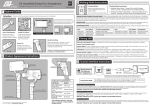
Press the Main Shutter to take a photo.
The screen will flash black to indicate a
photo has been taken.
The Second Shutter can be set as either
an Anti-Shake or Self-Timer through the
Control Panel.
The Mode Switch function allows you to
select different cameras including Photo,
Video, HDR, Selfie, Night and Code
Scanner.
The Control Panel provides one-tap
access to a range of advanced shooting
controls.
The Lightbox/Camera Roll provides
one-click access to the Camera Roll or
Lightbox.
Pressing on the Flash toggles between
the Auto, On and Off settings. Performing
a long-press on the Flash de/activates
the Torch. A single tap on the torch icon
deactivates the torch. Long press the torch
icon to switch between torch intensity
slider or exposure and ISO display.