1
IUCLID 5: Technical Completeness Check plugin – User Manual
4.2.3 Member of a joint submission
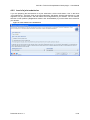
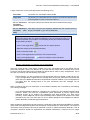
Tick the radio button “Yes” in the block “Joint submission”. Set the radio button to “Member of a joint
submission” and then select the tonnage band for your dossier. You can make a selection in both
picklists (“Registration dossier” and “Intermediates”) if you have both uses covered in your dossier.
You should also indicate if the Chemical Safety Report and Guidance on safe use are provided by
your lead on your behalf or if they are included in your dossier.
Please note also that you should make a selection in the picklist “Tonnage band of the joint
submission”.
Note: for the endpoint sections (section 4 to 8 of IUCLID 5) a dossier for a member of a joint
submission should normally contain only endpoint study records for those endpoints for which you
opted out from the joint submission. In the same manner, the member dossier should not contain any
C&L block (IUCLID 5 section 2) unless the member indicated that he is opting out for the C&L.
Figure 15: TCC selection for a member dossier
After having completed this screen the “Next” button becomes active. Clicking on this “Next” button
will run the TCC and display the results on Step 3.
December 2010 v1.1
12/18