1
optiMOS USER MANUAL
All Rows
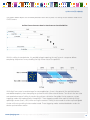
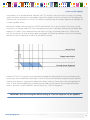
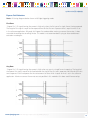
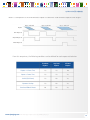
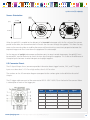
“Expose Out” I/O signal leaving camera is high only when all rows within a single frame are exposing
simultaneously. The length of the Expose Out signal is equal to the time between the start of the last row’s
exposure and the end of the first row’s exposure, which is also equal to the exposure time set in the software
application. Each row exposes for the length of time as defined by the software application plus the time
required for each row to start exposing (approximately 10ms). This allows high camera frame rates while
eliminating rolling shutter artifacts and channel overlap – providing an effective global shutter with the speed
and low noise benefits of rolling shutter. This mode is recommended for synchronizing camera with alternating
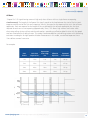
excitation wavelengths for high speed multi-color fluorescence. In this mode, user defined exposure time +
10ms defines camera frame rate.
For example:
User
Enters
Each Line
Exposes For
Expose Out
Goes High
For
1ms
11ms
1ms
1ms
90 fps
5ms
15ms
5ms
5ms
67 fps
10ms
20ms
10ms
10ms
50 fps
20ms
30ms
20ms
20ms
33 fps
Effective
Exposure
Expected
Frame Rate
Trigger
Ready
Trigger
In
Frame
Exposure
Expose
n x line time
www.qimaging.com
n x line time
©2014 QImaging. All rights reserved. QI_OPTIMOS_UM_Rev_A1
16