1
optiMOS USER MANUAL
Table of Contents
INTRODUCTION .............................................................................................................. 1
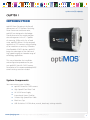
System Components ......................................................................................................... 1
Precautions......................................................................................................................... 2
Environmental Conditions for Operation and Storage.......................................................... 2
Microscopes, Lenses, Tripods............................................................................................... 2
Cleaning............................................................................................................................. 3
Repair................................................................................................................................. 3
INSTALLATION ................................................................................................................ 4
Host Computer Requirements............................................................................................. 4
Camera Power Requirements.............................................................................................. 5
Install the High Speed PCIe Board........................................................................................ 5
Install the Camera Driver..................................................................................................... 6
Connect the Camera........................................................................................................... 7
USING YOUR optiMOS CAMERA.................................................................................... 9
Imaging Software................................................................................................................ 9
Basic Camera Parameters.................................................................................................... 9
Exposure Time..................................................................................................................... 9
Rolling Shutter.................................................................................................................... 9
Gain ................................................................................................................................. 11
Clearing Mode.................................................................................................................. 11
Regions of Interest (ROI).................................................................................................... 13
Digital Binning.................................................................................................................. 13
Device Synchronization..................................................................................................... 14
Hardware Triggering Modes.............................................................................................. 14
Expose Out Behaviors ....................................................................................................... 15
TROUBLESHOOTING ..................................................................................................... 18
Resolving Problems with the Camera................................................................................. 18
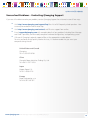
Unresolved Problems - Contacting QImaging Support ....................................................... 20
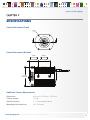
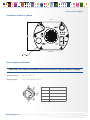
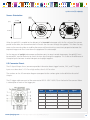
SPECIFICATIONS ............................................................................................................ 21
www.qimaging.com
©2014 QImaging. All rights reserved. QI_OPTIMOS_UM_Rev_A1