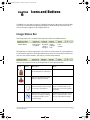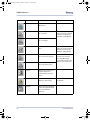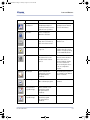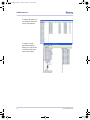
1
VixwinPlat.book Page i Thursday, November 5, 2009 11:35 AM
User Manual
Imaging Software
VixwinPlat.book Page ii Tuesday, August 17, 2010 2:39 PM
Warranty Statement
There are no warranties, express or implied, with respect to the contents of this
document, and all information provided herein is provided “as is.” Gendex
reserves the right to periodically change the information that is contained in
this document; however, Gendex makes no commitment to provide any such
changes in a timely manner or at all.
Limitation of Liability
In no event shall Gendex or its subsidiaries or affiliates or parent be liable to
any party for any direct, indirect, special, or consequential damages in connection with your use of this document, including, without limitation, loss of business revenue or earnings, lost data, damages caused by delays, lost profits, or
a failure to realize expected savings, even if Gendex was expressly advised of
the possibility of such damages.
Trademarks
Gendex and related marks, images, and symbols are the exclusive properties
of, and trademarks of, Gendex Dental Systems. All other brands and marks are
the properties of their respective owners. Imaging Technology provided under
License by AccuSoft Corporation. ImageGear 1996 - 2001 by AccuSoft Corporation. All Rights Reserved.
Copyright
Documentation for VixWin Platinum and the operating software are copyrighted
with all rights reserved. Under the copyright laws, this documentation may not
be reproduced, transmitted, transcribed, or translated into any human or computer language in whole or part without the prior written permission of the copyright holder.
About Gendex
To learn more about Gendex, access the Gendex Dental System Website
(www.gendex.com).
Language
The original language of this manual is English.
VixwinPlat.book Page iii Tuesday, August 17, 2010 2:39 PM
Table of Contents
Chapter 1 - Overview
Intended Use .........................................................................1-1
System Requirements ...........................................................1-2
Operating System .............................................................................. 1-2
Hardware ........................................................................................... 1-2
Additional Requirements .................................................................... 1-3
Network ............................................................................................. 1-3
Video Setting ..................................................................................... 1-3
Peripheral Hardware Compatibility ..................................................... 1-4
Applicable Standards ............................................................1-4
About this Manual .................................................................1-4
Chapter 2 - Installation
Prerequisites .........................................................................2-2
Install VixWin Platinum ..........................................................2-2
Install VixWin Platinum Modules ........................................................ 2-3
After Installation ...................................................................2-3
Software Registration ........................................................................ 2-3
Configuration ..................................................................................... 2-3
Uninstalling VixWin Platinum ............................................................. 2-4
Upgrading from VixWin32, 2000 or PRO version ................................. 2-4
Chapter 3 - System and User Settings
Language ..............................................................................3-1
Preferences ...........................................................................3-1
Database ........................................................................................... 3-2
Settings ............................................................................................. 3-4
Full mouth .......................................................................................... 3-4
032-0214-EN Rev 7
-iii
VixwinPlat.book Page iv Tuesday, August 17, 2010 2:39 PM
Table of Contents
Email .................................................................................................. 3-5
Customize .......................................................................................... 3-6
Teeth ................................................................................................. 3-6
User Interface ........................................................................3-7
General .............................................................................................. 3-7
Toolbar .............................................................................................. 3-8
Security ................................................................................3-9
Security ............................................................................................. 3-9
User ................................................................................................. 3-10
Magnification Factor Correction ...........................................3-11
Plugins ................................................................................3-12
Chapter 4 - Configuration
Visualix/Gx-S Frame Grabber .................................................4-2
GXS-700 ...............................................................................4-2
Visualix eHD ..........................................................................4-2
Visualix/Gx-S USB/HDI ..........................................................4-2
KaVo Dig eXam ......................................................................4-2
DenOptix ...............................................................................4-2
DenOptix 8/16 bit .............................................................................. 4-3
DenOptix QST ........................................................................4-4
Orthoralix DDE ......................................................................4-4
Orthoralix DPI .......................................................................4-4
Camera .................................................................................4-5
Optical Scanner .....................................................................4-5
Automatic Optimizer .............................................................4-6
Automatic Image Treatment ...................................................4-6
Chapter 5 - Operation
Launching VixWin ..................................................................5-2
Standalone Mode ............................................................................... 5-2
Bridge Mode ...................................................................................... 5-2
VxLink Module – Separate Software ................................................... 5-3
-iv
032-0214-EN Rev 7
VixwinPlat.book Page v Tuesday, August 17, 2010 2:39 PM
Table of Contents
Exit VixWin ......................................................................................... 5-3
Accessing and Creating a New Patient ...................................5-3
Editing a Patient ...................................................................5-4
Deleting a Patient ..................................................................5-4
Searching for an Existing Patient ...........................................5-5
Utilities .............................................................................................. 5-6
Creating and Managing Mounts – For Full Mouth View ...........5-7
Creating Mounts ................................................................................ 5-7
Deleting Mounts ................................................................................. 5-9
Customizing Mounts ....................................................................... 5-10
Acquiring Images ................................................................5-10
Acquiring Images with DenOptix ...................................................... 5-10
Acquiring Images with DenOptix QST ............................................... 5-10
Acquiring Images with Visualix/GXs-S HDI/USB, GXS-700, or Visualix eHD
Sensor ............................................................................................. 5-11
Acquiring Images with the KaVo Dig eXam Sensor ............................ 5-11
Acquiring Images with Orthoralix DDE/DPI ....................................... 5-11
Assigning Images to Patients ..............................................5-12
Adding Associated Data to Images .......................................5-13
Add Notes ........................................................................................ 5-13
Change Image File Format or Image Type Parameters ....................... 5-14
Assign Tooth Location ...................................................................... 5-14
Manage X-ray Dose Setting .............................................................. 5-14
Treating and Analyzing Acquired Images ..............................5-16
Annotations ..................................................................................... 5-18
Angle ............................................................................................... 5-19
Length ............................................................................................. 5-19
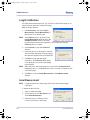
Length Calibration ............................................................................ 5-20
Area Measurement ........................................................................... 5-20
Tools ............................................................................................... 5-21
Magnify ........................................................................................... 5-21
Image ............................................................................................... 5-22
Spotlight .......................................................................................... 5-22
032-0214-EN Rev 7
-v
VixwinPlat.book Page vi Tuesday, August 17, 2010 2:39 PM
Table of Contents
Grayscale Enhance ........................................................................... 5-23
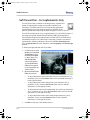
Soft Tissue Filter – For Cephalometric Only ....................................... 5-24
Optimizer ........................................................................................ 5-25
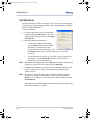
Set Optimizer ................................................................................... 5-26
Printing Images ...................................................................5-27
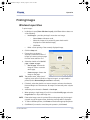
Windows Layout View ....................................................................... 5-27
Notes ............................................................................................... 5-28
Full Mouth View ................................................................................ 5-28
Loading Patient Images – For Windows Layout View .............5-29
Load Images – Status Mode ............................................................. 5-29
Load Images – Browser Mode ........................................................... 5-30
Images ............................................................................................. 5-32
Moving Images to and from a Different Patient ....................5-32
Emailing Images ..................................................................5-32
Chapter 6 - Icons and Buttons
Image Status Bar ...................................................................6-1
Buttons on the Toolbars ........................................................6-2
Chapter 7 - DICOM DIR
DICOM DIR Export ..................................................................7-1
DICOM DIR Import .................................................................7-4
Chapter 8 - VixWin Mount Editor
Customizing Mounts with the Mount Editor ...........................8-1
Imaging Plates ......................................................................8-2
Resizing Imaging Plates ..................................................................... 8-2
Rotating Imaging Plates ..................................................................... 8-3
Moving the Imaging Plates ................................................................. 8-3
Deleting an Imaging Plate .................................................................. 8-3
Additional Mount Information ................................................8-4
Enlarging the New Template ............................................................... 8-4
Assign Tooth Number ......................................................................... 8-4
-vi
032-0214-EN Rev 7
VixwinPlat.book Page vii Tuesday, August 17, 2010 2:39 PM
Table of Contents
Assign Acquisition Sequence ............................................................. 8-4
Assigning Load Sequence .................................................................. 8-5
Assigning Automatic Rotation ............................................................ 8-7
Saving the New Mounts ...................................................................... 8-7
Using the New Mount in VixWin .......................................................... 8-7
Modifying a Mount ............................................................................. 8-8
Deleting an Existing Mount ................................................................ 8-8
Advanced Functions ........................................................................... 8-8
Chapter 9 - VixWin Logbook
Open the Logbook .................................................................9-1
Using the Logbook ................................................................9-1
Configure X-ray Parameters ...................................................9-2
Chapter 10 - DAP (Dose Area Product)
Chapter 11 - Database
Restoring a Database ....................................................................... 11-1
032-0214-EN Rev 7
-vii
VixwinPlat.book Page viii Tuesday, August 17, 2010 2:39 PM
VixWin Platinum 2
-viii
032-0214-EN Rev 7
VixwinPlat.book Page 1 Tuesday, August 17, 2010 2:39 PM
Chapter
1
Overview
This user manual contains original instructions by Gendex Dental Systems.
Intended Use
VixWin™ Platinum is a software program for general dental and maxillo-facial diagnostic
imaging. VixWin Platinum manages and controls X-ray digital images from DenOptix®,
DenOptix® QST, Visualix® /Gx-S USB/HDI, Visualix eHD, GXS-700, KaVo Dig eXam®,
Orthoralix® DPI, and Orthoralix® DDE systems. It can also handle other types of images
acquired by digitizing film with a flat bed scanner or color images from an intraoral or
extra oral dental camera such as the AcuCam® Concept® IV FWT, GXC-300, and eZ1
series.
VixWin Platinum features DICOM DIR, a function that allows you to import and export
images in a DICOM format. For more DICOM related information, contact your Gendex
representative.
When properly installed, VixWin Platinum allows you to:
•
Control scanning of X-ray images from imaging plates with the DenOptix
and DenOptix QST scanners.
•
Control the direct capture of X-ray images from Visualix/Gx-S USB/HDI,
Visualix eHD, GXS-700, KaVo Dig eXam, Orthoralix DPI, and Orthoralix DDE
systems.
•
View and capture color images from specific cameras, such as a dental
camera, via a suitable video capture card.
•
Export and import digital images, such as those obtained by scanning a
film, in various standard file formats.
•
Process images with tools to enhance diagnostic value.
•
Analyze and enhance images to gather additional diagnostic information
that may not be immediately apparent on initial visual inspection.
•
Create a database of patients and easily store images in patient folders.
This manual can be viewed by choosing Help > User Manual in VixWin Platinum.
032-0214-EN Rev 7
1-1
VixwinPlat.book Page 2 Tuesday, August 17, 2010 2:39 PM
VixWin Platinum 2
System Requirements
Operating System
VixWin Platinum software requires one of the following operating system software:
Windows XP®
Professional
Windows Vista®
Business, 32 bit
Windows 7®
Professional, 32
and 64 bit
VixWin Platinum
Yes
Yes
Yes
VixWin Modules
Yes
Yes
Yes
NOTE: Other operating systems are not supported.
Hardware
VixWin Platinum has the following server requirements:
Server System
Requirements
Minimum
Recommended
Operating System
Microsoft® Windows® 2K Server
Microsoft® Windows® 2K Server
Processor
Pentium® 4 2.0 GHz
Pentium® 4 3.2 GHz
Memory
1024 MB
2048 MB
Hard Disk
30+ GB
200+ GB
Display Setting
1024x768 at 24 bit true color
1024x768 at 32 bit true color
Video RAM
4+ MB
8+ MB
Monitor
SVGA with 0.25/0.26 dot pitch
SVGA with 0.25/0.26 dot pitch
Network card
10/100 MB
10/100 MB
A backup device such as a tape backup or external hard drive will also be needed to
store the contents of the hard drive.
1-2
032-0214-EN Rev 7
VixwinPlat.book Page 3 Tuesday, August 17, 2010 2:39 PM
Overview
VixWin Platinum has the following local workstation requirements:
Workstation
System
Requirements
Minimum
Recommended
Processor
Pentium® 4, 2.0 GHz
Pentium® 4, 3.2 GHz
Memory
1024 MB
1024 MB
Hard Disk
6+ GB
60+ GB
Display Setting
1024x768 at 24 bit true color
1024x768 at 32 bit true color
Video RAM
4+ MB
8+ MB
Monitor
SVGA with 0.25/0.26 dot pitch
SVGA with 0.25/0.26 dot pitch
CD-ROM
CD-ROM 6X+
CD-ROM 6X+
Network card
10/100 MB
10/100 MB
Additional Requirements
•
USB 2.0 port is required for DenOptix, DenOptix QST, Visualix eHD,
GXS-700, KaVo Dig eXam, and GXC-300.
•
A PCI expansion slot is required for AcuCam Concept IV.
Network
You can operate the VixWin Platinum software on a Local Area Network (LAN).
Based on the size of the practice and the volume of images captured per year,
we recommend that you have a trained network technician set up your network
and configure VixWin Platinum for network operation.
Video Setting
Your video settings must be set to True Color 24 bit or 32 bit. A different video
setting will not provide proper video quality. You can change the video setting in
Windows XP Professional via Start > Control Panel > Display > Settings.
032-0214-EN Rev 7
1-3
VixwinPlat.book Page 4 Tuesday, August 17, 2010 2:39 PM
VixWin Platinum 2
Peripheral Hardware Compatibility
The following peripheral hardware is compatible with VixWin Platinum:
•
Gendex GxPicture 2.70 or greater.
•
TWAIN: DLL version 1.5 or greater (32 bits only).
•
Video camera: Video for Windows or Direct Show (Windows XP only).
•
Printer: Windows driver.
Applicable Standards
The following standards apply to VixWin Platinum:
•
IEC 60601-1:1988 +A1:1991 +A2:1995
•
IEC 60601-1-4:1996 +A1: 1999
•
93/42 EEC - European Directive concerning medical devices.
About this Manual
This manual uses the following convention:
Fields requiring action are shown as a bold font and indicate that an action or
selection must be completed.
Examples:
1-4
•
Select the Image folder layout.
•
Click OK.
032-0214-EN Rev 7
VixwinPlat.book Page 1 Tuesday, August 17, 2010 2:39 PM
Chapter
2
Installation
The VixWin Platinum installation compact disc (CD) contains:
•
the imaging software,
•
software modules that allow you to customize the VixWin Platinum
software.
After the VixWin Platinum software is installed, these modules can be installed:
•
VxDICOM - Provides DICOM communication features such as DICOM
storage, DICOM print, DICOM worklist and DICOM Query/Retrieve.
•
VxLink - bridges VixWin Platinum with the following Practice Management
software: Dentrix G3 and G4; PracticeWorks v7; Eaglesoft v14 and v15;
SoftDent v12; Easy Dental 2008 and 2009; Julie v3.15.
CAUTION
Only Practice Management versions listed are supported. Other
versions of Practice Management may cause loss or corruption of
patient data.
CAUTION
If you manually enter patient IDs into your Practice Management
Software, then be careful. Never use leading zeros.
Example: Do not use 0035, use 35.
•
VixWin Logbook - a radiation dosage reporting tool to VixWin Platinum.
If you need more information about VixWin products, contact your Gendex
representative.
032-0214-EN Rev 7
2-1
VixwinPlat.book Page 2 Tuesday, August 17, 2010 2:39 PM
VixWin Platinum 2
Prerequisites
Before installing the VixWin Platinum software, you must have the following:
•
A computer system that meets or exceeds the minimum system
requirements.
•
Network connectivity, if you need to store the patient image database on a
server.
Install VixWin Platinum
To install VixWin Platinum:
1. Start Microsoft Windows and log on using an account with administrative
privileges.
2. Close all open applications.
3. Disable any antivirus software that is running.
NOTE: You can install VixWin Platinum over previous versions of the VixWin
software. Any previously existing patient and image databases as well as
configuration data are not affected.
4. Insert the VixWin Platinum installation CD.
5. When the VixWin Platinum Introduction window displays, select Install
VixWin Platinum. Setup will automatically start. Follow the on-screen
directions.
At the end of the installation, a query box displays:
•
Run VixWin After Setup - Select this checkbox if you want VixWin Platinum
to automatically launch after the installation procedures on the CD.
NOTE: Do not select this if you have modules to install after the VixWin
installation.
•
Automatically Run VixWin on Image Acquisition - Select this checkbox if
you want VixWin to automatically open when an image is received.
NOTE: This is the only time that you can set these options.
6. Click Finish at the end of the setup. The installation and setup program
creates a Gendex Imaging folder in the Programs start menu and a VixWin
Platinum icon on the desktop.
NOTE: If no modules are to be installed at this time, click Exit.
2-2
032-0214-EN Rev 7
VixwinPlat.book Page 3 Tuesday, August 17, 2010 2:39 PM
Installation
Install VixWin Platinum Modules
NOTE: VixWin Platinum must be installed first.
To install the VixWin Platinum modules:
1. Select Install Modules from the VixWin Platinum Introduction window.
NOTE: If you do not see this introduction window, eject the CD and reinsert.
2. Select either of the following modules:
•
Install VxLink
•
Install VixWin Logbook
•
Install VxDICOM
3. Follow the on-screen directions and click Finish at the conclusion of the
setup.
4. Repeat these steps until you have installed all the needed modules.
5. Reboot your PC when the installation is completed.
After Installation
NOTE: When VixWin Platinum is run for the first time, you may be asked to provide
initial configuration options such as language, preferences, and hardware.
Refer to “System and User Settings” on page 3-1 for additional information.
Software Registration
To register the software, refer to the registration instructions inside the VixWin
Platinum software package.
Configuration
Refer to “System and User Settings” on page 3-1 for configuration options.
032-0214-EN Rev 7
2-3
VixwinPlat.book Page 4 Tuesday, August 17, 2010 2:39 PM
VixWin Platinum 2
Uninstalling VixWin Platinum
To uninstall VixWin Platinum:
1. Select Start > Control Panel > Add or Remove Programs.
2. From the list, select VixWin Platinum.
3. Click Remove and follow the on-screen instructions.
Upgrading from VixWin32, 2000 or PRO version
If you are currently a VixWin32, 2000, or PRO user, when upgrading to VixWin
Platinum, you can maintain the existing Mount database or upgrade to the new
Mount database.
NOTE: Custom mounts are lost when upgrading to a new mount database.
2-4
032-0214-EN Rev 7
VixwinPlat.book Page 1 Tuesday, August 17, 2010 2:39 PM
Chapter
3
System and User Settings
VixWin Platinum provides the VixWin administrator with the capability to customize
system settings (security and plugins) and user parameters (language, preferences, user
interface) or to use the system default settings. Gendex strongly recommends that you
carefully evaluate the available options.
The selected options provide you with the capability to accept the selection (OK), cancel
the selection (Cancel), or use the default system settings (Default). If additional
information is needed, refer to the Help section.
This chapter describes the following topics:
•
Language
•
Preferences
•
User Interface
•
Security
•
Magnification Factor Correction
•
Plugins
Language
Select the language for the screens.
To configure the language option:
1. On the menu bar, click
Options and select
Language.
2. Select your language.
3. Click OK.
Preferences
The Preferences window provides options for the Database, Settings, Full Mouth, Email,
Customize, and Teeth.
NOTE: Some selections are preselected with a check mark and indicate the default
values. To change the default value, click to deselect the checkbox.
032-0214-EN Rev 7
3-1
VixwinPlat.book Page 2 Tuesday, August 17, 2010 2:39 PM
VixWin Platinum 2
Database
To configure the database:
From the menu bar:
1. Click Options and
select Preferences.
2. Click the Database tab.
3. Select an Operating
Mode:
•
Bridge – Activates the VixWin bridge to the Practice Management (PM)
software that will be used. In Bridge mode, the Practice Management
software owns and stores the patient database.
NOTE: If you need information about Practice Management (PM) software, contact
your Practice Management Provider.
•
Standalone – VixWin will store the patient data and images on the
selected database drive.
4. If the operating mode selected is Standalone, click the Database drive
arrow and select the drive where the patient/image database will be physically located:
•
Disk “C:” local if the patient database will be stored on the local
computer.
•
The appropriate shared network drive, if the patient database will be
stored on the network.
5. If the operating mode selected is Bridge, click the Drive for database image
files arrow and select the drive where the patient/image database will be
physically located.
6. Select the Do not use XP Permissions checkbox if you need to limit a user’s
access to the database. Images and the database folders will inherit
permissions from the parent folder.
7. In the Database image file formats section, the default file formats are
shown.
3-2
•
Make desired changes to the 8-bit image file formats if the driver for
the capture device has been set to 8-bit images.
•
Make changes to the 16-bit image file formats if the driver for the
capture device has been set to 16-bit images.
032-0214-EN Rev 7
VixwinPlat.book Page 3 Tuesday, August 17, 2010 2:39 PM
System and User Settings
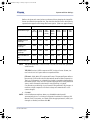
Refer to the chart and notes below to understand how changing the image file
format can affect the image file size. The chart lists the file sizes in kilobytes by
capture device type for each image file format option. (Sizes are approximate.)
Image File Format
Capture Device Type
TIFF
(16 bit)
TIFF
(8 bit)
TIFFJPEG
(16 bit)
TIFFJPEG
(8 bit)
JFIF
%100
JFIF
%75
JFIF
%50
eHD size # 2 (Hi Res.)
4725
2364
1834
719
660
109
67
DenOptix size # 2
at 300 dpi
350
175
152
90
88
18
13
DenOptix Pan
at 150 dpi
2888
1445
1256
760
719
125
76
DenOptix Ceph
at 150 dpi
2758
1380
1199
787
776
134
79
Orthoralix DDE Std.
Pan
8444
4225
3671
2234
1370
470
407
Orthoralix DDE Ceph
9521
4764
4139
1847
976
303
266
NOTE: TIFF (uncompressed): Lossless format. Fast, but uses more disk space than
other formats.
TIFF-JPEG (lossless): JPEG compressed TIFF, lossless format. Slower, but
uses about 30% less space than uncompressed files.
JFIF 100%, 75%, 50%: JFIF compressed format. The percent figure refers to
the amount of information that is theoretically retained after compression.
The loss of information on a dental X-ray image is virtually undetectable by
the naked eye. JFIF 100% and 75% formats are practical for saving hard disk
space, unless dictated by the need for very fast filing or by legal
considerations prohibiting a lossy format in filing medical X-ray images. A
medium or high compression format is always recommended for color
camera images.
8. Click OK.
NOTE: In the Preferences window, when you click OK, the window will
automatically close. To continue configuration activities for Settings, Full
Mouth, Email, Customize, and Teeth, click the appropriate tab, make your
changes as needed, and then click OK.
032-0214-EN Rev 7
3-3
VixwinPlat.book Page 4 Tuesday, August 17, 2010 2:39 PM
VixWin Platinum 2
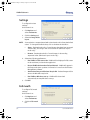
Settings
To configure the view
settings:
On the menu bar:
1. Click Options and
select Preferences.
2. Click the Settings tab.
3. Select the Image folder
layout.
NOTE: Some selections are preselected with a check mark and indicate the default
values. To change the default value, click to deselect the checkbox.
•
Status - Preview thumbnails of saved images that have been arranged
anatomically, according to the associated tooth. (Windows Layout
mode only.)
•
Browser - Preview thumbnails of saved images in descending
sequential order. (Windows Layout mode only.)
4. Select the following preferences:
•
Run VixWin in Full Screen mode - VixWin will be displayed in full screen
mode each time you launch the application.
•
Restore VixWin window when Patient Selected - VixWin will appear in
the foreground when a patient’s information is sent from the Practice
Management software.
•
Send deleted images to Windows Recycle Bin - Deleted images will be
sent to the Windows recycle bin.
•
Run VixWin at Windows start up - VixWin will be launched
automatically at every Windows start up.
5. Click OK.
Full mouth
To configure Full mouth
settings:
On the menu bar:
1. Click Options and
select Preferences.
2. Click the Full mouth
tab.
3-4
032-0214-EN Rev 7
VixwinPlat.book Page 5 Tuesday, August 17, 2010 2:39 PM
System and User Settings
3. Select preferences for Full mouth:
•
Direct capture/scan into the mount – Check this box if you want to
have images captured directly into the mount. Recommended for
Visualix/Gx-S, Visualix Gx-S USB/HDI, Visualix eHD, GXS-700, and
KaVo Dig eXam users.
IMPORTANT: If the Load Sequence has been set in the Mount Editor, the images
can be captured directly into the mount. Otherwise the images go directly into
the new image bin.
•
New mount at each DenOptix Scan – Check this box if you want to be
prompted to select a new mount before each scan.
•
Close patient after DenOptix scan – Check this box if you want to have
the selected patient folder automatically close after the scanning
ends. You can then access the patient folder from a different
workstation.
4. Click OK.
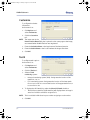
Email
To configure email
attachments:
On the menu bar:
1. Click Options and
select Preferences.
2. Click the Email tab.
3. Click the Attachment
File Format arrow and
select the appropriate file format. The selected file format defines the
image file type that will be sent via email as an attachment to the email.
NOTE: To optimize the compression of images sent as an attachment, Gendex
recommends that you use the default JPG format.
The email function can only be used if your email software (Outlook or Lotus
Notes) is properly configured on your computer. The email function does
not operate with Outlook Express, web-based email accounts such as
Hotmail, Yahoo, or any other web-based account.
4. Click OK.
032-0214-EN Rev 7
3-5
VixwinPlat.book Page 6 Tuesday, August 17, 2010 2:39 PM
VixWin Platinum 2
Customize
To configure the dentist
information:
On the menu bar:
1. Click Options and
select Preferences.
2. Click the Customize
tab.
NOTE: The name seen in the
Dental Practice Name field, that is printed on the same page as the image,
was entered when VixWin Platinum was registered.
3. Enter the Institution Name or the legal name of the dental practice.
4. Enter the Station Name or the location where the images are taken.
5. Click OK.
Teeth
To configure teeth options:
On the menu bar:
1. Click Options and
select Preferences.
2. Click the Teeth tab.
3. Select a Tooth
numbering system:
•
Universal numbering system (USA) - Designates the location of the
teeth from 1 to 32.
•
F.D.I. numbering system - Designates the location of the lower teeth
from 11 to 18 and 21 to 28 and the location of the upper teeth from 31
to 38 and 41 to 48.
4. To display the child teeth list, select the Show child teeth checkbox.
•
The deciduous teeth list (child teeth list) will display when an image is
saved and a child tooth will be assigned to it.
NOTE: This is available in Windows Layout or when assigning a tooth number.
5. Click OK.
3-6
032-0214-EN Rev 7
VixwinPlat.book Page 7 Tuesday, August 17, 2010 2:39 PM
System and User Settings
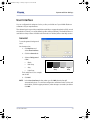
User Interface
You can configure the background color, toolbar, and sidebar of your VixWin Platinum
software to fit your requirements.
The selected options provide you with the capability to accept the selection (OK), cancel
the selection (Cancel), or use the default system settings (Default). The Default button is
available on many screens. If additional information is needed, refer to the Help section.
General
To set the general background
color:
On the menu bar:
1. Click Options and
select User Interface.
2. Click the General tab.
3. Select a Background
Color:
•
Black
•
Dark Gray
•
Gray
•
Light Gray
Black
Dark
Gray
Gray
Light
Gray
The background color samples
are shown.
4. Click OK.
NOTE: In the User Interface window, when you click OK, the window will
automatically close. To continue configuration activities for the Toolbar and
the Sidebar, click the appropriate tab, make changes as needed, and then
click OK.
032-0214-EN Rev 7
3-7
VixwinPlat.book Page 8 Tuesday, August 17, 2010 2:39 PM
VixWin Platinum 2
Toolbar
To customize the toolbar:
On the menu bar:
1. Click Options and
select User Interface.
2. Click the Toolbar or the
Sidebar tab.
NOTE: From the Toolbar and
the Sidebar tabs, you
can customize the position, graphic style, and size of the buttons.
3. To hide the toolbar from view, select the Hide Toolbar checkbox.
The toolbar and/or the sidebar will be hidden from the software user
interface on the VixWin screen.
4. Click Customize
Buttons if you need to
rearrange, add, or
remove the button
icons on the toolbar
and/or sidebar.
•
In the Customize
Toolbar window,
select the button icon and use the Add > button or the < Remove button
to move the button icon from one column to the other.
•
To rearrange the position of the button icons, click on the button icon
to be moved then click the Move Up or the Move Down button until the
button icon is in the desired location. (You can also drag the buttons.)
•
To reset the buttons,
click Reset to restore
the default values.
•
Click Close to exit
from the Customize
Toolbar window.
•
Click OK to make the changes effective.
5. To change the size of the button icons on the Toolbar or Sidebar window,
select one of the following:
3-8
•
Classic – Standard VixWin Pro user interface.
•
Small Platinum – New VixWin Platinum user interface. Suggested for
monitor resolutions of 800x600.
032-0214-EN Rev 7
VixwinPlat.book Page 9 Tuesday, August 17, 2010 2:39 PM
System and User Settings
•
Medium Platinum – New VixWin Platinum user interface. Suggested
for monitor resolutions of 1024x768.
•
Large Platinum – New VixWin Platinum user interface. Suggested for
monitor resolutions of 1280x1024, 1600x1200, or touch screen
monitors.
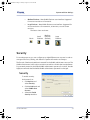
The button sizes are shown:
Classic
Small
Platinum
Medium
Platinum
(Default)
Large
Platinum
Security
For security purposes, you can configure up to eight different user accounts in order to
manage user access, editing, and deletion of patient information and images.
The first tab of the Security window is reserved for the VixWin administrator account. The
VixWin administrator is the only account that can enable or disable the security feature.
For password protection, the default VixWin administrator password is 123456. Gendex
highly recommends that the default VixWin administrator password be changed.
Security
To enable security:
On the menu bar:
1. Click Options and
select Security.
2. Click the Admin tab and
select VixWin User
Account.
3. Select the Enable
Security checkbox.
032-0214-EN Rev 7
3-9
VixwinPlat.book Page 10 Tuesday, August 17, 2010 2:39 PM
VixWin Platinum 2
NOTE: Select Change Password. A new, smaller
password window will display.
4. At the password window, enter the old
password (default password is 123456)
and type the new password twice.
NOTE: Passwords are case sensitive.
5. Click OK to exit from the VixWin Platinum
password window.
6. Click OK to exit from the Security window.
NOTE: In the Security window, when you click OK, the window will automatically
close. To continue security activities for User 1, User 2, User 3, User 4, User
5, User 6, and User 7 click the appropriate tab, make changes as needed for
each user, and then click OK.
User
To create or edit user
information:
On the menu bar:
1. Click Options and
select Security.
2. Click the appropriate
tab: User 1, User 2,
User 3, User 4, User 5,
User 6, or User 7.
3. Select an account type:
•
Windows User Account – Enter the Windows User Name.
•
VixWin User Account to enable additional security – Enter the User
Name and the Password.
NOTE: Editing the VixWin user account information can only be done by the VixWin
administrator.
4. Select the user account privilege:
3-10
•
Show list of patients – VixWin will not show the entire patient list
when the user logs into the system. In this case, users need to specify
the patient’s first and last name to access the image folder.
•
Allow edit of patient information –The edit function on the patient
database will be disabled and the user will not be able to edit any
patient data.
032-0214-EN Rev 7
VixwinPlat.book Page 11 Tuesday, August 17, 2010 2:39 PM
System and User Settings
•
Allow delete images/patients – The user will not be able to delete
images or patients from the VixWin database.
5. Click OK.
NOTE: When you click OK to exit from the
Security window, the system will prompt
you to enter a password.
Enter the default password or the new
password. Click OK. If you do not enter a
password, click Cancel to exit from the
VixWin Platinum password window.
When VixWin is launched again, VixWin users will need to enter their
account information (User Name and Password) to use the software.
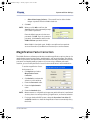
Magnification Factor Correction
The VixWin Platinum software provides the user with magnification options that can be
applied when measuring panoramic, cephalometric, and intraoral images. The default
values for panoramic and cephalometric are related to the Orthoralix DDE/DPI standard
panoramic and cephalometric projections. If you are using a different panoramic
machine, you can modify the factors based on the manufacturer’s recommendations.
To set the magnification factor:
On the menu bar:
1. Click Options and select
Magnification Factor
Correction.
2. Click Default to activate the
selection on this window.
3. Enter the Panoramic value.
4. Enter the Cephalometric
value.
5. Enter the IntraOral value.
NOTE: Measurements on a digital X-ray image, even with calibration, have limited
accuracy due to incorrect positioning, magnification, and manual selection.
6. If using an Orthoralix DDE system, select the Use values from driver (if
available) checkbox to have the magnification factor automatically set by
the driver.
032-0214-EN Rev 7
3-11
VixwinPlat.book Page 12 Tuesday, August 17, 2010 2:39 PM
VixWin Platinum 2
NOTE: All automatic image filters are set in the corresponding imaging product
driver. We recommend that you keep the Use values from driver (if
available) checkbox enabled, unless there is a special need not to use the
drivers.
7. Click OK.
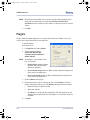
Plugins
Plugins allow third party applications to receive information from VixWin or it can be
used to start any program with an .exe extension.
To enable plugins:
On the menu bar:
1. Click Options and select Plugins.
2. Click the appropriate tab:
SmartCeph, Word Bridge,
Calculator, Keyboard, Other1,
Other2, Other3.
NOTE: SmartCeph is not available in the
U.S. and Canada.
•
Disable Plugin checkbox. When
selected, the disabled Plugin
will not be available.
•
Do not transfer image checkbox. When selected, prevents images from
being sent to the application.
•
Do not transfer text checkbox. When selected prevents the text from
being sent to the application.
3. Enter the Name of the plugin.
4. Enter the program location of the plugin file or click Browse to find the
plugin .exe program. When you click Browse, the Open window displays.
•
Browse to find the needed .exe file.
•
Select the .exe file.
•
Click Open or double-click the selected file. The new application will
display in the Program field and it will appear as a new menu selection
in VixWin.
5. Click OK.
3-12
032-0214-EN Rev 7
VixwinPlat.book Page 1 Tuesday, August 17, 2010 2:39 PM
Chapter
4
Configuration
VixWin Platinum is used to acquire images from all KaVo/Gendex digital imaging devices.
When installed, you can view the KaVo/Gendex driver properties and options. To change
the properties, you will need to identify the device and customize the settings to best fit
your dental practice needs.
This chapter covers the following topics:
•
Visualix/GX-S Frame Grabber
•
GXS-700
•
Visualix eHD
•
Visualix/Gx-S USB/HDI
•
KaVo Dig eXam
•
DenOptix
•
DenOptix QST
•
Orthoralix DDE
•
Orthoralix DPI
•
Camera
•
Optical Scanner
•
Automatic Optimizer
•
Automatic Image Treatment
Refer to the specific device manuals to configure the device properties. VixWin Platinum
is compatible with KaVo/Gendex devices.
You can configure settings or use the system default values. Gendex strongly
recommends that you carefully evaluate the available options.
NOTE: If you are unable to access a listed product, then the corresponding driver
is not installed.
The imaging devices provide you with the capability to accept the selection(s) (OK),
cancel the selection (Cancel), or use the default system settings (Default). The Default
button is available on many screens.
032-0214-EN Rev 7
4-1
VixwinPlat.book Page 2 Tuesday, August 17, 2010 2:39 PM
VixWin Platinum 2
Visualix/Gx-S Frame Grabber
This section applies to the Visualix system available prior to 2002.
To set the Visualix/Gx-S Frame Grabber properties:
On the menu bar:
1. Click Imaging Devices and select Visualix/Gx-S Frame Grabber.
2. Select Properties.
3. Select CCD sensor hardware.
4. Make any adjustments or changes as needed or refer to the Visualix/Gx-S
user manual.
GXS-700
To set the GXS-700 properties, click Imaging Devices and select GXS-700. Refer to the
device user manual to configure the properties.
Visualix eHD
To set the Visualix eHD properties, click Imaging Devices and select Visualix eHD. Refer
to the device user manual to configure the properties.
Visualix/Gx-S USB/HDI
To set the Visualix/Gx-S USB/HDI properties, click Imaging Devices and select Visualix/
Gx-S. Refer to the device user manual to configure the properties.
KaVo Dig eXam
To set the KaVo Dig eXam properties, click Imaging Devices and select Dig eXam. Refer
to the device user manual to configure the properties.
DenOptix
To set the DenOptix scanner properties:
On the menu bar:
4-2
032-0214-EN Rev 7
VixwinPlat.book Page 3 Tuesday, August 17, 2010 2:39 PM
Configuration
1. Click Imaging Devices and select DenOptix.
2. Select Properties.
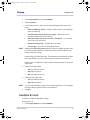
3. In the General section, select any of the following general scanner attributes:
•
Notice and Warning sounds – Enables audible tones for the DenOptix
notice and warning.
•
Scan Edit button (allows editing scan types) – Allows the user to
modify the default scanning selection.
•
Hi Res #2’s button (scans top row of #2’s at 600 dpi) – For scanning
size 2 intra orals at 600 dpi.
•
Display Scanning dialog – Displays the scan status.
•
16 bit images – Uses the 16 bit image file format.
NOTE: Selecting the Hi Res #2’s button checkbox enables a higher resolution/dpi
for enhanced image definition. (Both the scanning time and the file size
increase with this setting.)
IntraOral (dpi) and Pan/Ceph (dpi): The higher the dpi selected, the better
the image definition, but the scanning time and the file size increases.
Default values are defined in order to match the requirements for standard
clinical use.
4. Select the IntraOral (dpi):
•
150 (standard resolution)
•
300 (high resolution)
•
600 (very high resolution)
5. Select the Pan/Ceph (dpi):
•
150 (standard resolution)
•
300 (high resolution)
NOTE: You can use the default resolution for standard applications or set a higher
resolution when a special clinical case requires it.
6. Click OK.
DenOptix 8/16 bit
To set the bit depth for DenOptix images:
On the menu bar:
1. Click Imaging Devices and select DenOptix.
032-0214-EN Rev 7
4-3
VixwinPlat.book Page 4 Tuesday, August 17, 2010 2:39 PM
VixWin Platinum 2
2. Select Options.
3. Select 8 bit or 16 bit for the appropriate DenOptix image files:
•
IntraOral
•
Panoramic
•
Cephalometric
NOTE: Handling 8 bit or 16 bit images
You can scan DenOptix images and obtain 16 bit image files (65,535
gray levels) instead of 8 bit (256 gray levels). While 16 bit images contain
more information, they create larger files. When importing 16 bit images,
you will need to define the image type (intraoral, panoramic or
cephalometric) to apply the correct 16 bit enhancement.
4. Click OK.
DenOptix QST
To set the DenOptix QST properties, click Imaging Devices and select DenOptix QST.
Refer to the device user manual to configure the properties.
Orthoralix DDE
To set the Orthoralix DDE properties, click Imaging Devices and select Orthoralix DDE.
Refer to the device user manual to configure the properties.
Orthoralix DPI
To set the Orthoralix DPI properties, click Imaging Devices and select Orthoralix DPI.
Refer to the device user manual to configure the properties.
4-4
032-0214-EN Rev 7
VixwinPlat.book Page 5 Tuesday, August 17, 2010 2:39 PM
Configuration
Camera
To set the camera:
On the menu bar:
1. Click Imaging Devices,
select Camera, and then
select Device.
2. Select the video camera
interface:
•
Video for Windows
(Windows XP only)
•
Direct Show (Windows XP only)
NOTE: Select Video for Windows or Direct Show if you are connecting a video
camera using a video capture board. The video capture board must be
compatible with Video For Windows or Direct Show.
•
Gendex Digital Camera
NOTE: The Gendex Digital Camera, corresponding to the AcuCam Concept®
IV FWT, GXC-300, and eZ1, is the default. This option requires GxPicture/
GxVideo.
•
KaVo ErgoCam
3. Click OK.
Optical Scanner
Optical image scanners are supported through the TWAIN protocol.
To set the Optical Scanner:
On the menu bar:
1. Click File > Optical Scanner Select.
2. Select the TWAIN source or the driver needed from the list.
3. Click Imaging Devices.
4. Select Optical Scanner and then Automatic Image Treatment.
5. Click Flip to automatically flip all incoming images acquired from the
optical scanner or TWAIN compliant devices.
6. Click OK.
032-0214-EN Rev 7
4-5
VixwinPlat.book Page 6 Tuesday, August 17, 2010 2:39 PM
VixWin Platinum 2
Automatic Optimizer
Some of the imaging devices allow the Optimizer filter to be automatically applied to
newly acquired images. Images can then be displayed with consistently high image
quality, without the need for user interaction.
To set the Automatic Optimizer:
On the menu bar:
1. Click Imaging Devices > [device] > Automatic Optimizer.
2. Click the appropriate tab.
3. Select the Optimizer checkbox.
4. Make the Automatic Optimizer adjustments:
•
To adjust the sharpness of the image, move the Detail slider control to
the left (decrease) or to the right (increase).
•
To adjust the intensity of the image, move the Intensity slider control
to the left (decrease) or to the right (increase).
•
To adjust the level of reduction in noise (the amount of graininess in
the image), move the Noise Reduction slider control to the left
(decreases) or to the right (increase).
5. Click OK.
Automatic Image Treatment
Some of the imaging devices allow image processing to be automatically applied to
newly acquired images. Images can then be displayed with consistently high image
quality, without the need for user interaction.
To automate the image treatment:
On the menu bar:
1. Click Imaging Devices > [device] > Automatic Image Treatment.
2. Click the appropriate tab.
3. To adjust the exposure level of the image, move the Gamma slider control
to the left (decrease) or to the right (increase).
NOTE: The image contrast can be significantly enhanced by adjusting the gamma
values.
4. To adjust the luminance of the image, move the Brightness slider control to
the left (decrease) or to the right (increase).
4-6
032-0214-EN Rev 7
VixwinPlat.book Page 7 Tuesday, August 17, 2010 2:39 PM
Configuration
5. To adjust the color or light of the image, move the Contrast slider control to
the left (decrease) or to the right (increase).
NOTE: When you move the slider control to the left or to the right, the number will
appear in the associated Gamma, Brightness, and Contrast text fields.
6. Click OK.
032-0214-EN Rev 7
4-7
VixwinPlat.book Page 8 Tuesday, August 17, 2010 2:39 PM
VixWin Platinum 2
4-8
032-0214-EN Rev 7
VixwinPlat.book Page 1 Tuesday, August 17, 2010 2:39 PM
Chapter
5
Operation
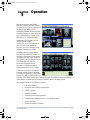
Operating and using the VixWin
Platinum software provides you with
the capability to acquire/capture and
analyze images while moving
seamlessly between different layouts
to display images. You must select the
layout view (Windows Layout or Full
Mouth) prior to acquiring images.
In Windows Layout view, you can
display several images
simultaneously on the VixWin work
area. You can move, minimize,
cascade, or zoom in and out using
different magnification scales.
In Full Mouth view, images will be
mounted in predefined locations on
the screen. If you take a large number
of images including video images for
each patient, we recommend that you
use Full Mouth view. We also
recommend using the mount
templates in Full Mouth view for
better organization of your images.
In Windows Layout and Full Mouth
view, the selected options provide
you with the capability to accept the
selection(s) (OK), cancel the selection
(Cancel), or use the default system settings (Default). The Default button is available on
many screens. If additional information is needed, refer to the Help section.
This chapter describes the following sections:
•
Launching VixWin
•
Accessing and creating a new patient
•
Editing a patient
•
Deleting a patient
•
Searching for an existing patient
•
Creating and managing mounts – for Full Mouth view
•
Acquiring images
•
Assigning images to patients
032-0214-EN Rev 7
5-1
VixwinPlat.book Page 2 Tuesday, August 17, 2010 2:39 PM
VixWin Platinum 2
•
Treating and analyzing acquired images
•
Printing images
•
Loading patient images – for Windows Layout view
•
Moving images to and from a different patient
•
Emailing images
Launching VixWin
Depending on the Operating Mode (Standalone or Bridge) that was configured, the user
launches VixWin accordingly.
Operating Mode
Function
Standalone
Uses the VixWin patient database
Bridge
Enables access to 3rd party Patient Management software
Standalone Mode
To start your VixWin Platinum software when configured in
Standalone mode:
1. Open VixWin Platinum from Start > All Programs > Gendex
Imaging or click the VixWin icon on the desktop:
2. Wait a few seconds until the Patient Folder window appears.
Bridge Mode
NOTE: Properties related to the dental Practice Management software are set up
independently from VixWin. The Bridge mode feature enables
communication between the imaging software and the Practice
Management software. Refer to your Practice Management software user
manual for more information.
In Bridge mode, the Practice Management software owns and stores the
patient database.
To start your VixWin Platinum software when configured in Bridge mode:
1. Click on the link in the Practice Management software to launch the VixWin
program.
5-2
032-0214-EN Rev 7
VixwinPlat.book Page 3 Tuesday, August 17, 2010 2:39 PM
Operation
2. Wait a few seconds until VixWin Platinum opens and the patient name
appears in the title bar.
VxLink Module – Separate Software
NOTE: If VxLink is installed, Bridge mode must be selected to enable VxLink to
communicate with the Practice Management software.
To start your VxLink software when VixWin is configured in Bridge mode:
1. Select the patient chart in your Practice Management software (Dentrix,
Easy Dental, Eaglesoft, PracticeWorks, Softdent, or Julie).
NOTE: When using the VxLink interface module, VixWin will automatically update
to a new patient when a new patient is selected in the Practice Management
software.
2. Double-click the Vx button present in
the system tray. VixWin will launch
and display the patient name on the
title bar and any images previously
stored (if any).
Exit VixWin
To close the VixWin Platinum software, click the Exit icon in the top
right.
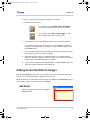
Accessing and Creating a New Patient
To start a VixWin session, you must create a new patient or select an existing
patient before acquiring images.
NOTE: You can click the Patient Folder button to access the Patient
Folder window.
To create a new patient folder:
On the menu bar:
1. Click File > Patient Folder.
2. On the Patient Folder window,
click New to enter new patient
information.
3. Enter the new patient Last
name and any other patient
information.
032-0214-EN Rev 7
5-3
VixwinPlat.book Page 4 Tuesday, August 17, 2010 2:39 PM
VixWin Platinum 2
NOTE: In order to avoid duplicate entries, VixWin displays a warning message in
case a patient’s Last name and/or Health code already exist in the
database. If the existing patient name shown is not your patient, you can
differentiate your patient from the existing patient by spelling out the
patient middle name or entering a differentiating fact in the database.
4. Click OK to enter the name in the patient’s list.
5. Click OK to open the folder for the selected patient.
Editing a Patient
Patient data can be modified at any time using the Edit button. The edit function also
prevents the user from accidentally modifying patient data. During the edit operation,
the user can confirm the changes by clicking OK or use Cancel to cancel modifications
during the edit session.
To edit a patient:
On the menu bar:
1. Click File > Patient Folder.
2. On the Patient Folder window, select the patient name to be edited and
click Edit.
3. Make the appropriate changes and click OK to accept the changes. If you
need to cancel the modifications entered during the edit session, click
Cancel.
Deleting a Patient
To remove a patient from the VixWin database, you can delete the patient folder and all
associated image files.
To delete a patient:
On the menu bar:
1. Click File > Patient Folder.
2. On the Patient Folder window,
select the patient name to be
deleted and click Delete.
3. At the Confirm Delete
window, click Yes to delete
the selected patient and all
associated images from the
database.
5-4
032-0214-EN Rev 7
VixwinPlat.book Page 5 Tuesday, August 17, 2010 2:39 PM
Operation
NOTE: Removing a patient permanently removes all records and images
associated with the patient. To restore the information, you must restore
the database from a backup.
Searching for an Existing Patient
To search for an existing
patient:
On the menu bar:
1. Click File > Patient
Folder.
2. On the Patient
Folder window, click Search.
3. In the Patient Folder
window, enter the
patient’s Last name
or patient information.
4. Click OK.
5. Click List to enter
another query and
to repeat the search
sequence.
032-0214-EN Rev 7
5-5
VixwinPlat.book Page 6 Tuesday, August 17, 2010 2:39 PM
VixWin Platinum 2
Utilities
Additional functionality
exists to conceal and
view patient names in
the patient folder.
To conceal a patient
name:
On the menu bar:
1. Click File > Patient
Folder.
2. On the Patient
Folder window,
select the patient
name to be
concealed.
3. From the menu bar on the Patient Folder window, click Utilities.
NOTE: The Utilities function enables the Conceal/Reveal functions to be toggled
On/Off.
4. Select Conceal selected patient. The patient name will not be displayed
and you will not be able to view the patient name.
5. To revive a patient, click Utilities and select Revive selected patient. The
patient name will be displayed.
Optional: To show or conceal patient names, select one of the following:
•
Show concealed patients or Hide concealed patients - Displays a list
of previously concealed patients or hides the previously concealed
patient names.
•
Show archived patients or Hide archived patients - Displays a list of
archived patient names or hides the previously stored or archived
patient names.
6. Click OK.
5-6
032-0214-EN Rev 7
VixwinPlat.book Page 7 Tuesday, August 17, 2010 2:39 PM
Operation
Creating and Managing Mounts – For Full Mouth
View
You can set up mounts at any time. You can acquire/capture new images directly into the
mount or into the new image bin. The acquired/captured images can be arranged in
mounts and the mounts are organized in the patient folder. Mounts are used to
designate the specific location of the teeth X-rayed.
Creating Mounts
NOTE: To access the mount screens, you must be in the Full Mouth view.
All images that are in the new image bin can be moved into a mount. Select a
mount and then drag each image into its new position.
If you are using the Direct capture/scan into the mount option, you can
rearrange the images if they are not in the correct position.
To create a new mount:
From the menu bar:
1. Click View and select Full Mouth.
NOTE: VixWin opens in the mode it was in when VixWin was exited last.
2. In the Full Mouth view, to display the Quick Mount Selector
window, click the New Mount icon.
Or click Full Mouth
Series > New Mount.
The Quick Mount
Selector window is
divided into two
sections:
•
Most used templates (includes the four templates most commonly
used), and
•
Other templates (contains all the predefined mounts).
You can customize the Most used templates section by dragging templates
from the Other templates section into the Most used templates section.
032-0214-EN Rev 7
5-7
VixwinPlat.book Page 8 Tuesday, August 17, 2010 2:39 PM
VixWin Platinum 2
3. Select one of the template mounts: Choose from the Most used templates
choices, or for additional mount templates, scroll through the Other
templates choices.
NOTE: As you scroll through the templates listed, the template is highlighted and
the name is displayed on the window title bar.
4. Click OK to
open the
selected
mount
template. The
empty mount
automatically displays
with the
current date
displayed on
the tab.
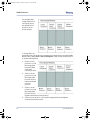
Current mount
template
Date tabs
New image bin
Status Bar
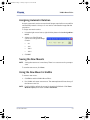
5. Right-click on
the Date tab to open the mount information
window. If necessary, replace the date. Add
notes applicable to the mount. The notes will
only print when File > Print > Mount or
File > Print > Screen are used.
6. All images that are in the
new image bin can be
moved into a mount. Select
a mount and then drag each
image into its new position.
When you drop an image
over an existing image,
images will swap position.
All modifications are
automatically saved. You do
not need to manually save
your changes.
5-8
032-0214-EN Rev 7
VixwinPlat.book Page 9 Tuesday, August 17, 2010 2:39 PM
Operation
NOTE: Using DenOptix
If the Load Sequence has been set in the Mount Editor, the images can be
captured directly into the mount. Otherwise the images go directly into the
new image bin.
Select Options > Preferences and click on the Full mouth tab:
•
Direct capture/scan into the mount – Check this box if you want to
have images captured directly into the mount.
•
New mount at each DenOptix Scan – Check this box if you want to be
prompted to select a new mount before each scan.
When you are ready to create a new mount, click Scanner, if prompted,
select a mount from the mount list, and scan your images. Depending
on the option selected, the images go directly into the mount or into the
new image bin.
NOTE: Using Visualix or KaVo Dig eXam sensors
A green highlight will indicate the position where the next image will be
located. The green shade will automatically advance to the next position
after the image is acquired.
7. Continue to the next patient or exit from the mount screen.
Deleting Mounts
To delete a mount:
On the menu bar:
1. Click Full Mouth
Series > Delete
Mount.
2. To confirm the deletion, click
Yes.
NOTE: The images are not deleted.
They are moved to the new
image bin at the bottom.
032-0214-EN Rev 7
5-9
VixwinPlat.book Page 10 Tuesday, August 17, 2010 2:39 PM
VixWin Platinum 2
Customizing Mounts
Occasionally, a new mount template may be needed. Refer to “VixWin Mount
Editor” on page 8-1.
Acquiring Images
Any image can be acquired, then selected for treatment, analysis, and saving. When the
currently acquired image is selected, it is highlighted by a title bar or frame of a different
color.
Acquiring Images with DenOptix
Scanner Setup
To acquire images with DenOptix, refer to the DenOptix user manual for
scanning information.
Acquiring Images with DenOptix QST
For complete DenOptix QST information, refer to the DenOptix QST user manual.
Scanner Setup
Load the carousel into the scanner and close the DenOptix QST top cover.
Operation
NOTE: When VixWin is running, it checks whether a DenOptix QST scanner is
properly connected, interfaced, and powered by running an initializing
routine, lasting approximately 5 seconds.
To acquire/capture images with DenOptix QST:
1. Select the DenOptixQST button on the VixWin toolbar. The system
will automatically detect the carousel type and the plate selection
screen will appear.
2. Select the plate positions you want to scan or use a predefined template
and click Scan. Wait until the end of the process. Once the scanning is
completed all images will appear in VixWin.
5-10
032-0214-EN Rev 7
VixwinPlat.book Page 11 Tuesday, August 17, 2010 2:39 PM
Operation
NOTE: To start scanning imaging plates with the DenOptix QST, follow the
procedure in the DenOptix QST manual.
Acquiring Images with Visualix/GXs-S HDI/USB,
GXS-700, or Visualix eHD Sensor
NOTE: No connection or synchronization is needed between the X-ray generator
and the CCD sensor. After the detection of the X-ray image by the sensor,
VixWin will automatically display the image on the screen (unless you have
disabled the sensor). You can immediately examine the image, or use any
of the various features for enhancement and analysis.
To capture a new X-ray image with the sensor:
1. Position the sensor in the patient’s mouth using the paralleling technique.
2. Position and aim the device according to the recommended manner for the
dental X-ray source. Refer to the sensor product User Manual.
3. Take an exposure.
Acquiring Images with the KaVo Dig eXam Sensor
NOTE: The KaVo Dig eXam sensor acquires 16 bit images only.
To acquire/capture images with KaVo Dig eXam Sensor, refer to the KaVo Dig
eXam user manual.
Acquiring Images with Orthoralix DDE/DPI
To acquire/capture images with Orthoralix DDE/DPI, you only need to properly
position the patient and take the X-ray exposure. VixWin will automatically
display the image on the screen.
You can immediately examine the image or use any of the various features to
enhance and analyze the image.
Refer to the Orthoralix DDE/DPI user manual for more information.
032-0214-EN Rev 7
5-11
VixwinPlat.book Page 12 Tuesday, August 17, 2010 2:39 PM
VixWin Platinum 2
Assigning Images to Patients
The window in which
images are assigned to
patients is the Save Image
window:
NOTE: Images are not
saved until the
Save button in
this window is
clicked.
NOTE: The maximum
number of
images which
can be saved
for each
patient is 256
in Standalone mode and 4096 in Bridge mode.
NOTE: For an image that has been saved,
the first time you switch from
Windows Layout view to Full Mouth
view, this window will display:
Click Yes to have VixWin automatically place the images in a mount that you
will be prompted to select. If you do not need to use a mount, click No. To
manually create a mount, refer to “Creating and Managing Mounts – For Full
Mouth View” on page 5-7.
5-12
032-0214-EN Rev 7
VixwinPlat.book Page 13 Tuesday, August 17, 2010 2:39 PM
Operation
To assign a newly acquired image or image set to a patient:
1. In Windows Layout view,
for an image set, select File > Save All Images
or click the corresponding button on the toolbar.
for an image, select File > Save Image or click
the corresponding button on the toolbar.
2. The image(s) are now saved with the patient that is currently selected.
In standalone mode only, the image(s) can be reassigned to a different
patient or to a new patient. To reassign to a new or different patient, click
the Patient button.
3. From the patient folder select the patient or create a new patient to which
the image(s) should be assigned. Click OK.
4. When reassigning images to a different patient or to a newly selected
patient, a dialog box displays asking, “Are you sure you want to move this
image to the newly selected patient?” Click Yes.
5. To reassign the images to the original patient, click the Patient button and
select the original patient from the patient list.
Adding Associated Data to Images
With the Save Image window open, it is possible to add notes, change the image file
format, and associate the image to a specific tooth position.
When all additions and changes have been made, click Save on the Save Image window.
(If you need to cancel out of the image, click Cancel.)
Add Notes
Enter any image information in the Image
notes text field.
032-0214-EN Rev 7
5-13
VixwinPlat.book Page 14 Tuesday, August 17, 2010 2:39 PM
VixWin Platinum 2
Change Image File Format or Image Type Parameters
If desired select a different image file format or the image type parameter.
NOTE: To change the default image file format,
select Options > Preferences > Database and
then select a different format.
Assign Tooth Location
1. To select the location of a tooth, click the tooth in the tooth chart area or
select one of the bitewing positions:
•
BWRI – Bitewing Right Incisor
BWLI – Bitewing Left Incisor
•
BWRC – Bitewing Right Canine
BWLC – Bitewing Left Canine
•
BWRM – Bitewing Right Molar
BWLM – Bitewing Left Molar
2. The tooth identification number is displayed.
NOTE: It is not necessary to assign an image to a
tooth position.Tooth assignment is not used
with panoramic X-ray, cephalometric X-ray, or
camera images.
Manage X-ray Dose Setting
1. To manage X-ray dose settings used
to acquire the image or DICOM
specific dataset information, click
Dataset. The Image Dataset window
will display.
2. At the Image Dataset window, click
the Image type arrow and select one
of the following:
5-14
•
None
•
IntraOral
•
Panoramic
•
Cephalometric
032-0214-EN Rev 7
VixwinPlat.book Page 15 Tuesday, August 17, 2010 2:39 PM
Operation
NOTE: If None, Panoramic, or Cephalometric was selected, you will not be able to
select the Positioner Type.
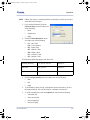
3. If you selected IntraOral, click the
Positioner Type arrow and select one
of the following:
•
None
•
Cephalostat
•
Rigid
4. Click the Patient Orientation arrow
and select one of the following:
•
L\F – Left \ Feet
F\A – Foot \ Anterior
•
R\F – Right \ Feet
A\F – Anterior \ Feet
•
R\H – Right \ Head
P\F – Posterior \ Feet
•
A\L – Anterior \ Left
The following object tags apply to the above list:
IntraOral / Bitewing
L\F, P\F, A\L, A\F, R\F
Default L\F
Panoramic
R\F, L\F, F\A
Default L\F
Cephalometric
L\F, F\A, R\F, A\F
Default L\F
5. Click the Image Laterality arrow and select one of the following:
•
Both
•
Left
•
Right
6. To view Patient, Series, Study, or Equipment status information, click on
the appropriate tab. No user information is entered on these tabs.
7. To add X-ray attributes, click the LogBook tab and enter the following:
•
X-ray time (ms)
•
X-ray current (mA)
•
X-ray voltage (kV)
•
X-ray dose (μGy)
032-0214-EN Rev 7
5-15
VixwinPlat.book Page 16 Tuesday, August 17, 2010 2:39 PM
VixWin Platinum 2
8. If you want to save the settings as the default setting, select the Save as
Default values for the image type “...” checkbox.
9. To use the driver information, select the Always use information from driver
checkbox.
10. Click OK to accept the values and to exit the Image Dataset window.
NOTE: If you click Cancel, the dataset
information will not be saved.
Treating and Analyzing Acquired Images
NOTE: You can always undo
the automatic and
manually applied
treatments by using
the Edit > Undo
treatments function.
This functionality
restores the original
appearance of the
image. The Undo
function removes the
last applied
treatment only.
You can easily treat and analyze images to enhance views. However, an accurate image
rendition is best for analysis.
To treat and analyze new X-ray images in Windows Layout or Full Mouth view:
5-16
032-0214-EN Rev 7
VixwinPlat.book Page 17 Tuesday, August 17, 2010 2:39 PM
Operation
1. Using the right mouse button, right-click the
image to access functions such as the Magnify,
Spotlight, Annotation Toolbox, Notes, Image
Dataset, Tooth Chart, Grayscale Enhance,
Optimizer, and Set Optimizer. The Full Mouth
version includes an additional command, Fit to
Screen/Return to Mount.
NOTE: Refer to “Assigning Images to Patients” on
page 5-12 for Image Dataset and Tooth Chart
information.
You can also click one of the following on the main menu:
•
Tools - Selections include Magnify, Zoom, Fit to Screen, Colorize,
Isodensity, Gray Section, and Histogram.
NOTE: To retain detail discernment, do not over-zoom images. The detection of
diagnostic information is at its best when a moderate magnification factor
is used. The magnifier allows you to enlarge a part of an image with
enhanced contrast.
•
Image - Selections include Rotate, Flip, Mirror, Reverse, Equalize,
Grayscale Enhancement, Soft Tissue Filter, Emboss, Sharpen, Smooth,
Despeckle, Optimizer, Set Optimizer, and Spotlight.
•
Annotations - Selections include Annotation Toolbox (the toolbox will
display), Show/Hide Marks, Select Mark, Mark Properties, Delete Mark,
Notes, Angle Measurement, Length Measurement, and Area Measurement.
NOTE: Annotations can also be added on top of the image for easier case
presentation. All major functions can be executed from the toolbar and
sidebar.
2. Complete the appropriate image treatments.
3. Save the image. If
in Full Mouth
view, the system
will automatically
save the image(s).
032-0214-EN Rev 7
5-17
VixwinPlat.book Page 18 Tuesday, August 17, 2010 2:39 PM
VixWin Platinum 2
NOTE: In Windows Layout view, images can be cleared from the
screen with the Edit > Close Image or Edit > Close All
Images functions.
NOTE: You can also export and import images from VixWin. The most common file
formats are supported, such as BMP, TIFF, JPEG, JFIF, PCX, and TGA. Another
way to transfer image files to and from another program is by using the Copy
and Paste functions in the Edit menu or using the VixWin Platinum shortcut
keys (Ctrl+C for copy, Ctrl+V for paste as X-ray image, Ctrl+P for paste as a
color image).
Annotations
The Annotations menu allows you to place annotations directly onto the image
and to hide or show them when needed. Any annotations made will be saved
with the image. If you print the image, the annotations will be printed with it. In
addition to annotations, you can measure an angle in the image, measure the
length of an object in the image, and measure an area of the image.
To use annotations:
1. On the menu bar, click Annotations and select Annotations Toolbox.
2. Use any of the following tools (a description is shown with the toolbox) to
place arrows, text, measurements or outlines around objects directly on the
image.
Select Mark
Hollow Rectangle
Highlighter
Straight Line
Typed Text
Attach A Note
Freehand Line
Text Stamp
Hollow Ellipse
Hollow Polygon
Polyline
Length Measurement
5-18
Filled rectangle
Arrow
Filled Ellipse
Filled Polygon
Hide/Show Marks
Angle Measurement
032-0214-EN Rev 7
VixwinPlat.book Page 19 Tuesday, August 17, 2010 2:39 PM
Operation
3. If you need to add text
notes to store in the
image database, but do
not need the annotations to display on the
image, use the right
mouse button to rightclick the image. Select
Notes from the menu.
4. Enter the notes and
click OK when
complete.
Angle
To determine an angle:
Open or select the image.
1. On the menu bar, click Annotations and select Angle Measurement.
2. Click the areas on the image to determine the angle. As you move over the
image, VixWin automatically calculates and displays the angle of the area
selected.
Length
NOTE: For greater precision in measuring, refer to the section titled Length
Calibration.
To determine a length:
Open or select the image.
1. On the menu bar, click Annotations and
select Length Measurement.
2. Click two or more points on the image to
measure the distance between the
points. The Total length is displayed.
3. If desired, enter a new Magnification
factor in the Length Measurement
window. A new magnification factor will
change the Image Size (mm). This affects the new length measurement.
NOTE: The current Image size (mm) is shown on the Length Measurement window.
•
To measure additional distances, click Clear to discard the previous
length measurement before starting the next measurement.
4. When finished, click Exit to close the window.
032-0214-EN Rev 7
5-19
VixwinPlat.book Page 20 Tuesday, August 17, 2010 2:39 PM
VixWin Platinum 2
Length Calibration
For higher measurement precision, it is possible to calibrate the image on an
object of known dimensions within the image.
With the image selected:
1. Click Annotations and select Length
Measurement (or Area Measurement) if
the window is not already open.
NOTE: The Calibrate button is provided in the
Length Measurement window and in the
Area Measurement window. The steps
provided below are the same regardless of from which window the
Calibrate button is clicked.
2. Click Calibrate to open the Calibration
window.
3. Select two points on the image of a known
distance. Enter the length corresponding to
the selected segment (mm) in the text field.
4. Click OK to accept the new length
calibration. The Calibration window will
close allowing you to make a new length
measurement.
NOTE: After calibration, the image dimensions are real and the Magnification
Factor gets set to 1.0. No Magnification Factor correction is applied to the
calibrated image.
5. Click Exit to close the Length Measurement (or Area Measurement)
window.
Area Measurement
NOTE: For greater precision in measuring, refer to the section titled Length
Calibration.
To determine the area size:
1. Open or select the image.
2. On the menu bar, click Annotations and
select Area Measurement.
3. Select the points to define the area
contour to measure on the image.
5-20
032-0214-EN Rev 7
VixwinPlat.book Page 21 Tuesday, August 17, 2010 2:39 PM
Operation
4. To calculate the perimeter of the area, click Calculate. The total area
measurement is displayed.
•
If desired, enter a new Magnification factor in the Area Measurement
window. A new magnification factor will change the Image Size (mm).
This affects the new area measurement and calculations.
NOTE: The current Image size (mm) is shown on the Area Measurement window.
•
To measure additional areas, click Clear to discard the previous area
measurement before starting the next measurement.
5. When finished, click Exit to close the window.
Tools
The Tools menu provides selections to magnify and treat images.
The Magnify feature, available on the Tools menu, enables you to over-zoom
image details and determine if additional image treatment is needed. The size
of the magnified area is defined in the size field of the Magnify window, either
by using the scroll arrows or by manually entering a number.
We recommend that you do not magnify images to gain better detail
discernment. The detection of diagnostic information is best when a moderate
magnification factor is used.
Magnify
To magnify and view an area of an image:
On the menu bar:
1. Click Tools and select Magnify or right-click on
the selected image and select Magnify.
2. Enter the magnification settings:
•
To set the view area size (number of pixels),
move the slider control to the left
(decrease) or to the right (increase), or enter
a number in the Size field.
•
To set the magnification power, click the Magnification arrows up
(increase) or down (decrease).
•
To set the type of view, choose one of the following:
•
Equalize - Used to show or to highlight morphological
structures in the image.
NOTE: If you only want to apply local equalize, you can also use
the Spotlight function.
032-0214-EN Rev 7
5-21
VixwinPlat.book Page 22 Tuesday, August 17, 2010 2:39 PM
VixWin Platinum 2
•
Reverse - Converts negative (black) into positive (white) and
vice versa.
•
Normal - Magnifies the selected area without enhancing the
view.
3. Click on the image and move the mouse to move to the area to be viewed.
4. Close the Magnify window.
Image
The Image menu provides selections to rotate, enhance, and treat images. Four
different orientations can be assigned to each image position.
To modify the acquisition sequence or the rotation of a mount, refer to
“Customizing Mounts ” on page 5-10.
Spotlight
The Spotlight, available on the Image menu, enables light to optimize image
viewing capability.
To spotlight images:
On the menu bar:
1. Click Image and select Spotlight or use the right
mouse button, and right-click the image, then
select Spotlight.
2. Move the Spotlight slider control to the left (decrease) or to the right
(increase) to define the size of the spotlight area.
3. To use the Spotlight feature, click on an image and then move the mouse
over the area to spotlight.
4. Close the Spotlight window.
5-22
032-0214-EN Rev 7
VixwinPlat.book Page 23 Tuesday, August 17, 2010 2:39 PM
Operation
Grayscale Enhance
The Grayscale Enhance,
available on the Image menu, Gamma
enables easier and faster
slider
image treatment to optimize
image contrast and image
quality.
To use the grayscale enhance
feature:
LL%
slider
UL%
slider
On the menu bar:
1. Click Image > Grayscale
Enhance.
2. Enter the enhancement
settings.
•
To set the Gamma value, move the slider control up (increase) or down
(decrease), or enter a value.
NOTE: The gamma value indicates the Gamma red curve (concave for gamma
greater than 1 and convex for gamma less than 1). The level of X-ray
exposure can be significantly enhanced by adjusting the Gamma value.
•
To set the LL% (lower level), enter a value.
•
To set the UL% (upper level), enter a value.
NOTE: The LL (lower level) and the UL (upper level) indicate the grayscale value
used to improve image quality and contrast.
•
To adjust the brightness of the image, move the Brightness slider
control to the left (decrease) or to the right (increase).
•
To adjust the contrast of the image, move the Contrast slider control to
the left (decrease) or to the right (increase).
3. To reset the values and start over click the Default button.
4. To accept the enhancement settings, click OK or, to close and discard, click
Cancel.
032-0214-EN Rev 7
5-23
VixwinPlat.book Page 24 Tuesday, August 17, 2010 2:39 PM
VixWin Platinum 2
Soft Tissue Filter – For Cephalometric Only
The Soft Tissue Filter, available on the Image menu, enhances the
quality of cephalometric images and provides detailed bone
information. The filter enables you to automatically regulate the
gamma filtering across the image by enhancing visibility of the
patient’s profile while improving the detail recognition in the bone area.
The Soft Tissue Filter works only on cephalometric L/L, and A/P-P/A images. If
the image is acquired directly with the Orthoralix DDE, the image will be
automatically recognized as cephalometric and the Soft Tissue Filter will be
immediately ready for use. If the image is imported, it needs to be saved as
cephalometric. Switch to Windows Layout and click File > Save Image then
choose Cephalometric from the selections under Image type in the Save Image
window.
To enhance images with the Soft Tissue Filter:
1. On the menu bar, click
Image and select Soft
Tissue Filter or click
the Soft Tissue Filter
on the Sidebar. The
Soft Tissue Filter
window will display
and the Soft Tissue
Filter will be applied
to the image with the
default values.
2. Make the Soft Tissue
Filter adjustments:
•
To adjust the Gamma level of the hard tissues zone (minimum of 0.1,
maximum of 0.7), move the Bone slider control to the left (decrease) or
to the right (increase).
•
To adjust the Gamma level of the tissues zone (minimum of 0.8,
maximum of 3.0), move the Soft Tissue slider control to the left
(decrease) or to the right (increase).
•
To adjust the transition level between hard and soft tissues (minimum
of 0.1, maximum of 0.5), move the Transition slider control to the left
(decrease) or to the right (increase).
•
To adjust the Gamma level of the overall image (minimum of 0.20,
maximum of 2.00) move the Gamma slider control to the left
(decrease) or to the right (increase).
3. Click OK or click any of the default buttons:
5-24
032-0214-EN Rev 7
VixwinPlat.book Page 25 Tuesday, August 17, 2010 2:39 PM
Operation
•
Factory default – Sets to the Gendex default parameters (bone = 0.25;
soft tissue = 1.50; transition = 0.20).
•
Default – Sets to the default parameters set by the user (the Gendex
default if no change in the default values has been made by the user).
•
Save as Default – Saves the current settings as the default for the Soft
Tissue Filter.
NOTE: When the cephalometric image has been displayed on the screen, it can be
filtered with the Soft Tissue Filter by clicking Soft Tissue Filter on the sidebar
and/or in the toolbar.
If not already present in the sidebar or toolbar, the Soft Tissue Filter button
can be added by selecting Options > User Interface on the menu bar.
Optimizer
The Optimizer, available on the Image menu, is an advanced imaging
filter. The Optimizer enhances the image quality of an X-ray image by
highlighting morphological details and providing sharpness to the image.
You can easily apply the Optimizer filter: Select the image and click the
Optimizer button on the Sidebar.
To revert to the non-filtered image, click the Optimizer button again.
To make changes to the Optimizer filter settings:
1. Using the right mouse button, right-click the image and select Set
Optimizer or, with the image selected, press the space bar on the keyboard.
2. Refer to the following section to change Optimizer filter settings.
032-0214-EN Rev 7
5-25
VixwinPlat.book Page 26 Tuesday, August 17, 2010 2:39 PM
VixWin Platinum 2
Set Optimizer
The Set Optimizer, available on the Image menu, is an advanced imaging filter
that allows you to adjust image parameters. The image parameters are Detail,
Intensity and Noise Reduction.
To set the Optimizer:
1. Using the right mouse button, right-click the
image and select Set Optimizer to open the
Optimizer filter settings toolbox or click Image >
Set Optimizer.
2. Make the Optimizer adjustments:
•
To adjust the sharpness of the image,
move the Detail slider control to the left
(decrease) or to the right (increase).
•
To adjust the intensity of the image, move
the Intensity slider control to the left (decrease) or to the right
(increase).
•
To adjust the level of reduction in noise (the amount of graininess in
the image), move the Noise Reduction slider control to the left
(decreases) or to the right (increase).
NOTE: After pressing the Enter key (or clicking OK), the only way to cancel the new
settings is to right-click on the image and select Optimizer.
3. Click OK or press Enter on your keyboard to see the filters applied on the
image. To reject the new settings, click Cancel in the Optimizer filter
settings toolbox.
NOTE: You can also change the default values of Detail, Intensity, and Noise
Reduction by setting your new preferred values and clicking Save as
Default. You can always go back to the original default values by clicking
Gendex Default.
The Optimizer has different default settings depending on the image source
(Orthoralix, DenOptix, or Visualix).
5-26
032-0214-EN Rev 7
VixwinPlat.book Page 27 Tuesday, August 17, 2010 2:39 PM
Operation
Printing Images
Windows Layout View
To print images:
1. In Windows Layout (View > Windows Layout), click File and then select one
of the following:
•
•
Load Images – provides printing for more than one image.
•
Select Status or Browser mode.
•
Select the images to be printed (a green check mark is
displayed on each selected image).
•
Click Print.
Print – allows printing of the currently displayed image.
2. Click the Setup tab.
3. If more than one image is
displayed, select the number of
images you want to print per page
from the arrow selection box.
4. Select the checkbox for Use full
page or Center on page:
•
Use full page - Resizes the
image in order to cover the
whole page.
•
Center on page - Centers the
image on the page.
NOTE: The patient name, date, time of
capture, notes and an indication of that an image is an original will be
printed (unless Remove Margins and Text is selected).
5. If desired, select the checkbox to remove margins and text: the selection
Remove Margins and Text removes all margins and text and prints only the
image.
6. Select the print orientation: Portrait or Landscape.
7. When printing a single image, if you did not select Use full page, select the
Image Scale % to adjust the image size.
NOTE: If the entire image cannot be printed (due to the paper size), the image is
cropped around the paper center. A warning message will be displayed.
8. To select a different printer, click Printer and select the appropriate printer.
9. Click Print. If you need to cancel the print operation, click Cancel.
032-0214-EN Rev 7
5-27
VixwinPlat.book Page 28 Tuesday, August 17, 2010 2:39 PM
VixWin Platinum 2
Notes
To add a note to be printed only with the
current printout:
1. Click the Notes tab and enter the
note.
2. When more than one image is
being printed, use the Next and
Previous buttons to switch or scroll
between images.
To add a note that will be printed each time the image is printed:
•
Right-click the image and select Notes, or select the image and
click the Notes button on the status bar.
Full Mouth View
Windows Layout and Full Mouth view have the same print window. The image
shown in the print window will correspond to the image on the screen.
To print images in Full Mouth:
On the menu bar:
1. Click File > Print.
2. Select the print mode:
•
Screen - Prints a screen-capture image (the mounted image as seen on
the screen).
•
Mount - Prints the full mount in high resolution by creating a single
high resolution image.
•
Selected images - Prints the images you select and allows you to
choose the number of images printed per page.
3. Click the Setup and Notes tab, make the appropriate selections, and then
click Print.
5-28
032-0214-EN Rev 7
VixwinPlat.book Page 29 Tuesday, August 17, 2010 2:39 PM
Operation
Loading Patient Images – For Windows Layout
View
You can load patient images when you have patient images for an existing patient.
You must be in Windows Layout (View > Windows Layout) view to load patient images.
The Load images window is not available in Full Mouth view as images are automatically
displayed.
NOTE: You can also click the Load Images button to access the Load
Images window.
To load patient images:
1. On the menu bar:
2. Click File > Load images to view the thumbnails of any images saved to the
patient.
3. In the Load images window, make sure you are in the appropriate Status or
Browser window. If the Browser button is displayed, then you are in the
Status window. You can click Browser/Status to toggle between the Status
and Browser window.
Load Images – Status Mode
NOTE: You must be in Status mode to Modify, Export, Print, Email, or Delete
images. The default load page will appear when you access Load images.
To change the default load page (Status Mode), click Options >
Preferences > Settings > Image folder layout.
To view, move, and modify image thumbnails in Status view:
1. In the Load images window,
preview thumbnails of saved
images that are arranged
anatomically according to the
tooth association. The thumbnails of images without tooth
associations are displayed in
the lower part of the window.
The most recent image will
appear to the far left corner of the Load images window.
2. To change the position of a thumbnail on the mount, drag the thumbnail to
the desired position.
3. To browse through all images, use the scrollbar and select one or more
images by clicking on the image. A green √ indicates the selected image(s).
032-0214-EN Rev 7
5-29
VixwinPlat.book Page 30 Tuesday, August 17, 2010 2:39 PM
VixWin Platinum 2
4. Using the right mouse button, right-click a thumbnail to open and modify
the notes associated with the image.
5. Click any of the following buttons to:
•
Delete – Deletes the last selected image (image with the eye symbol)
from the VixWin database.
•
Modify – Allows changes and additions to the notes and tooth number
associated to the image.
•
Print – Prints all selected images (images with the green check mark).
This will open the print dialog box.
•
Email – Emails all selected images (images with the green check
mark).
•
Browser – Switches from one modality to another.
•
Export – Exports the selected images.
NOTE: To enable the child teeth list, click Options > Preferences > Teeth.
6. Click OK. The load page will be closed and all selected images will be
opened.
Load Images – Browser Mode
NOTE: You must be in Browser mode to Modify, Export, Print, Email, and Delete.
The default load page will appear when the Load images window displays.
To change the default load page, click Options > Preferences > Settings >
Image folder layout.
To view and modify image thumbnails in Browser view:
1. In the Load images window, preview thumbnails of saved images (up to 12
images will be displayed) that are arranged sequentially. The most recent
image will appear in the upper left corner of the Load images window.
2. To browse through all images, use the scrollbar and select one or more
images by clicking on the image. A green √ indicates the selected image.
5-30
032-0214-EN Rev 7
VixwinPlat.book Page 31 Tuesday, August 17, 2010 2:39 PM
Operation
NOTE: An eye-shaped
mark indicates
the last selected
Image
image.
information
Associated infor- Note area
mation - image
information and
notes - is
displayed. (The
notes may have
been added earlier. New notes can be added while the window is open and
will be associated with the image the next time it is viewed.)
3. Click any of the following buttons to:
•
Delete – Deletes the last selected image (image with the eye symbol)
from the VixWin database.
•
Modify – Allows changes and additions to the notes and tooth number
associated to the image.
•
Print – Prints all selected images (images with the green check mark).
This will open the print dialog box.
•
Email – Emails all selected images (images with the green check
mark).
•
Status – Switches from one modality to another.
•
Export – Exports the selected images.
4. Click OK. The load page will be closed and all selected images will be
opened.
032-0214-EN Rev 7
5-31
VixwinPlat.book Page 32 Tuesday, August 17, 2010 2:39 PM
VixWin Platinum 2
Images
Additional functionality exists to display different types of images for viewing in
the Load images window.
To show image type:
From the Browser Load images window:
1. On the menu bar, click Images.
2. Select one of the following:
•
Show All Images – Displays all
patient images.
•
Show IntraOral – Displays only intraoral images.
•
Show Pan/Ceph and other X-rays – Displays only panoramic and
cephalometric images.
•
Show color images – Displays only color images from a dental camera.
3. Click OK.
Moving Images to and from a Different Patient
Occasionally, you may need to move images from one patient to another.
To move images from one patient to another:
1. In the Full Mouth view, drag the images into the Unassigned
Image Bin. The images will be stacked and you will see the
last image in the Unassigned Image Bin.
2. Select a new patient in VixWin or within your Practice
Management software. Move all the images from the
Unassigned Image Bin by dragging the images into the new image bin.
Emailing Images
In Windows Layout view, email allows a user to email an image or all patient images by
selecting File > Send Email. Multiple images can also be selected and emailed in the
Status or Browser load pages.
In the Full Mouth view, you can also email the entire mount or the selected
images by selecting File > Send Email or click the Email button.
5-32
032-0214-EN Rev 7
VixwinPlat.book Page 33 Tuesday, August 17, 2010 2:39 PM
Operation
VixWin uses the available PC email application to create a new electronic message with
the selected image(s) attached to it in the preselected file format. The image(s) is
emailed in the form seen on the screen, with all enhancements and annotations that the
user has added.
To define the email application that you want VixWin to use, click Start > Control Panel >
Internet Options. In the Programs tab, set the email application such as Outlook or Lotus
Notes.
NOTE: The email function can only be used if your email software (Outlook or Lotus
Notes) is properly configured on your computer. The email function does
not operate with Outlook Express, web-based email accounts such as
Hotmail, Yahoo, or any other web-based account.
032-0214-EN Rev 7
5-33
VixwinPlat.book Page 34 Tuesday, August 17, 2010 2:39 PM
VixWin Platinum 2
5-34
032-0214-EN Rev 7
VixwinPlat.book Page 1 Tuesday, August 17, 2010 2:39 PM
Chapter
6
Icons and Buttons
In VixWin icons are used on buttons to identify the purpose of the button and in windows
to provide a visual reference regarding the purpose of the window. A standard set of
icons and buttons appear on the Image Status bar.
Image Status Bar
The Image Status bar is located in the lower part of the main VixWin window.
Patient Name
Date & time
of capture
Image file Image
name & captured
file type from
Tooth
number
The right section of the Image Status bar contains icons that serve as a quick reference
for information specific to the image selected and buttons for commonly used functions
such as notes, measurements, annotations, and the image dataset.
The icons and buttons found on the Image Status bar are described here:
Icon
Button
Description
Notes
Indicates the image is an original
and saved without compression.
Indicates the image was saved
using a compressed format.
032-0214-EN Rev 7
Double-click to open the tooth
chart. The chart is used to assign
or reassign tooth numbers.
A red X in the lower left corner of
the icon indicates that a tooth
number has not been assigned to
the image.
Double-click to open the notes
window for viewing, modifying,
or adding information to the
selected image.
A red X in the lower left corner of
the icon indicates that no notes
are associated with the image.
6-1
VixwinPlat.book Page 2 Tuesday, August 17, 2010 2:39 PM
VixWin Platinum 2
Icon
Button
Description
Notes
Double-click to open the
measurement tool to measure
the length of a segment or set of
segments.
Calibration using an object of a
known size is available.
Double-click to open the
annotations toolbox.
A red X in the lower left corner
of the icon indicates that no
annotations are associated with
the image.
Double-click to open the Image
Dataset window to view or
modify the X-ray dose settings
used to acquire the image (used
in the Logbook module) and
DICOM dataset.
Buttons on the Toolbars
The horizontal toolbar (located across the top of the screen), and the vertical sidebar
(appears at the right side of the screen when an image(s) is displayed) contain buttons
for most of the tools accessible from the top menu. Buttons are not available for the
following tools:
•
Sharpen: Select from the Image menu to enhance the edges of the
selected image. Enhancing the edges results in an increase in the
graininess of the image. (The filter is a high pass spatial filter.)
•
Smooth: Select from the Image menu to apply a soft blurring filter to the
selected image. (The filter is a low pass spatial filter.)
•
Area measurement: Refer to the explanation found under the selections
available from the Annotations menu.
You may hide or customize the toolbars
separately. The customized toolbars are modespecific: Changes made to either toolbar in
Windows Layout view will not affect the toolbars in
Full Mouth view and vice versa. Use the menu
Options > User Interface to hide or show the
various tools and to choose which toolbar the
buttons will appear on.
NOTE: Choosing the Classic set of buttons
allows you to add buttons that do not match the look of the buttons
described in the chart below.
6-2
032-0214-EN Rev 7
VixwinPlat.book Page 3 Tuesday, August 17, 2010 2:39 PM
Icons and Buttons
The current set of buttons is described here:
Button
Button Name
Description
Help Contents
Click to access the Help
information.
Windows Layout
Click to switch to the
Windows Layout view.
New Mount
Click to access the Quick
Mount Selector.
Full Mouth
Click to switch to the Full
Mouth view.
Patient Folder
Click to open an existing
patient folder or add a new
patient folder.
Load Images
Click to load images.
This button is only
available in Windows
Layout view.
Save Image
Click to save the selected
image or treatments
applied to an image.
This button is only
available in Windows
Layout view.
Save All Images
For newly captured images
that have not yet been
saved, click to save all the
images.
This button is only
available in Windows
Layout view.
Close Image
Click to close the selected
image.
This button is only
available in Windows
Layout view.
Close All Images
Click to close all images.
This button is only
available in Windows
Layout view.
032-0214-EN Rev 7
Notes
6-3
VixwinPlat.book Page 4 Tuesday, August 17, 2010 2:39 PM
VixWin Platinum 2
Button
6-4
Button Name
Description
Notes
Exit
Click to exit the VixWin
application.
Rotate Left
Click to rotate the image
90° to the left
Rotate Right
Click to rotate the image
90° to the right.
Rotate 180°
Click to rotate the image
180°.
Use to properly view an
image according to the real
orientation in the mouth
(Maxillary or Mandibular).
Flip
Click to flip the image
across the horizontal axis.
Mirror
Click to flip the image
across the vertical axis.
Use to correct an image
that has been scanned
incorrectly. Mirror/flip
functionality is disabled for
images from a CCD sensor.
Reverse
Enables the conversion of
negative (black) into
positive (white) and vice
versa.
Grayscale Enhance
Click to control the entire
grayscale of the image.
Equalize
Click to enhance the image
contrast by maximizing the
use of the available
grayscale.
Use to properly view an
image according to the real
orientation in the mouth
(maxillary or mandibular).
For brightness, contrast,
and gamma.
032-0214-EN Rev 7
VixwinPlat.book Page 5 Tuesday, August 17, 2010 2:39 PM
Icons and Buttons
Button
Button Name
Description
Notes
Darker
Click to decrease the
gamma effect in order to
darken the image.
Lighter
Click to increase the
gamma effect in order to
lighten the image.
Gamma enhancements
make the radiographic
objects in a grayscale
image more readily
perceived than in an image
using a linear scale.
Annotation Toolbox
Click to open the
annotations toolbox.
Emboss
Click to enable a spatial
filter to simulate a 3D
image.
Despeckle
Click to reduce the typical
grainy or speckled
appearance of X-ray
images.
Reducing the speckled
appearance results in a
small loss in resolution.
Optimizer
Click to apply the optimizer
filter.
Default values for detail,
intensity, and noise
reduction depend on the
type of image to which the
filter is applied.
Undo
Click to undo the last
applied treatment.
Previously applied
treatments remain.
Undo treatments
Click to undo all
treatments.
Colorize
Click to assign a color to
each unique shade of gray
to produce a pseudo color
image of the selected
image.
032-0214-EN Rev 7
This function may enhance
the detection of subtle
differences in radiographic
density.
6-5
VixwinPlat.book Page 6 Tuesday, August 17, 2010 2:39 PM
VixWin Platinum 2
Button
6-6
Button Name
Description
Notes
Isodensity
Click to replace a range of
gray shades in the selected
image with a color.
The range of gray shades is
selectable. This may be
used to better visualize
areas of uniform
radiographic density.
Histogram
Click to create a histogram
showing the grayscale
range of a user-defined
rectangular area.
The rectangular area can be
the entire image or a userdefined area within an
image
Gray Section
Click to create a diagram
that shows the distribution
of gray levels along a userdefined line.
Angle
Measurement
Click to measure the angle
between a pair of userdefined segments.
The accuracy of the angle
calculation is limited due to
image projection,
magnification, and manual
point selection.
Length
Measurement
Click to measure the total
length of a segment or set
of segments.
This tool can be calibrated
using an object with a
known length. The
accuracy of the length
calculation is limited due to
image projection,
magnification, and manual
point selection.
Magnify
Click to magnify areas
within the selected image.
The user can change the
size of the area that is
magnified.
Spotlight
Click to apply the equalizer
filter to a user-defined area
within the image.
The user can change the
size of the area that is
equalized.
032-0214-EN Rev 7
VixwinPlat.book Page 7 Tuesday, August 17, 2010 2:39 PM
Icons and Buttons
Button
Button Name
Description
Zoom +
Windows Layout view: Click
to increase the zoom factor
for the selected image.
Notes
Full Mouth view: For the
selected image, click to
toggle between viewing the
image as part of the mount
view and viewing only the
image fit to the screen.
Zoom X1
Click to set the zoom factor
to 1:1.
Zoom -
Windows Layout view: Click
to decrease the zoom factor
for the selected image.
Only enabled when the
selected image is viewed at
a magnification level other
than 1:1. Available in
Windows Layout view only.
Full Mouth view: For the
selected image, click to
toggle between viewing the
image as part of the mount
view and viewing only the
image fit to the screen.
Fit to screen
Windows Layout view: Click
to fit the selected image to
the screen.
Full Mouth view: For the
selected image, click to
toggle between viewing the
image as part of the mount
view and viewing only the
image fit to the screen.
Soft Tissue Filter
Click to apply the soft
tissue filter to the selected
image.
Show/Hide Marks
Click to show/hide marks
on the selected image.
032-0214-EN Rev 7
For cephalometric images
only.
6-7
VixwinPlat.book Page 8 Tuesday, August 17, 2010 2:39 PM
VixWin Platinum 2
Button
6-8
Button Name
Description
Notes
Copy
Click to copy the selected
image.
Copies the image to the
Windows clipboard.
Paste as X-ray
image
Click to paste the image as
an X-ray image.
Both color and grayscale
images are pasted as
grayscale images.
Paste as color
image
Click to paste a color image
as a color image.
Export
Click to export the selected
image(s).
Import
Click to import an image(s).
Send Email
Click to send the selected
image(s) in an email.
Print
Click to print the selected
image on the default
Windows printer.
The Print dialog box does
not open.
Camera
Click to open the camera
window.
Window opens only when
camera driver is set to
Video for Windows or Direct
Show.
Optical Scanner
Acquire
Click to start the scan
operation for the selected
TWAIN driver.
Select File > Optical
Scanner Select to select
the driver.
DenOptix Scanner
With the driver for the
DenOptix Scanner
installed, click to start the
scan operation.
Refer to the DenOptix
Scanner user manual for
more information.
032-0214-EN Rev 7
VixwinPlat.book Page 9 Tuesday, August 17, 2010 2:39 PM
Icons and Buttons
Button
Button Name
Description
Notes
DenOptix
QuadSpeed
With the driver for the
DenOptix QuadSpeed
(scanner) installed, click to
start the scan operation.
Refer to the DenOptix
QuadSpeed user manual
for more information.
Calculator
Click to display the
Windows calculator.
Keyboard
Click to display the VixWin
keyboard icon in the top
left corner of the screen.
To display the keyboard,
click the icon.
Logbook
Click to display the
Logbook.
Installed as a separate
module, the Logbook is a
radiation dosage reporting
tool for VixWin Platinum.
CCD Sensor
Click to enable or disable
the electronics for the
Visualix Frame Grabber
sensor.
This button is enabled only
when the Frame Grabber
card for the sensor is
detected. Always disable
the sensor electronics
before moving the sensor
from one computer to
another.
SmartCeph
Click to launch the
SmartCeph program
(program must be
installed).
The SmartCeph program is
not available in the United
States or Canada.
Word Bridge
Click to launch the
Microsoft Word program.
Microsoft Word must be
installed.
(User-specified
program bridge)
Click to launch a userspecified program
(program must be
installed).
(User-specified
program bridge)
Click to launch a userspecified program
(program must be
installed).
032-0214-EN Rev 7
6-9
VixwinPlat.book Page 10 Tuesday, August 17, 2010 2:39 PM
VixWin Platinum 2
Button
6-10
Button Name
Description
Notes
(User-specified
program bridge)
Click to launch a userspecified program
(program must be
installed).
Send to PACS
Sends the selected image
to a DICOM storage PACS.
Only available if the
VxDICOM module is
installed.
Send All to PACS
Sends all displayed images
to a DICOM storage PACS.
Only available if the
VxDICOM module is
installed.
PACS Query/
Retrieve
Opens a window from
which to query and retrieve
patients and images from a
DICOM storage PACS.
Only available if the
VxDICOM module is
installed.
Print to DICOM
Prints images to a DICOM
printer.
Only available if the
VxDICOM module is
installed.
032-0214-EN Rev 7
VixwinPlat.book Page 1 Tuesday, August 17, 2010 2:39 PM
Chapter
7
DICOM DIR
Your VixWin Platinum imaging software is a DICOM 3.0 standard compliant application.
VixWin Platinum features DICOM DIR (directory), a function that allows you to import and
export images in a DICOM format and to exchange images and patient information
according to the DICOM 3.0 standard.
DICOM DIR Export
To export all studies, a patient study, or an
image for a selected patient in a format
compliant to the DICOM 3.0 protocol:
1. Select File > DICOM Export. As the
VixWin data is being loaded, the
progress of the loading process is
reported in a window similar to the
one shown here:
When completed, the window that appears displays the patients’ names.
2. Select the patient name, the study name, or the image name:
032-0214-EN Rev 7
7-1
VixwinPlat.book Page 2 Tuesday, August 17, 2010 2:39 PM
VixWin Platinum 2
To export all studies for
one patient, select the
name of the patient:
To export a study,
expand the patient
directory to see the list
of studies. Select the
name of the study:
7-2
032-0214-EN Rev 7
VixwinPlat.book Page 3 Tuesday, August 17, 2010 2:39 PM
DICOM DIR
To export an image,
expand the study
directory to see the list
of images. Select the
name of the image:
NOTE: To see the
thumbnail images, click on Options
on the menu bar and select the
checkbox Show Thumbnails.
3. Click on the Save
button.
4. In the window that
opens, browse to find the
location of the folder to
which the image(s) should
be exported:
032-0214-EN Rev 7
7-3
VixwinPlat.book Page 4 Tuesday, August 17, 2010 2:39 PM
VixWin Platinum 2
5. Click Save. A window reports the
number of images exported.
6. Click OK.
DICOM DIR Import
When DICOM images are imported, they
can be stored in the VixWin Platinum
image database. To import DICOM
databases, studies, series and images
compliant to the DICOM 3.0 protocol:
1. Select File > DICOM Import.
2. From the folder that
contains the images to be
imported, scroll to locate
and select DICOMDIR.
3. Click Open.
7-4
032-0214-EN Rev 7
VixwinPlat.book Page 1 Tuesday, August 17, 2010 2:39 PM
Chapter
8
VixWin Mount Editor
The VixWin Mount Editor is separate from VixWin Platinum. It is used to create, edit, and
delete mounts. To access the Mount Editor you must have selected a patient and be in
Full Mouth view. The following topics are discussed:
•
Customizing Mounts with the Mount Editor
•
Imaging Plates
•
Additional Mount Information.
Customizing Mounts with the Mount Editor
VixWin Platinum comes with many mounts already defined for you. You can also design
your own mounts, or modify the existing mounts, by using the custom mount feature.
To customize mounts:
1. Click Full Mouth Series > Customize
Mount.
2. After the Mount Editor
launches, click New.
032-0214-EN Rev 7
8-1
VixwinPlat.book Page 2 Tuesday, August 17, 2010 2:39 PM
VixWin Platinum 2
3. Enter the New mount name
(use a unique name) and
click OK. This name will be
displayed in the mount list.
4. Design your new custommount while in Drag Mode
by dragging the imaging
plates from the right side of
the editor. From the action menu you can:
•
Resize the plates (optional).
•
Rotate the plates (optional).
•
Move the plates as close as possible.
•
Move the entire template to upper left corner.
•
Enlarge the template to fit the screen.
•
Assign the load sequence (optional).
•
Assign the rotation (optional).
•
Assign the tooth numbers (optional).
5. Save the new mount when finished.
Imaging Plates
Imaging Plates are an important aspect of the mount mode.
Resizing Imaging Plates
To resize an imaging plate(s):
1. Click Drag Mode to toggle to the Select Mode.
2. To enlarge only one plate, select an existing imaging plate and click
Action > Image Plate > Conversion.
3. Click on the needed conversion.
4. To create a custom sized plate, click Action > Image Plate.
5. Select Action > Larger (+5%) or Action > Smaller (-%5) or use the resize plate
arrows on the right side of the Mount Editor.
6. To copy the imaging plate attributes, right-click the imaging plate that has
been resized. Select Copy Attributes or click Action > Image Plate > Copy
Attributes. To resize an additional plate with the same attributes, right-click
8-2
032-0214-EN Rev 7
VixwinPlat.book Page 3 Tuesday, August 17, 2010 2:39 PM
VixWin Mount Editor
the imaging plate. Select Paste > Height-Width (Clone) or Action > Image
Plate > Paste > Height-Width (Clone).
7. If you want to resize the mount, click the small command button under the
word resize to toggle between resize mount and resize plate. Use the resize
plate arrows on the right side of the Mount Editor.
Rotating Imaging Plates
To rotate an imaging plate:
1. Click Drag Mode to toggle to the Select Mode.
2. Right-click on the plate and select Rotate or click the
plate and click Action > Image Plate > Rotate.
Moving the Imaging Plates
To move the plates:
1. Select and drag the plate.
2. In the select mode, click the plate to move. Use the
4 directional buttons on the right side. Set the
precision from roughest to finest. To move all the
plates at the same time, select All and use the 4
directional buttons.
3. To toggle modes (Drag/Select), use the menu
toggle.
4. Make sure the mount aligns to the top left corner, as compact as possible,
with reduced gaps between plates to avoid losing space on the screen, and
consequently shrinking the images. The Drag/Select toggle is the second
most important menu item within the Mount Editor.
Deleting an Imaging Plate
Drag any unwanted imaging plate onto the recycle bin. A brief,
animated bloating will confirm the operation’s success.
032-0214-EN Rev 7
8-3
VixwinPlat.book Page 4 Tuesday, August 17, 2010 2:39 PM
VixWin Platinum 2
Additional Mount Information
Enlarging the New
Template
Use the shrink/zoom buttons to
enlarge (or reduce) the new mount in order to fit the available space.
Make sure the new mount is large enough to fit the entire space available for
larger images and better viewing.
Assign Tooth
Number
To maintain compatibility
with the Windows Layout view and especially with the Load Image dialog, a
tooth number can be assigned to a mount position. For new mounts, assign the
tooth number(s) after creating the mount. For mounts created previously, assign
or reassign the tooth number(s) after opening the mount from Mounts > Modify.
To assign the tooth number:
On the Toggle menu:
1. Select the Select Mode.
2. Using the right mouse button, right-click the imaging plate.
3. Select Assign ToothID.
4. Select the tooth number.
5. Toggle, if needed, the upper or lower arch with the 2 radio buttons on the
right side.
NOTE: You can assign multiple tooth numbers to the same imaging plate (up to 8
IDs). When completed, click OK to confirm.
6. Repeat for each imaging plate.
Assign Acquisition Sequence
When capturing images directly into the mount, VixWin loads the images into
the mount based on the sequence (Options > Preferences > Full Mouth/Direct
Capture scan). The sequence number is displayed in the empty template in
VixWin. The next sequence number is highlighted in the mount.
To assign or edit the sequence:
8-4
032-0214-EN Rev 7
VixwinPlat.book Page 5 Tuesday, August 17, 2010 2:39 PM
VixWin Mount Editor
1. Click Action > Show-Set > Set Load Sequence
or click the green diamond next to the
Recycle bin.
2. A large number 1 will overlay the recycle bin,
indicating the sequence number that needs
to be assigned.
3. Click the imaging plate that will be first in
the sequence.
4. A large number 2 will then appear. Click the imaging plate that is to be next
in the sequence.
5. Repeat until all the imaging plates are assigned a sequence number. Click
the large number to stop the sequence assignment.
6. Click Save to save the mount.
NOTE: When creating a new mount, the sequence is initially defined by the order
in which the new plates are dragged.
Examples with DenOptix scanner:
With the DenOptix carousel, the sequence is defined by the imaging plate
position on the carousel.
To scan 4 bitewings, we recommend loading the 4 imaging plates in the
right order in the positions 1, 2, 3, and 4 of the carousel.
Assigning Load Sequence
By default, images are loaded into the mount positions starting with the lowest
numbered carousel position, followed by the next lowest numbered carousel
position, and so on until all the carousel positions have been loaded into mount
positions.
032-0214-EN Rev 7
8-5
VixwinPlat.book Page 6 Tuesday, August 17, 2010 2:39 PM
VixWin Platinum 2
For example, with
image plates in four
carousel positions,
the default mount
positions are as
shown at right:
To change the load
sequence to the one shown in the sample mount shown below, using the VixWin
Mount Editor, select Action > Set Load Sequence. Click on each mount position
to set the new sequence.
1. Click on mount
position 1 to load
the image plate
from the lowest
numbered
carousel position.
2. Click on mount
position 4 to load
the image plate
from the second
lowest numbered
carousel
position.
3. Click on mount
position 2 to load
the image plate
from the second
highest numbered carousel position.
4. Click on mount position 3 to load the image plate from the highest
numbered carousel position.
8-6
032-0214-EN Rev 7
VixwinPlat.book Page 7 Tuesday, August 17, 2010 2:39 PM
VixWin Mount Editor
Assigning Automatic Rotation
Assigning automatic rotation ensures that all images acquired in a mount will be
automatically rotated so that you do not need to orientate the image after the
acquisition.
To assign automatic rotation:
1. Using the right mouse button, right-click the plate and select Assign Orientation.
2. Select one of the following
options according to the image
rotation.
•
0%
•
90%
•
180%
•
270%
3. Click OK.
Saving the New Mounts
NOTE: Saving the new mount is mandatory. There is no autosave and no prompt to
save.
To save the new mount, click Save.
Using the New Mount in VixWin
To create a new mount:
1. Click Exit to exit the VixWin Mount Editor.
2. Run VixWin and create a new mount. The new template will be at the top of
the Other mounts list.
NOTE: If still in VixWin, refresh the mount list by exiting Full Mouth. Click View >
Windows Layout, then return to View > Full Mouth.
032-0214-EN Rev 7
8-7
VixwinPlat.book Page 8 Tuesday, August 17, 2010 2:39 PM
VixWin Platinum 2
Modifying a Mount
1. Click Full Mouth Series > Customize
Mount.
2. After the Mount Editor launches, click
Load or click Mounts > Modify and
select an existing mount from the list.
3. Add, delete, move and resize any of
the imaging plates.
4. When completed, click Save to save
the modified mount with a new
name.
Deleting an Existing Mount
To delete a mount:
1. Click Mounts > Delete.
2. Select a mount from the list. Click
Yes to confirm the deletion.
Advanced Functions
You can align and resize image plates using the Copy and Paste functions:
When creating custom sized imaging plates, the plate attributes can be copied
and pasted to another plate.
To use create custom image plates:
1. Select the Select Mode (Important!)
2. Using the right mouse button, right-click the imaging plate, and select Copy
Attributes. Right-click the imaging plates to modify and select Paste:
8-8
•
Height-Width to assign the same size
•
Top Align to align both imaging plates with the top of the first one
032-0214-EN Rev 7
VixwinPlat.book Page 9 Tuesday, August 17, 2010 2:39 PM
VixWin Mount Editor
•
Left Align to align both imaging plates with the left side of the first one
•
Swap Positions to swap the plates
•
Tip 1: Use the Copy and Paste buttons to quickly copy and paste the
height and width.
•
Tip 2: Use the Copy and Top or Left buttons to quickly align imaging
plates.
032-0214-EN Rev 7
8-9
VixwinPlat.book Page 10 Tuesday, August 17, 2010 2:39 PM
VixWin Platinum 2
8-10
032-0214-EN Rev 7
VixwinPlat.book Page 1 Tuesday, August 17, 2010 2:39 PM
Chapter
9
VixWin Logbook
Installed as a separate module, VixWin Logbook is a radiation dosage reporting
tool for VixWin Platinum. It can be used to display and print reports of x-ray
parameters (kV, mA, msec, and dose) for selected patients’ images.
Open the Logbook
To open the Logbook:
Click the Logbook button or choose Tools > Logbook.
VixWin Logbook
opens in its own
window.
An alphabetical list
of patients is
displayed on the
left-hand side of the
Logbook window.
The patient currently
active in VixWin
Platinum is selected
by default.
A list of images belonging to the selected patient(s) is displayed on the righthand side of the Logbook window.
Using the Logbook
Search for patients by entering the start of their last or first name in the text
boxes provided. It is possible to select more than one patient by checking
multiple patients in the list. Click all to see the complete list of images for all
patients.
The list includes only those images that meet the criteria defined under List
Options. Images can be filtered by date ranges and image type.
•
If Show real x-rays only is checked then only x-ray images acquired from
known Gendex devices are displayed.
032-0214-EN Rev 7
9-1
VixwinPlat.book Page 2 Tuesday, August 17, 2010 2:39 PM
VixWin Platinum 2
•
Successively clicking Was Pregnant filters images for pregnant/nonpregnant/all patients.
A report of the images of interest can be printed to a standard Windows printer
by clicking the Print button. The print will take a long time if many images are
displayed.
Configure X-ray Parameters
X-ray parameters are saved by VixWin together with the images. To configure or
set x-ray parameters from within VixWin, right click an image, choose Image
Dataset from the pop-up menu, then select the Logbook tab.
9-2
•
Some GxPicture products can pass
x-ray parameters to VixWin through
GxPicture. Select Always use
information from driver on the
Logbook tab to enable this
functionality.
•
The kV, mA, msec, and dose can be
set for the selected image in the
Image Dataset dialog box. To save
the entered parameters as default
values for the image type
(i.e. intraoral, panoramic, cephalometric, etc) select Save as default values
for image type ‘...’ on the Logbook tab.
•
To associate the default values to new images, select Always use default
values on the Logbook tab.
032-0214-EN Rev 7
VixwinPlat.book Page 1 Tuesday, August 17, 2010 2:39 PM
Chapter
10
DAP (Dose Area Product)
VixWin stores and displays DAP (Dose Area Product) values from DAP-enabled Orthoralix
8500 and 9200 machines. The DAP value, with units mGy*cm2, is displayed in the image
title bar (Windows Layout), or at the bottom of the image (Full Mouth Layout).
To toggle the display of DAP values, choose Imaging Devices > Orthoralix DDE >
DAP Settings. The default is ON (checked).
NOTE:
032-0214-EN Rev 7
Display of Dose Area Product is required by some countries. Although
the display of DAP can be disabled, users are required to ensure that
local regulations do not prohibit this operation.
10-1
VixwinPlat.book Page 2 Tuesday, August 17, 2010 2:39 PM
VixWin Platinum 2
10-2
032-0214-EN Rev 7
VixwinPlat.book Page 1 Tuesday, August 17, 2010 2:39 PM
Chapter
11
Database
CAUTION
It is very important that you regularly back up the entire VixWin
database (image and patient database files) on a backup volume (LAN,
removable hard disk, or tape drive) in order to be able to restore the
information in case of a computer crash or fault.
When VixWin is configured with a stand alone database, the database files are saved in
the [User selected drive]:\VXDATA directory. The directory contains the complete
database of image and patient data.
When VixWin is configured in bridge mode, the database directory is configured by the
Patient Administration software. The default directory is [Drive]:\VXIMAGES but it is often
named differently and it often contains sub directories, each containing image and
patient data files.
CAUTION
Be sure to backup the complete database, including all the patient and
image data files.
Restoring a Database
In case of the loss of a database, you can restore it by copying back the whole
set of files to the database directory.
032-0214-EN Rev 7
11-1
VixwinPlat.book Page 2 Tuesday, August 17, 2010 2:39 PM
VixWin Platinum 2
11-2
032-0214-EN Rev 7
VixwinPlat.book Page i Thursday, November 5, 2009 11:35 AM
VixwinPlat.book Page i Thursday, November 5, 2009 11:35 AM
0413
Gendex Dental Systems
Kaltenbach & Voigt GmbH
1910 North Penn Road
Hatfield, PA 19440 USA
Customer Service: 1-800-323-8029
Fax: 1-847-550-1322
Technical Support: 1-800-769-2909
Fax: 1-847-718-0716
www.gendex.com
Bismarckring 39
D-88400 Biberach, Germany
Tel: +49 7351 56 0
Fax: +49 7351 56 1488
e-mail: [email protected]
©2010 Gendex Dental Systems, 032-0214-EN Rev 7
2010 September 15