1
5.2.5 Setup Parameters
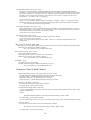
The B6TS setup parameters can be read and written via the B6TS I/F board.
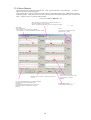
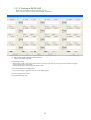
the main menu. A window appears as shown in the following figure.
Click the Setup Parameter button on
Click the [B6TS → Workbench Load] button at lower left corner of the window to display the current B6TS
parameters. When this button is first clicked after this software has been activated, the message “B6Tworkbench is
not connected yet” may be displayed. In this case, click the button again.
When this [Workbench → B6TS Load] button is clicked after the necessary items are set, the parameters are written
to B6TS.
In addition, the [Save file] or [Read file] button can be used to save the current display parameters in a file of the
personal computer or to read them from the file.
Explanation of Parameters
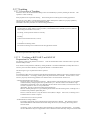
Operation Mode (MODE : 0x3E)
Output Mode (COM : 0x3E.bit0)
The output configuration of the B6TS detection results is selected.
Data communication (serial communication) using either serial communication (SPI-compliant) or by
turning the terminal On or Off depending on the detection result (producing an On/Off output) can be
selected.
CHG Active Condition (CHG : 0x3E.bit1)
The B6TS measurement status can be monitored using the CHG signals.
Either turning the GHC terminal on “High” for every measurement (end of measurement) or turning it on
“High” (On/Off status change) for every status change from touch to non-touch and vice versa in any
measurement channel can be selected.
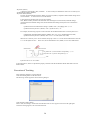
Drift Compensation (DC : 0x3E.bit2)
The touch/non-touch measurement result varies depending on ambient conditions. Whether or not to
compensate for the touch/non-touch measurement according to this change can be selected.
When “No compensation” is selected, touch/nontouch evaluation takes place using the setting On/Off
threshold value.
When “Compensation” is selected, the On/Off threshold is compensated dynamically depending on the
ambient conditions.
However, note that drift compensation is effective at times without touch assessment. No drift
compensation takes place even when “compensation” has been selected so long as “touch” is judged as
the measurement result of B6TS.
Drift Compensation type (DCF : 0x3E.bit3)
This parameter is enabled when select ‘enable’ at Drift Compensation (DC).
Note : This parameter is only for B6TS-16LF.
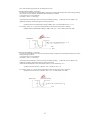
All
REFx only
:Compensate the threshold as to REFx:THRx=CREFx:CTHRx.
:Compensate at CTHRx=THRx
15