1
2.2.3
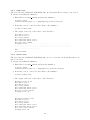
Patching the source code (recommended for g++ ≥ 4.1)
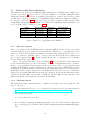
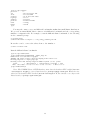
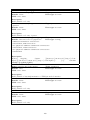
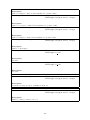
Apply the following patch to SystemC 2.2.0: patch-systemc-2.2.0.gz
$ cd systemc-2.2.0
$ gzip -dc patch-systemc-2.2.0.gz | patch -p1
2.2.4
Configuring SystemC
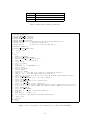
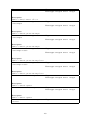
To configure, compile, and install SystemC in your home directory, do the following at the
command prompt:
$
$
$
$
$
cd systemc-2.2.0
mkdir objdir
cd objdir
mkdir ${HOME}/systemc
../configure --prefix=${HOME}/systemc
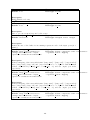
Note: if configure needs automake or autoconf, please install these tools, then rebuild SystemC configure script by running these commands before actually running the configure script:
$ cd systemc-2.2.0
$ aclocal
$ automake
2.2.5
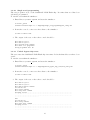
Compiling and installing SystemC
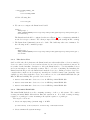
To handle threads, SystemC relies on QuickThreads, a fast implementation of user’s threads.
QuickThreads speeds-up threads switching compared to the slower kernel POSIX threads and
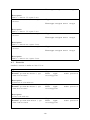
thus considerably improves overall simulation performance. To compile SystemC with the builtin QuickThreads (recommended), do the following at the command prompt:
$ make
$ make install
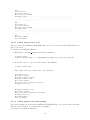
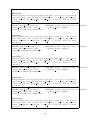
However, if you intend to instrument your simulator (e.g. with valgrind) to debug the
simulator memory leaks, bad memory accesses, pointers, and uninitialized memory reads, you
should use the slower kernel POSIX threads. To compile SystemC with the kernel POSIX
threads, do the following at the command prompt:
$ make pthreads
$ make install
2.3
2.3.1
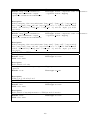
Building the UNISIM Virtex 5 FXT simulator
Uncompressing the source code tarball
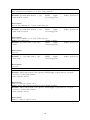
$ tar zxvf unisim-virtex5fxt-1.0.tar.gz
2.3.2
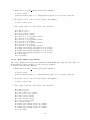
Configuring the simulator building process
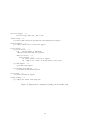
$ cd unisim-virtex5fxt-1.0
$ ./configure \
--with-systemc=${HOME}/systemc \
--with-tlm20=${HOME}/TLM-2009-07-15 CXXFLAGS=’-O3 -g3 -Wall’
8