1
AMCA User Manual
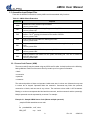
• Description Represents Examples
• Code
Courier Font User-entered code or sample code
#define BITWIDTH
Angle Brackets: <>
Variables. Text you supply <label>, <exp>
Curly Brackets and Pipe Character:{ | }
Choice of mutually exclusive arguments; an OR selection errorlevel { 0 | 1 }
Lowercase Characters in Quotes
Type of data “filename”
Ellipses: ...
Used to imply, but not show, additional text that is not relevant to the example.
List [“list_option”, ...,“list_option”]
0xnnnn 0xnnnn represents a hexadecimal number where n is a hexadecimal digit 0xFFFF, 0x003B
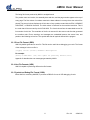
1.1.3 Updates
All documentation becomes dated, and this user’s guide is no exception. Since AMCA, and other
ALPHA tools are constantly evolving to meet customer needs, some actual dialogs and/or tool
descriptions may differ from those in this document. Please refer to our web site to obtain the latest
documentation available.
1.2 Recommended Reading
This user’s guide describes how to use AMCA. The user may also find the data sheets for specific
micro-controller devices informative in developing firmware.
• RevisionHistory.TXT
For the latest information on using AMCA, read the REVISIONHISTORY files (ASCII text files) included
with the AMCA software. The REVISIONHISTORY files contain update information that may not be
included in this document.
• Interface
In-text Bold Characters Designates a button OK, Cancel
Uppercase Characters in Angle Brackets: < > Delimiters for special keys. <TAB>, <ESC>
• Microsoft Windows Manuals
This manual assumes that users are familiar with Microsoft Windows operating system. Many excellent
references exist for this software program, and should be consulted for general operation of Windows.
4
Rev 2.2
2004/2/12