1
PTZ Control
Remote Unit
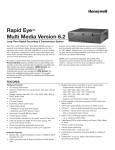
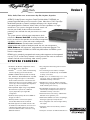
The RU is the heart of the REMM system and designed
to satisfy the security industry’s growing demand for an
integrated video security tool. The RU was engineered
from its inception for durability and expandability to
meet the stringent requirements of today’s security
environment.
REMM ADMIN
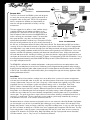
server
LAN/WAN
or Dial-Up
REMM VIEW
workstation
Audio
(2 channels)
LocalView
Cameras
(up to 16)
The new rugged chassis offers a sleek, modular design
Spot Monitor Output
suited for desktop or rack-mount installations. It fits
(NTSC)
perfectly into a standard 19" EIA rack and can be fitted
with the optional slide rack-mount kit (ARMSLIDE) that
Control Outputs
(up to 8)
POS/External Data
makes servicing your installation simple. The removable
Alarm Inputs
(up to 4)
(up to 16)
front panel features a key lock, concealing four fieldreplaceable/expandable hard drive bays; the optional CD-RW
BASIC SYSTEM DIAGRAM
drive for creating evidence clips of your security data locally at
the RU site; and red power button for front panel power control. The detachable rear BNC panel allows
servicing of the unit without the removal or disruption of your coaxial cable leads. The RU is equipped with
two independent 2-way audio channels that offer users the ability to monitor and record synchronized audio
streams. Data handling capabilities enable the RU to connect with a growing list of POS devices such as cash
registers and ATMs for monitoring, recording and retrieval of critical business data. All physical connections
are made directly to the RU, including 16 cameras, 16 alarm input devices, eight auxiliary control outputs, two
serial ports for control of most industry standard PTZ domes, and connection to POS and ATM devices. Using
our multi-port protocol interface translator (AVBPIT4POS) up to four POS or ATM devices can be connected
to a single serial port on the RU.
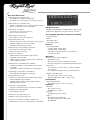
The REMM RU is offered in 36 standard configurations, making it one of the most versatile products in the
industry. This versatility focuses on real issues confronting users of digital recording products today including,
length of time for storage of video, video capture rate (ips), and the option to record incident clips to a CD-RW
at the RU site. Our intuitive RU model number allows you to configure the right unit for every application. (See
ordering information on back.)
LocalView
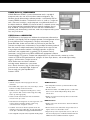
LocalView, the local user interface, enables the user to define basic system and camera configurations
and view live and recorded video at the RU site. LocalView features three levels of password protected
security: Administrator, Clip user and Cycle. Using only a VGA monitor (not supplied), and a PS2 mouse
(supplied), the user can configure system and network settings such as: Unit Name, Time Zone,
Date, IP address, Network Mask and Gateway. Camera configurations include: Live Video window,
Settings box for manual and AGC controls, Selected Camera box for Name and Type (camera)
designation, and a Recording box for Rate (capture) and Quality settings. Video management capabilities
include: four Live Video tabs that are individually configurable by selecting from one of 12 pre-defined
camera grids. The grids range from a single camera to a 4x4 matrix, allowing a multiplexed view of all 16
cameras in a single panel. The Live video tabs can be made to cycle through automatically, creating a
user-definable “Live Tour” of all cameras attached to the RU.
Recorded video can also be reviewed and played back in its own video tab called Clip Builder. Clip Builder
can be arranged in any of the 12 pre-defined grids allowing up to 16 video streams to be displayed. Clip
Builder also provides a utility to create a video clip using Start and Stop times. A user can store the clip to
the RU’s hard drive or directly to a CD-RW if the unit is equipped with the optional CD-RW drive. The Clip
Player tab provides a utility to review a pre-recorded clip from the RU’s hard drive, or from a previouslyrecorded CD, loaded in the CD-RW drive. Both Clip Builder and Clip Player provide mouse-selectable,
VCR-like controls, such as, Play, Pause, Fast Forward and Rewind.