1
Grant Agreement: 287829
Comprehensive Modelling for Advanced Systems of Systems
Initial release of the COMPASS Tool
User Manual
Technical Note Number: D31.1a
Version: 1.0
Date: September 2012
Public Document
http://www.compass-research.eu
D31.1a - Initial release of the COMPASS Tool (Public)
Contributors:
Peter Gorm Larsen, AU
Joey Coleman, AU
Anders Kaels Malmos, AU
Rasmus Lauritzen, AU
Stefan Hallerstede, AU
Editors:
Joey Coleman, AU
Stefan Hallerstede, AU
Reviewers:
Alexander Romanovsky, NCL
Margherita Forcolin, Insiel
Simon Foster, York
2
D31.1a - Initial release of the COMPASS Tool (Public)
Document History
Ver
0.1
0.2
0.3
Date
18-07-2012
30-07-2012
13-08-2012
Author
Peter Gorm Larsen
Stefan Hallerstede
Joey Coleman
0.4
06-09-2012
Joey Coleman
0.5
07-09-2012
Joey Coleman
0.6
1.0
25-09-2012
28-09-2012
Joey Coleman
Peter Gorm Larsen
3
Description
Initial document version
Edited; assigned tasks
Edited; wrote section on commandline; commented section on simulation/debug (now in commandline)
Editing; cleanup of most remaining
draftnotes
Last little cleanups; ready for internal draft review
Incorporate internal draft comments
Ready for 1st year project review
D31.1a - Initial release of the COMPASS Tool (Public)
Contents
1
Introduction
5
2
Obtaining the Software
6
3
The Command-line Interface
3.1 Available Functionality . . . . . . . . . . . . . . . . . . . . . . .
3.2 Basic Invocation . . . . . . . . . . . . . . . . . . . . . . . . . . .
3.3 CML Simulation . . . . . . . . . . . . . . . . . . . . . . . . . .
7
7
8
9
4
Using the COMPASS Perspective
12
4.1 Eclipse Terminology . . . . . . . . . . . . . . . . . . . . . . . . 12
5
Managing COMPASS Projects
15
5.1 Creating new COMPASS projects . . . . . . . . . . . . . . . . . 15
5.2 Importing COMPASS projects . . . . . . . . . . . . . . . . . . . 17
5.3 Exporting COMPASS projects . . . . . . . . . . . . . . . . . . . 18
4
D31.1a - Initial release of the COMPASS Tool (Public)
1
Introduction
This document is a user manual for the COMPASS tool, an open source tool
supporting systematic engineering of System of Systems using the COMPASS
Modelling Language (CML). The ultimate target is a tool that is built on top of
the Eclipse platform, that integrates both with the RT-Tester tool, and that also
integrates with Artisan Studio. In addition the tool functionality is available from
a command-line interface which also is explained. This document is targeted at
users with limited experience working with Eclipse based tools. Directions are
given as to where to obtain the software.
This user manual does not provide detail regarding the underlying CML formalism. Thus if you are not familiar with this, we suggest the tutorial for CML before
proceeding with this user manual [WCF+ 12, BGW12].
This version of the document supports version 0.0.1 of the COMPASS tool suite.
It is intended to introduce readers to how this version of the tool can be used with
CML models. The connection to the Artisan Studio tool and the RT-Tester tool is
not yet available and, hence, is not described further in this deliverable.
At present, the delivered software is split into several pieces. The core functionality includes the ability to read CML models and perform basic typechecking on
them. On top of this we have built two proof-of-concept tools: the first is the initial
COMPASS IDE, which wraps the core functionality and provides editing abilities;
the second is the command-line tool, which also wraps the core functionality, but
provides the ability to launch the initial version of the CML simulator.
The next version of the tool, for the D31.2 deliverable, will integrate the two
proof-of-concept tools we have here into a single IDE tool that incorporates all
the features. We will, however, retain the command-line tool for development
purposes.
Section 2 describes how to get hold of the software and get it installed on your
own computer. Section 3 describes the command-line interface to the COMPASS
tool. Afterwards Section 4 explains the different views in the COMPASS Eclipse
perspective. This is followed by Section 5 which explains how to manage different
projects in the COMPASS tool.
5
D31.1a - Initial release of the COMPASS Tool (Public)
2
Obtaining the Software
This section explains how to obtain the COMPASS IDE and COMPASS commandline tool, described in this user manual.
The COMPASS suite is an open source tool, developed by universities and industrial partners involved in the COMPASS EU-FP7 project [FLW12]. The tool is
developed on top of the Eclipse platform [Car05].
The source code and pre-built releases for the COMPASS CML tool are hosted
on SourceForge.net, and this has been selected as our primary mechanism for
supporting the community of users of CML and the developers building tools for
the COMPASS platform. It has facilities for file distribution, source code hosting,
and bug reporting.
The simplest way to run the COMPASS Tool is to download it from the SourceForge.net project files download page at
https://sourceforge.net/projects/compassresearch/files/
This download is a specially-built version of the Eclipse platform that only includes the components that are neccessary to run the COMPASS Tool — it does
not include the Java development tools usually associated with the Eclipse platform.
Also available from that page is the command-line tool, with which it is possible
to use the initial CML simulator.
Note that the COMPASS tools require the Java SE Runtime Environment version
6 or later. On Windows environments, either the 32-bit or 64-bit versions may be
used, on Mac OS X and Linux, the 64-bit version is required.
6
D31.1a - Initial release of the COMPASS Tool (Public)
3
The Command-line Interface
The command-line interface to the COMPASS tool was conceived as a tool for
developers to quickly allow them to access and test the core libraries. This allows
developers of the tool to quickly test new functionality for correctness without
having to create the GUI elements that will control the functionality in the integrated IDE. A beneficial side-effect of having this tool is that general users are not
required to load the IDE to test CML programs, but instead may invoke them via
the command-line.
3.1
Available Functionality
The command-line tool presently has access to the following features in the core
libraries:
• CML parser
• CML typechecker
• CML AST to DOT graph generation
• CML interpreter
• Example core plugins
The CML parser is the primary element of the command-line tool, as nothing can
happen without using it. Generally, the tool will read in a (sequence of) CML
file(s) and then perform a typecheck on the abstract syntax tree (AST). At this
point, the data is ready to be used by the rest of the core libraries and plugins.
It is possible to run the core libraries on an AST that has not been typechecked,
but doing so is not recommended except to test error reporting or if the user only
wishes to generate a DOT graph of the AST.
The DOT graph generator will output a representation of the AST generated from
the input CML files in the DOT language. The output is suitable for use in the
Graphviz suite of graph visualization utilities.1 The output is useful for producing
a visual representation of the data used internally by the COMPASS tool to represent the static structure of a model of a system of systems. This allows a developer
to quickly verify whether the input CML files result in the expected internal data
structures.
1
Found at http://www.graphviz.org.
7
D31.1a - Initial release of the COMPASS Tool (Public)
The Proof Obligation Generator (POG) can be invoked by the command-line tool
and doing so will cause it to produce the internal representation of the consistency and validation checks that the input CML files require. The theorem proving and model checking plugins planned for future releases will be able to use
these proof obligations to verify the consistency and correctness of the input CML
model.
The CML interpreter is only accessible from the command-line tool in the M12
release of the COMPASS tools. Invoking the CML interpreter on a set of input
CML files will result in the model being executed in a simulation run. The results of the simulation will be printed to the console during the run. Interfaces to
graphical components are not yet available.
3.2
Basic Invocation
After obtaining the commandline tool package, decompress it into a folder. In that
folder will be –among others– the files cmlc and cmlc.bat. Invocation of the
cmlc (Linux, Mac OS X) or cmlc.bat (Windows) script with no parameters
will produce the following output:
COMPASS command line CML Checker - CML 0
Usage: cmlc [switches] <file1>, ...,<fileN>
Switches:
-coe
Continue on Exception
-dotg
DOT graph generation,
-dotg=<out> write output to <out>
-dwa
Run the Div Warn Analysis example
-e
Simulation,
-e=<processId> simulate the process identified
by <processId>
-empty Empty analysis, run the empty analysis
-i
Interactive mode
-notc
Omit type checking phase
-po
Parse Only, stop analysis after the parsing
-soe
Silence on Exception
-tco
Type Check Only
Assuming some CML model in a file, example.cml, loading it into the commandline interface is accomplished by typing cmlc example.cml. If run in this
manner, the output will be:
8
D31.1a - Initial release of the COMPASS Tool (Public)
COMPASS command line CML Checker - CML 0
Parsing file: example.cml
1 file(s) successfully parsed. Starting analysis:
Running The CML Type Checker on example.cml
Note that, by default, the interpreter is not invoked on input; see Section 3.3.
It is also possible to input CML directly into the command-line tool when invoked
with the -i option. This is useful for quickly cutting and pasting small bits of
CML, for example.
To generate a DOT-language graph representation of a parsed CML model, we
use the -dotg=<file> option. The invocation cmlc -dotg=example.gv
example.cml will produce console output:
COMPASS command line CML Checker - CML 0
Parsing file: example.cml
1 file(s) successfully parsed. Starting analysis:
Running eu.compassresearch.ast.preview.DotGraphVisitor on
example.cml
Running The CML Type Checker on example.cml
And it will also write out the file example.gv in the process. This file can then
be processed with a DOT language processor (such as Graphviz) into many other
formats, including PDF, SVG, PNG, and JPEG.
3.3
CML Simulation
Please note: this section serves as the documentation requirements of D32.1.
The commandline tool enables simulation of CML models when invoked with the
-e option. Since the CML model may have more than one process defined, the
-e=<processId> option must be supplied, where <processId> is the name
of the process that is to be simulated.
9
D31.1a - Initial release of the COMPASS Tool (Public)
As an example of how this works, consider the following CML model in a file
called example.cml:
channels
init, a, b
process A = begin
@ init -> a -> Skip
end
process B = begin
@ init -> b -> Skip
end
process C = A;B
The following command will simulate the process identified by C:
cmlc -e=C example.cml
This results in the following output being printed to the console:
COMPASS command line CML Checker - CML 0
Parsing file: example.cml
1 file(s) successfully parsed. Starting analysis:
Running The CML Type Checker on example.cml
Running The CML Interpreter on example.cml
--------begin step--------Offered Events:
<init>
Current interpretation state:
C = (A = (init->a->Skip);B)
Trace after step:
<init>
--------begin step--------Offered Events:
<a>
Current interpretation state:
C = (A = (a->Skip);B)
Trace after step:
<init><a>
--------begin step---------
10
D31.1a - Initial release of the COMPASS Tool (Public)
Offered Events:
<init>
Current interpretation state:
C = (B = (init->b->Skip))
Trace after step:
<init><a><init>
--------begin step--------Offered Events:
<b>
Current interpretation state:
C = (B = (b->Skip))
Trace after step:
<init><a><init><b>
--------begin step--------Offered Events:
Current interpretation state:
Trace after step:
<init><a><init><b>
The output has three pieces of information for each step:
Offered Events: These are the events that were available for synchronisation before the current step is taken. This means that the collection of processes in
the model are able to synchronise with the environment on these events.
Current interpretation state: This is a representation of the current process state
of the interpreter just before the step was taken.
Trace after step: This is the history of past events, including the event that happened in this step.
At present the interpreter will synchronise on any offered event using a stub “environment”. This means that there is, in effect, a process running in parallel with
every model that can synchronise on every possible event. This is not meant to
mirror the intended semantics, but is just an intermediate state that will lead to an
interactive mode that allows the user to act as the environment for the purposes of
simulating the whole CML model of a system of systems.
11
D31.1a - Initial release of the COMPASS Tool (Public)
4
Using the COMPASS Perspective
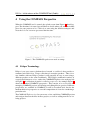
When the COMPASS tool is started, the splash screen from Figure 1 should appear. The first time it is started you will have to decide where you want the default
place for your projects to be. Click ok to start using the default workspace and
close the welcome screen to get started the first time.
Figure 1: The COMPASS spash screen used at startup
4.1
Eclipse Terminology
Eclipse is an open source platform based around a workbench that provides a
common look and feel to a large collection of extension products. Thus, for a
user familiar with one Eclipse product it will generally be easy to start using a
different product on the same workbench. The Eclipse workbench consists of
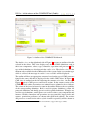
several panels known as views, such as the COMPASS Explorer view at the top left
of Figure 2. A collection of panels is called a perspective, for example Figure 2
shows the standard COMPASS perspective. This consists of a set of views for
managing COMPASS projects and viewing and editing files in a project. Different
perspectives are available in COMPASS as will be described later, but for the
moment think of a perspective as a useful composition of views for conducting a
particular task.
The COMPASS Explorer view lets you create, select, and delete COMPASS projects
and navigate between the files in these projects, as well as adding new files to existing projects.
12
D31.1a - Initial release of the COMPASS Tool (Public)
Figure 2: Outline of the COMPASS Workbench.
The Outline view, on the right hand side of Figure 2, presents an outline of the file
selected in the editor. This view displays any declared CML definitions such as
their state components, values, types, functions, operations and processes2 . The
type of the definitions are also shown in the outline view. The Outline view is at the
moment only available for the CML models of the system. In the case another type
of file is selected, the message An outline is not available will be displayed.
The outline will have an appropriate structure based on the type of CML construct
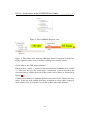
found in the source file that is displayed in the visible CML editor. In Figure 4 a
CML class is outlined on the left reflecting the structure of a class. On the right
Figure 4 depicts a CML process and lists its actions. In the current version of the
COMPASS tool outline decorations are omitted but are planned to be as follows:
The colour of the icons in front of a name in the outline indicates the accessibility
of the corresponding definition. Red is used for private definitions, yellow for
protected definitions and finally green is used for public definitions. Triangles are
used for type definitions, small squares are used for values, state components and
instance variables, functions and operations are represented by larger circles and
squares, permission predicates are shown with small lock symbols. For actions
and processes a round circle with a styled A and P respectively will be shown to
2
In a later version of the tool the outline view will also support other types of files.
13
D31.1a - Initial release of the COMPASS Tool (Public)
Figure 3: The COMPASS Explorer view.
Figure 4: The outline view showing CML class named Component1 on the left.
On the right the outline view is showing a CML process and its actions.
clearly indicate the CML model elements.
Functions have a small “F” lifted over the icons and static definitions have a small
“S” lifted over the icon. For record types a small arrow is placed in front of the
icon and if that is clicked the fields of the records can be shown as illustrated in
Figure 4.
Clicking on the name of a definition will move the cursor in the editor to the definition. At the top of the outline view there are buttons to select what is displayed
in the outline view, for instance it is possible to hide non-public members.
14
D31.1a - Initial release of the COMPASS Tool (Public)
5
Managing COMPASS Projects
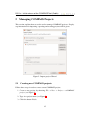
This section explains how to use the tool to manage COMPASS projects. Step by
step instructions for importing, exporting and creating projects will be given.
Figure 5: Import project Wizard
5.1
Creating new COMPASS projects
Follow these steps in order to create a new COMPASS project:
1. Create a new project by choosing File → New → Project → COMPASS
project (see Figure 6)
2. Type in a project name (see Figure 7)
3. Click the button Finish.
15
D31.1a - Initial release of the COMPASS Tool (Public)
Figure 6: Create Project Wizard
Figure 7: Create Project Wizard
16
D31.1a - Initial release of the COMPASS Tool (Public)
Figure 8: Import archive file
5.2
Importing COMPASS projects
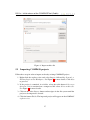
Follow these steps in order to import an already existing COMPASS project:
1. Right-click the explorer view and select Import, followed by General →
Existing Projects into Workspace. See Figure 5 for more details. Click Next
to proceed.
2. If the project is contained in a folder, select the radio button Select root
directory, if it is contained on a compressed file select Select archive file.
See Figure 8 for more details.
3. Click on the active Browse button and navigate in the file system until the
project to be imported is located.
4. Click the button Finish. The imported project will appear on the COMPASS
explorer view.
17
D31.1a - Initial release of the COMPASS Tool (Public)
Figure 9: Select an output format for the exporting process.
5.3
Exporting COMPASS projects
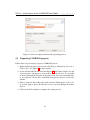
Follow these steps in order to export a COMPASS project:
1. Right click on the target project and select Export, followed by General →
Archive File. See Figure 9 for more details.
2. A new window like the one shown in Figure 10 will follow. In this case the
selected project will appear as root node on the left side of it. It is possible
to browse through the contents of the project and select the convenient files
to be exported. All the files contained in the project will be selected by
default.
3. Enter a name for the archive file in the text box following To archive file.
A specific path to place the final file can be selected through the button
Browse.
4. Click on the Finish button to complete the export process.
18
D31.1a - Initial release of the COMPASS Tool (Public)
Figure 10: Project ready to be exported.
19
D31.1a - Initial release of the COMPASS Tool (Public)
References
[BGW12] Jeremy Bryans, Andy Galloway, and Jim Woodcock. Cml definition
1. Technical report, COMPASS Deliverable, D23.2, September 2012.
[Car05]
David Carlson. Eclipse Distilled. Addison-Wesley, 2005. ISBN 0321-28815-7.
[FLW12]
John Fitzgerald, Peter Gorm Larsen, and Jim Woodcock. Modelling
and Analysis Technology for Systems of Systems Engineering: Research Challenges. In INCOSE, Rome, Italy, July 2012.
[WCF+ 12] J. Woodcock, A. Cavalcanti, J. Fitzgerald, P. Larsen, A. Miyazawa,
and S. Perry. Features of CML: a Formal Modelling Language for
Systems of Systems. In Proceedings of the 7th International Conference on System of System Engineering, volume 6 of IEEE Systems
Journal. IEEE, July 2012.
20