1
To our customers,
Old Company Name in Catalogs and Other Documents
On April 1st, 2010, NEC Electronics Corporation merged with Renesas Technology
Corporation, and Renesas Electronics Corporation took over all the business of both
companies. Therefore, although the old company name remains in this document, it is a valid
Renesas Electronics document. We appreciate your understanding.
Renesas Electronics website: http://www.renesas.com
April 1st, 2010
Renesas Electronics Corporation
Issued by: Renesas Electronics Corporation (http://www.renesas.com)
Send any inquiries to http://www.renesas.com/inquiry.
Notice
1.
2.
3.
4.
5.
6.
7.
All information included in this document is current as of the date this document is issued. Such information, however, is
subject to change without any prior notice. Before purchasing or using any Renesas Electronics products listed herein, please
confirm the latest product information with a Renesas Electronics sales office. Also, please pay regular and careful attention to
additional and different information to be disclosed by Renesas Electronics such as that disclosed through our website.
Renesas Electronics does not assume any liability for infringement of patents, copyrights, or other intellectual property rights
of third parties by or arising from the use of Renesas Electronics products or technical information described in this document.
No license, express, implied or otherwise, is granted hereby under any patents, copyrights or other intellectual property rights
of Renesas Electronics or others.
You should not alter, modify, copy, or otherwise misappropriate any Renesas Electronics product, whether in whole or in part.
Descriptions of circuits, software and other related information in this document are provided only to illustrate the operation of
semiconductor products and application examples. You are fully responsible for the incorporation of these circuits, software,
and information in the design of your equipment. Renesas Electronics assumes no responsibility for any losses incurred by
you or third parties arising from the use of these circuits, software, or information.
When exporting the products or technology described in this document, you should comply with the applicable export control
laws and regulations and follow the procedures required by such laws and regulations. You should not use Renesas
Electronics products or the technology described in this document for any purpose relating to military applications or use by
the military, including but not limited to the development of weapons of mass destruction. Renesas Electronics products and
technology may not be used for or incorporated into any products or systems whose manufacture, use, or sale is prohibited
under any applicable domestic or foreign laws or regulations.
Renesas Electronics has used reasonable care in preparing the information included in this document, but Renesas Electronics
does not warrant that such information is error free. Renesas Electronics assumes no liability whatsoever for any damages
incurred by you resulting from errors in or omissions from the information included herein.
Renesas Electronics products are classified according to the following three quality grades: “Standard”, “High Quality”, and
“Specific”. The recommended applications for each Renesas Electronics product depends on the product’s quality grade, as
indicated below. You must check the quality grade of each Renesas Electronics product before using it in a particular
application. You may not use any Renesas Electronics product for any application categorized as “Specific” without the prior
written consent of Renesas Electronics. Further, you may not use any Renesas Electronics product for any application for
which it is not intended without the prior written consent of Renesas Electronics. Renesas Electronics shall not be in any way
liable for any damages or losses incurred by you or third parties arising from the use of any Renesas Electronics product for an
application categorized as “Specific” or for which the product is not intended where you have failed to obtain the prior written
consent of Renesas Electronics. The quality grade of each Renesas Electronics product is “Standard” unless otherwise
expressly specified in a Renesas Electronics data sheets or data books, etc.
“Standard”:
8.
9.
10.
11.
12.
Computers; office equipment; communications equipment; test and measurement equipment; audio and visual
equipment; home electronic appliances; machine tools; personal electronic equipment; and industrial robots.
“High Quality”: Transportation equipment (automobiles, trains, ships, etc.); traffic control systems; anti-disaster systems; anticrime systems; safety equipment; and medical equipment not specifically designed for life support.
“Specific”:
Aircraft; aerospace equipment; submersible repeaters; nuclear reactor control systems; medical equipment or
systems for life support (e.g. artificial life support devices or systems), surgical implantations, or healthcare
intervention (e.g. excision, etc.), and any other applications or purposes that pose a direct threat to human life.
You should use the Renesas Electronics products described in this document within the range specified by Renesas Electronics,
especially with respect to the maximum rating, operating supply voltage range, movement power voltage range, heat radiation
characteristics, installation and other product characteristics. Renesas Electronics shall have no liability for malfunctions or
damages arising out of the use of Renesas Electronics products beyond such specified ranges.
Although Renesas Electronics endeavors to improve the quality and reliability of its products, semiconductor products have
specific characteristics such as the occurrence of failure at a certain rate and malfunctions under certain use conditions. Further,
Renesas Electronics products are not subject to radiation resistance design. Please be sure to implement safety measures to
guard them against the possibility of physical injury, and injury or damage caused by fire in the event of the failure of a
Renesas Electronics product, such as safety design for hardware and software including but not limited to redundancy, fire
control and malfunction prevention, appropriate treatment for aging degradation or any other appropriate measures. Because
the evaluation of microcomputer software alone is very difficult, please evaluate the safety of the final products or system
manufactured by you.
Please contact a Renesas Electronics sales office for details as to environmental matters such as the environmental
compatibility of each Renesas Electronics product. Please use Renesas Electronics products in compliance with all applicable
laws and regulations that regulate the inclusion or use of controlled substances, including without limitation, the EU RoHS
Directive. Renesas Electronics assumes no liability for damages or losses occurring as a result of your noncompliance with
applicable laws and regulations.
This document may not be reproduced or duplicated, in any form, in whole or in part, without prior written consent of Renesas
Electronics.
Please contact a Renesas Electronics sales office if you have any questions regarding the information contained in this
document or Renesas Electronics products, or if you have any other inquiries.
(Note 1) “Renesas Electronics” as used in this document means Renesas Electronics Corporation and also includes its majorityowned subsidiaries.
(Note 2) “Renesas Electronics product(s)” means any product developed or manufactured by or for Renesas Electronics.
User’s Manual
PM plus Ver. 5.20
Target Devices
78K0S Series
78K0 Series
78K4 Series
V850 Series
Document No. U16934EJ1V0UM00 (1st edition)
Date Published April 2004 CP(K)
© NEC Electronics Corporation 2004
Printed in Japan
[MEMO]
2
User's Manual U16934EJ1V0UM
Windows, WindowsNT and Microsoft are either a registered trademark or a trademark of Microsoft
Corporation in the United States and/or other countries.
PC/AT is a trademark of International Business Machines Corporation.
User’s Manual U16934EJ1V0UM
3
• The information in this document is current as of April, 2004. The information is subject to change
without notice. For actual design-in, refer to the latest publications of NEC Electronics data sheets or
data books, etc., for the most up-to-date specifications of NEC Electronics products. Not all
products and/or types are available in every country. Please check with an NEC Electronics sales
representative for availability and additional information.
• No part of this document may be copied or reproduced in any form or by any means without the prior
written consent of NEC Electronics. NEC Electronics assumes no responsibility for any errors that may
appear in this document.
• NEC Electronics does not assume any liability for infringement of patents, copyrights or other intellectual
property rights of third parties by or arising from the use of NEC Electronics products listed in this document
or any other liability arising from the use of such products. No license, express, implied or otherwise, is
granted under any patents, copyrights or other intellectual property rights of NEC Electronics or others.
• Descriptions of circuits, software and other related information in this document are provided for illustrative
purposes in semiconductor product operation and application examples. The incorporation of these
circuits, software and information in the design of a customer's equipment shall be done under the full
responsibility of the customer. NEC Electronics assumes no responsibility for any losses incurred by
customers or third parties arising from the use of these circuits, software and information.
• While NEC Electronics endeavors to enhance the quality, reliability and safety of NEC Electronics products,
customers agree and acknowledge that the possibility of defects thereof cannot be eliminated entirely. To
minimize risks of damage to property or injury (including death) to persons arising from defects in NEC
Electronics products, customers must incorporate sufficient safety measures in their design, such as
redundancy, fire-containment and anti-failure features.
• NEC Electronics products are classified into the following three quality grades: "Standard", "Special" and
"Specific".
The "Specific" quality grade applies only to NEC Electronics products developed based on a customerdesignated "quality assurance program" for a specific application. The recommended applications of an NEC
Electronics product depend on its quality grade, as indicated below. Customers must check the quality grade of
each NEC Electronics product before using it in a particular application.
"Standard": Computers, office equipment, communications equipment, test and measurement equipment, audio
and visual equipment, home electronic appliances, machine tools, personal electronic equipment
and industrial robots.
"Special": Transportation equipment (automobiles, trains, ships, etc.), traffic control systems, anti-disaster
systems, anti-crime systems, safety equipment and medical equipment (not specifically designed
for life support).
"Specific": Aircraft, aerospace equipment, submersible repeaters, nuclear reactor control systems, life
support systems and medical equipment for life support, etc.
The quality grade of NEC Electronics products is "Standard" unless otherwise expressly specified in NEC
Electronics data sheets or data books, etc. If customers wish to use NEC Electronics products in applications
not intended by NEC Electronics, they must contact an NEC Electronics sales representative in advance to
determine NEC Electronics' willingness to support a given application.
(Note)
(1) "NEC Electronics" as used in this statement means NEC Electronics Corporation and also includes its
majority-owned subsidiaries.
(2) "NEC Electronics products" means any product developed or manufactured by or for NEC Electronics (as
defined above).
M8E 02. 11-1
4
User's Manual U16934EJ1V0UM
Regional Information
Some information contained in this document may vary from country to country. Before using any NEC
Electronics product in your application, pIease contact the NEC Electronics office in your country to
obtain a list of authorized representatives and distributors. They will verify:
•
Device availability
•
Ordering information
•
Product release schedule
•
Availability of related technical literature
•
Development environment specifications (for example, specifications for third-party tools and
components, host computers, power plugs, AC supply voltages, and so forth)
•
Network requirements
In addition, trademarks, registered trademarks, export restrictions, and other legal issues may also vary
from country to country.
[GLOBAL SUPPORT]
http://www.necel.com/en/support/support.html
NEC Electronics America, Inc. (U.S.)
NEC Electronics (Europe) GmbH
NEC Electronics Hong Kong Ltd.
Santa Clara, California
Tel: 408-588-6000
800-366-9782
Duesseldorf, Germany
Tel: 0211-65030
Hong Kong
Tel: 2886-9318
• Sucursal en España
Madrid, Spain
Tel: 091-504 27 87
• Succursale Française
Vélizy-Villacoublay, France
Tel: 01-30-67 58 00
• Filiale Italiana
Milano, Italy
Tel: 02-66 75 41
• Branch The Netherlands
Eindhoven, The Netherlands
Tel: 040-244 58 45
• Tyskland Filial
NEC Electronics Hong Kong Ltd.
Seoul Branch
Seoul, Korea
Tel: 02-558-3737
NEC Electronics Shanghai Ltd.
Shanghai, P.R. China
Tel: 021-5888-5400
NEC Electronics Taiwan Ltd.
Taipei, Taiwan
Tel: 02-2719-2377
NEC Electronics Singapore Pte. Ltd.
Novena Square, Singapore
Tel: 6253-8311
Taeby, Sweden
Tel: 08-63 80 820
• United Kingdom Branch
Milton Keynes, UK
Tel: 01908-691-133
J04.1
User’s Manual U16934EJ1V0UM
5
[MEMO]
6
User's Manual U16934EJ1V0UM
PREFACE
Readers:
The PM plus is an integrated development environment platform that enables efficient
controls of programs running in WindowsTM.
This manual is intended for user engineers who wish to develop application systems
using the PM plus on Windows.
Purpose:
This manual explains how to operate PM plus on Windows.
For the Windows operations, refer to the function guides provided with the Windows
OS.
Organization:
This manual consists of the following contents:
• GENERAL
• INSTALLATION
• STARTING AND EXITING
• QUICK TOUR
• METHOD OF OPERATION
• WINDOW REFERENCE
• MESSAGES
How to Read This Manual: It is assumed that the readers of this manual have a general knowledge of
microcomputers and a basic knowledge of how to operate Windows98, WindowsMe,
Windows2000, WindowsNTTM 4.0.Workstation+SP3 or later, or WindowsXP.
User’s Manual U16934EJ1V0UM
7
Related Documents:
When using this manual, also refer to the following documents.
Some related documents may be preliminary versions. Note, however, that whether a
related document is preliminary is not indicated in this document.
Documents related to 78K Series development tools (User’s Manual)
Document Name
CC78K0 Ver. 3.60 C Compiler
CC78K0S C Compiler
CC78K4 C Compiler
RA78K0 Ver. 3.70 Assembler Package
RA78K0S Assembler Package
Document No.
Operation
U17017E
Language
U17016E
Operation
To be prepared
Language
To be prepared
Operation
To be prepared
Language
To be prepared
Operation
U17015E
Language
U17014E
Structured Assembly Language
U11789E
Operation
To be prepared
Language
To be prepared
Structured Assembly Language
To be prepared
Operation
To be prepared
Language
To be prepared
Structured Assembly Language
To be prepared
SM78K Series Ver. 2.52 System Simulator
Operation
U16768E
ID78K0-NS Ver. 2.52 Integrated Debugger
Operation
U16488E
ID78K0S-NS Ver. 2.52 Integrated Debugger
Operation
U16584E
ID78K4-NS Ver. 2.52 Integrated Debugger
Operation
U16632E
ID78K0-QB Ver. 2.81 Integrated Debugger
Operation
U16996E
RA78K4 Assembler Package
PM plus Ver. 5.20
8
This manual
User’s Manual U16934EJ1V0UM
Documents related to V850 Series development tools (User’s Manual)
Document Name
CA850 Ver. 2.70 C Compiler Package
Document No.
Operation
U16932E
C Language
U16930E
Assembly Language
U16931E
Link Directives
U16933E
ID850 Ver. 2.50 Integrated Debugger
Operation
U16217E
ID850NW Ver. 2.51 Integrated Debugger
Operation
U16454E
ID850NWC Ver. 2.51 Integrated Debugger
Operation
U16525E
ID850QB Ver. 2.80 Integrated Debugger
Operation
U16973E
SM850 Ver. 2.50 System Simulator
Operation
U16218E
SM850 Ver. 2.00 or later System Simulator
External Part User Open Interface
U14873E
Specifications
RX850 Ver. 3.13 or later Real-Time OS
RX850 Pro Ver. 3.13 Real-Time OS
Basics
U13430E
Installation
U13410E
Technical
U13431E
Basics
U13773E
Installation
U13774E
Technical
U13772E
RD850 Ver. 3.01 Task Debugger
U13737E
RD850 Pro Ver. 3.01 Task Debugger
U13916E
AZ850 Ver. 3.10 System Performance Analyzer
U14410E
PG-FP4 Flash Memory Programmer
U15260E
PM plus Ver. 5.20
This manual
User’s Manual U16934EJ1V0UM
9
CONTENTS
CHAPTER 1 GENERAL ... 23
1. 1 Overview ... 23
1. 2 Functions and Features ... 25
1. 3 Positioning of PM plus ... 26
1. 4 Operating Environments ... 27
CHAPTER 2 INSTALLATION ... 29
2. 1 Installing PM plus ... 29
2. 2 Uninstalling PM plus ... 29
CHAPTER 3 STARTING AND EXITING ... 31
3. 1 Starting ... 31
3. 2 Exiting ... 31
CHAPTER 4 QUICK TOUR ... 32
4. 1 Overview ... 32
4. 2 Creating Workspace ... 33
4. 3 Setting Options Related to Compilation ... 34
4. 4 Selecting Active Project ... 35
4. 5 Selecting Debugger ... 36
4. 6 Executing Build ... 37
4. 7 Other Settings ... 37
CHAPTER 5 METHOD OF OPERATION ... 38
5. 1 File Management ... 38
5. 1. 1 Creating a new file ... 38
5. 1. 2 Opening a existing file ... 38
5. 1. 3 Inserting a file ... 38
5. 1. 4 Closing a window ... 38
5. 1. 5 Opening a project file generated by the previous version (Project manager V3.xx) ... 38
5. 1. 6 Creating a new workspace ... 39
5. 1. 7 Opening a workspace ... 57
5. 1. 8 Saving a workspace ... 62
5. 1. 9 Closing a workspace ... 62
5. 1. 10 Saving a file by overwriting ... 63
5. 1. 11 Saving a file with a new name ... 63
5. 1. 12 Saving all files ... 63
10
User’s Manual U16934EJ1V0UM
5. 1. 13 Saving all files (Changed files only) ... 63
5. 1. 14 Saving and Closing all files ... 64
5. 1. 15 Closing all windows ... 64
5. 1. 16 Closing all windows without saving ... 64
5. 1. 17 Changing a source file name ... 64
5. 1. 18 Saving all source files ... 64
5. 1. 19 Checking printing status ... 64
5. 1. 20 Printing ... 65
5. 1. 21 Printing directly ... 65
5. 1. 22 History of files ... 65
5. 1. 23 History of workspaces ... 65
5. 1. 24 Exiting PM plus ... 65
5. 2 Edit Functions ... 66
5. 2. 1 Canceling an edit operation ... 66
5. 2. 2 Canceling an [Undo] operation ... 66
5. 2. 3 Cutting off character strings ... 67
5. 2. 4 Copying character strings ... 67
5. 2. 5 Cutting off character strings (Cut for Append) ... 67
5. 2. 6 Copying character strings (Copy for Append) ... 67
5. 2. 7 Copying character strings as a screen image ... 68
5. 2. 8 Inserting the contents of clipboard ... 68
5. 2. 9 Inserting the contents of clipboard with specified format ... 68
5. 2. 10 Deleting character strings ... 69
5. 2. 11 Deleting a word ... 69
5. 2. 12 Deleting characters to the end of a word ... 69
5. 2. 13 Deleting a line ... 69
5. 2. 14 Deleting character strings to the top of line ... 69
5. 2. 15 Deleting character strings to the end of line ... 69
5. 2. 16 Selecting a word at the caret ... 70
5. 2. 17 Selecting a word to the left of the caret ... 70
5. 2. 18 Selecting a word to the right of the caret ... 70
5. 2. 19 Selecting a range to the top of line ... 70
5. 2. 20 Selecting a range to the end of line ... 70
5. 2. 21 Selecting entire contents ... 70
5. 2. 22 Grouping by keyword ... 71
5. 2. 23 Restoring color of grouping line ... 71
5. 2. 24 Creating function prototypes ... 71
5. 2. 25 Inserting a new object ... 71
5. 2. 26 Setting links for objects ... 71
5. 2. 27 Object ... 71
5. 3 Search Functions ... 72
5. 3. 1 Searching for a character string ... 72
5. 3. 2 Searching for a character string upward ... 72
User’s Manual U16934EJ1V0UM
11
5. 3. 3 Searching for a character string downward ... 72
5. 3. 4 Searching for a word upward ... 72
5. 3. 5 Searching for a word downward ... 73
5. 3. 6 Replacing a character string ... 73
5. 3. 7 Jumping to a specified line ... 73
5. 3. 8 Jumping to a specified line in a specified source file ... 73
5. 3. 9 Jumping to a marked line ... 73
5. 3. 10 Moving the caret to the top of line ... 73
5. 3. 11 Moving the caret to the end of line ... 73
5. 3. 12 Moving the caret to the top of file ... 74
5. 3. 13 Moving the caret to the end of file ... 74
5. 3. 14 Moving the caret to the index line ... 74
5. 3. 15 Moving the caret to the top layer ... 74
5. 3. 16 Moving the caret to the layer line of the same depth upward ... 75
5. 3. 17 Moving the caret to the layer line of the same depth downward ... 75
5. 3. 18 Moving the caret to the position before a jump ... 75
5. 3. 19 Moving the caret to the function definition line ... 76
5. 3. 20 Searching for matching braces ... 76
5. 3. 21 Searching for a character string within multiple files ... 76
5. 3. 22 Replacing a character string within multiple files ... 77
5. 3. 23 Searching for a character string within a project ... 78
5. 3. 24 Jumping to a desired line (tag jump) ... 79
5. 3. 25 Returning from a tag jump ... 80
5. 3. 26 Continuing a tag jump downward ... 80
5. 3. 27 Continuing a tag jump upward ... 80
5. 3. 28 Moving the caret one word to the right ... 80
5. 3. 29 Moving the caret one word to the left ... 81
5. 3. 30 Moving the caret up by one line ... 81
5. 3. 31 Moving the caret down by one line ... 81
5. 3. 32 Moving the caret one character to the right ... 81
5. 3. 33 Moving the caret one character to the left ... 82
5. 3. 34 Making the Search Character String Specification combo box active ... 82
5. 4 Layer Management ... 83
5. 4. 1 Promoting layers ... 83
5. 4. 2 Demoting Layers ... 83
5. 4. 3 Expanding or collapsing one of the lower layers ... 84
5. 4. 4 Expanding one of the lower layers ... 84
5. 4. 5 Collapsing one of the lower layers ... 84
5. 4. 6 Expanding all of the lower layers ... 85
5. 4. 7 Expanding all of the layers ... 85
5. 4. 8 Collapsing all of the layers ... 85
5. 4. 9 Expanding a specified number of layers ... 85
5. 4. 10 Collapsing a specified number of layers ... 85
12
User’s Manual U16934EJ1V0UM
5. 4. 11 Displaying the top layer only ... 86
5. 4. 12 Displaying the first and second layers ... 86
5. 4. 13 Displaying the first to third layers ... 86
5. 4. 14 Displaying the first to fourth layers ... 86
5. 4. 15 Displaying the first to fifth layers ... 86
5. 4. 16 Collapsing a layer at the caret ... 86
5. 4. 17 Applying a layer rule ... 87
5. 5 Display Functions ... 88
5. 5. 1 Displaying a list of functions ... 88
5. 5. 2 Displaying a list of layers ... 88
5. 5. 3 Displaying the standard bar ... 88
5. 5. 4 Displaying the build bar ... 88
5. 5. 5 Displaying the option bar ... 88
5. 5. 6 Displaying the external tool bar ... 88
5. 5. 7 Displaying the status bar ... 88
5. 5. 8 Displaying the Project window ... 88
5. 5. 9 Displaying the Output window ... 88
5. 5. 10 Displaying an object as contents or icon ... 89
5. 5. 11 Displaying all objects as contents ... 89
5. 5. 12 Displaying all objects as icons ... 89
5. 6 Project Management ... 90
5. 6. 1 Creating a project file ... 90
5. 6. 2 Selecting active project ... 90
5. 6. 3 Adding a new project to a workspace ... 91
5. 6. 4 Inserting a project into a workspace ... 109
5. 6. 5 CVS update ... 109
5. 6. 6 CVS commit ... 109
5. 6. 7 CVS log ... 109
5. 6. 8 CVS status ... 109
5. 6. 9 CVS comparison ... 110
5. 6. 10 Exporting a make file ... 110
5. 6. 11 Setting project information ... 110
5. 6. 12 Adding a source file ... 110
5. 6. 13 Adding a project-related file ... 110
5. 6. 14 Adding other files ... 110
5. 6. 15 Making the Active Project Selection combo box active ... 110
5. 6. 16 Changing a project group name ... 111
5. 6. 17 Changing a project title ... 111
5. 6. 18 Moving a project ... 111
5. 7 Build Functions ... 112
5. 7. 1 Building and Debugging ... 112
5. 7. 2 Rebuilding and Debugging ... 112
5. 7. 3 Compiling ... 112
User’s Manual U16934EJ1V0UM
13
5. 7. 4 Building ... 113
5. 7. 5 Stopping build ... 113
5. 7. 6 Rebuilding ... 113
5. 7. 7 Batch building ... 113
5. 7. 8 Batch Rebuilding ... 113
5. 7. 9 Updating dependency relationship of files ... 114
5. 7. 10 Cleaning ... 114
5. 7. 11 Editing ... 114
5. 7. 12 Debugging ... 114
5. 7. 13 Downloading multiple load module files ... 114
5. 7. 14 Selecting build mode ... 114
5. 7. 15 Setting build options ... 115
5. 7. 16 Setting batch build ... 115
5. 7. 17 Making the Build Mode Selection combo box active ... 115
5. 8 Tool Management ... 116
5. 8. 1 Setting options for each tool ... 116
5. 8. 2 Estimating stack size ... 116
5. 8. 3 Dumping the load module file or the object file ... 116
5. 8. 4 Selecting and setting the debugger to be used ... 116
5. 8. 5 Registering external tools ... 116
5. 8. 6 Starting up external tools ... 117
5. 8. 7 Comparing files ... 117
5. 8. 8 Inserting device file ... 117
5. 8. 9 Setting environment ... 117
5. 8. 10 Setting font ... 117
5. 8. 11 Customizing settings ... 118
5. 8. 12 Recording key operations ... 118
5. 8. 13 Playing back key operations ... 118
5. 8. 14 Saving key operations ... 118
5. 8. 15 Commands corresponding to key operations ... 118
5. 8. 16 Reading key operations ... 128
5. 8. 17 Executing macro ... 128
5. 8. 18 Registering macro ... 128
5. 8. 19 Executing registered macro ... 128
5. 9 Window Management ... 129
5. 9. 1 Arranging windows so they overlap ... 129
5. 9. 2 Arranging windows horizontally ... 129
5. 9. 3 Arranging windows vertically ... 129
5. 9. 4 Splitting a window ... 129
5. 9. 5 Moving the caret to the other split window ... 129
5. 9. 6 Activating the next window ... 129
5. 9. 7 Activating the previous window ... 130
5. 9. 8 Displaying a list of windows ... 130
14
User’s Manual U16934EJ1V0UM
5. 10 Help Functions ... 131
5. 10. 1 Starting up the PM plus help ... 131
5. 10. 2 Displaying the help of the Main window ... 131
5. 10. 3 Displaying the help of a current window ... 131
5. 10. 4 Displaying a list of shortcut keys ... 131
5. 10. 5 Accessing to NEC Electronics microprocessor web site ... 131
5. 10. 6 Starting up a external help 1 ... 131
5. 10. 7 Starting up a external help 2 ... 131
5. 10. 8 Starting up a external help 3 ... 131
5. 10. 9 Displaying the version information about PM plus ... 132
CHAPTER 6 WINDOW REFERENCE ... 133
6. 1 Window Composition ... 133
6. 2 Explanation of Windows/Dialog boxes ... 138
Main window ... 139
Project window ... 164
Edit window ... 176
Search result display window ... 183
Output window ... 185
Open dialog box ... 187
Insert File dialog box ... 190
Open Workspace dialog box ... 193
Save As dialog box ... 195
Save Source Files Options dialog box ... 197
Change Source File Names dialog box ... 199
Change Selected Source File Name dialog box ... 201
Change Selected Source File Names dialog box ... 203
Set Comment Mark dialog box ... 205
Print dialog box ... 206
Font dialog box (Print) ... 209
Set Header/Footer dialog box ... 211
Grouping by Keyword dialog box ... 214
Select the way of Function Prototypes dialog box ... 217
Find String dialog box ... 220
Replace String dialog box ... 224
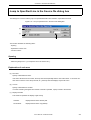
Jump to Specified Line dialog box ... 229
Jump to Specified Line in the Source file dialog box ... 231
Mark Jump dialog box ... 233
Find in Files dialog box ... 235
Replace in Files dialog box ... 240
Expand to Specified Layer dialog box ... 245
Collapse to Specified Layer dialog box ... 247
User’s Manual U16934EJ1V0UM
15
Set Layer Rule dialog box ... 248
Function List dialog box ... 251
Save the Function List dialog box ... 254
Layer List dialog box ... 256
Select Active Project dialog box ... 258
Project Settings dialog box ... 259
Insert Project dialog box ... 264
Add Source Files dialog box ... 266
Project Group Name dialog box ... 268
Project Title dialog box ... 269
Add Project Related Files dialog box ... 270
Add Other Files dialog box ... 272
Properties dialog box ... 274
Add New Memo dialog box ... 276
Startup File dialog box ... 277
Copy Startup File from dialog box ... 279
Startup File to register dialog box ... 281
Link Directive File dialog box ... 283
Copy Link Directive File from dialog box ... 285
Link Directive File to register dialog box ... 287
CVS Update dialog box ... 289
CVS Commit dialog box ... 291
CVS Log dialog box ... 293
CVS Status dialog box ... 295
Select Project dialog box ... 297
Batch Build dialog box ... 299
Build Mode dialog box ... 301
Add Build Mode dialog box ... 303
Build Settings dialog box ... 305
Add Command dialog box ... 310
Edit Command dialog box ... 311
Debugger Settings dialog box ... 313
Register External Tool dialog box ... 316
Select External Tool dialog box ... 318
File Compare dialog box ... 320
PM plus Settings dialog box ... 323
User Setting dialog box ... 346
Font dialog box ... 348
Customize dialog box ... 350
Edit User keyword dialog box ... 358
Edit C Language's reserve words dialog box ... 360
Save the Key Operation dialog box ... 362
Load the Macro File dialog box ... 364
16
User’s Manual U16934EJ1V0UM
Play back the Macro File dialog box ... 366
Entry Macro Files dialog box ... 368
Add the Macro file dialog box ... 370
Change the Macro file dialog box ... 372
dump850 dialog box ... 374
Window List dialog box ... 376
Shortcut List dialog box ... 378
About PM plus dialog box ... 380
CHAPTER 7 MESSAGES ... 382
7. 1 Display Format ... 382
7. 2 List of Fatal Error Messages ... 383
7. 3 List of Operation Error Messages ... 391
7. 4 List of Question Messages ... 404
7. 5 List of Information Messages ... 411
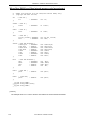
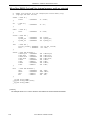
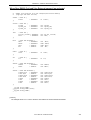
APPENDIX A SAMPLE LINK DIRECTIVE FILE ... 413
When [Not use RTOS] and [Use Internal memory only] are selected ... 414
When [Not use RTOS] and [Use External memory] are selected ... 415
When [Use RX850] and [Use Internal memory only] are selected ... 416
When [Use RX850] and [Use External memory] are selected ... 417
When [Use RX850 Pro] and [Use Internal memory only] are selected ... 418
When [Use RX850 Pro] and [Use External memory] are selected ... 419
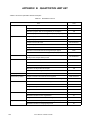
APPENDIX B QUANTITATIVE LIMIT LIST ... 420
INDEX ... 421
User’s Manual U16934EJ1V0UM
17
LIST OF FIGURES
Figure No.
Title and Page
1-1
Main Window ... 24
1-2
Relationship between Software for Program Development and PM plus ... 26
3-1
Main Window ... 31
4-1
Operation Flow until Debugging ... 32
4-2
Setting Options Related to Compilation ... 34
4-3
Selecting Active Project ... 35
4-4
Selecting Debugger ... 36
5-1
Wizard Flow for Creating New Workspace ... 40
5-2
New Workspace - Step 1/8 [Workspace Information] Dialog Box ... 43
5-3
New Workspace - Step 2/8 [Select Real-Time OS] Dialog Box ... 45
5-4
New Workspace - Step 3/8 [Startup File] Dialog Box ... 46
5-5
New Workspace - Step 4/8 [Register Mode] Dialog Box ... 48
5-6
New Workspace - Step 5/8 [LinkDirective File] Dialog Box ... 50
5-7
New Workspace - Step 6/8 [Setup Source Files] Dialog Box ... 53
5-8
New Workspace - Step 7/8 [Select Debugger] Dialog Box ... 55
5-9
New Workspace - Step 8/8 [Confirmation] Dialog Box ... 56
5-10
Project Information Dialog Box ... 59
5-11
Source File Dialog Box ... 61
5-12
History of Replace in files Window ... 77
5-13
Search result display Window ... 78
5-14
Promoting Layers ... 83
5-15
Demoting Layer ... 83
5-16
Expanding One of the Lower Layers ... 84
5-17
Collapsing One of the Lower Layers ... 84
5-18
Expanding All of the Lower Layers ... 85
5-19
The Wizard Flow of Add New Project Dialog Boxes ... 92
5-20
Add New Project - Step 1/8 [Project Information] Dialog Box ... 95
5-21
Add New Project - Step 2/8 [Select Real-Time OS] Dialog Box ... 97
5-22
Add New Project - Step 3/8 [Startup File] Dialog Box ... 98
5-23
Add New Project - Step 4/8 [Register Mode] Dialog Box ... 100
5-24
Add New Project - Step 5/8 [LinkDirective File] Dialog Box ... 102
5-25
Add New Project - Step 6/8 [Setup Source Files] Dialog Box ... 105
5-26
Add New Project - Step 7/8 [Select Debugger] Dialog Box ... 107
5-27
Add New Project - Step 8/8 [Confirmation] Dialog Box ... 108
6-1
Window Composition of PM plus ... 137
6-2
Main Window ... 139
6-3
Status Bar ... 162
6-4
Project Window ... 164
6-5
Project Window - [File] Tab ... 165
18
User’s Manual U16934EJ1V0UM
6-6
Project Window - [Memo] Tab ... 172
6-7
Position where a File is Dropped in a Workspace for which Project is Registered ... 174
6-8
Edit Window ... 176
6-9
Search Result Display Window ... 183
6-10
Output Window ... 185
6-11
Open Dialog Box ... 187
6-12
Insert File Dialog Box ... 190
6-13
Open Workspace Dialog Box ... 193
6-14
Save As Dialog Box ... 195
6-15
Save Source Files Options Dialog Box ... 197
6-16
Change Source File Name Dialog Box ... 199
6-17
Change Selected Source File Name Dialog Box ... 201
6-18
Change Selected Source File Names Dialog Box ... 203
6-19
Set Comment Mark Dialog Box ... 205
6-20
Print Dialog Box ... 206
6-21
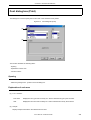
Font Dialog Box (Print) ... 209
6-22
Set Header/Footer Dialog Box ... 211
6-23
Grouping by Keyword Dialog Box ... 214
6-24
Select the way of Function Prototypes Dialog Box ... 217
6-25
Find String Dialog Box ... 220
6-26
Find String Dialog Box (Mini) ... 221
6-27
Replace String Dialog Box ... 224
6-28
Replace String Dialog Box (Mini) ... 227
6-29
Jump to Specified Line Dialog Box ... 229
6-30
Jump to Specified Line in the Source file Dialog Box ... 231
6-31
Mark Jump Dialog Box ... 233
6-32
Find in Files Dialog Box ... 235
6-33
Find in Files Dialog Box (Details) ... 235
6-34
Select Folder Dialog Box ... 236
6-35
Replace in Files Dialog Box ... 240
6-36
Replace in Files Dialog Box during Replacement ... 240
6-37
Expand to Specified Layer Dialog Box ... 245
6-38
Collapse to Specified Layer Dialog Box ... 247
6-39
Set Layer Rule Dialog Box ... 248
6-40
Function List Dialog Box ... 251
6-41
Save the Function List Dialog Box ... 254
6-42
Layer List Dialog Box ... 256
6-43
Select Active Project Dialog Box ... 258
6-44
Project Settings Dialog Box ... 259
6-45
Project Settings Dialog Box - [Project Information] Tab ... 260
6-46
Project Settings Dialog Box - [Source File] Tab ... 262
6-47
Insert Project Dialog Box ... 264
6-48
Add Source Files Dialog Box ... 266
User’s Manual U16934EJ1V0UM
19
6-49
Project Group Name Dialog Box ... 268
6-50
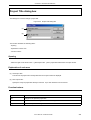
Project Title Dialog Box ... 269
6-51
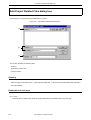
Add Project Related Files Dialog Box ... 270
6-52
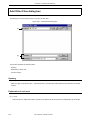
Add Other Files Dialog Box ... 272
6-53
Properties Dialog Box ... 274
6-54
Add New Memo Dialog Box ... 276
6-55
Startup File Dialog Box ... 277
6-56
Copy Startup File from Dialog Box ... 279
6-57
Startup File to register Dialog Box ... 281
6-58
Link Directive File Dialog Box ... 283
6-59
Copy Link Directive File from Dialog Box ... 285
6-60
Link Directive File to register Dialog Box ... 287
6-61
CVS Update Dialog Box ... 289
6-62
CVS Commit Dialog Box ... 291
6-63
CVS Log Dialog Box ... 293
6-64
CVS Status Dialog Box ... 295
6-65
Select Project Dialog Box ... 297
6-66
Batch Build Dialog Box ... 299
6-67
Build Mode Dialog Box ... 301
6-68
Add Build Mode Dialog Box ... 303
6-69
Build Settings Dialog Box ... 305
6-70
Build Settings Dialog Box - [Build] Tab ... 306
6-71
Build Settings Dialog Box - [Pre Build Process] Tab ... 307
6-72
Build Settings Dialog Box - [After Build Process] Tab ... 308
6-73
Add Command Dialog Box ... 310
6-74
Edit Command Dialog Box ... 311
6-75
Debugger Settings Dialog Box ... 313
6-76
Register External Tool Dialog Box ... 316
6-77
Select External Tool Dialog Box ... 318
6-78
File Compare Dialog Box ... 320
6-79
File Compare Dialog Box (Mini) ... 320
6-80
PM plus Settings Dialog Box ... 323
6-81
PM plus Settings Dialog Box - [Workspace] Tab ... 324
6-82
PM plus Settings Dialog Box - [External Editor] Tab ... 325
6-83
PM plus Settings Dialog Box - [File] Tab ... 327
6-84
PM plus Settings Dialog Box - [Recent] Tab ... 330
6-85
PM plus Settings Dialog Box - [Source File by idl File] Tab ... 332
6-86
PM plus Settings Dialog Box - [Window] Tab ... 334
6-87
PM plus Settings Dialog Box - [Path] Tab ... 335
6-88
PM plus Settings Dialog Box - [Edit] Tab ... 337
6-89
PM plus Settings Dialog Box - [View] Tab ... 339
6-90
PM plus Settings Dialog Box - [Layer] Tab ... 341
6-91
PM plus Settings Dialog Box - [Scroll] Tab ... 343
20
User’s Manual U16934EJ1V0UM
6-92
PM plus Settings Dialog Box - [Find/ Replace] Tab ... 344
6-93
User Setting Dialog Box ... 346
6-94
Font Dialog Box ... 348
6-95
Customize Dialog Box ... 350
6-96
Customize Dialog Box - [Keyboard] Tab ... 351
6-97
Customize Dialog Box - [Menu] Tab ... 352
6-98
Customize Dialog Box - [Toolbar] Tab ... 353
6-99
Customize Dialog Box - [User Menu] Tab ... 355
6-100
Customize Dialog Box - [Keyword] Tab ... 356
6-101
Edit User keyword Dialog Box ... 358
6-102
Edit C Language's reserve words Dialog Box ... 360
6-103
Save the Key Operation Dialog Box ... 362
6-104
Load the Macro File Dialog Box ... 364
6-105
Play back the Macro File Dialog Box ... 366
6-106
Entry Macro Files Dialog Box ... 368
6-107
Add the Macro file Dialog Box ... 370
6-108
Change the Macro file Dialog Box ... 372
6-109
dump850 Dialog Box ... 374
6-110
Window List Dialog Box ... 376
6-111
Shortcut List Dialog Box ... 378
6-112
About PM plus Dialog Box ... 380
7-1
Message Dialog Box ... 382
User’s Manual U16934EJ1V0UM
21
LIST OF TABLES
List No.
Title and Page
5-1
Messages on the History of Replace in files Window ... 77
5-2
Command Format for Key Board Macro (File menu) ... 119
5-3
Command Format for Key Board Macro (Edit menu) ... 119
5-4
Command Format for Key Board Macro (Find menu) ... 120
5-5
Command Format for Key Board Macro (Layer menu) ... 122
5-6
Command Format for Key Board Macro (jump-related) ... 123
5-7
Command Format for Key Board Macro (Help menu) ... 123
5-8
Command Format for Key Board Macro (no menu) ... 124
5-9
Command Format for Key Board Macro (control command-related) ... 125
6-1
Window/Dialog Box List ... 133
6-2
Standard Bar ... 159
6-3
Build Bar ... 160
6-4
Option Bar (78K Series) ... 161
6-5
Option Bar (V850 Series) ... 161
7-1
The Meaning of each Message Type ... 382
B-1
Quantitative Limit List ... 420
22
User’s Manual U16934EJ1V0UM
CHAPTER 1 GENERAL
CHAPTER 1 GENERAL
1. 1 Overview
The project manager (PM plus) is an integrated development environment platform that is used to efficiently develop
user programs for NEC Electronics 8-/16-bit microcontrollers for embedded control, the 78K Series and NEC Electronics
32-bit microcontrollers for embedded control, the V850 Series.
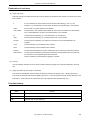
A series of operations in user program development can be performed from PM plus such as editor startup, builder startup, and debugger startup.
PM plus is a product that integrates a project manager (PM), which is the conventional integrated development environment platform, and a screen editor (idea-L).
The terms used for PM plus are defined below.
User’s Manual U16934EJ1V0UM
23
CHAPTER 1 GENERAL
Workspace
A "workspace" is the unit which manages the file name of multiple project files.
PM plus saves the file names of multiple project files into a workspace file (*.prw), and refers to it.
Project
A "project" is a unit managed by PM plus. It indicates an application system developed under PM plus and its environment.
PM plus saves the information, such as the source files, target device name, tool options for creating a load module,
and editor or debugger, to be used for the application system into each project file (*.prj) as "project information" and
refers to it.
Build or debug is performed in project units. Therefore, the project to be built or debugged have to be set as "active
project" (by selecting the [Project] menu -> [Select Active Project...] ).
Project group
Multiple registered projects can be arranged with related projects in a group. Note that each project to be registered
in a project group must target a common device (i.e. only one device file can be assigned to a project group).
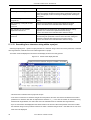
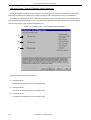
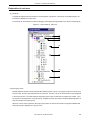
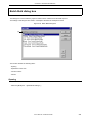
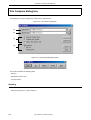
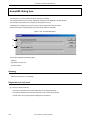
Figure 1-1 shows the image of the Main window.
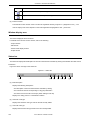
Figure 1-1 Main Window
Workspace
Project group
Project
IDL file
An IDL file is a file used to save the layer information for PM plus (idea-L information file).
24
User’s Manual U16934EJ1V0UM
CHAPTER 1 GENERAL
1. 2 Functions and Features
The major functions and features of PM plus are as follows :
- Managing multiple projects
PM plus can manage multiple project files collectively by using concepts such as workspace and project group.
- Starting a builder
PM plus can be used to start tools required for generating application systems (a compiler, structured assembler,
assembler, linker, ROM-ization processor necessary for storing programs in ROM, and a hex converter).
- Starting editor
PM plus can be used to create or modify the source files to be used for a project by the editor function which PM
plus provides. Furthermore, an external editor can also be registered and started form PM plus.
- Starting a debugger
PM plus can be used to start NEC Electronics debugger or system simulator. When a correction of the source program is issued from the debugger, PM plus displays a specified line of the specified file.
- Registering and executing external tools
Other applications the user often uses can be included in the menu of PM plus and started from this menu.
- Linking with a source management tool
Version management of the source program in the software development process can be performed more easily by
linking with a source management tool.
- Linking with a source analysis tool
Quality management of the source program in the software development process can be performed more easily by
linking with a commercial source analysis tool.
- Supporting ToolLink
Communication with ToolLink support tools is easily achieved through supporting ToolLink.
- Correspondence of comments with specification
PM plus supports a function that is effective in adjustment of specification at the processes of its review (idea processor function). This makes it possible to reflect the adjusted contents to a source program as comments.
User’s Manual U16934EJ1V0UM
25
CHAPTER 1 GENERAL
1. 3 Positioning of PM plus
Figure 1-2 shows the relationship between the software used for program development and PM plus.
Figure 1-2 Relationship between Software for Program Development and PM plus
Product planning
PM plus
System design
Edit
Hardware design
Software design
Real-time OS
Production
Cording
Editor
Inspection
Compilling/
Assembling
Yes
Error?
Build
Compiler
Structured assembler [Note 1]
Assembler
Linker
ROM-ization processor [Note 1]
Hex converter [Note 2]/
Object converter [Note 1]
No
Yes
Error?
No
Debug
Yes
System simulater
Bug?
No
Integrated debugger
System
debugging
Performance analyzer
System evaluation
Performance AnalysisTuning Tool
Commercialization
[Note 1] 78K Series only
[Note 2] V850 Series only
26
User’s Manual U16934EJ1V0UM
Debug
CHAPTER 1 GENERAL
1. 4 Operating Environments
The following environments are required in order to use PM plus.
[Caution]
The operation of PM plus is not guaranteed in a network environment. Do not use PM plus in a network environment.
(1) Host machine
IBM PC/AT or compatible machine on which the following operation systems can operate.
- CPU
: Pentium II 400MHz or higher
- Memory
: 128M byte or more
- OS
: Windows 98, Windows Me, Windows 2000,
Windows NT 4.0 Workstation+SP3 or later,
Windows XP (Professional Edition, Home Edition)
[Caution]
Regardless of which OS is used, Internet Explorer 5.0 or higher and the latest Service Pack must be installed.
- Screen size
: 800 * 600 pixel or more
(2) DLL
The following DLL files provided by Microsoft Corp. are required.
- mfc42.dll V6.0.8665.0 or more (It is provided when PM plus is installed.)
- msvctr.dll V6.1 or more (It is provided when PM plus is installed.)
- ComCtl32.dll V5.81 or more (It is necessary to install in addition to PM plus.)
(3) Related development tools
[78K Series]
Assembler
RA78K0 (NEC Electronics : V3.70[Note] or later)
RA78K0S (NEC Electronics : V1.50[Note] or later)
RA78K4 (NEC Electronics : V1.70[Note] or later)
Compiler
CC78K0 (NEC Electronics : V3.60[Note] or later)
CC78K0S (NEC Electronics : V1.60[Note] or later)
CC78K4 (NEC Electronics : V2.50[Note] or later)
Debugger
ID78K0-NS (NEC Electronics : V2.52 or later)
ID78K0S-NS (NEC Electronics : V2.52 or later)
ID78K4-NS (NEC Electronics : V2.52 or later)
Simulator
SM78K0 (NEC Electronics : V2.52 or later)
SM78K0S (NEC Electronics : V2.52 or later)
SM78K4 (NEC Electronics : V2.52 or later)
Device File
A device file of target device to be used (NEC Electronics)
[Note]
The listed version number is the preliminary version number, because the tool is still under development.
User’s Manual U16934EJ1V0UM
27
CHAPTER 1 GENERAL
[V850 Series]
28
Compiler
CA850 (NEC Electronics : V2.70 or later)
Debugger
ID850 (NEC Electronics : V2.52 or later)
Simulator
SM850 (NEC Electronics : V2.51 or later)
Performance AnalysisTuning Tool
TW850 (NEC Electronics : V1.20 or later)
Device File
A device file of target device to be used (NEC Electronics)
User’s Manual U16934EJ1V0UM
CHAPTER 2 INSTALLATION
CHAPTER 2 INSTALLATION
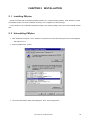
2. 1 Installing PM plus
PM plus is included with an assembler package (RA78Kx) or a compiler package (CA850). When RA78Kx or CA850
are installed, PM plus can be also installed if necessary, as it is supplied in the same package.
For the details on how to install the assembler package or the compiler package, refer to the user's manual of each
tool.
2. 2 Uninstalling PM plus
1. Click "Add/Remove Program " icon in Windows control panel, and select the following item from the list displayed.
NEC PM plus Vx.xx
2. Click the [Add/Remove...] button.
3. The Confirm File Deletion dialog will be displayed. Then, click the [Yes] button.
User’s Manual U16934EJ1V0UM
29
CHAPTER 2 INSTALLATION
4. When PM plus have been deleted, the message "Uninstall successfully completed." is displayed, click the [OK] button. This completes uninstalling PM plus.
30
User’s Manual U16934EJ1V0UM
CHAPTER 3 STARTING AND EXITING
CHAPTER 3 STARTING AND EXITING
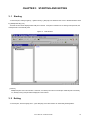
3. 1 Starting
To start PM plus, select [Programs] -> [NECTools32] -> [PM plus] from Windows start menu or double-click an exist-
ing workspace file(*.prw).
The Main window will be displayed after PM plus is started. If PM plus is started from an existing workspace file, that
workspace file is automatically read.
Figure 3-1 Main Window
[Caution]
Multiple PM plus cannot be activated. Therefore, if an attempt is made to start PM plus while PM plus has already
run, already-running PM plus will be displayed on the forefront.
3. 2 Exiting
To exit PM plus, select the [File] menu -> [Exit PM plus] on the Main window or select the [Close] button.
User’s Manual U16934EJ1V0UM
31
CHAPTER 4 QUICK TOUR
CHAPTER 4 QUICK TOUR
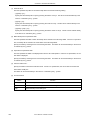
4. 1 Overview
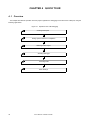
This chapter describes the operation flow from project registration to debugging for first-time users of PM plus, using the
following organization.
Figure 4-1 Operation Flow until Debugging
Creating Workspace
Setting Options Related to Compilation
Selecting Active Project
Selecting Debugger
Executing Build
Other Settings
32
User’s Manual U16934EJ1V0UM
CHAPTER 4 QUICK TOUR
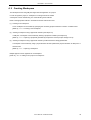
4. 2 Creating Workspace
The development flow using PM plus begins with the registration of a project.
In order to register a project, a "workspace" to manage it must be created.
A workspace can be created using one of the following three methods.
Refer to the appropriate method in accordance with the environment used.
(1) Creating a new workspace
A new workspace can be created by specifying the necessary project information in order in a wizard format.
[Refer to] : "5. 1. 6 Creating a new workspace"
(2) Creating a workspace using a project file created by the PM(V3.xx)
In PM plus, a workspace can be created by reading a project file created by the PM(V3.xx).
[Refer to] : "5. 1. 5 Opening a project file generated by the previous version (Project manager V3.xx)"
(3) Creating a workspace using a project file created by a NEC Electronics debugger/simulator
A workspace can be created by using a project file that has been updated the project information for PM plus in a
wizard format.
[Refer to] : "5. 1. 7 Opening a workspace"
Multiple projects can be registered to one workspace.
[Refer to] : "5. 6. 3 Adding a new project to a workspace"
User’s Manual U16934EJ1V0UM
33
CHAPTER 4 QUICK TOUR
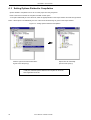
4. 3 Setting Options Related to Compilation
Options related to compilation can be set for each project from the [Tool] menu.
Refer to the user's manual of the compiler for details of each option.
To set option individually in source file units, select the appropriate file on the Project window and click the right mouse
button. When option is set individually, the icon of the source file will change to green on the Project window.
Figure 4-2 Setting Options Related to Compilation
Click the right mouse button after selecting the source file (entry.c)
Options are set individually
per source file (entry.c)
In PM plus, individual options related to the compiler can be set for
each registered source file.
34
User’s Manual U16934EJ1V0UM
CHAPTER 4 QUICK TOUR
4. 4 Selecting Active Project
In PM plus, multiple projects can be registered to one workspace.
When build is executed, therefore, the project to be built must be pre-specified.
To specify the active project, select the appropriate project on the Project window and click the right mouse button. The
icon of the project will change from gray to pink when selected as an active project.
Only an active project is built or debugged.
[Refer to] : "5. 6. 2 Selecting active project"
Figure 4-3 Selecting Active Project
Project group name:
Multiple projects can be managed
(the example shows main, ServoLibrary).
Library files, etc. can be registered.
Specifications, etc. can be freely
registered.
Click the right mouse button after selecting
the project (ServoLibrary).
The project (ServoLibrary) is set as
the active project.
In PM plus, multiple projects can be registered or managed together
with related projects in a project group.
User’s Manual U16934EJ1V0UM
35
CHAPTER 4 QUICK TOUR
4. 5 Selecting Debugger
Selecting the [Tool] menu -> [Debugger Settings...] displays the Debugger Settings dialog box in which the debugger to
be used can be set.
In this dialog box, all the NEC Electronics debuggers and simulators that are installed in the host machine can be displayed and selected.
After executing build by selecting the [Build] menu -> [Build and Debug], the debugger that is set here starts up automatically and downloads a load module file at the same time to facilitate the debug operation.
[Refer to] : Debugger Settings dialog box
Figure 4-4 Selecting Debugger
36
User’s Manual U16934EJ1V0UM
CHAPTER 4 QUICK TOUR
4. 6 Executing Build
Selecting [Build] menu -> [Build and Debug] starts batch processing from build to debug for the active project.
If build ends correctly, the set debugger starts up automatically and loads the created load module file (if the debugger
does not have to be started up, execute build by selecting the [Build] menu -> [Build]). At this time, a make file (*.mak) is
also created automatically in default condition.
The messages that are output from the language processing tool during build execution are displayed on the Output
window. At this time, place the caret on the error/warning line that is displayed and double-click the left mouse button to
open the source file and tag-jump to the relevant error/warning line.
[Refer to] : "5. 7. 1 Building and Debugging"
4. 7 Other Settings
There are many other functions is provided to enable more efficient and smooth execution of the debug operation flow
using the PM plus platform.
- Setting the layer rule
[Refer to] : "5. 4. 17 Applying a layer rule"
- Registration of external tools and customization of menu/toolbars
[Refer to] : "5. 8. 5 Registering external tools", "5. 8. 11 Customizing settings"
- Word-based searching in all the source files of the project
[Refer to] : "5. 3. 23 Searching for a character string within a project"
User’s Manual U16934EJ1V0UM
37
CHAPTER 5 METHOD OF OPERATION
CHAPTER 5 METHOD OF OPERATION
5. 1 File Management
5. 1. 1 Creating a new file
Selecting the [File] menu -> [New] opens a new Edit window.
Up to 64 Edit window can be opened together with the Search result display window and the Output window.
5. 1. 2 Opening a existing file
Selecting the [File] menu -> [Open] opens the Open dialog box to open a selected file.
5. 1. 3 Inserting a file
Selecting the [File] menu -> [Insert file...] opens the Insert File dialog box to insert a specified file at the caret position in
the currently active Edit window.
The files that can be inserted are as follows :
- A IDL file
- A text format file
5. 1. 4 Closing a window
Selecting the [File] menu -> [Close] closes the file being edited. If the file has been changed, a message for confirming
whether to save the changes is displayed.
Note that if there are any files with read-only having the same name, those files will all be closed.
5. 1. 5 Opening a project file generated by the previous version (Project manager
V3.xx)
To open a project file generated by the previous version (Project manager (V3.xx)), select the [File] menu -> [Open
Workspace...] to open the Open Workspace dialog box, and specify "Project File (*.prj)" as "Files of type:"
In this case, the following message will be displayed.
38
User’s Manual U16934EJ1V0UM
CHAPTER 5 METHOD OF OPERATION
When the project file generated by the previous version is read into PM plus, each designation is automatically determined as follows :
- Workspace file name
: project file name + extension (*.prw)
- Project group name
: device series name (e.g. V850 Series)
- Project title name
: If a title setting has been performed with the read file, it remains as its title.
If a title setting has not been performed with the read file, it gets the project file name.
The workspace name can not be renamed. However, the project group name or the project title name can be renamed
by clicking the right mouse button on its name in the Project window.
If a project file generated by the other NEC Electronics tools (debugger, etc.) is to be opened, refer to the "5. 1. 7 Opening a workspace".
5. 1. 6 Creating a new workspace
Selecting the [File] menu -> [New Workspace...] creates a new workspace.
To create a new workspace and its project, the following wizard-format dialog boxes are displayed. Enter/select the
necessary information in each dialog box and click the [Next>] button to proceed.
- New Workspace - Step 1/8 [Workspace Information] dialog box
- New Workspace - Step 2/8 [Select Real-Time OS] dialog box
- New Workspace - Step 3/8 [Startup File] dialog box
- New Workspace - Step 4/8 [Register Mode] dialog box
- New Workspace - Step 5/8 [LinkDirective File] dialog box
- New Workspace - Step 6/8 [Setup Source Files] dialog box
- New Workspace - Step 7/8 [Select Debugger] dialog box
- New Workspace - Step 8/8 [Confirmation] dialog box
Clicking the [Finish] button in the dialog box at the last step (New Workspace - Step 8/8 [Confirmation] dialog box)
causes a make file to be created automatically. Refer to the "5. 6. 10 Exporting a make file" for details of make file creation.
User’s Manual U16934EJ1V0UM
39
CHAPTER 5 METHOD OF OPERATION
The dialog boxes to be displayed differ depending on the selection. The wizard flow of each selection is shown below :
Figure 5-1 Wizard Flow for Creating New Workspace
Step 1/8 (Workspace Information)
Check to "Create Blank Workspace"
option
Yes
No
No
Specification of V850 series
and non-library
Yes
Step 2/8 (Select Real-Time OS)
Step 3/8 (Startup File)
Check to "Use the Sample file"
option
Yes
Step 4/8 (Register Mode)
Step 5/8 (Link Directive File)
Step 6/8 (Setup Source Files)
No
Specification of V850 series
and non-library
Yes
Step 7/8 (Select Debugger)
Step 8/8 (Confirmation)
40
User’s Manual U16934EJ1V0UM
No
CHAPTER 5 METHOD OF OPERATION
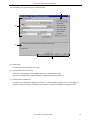
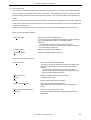
The configuration of a typical dialog box is described below.
(c)
(a)
(b)
(d)
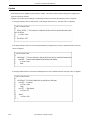
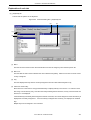
(a) Setting items
The items to be set are displayed in this area.
(b) Function description and cautions
The function of the dialog box and applicable cautions are described in this area.
This area is not displayed in the New Workspace - Step 8/8 [Confirmation] dialog box.
(c) Current position of wizard flow
The whole flow of the wizard is displayed in this area. î>>î mark signifies the position of the current dialog box.
If the flow changes according to the selection of information, the steps to be skipped are displayed in gray.
User’s Manual U16934EJ1V0UM
41
CHAPTER 5 METHOD OF OPERATION
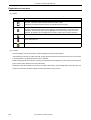
(d) Function buttons
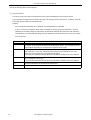
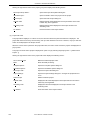
Button
42
Function
<Back
Returns to the previous wizard step.
This button is always disabled in the New Workspace - Step 1/8 [Workspace Information]
dialog box.
Next>
Opens the next step dialog box. (The next step dialog box to be opened differs depending on
the selection.)
This button appears as [Finish] button in the New Workspace - Step 8/8 [Confirmation] dialog
box. Terminates this wizard for creating a new workspace, and generates a new workspace
file and a project file belonging to that workspace, according to the displayed information.
Cancel
Stops the operation for creating a new workspace file, and returns to its previous status (in
which the previously read workspace file is available for use).
Help
Opens the help for this dialog box.
User’s Manual U16934EJ1V0UM
CHAPTER 5 METHOD OF OPERATION
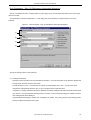
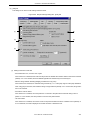
New Workspace - Step 1/8 [Workspace Information] dialog box
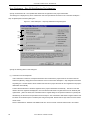
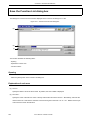
Specify a workspace file name, a folder position, a project group name, and the series and device name of the target
device to be used.
The specification of the item marked with "*" in this dialog can not be omitted (i.e. the [Next>] button can not be
selected).
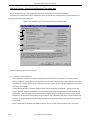
Figure 5-2 New Workspace - Step 1/8 [Workspace Information] Dialog Box
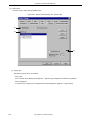
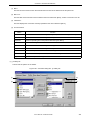
(1)
(2)
(3)
(4)
Specify the following items on this dialog box.
(1) Workspace File Name :
Specify the name of the file to save the workspace information. Up to 255 characters can be specified. Blanks and
two-byte code cannot be used in the file name.
The file extension is ".prw". If the extension is omitted, it is automatically set to ".prw". The file name which
changed the workspace file extension "prw" to "prj" is assigned as the project file name.
In addition, if a existing workspace file name is specified, the existing workspace file will be renamed as backup file
(e.g. test.prw -> test.prw.bak) after the [Next>] button is clicked. Then the message dialog box whether to create a
new workspace file will be displayed.
If [Create Blank Workspace] is checked, only a workspace is created. In this case, [Project Group Name], [Series
Name], and [Device Name] become invalid.
User’s Manual U16934EJ1V0UM
43
CHAPTER 5 METHOD OF OPERATION
(2) Folder :
Specify the folder in which the workspace file and project file are stored.
Selecting the [Browse...] button opens the Browse for Folder dialog box in which to specify the project folder position. The folder in which PM plus.exe exists is default folder.
(3) Project Group Name :
Specify the name of the project group to be displayed on the Project window. Up to 260 characters can be specified.
If the specification of this area is omitted, the name of the project group displayed on the Project window is the
same as the name of the workspace file.
In addition, the project title of the project newly created by this wizard is assigned the name of the project group
specified with this area. If you wish to change a project title, select the [Edit Project Title...] menu by clicking the
mouse right button on the target project title in the Project window.
(4) Series Name : and Device Name :
Select the item to be created and the device file to be used from the drop-down list.
Clicking the [Device Install] button starts the device file installer to register the new device file.
44
User’s Manual U16934EJ1V0UM
CHAPTER 5 METHOD OF OPERATION
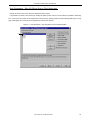
New Workspace - Step 2/8 [Select Real-Time OS] dialog box
Specify whether or not to use NEC Electronics real-time OS.
This dialog box is displayed only when "V850 Series" has been specified as the series name in the New Workspace Step 1/8 [Workspace Information] dialog box.
Figure 5-3 New Workspace - Step 2/8 [Select Real-Time OS] Dialog Box
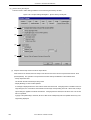
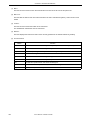
(1)
Specify the following items on this dialog box.
(1) RTOS :
When using the NEC Electronics real-time OS, select the name of real-time OS, when not using that, select "Not
use" from the drop-down list. All the names of the real-time OS for NEC Electronics V850 series that have been
installed are displayed on the drop-down list.
If the name of the real-time OS to be used is selected, the [RTOS setting...] button becomes valid, and clicking this
button opens the dialog box for setting the real-time OS. Refer to the user's manual of the real-time OS for details
on the setting.
User’s Manual U16934EJ1V0UM
45
CHAPTER 5 METHOD OF OPERATION
New Workspace - Step 3/8 [Startup File] dialog box
Specify a startup file.
This dialog box is displayed only when "V850 Series" has been specified as the series name in the New Workspace Step 1/8 [Workspace Information] dialog box.
Figure 5-4 New Workspace - Step 3/8 [Startup File] Dialog Box
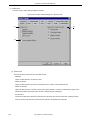
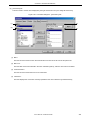
(1)
(2)
(3)
(4)
(5)
Specify the following items on this dialog box.
(1) Copy and Use the Sample file
If this button is selected, the startup file of the sample that corresponds to the register mode set in the next wizard
step is copied to the project folder and registered to the project-related files. The name of the startup file to be registered is displayed in The Startup File Name to register edit box as an absolute path.
If [File Name...] button is clicked, the Startup File to register dialog box is opened to select the any startup file.
Alternatively, the file name to be specified can also be input in The Startup File Name to register edit box edit box
either as an absolute path or a relative path using the keyboard. Blanks and two-byte code cannot be used in the
file name.
If real-time OS is selected for use in the previous wizard step (New Workspace - Step 2/8 [Select Real-Time OS]
dialog box), this button cannot be selected.
46
User’s Manual U16934EJ1V0UM
CHAPTER 5 METHOD OF OPERATION
(2) Use the Existing file
When an existing startup file is used, select this radio button.
If [Brows...] button is clicked, the Startup File dialog box is opened to select the any startup file. The name of the
startup file to be registered is displayed in The Startup File Name to register edit box as an absolute path. Alternatively, the file name to be specified can also be input in The Startup File Name to register edit box edit box either as
an absolute path or a relative path using the keyboard. Blanks and two-byte code cannot be used in the file name.
If an existing file is used, the [File Name...] button cannot be selected.
(3) Copy and Use the Existing file
When an existing startup file is copied and used, select this radio button. Specify the startup file name to be the
copy source and the startup file name to be the copy destination.
If [Brows...] button is clicked, the Copy Startup File from dialog box is opened to select the any startup file. The
name of the startup file to be the copy source is displayed in the Copy from edit box as an absolute path. Alternatively, the file name to be specified can also be input in the Copy from edit box either as an absolute path or a relative path using the keyboard. Blanks and two-byte code cannot be used in the file name.
If [File Name...] button is clicked, the Startup File to register dialog box is opened to select the any startup file.
Alternatively, the file name to be specified can also be input in The Startup File Name to register edit box edit box
either as an absolute path or a relative path using the keyboard.
(4) Do Not specify now
When no startup file is specified now, select this radio button.
In this case, a startup file can be specified by selecting the project-related file folder on the Project window and then
selecting [Add Project Related files...] using the right mouse button, or selecting the [Tool] menu -> [Linker
Options...].
[Caution]
In an environment in which a version of CA850 earlier than V2.50 is installed, the [Do Not specify now] button is
selected automatically and other items become invalid.
(5) The Startup File Name to register :
Specify the name of the startup file to be registered.
If [File Name...] button is clicked, the Startup File to register dialog box is opened to select the any startup file.
Alternatively, the file name to be specified can also be input in The Startup File Name to register edit box edit box
either as an absolute path or a relative path using the keyboard. Blanks and two-byte code cannot be used in the
file name.
[Caution]
If after selecting "Do Not specify now" for the startup file and registering the source file in the New Workspace - Step
6/8 [Setup Source Files] dialog box, and then returning to this dialog box and specifying the source file registered in
the New Workspace - Step 6/8 [Setup Source Files] dialog box as the startup file, and ending the wizard as is, the following linker option setting message is displayed, and the startup file is registered to both the source file and projectrelated files.
"Startup file specification is illegal."
Delete the startup file registered to the source file.
User’s Manual U16934EJ1V0UM
47
CHAPTER 5 METHOD OF OPERATION
New Workspace - Step 4/8 [Register Mode] dialog box
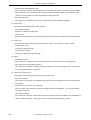
Specify the register mode option for the C compiler. The sample file of the startup file corresponding to the register
mode which is selected in this dialog box is copied to the project folder, and registered to the project-related files.
This dialog box is displayed only when "V850 Series" has been specified as the series name in the New Workspace Step 1/8 [Workspace Information] dialog box and "Copy and Use the Sample file" has been specified in the previous wizard step (New Workspace - Step 3/8 [Startup File] dialog box).
Figure 5-5 New Workspace - Step 4/8 [Register Mode] Dialog Box
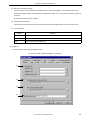
(1)
(2)
(3)
Specify the following items on this dialog box.
(1) 22-Register Mode
The startup file is determined as the 22-register mode.
(2) 26-Register Mode
The startup file is determined as the 26-register mode.
(3) 32-Register Mode
The startup file is determined as the 32-register mode.
48
User’s Manual U16934EJ1V0UM
CHAPTER 5 METHOD OF OPERATION
[Caution]
If the register mode of the compiler option is changed after a new workspace is created, the quasi directive indicating the register mode in the startup file may indicate a different mode from the register mode of the other
source files. Therefore, execute the relevant processing/measure from those shown below :
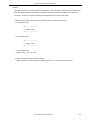
- Modify the quasi directive that indicates the register mode in the startup file as follows :
*) In 22-register mode
#-----------------------------#
register mode
#------------------------------
*) In 26-register mode
#-----------------------------#
register mode
#------------------------------
*) In 32-register mode
Delete ".option reg_mode " line.
- Ignore the following warning displayed at linking.
Id850: W4608: input file have different register modes, use "-rc" option for more information.
User’s Manual U16934EJ1V0UM
49
CHAPTER 5 METHOD OF OPERATION
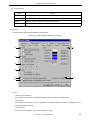
New Workspace - Step 5/8 [LinkDirective File] dialog box
Specify a link directive file. The specified link directive file is registered to the project-related files.
This dialog box is displayed only when "V850 Series" has been specified as the series name in the New Workspace Step 1/8 [Workspace Information] dialog box.
Figure 5-6 New Workspace - Step 5/8 [LinkDirective File] Dialog Box
(1)
(2)
(3)
(4)
(5)
Specify the following items on this dialog box.
(1) Create and Use the Sample file
If this radio button is selected, a sample link directive file is created in the project folder in accordance with the
selection in [Memory Usage] area and the selection of the OS in the New Workspace - Step 2/8 [Select Real-Time
OS] dialog box. The link directive file is created under the name "project file name.dir" and registered to the projectrelated files automatically.
The link directive file that is created is registered to the project-related files automatically. The name of the link
directive file to be registered is displayed in The Link Directive File Name to register edit box as an absolute path.
If [File Name...] button is clicked, the Link Directive File to register dialog box is opened to select the any startup file.
Alternatively, the file name to be specified can also be input in The Link Directive File Name to register edit box edit
box either as an absolute path or a relative path using the keyboard. Blanks and two-byte code cannot be used in
the file name.
Refer to APPENDIX A SAMPLE LINK DIRECTIVE FILE for the contents of the link directive file to be created.
50
User’s Manual U16934EJ1V0UM
CHAPTER 5 METHOD OF OPERATION
[Caution]
The link directive file that is created must be customized in accordance with the target specification or userdefined sections.
In an environment in which a version of CA850 earlier than V2.50 has been installed, the [Do Not specify now]
radio button is selected automatically and this radio button becomes invalid.
(2) Use the Existing file
When an existing link directive file is used, select this radio button.
If [Brows...] button is clicked, the Link Directive File dialog box is opened to select the any startup file. The name of
the link directive file to be registered is displayed in The Link Directive File Name to register edit box as an absolute
path. Alternatively, the file name to be specified can also be input in The Link Directive File Name to register edit
box edit box either as an absolute path or a relative path using the keyboard. Blanks and two-byte code cannot be
used in the file name.
If an existing link directive file is used, the [File Name...] button cannot be selected.
[Caution]
In an environment in which a version of CA850 earlier than V2.50 has been installed, the [Do Not specify now]
radio button is selected automatically and this radio button becomes invalid.
(3) Copy and Use the Existing file
When an existing link directive file is copied and used, select this radio button. Specify the link directive file name
to be the copy source and the link directive file name to be the copy destination.
If [Brows...] button is clicked, the Copy Link Directive File from dialog box is opened to select the any startup file.
The name of the link directive file to be the copy source is displayed in the Copy from edit box as an absolute path.
Alternatively, the file name to be specified can also be input in the Copy from edit box either as an absolute path or
a relative path using the keyboard. Blanks and two-byte code cannot be used in the file name.
If [File Name...] button is clicked, the Link Directive File to register dialog box is opened to select the any startup file.
Alternatively, the file name to be specified can also be input in The Link Directive File Name to register edit box edit
box either as an absolute path or a relative path using the keyboard.
[Caution]
In an environment in which a version of CA850 earlier than V2.50 has been installed, the [Do Not specify now]
radio button is selected automatically and this radio button becomes invalid.
(4) Do Not specify now
When no link directive file is specified, select this radio button.
A link directive file can be specified by selecting a project-related file folder on the Project window and then selecting [Add Project Related files...] using the right mouse button, or selecting the [Tool] menu -> [Linker Options...]
after exiting the wizard.
[Caution]
In the environment in which a version of CA850 earlier than V2.50 has been installed, the [Do Not specify now]
button is selected automatically, and other items become invalid.
User’s Manual U16934EJ1V0UM
51
CHAPTER 5 METHOD OF OPERATION
(5) The Link Directive File Name to register :
Specify the name of the link directive file to be registered.
If [File Name...] button is clicked, the Link Directive File to register dialog box is opened to select the any startup file.
Alternatively, the file name to be specified can also be input in The Link Directive File Name to register edit box edit
box either as an absolute path or a relative path using the keyboard. Blanks and two-byte code cannot be used in
the file name.
52
User’s Manual U16934EJ1V0UM
CHAPTER 5 METHOD OF OPERATION
New Workspace - Step 6/8 [Setup Source Files] dialog box
Specify the name of the source file to be registered into the project.
It is possible to proceed to the next step by clicking the [Next>] button even if no source files are specified in this dialog
box. In this case, source files can be registered into the project by specifying with the Project Settings dialog box or dragging and dropping the source files to be registered onto the Project window.
Figure 5-7 New Workspace - Step 6/8 [Setup Source Files] Dialog Box
(1)
User’s Manual U16934EJ1V0UM
53
CHAPTER 5 METHOD OF OPERATION
Specify the following items on this dialog box.
(1) Source File Name :
The names of the source files to be registered into the project are displayed in the source file list box.
The source files are registered to the project file in the order currently shown in this list box. In addition, the build
processing are performed in the registered order.
[Caution]
- If the compiler and assembler are not installed, source file addition is not possible.
- If, after a source file is added, the series name is changed by returning to the New Workspace - Step 1/8
[Workspace Information] dialog box, files among the previously added file other than those with extensions
corresponding to the series after the change are also displayed in the source file list box. In this case, delete
these source files.
Button
54
Function
Add...
Opens the Add Source Files dialog box to specify the source code files to be registered to
the project. Up to 2,048 source files can be registered per project. The extension of source
code file differs depending on the series name registered to the project.
Remove
Removes the selected file from the source file list box. By selecting a file name while holding
down the SHIFT or CTRL key, multiple source file names can be selected at once. The
names of the removed files are not registered to the project.
If no source file is selected or listed in the source file list box, this button can not be selected.
Remove All
Removes all the source files from the source file list box. The names of the removed files
are not registered to the project.
If no source file is selected or listed in the source file list box, this button can not be selected.
Up
Moves the selected file up within the source file list box.
Down
Moves the selected file down within the source file list box.
User’s Manual U16934EJ1V0UM
CHAPTER 5 METHOD OF OPERATION
New Workspace - Step 7/8 [Select Debugger] dialog box
Select the debugger which debug the project to be created newly.
The specification of the item marked with "*" in this dialog can not be omitted (i.e. the [Next>] button can not be
selected). The debugger specified with this dialog box can be changed after exiting this wizard.
Figure 5-8 New Workspace - Step 7/8 [Select Debugger] Dialog Box
(1)
(2)
(3)
Specify the following items on this dialog box.
(1) Debugger :
Select the debugger to be used from the drop-down list. All the NEC Electronics debuggers that have been
installed are displayed in the drop-down list together with the corresponding series name.
When a debugger is selected from this list, the file name of the debugger is displayed in the [File Name] text box
and the selected debugger will start up automatically when a debug operation is executed.
If you wish to change the debugger to be used after exiting the wizard, select the [Tool] menu -> [Debugger Setting...].
(2) File name :
The file name of the debugger to be used for debugging is displayed. When the debugger is selected by the
[Debugger] drop-down list, that file name is displayed with the path automatically.
If you wish to change the path, select the [Tool] menu -> [Debugger Settings].
(3) Option :
Specify the options for when starting up the debugger.
User’s Manual U16934EJ1V0UM
55
CHAPTER 5 METHOD OF OPERATION
New Workspace - Step 8/8 [Confirmation] dialog box
The contents of the specification are confirmed and the wizard for creating a new workspace is terminated.
Figure 5-9 New Workspace - Step 8/8 [Confirmation] Dialog Box
(1)
Specify the following items on this dialog box.
(1) The display of the settings
The various information specified with this wizard for creating a new workspace is displayed.
If the contents shown in this dialog box are correct, click the [Finish] button to terminate this wizard. Then PM plus
generates a new workspace file and a project file belonging to that workspace, according to the information displayed.
56
User’s Manual U16934EJ1V0UM
CHAPTER 5 METHOD OF OPERATION
5. 1. 7 Opening a workspace
Selecting [File] menu -> [Open Workspace...] or moving the workspace file using a drag-and-drop operation opens a
workspace.
Selecting the [File] menu -> [Open Workspace...] displays the Open Workspace dialog box and opens the selected
workspace file (*.prw) on the Project window. At this time, closes the currently opened workspace file and project file. If a
project file (*.prj), rather than a workspace file, is specified, a message is displayed, after which the prw file corresponding
to prj is opened. At this time, the project file (*.prj) of PM (V3.xx) format can also be specified in this dialog box. (Refer to
the "5. 1. 5 Opening a project file generated by the previous version (Project manager V3.xx)".)
If a workspace file is is dragged to the main frame, Edit window, Search result display window, Output window, and
Project window, opens the workspace file that was dropped. At this time, closes the currently opened workspace file. If a
project file (*.prj), rather than a workspace file, is moved using a drag-and-drop operation, a prw file corresponding to prj is
opened.
If an attempt is made to open a project file created by another NEC Electronics tool (debugger or simulator), a message
is displayed, after which the following wizard-format dialog boxes for updating the project information for PM plus are
opened.
Enter/select the necessary information in each dialog box and click the [Next>] button to proceed.
- Project Information dialog box
- Source File dialog box
User’s Manual U16934EJ1V0UM
57
CHAPTER 5 METHOD OF OPERATION
The configuration of a typical dialog box is described below.
(a)
(b)
(a) Setting items
The items to be set are displayed in this area.
(b) Function buttons
Button
58
Function
<Back
Returns to the previous wizard.
This button is always disabled in the Project Information dialog box.
Next>
Opens the next wizard.
This button appears as [Finish] button in the Source File dialog box. In this case, sets the
project information and the source file information into the project file and terminates this wizard.
Cancel
Does not enable the specified items, and closes this dialog.
Help
Opens the help for this dialog box.
User’s Manual U16934EJ1V0UM
CHAPTER 5 METHOD OF OPERATION
Project Information dialog box
Confirms the project information and modify the project title and the series and device name of the target device to be
used.
Figure 5-10
Project Information Dialog Box
(1)
(2)
(3)
Specify the following items on this dialog box.
(1) Information display area
Project File Name :
The name of the project file is displayed.
Folder :
The project folder specified in the project file is displayed.
Workspace File Name :
The name of the workspace file to which the project belongs is displayed with an absolute path.
The file name is automatically determined as project file name + extension (*.prw).
Project Group :
The name of the project group to which the project belongs is displayed.
If you wish to change the name of the project group, after this wizard terminates, click the name of that project
group with the right mouse button in the Project window and select the [Edit Project Group Name...] menu.
(2) Project Title :
The project title to be displayed in the Project window is displayed.
If the project title is modified here, the modification is reflected in the Project window.
Up to 260 characters can be entered for a project title.
User’s Manual U16934EJ1V0UM
59
CHAPTER 5 METHOD OF OPERATION
(3) Series Name : and Device Name :
The series and device name of the target device to be used are displayed.
They can be changed by selecting from the drop-down lists, in which all the series and device names of the
installed devices are displayed.
If multiple projects are registered into the project group, or if the debugger/simulator is running, these drop-down
lists are invalid.
Clicking the [Device Install] button starts the device file installer to register the new device file.
60
User’s Manual U16934EJ1V0UM
CHAPTER 5 METHOD OF OPERATION
Source File dialog box
Specifies the source file information on the project.
Figure 5-11 Source File Dialog Box
(1)
User’s Manual U16934EJ1V0UM
61
CHAPTER 5 METHOD OF OPERATION
Specify the following items on this dialog box.
(1) Source Files :
The names of the source files specified by the project file are displayed in the order the build processing with the
relative path on the basis of the project folder.
Up to 2,048 source files can be registered.
[Caution]
- If the compiler and assembler are not installed, source file addition is not possible.
- Make is assembled/compiled in accordance with the program type, in the order the files are displayed in the
list of source files. The path of project folder is being used for the path name of the source file when executing make.
The order of linkage depends on the linker in the series to be used.
Button
Function
Add...
Opens Add Source Files dialog box to add the source file to the project.
Remove
Removes the selected source file from the list.
Remove All
Removes all the source files from the list.
Up
Moves the selected source file up within the list.
Down
Moves the selected source file down within the list.
5. 1. 8 Saving a workspace
Selecting the [File] menu -> [Save Workspace] saves the currently opened workspace.
The information of the opened workspace and the project(s) is saved into the current file. (by overwriting)
5. 1. 9 Closing a workspace
Selecting the [File] -> [Close Workspace] closes all the currently opened windows. At this time, you can select whether
all the Edit window are to be closed. After the all windows are closed, "No Workspace" will appear on the [File] tag in the
Project window.
62
User’s Manual U16934EJ1V0UM
CHAPTER 5 METHOD OF OPERATION
5. 1. 10 Saving a file by overwriting
Selecting the [File] menu -> [Save] saves an IDL file or and a source file are saved into the each current file (by overwriting). All the current file information including such as the layer information and the location of the caret in the Edit window
is saved into the IDL file.
By specifying the [Layer Indent] area ([Tool] menu -> [PM plus Settings...] - [Source File by idl file] tab), the indent by
layer can be replaced with the Tab code or a single-byte space.
If the following files are active, the Save As dialog box is displayed to specify the name of the file.
- A newly created Edit window
A default file name is created based on the contents of the first line in the Edit window.
- A Search result display window
A default file name is created based on the contents of the first line in the Edit window.
- An IDL backup file opened by selecting the [Open] menu or the history of the file.
A default file name is "backup file name.idl".
- An Edit window in which multiple files were read.
A default file name is created based on the contents of the first line in the Edit window.
- A file saved automatically
A default file name is created based on the contents of the first line in the Edit window.
- A newly created source file
A default file name is created based on the contents of the first layer line of each file in the Edit window.
5. 1. 11 Saving a file with a new name
Selecting the [File] menu -> [Save as...] opens the Save As dialog box to assign a name to the file being edited and
save it. In addition, the indent by the layer and the setting of the Tab can be specified with the Save Source Files Options
dialog box.
5. 1. 12 Saving all files
Selecting the [File] menu -> [Save All] saves all of the files currently open in the Edit window by overwriting. The contents of the Edit window including those that have not been modified are also saved, however, the contents of the Edit window, Output window and Search result display window that have the read-only attribute are not saved.
Note that [Save All (Changed files Only)] menu item is not displayed in the default condition. If you wish to make this
menu item display, specify it with the [Tool] menu -> [Customize...] - [Menu] tab.
5. 1. 13 Saving all files (Changed files only)
By selecting the [File] menu -> [Save All (Changed files Only)], the contents of all the Edit window currently opened are
saved by the same file name. However, the contents of the Edit window including those that have not been modified is not
saved.
Note that [Save All (Changed files Only)] menu item is not displayed in the default condition. If you wish to make this
menu item display, specify it with the [Tool] menu -> [Customize...] - [Menu] tab.
User’s Manual U16934EJ1V0UM
63
CHAPTER 5 METHOD OF OPERATION
5. 1. 14 Saving and Closing all files
Selecting the [File] menu -> [Save and Close All] saves all of the files currently open in the Edit window and then closes
the windows. The Project window and the Output window are not closed.
Note that [Save and Close All] menu item is not displayed in the default condition. If you wish to make this menu item
display, specify it with the [Tool] menu -> [Customize...] - [Menu] tab.
5. 1. 15 Closing all windows
Selecting the [File] menu -> [Close All] closes all the Edit window currently open. If any of the contents have been
changed, a message for confirming whether the changes are to be saved is displayed. The Project window and the Output window are not closed.
Note that [Close All] menu item is not displayed in the default condition. If you wish to make this menu item display,
specify it with the [Tool] menu -> [Customize...] - [Menu] tab.
5. 1. 16 Closing all windows without saving
Selecting the [File] menu -> [Destroy All] closes all the Edit window currently open without saving. The Output window
and the Project window are not closed.
5. 1. 17 Changing a source file name
Selecting the [File] menu -> [Change Source File Name...] opens the Change Source File Names dialog box in which
the name of the source file can be changed.
5. 1. 18 Saving all source files
Selecting the [File] menu -> [Save All Source Files] saves all the source files by overwriting regardless of whether the
contents are modified or not.
5. 1. 19 Checking printing status
Selecting the [File] menu -> [Print Preview] displays the printing status of the active Edit window in the condition set in
the Print dialog box.
The following functions are supported on the print preview window :
64
[Print]
Displays the Print dialog box.
[Next Page]
Displays the next screen.
[Prev Page]
Displays the previous screen.
[One Page/Two Page ]
Toggles the display mode between one-page or two-page.
[Zoom In]
Expands the display in two steps.
[Zoom Out]
Reduces the display in two steps.
[Close]
Closes the print preview window.
User’s Manual U16934EJ1V0UM
CHAPTER 5 METHOD OF OPERATION
5. 1. 20 Printing
Selecting the [File] menu -> [Print...] opens the Print dialog box to print the contents of the active Edit window.
5. 1. 21 Printing directly
Selecting the [File] menu -> [Print Direct] prints the contents of the active Edit window without opening the Print dialog
box.
5. 1. 22 History of files
The bottom of the [File] menu displays the names of the ten most recently edited/saved files. Selecting any one of them
causes the Edit window for that file to open.
5. 1. 23 History of workspaces
The bottom of the [File] menu displays the names of the ten most recently opened workspace files or project files.
5. 1. 24 Exiting PM plus
To exit the PM plus, select [File] menu -> [Exit PM plus] or the [Close] button. For any window that has been edited, a
message for confirming whether to save the changes is displayed, then the PM plus is exited.
User’s Manual U16934EJ1V0UM
65
CHAPTER 5 METHOD OF OPERATION
5. 2 Edit Functions
5. 2. 1 Canceling an edit operation
Selecting the [Edit] menu -> [Undo] cancels the effect of an edit operation and restores the previous state. Up to 1,024
edit operations can be undone.
[Undo] is effective for the following edit operations:
- Entry of characters into the Edit window. (The key input is canceled for each one character including the TAB, DEL,
BS and ENTER key.)
- [File] -> [Insert file...]
- [Edit] -> [Cut]
- [Edit] -> [Paste]
- [Edit] -> [Paste Special...]
- [Edit] -> [Delete]
- [Edit] -> [Delete the Line]
- [Edit] -> [Insert New Object...]
- Replacement of a character string using [Find] -> [Replace...] (except [Replace All])
- Copying of lines by dragging of mouse
- Movement of lines by dragging of mouse
- Insertion of a tab character at the beginning of a line
- Deletion of a tab character at the beginning of a line
- [Layer] -> [Promote]
- [Layer] -> [Demote]
5. 2. 2 Canceling an [Undo] operation
Selecting the [Edit] menu -> [Redo] cancels the effect of an [Undo] operation and restores the previous state. Up to
1,024 edit operations can be redone.
[Redo] is effective for the following edit operations:
- Entry of characters into the Edit window. (The key input is canceled for each one character including the TAB, DEL,
BS and ENTER key.)
- [File] -> [Insert file...]
- [Edit] -> [Cut]
- [Edit] -> [Paste]
- [Edit] -> [Paste Special...]
- [Edit] -> [Delete]
- [Edit] -> [Delete the Line]
- [Edit] -> [Insert New Object...]
- Replacement of a character string using [Find] -> [Replace...] (except [Replace All])
- Copying of lines by dragging of mouse
- Movement of lines by dragging of mouse
66
User’s Manual U16934EJ1V0UM
CHAPTER 5 METHOD OF OPERATION
- Insertion of a tab character at the beginning of a line
- Deletion of a tab character at the beginning of a line
- [Layer] -> [Promote]
- [Layer] -> [Demote]
5. 2. 3 Cutting off character strings
Selecting the [Edit] menu -> [Cut] sends the character string or lines selected with range selection to the clipboard and
deletes them from the Edit window.
If the lines selected with range selection have lower layers, the contents of the lower layer lines will also be sent to the
clipboard regardless of whether the layers are expanded or collapsed.
When a character string is cut, the caret position will not be changed. When lines are cut, the caret will be positioned to
the beginning of the line following the cut position. When the last line of a document is cut, the caret will be positioned to
the end of the new last line.
5. 2. 4 Copying character strings
Selecting the [Edit] menu -> [Copy] sends the character string or the lines selected with range selection to the clipboard.
If the lines selected with range selection have lower layers, the contents of the lower layer lines will also be sent to the
clipboard regardless of whether the layers are expanded or collapsed.
5. 2. 5 Cutting off character strings (Cut for Append)
Selecting the [Edit] menu -> [Cut for Append] adds the contents of the character strings or the lines selected with range
selection to the end of the clipboard and deletes them from the Edit window. This menu item dose not erase the previous
contents of the clipboard but instead appends the copy portion to the end of the contents of the clipboard.
If the lines selected with range selection have lower layers, the contents of the lower layer lines will also be sent to the
clipboard regardless of whether the layers are expanded or collapsed.
When a character string is cut, the caret position will not be changed. When lines are cut, the caret will be positioned to
the beginning of the line following the cut position. When the last line of a document is cut, the caret will be positioned to
the end of the new last line.
Note that [Cut for Append] menu item is not displayed in the default condition. If you wish to make this menu item display, specify it with the [Tool] menu -> [Customize...] - [Menu] tab.
5. 2. 6 Copying character strings (Copy for Append)
Selecting the [Edit] menu -> [Copy for Append] adds the contents of the character string or the lines selected with range
selection to the end of the clipboard. This menu item dose not erase the previous contents of the clipboard but instead
appends the copy portion to the end of the contents of the clipboard.
If the lines selected with range selection have lower layers, the contents of the lower layer lines will also be sent to the
clipboard regardless of whether the layers are expanded or collapsed.
Note that [Copy for Append] menu item is not displayed in the default condition. If you wish to make this menu item display, specify it with the [Tool] menu -> [Customize...] - [Menu] tab.
User’s Manual U16934EJ1V0UM
67
CHAPTER 5 METHOD OF OPERATION
5. 2. 7 Copying character strings as a screen image
Selecting the [Edit] menu -> [Image Copy] sends the character string or lines selected with range selection to the clipboard exactly as they are displayed on the screen (as a screen image).
When the contents of the lines are sent to the clipboard, no layer information is sent. Each time the layer is demoted by
one, a space or Tab code is written. The code to write can be specified with [Image Copy] on the [Tool] menu -> [PM plus
Settings...] - [Edit] tab. Furthermore, the number of the indent characters can be specified with [Indent Characters] on the
same [Edit] tab.
If the lines selected with range selection have lower layers, the contents of the lower layer lines that have been collapsed will not be sent to the clipboard. Note that objects cannot be copied.
5. 2. 8 Inserting the contents of clipboard
Selecting the [Edit] menu -> [Paste] reads the contents of the clipboard and inserts them at the caret position. At this
time, the layer information is also inserted.
When a character string is pasted, the caret will move to the position following the character string in the default condition. If, however, [Don't Move Caret as Paste] is checked on the [Edit] tab on the [Option] menu - [PM plus Settings...], the
caret will not move.
When lines are pasted, they are inserted to the line above the caret position and the screen is redisplayed without moving of the caret position. If, however, the caret is positioned to the top line of the screen or if is not visible on the screen,
the screen is scrolled and redisplayed so that the caret is positioned to the middle of the screen.
If you perform [Paste] while performing range selection, the lines selected with range selection will be deleted and the
contents of the clipboard will be inserted to the position occupied by the lines selected with range selection. At this time,
the caret will be positioned to the top of the line following the inserted position. If, however, the caret is positioned to the
top line of the screen or if is not visible on the screen, the screen is scrolled and redisplayed so that the caret is positioned
to the middle of the screen.
If the first layer line having a lower layer is copied or cut off from the other file and pasted to the first layer of the IDL file
being edited, the source file name of the copy source is set as is. If the same source file name exists in the IDL file being
edited, however, the information of the source file name of the copy source will be deleted. If an attempt is made to save
the IDL file being edited in this case, a message prompting you to change the path of the source file name will be displayed, then if you will select [Yes] in response to this message, the Change Source File Names dialog box will be displayed. In this dialog box, specify the name of the source file to be created from the IDL file being edited.
5. 2. 9 Inserting the contents of clipboard with specified format
Selecting the [Edit] menu -> [Paste Special...] opens the Paste Special dialog box to select the format in which the contents of the clipboard are to be pasted, and then inserts the contents of the clipboard to the caret position. In the dialog
box, the processing depends on MFC (Microsoft Foundation Class).
68
User’s Manual U16934EJ1V0UM
CHAPTER 5 METHOD OF OPERATION
5. 2. 10 Deleting character strings
Selecting the [Edit] menu -> [Delete] deletes the character string or the lines selected with range selection. The character string or the lines selected with range selection are not sent to the clipboard.
When a character string is deleted, the caret position will not be changed. When lines are deleted, the caret will be positioned to the beginning of the line following the deleted position. When the last line of a document is deleted, the caret will
be positioned to the end of the new last line.
5. 2. 11 Deleting a word
Selecting the [Edit] menu -> [Delete the Word] deletes a single word at the caret position. The deleted characters are
not sent to the clipboard. Refer to the Edit window for definitions of "words".
Note that [Delete the Word] menu item is not displayed in the default condition. If you wish to make this menu item display, specify it with the [Tool] menu -> [Customize...] - [Menu] tab.
5. 2. 12 Deleting characters to the end of a word
Selecting the [Edit] menu -> [Delete to End of Word] deletes the portion of the word that is to the right of the caret position. The deleted characters are not sent to the clipboard. Refer to the Edit window for definitions of "words".
Note that [Delete to the End of Word] menu item is not displayed in the default condition. If you wish to make this menu
item display, specify it with the [Tool] menu -> [Customize...] - [Menu] tab.
5. 2. 13 Deleting a line
Selecting the [Edit] menu -> [Delete the Line] deletes a single line at the caret position. If multiple lines are selected with
range selection, [Delete the Line] cannot be selected. The contents of the deleted line is not sent to the clipboard.
5. 2. 14 Deleting character strings to the top of line
Selecting the [Edit] menu -> [Delete to the Top of Line] deletes the portion of the line from the caret position to the beginning of the line. The contents of the deleted line is not sent to the clipboard. After the portion is deleted, the caret will be
positioned to the beginning of the line.
Note that [Delete to the Top of Line] menu item is not displayed in the default condition. If you wish to make this menu
item display, specify it with the [Tool] menu -> [Customize...] - [Menu] tab.
5. 2. 15 Deleting character strings to the end of line
Selecting the [Edit] menu -> [Delete to the End of Line] deletes the portion of the line from the caret position to the end
of the line. The contents of the deleted line is not sent to the clipboard. After the portion is deleted, the caret position will
not be changed.
Note that [Delete to the End of Line] menu item is not displayed in the default condition. If you wish to make this menu
item display, specify it with the [Tool] menu -> [Customize...] - [Menu] tab.
User’s Manual U16934EJ1V0UM
69
CHAPTER 5 METHOD OF OPERATION
5. 2. 16 Selecting a word at the caret
Selecting the [Edit] menu -> [Select to the Word] selects a word at the caret position.
Refer to the Edit window for definitions of "words".
Note that [Select to the Word] menu item is not displayed in the default condition. If you wish to make this menu item
display, specify it with the [Tool] menu -> [Customize...] - [Menu] tab.
5. 2. 17 Selecting a word to the left of the caret
Selecting the [Edit] menu -> [Select to the Top of Word] selects the portion of the word that is to the left of the caret position, with range selection.
Refer to the Edit window for definitions of "words".
Note that [Select to the Top of Word] menu item is not displayed in the default condition. If you wish to make this menu
item display, specify it with the [Tool] menu -> [Customize...] - [Menu] tab.
5. 2. 18 Selecting a word to the right of the caret
Selecting the [Edit] menu -> [Select to the End of Word] selects the portion of the word that is to the right of the caret
position, with range selection.
Refer to the Edit window for definitions of "words".
Note that [Select to the End of Word] menu item is not displayed in the default condition. If you wish to make this menu
item display, specify it with the [Tool] menu -> [Customize...] - [Menu] tab.
5. 2. 19 Selecting a range to the top of line
Selecting the [Edit] menu -> [Select to the Top of Line] selects the range from the caret position to the beginning of the
line is selected with range selection.
Note that [Select to the Top of Line] menu item is not displayed in the default condition. If you wish to make this menu
item display, specify it with the [Tool] menu -> [Customize...] - [Menu] tab.
5. 2. 20 Selecting a range to the end of line
Selecting the [Edit] menu -> [Select to the End of Line] selects the range from the caret position to the end of the line
with range selection.
Note that [Select to the End of Line] menu item is not displayed in the default condition. If you wish to make this menu
item display, specify it with the [Tool] menu -> [Customize...] - [Menu] tab.
5. 2. 21 Selecting entire contents
Selecting the [Edit] menu -> [Select All] selects the entire contents of the Edit window.
70
User’s Manual U16934EJ1V0UM
CHAPTER 5 METHOD OF OPERATION
5. 2. 22 Grouping by keyword
Selecting the [Edit] menu -> [Grouping be Keyword...] opens the Grouping by Keyword dialog box in which the lines that
contain a specified character string can be collected.
5. 2. 23 Restoring color of grouping line
Selecting the [Edit] menu -> [Restore Color of Grouping Lines] restores the color assigned to the lines collected with
[Grouping by Keyword...].
5. 2. 24 Creating function prototypes
Selecting the [Edit] menu -> [Make Function Prototypes...] opens the Select the way of Function Prototypes dialog box
in which a function prototype can be created automatically.
5. 2. 25 Inserting a new object
Selecting the [Edit] menu -> [Insert New Object...] opens the Insert Object dialog box to insert a new embedded object.
In the dialog box, the processing depends on MFC (Microsoft Foundation Class).
5. 2. 26 Setting links for objects
Selecting the [Edit] menu -> [Link...] opens the Links dialog box to edit link objects, change sources, and cancel links. In
the dialog box, the processing depends on MFC (Microsoft Foundation Class).
5. 2. 27 Object
Selecting the [Edit] menu -> [Object] (the end of the menu list) starts an application and converts a file type for a
selected object.
The character strings and functions displayed on this menu item differ depending on the type of the selected object.
User’s Manual U16934EJ1V0UM
71
CHAPTER 5 METHOD OF OPERATION
5. 3 Search Functions
5. 3. 1 Searching for a character string
Selecting the [Find] menu -> [Find...] opens Find String dialog box to search for a character string.
5. 3. 2 Searching for a character string upward
Selecting the [Find] menu -> [Find Upward] searches for a specified character string in the upward direction (toward the
beginning of the text).
If you have not specified a character string to search for, the Find String dialog box will be opened.
If [Don't Stop Finding at Top Line/End Line] is checked on the [Tool] menu -> [PM plus Settings...] - [Find/Replace] tab,
a message confirming whether to continue the search is output once the search to the top line is completed. If this check
box is not checked, it terminates after searching to the top line.
Note that [Find Upward] menu item is not displayed in the default condition. If you wish to make this menu item display,
specify it with the [Tool] menu -> [Customize...] - [Menu] tab.
5. 3. 3 Searching for a character string downward
Selecting the [Find] menu -> [Find Downward] searches for a specified character string in the downward direction
(toward the end of the text).
If you have not specified a character string to search for, the Find String dialog box will be opened.
If [Don't Stop Finding at Top Line/End Line] is checked on the [Tool] menu -> [PM plus Settings...] - [Find/Replace] tab,
a message confirming whether to continue the search is output once the search to the end line is completed. If this check
box is not checked, it terminates after searching to the end line.
Note that [Find Downward] menu item is not displayed in the default condition. If you wish to make this menu item display, specify it with the [Tool] menu -> [Customize...] - [Menu] tab.
5. 3. 4 Searching for a word upward
Selecting the [Find] menu -> [Find the Word Upward] searches for the word at the caret position in the upward direction.
If [Register String for Direct Search as a Candidate of further Finding] is checked on the [Tool] menu -> [PM plus Settings...] - [Find/Replace] tab, the word at the caret position will be stored as a search string, and included in the search
string history in the Find String dialog box.
If this check box is not checked, the word will not be stored as a search string.
Note that [Find the Word Upward] menu item is not displayed in the default condition. If you wish to make this menu
item display, specify it with the [Tool] menu -> [Customize...] - [Menu] tab.
72
User’s Manual U16934EJ1V0UM
CHAPTER 5 METHOD OF OPERATION
5. 3. 5 Searching for a word downward
Selecting the [Find] menu -> [Find the Word Downward] searches for the word at the caret position in the downward
direction.
If [Register String for Direct Search as a Candidate of further Finding] is checked on the [Tool] menu -> [PM plus Settings...] - [Find/Replace] tab, the word at the caret position will be stored as a search string, and included in the search
string history in the Find String dialog box.
If this check box is not checked, the word will not be stored as a search string.
Note that [Find the Word Downward] menu item is not displayed in the default condition. If you wish to make this menu
item display, specify it with the [Tool] menu -> [Customize...] - [Menu] tab.
5. 3. 6 Replacing a character string
Selecting the [Find] menu -> [Replace...] opens Replace String dialog box to replace a character string.
5. 3. 7 Jumping to a specified line
Selecting the [Find] menu -> [To a Specific Line...] opens Jump to Specified Line dialog box to jump to a specified destination line number.
5. 3. 8 Jumping to a specified line in a specified source file
Selecting the [Find] menu -> [To the Specific Line in the Source file...] opens Jump to Specified Line in the Source file
dialog box to jump to a specified destination line number in a specified source file.
Note that [To the Specific Line in the Source file...] menu item is not displayed in the default condition. If you wish to
make this menu item display, specify it with the [Tool] menu -> [Customize...] - [Menu] tab.
5. 3. 9 Jumping to a marked line
Selecting the [Find] menu -> [Mark Jump...] opens Mark Jump dialog box to register the current caret position as a mark,
or to jump to a marked line.
5. 3. 10 Moving the caret to the top of line
Selecting the [Find] menu -> [To the Top of Line] moves the caret to the top of the line to which the caret is currently
positioned.
5. 3. 11 Moving the caret to the end of line
Selecting the [Find] menu -> [To the End of Line] moves the caret to the end of the line to which the caret is currently
positioned.
User’s Manual U16934EJ1V0UM
73
CHAPTER 5 METHOD OF OPERATION
5. 3. 12 Moving the caret to the top of file
Selecting the [Find] menu -> [To the Top of File] moves the caret to the top of the top line (the top layer line) of a file.
When [Release Range Selected Before Jump] is checked on the [Tool] menu -> [PM plus Settings...] - [Edit] tab, if range
selection has been performed, the selected range is released and the caret moves to the top of the top line. When this
check box is not checked, if range selection has been performed, the range from the position where range selection
started to the top line is re-selected. If, however, a layer higher than that of the line where range selection started exists
between the range selection start position and the top line, the range up to the line immediately before the line with that
higher layer is re-selected.
5. 3. 13 Moving the caret to the end of file
Selecting the [Find] menu -> [To the End of File] moves the caret to the end of the last line of a file.
When [Release Range Selected Before Jump] is checked on the [Tool] menu -> [PM plus Settings...] - [Edit] tab, if range
selection has been performed, the selected range is released and the caret moves to the end of the last line. When this
check box is not checked, if range selection has been performed, the range from the position where range selection
started to the last line is re-selected. If, however, a layer higher than that of the line where range selection started exists
between the range selection start position and the last line, the range immediately before that higher layer line is reselected.
5. 3. 14 Moving the caret to the index line
Selecting the [Find] menu -> [To the Index Line] moves the caret to the top of the index line at the current caret position
(line with a layer higher by one).
When [Release Range Selected Before Jump] is checked on the [Tool] menu -> [PM plus Settings...] - [Edit] tab, if range
selection has been performed, the selected range is released and the caret moves to the top of the index line. When this
check box is not checked, if range selection has been performed, the range from the position where range selection
started to the index line is re-selected. If, however, a layer higher than that of the line where the range selection started
exists between the range selection start position and the index line, the range up to the line immediately before the index
line is re-selected because that higher layer cannot be selected by range selection.
5. 3. 15 Moving the caret to the top layer
Selecting the [Find] menu -> [To the Top Layer at caret] moves the caret to the top layer line at the caret position.
When [Release Range Selected Before Jump] is checked on the [Tool] menu -> [PM plus Settings...] - [Edit] tab, if range
selection has been performed, the selected range is released and the caret moves to the top layer at the caret position. If,
however, a layer higher than that of the line where range selection started exists between the range selection start position
and the top layer at the caret position, the range immediately before that higher layer line is re-selected.
74
User’s Manual U16934EJ1V0UM
CHAPTER 5 METHOD OF OPERATION
5. 3. 16 Moving the caret to the layer line of the same depth upward
Selecting the [Find] menu -> [Same Layer Line Up] moves the caret to the layer line of the same depth at a position one
line above the caret (in the upward direction).
if range selection has been performed, the selected range is released and then the caret moves regardless of whether
[Release Range Selected Before Jump] is checked on the [Tool] menu -> [PM plus Settings...] - [Edit] tab.
Note that [Same Layer Line Up] menu item is not displayed in the default condition. If you wish to make this menu item
display, specify it with the [Tool] menu -> [Customize...] - [Menu] tab.
5. 3. 17 Moving the caret to the layer line of the same depth downward
Selecting the [Find] menu -> [Same Layer Line Down] moves the caret to the layer line of the same depth at a position
one line below the caret (in the downward direction).
if range selection has been performed, the selected range is released and then the caret moves regardless of whether
[Release Range Selected Before Jump] is checked on the [Tool] menu -> [PM plus Settings...] - [Edit] tab.
Note that [Same Layer Line Down] menu item is not displayed in the default condition. If you wish to make this menu
item display, specify it with the [Tool] menu -> [Customize...] - [Menu] tab.
5. 3. 18 Moving the caret to the position before a jump
Selecting the [Find] menu -> [Back Jump] moves the caret back to the position immediately before the previous jump.
This menu item becomes valid if the following jump is performed :
- [Mark Jump]
- [To the Specific Line...]
- [To the Specific Line in the Source file...]
- [To the Top of File]
- [To the Index Line]
- [To the Top Layer at caret]
- [To the End of File]
- [To the Function Definition]
- [To the Matching Brace]
- Jump from [Function List...] of the [View] menu
- Jump from [Layer List...] of the [View] menu
- [Some Layer Line Up]
- [Some Layer Line Down]
if range selection has been performed, the selected range is released and then the caret moves regardless of whether
[Release Range Selected Before Jump] is checked on the [Tool] menu -> [PM plus Settings...] - [Edit] tab.
Note that [Back Jump] menu item is not displayed in the default condition. If you wish to make this menu item display,
specify it with the [Tool] menu -> [Customize...] - [Menu] tab.
User’s Manual U16934EJ1V0UM
75
CHAPTER 5 METHOD OF OPERATION
5. 3. 19 Moving the caret to the function definition line
Selecting the [Find] menu -> [To the Function Definition] moves the caret to the definition line of the function name that
is at the current caret position, or is selected with range selection. Specification except for a function cannot be performed.
If a project is opened, it searches for the definition line in all the files registered with the project. If a project is not
opened, it searches for the definition line within all the files open in the active Edit window.
5. 3. 20 Searching for matching braces
Selecting the [Find] menu -> [To the Matching Brace] searches for the matching brace that at the caret position and
moves the caret to that brace. PM plus can search for the following three types of braces: ( ), { }, and []. If no matching
brace can be found, the caret position does not move. Any braces in comments are ignored.
If range selection has been performed, the selected range is released and then the caret moves regardless of whether
[Release Range Selected Before Jump] is checked on the [Tool] menu -> [PM plus Settings...] - [Edit] tab.
[Example]
The matching brace:No.1
The matching brace:No.3
The matching brace:No.2
The caret position is alternately moved to the matching
brace by the input of the CTRL + L key combination.
The matching brace:No.2
The matching brace:No.3
The matching brace:No.1
5. 3. 21 Searching for a character string within multiple files
Selecting the [Find] menu -> [Find in Files...] opens Find in Files dialog box to search for a character string within multiple files in a specified folder.
76
User’s Manual U16934EJ1V0UM
CHAPTER 5 METHOD OF OPERATION
5. 3. 22 Replacing a character string within multiple files
Selecting the [Find] menu -> [Replace in Files...] opens Replace in Files dialog box to replace a character string within
multiple files in a specified folder.
When [Replace in Files...] is executed, the History of Replace in files window is opened to show the file history message
of the replacement in files. The message begins with the search key, replacement character string, file type, and
searched folder. The body of the history contains the name of the searched files, number of the lines for which the
replacement was performed, source file names (where applicable), and the contents of the lines before the replacement.
Figure 5-12 History of Replace in files Window
Displays the search conditions.
Displays the number of serach files.
Displays the names of search files, numbers of the lines for which
the replacement was performed, source file names (where applicable), and the contents of the lines before the replacement.
Table 5-1 shows the messages on the History of Replace in files window.
Table 5-1 Messages on the History of Replace in files Window
Massages
Description
The folder of xxx is invalid.
The specified folder is invalid.
The extension of xxx is invalid.
The extension of the specified file is invalid.
The System File of xxx is invalid.
An attempt was made to replace in a system file.
The Hidden File of xxx is invalid.
An attempt was made to replace in a hidden file.
The Read Only File of xxx is invalid.
The replacement cannot be performed in the specified file because of a
read-only attribute.
The Binary File of xxx is invalid.
The replacement cannot be performed in the specified file because of a
binary file.
File xxx was Replaced.
Replaced:xxx/Found:xxx
The replacement and saving were performed in the specified file.
Replaced : the number of the replacement
Found : the number of the detection
File xxx was closed.
Found:xxx
The specified file was closed.
Found : the number of the detected search character strings
User’s Manual U16934EJ1V0UM
77
CHAPTER 5 METHOD OF OPERATION
Massages
Description
The using file xxx is skipped.
The specified file was skipped because it was under editing.
When the message whether the search will be performed in a file under
editing is displayed, the above message is displayed after selecting the
"No" button.
The search string was not found into the
using file xxx.
The search character string was not detected in the specified file under
editing.
The processing of using file xxx was
canceled.
Found:xxx
Search of the specified file currently being edited was stopped.
Found : the number of the detected search character strings
The using file xxx was replaced.
Replaced:xxx/Found:xxx
The replacement was performed in the specified file under editing.
Replaced : the number of the replaced character strings
Found : the number of the detected search character strings
The using file xxx was searched.
Found:xxx
The searching was performed in the specified file under editing. When
the searching was performed to the end of the file under editing, this
message is displayed after selecting the "Find Next" button.
Found : the number of the detected search character strings
5. 3. 23 Searching for a character string within a project
Selecting the [Find] menu -> [Find in Project] searches for a character string to which the caret is positioned, or selected
with range selection, within all of the source files registered to a project.
The search result are displayed in the Search result display window to be newly opened.
Figure 5-13 Search result display Window
Displays the search character string and "Untitled x" on the title.
- This menu item is effective when a project file is open.
- In the case of a search for a character string at the caret position, this menu item cannot be selected if the caret is
positioned to a character other than an alphanumeric character or "_". In the case of a search for a character string
selected with range selection, this menu item cannot be selected if lines are selected with range selection.
- Up to 5119 characters are displayed as the search results in the format of "file-name (number-of-the-line-on-whichthe-character-string-is found) contents-of-the line-on-which- character-string-is-found". Note that 5120 or more character cannot be displayed.
78
User’s Manual U16934EJ1V0UM
CHAPTER 5 METHOD OF OPERATION
- The search can be interrupted by pressing the ESC key.
- The search conditions are as specified in the Find in Files dialog box. Of the conditions that can be set in the Find in
Files dialog box, only the following items are effective for [Find in Project].
- [Match Case]
- [Match Whole Word Only]
- [Show File Names]
5. 3. 24 Jumping to a desired line (tag jump)
If a file name and a line number are displayed on the line to which the caret is positioned, selecting the [Find] menu ->
[Tag Jump] opens the file and jumps to the desired line.
This makes it possible to jump from an error message displayed during a build to the corresponding error line in the
source file.
- A tag jump can be performed only in the format of "file-name delimiter line-number". The following four characters
are handled as delimiters :
- Single-byte space character
- Tab character
- Parentheses "(" and ")"
- If the file name exceeds 260 single-byte characters, this is regarded as a tag jump format error, and a jump cannot
be performed.
- A file name containing any of the following symbols is not regarded as being a file name, and jump cannot be performed.
/, ;, *, ?, ", <, >, |
- If the line number dose not consist of single-byte digits, the caret will be positioned to the top line of the jump destination file.
- If the jump destination line is in a collapsed layer, that layer will be expanded before a jump.
- If [Select a String between Double (")/Single (') Quotations as Tag Jump] is checked on the [Tool] menu -> [PM plus
Settings...] - [Edit] tab, and a character string enclosed in " " or ' ' exists on the line from which a jump is to be performed, PM plus searches for the character string in the jump destination line, and the character string is selected
with range selection. If multiple occurrences of the character string are found, the first occurrence is selected with
range selection.
- If the jump destination file has already been opened in an Edit window, and range selection has been performed in
the window, the selected range will be released when a jump is performed.
- When a tag jump is performed, if the IDL file from which the source file was created cannot be found, a message is
displayed. Clicking <OK> button in the message dialog box opens the Select IDL File dialog box, so that the IDL file
or source file to be opened can be selected.
User’s Manual U16934EJ1V0UM
79
CHAPTER 5 METHOD OF OPERATION
5. 3. 25 Returning from a tag jump
After a tag jump has been performed, selecting the [Find] menu -> [To the Tag File] returns from the tag jump destination to the window from which the tag jump was performed. If the corresponding line in the window from which the tag
jump was performed cannot be found, a jump is performed to the top line of the window from which the tag jump was performed.
5. 3. 26 Continuing a tag jump downward
Once a tag jump has been performed, selecting the [Find] menu -> [Next Tag Jump] continues the search for the line in
tag jump format in the window from which the tag jump has been performed, in the downward direction, and performs a
tag jump to the next occurrence. On the display, it is not possible to return to the window from which a tag jump is performed.
5. 3. 27 Continuing a tag jump upward
Once a tag jump has been performed, selecting the [Find] menu -> [Next Tag Jump Upward] continues the search for
the line in a tag jump format in the window from which the tag jump has been performed, in the upward direction, and performs a tag jump to the next occurrence. On the display, it is not possible to return to the window from which a tag jump
is performed.
Note that [Next Tag Jump Upward] menu item is not displayed in the default condition. If you wish to make this menu
item display, specify it with the [Tool] menu -> [Customize...] - [Menu] tab.
5. 3. 28 Moving the caret one word to the right
Selecting the [Find] menu -> [One Word Right] moves the caret one word to the right. If the caret is positioned to the
right end of a line, the caret dose not move.
The definitions of "words" are as follows :
- Consecutive single-byte alphanumeric characters and underscores
- Consecutive characters other than the above (excluding spaces and tabs)
When [Release Range Selected Before Jump] is checked on the [Tool] menu -> [PM plus Settings...] - [Edit] tab, if range
selection has been performed, the selected range is released and the caret moves one word to the right. When this check
box is not checked, if range selection has been performed, the caret moves one word to the right, and the range from the
position where range selection started to the new caret position is re-selected. If lines have been selected with range
selection, nothing is performed.
Note that [One Word Right] menu item is not displayed in the default condition. If you wish to make this menu item display, specify it with the [Tool] menu -> [Customize...] - [Menu] tab.
80
User’s Manual U16934EJ1V0UM
CHAPTER 5 METHOD OF OPERATION
5. 3. 29 Moving the caret one word to the left
Selecting the [Find] menu -> [One Word Left] moves the caret one word to the left. If the caret is positioned to the left
end of a line, the caret dose not move.
The definitions of "words" are as follows :
- Consecutive single-byte alphanumeric characters and underscores
- Consecutive characters other than the above (excluding spaces and tabs)
When [Release Range Selected Before Jump] is checked on the [Tool] menu -> [PM plus Settings...] - [Edit] tab, if range
selection has been performed, the selected range is released and the caret moves one word to the left. When this check
box is not checked, if range selection has been performed, the caret moves one word to the left, and the range from the
position where range selection started to the new caret position is re-selected. If lines have been selected with range
selection, nothing is performed.
Note that [One Word Left] menu item is not displayed in the default condition. If you wish to make this menu item display, specify it with the [Tool] menu -> [Customize...] - [Menu] tab.
5. 3. 30 Moving the caret up by one line
Selecting the [Find] menu -> [One Line Up] moves the caret up by one line.
If range selection has been performed, the selected range is released and the caret moves regardless of whether
[Release Range Selected Before Jump] is checked on the [Tool] menu -> [PM plus Settings...] - [Edit] tab.
Note that [One Line Up] menu item is not displayed in the default condition. If you wish to make this menu item display,
specify it with the [Tool] menu -> [Customize...] - [Menu] tab.
5. 3. 31 Moving the caret down by one line
Selecting the [Find] menu -> [One Line Down] moves the caret down by one line.
If range selection has been performed, the selected range is released and the caret moves regardless of whether
[Release Range Selected Before Jump] is checked on the [Tool] menu -> [PM plus Settings...] - [Edit] tab.
Note that [One Line Down] menu item is not displayed in the default condition. If you wish to make this menu item display, specify it with the [Tool] menu -> [Customize...] - [Menu] tab.
5. 3. 32 Moving the caret one character to the right
Selecting the [Find] menu -> [One Character Right] moves the caret one character to the right.
If range selection has been performed, the selected range is released and the caret moves regardless of whether
[Release Range Selected Before Jump] is checked on the [Tool] menu -> [PM plus Settings...] - [Edit] tab.
Note that [One Character Right] menu item is not displayed in the default condition. If you wish to make this menu item
display, specify it with the [Tool] menu -> [Customize...] - [Menu] tab.
User’s Manual U16934EJ1V0UM
81
CHAPTER 5 METHOD OF OPERATION
5. 3. 33 Moving the caret one character to the left
Selecting the [Find] menu -> [One Character Left] moves the caret one character to the left.
If range selection has been performed, the selected range is released and the caret moves regardless of whether
[Release Range Selected Before Jump] is checked on the [Tool] menu -> [PM plus Settings...] - [Edit] tab.
Note that [One Character Left] menu item is not displayed in the default condition. If you wish to make this menu item
display, specify it with the [Tool] menu -> [Customize...] - [Menu] tab.
5. 3. 34 Making the Search Character String Specification combo box active
Selecting [Find] menu -> [Direct Search] makes the Search Character String Specification combo box of the toolbar
active. After directly inputting the character string to be searched, press the Enter key to search the specified character
string in the currently active Edit window.
82
User’s Manual U16934EJ1V0UM
CHAPTER 5 METHOD OF OPERATION
5. 4 Layer Management
5. 4. 1 Promoting layers
Selecting the [Layer] menu -> [Promote] promotes the layer of the line to which the caret is positioned or the line
selected with range selection, by one, as well as the layers of its lower layer lines, if any.
Figure 5-14 Promoting Layers
Select the [Layer] menu -> [Promote].
If a line without lower layers, the layer mark at the top of the line is changed
to the "Line with Lower Layer" mark. The layer mark can be specified with
the [Layer Mark at Top of Line] area on the [Tool] menu -> [PM Setting...] [Layer] tab.
5. 4. 2 Demoting Layers
Selecting the [Layer] menu -> [Demote] demotes the layer of the line to which the caret is positioned or the line selected
with range selection, by one, as well as the layers of its lower layer lines, if any.
Figure 5-15 Demoting Layer
Select the [Layer] menu -> [Demote].
If a line with lower layers, the layer mark at the top of the line is changed to
the "Line with Lower Layer" mark. The layer mark can be specified with the
[Layer Mark at Top of Line] area on the [Tool] menu -> [PM Setting...] [Layer] tab.
User’s Manual U16934EJ1V0UM
83
CHAPTER 5 METHOD OF OPERATION
5. 4. 3 Expanding or collapsing one of the lower layers
Selecting the [Layer] menu -> [Expand/Collapse] expands one of the lower layers of the line to which the caret is positioned or the line selected with range selection if it is collapsed, and collapses it if expanded.
When a lower layer is expanded, if not all of the lines with the expanded lower layer can be displayed, the screen will be
scrolled so that the caret line is positioned to the top of the screen.
5. 4. 4 Expanding one of the lower layers
Selecting the [Layer] menu -> [Expand] expands one of the lower layers of the line to which the caret is positioned or the
line selected with range selection.
When a lower layer is expanded, if not all of the lines with the expanded lower layer can be displayed, the screen will be
scrolled so that the caret line is positioned to the top of the screen.
Note that [Expand] menu item is not displayed in the default condition. If you wish to make this menu item display,
specify it with the [Tool] menu -> [Customize...] - [Menu] tab.
Figure 5-16 Expanding One of the Lower Layers
Select the [Layer] menu -> [Expand].
5. 4. 5 Collapsing one of the lower layers
Selecting the [Layer] menu -> [Collapse] collapses one of the lower layers of the line to which the caret is positioned or
the line selected with range selection.
Note that [Collapse] menu item is not displayed in the default condition. If you wish to make this menu item display,
specify it with the [Tool] menu -> [Customize...] - [Menu] tab.
Figure 5-17 Collapsing One of the Lower Layers
Select the [Layer] menu -> [Collapse].
84
User’s Manual U16934EJ1V0UM
CHAPTER 5 METHOD OF OPERATION
5. 4. 6 Expanding all of the lower layers
Selecting the [Layer] menu -> [Expand All Lower Layers] expands all of the lower layers of the line to which the caret is
positioned or the line selected with range selection.
When a lower layer is expanded, if not all of the lines with the expanded lower layer can be displayed, the screen will be
scrolled so that the caret line is positioned to the top of the screen.
Figure 5-18 Expanding All of the Lower Layers
Select the [Layer] menu -> [Expand All Lower Layers].
5. 4. 7 Expanding all of the layers
Selecting the [Layer] menu -> [Expand All] expands all of the layers in the active Edit window.
5. 4. 8 Collapsing all of the layers
Selecting the [Layer] menu -> [Collapse All] collapses all of the layers in the active Edit window. If the caret is positioned to a collapsed layer, it will be moved to the top layer.
5. 4. 9 Expanding a specified number of layers
Selecting the [Layer] menu -> [Expand the Specific Layer...] opens the Expand to Specified Layer dialog box to expand
a specified number of layers.
A value within the range of 1 to 127 can be specified in this dialog box. The last setting is displayed in the default condition. When this value is specified for the first time, 127 is displayed.
5. 4. 10 Collapsing a specified number of layers
Selecting the [Layer] menu -> [Collapse the Specific Layer...] opens the Collapse to Specified Layer dialog box to collapse a specified number of layers.
A value within the range of 1 to 127 can be specified in this dialog box. The last setting is displayed in the default condition. When this value is specified for the first time, 1 is displayed.
User’s Manual U16934EJ1V0UM
85
CHAPTER 5 METHOD OF OPERATION
5. 4. 11 Displaying the top layer only
Selecting the [Layer] menu -> [Shown Index 1] collapses lower layers and displays the top layer only.
If the caret is positioned to a layer other than the top layer, it will be positioned to the top layer.
Note that [Show Index 1] menu item is not displayed in the default condition. If you wish to make this menu item display,
specify it with the [Tool] menu -> [Customize...] - [Menu] tab.
5. 4. 12 Displaying the first and second layers
Selecting the [Layer] menu -> [Shown Index 2] collapses the third and subsequent layers and displays the first and second layers.
If the caret is positioned to a layer below the second layer, it will be positioned to the second layer.
Note that [Show Index 2] menu item is not displayed in the default condition. If you wish to make this menu item display,
specify it with the [Tool] menu -> [Customize...] - [Menu] tab.
5. 4. 13 Displaying the first to third layers
Selecting the [Layer] menu -> [Shown Index 3] collapses the fourth and subsequent layers and displays the first to third
layers.
If the caret is positioned to a layer below the third layer, it will be positioned to the third layer.
Note that [Show Index 3] menu item is not displayed in the default condition. If you wish to make this menu item display,
specify it with the [Tool] menu -> [Customize...] - [Menu] tab.
5. 4. 14 Displaying the first to fourth layers
Selecting the [Layer] menu -> [Shown Index 4] collapses the fifth and subsequent layers and displays the first to fourth
layers.
If the caret is positioned to a layer below the fourth layer, it will be positioned to the fourth layer.
Note that [Show Index 4] menu item is not displayed in the default condition. If you wish to make this menu item display,
specify it with the [Tool] menu -> [Customize...] - [Menu] tab.
5. 4. 15 Displaying the first to fifth layers
Selecting the [Layer] menu -> [Shown Index 5] collapses the sixth and subsequent layers and displays the first to fifth
layers.
If the caret is positioned to a layer below the fifth layer, it will be positioned to the fifth layer.
Note that [Show Index 5] menu item is not displayed in the default condition. If you wish to make this menu item display,
specify it with the [Tool] menu -> [Customize...] - [Menu] tab.
5. 4. 16 Collapsing a layer at the caret
Selecting the [Layer] menu -> [Collapse This Layer] collapses the layer of the line to which the caret positioned. If the
caret line has lower layers and these lower layers are expanded, the lower layers will also be collapsed.
86
User’s Manual U16934EJ1V0UM
CHAPTER 5 METHOD OF OPERATION
5. 4. 17 Applying a layer rule
Selecting the [Layer] menu -> [Apply Layer Rule...] opens the Set Layer Rule dialog box in which a layer rule can be
applied to the contents of the Edit window.
User’s Manual U16934EJ1V0UM
87
CHAPTER 5 METHOD OF OPERATION
5. 5 Display Functions
5. 5. 1 Displaying a list of functions
Selecting the [View] menu -> [Function List...] opens the Function List dialog box to list the functions of the file displayed
in the active Edit window. The list of functions can be saved in the TEXT or CSV format with the Save the Function List
dialog box.
5. 5. 2 Displaying a list of layers
Selecting the [View] menu -> [Layer List...] opens the Layer List dialog box to list the layers of the file displayed in the
active Edit window.
5. 5. 3 Displaying the standard bar
Selecting the [View] menu -> [Standard Bar] toggles the standard bar between on and off.
5. 5. 4 Displaying the build bar
Selecting the [View] menu -> [Build Bar] toggles the build bar between on and off.
5. 5. 5 Displaying the option bar
Selecting the [View] menu -> [Option Bar] toggles the option bar between on and off.
5. 5. 6 Displaying the external tool bar
Selecting the [View] menu -> [Ex-tool Bar] toggles the external tool bar between on and off.
5. 5. 7 Displaying the status bar
Selecting the [View] menu -> [Status Bar] toggles the status bar between on and off.
5. 5. 8 Displaying the Project window
Selecting the [View] menu -> [Project Window] toggles the Project window between on and off.
5. 5. 9 Displaying the Output window
Selecting the [View] menu -> [Output Window] toggles the Output window between on and off.
88
User’s Manual U16934EJ1V0UM
CHAPTER 5 METHOD OF OPERATION
5. 5. 10 Displaying an object as contents or icon
Selecting the [View] menu -> [Display Object as Content]/[Display Object as Icon] toggles the display format of an
embedded object between contents and icon.
When an object displayed as contents is selected, this menu item is displayed as [Display Object as Icon]. Selecting
this menu item causes the object to be displayed as an icon.
When an object displayed as an icon is selected, this menu item is displayed as [Display Object as Content]. Selecting
this menu item causes the object to be displayed as contents.
5. 5. 11 Displaying all objects as contents
Selecting [View] menu -> [Display All Object as Content] displays all the objects in the currently active Edit window as
contents.
5. 5. 12 Displaying all objects as icons
Selecting [View] menu -> [Display All Object as Icons] displays all the objects in the currently active Edit window as
icons.
User’s Manual U16934EJ1V0UM
89
CHAPTER 5 METHOD OF OPERATION
5. 6 Project Management
5. 6. 1 Creating a project file
Up to 128 source projects can be registered per workspace.
[ When registering a project to a new workspace ]
A project file can be created using one of the following three methods. Refer to the appropriate method when creating
the workspace.
- Creating a new project file
A new workspace can be created by specifying the necessary project information in order in a wizard format.
[Refer to] : "5. 1. 6 Creating a new workspace"
- Creating a workspace using a project file created by the PM(V3.xx)
In PM plus, a workspace can be created by reading a project file created by the PM(V3.xx).
[Refer to] : "5. 1. 5 Opening a project file generated by the previous version (Project manager V3.xx)"
- Creating a workspace using a project file created by an NEC Electronics debugger/simulator
A workspace can be created by using a project file that has been updated the project information for PM plus in a
wizard format.
[Refer to] : "5. 1. 7 Opening a workspace"
[ When registering a project to an existing workspace ]
- Creating a new project file
[Refer to] : "5. 6. 3 Adding a new project to a workspace"
5. 6. 2 Selecting active project
Selecting the [Project] menu -> [Select Active Project...] displays the Select Active Project dialog box in which the active
project can be selected.
The active project means the project to be built or debugged.
90
User’s Manual U16934EJ1V0UM
CHAPTER 5 METHOD OF OPERATION
5. 6. 3 Adding a new project to a workspace
Selecting the [Project] menu -> [Add New Project...] can be added a new project to a workspace.
A new project can also be added by selecting a project group on the Project window, clicking the right mouse button,
and selecting [Add New Project...].
In order to add a new project to the workspace currently open, the following wizard-format dialog boxes are displayed.
Enter/select the necessary information in each dialog box and click the [Next>] button to proceed.
- Add New Project - Step 1/8 [Project Information] dialog box
- Add New Project - Step 2/8 [Select Real-Time OS] dialog box
- Add New Project - Step 3/8 [Startup File] dialog box
- Add New Project - Step 4/8 [Register Mode] dialog box
- Add New Project - Step 5/8 [LinkDirective File] dialog box
- Add New Project - Step 6/8 [Setup Source Files] dialog box
- Add New Project - Step 7/8 [Select Debugger] dialog box
- Add New Project - Step 8/8 [Confirmation] dialog box
Clicking the [Finish] button in the dialog box at the last step (Add New Project - Step 8/8 [Confirmation] dialog box)
causes a make file to be created automatically. Refer to the "5. 6. 10 Exporting a make file" for details of make file creation.
User’s Manual U16934EJ1V0UM
91
CHAPTER 5 METHOD OF OPERATION
The dialog boxes to be displayed differ depending on the selection. The wizard flow of each selection is shown below :
Figure 5-19 The Wizard Flow of Add New Project Dialog Boxes
Step 1/8 (Project Information)
No
Specification of V850 series
and non-library
Yes
Step 2/8 (Select Real-Time OS)
Step 3/8 (Startup File)
"Copy and Use the Sample file"
Yes
Step 4/8 (Register Mode)
Step 5/8 (Link Directive File)
Step 6/8 (Setup Source Files)
No
Specification of V850 series
and non-library
Yes
Step 7/8 (Select Debugger)
Step 8/8 (Confirmation)
92
User’s Manual U16934EJ1V0UM
No
CHAPTER 5 METHOD OF OPERATION
The configuration of a typical dialog box is described below.
(c)
(a)
(b)
(d)
(a) Setting items
The items to be set are displayed in this area.
(b) Function description and cautions
The function of the dialog box and applicable cautions are described in this area.
This area is not displayed in the Add New Project - Step 8/8 [Confirmation] dialog box.
(c) Current position of wizard flow
The whole flow of the wizard is displayed in this area. î>>î mark signifies the position of the current dialog box.
If the flow changes according to the selection of information, the steps to be skipped are displayed in gray.
User’s Manual U16934EJ1V0UM
93
CHAPTER 5 METHOD OF OPERATION
(d) Function buttons
Button
94
Function
<Back
Returns to the previous wizard step.
This button is always disabled in the Add New Project - Step 1/8 [Project Information] dialog
box.
Next>
Opens the next step dialog box. (The next step dialog box to be opened differs depending on
the selection.)
This button appears as [Finish] button in the Add New Project - Step 8/8 [Confirmation] dialog box. In this case, terminates this wizard for adding a new project, and creates the workspace and the project file belonging to that workspace in accordance with the displayed
information.
Cancel
Stops the operation for adding a new project, and returns to its previous status (in which the
previously read workspace file is available for use).
Help
Opens the help for this dialog box.
User’s Manual U16934EJ1V0UM
CHAPTER 5 METHOD OF OPERATION
Add New Project - Step 1/8 [Project Information] dialog box
Specify a project group name, a project file name, a project folder position, a project title and the series and device
name of the target device to be used.
The specification of the item marked with "*" in this dialog can not be omitted (i.e. the [Next>] button can not be
selected).
Figure 5-20 Add New Project - Step 1/8 [Project Information] Dialog Box
(1)
(2)
(3)
(4)
(5)
(6)
Specify the following items on this dialog box.
(1) Workspace File Name :
The file name of the workspace currently open is displayed with an absolute path.
(2) Project Group Name :
Specify the name of the project group to be displayed on the Project window. Up to 260 characters can be specified.
To insert a project in an existing group, select the relevant group name from the drop-down list.
If this specification is omitted, the name of the project group displayed on the Project window will be set as [Workspace File Name] without the path and extension.
User’s Manual U16934EJ1V0UM
95
CHAPTER 5 METHOD OF OPERATION
(3) Project File Name :
Specify the name of the file to save the project information of the newly added project. Up to 255 characters can be
specified. Blanks and two-byte code cannot be used in the file name.
The extension of the file is "prj", which is appended automatically when the extension is omitted. In addition, if an
existing project file name is specified, the existing project file will be renamed as backup file (e.g. test.prj ->
test.prj.bak) after the [Next>] button is clicked. Then the message dialog box whether to create a new project file
will be displayed.
(4) Project Folder :
Specify the folder to save the project file of the newly added project.
Selecting the [Browse...] button opens the Browse for Folder dialog box in which to specify the project folder position.
(5) Project Title :
Specify the project title to be displayed in the Project window. Up to 260 characters can be specified.
If this specification is omitted, the project title will be set as the project file name without the path and extension.
(6) Series Name : and Device Name :
Select the item to be created and the device file to be used from the drop-down list.
Clicking the [Device Install] button starts the device file installer to register the new device file.
96
User’s Manual U16934EJ1V0UM
CHAPTER 5 METHOD OF OPERATION
Add New Project - Step 2/8 [Select Real-Time OS] dialog box
Specify whether or not to use NEC Electronics real-time OS.
This dialog box is displayed only when "V850 Series" has been specified as the series name in the Add New Project Step 1/8 [Project Information] dialog box.
Figure 5-21 Add New Project - Step 2/8 [Select Real-Time OS] Dialog Box
(1)
Specify the following items on this dialog box.
(1) RTOS :
When using the NEC Electronics real-time OS, select the name of real-time OS, when not using that, select "Not
use" from the drop-down list. All the names of the real-time OS for NEC Electronics V850 series that have been
installed are displayed on the drop-down list.
If the name of the real-time OS to be used is selected, the [RTOS setting...] button becomes valid, and clicking this
button opens the dialog box for setting the real-time OS. Refer to the user's manual of the real-time OS for details
on the setting.
User’s Manual U16934EJ1V0UM
97
CHAPTER 5 METHOD OF OPERATION
Add New Project - Step 3/8 [Startup File] dialog box
Specify the startup file to be used by a radio button.
This dialog box is displayed only when "V850 Series" has been specified as the series name in the Add New Project Step 1/8 [Project Information] dialog box.
Figure 5-22 Add New Project - Step 3/8 [Startup File] Dialog Box
(1)
(2)
(3)
(4)
(5)
Specify the following items on this dialog box.
(1) Copy and Use the Sample file
If this button is selected, the startup file of the sample that corresponds to the register mode set in the next wizard
step is copied to the project folder and registered to the project-related files. The name of the startup file to be registered is displayed in The Startup File Name to register edit box as an absolute path.
If [File Name...] button is clicked, the Startup File to register dialog box is opened to select the any startup file.
Alternatively, the file name to be specified can also be input in The Startup File Name to register edit box edit box
either as an absolute path or a relative path using the keyboard. Blanks and two-byte code cannot be used in the
file name.
If real-time OS is selected for use in the previous wizard step (Add New Project - Step 2/8 [Select Real-Time OS]
dialog box), this button cannot be selected.
98
User’s Manual U16934EJ1V0UM
CHAPTER 5 METHOD OF OPERATION
(2) Use the Existing file
When an existing startup file is used, select this radio button.
If [Brows...] button is clicked, the Startup File dialog box is opened to select the any startup file. The name of the
startup file to be registered is displayed in The Startup File Name to register edit box as an absolute path. Alternatively, the file name to be specified can also be input in The Startup File Name to register edit box edit box either as
an absolute path or a relative path using the keyboard. Blanks and two-byte code cannot be used in the file name.
If an existing file is used, the [File Name...] button cannot be selected.
(3) Copy and Use the Existing file
When an existing startup file is copied and used, select this radio button. Specify the startup file name to be the
copy source and the startup file name to be the copy destination.
If [Brows...] button is clicked, the Copy Startup File from dialog box is opened to select the any startup file. The
name of the startup file to be the copy source is displayed in the Copy from edit box as an absolute path. Alternatively, the file name to be specified can also be input in the Copy from edit box either as an absolute path or a relative path using the keyboard. Blanks and two-byte code cannot be used in the file name.
If [File Name...] button is clicked, the Startup File to register dialog box is opened to select the any startup file.
Alternatively, the file name to be specified can also be input in The Startup File Name to register edit box edit box
either as an absolute path or a relative path using the keyboard.
(4) Do Not specify now
When no startup file is specified now, select this radio button.
In this case, a startup file can be specified by selecting the project-related file folder on the Project window and then
selecting [Add Project Related files...] using the right mouse button, or selecting the [Tool] menu -> [Linker
Options...].
[Caution]
In the environment in which a version of CA850 earlier than V2.50 has been installed, the [Do Not specify now]
button is selected automatically and other items become invalid.
(5) The Startup File Name to register :
Specify the name of the startup file to be registered.
If [File Name...] button is clicked, the Startup File to register dialog box is opened to select the any startup file.
Alternatively, the file name to be specified can also be input in The Startup File Name to register edit box edit box
either as an absolute path or a relative path using the keyboard. Blanks and two-byte code cannot be used in the
file name.
[Caution]
If after selecting "Do Not specify now" for the startup file and registering the source file in the Add New Project - Step
6/8 [Setup Source Files] dialog box, and then returning to this dialog box and specifying the source file registered in
the Add New Project - Step 6/8 [Setup Source Files] dialog box as the startup file, and ending the wizard as is, the following linker option setting message is displayed, and the startup file is registered to both the source file and projectrelated files.
"Startup file specification is illegal."
Delete the startup file registered to the source file.
User’s Manual U16934EJ1V0UM
99
CHAPTER 5 METHOD OF OPERATION
Add New Project - Step 4/8 [Register Mode] dialog box
Specify the register mode option for the C compiler. The sample file of the startup file corresponding to the register
mode which is selected in this dialog box is copied to the project folder, and registered to the project-related files.
This dialog box is displayed only when "V850 Series" has been specified as the series name in the Add New Project Step 1/8 [Project Information] dialog box and "Copy and Use the Sample file" has been specified in the previous wizard
step (Add New Project - Step 3/8 [Startup File] dialog box).
Figure 5-23 Add New Project - Step 4/8 [Register Mode] Dialog Box
(1)
(2)
(3)
Specify the following items on this dialog box.
(1) 22-Register Mode
The startup file is determined as the 22-register mode.
(2) 26-Register Mode
The startup file is determined as the 26-register mode.
(3) 32-Register Mode
The startup file is determined as the 32-register mode.
100
User’s Manual U16934EJ1V0UM
CHAPTER 5 METHOD OF OPERATION
[Caution]
If the register mode of the compiler option is changed after a new workspace is created, the quasi directive indicating the register mode in the startup file may indicate a different mode from the register mode of the other
source files. Therefore, execute the relevant processing/measure from those shown below :
- Modify the quasi directive that indicates the register mode in the startup file as follows :
*) In 22-register mode
#-----------------------------#
register mode
#------------------------------
*) In 26-register mode
#-----------------------------#
register mode
#------------------------------
*) In 32-register mode
Delete ".option reg_mode " line.
- Ignore the following warning displayed at linking.
Id850: W4608: input file have different register modes, use "-rc" option for more information.
User’s Manual U16934EJ1V0UM
101
CHAPTER 5 METHOD OF OPERATION
Add New Project - Step 5/8 [LinkDirective File] dialog box
Specify a link directive file. The specified link directive file is registered to the project-related files.
This dialog box is displayed only when "V850 Series" has been specified as the series name in the Add New Project Step 1/8 [Project Information] dialog box.
Figure 5-24 Add New Project - Step 5/8 [LinkDirective File] Dialog Box
(1)
(2)
(3)
(4)
(5)
Specify the following items on this dialog box.
(1) Create and Use the Sample file
If this radio button is selected, a sample link directive file is created in the project folder in accordance with the
selection in [Memory Usage] area and the selection of the OS in the Add New Project - Step 2/8 [Select Real-Time
OS] dialog box. The link directive file is created under the name "project file name.dir" and registered to the projectrelated files automatically.
The link directive file that is created is registered to the project-related files automatically. The name of the link
directive file to be registered is displayed in The Link Directive File Name to register edit box as an absolute path.
If [File Name...] button is clicked, the Link Directive File to register dialog box is opened to select the any startup file.
Alternatively, the file name to be specified can also be input in The Link Directive File Name to register edit box edit
box either as an absolute path or a relative path using the keyboard. Blanks and two-byte code cannot be used in
the file name.
Refer to APPENDIX A SAMPLE LINK DIRECTIVE FILE for the contents of the link directive file to be created.
102
User’s Manual U16934EJ1V0UM
CHAPTER 5 METHOD OF OPERATION
[Caution]
The link directive file that is created must be customized in accordance with the target specification or userdefined sections.
In an environment in which a version of CA850 earlier than V2.50 has been installed, the [Do Not specify now]
radio button is selected automatically and this radio button becomes invalid.
(2) Use the Existing file
When an existing link directive file is used, select this radio button.
If [Brows...] button is clicked, the Link Directive File dialog box is opened to select the any startup file. The name of
the link directive file to be registered is displayed in The Link Directive File Name to register edit box as an absolute
path. Alternatively, the file name to be specified can also be input in The Link Directive File Name to register edit
box edit box either as an absolute path or a relative path using the keyboard. Blanks and two-byte code cannot be
used in the file name.
If an existing link directive file is used, the [File Name...] button cannot be selected.
[Caution]
In an environment in which a version of CA850 earlier than V2.50 has been installed, the [Do Not specify now]
radio button is selected automatically and this radio button becomes invalid.
(3) Copy and Use the Existing file
When an existing link directive file is copied and used, select this radio button. Specify the link directive file name
to be the copy source and the link directive file name to be the copy destination.
If [Brows...] button is clicked, the Copy Link Directive File from dialog box is opened to select the any startup file.
The name of the link directive file to be the copy source is displayed in the Copy from edit box as an absolute path.
Alternatively, the file name to be specified can also be input in the Copy from edit box either as an absolute path or
a relative path using the keyboard. Blanks and two-byte code cannot be used in the file name.
If [File Name...] button is clicked, the Link Directive File to register dialog box is opened to select the any startup file.
Alternatively, the file name to be specified can also be input in The Link Directive File Name to register edit box edit
box either as an absolute path or a relative path using the keyboard.
[Caution]
In an environment in which a version of CA850 earlier than V2.50 has been installed, the [Do Not specify now]
radio button is selected automatically and this radio button becomes invalid.
(4) Do Not specify now
When no link directive file is specified, select this radio button.
A link directive file can be specified by selecting a project-related file folder on the Project window and then selecting [Add Project Related files...] using the right mouse button, or selecting the [Tool] menu -> [Linker Options...]
after exiting the wizard.
[Caution]
In the environment in which a version of CA850 earlier than V2.50 has been installed, the [Do Not specify now]
button is selected automatically, and other items become invalid.
User’s Manual U16934EJ1V0UM
103
CHAPTER 5 METHOD OF OPERATION
(5) The Link Directive File Name to register :
Specify the name of the link directive file to be registered.
If [File Name...] button is clicked, the Link Directive File to register dialog box is opened to select the any startup file.
Alternatively, the file name to be specified can also be input in The Link Directive File Name to register edit box edit
box either as an absolute path or a relative path using the keyboard. Blanks and two-byte code cannot be used in
the file name.
104
User’s Manual U16934EJ1V0UM
CHAPTER 5 METHOD OF OPERATION
Add New Project - Step 6/8 [Setup Source Files] dialog box
Specify the name of the source file to be registered into the project.
It is possible to proceed to the next step by clicking the [Next>] button even if no source files are specified in this dialog
box. In this case, source files can be registered into the project by specifying with the Project Settings dialog box or dragging and dropping the source files to be registered onto the Project window.
Figure 5-25 Add New Project - Step 6/8 [Setup Source Files] Dialog Box
(1)
User’s Manual U16934EJ1V0UM
105
CHAPTER 5 METHOD OF OPERATION
Specify the following items on this dialog box.
(1) Source File Name :
The names of the source files to be registered into the project are displayed in the source file list box.
The source files are registered to the project file in the order currently shown in this list box. In addition, the build
processing are performed in the registered order.
[Caution]
- If the compiler and assembler are not installed, source file addition is not possible.
- If, after a source file is added, the series name is changed by returning to the Add New Project - Step 1/8
[Project Information] dialog box, files among the previously added file other than those with extensions corresponding to the series after the change are also displayed in the source file list box. In this case, delete these
source files.
Button
106
Function
Add...
Opens the Add Source Files dialog box to specify the source code files to be registered to
the project. Up to 2,048 source files can be registered per project. The extension of source
code file differs depending on the series name registered to the project.
Remove
Removes the selected file from the source file list box. By selecting a file name while holding
down the SHIFT or CTRL key, multiple source file names can be selected at once. The
names of the removed files are not registered to the project.
If no source file is selected or listed in the source file list box, this button can not be selected.
Remove All
Removes all the source files from the source file list box. The names of the removed files
are not registered to the project.
If no source file is selected or listed in the source file list box, this button can not be selected.
Up
Moves the selected file up within the source file list box.
Down
Moves the selected file down within the source file list box.
User’s Manual U16934EJ1V0UM
CHAPTER 5 METHOD OF OPERATION
Add New Project - Step 7/8 [Select Debugger] dialog box
Select the debugger which debug the project to be created newly.
The specification of the item marked with "*" in this dialog can not be omitted (i.e. the [Next>] button can not be
selected). The debugger specified with this dialog box can be changed after exiting this wizard.
Figure 5-26 Add New Project - Step 7/8 [Select Debugger] Dialog Box
(1)
(2)
(3)
Specify the following items on this dialog box.
(1) Debugger :
Select the debugger to be used from the drop-down list. All the NEC Electronics debuggers that have been
installed are displayed in the drop-down list together with the corresponding series name.
When a debugger is selected from this list, the file name of the debugger is displayed in the [File Name] text box
and the selected debugger will start up automatically when a debug operation is executed.
If you wish to change the debugger to be used after exiting the wizard, select the [Tool] menu -> [Debugger Setting...].
(2) File name :
The file name of the debugger to be used for debugging is displayed. When the debugger is selected by the
[Debugger] drop-down list, that file name is displayed with the path automatically.
If you wish to change the path, select the [Tool] menu -> [Debugger Settings].
(3) Option :
Specify the options for when starting up the debugger.
User’s Manual U16934EJ1V0UM
107
CHAPTER 5 METHOD OF OPERATION
Add New Project - Step 8/8 [Confirmation] dialog box
The contents of the setting are confirmed and the wizard for creating a new project is terminated.
Figure 5-27 Add New Project - Step 8/8 [Confirmation] Dialog Box
(1)
Specify the following items on this dialog box.
(1) The display of the settings
The information set by this wizard for creating a new project is displayed here.
If there are no errors in settings, click the [Finish] button to terminate this wizard. The workspace and the project
file belonging to that workspace will then be created in accordance with the displayed information.
108
User’s Manual U16934EJ1V0UM
CHAPTER 5 METHOD OF OPERATION
5. 6. 4 Inserting a project into a workspace
Selecting the [Project] menu -> [Insert Project...] opens Insert Project dialog box to insert an existing project into the
project group.
5. 6. 5 CVS update
Selecting the [Project] menu -> [CVS Update...] allows the CVS update command to be executed for the selected file
and a file registered in the repository to be acuired.
The following operations must be performed before executing this menu item.
- Set the folder that includes cvs.exe using the PATH variable of OS.
- Set the repository of CVS.
- If the CVS server is being used, log onto the server.
5. 6. 6 CVS commit
Selecting the [Project] menu -> [CVS commit...] executes the CVS commit command for the selected file and reflects
the file in the repository.
The following operations must be performed before executing this menu item.
- Set the folder that includes cvs.exe using the PATH variable of OS.
- Set the repository of CVS.
- If the CVS server is being used, log onto the server.
5. 6. 7 CVS log
Selecting the [Project] menu -> [CVS Log...] executes the CVS log command for the selected file and displays the log
contents of the file on the Output window.
The following operations must be performed before executing this menu item.
- Set the folder that includes cvs.exe using the PATH variable of OS.
- Set the repository of CVS.
- If the CVS server is being used, log onto the server.
5. 6. 8 CVS status
Selecting the [Project] menu -> [CVS Status...] executes the CVS status command for the selected file and displays the
status of the file on the Output window.
The following operations must be performed before executing this menu item.
- Set the folder that includes cvs.exe using the PATH variable of OS.
- Set the repository of CVS.
- If the CVS server is being used, log onto the server.
User’s Manual U16934EJ1V0UM
109
CHAPTER 5 METHOD OF OPERATION
5. 6. 9 CVS comparison
Selecting the [Project] menu -> [CVS Diff] executes the CVS comparison command for the selected file and compares
that file with the previous version. The comparison result is displayed on the Output window.
The following operations must be performed before executing this menu item.
- Set the folder that includes cvs.exe using the PATH variable of OS.
- Set the repository of CVS.
- If the CVS server is being used, log onto the server.
5. 6. 10 Exporting a make file
Selecting the [Project] menu -> [Export Makefile] creates a make file corresponding to the currently active project.
When a make file is created, a parameter file dependent on the language product may be created for the language processing program. Therefore the created file will differ depending on the series to be used.
The make file is created under the name "Project file name + .mak". If a make file already exists, it is overwritten.
5. 6. 11 Setting project information
Selecting the [Project] menu -> [Project Settings...] opens Project Settings dialog box ,in which the project information
can be set.
Note that the name of project group can not be changed in the Project Settings dialog box. To change the name, select
the project group name on the Project window, click the right mouse button, and use the [Edit Project Group Name...]
menu that is displayed.
5. 6. 12 Adding a source file
Selecting the [Project] menu -> [Add Source Files...] displays the Add Source Files dialog box in which the source file
can be added to the active project.
5. 6. 13 Adding a project-related file
Selecting the [Project] menu -> [Add Project Related Files...] displays the Add Project Related Files dialog box in which
the project-related file can be added to the active project.
5. 6. 14 Adding other files
Selecting the [Project] menu -> [Add Other Files...] displays the Add Other Files dialog box in which any file can be
added to the active project as other file.
5. 6. 15 Making the Active Project Selection combo box active
Selecting [Project] menu -> [Direct Select Active Project] makes the Active Project Selection combo box of the toolbar
active. Active projects can be switched by selecting a project.
110
User’s Manual U16934EJ1V0UM
CHAPTER 5 METHOD OF OPERATION
5. 6. 16 Changing a project group name
To change the project group name, select the project group name on the Project window, click the right mouse button,
and use the [Edit Project Group Name...] menu that is displayed.
5. 6. 17 Changing a project title
To change the project title, select the project title on the Project window, click the right mouse button, and use the [Edit
Project Title...] menu that is displayed.
The project title can also be changed with the [Project] menu -> [Project Settings...].
5. 6. 18 Moving a project
To move the project to another project group, follow the procedure shown below on the Project window.
1. Select the name of the project title to be moved, click the right mouse button, and delete the project using the
[Delete Project] menu.
2. Select the name of the project group to which the project is to be moved, click the right mouse button, and insert
the deleted project using the [Insert Project...] menu.
User’s Manual U16934EJ1V0UM
111
CHAPTER 5 METHOD OF OPERATION
5. 7 Build Functions
5. 7. 1 Building and Debugging
Selecting the [Build] menu -> [Build and Debug] executes batch processing from build to debug for the active project.
If build ends correctly, the debugger starts up automatically and loads the load module file created by build processing.
However, if a program is under execution on the debugger, an error will occur. When an error occurs during build, the processing stops and the debugger does not start up.
The messages output from the language processing tools during build are output to a log file. The log file is created in
the project folder, under the name "project file name.plg".
To stop build, select the [Build] menu -> [Stop Build].
5. 7. 2 Rebuilding and Debugging
Selecting the [Build] menu -> [Rebuild and Debug] executes batch processing from rebuild to debug for the active
project. With [Build and Debug] menu item, source files are built only when the time stamp is updated after the source
files and their dependent files have been scanned, whereas with [Rebuild and Debug] menu item, all the source files are
built unconditionally.
If rebuild ends correctly, the debugger starts up automatically and loads the load module file created by rebuild processing. However, if a program is under execution on the debugger, an error will occur. When an error occurs during rebuild,
the processing stops and the debugger does not start up.
The messages output from the language processing tools during build are output to a log file. The log file is created in
the project folder, under the name "project file name.plg".
To stop rebuild, select the [Build] menu -> [Stop Build].
5. 7. 3 Compiling
Selecting the [Build] menu -> [Compile] executes a language tool (assembler, C compiler) for the selected file on the
Project window. "Compile" is a part of "Build", except that object file linking is not executed within "Compile". Execution of
"Compile" will also start up the assembler for the assembler source code.
The messages output form the language processing tools during compilation are output to a log file and displayed on
the Output window. The log file is created in the project folder, under the name "project file name.plg".
112
User’s Manual U16934EJ1V0UM
CHAPTER 5 METHOD OF OPERATION
5. 7. 4 Building
Selecting the [Build] menu -> [Build] starts up a set of language tools (assembler, C compiler, and link commands) for
the active project. With [Build] menu item, source files are built only when the time stamp is updated after the source files
and their dependent files have been scanned.
The make file is created during build in default condition, under the name "project file name.mak". This make file is
updated during build by default if options and other settings are changed.
The messages output form the language processing tools during build are output to a log file and displayed on the Output window. The log file is created in the project folder, under the name "project file name.plg".
To stop build, select the [Build] menu -> [Stop Build].
[Caution]
In Project Manager V3.xx, if the [Build] menu item is executed while the debugger is activated, a load module file is
downloaded automatically, but in PM plus, a load module file is not downloaded. To perform batch processing from
build to download, use the [Build and Debug] menu item.
5. 7. 5 Stopping build
If [Build] menu -> [Stop Build] is selected during build execution, build processing is stopped. If [Build] menu -> [Stop
Build] is selected during batch build or batch rebuild execution, a question message is displayed and build processing is
paused.
5. 7. 6 Rebuilding
Selecting the [Build] menu -> [Rebuild] starts up a set of language tools (assembler, C compiler, and link commands) for
the active project.
With [Build] menu item, source files are built only when the time stamp is updated after the source files and their dependent files have been scanned, whereas with [Rebuild] menu item, all the source files are built unconditionally.
The messages output form the language processing tools during rebuild are output to a log file and displayed on the
Output window. The log file is created in the project folder, under the name "project file name.plg".
To stop rebuild, select the [Build] menu -> [Stop Build].
[Caution]
In Project Manager V3.xx, if the [Rebuild] menu item is executed while the debugger is activated, a load module file is
downloaded automatically, but in PM plus, a load module file is not downloaded. To perform batch processing from
rebuild to download, use the [Rebuild and Debug] menu item.
5. 7. 7 Batch building
Selecting the [Build] menu -> [Batch Build...] opens Batch Build dialog box and executes building of the projects speci-
fied in the Batch Build dialog box from multiple projects registered to the workspace.
5. 7. 8 Batch Rebuilding
Selecting the [Build] menu -> [Batch Rebuild...] opens Batch Build dialog box and executes rebuilding of the projects
specified in the Batch Build dialog box from multiple projects registered to the workspace.
User’s Manual U16934EJ1V0UM
113
CHAPTER 5 METHOD OF OPERATION
5. 7. 9 Updating dependency relationship of files
Selecting the [Build] menu -> [Update dependencies] updates the dependency relationship of the source files and
include files, and reflects the update contents in the Project window.
[Caution]
If a change that affects the dependency relationship (change of include file path, etc.) has been made in the compiler
option settings or assembler option settings, the dependency relationship must be updated.
5. 7. 10 Cleaning
Selecting the [Build] menu -> [Clean] deletes all the intermediate files and output files generated by building projects.
The user is not asked for confirmation when these files are deleted.
5. 7. 11 Editing
Selecting the [Build] menu -> [Edit] enables the file selected on the Project window to be opened with the set editor.
If a file that cannot be edited is selected on the Project window, an external editor is opened and the file is edited as a
new document.
5. 7. 12 Debugging
Selecting the [Build] menu -> [Debug] starts up the debugger and downloads a load module file. During downloading,
the name of the load module file is displayed on the Output window.
At this time, if a program is being executed on the debugger, an error will occur. Therefore, Select the [Debug] menu
item after stopping the program.
5. 7. 13 Downloading multiple load module files
Selecting the [Build] menu -> [Download Some Load Module Files] enables the multiple load module files to be loaded
onto the debugger. This menu item become valid only when a project that uses a V850 Series device is active.
The load module files to be loaded are those specified as the debug target files of an active project, or the files in the
[Debug Target File List] on the Debugger Settings dialog box (the [Download the debug target files in the same project
group] check box must be checked).
When downloading files to the debugger, the names of the downloaded files are displayed on the Output window.
5. 7. 14 Selecting build mode
Selecting the [Build] menu -> [Select Build Mode...] opens Build Mode dialog box in which the build mode can be
selected, added and deleted.
114
User’s Manual U16934EJ1V0UM
CHAPTER 5 METHOD OF OPERATION
5. 7. 15 Setting build options
Selecting the [Build] menu -> [Build Settings...] opens Build Settings dialog box in which the build options can be set.
The settable items are follows :
- Options during build
- Processing to be executed before build
- Processing to be executed after build
5. 7. 16 Setting batch build
Selecting the [Build] menu -> [Batch Build Settings...] opens Build Settings dialog box in which the project for batch build
or rebuild can be selected and the build sequence can be set.
5. 7. 17 Making the Build Mode Selection combo box active
Selecting [Build] menu -> [Direct Build Mode Selection] makes the Build Mode Selection combo box of the toolbar
active. The build mode can be selected.
User’s Manual U16934EJ1V0UM
115
CHAPTER 5 METHOD OF OPERATION
5. 8 Tool Management
5. 8. 1 Setting options for each tool
The [Tool] menu displays the menu items for setting the tool options executed on PM plus. Refer to the user's manual
of each tool for the operation of the selected menu.
5. 8. 2 Estimating stack size
Selecting the [Tool] menu -> [stack850] starts up "stack850", a tool to estimate the stack, with "-size" option and displays the result on the Edit window. This menu item is displayed only when a project that uses a V850 Series device is
active. The object whose stack is measured is the assembler file generated from the source files of the active project.
The estimated results are saved under the file name "project file name.stk". If the same file name already exists, the
previous file is renamed "project file name.stk.bak".
The execution of stack850 can be stopped by using the ESC key. In this case, the results are not displayed.
Refer to the CA850 compiler package user's manual for details on stack850.
5. 8. 3 Dumping the load module file or the object file
Selecting the [Tool] menu -> [dump850] opens the dump850 dialog box and starts up the dump command "dump850".
The results are displayed on the Edit window. This menu item is displayed only when a project that uses a V850 Series
device is active.
The object to be analyzed are the load module file of the active project specified with the dump850 dialog box or the
object file generated from the source files selected on the active Edit window/Project window. If the active Edit window is
an IDL file, the object file generated from the source file indicated by the caret is analyzed.
The analyzed results are saved under the file name "project file name.dmp". If the same file name already exists, the
previous file is renamed "project file name.dmp.bak".
The execution of dump850 can be stopped by using the ESC key. In this case, the results are not displayed.
Refer to the CA850 compiler package user's manual for details on dump850.
5. 8. 4 Selecting and setting the debugger to be used
Selecting the [Tool] menu -> [Debugger Settings...] opens the Debugger Settings dialog box. The debugger to be used,
the load module files to be downloaded, and other options can be set in this dialog box.
5. 8. 5 Registering external tools
Selecting the [Tool] menu -> [Register Ex-tool...] opens the Register External Tool dialog box in which the external tools
to be used can be registered. Up to 10 external tools can be registered.
The icons of the tools set as external tools are displayed as buttons on the external toolbar.
116
User’s Manual U16934EJ1V0UM
CHAPTER 5 METHOD OF OPERATION
5. 8. 6 Starting up external tools
The [Tool] menu includes items for starting up the external tools registered with the [Tool] menu -> [Register Ex-tool...].
The arguments at startup and the current folder are based on those set in the Register External Tool dialog box.
5. 8. 7 Comparing files
Selecting the [Tool] menu -> [File Compare...] opens the File Compare dialog box in which the contents of the selected
Edit window can be compared.
5. 8. 8 Inserting device file
Selecting the [Tool] menu -> [Device File Installer...] starts up the device file installer (DFINST).
If there is no corresponding device file, download the applicable file from the following web site :
http://www.necel.com/micro/ods/eng/tool/DeviceFile/list.html
This download site can also be accessed by selecting the [Help] menu -> [NEC Electronics Microprocessor Web].
5. 8. 9 Setting environment
Selecting the [Tool] menu -> [PM plus Settings...] opens PM plus Settings dialog box in which the environment of PM
plus can be set. The following environment settings are available :
- Options related to workspace
- External editors
- File-related items
- Source files generated by idl files
- Window size and position
- Path-related items
- Editing-related items
- Window display
- Layer-related items
- Edit window-related items
- Search/replace-related items
5. 8. 10 Setting font
Selecting the [Tool] menu -> [Font...] opens the Font dialog box in which the type and size of the font on the Edit window
can be selected.
User’s Manual U16934EJ1V0UM
117
CHAPTER 5 METHOD OF OPERATION
5. 8. 11 Customizing settings
Selecting the [Tool] menu -> [Customize...] opens Customize dialog box in which each setting can be customized. The
following settings are available :
- Shortcut keys assigned to each menu
- Menu items to be displayed
- Toolbar items to be displayed
- Right mouse button menu items and shortcut menu items
- Highlight display and color
5. 8. 12 Recording key operations
Selecting the [Tool] menu -> [Record the Key Operations/Stop Recording the Key Operations] starts and stops recording of the key operations.
While key operations are not being recorded, this menu item is [Record the Key Operations], and selecting this menu
item starts recording of the key operations.
While key operations are not being recorded, this menu item is [Record the Key Operations], and selecting this menu
item starts recording of the key operations.
While key operations are being recorded, "(Recording)" is displayed on the window title.
5. 8. 13 Playing back key operations
Selecting the [Tool] menu -> [Play Back] plays back the recorded key operations. If this menu item is selected during
recording, the recording stops and the operations start to be played back.
If the prebious key operation is read by selecting the [Tool] menu -> [Load the Macro File...], that key operation is played
back.
5. 8. 14 Saving key operations
Selecting the [Tool] menu -> [Save the Key Operations...] opens the Save the Key Operation dialog box in which the
recorded key operations can be saved to a file.
The extension of the file (macro fle) in which the operations are saved is "*.imc".
5. 8. 15 Commands corresponding to key operations
When the recorded key operations are saved, the command corresponding to each key operation is described in a
macro file (.imc).
The macro file is text file, and can therefore be referenced or modified. Addition is also possible, in accordance with the
prescribed format.
The formats of the commands describable in macro files as follows :.
118
User’s Manual U16934EJ1V0UM
CHAPTER 5 METHOD OF OPERATION
[How to read command format]
- "< >" indicates an argument that cannot be omitted, and "[ ] " indicates an argument that can be omitted.
- "|" indicates selection of either side.
Table 5-2 Command Format for Key Board Macro (File menu)
Contents
Command Format
New
newfile [idl]
idl: Creates new idl file.
Open
openfile <"filename"> [readonly] [layer] [autoselect | sjis | euc | jis | unicode]
filename: Specify the file name with full path.
readonly: Opens the file as a read only file.
layer: Reads the file with layer rule.
autoselect: Detects automatically.
sjis: Reads the files with Shift-JIS codes.
euc: Reads the files with EUC codes.
jis: Reads the files with JIS codes
unicode: Reads the files with Unicode.
Insert file
insertfile <"filename">
filename: Specify the file name with full path.
Open workspace
openworkspace <"filename">
filename: Specify the file name with full path.
Close workspace
closeworkspace [nosave]
Close
closefile [nosave]
nosave: Closes the edited file without saving.
Save
save
Save As
saveas <"filename"> [makesource [notdevide]] [replace] [crlf|lf|cr]
[sjis|euc|jis|unicode]
filename: Specify the file name with full path.
makesource: Creates a source file.
notdivide: Does not divide the source file.
replace: Overwrites without displaying message to verify.
crlf: Saves a line feed code as CR+LF.
lf: Saves a line feed code as LF.
cr: Saves a line feed code as CR.
sjis: Saves as Shift-JIS code.
euc: Saves as EUC code.
jis: Saves as JIS code.
unicode: Saves as Unicode.
Print
print
Table 5-3 Command Format for Key Board Macro (Edit menu)
Contents
Command Format
Undo
undo
Redo
redo
Cut
Combination of copy command and delete command
Copy
copy
Image Copy
imagecopy
Paste
paste
User’s Manual U16934EJ1V0UM
119
CHAPTER 5 METHOD OF OPERATION
Contents
Command Format
Delete
delete
Delete the Word
deleteword <all>
all: Required to distinguish from "Delete to the End of Word"
Delete to the End of Word
deleteword
Delete the Line
deleteline
Delete to the Top of Line
deletebefore
Delete to the End of Line
deleteafter
Select to the Top of Line
selectbefore
Select to the End of Line
selectafter
Select to the Word
selectword
Select to the Top of Word
selectleftword
Select to the End of Word
selectrightword
Select All
selectall
Grouping by Keyword
grouping <character string to be searche> [and | or] [color | delete | none |
coloronly] [undocolor] [window]
<character string to be searched> : Specify the character string to be
searched with " ".
[and] : AND search
[or] : OR search
[matchcase] : Distinguishes a uppercase and lowercase character.
[zen] : Distinguishes a two-byte and one-byte character.
[paragraph] : Specifies a paragraph (when omitted, no paragraph is specified).
[color] : Changes the color after grouping.
[delete] : Deletes after grouping.
[none] : Does nothing after grouping.
[coloronly] : Only changes the color (cannot be specified at same time as
process after grouping).
[undocolor] : Restores the original color of grouped lines.
[window] : Groups lines in a new Edit window.
Restore Color of Grouping Lines
undogroupcolor
Table 5-4 Command Format for Key Board Macro (Find menu)
Contents
Find Upward
120
Command Format
findup <character string to be searched> [word] [matchcase] [zen] [special]
[[[loop] [askloop]] | [frombottom]] [source]
<character string to be searched>: Specify the character string to be
searched with " "
word: Search word
matchcase : Distinguishes a uppercase and lowercase character.
zen : Distinguishes a two-byte and one-byte character.
special: Regular expression
loop: Does not end the search at the top or bottom line.
askloop: Displays a message to verify when the search does not end at
the top or bottom line.
frombottom : Searches from the top or bottom line.
source: Searches only source files with caret.
User’s Manual U16934EJ1V0UM
CHAPTER 5 METHOD OF OPERATION
Contents
Command Format
Find Downward
finddown <character string to be searched> [word] [matchcase] [zen] [special] [[[loop] [askloop]] | [frombottom]] [source]
<character string to be searched>: Specify the character string to be
searched with " ".
word: Search word
matchcase : Distinguishes a uppercase and lowercase character.
zen : Distinguishes a two-byte and one-byte character.
special: Regular expression
loop: Does not end the search at the top or bottom line.
askloop: Displays a message to verify when the search does not end at
the top of bottom line.
frombottom: Searches from the top or bottom line.
source: Searches only source files with caret.
Replace
replace <character string before replacement> <character string after
replacement> [word] [matchcase] [zen] [special] [[[loop] [askloop]] | [frombottom]] [source] [all]
<character string before replacement>: Specify the character string before
replacement with " ".
<character string after replacement>: Specify the character string after
replacement with " ".
word: Search word
matchcase : Distinguishes a uppercase and lowercase character.
zen : Distinguishes a two-byte and one-byte character.
special: Regular expression
loop: Does not end the search at the top or bottom line.
askloop: Displays a message to verify when search does not end at the
top or bottom line.
frombottom: Searches from the top or bottom line.
source: Searches only source files with caret.
all: Replace all (when omitted, same as the operation of [Replace] button)
Find in Files (When searching
through multiple files)
grepfile <character string to be searched> <fiel type> <folder> [subfolder]
[word] [matchcase] [zen] [special] [source] [findalllayer | foundlayer |
foundnotlayer] [autoselect | sjis | euc | jis | unicode]
<character string to be searched>: Specify the character string to be
searched with " ".
<file type>: Specify the file type character string with " ".
<folder>: Specify the folder character string with " ".
subfolder: Also search sub folders.
word: Search word
matchcase : Distinguishes a uppercase and lowercase character.
zen : Distinguishes a two-byte and one-byte character.
special: Regular expression
source: Also displays source file name.
findalllayer: Displays all searched files with layers.
foundlayer: Displays files in which character strings are found, with layers.
foundnotlayer: Displays files in which character strings are found, without
layers.
autoselect: Detects automatically.
sjis: Reads the files with Shift-JIS codes.
euc: Reads the files with EUC codes.
jis: Reads the files with JIS codes.
unicode: Reads the files with Unicode.
User’s Manual U16934EJ1V0UM
121
CHAPTER 5 METHOD OF OPERATION
Contents
Command Format
Find in Files (When searching
through the current edit window)
grepedit <Character string to be searched> [word] [matchcase] [zen] [special] [source] [findalllayer | foundlayer | foundnotlayer] [autoselect | sjis | euc
| jis | unicode]
<character string to be searched>: Specify the character string to be
searched with " ".
word: Searches for word.
matchcase : Distinguishes a uppercase and lowercase character.
zen : Distinguishes a two-byte and one-byte character.
special: Regular expression
source: Displays the source file name as well.
findalllayer: Displays all searched files with layers.
foundlayer: Displays the files in which character strings are found, with layers.
foundnotlayer: Displays the files in which character strings are found, without layers.
autoselect: Detects automatically.
sjis: Reads the files with Shift-JIS codes.
euc: Reads the files with EUC codes.
jis: Reads the files with JIS codes.
unicode: Reads the files with Unicode.
Copy for Append
copyforappend
Cut for Append
cutforappend
Find in Project
findinproject
Table 5-5 Command Format for Key Board Macro (Layer menu)
Contents
Promote
onelevelup
Demote
oneleveldown
Expand
expand
Collapse
collapse
Expand All Lower Layers
expandalllower
Expand All
expandall
Collapse All
collapseall
Expand the Specific Layer
expandspecified [caret]
caret : Limits the action to those layers below the caret position.
Collapse the Specific Layer
122
Command Format
collapsespecified [caret]
caret : Limits the action to those layers below the caret position.
Show Index 1
displaylayer1
Show Index 2
displaylayer2
Show Index 3
displaylayer3
Show Index 4
displaylayer4
Show Index 5
displaylayer5
Collapse This Layer
collapsethislayer
User’s Manual U16934EJ1V0UM
CHAPTER 5 METHOD OF OPERATION
Table 5-6 Command Format for Key Board Macro (jump-related)
Contents
Command Format
To the Top of Line
topofline
To the End of Line
endofline
Mark Jump (Adding the current
caret position as a marked line)
addmark
Mark Jump (Jumping to a marked
line)
markjump <mark-number>
<mark-number> : Specifies number of mark beginning with 1 (in display
order of Mark Jump dialog box).
To the Specific Line
jump <line number>
<line number>:Specify line number appearing on top of file as first line
(excluding collapsed layers).
To the Top of File
topline
To the Index Line
indexline
To the End of File
bottomline
Tag Jump
tagjump
Next Tag Jump
nexttagjump
Next Tag Jump Upward
upwardnexttag
One Word Right
rightword
One Word Left
leftword
To the Matching Brace
jumpparent
To the Tag File
backtagjump
To the Function Definition
fuctiondefinition
To the Top Layer at caret
toplayer
One Line Up
up [line count]
line count : Specify the number of lines to be jumped (default is 1)
One Line Down
down [line count]
line count : Specify the number of lines to be jumped (default is 1)
One Character Left
up [character count]
character count : Specify the number of characters to be jumped (default
is 1)
One Character Right
right [character count]
character count : Specify the number of characters to be jumped (default
is 1)
Some Layer Line Up
upsamelayer
Same Layer Line Down
downsamelayer
Back Jump
backjump
Table 5-7 Command Format for Key Board Macro (Help menu)
Contents
Command Format
External HELP 1
externalhelp1
External HELP 2
externalhelp2
User’s Manual U16934EJ1V0UM
123
CHAPTER 5 METHOD OF OPERATION
Contents
External HELP 3
Command Format
externalhelp3
Table 5-8 Command Format for Key Board Macro (no menu)
Contents
124
Command Format
Insert character
insert <character string>
<character string> : Specify the character string with " ".
[Caution]
Inserts characters independently of insert/overwrite mode.
Overwrite character
overwrite <character string >
<character string> : Specify the character string with " ".
[Caution]
Inserts characters independently of insert/overwrite mode.
Enter character
input <character string >
<character string> : Specify the character string with " ".
[Caution]
Inserts characters dependently of insert/overwrite mode.
Input mode can be switched between insertmode, overwritemode, overwriteswitch, etc.
Enter new line
insertreturn [count]
count : Specify an input count (default is 1).
Next Page
nextpage
Previous page
prevpage
Begin select
beginsel
[Caution]
After executing beginsel, execute a character move command or line
move command to specify a range.
End select
endsel
[Caution]
Releases the range selection mode set by beginsel.
Enter backspace
backspace [count]
count : Specify an input count (default is 1).
Fast caret up
upfast [count]
count : Specify a movement count (default is 1).
Fast caret down
downfast [count]
count : Specify a movement count (default is 1).
Insert mode
insertmode
Overwrite mode
overwritemode
Edit window selection
window <window name> [readonly [= ReadOnly No] ]
<window name> : Specify the file name of the Edit window with full path.
If the file name is not determined, specify the title character string of the
caption. This is a character string specification, so enclose with " ".
Readonly = ReadOnly No: Specifies [readonly] when selecting the Edit
window of Read-only. If ReadOnly number is displayed on the caption,
specify the number as [readonly=1], etc.
User’s Manual U16934EJ1V0UM
CHAPTER 5 METHOD OF OPERATION
Table 5-9 Command Format for Key Board Macro (control command-related)
Contents
Command Format
Exit PM plus
exit
Switch overwrite/insert mode
overwriteswitch
Start up external execution module
exec <parameter>
<parameter>: Specify the name of the execution module and all the execution module arguments with " ".
[Example]
exec "dir"
exec "dir /od *.txt"
exec "z:\hide\hidemaru.exe" // startup z:\hide\hidemaru.exe
Numeric variable definition
#variable name
#variable name = "initial value"
"initial value" : Specify the initial value of the variable.
[Caution]
An arbitrary variable name can be set for the variable name.
When the initial value is omitted, 0 is assumed.
[Example]
#cnt
//initialized to 0
#cnt2=5 //initialized to 5
Character string variable definition
$character string variable name
$character string variable name = "initial value"
"initial value" : Specify the initial value of the variable.
[Caution]
An arbitrary character string name can be set for the character string
variable name.
When the initial value is omitted, " " is assumed.
[Example]
$str
//initialized to " "
$str2="ABC" //initialized to "ABC"
Operator
++, --, +=, -=, *=, /=, =, +, [Example]
#cnt++
#value-#value += 5
#cnt-=12
#idx *= #cnt
#idx /= #cnt
#idx=#idx+2-#cnt
Conditional expression
<, >, ==, <=, >=, !=
[Example]
#a<#b : #a is smaller than #b.
#a>10 : #a is larger than 10.
#a==#b : #a is equal to #b.
#a<=5 : #a is 5 or less.
#a>=8 : #a is 8 or more.
#a!=#b : #a is not equal to #b.
while statement
while(conditional expression ){ process }
[Example]
// routine to insert 1 ten times
#cnt = 0
while( #cnt < 10 ){
insert "1"
// insert 1
insertreturn // return
#cnt++
// add #cnt
}
User’s Manual U16934EJ1V0UM
125
CHAPTER 5 METHOD OF OPERATION
Contents
break statement
Command Format
break
[Example]
#cnt = 0
while(1){
insert "1"
insertreturn
// infinite loop
//insert 1
// return
if( #cnt == 5 ){
break;
// finish after 5 loops
}
#cnt++
// add #cnt
}
126
continue statement
continue
[Example]
#cnt = 0
while( #cnt <10 ){ // ten loops
if( #cnt == 0 ){
insert "1"
// insert 1
insertreturn
// return
}
else{
continue
// go back to top of while
}
#cnt++
// add #cnt
}
if statement
if(conditional expression){ process }
elseif { process }
else { process }
[Example]
#cnt = 0
while( #cnt <10 ){ // ten loops
if( #cnt == 0 ){
insert "0"
// insert 0
insertreturn
// return
}
elseif( #cnt == 1){
insert "1"
insertreturn
// return
}
else{
continue
// go back to top of while
}
#cnt++
// add #cnt
}
Display message box
msgbox <character string>
<character string> : Specify the character string to be displayed with " ".
[Caution]
If the [OK] button is selected, the message box closes.
Obtaining the character at the caret
$x = getchar
$x : Character string type variable
[Return values]
One character (or character string) returned at the caret
Checking the title line at the caret
#x = istitle
#x : Integer type variable
[Return values]
1 : Title line
0 : Not title line
User’s Manual U16934EJ1V0UM
CHAPTER 5 METHOD OF OPERATION
Contents
Command Format
Checking the title line at the caret
(expand/collapse)
#x = istitleopen
#x : Integer type variable
[Return values]
1 : The layer of the title line is expanded.
0 : The layer of the title line is collapsed.
Checking the first line at the caret
#x = istop
#x : Integer type variable
[Return values]
1 : Top line
0 : Not top line
Checking the last line at the caret
#x = isbottom
#x : Integer type variable
[Return values]
1 : Bottom line
0 : Not bottom line
[Caution]
Even if the caret line appears to be a bottom line (lower layers collapsed), 1 is returned.
Checking the end of line
#x = isendofline
#x : Integer type variable
[Return values]
1 : The caret is at the end of the line.
0 : The caret is not at the end of the line.
Checking the end of file (EOF)
#x = iseof
#x : Integer type variable
[Return values]
1 : The caret is at the end of the file.
0 : The caret is not at the end of the file.
[Caution]
Even if the caret line appears to be a bottom line (lower layers collapsed), 1 is returned.
Obtaining the column position of
the caret (tab character = 1 character)
#x = getcol
#x : Integer type variable
[Return values]
The column number of the caret is returned.
Leftmost column = 1.
#x = getdispcol
#x : Integer type variable
[Return values]
The column number of the caret is returned.
Leftmost column = 1.
Obtaining the column position of
the caret (tab character = specified
number of space characters)
Obtaining the line position of the
caret (excluding collapsed layers)
#x = getdispline
#x : Integer type variable
[Return values]
The line number of the caret is returned. First line = 1.
Obtaining the line position of the
caret (including collapsed layers)
#x = getabsline
#x : Integer type variable
[Return values]
The line number of the caret is returned. First line = 1.
Checking the em-size character at
the caret
#x = isdbcs
#x : Integer type variable
[Return values]
1 : Two-byte character
0 : one-byte character
Inserting the current time into the
caret position
time
User’s Manual U16934EJ1V0UM
127
CHAPTER 5 METHOD OF OPERATION
Contents
Inserting the current date into the
caret position
Command Format
date
5. 8. 16 Reading key operations
Selecting the [Tool] menu -> [Load the Macro File...] opens the Load the Macro File dialog box in which a key operation
can be read from the specified file (*.imc). To play back the key operation, select the [Tool] menu -> [Play Back the Macro
File...] .
5. 8. 17 Executing macro
Selecting the [Tool] menu -> [Play Back the Macro File...] opens the Play back the Macro File dialog box in which a key
operation is read from the specified file (*.imc) and played back.
5. 8. 18 Registering macro
Selecting the [Tool] menu -> [Register the Macro Files...] opens the Entry Macro Files dialog box in which the specified
file (*.imc) can be registered to a key.
5. 8. 19 Executing registered macro
Selecting the [Tool] menu -> [Play Back the Register Macro] plays back the macro registered with [Register the Macro
Files...].
128
User’s Manual U16934EJ1V0UM
CHAPTER 5 METHOD OF OPERATION
5. 9 Window Management
5. 9. 1 Arranging windows so they overlap
Selecting the [Window] menu -> [Cascade] overlaps all currently displayed windows with one another in such a way that
their titles are visible (cascading).
5. 9. 2 Arranging windows horizontally
Selecting the [Window] menu -> [Tile Horizontally] tiles all currently displayed windows horizontally.
5. 9. 3 Arranging windows vertically
Selecting the [Window] menu -> [Tile Vertically] tiles all currently displayed windows vertically.
5. 9. 4 Splitting a window
Selecting the [Window] menu -> [Split] splits the currently active Edit window into two. At this time, the editing operations performed in one part of the window are reflected in the other.
To split a window, use either of the following :
- After selecting the [Window] menu -> [Split], specify the split position with mouse.
- When the mouse cursor is positioned to the "-" mark on the top of the Edit window,
the split-enabling cursor is displayed, and specify the split position by it .
To return a split window to the previous state, use either of the following :
- Move the split line toward the top or bottom of the window with mouse.
- Double-click the left mouse button on the split line.
5. 9. 5 Moving the caret to the other split window
Selecting the [Window] menu -> [To the Next Split Window] moves the caret from the split window to the other split window.
5. 9. 6 Activating the next window
Selecting the [Window] menu -> [To the Next Window] activating the window following the currently active one, according to Z order( window superposition order).
Note that [To the Next Window] menu item is not displayed in the default condition. If you wish to make this menu item
display, specify it with the [Tool] menu -> [Customize...] - [Menu] tab.
User’s Manual U16934EJ1V0UM
129
CHAPTER 5 METHOD OF OPERATION
5. 9. 7 Activating the previous window
Selecting the [Window] menu -> [To the Previous Window] activating the window preceding the currently active one,
according to Z order (window superposition order).
Note that [To the Previous Window] menu item is not displayed in the default condition. If you wish to make this menu
item display, specify it with the [Tool] menu -> [Customize...] - [Menu] tab.
5. 9. 8 Displaying a list of windows
Selecting the [Window] menu -> [Window List...]opens the Window List dialog box to display a list of currently open windows.
130
User’s Manual U16934EJ1V0UM
CHAPTER 5 METHOD OF OPERATION
5. 10 Help Functions
5. 10. 1 Starting up the PM plus help
Selecting the [Help] menu -> [PM plus Help] starts up the PM plus help.
5. 10. 2 Displaying the help of the Main window
Selecting the [Help] menu -> [Main Window] displays the help topic of the Main window.
5. 10. 3 Displaying the help of a current window
Selecting the [Help] menu -> [Current Window] displays the help topic of the current active window.
5. 10. 4 Displaying a list of shortcut keys
Selecting the [Help] menu -> [Shortcut List...] opens Shortcut List dialog box to list the shortcut keys specified for the PM
plus menu items.
5. 10. 5 Accessing to NEC Electronics microprocessor web site
Selecting the [Help] menu -> [NEC Electronics Microprocessor Web] accesses the NEC Electronics microprocessor
web site.
http://www.necel.com/micro/index_e.html
5. 10. 6 Starting up a external help 1
Selecting the [Help] menu -> [External HELP 1] starts up the help specified with [External HELP "(1) [Shift]+[F1]"] area
on the [Tool] menu -> [PM plus Settings...] tab.
5. 10. 7 Starting up a external help 2
Selecting the [Help] menu -> [External HELP 2] starts up the help specified with [External HELP "(2) [Ctrl]+[F1]"] area on
the [Tool] menu -> [PM plus Settings...] tab.
5. 10. 8 Starting up a external help 3
Selecting the [Help] menu -> [External HELP 3] starts up the help specified with [External HELP "(3) [Shift]+[Ctrl]+[F1]"]
area on the [Tool] menu -> [PM plus Settings...] tab.
User’s Manual U16934EJ1V0UM
131
CHAPTER 5 METHOD OF OPERATION
5. 10. 9 Displaying the version information about PM plus
Selecting the [Help] menu -> [About PM plus...] displays the version information about PM plus. When a project file is
opened, the version information about NEC Electronics tools and device files that are corresponding to the project is also
displayed.
132
User’s Manual U16934EJ1V0UM
CHAPTER 6 WINDOW REFERENCE
CHAPTER 6 WINDOW REFERENCE
6. 1 Window Composition
PM plus has the following windows and dialog boxes.
Table 6-1 Window/Dialog Box List
Window Name, Dialog Box Name
Contents
Main window
This window is the first window to be opened after PM plus is
started. To use PM plus, start operation from this window.
Project window
This window is used to display various information on the
projects currently opened.
Edit window
This window is used to edit source programs.
Search result display window
This window is used to display the results of search.
Output window
This window is used to display the execution status of the
make file during build processing.
Open dialog box
This dialog box is used to open a specified file.
Insert File dialog box
This dialog box is used to insert the contents of a specified file
to the current caret position in the active Edit window.
Open Workspace dialog box
This dialog box is used to open a specified workspace file.
Save As dialog box
This dialog box is used to save the current active file into a
specified file.
Save Source Files Options dialog box
This dialog box is used to set options when a source file is
saved.
Change Source File Names dialog box
This dialog box is used to change the name of the source file to
be created from an IDL file being edited to a specified file
name.
Change Selected Source File Name dialog box
This dialog box is used to rename the source file selected in
the Change Source File Names dialog box.
Change Selected Source File Names dialog box
This dialog box is used to rename multiple source files
selected in the Change Source File Names dialog box.
Set Comment Mark dialog box
This dialog box is used to change a comment mark for a specified file.
Print dialog box
This dialog box is used to print the contents of the window
being edited.
Font dialog box (Print)
This dialog box is used to specify the font and size of the characters to be printed.
Set Header/Footer dialog box
This dialog box is used to specify the contents of the header or
footer to be printed.
Grouping by Keyword dialog box
This dialog box is used to collect lines including a specified
character string and display the collected results at the top of
the Edit window. In the collected results, the search key is displayed in the first layer, and the collected lines are displayed in
the second layer.
Select the way of Function Prototypes dialog box
This dialog box is used to automatically generate the prototype
declaration of a function.
User’s Manual U16934EJ1V0UM
133
CHAPTER 6 WINDOW REFERENCE
Window Name, Dialog Box Name
134
Contents
Find String dialog box
This dialog box is used to find a character string.
Replace String dialog box
This dialog box is used to replace a character string.
Jump to Specified Line dialog box
This dialog box is used to make a jump to a specified destination line number in the current file.
Jump to Specified Line in the Source file dialog
box
This dialog box is used to make a jump to a specified destination line number in a specified source file.
Mark Jump dialog box
This dialog box is used to specify the current caret position as
a mark or to make a jump to a marked line.
Find in Files dialog box
This dialog box is used to search through multiple files in a
specified folder for a character string.
Replace in Files dialog box
This dialog box is used to replace a character string in multiple
files in a specified folder.
Expand to Specified Layer dialog box
This dialog box is used to expand specified layers.
Collapse to Specified Layer dialog box
This dialog box is used to collapse specified layers.
Set Layer Rule dialog box
This dialog box is used to apply a layer rule to the current contents of the Edit window, or set the layer rule to be applied
when files are read.
Function List dialog box
This dialog box is used to lists the functions of the file displayed in the active Edit window.
Save the Function List dialog box
This dialog box is used to save the functions displayed in the
Function List dialog box to a file.
Layer List dialog box
This dialog box is used to list the layers of the file displayed in
the active Edit window.
Select Active Project dialog box
This dialog box is used to select the active project.
Project Settings dialog box
This dialog box is used to set the information on the active
project.
Insert Project dialog box
This dialog box is used to insert an existing project into a
project group.
Add Source Files dialog box
This dialog box is used to add source files to a project.
Project Group Name dialog box
This dialog box is used to change a project group name.
Project Title dialog box
This dialog box is used to change a project title.
Add Project Related Files dialog box
This dialog box is used to add project-related files to a project.
Add Other Files dialog box
This dialog box is used to add any files to a project as other
files.
Properties dialog box
This dialog box is used to displays the path information and
read attribute of the selected file.
Add New Memo dialog box
This dialog box is used to add a new memo.
Startup File dialog box
This dialog box is used to specify a startup file when an existing file is used as a startup file.
Copy Startup File from dialog box
This dialog box is used to specify a startup file to be a copy
source when an existing file is copied and used as a startup
file.
Startup File to register dialog box
This dialog box is used to specify a startup file to register.
User’s Manual U16934EJ1V0UM
CHAPTER 6 WINDOW REFERENCE
Window Name, Dialog Box Name
Contents
Link Directive File dialog box
This dialog box is used to specify a link directive file when an
existing file is used as a link directive file.
Copy Link Directive File from dialog box
This dialog box is used to specify a link directive file to be a
copy source when an existing file is copied and used as a link
directive file.
Link Directive File to register dialog box
This dialog box is used to specify a link directive file when an
existing file is used as a link directive file.
CVS Update dialog box
This dialog box is used to execute the CVS update command
for the selected file and acquire files registered in the repository.
CVS Commit dialog box
This dialog box is used to execute the CVS commit command
for the selected file and reflect the file in the repository.
CVS Log dialog box
This dialog box is used to execute the CVS log command for
the selected file and display the file's log contents in the Output
window.
CVS Status dialog box
This dialog box is used to execute the CVS status command
for the selected file and display the file's status in the Output
window.
Select Project dialog box
This dialog box is used to specify the project to be added when
a source file is dragged to the Project window while a workspace file or project file is open.
Batch Build dialog box
This dialog box is used to select the project for batch build or
rebuild and set the build sequence.
Build Mode dialog box
This dialog box is used to select, add and delete build modes.
Add Build Mode dialog box
This dialog box is used to add a new build mode.
Build Settings dialog box
This dialog box is used to set options related to build.
Add Command dialog box
This dialog box is used to specify the commands used to execute any processing required before or after build (copying of
output files to another folder, etc).
Edit Command dialog box
This dialog box is used to edit commands specified as required
processing either during build execution, before or after build
processing.
Debugger Settings dialog box
This dialog box is used to set the details of the debugger to be
used.
Register External Tool dialog box
This dialog box is used to register (add), change, and delete
external tools to be used. Up to 10 tools can be registered.
The currently set tools are displayed.
Select External Tool dialog box
This dialog box is used to specify a external tool to be used.
File Compare dialog box
This dialog box is used to compare the contents of two Edit
windows.
PM plus Settings dialog box
This dialog box is used to make various environment settings.
User Setting dialog box
This dialog box is used to set arbitrary keywords for the smart
lookup function.
Font dialog box
This dialog box is used to select the type and size of characters to be displayed in the Edit window.
Customize dialog box
This dialog box is used to set the options of keyboard, menu,
toolbar, user menu, keyword.
User’s Manual U16934EJ1V0UM
135
CHAPTER 6 WINDOW REFERENCE
Window Name, Dialog Box Name
136
Contents
Edit User keyword dialog box
This dialog box is used to edit the keywords defined by the
user to highlight arbitrary character strings.
Edit C Language's reserve words dialog box
This dialog box is used to edit the keywords for highlighting of
reserved words in C language.
Save the Key Operation dialog box
This dialog box is used to save the recorded key operation in a
file.
Load the Macro File dialog box
This dialog box is used to read a saved macro file.
Play back the Macro File dialog box
This dialog box is used to read the key operation from a saved
macro file and execute the macro.
Entry Macro Files dialog box
This dialog box is used to register a macro file to a key.
Add the Macro file dialog box
This dialog box is used to add a macro file for macro registration.
Change the Macro file dialog box
This dialog box is used to change the stored contents of a
macro file.
dump850 dialog box
This dialog box is used to activate the dump command,
dump850.
Window List dialog box
This dialog box is used to list the widows that are currently
open.
Shortcut List dialog box
This dialog box is used to display a list of the shortcut keys set
in PM plus.
About PM plus dialog box
This dialog box is used to display the version information about
PM plus.
User’s Manual U16934EJ1V0UM
CHAPTER 6 WINDOW REFERENCE
Figure 6-1 shows a screen image when displaying the various windows.
Figure 6-1 Window Composition of PM plus
Project window
Edit window
Search result display window
User’s Manual U16934EJ1V0UM
Output window
137
CHAPTER 6 WINDOW REFERENCE
6. 2 Explanation of Windows/Dialog boxes
This section explains each window/dialog box of PM plus as follows:
Window/Dialog box name
Briefly explains the function of the window or dialog box and points to be noted.
In addition, the screen image of the window or dialog box is illustrated. Item of related operation are also explained.
Opening
Explains how to open the window or dialog box.
If two of more methods of opening are listed, the window or dialog box can be opened by any of them.
Explanation of each area
Explains items to be set to or displayed in each area of the window or dialog box.
Function buttons
Explains the operation of each button in the window or dialog box.
138
User’s Manual U16934EJ1V0UM
CHAPTER 6 WINDOW REFERENCE
Main window
The Main window is the first window to be opened after PM plus is started. To use PM plus, start operation from this
window.
Figure 6-2 Main Window
Title bar
Menu bar
Tool bar
Window display area
Status bar
This section describes the following items.
- Title bar
- Menu bar
- Tool bar
- Window display area
- Status bar
- Drag-and-drop function
User’s Manual U16934EJ1V0UM
139
CHAPTER 6 WINDOW REFERENCE
Title bar
The title bar displays the following information.
PM plus - the name of the workspace or the project file [file name]
[Caution]
In [file name], the name of the file which is opened in the active Edit window is displayed.
If you wish to make it display with the path, specify it with the [Tool] menu -> [PM plus Settings...] - [View] tab.
Menu bar
The menu bar consists of the following menus.
(1) [File] menu
(2) [Edit] menu
(3) [Find] menu
(4) [Layer] menu
(5) [View] menu
(6) [Project] menu
(7) [Build] menu
(8) [Tool] menu
(9) [Window] menu
(10) [Help] menu
140
User’s Manual U16934EJ1V0UM
CHAPTER 6 WINDOW REFERENCE
(1) [File] menu
New
Opens a new Edit window newly.
Up to 64 Edit windows can be opened including the Search result display
windows and the Output windows.
Open...
Loads a existing file and opens the Edit window. The name of the file loaded
is displayed on the title of the Edit window.
Opens the Open dialog box.
Insert file...
Inserts a specified file at the caret position in the currently active Edit window.
Opens the Insert File dialog box.
Close
Closes the currently active Edit window or Search result display window. If
there are any files with read-only having the same name, those files will be
closed.
New Workspace...
Opens the wizard to create a workspace newly.
Open Workspace...
Opens a Workspace.
Opens the Open Workspace dialog box.
Save Workspace
Saves the contents of the workspace by overwriting.
Close Workspace
Closes the currently open workspace.
Save
Overwrites the file currently being edited.
Save As...
Saves the file currently being edited to the file whose name is specified.
Opens the Save As dialog box.
User’s Manual U16934EJ1V0UM
141
CHAPTER 6 WINDOW REFERENCE
142
Save All...
Overwrites all the files that are currently open in the Edit windows. The contents of the Edit windows including those that have not been modified are
saved. However, the contents of the Edit windows, Output windows and
Search result display windows which have the read-only attribute are not
saved.
Note that this menu item is not displayed in the default condition. If you wish
to make this menu item display, specify it with the [Tool] menu -> [Customize...] - [Menu] tab.
Save All (Changed files Only)
Overwrites all modified files that are currently open in the Edit windows.
Note that this menu item is not displayed in the default condition. If you wish
to make this menu item display, specify it with the [Tool] menu -> [Customize...] - [Menu] tab.
Save and Close All
Saves all the files that are currently open in the Edit windows and then
closes the windows.
Note that this menu item is not displayed in the default condition. If you wish
to make this menu item display, specify it with the [Tool] menu -> [Customize...] - [Menu] tab.
Close All
Closes all the Edit windows currently open.
Note that this menu item is not displayed in the default condition. If you wish
to make this menu item display, specify it with the [Tool] menu -> [Customize...] - [Menu] tab.
Destroy All
Closes all the Edit windows currently open. Any changes made to the files
will not be saved. The Project window and the Output windows cannot be
closed.
Note that this menu item is not displayed in the default condition. If you wish
to make this menu item display, specify it with the [Tool] menu -> [Customize...] - [Menu] tab.
Change Source File Name...
Changes the names of the source files that are currently being edited.
Opens the Change Source File Names dialog box.
Save All Source Files
Updates all of the source files that are currently being edited.
Print Preview
Displays the printing status of the window currently being edited.
Print...
Prints the contents of the window currently being edited.
Opens the Print dialog box.
Print Direct
Prints the contents of the window currently being edited.
The Print dialog box is not opened.
Note that this menu item is not displayed in the default condition. If you wish
to make this menu item display, specify it with the [Tool] menu -> [Customize...] - [Menu] tab.
Recent File
Displays the name of the ten most recently edited or saved files.
Recent Workspace
Displays the name of the ten most recently opened workspaces.
Exit PM plus
Exits from PM plus.
User’s Manual U16934EJ1V0UM
CHAPTER 6 WINDOW REFERENCE
(2) [Edit] menu
Undo
Cancels the effect of an edit operation to restore the previous state.
Redo
Cancels the effect of an [Undo] operation.
Cut
Sends the character string or lines selected with range selection to the
clipboard and deletes them.
Copy
Sends the character string or lines selected with range selection to the
clipboard.
Cut for Append
Sends the character string or the lines selected with range selection to
the clipboard and deletes them. This command does not erase the previous contents of the clipboard but instead appends the cut potion to the
end of the contents of the clipboard.
Note that this menu item is not displayed in the default condition. If you
wish to make this menu item display, specify it with the [Tool] menu ->
[Customize...] - [Menu] tab.
Copy for Append
Sends the character string or the lines selected with range selection to
the clipboard. This command does not erase the previous contents of
the clipboard but instead appends the cut potion to the end of the contents of the clipboard.
Note that this menu item is not displayed in the default condition. If you
wish to make this menu item display, specify it with the [Tool] menu ->
[Customize...] - [Menu] tab.
Image Copy
Sends the character string or the lines selected with range selection to
the clipboard exactly as they are displayed on the screen.
Paste
Inserts the contents of the clipboard at the caret position.
Paste Special...
Inserts the contents of the clipboard by the specified format at the caret
position.
Delete
Deletes the character string or the lines selected with the range selection.
User’s Manual U16934EJ1V0UM
143
CHAPTER 6 WINDOW REFERENCE
144
Delete the Word
Deletes a single word at the caret position.
Note that this menu item is not displayed in the default condition. If you
wish to make this menu item display, specify it with the [Tool] menu ->
[Customize...] - [Menu] tab.
Delete to the End of Word
Deletes the portion of the word at the caret position that is to the right of
the caret position.
Note that this menu item is not displayed in the default condition. If you
wish to make this menu item display, specify it with the [Tool] menu ->
[Customize...] - [Menu] tab.
Delete the Line
Deletes a single line at the caret position.
Deleting to the Top of Line
Deletes the portion of the line from the caret position to the beginning of
the line.
Note that this menu item is not displayed in the default condition. If you
wish to make this menu item display, specify it with the [Tool] menu ->
[Customize...] - [Menu] tab.
Delete to the End of Line
Deletes the portion of the line from the caret position to the end of the
line.
Note that this menu item is not displayed in the default condition. If you
wish to make this menu item display, specify it with the [Tool] menu ->
[Customize...] - [Menu] tab.
Select to the Word
Selects the word at the caret position with the range selection.
Note that this menu item is not displayed in the default condition. If you
wish to make this menu item display, specify it with the [Tool] menu ->
[Customize...] - [Menu] tab.
Select to the Top of Word
Selects the portion of the word at the caret position that is to the left of
the caret position, with range selection.
Note that this menu item is not displayed in the default condition. If you
wish to make this menu item display, specify it with the [Tool] menu ->
[Customize...] - [Menu] tab.
Select to the End of Word
Selects the portion of the word at the caret position that is to the right of
the caret position, with range selection.
Note that this menu item is not displayed in the default condition. If you
wish to make this menu item display, specify it with the [Tool] menu ->
[Customize...] - [Menu] tab.
Select to the Top of Line
Selects the portion of the line from the caret position to the beginning of
the line with range selection.
Note that this menu item is not displayed in the default condition. If you
wish to make this menu item display, specify it with the [Tool] menu ->
[Customize...] - [Menu] tab.
Select to the End of Line
Selects the portion of the line from the caret position to the end of the
line with range selection.
Note that this menu item is not displayed in the default condition. If you
wish to make this menu item display, specify it with the [Tool] menu ->
[Customize...] - [Menu] tab.
Select All
Selects the entire contents of the Edit window.
Grouping by Keyword...
Collects the lines containing a specified character string.
Opens the Grouping by Keyword dialog box.
Restore Color of Grouping Lines
Restores the color assigned to the lines collected with the [Grouping by
Keyword...].
Make Function Prototypes...
Makes the function prototypes automatically.
Opens the Select the way of Function Prototypes dialog box.
Insert New Object...
Inserts new embedded objects.
Opens the Insert Object dialog box.
User’s Manual U16934EJ1V0UM
CHAPTER 6 WINDOW REFERENCE
Link...
Edits the linked object and changes the link information.
Opens the Links dialog box.
Object
Starts an application and converts a file type for a selected object.
User’s Manual U16934EJ1V0UM
145
CHAPTER 6 WINDOW REFERENCE
(3) [Find] menu
146
Find...
Searches for the specified character string.
Opens the Find String dialog box.
Find Upward
Searches for the specified character string toward the beginning of
the file.
Note that this menu item is not displayed in the default condition. If
you wish to make this menu item display, specify it with the [Tool]
menu -> [Customize...] - [Menu] tab.
Find Downward
Searches for the specified character string toward the end of the
file.
Note that this menu item is not displayed in the default condition. If
you wish to make this menu item display, specify it with the [Tool]
menu -> [Customize...] - [Menu] tab.
Find the Word Upward
Searches for the word at the caret position toward the beginning of
the file.
Note that this menu item is not displayed in the default condition. If
you wish to make this menu item display, specify it with the [Tool]
menu -> [Customize...] - [Menu] tab.
Find the Word Downward
Searches for the word at the caret position toward the end of the
file.
Note that this menu item is not displayed in the default condition. If
you wish to make this menu item display, specify it with the [Tool]
menu -> [Customize...] - [Menu] tab.
Replace...
Replaces the specified character string with the replacement character string.
Opens the Replace String dialog box.
To a Specific Line...
Moves the caret position to the specified line.
Opens the Jump to Specified Line dialog box.
User’s Manual U16934EJ1V0UM
CHAPTER 6 WINDOW REFERENCE
To the Specific Line in the Source file...
Moves the caret position to the specified line in the specified source
file.
Opens the Jump to Specified Line in the Source file dialog box.
Note that this menu item is not displayed in the default condition. If
you wish to make this menu item display, specify it with the [Tool]
menu -> [Customize...] - [Menu] tab.
Mark Jump...
Registers the current caret position as a mark, or moves the caret
position to the marked line.
Opens the Mark Jump dialog box.
To the Top of Line
Moves the caret position to the top of the line.
To the End of Line
Moves the caret position to the end of the line.
To the Top of File
Moves the caret position to the top of the top line of the file.
To the End of File
Moves the caret position to the end of the last line of the file.
To the Index Line
Moves the caret position to the top of the index line at the current
caret position.
To the Top Layer at caret
Moves the caret position to the top layer line at the current caret
position.
Same Layer Line Up
Moves the caret position to the layer line of the same depth at a
position one line above the current caret.
Note that this menu item is not displayed in the default condition. If
you wish to make this menu item display, specify it with the [Tool]
menu -> [Customize...] - [Menu] tab.
Same Layer Line Down
Moves the caret position to the layer line of the same depth at a
position one line below the current caret.
Note that this menu item is not displayed in the default condition. If
you wish to make this menu item display, specify it with the [Tool]
menu -> [Customize...] - [Menu] tab.
Back Jump
Moves the caret position to the position before the previous jump.
Note that this menu item is not displayed in the default condition. If
you wish to make this menu item display, specify it with the [Tool]
menu -> [Customize...] - [Menu] tab.
To the Function Definition
Moves the caret position to the definition line for the function.
To the Matching Brace
Searches for the matching brace that at the current caret position
and moves the caret to that brace.
Find in Files...
Searches for the specified character string within multiple files.
Opens the Find in Files dialog box.
Replace in Files...
Replaces the specified character string within multiple files.
Opens the Replace in Files dialog box.
Find in Project
Searches for the specified character string within multiple files registered in the project.
Tag Jump
Performs a tag jump.
To the Tag File
Returns from the tag jump destination to the window from which the
tag jump was made.
Next Tag Jump
Continues the search for the line in tag jump format.
Next Tag Jump Upward
Continues the search for the line in tag jump format upward from a
tag jump that has been made.
Note that this menu item is not displayed in the default condition. If
you wish to make this menu item display, specify it with the [Tool]
menu -> [Customize...] - [Menu] tab.
User’s Manual U16934EJ1V0UM
147
CHAPTER 6 WINDOW REFERENCE
148
One Word Right
Moves the caret position rightward by one word.
Note that this menu item is not displayed in the default condition. If
you wish to make this menu item display, specify it with the [Tool]
menu -> [Customize...] - [Menu] tab.
One Word Left
Moves the caret position leftward by one word.
Note that this menu item is not displayed in the default condition. If
you wish to make this menu item display, specify it with the [Tool]
menu -> [Customize...] - [Menu] tab.
One Line Up
Moves the caret position upward by one line.
Note that this menu item is not displayed in the default condition. If
you wish to make this menu item display, specify it with the [Tool]
menu -> [Customize...] - [Menu] tab.
One Line Down
Moves the caret position downward by one line.
Note that this menu item is not displayed in the default condition. If
you wish to make this menu item display, specify it with the [Tool]
menu -> [Customize...] - [Menu] tab.
One Character Right
Moves the caret position rightward by one character.
Note that this menu item is not displayed in the default condition. If
you wish to make this menu item display, specify it with the [Tool]
menu -> [Customize...] - [Menu] tab.
One Character Left
Moves the caret position leftward by one character.
Note that this menu item is not displayed in the default condition. If
you wish to make this menu item display, specify it with the [Tool]
menu -> [Customize...] - [Menu] tab.
Direct Search
Make the Search Character String Specification combo box of the
toolbar active. Searches for the specified character string in the
currently active Edit window by pressing [Enter] key.
Note that this menu item is not displayed in the default condition. If
you wish to make this menu item display, specify it with the [Tool]
menu -> [Customize...] - [Menu] tab.
User’s Manual U16934EJ1V0UM
CHAPTER 6 WINDOW REFERENCE
(4) [Layer] menu
Promote
Promotes the layer of line to which the current caret positioned or the line
selected with range selection by one.
Demote
Demotes the layer of line to which the current caret positioned or the line
selected with range selection by one.
Expand/Collapse
Expands/Collapses one of the lower layers of the line to which the current
caret is positioned or the line selected with range selection.
Expand
Expands one of the lower layers of the line to which the current caret is positioned or the line selected with range selection.
Note that this menu item is not displayed in the default condition. If you wish
to make this menu item display, specify it with the [Tool] menu -> [Customize...] - [Menu] tab.
Collapse
Collapses one of the lower layers of the line to which the current caret is
positioned or the line selected with range selection.
Note that this menu item is not displayed in the default condition. If you wish
to make this menu item display, specify it with the [Tool] menu -> [Customize...] - [Menu] tab.
Expand All Lower Layers
Expands all of the lower layers of the line to which the current caret is positioned or the line selected with range selection.
Expand All
Expands all of the layers in the active Edit window.
Collapse All
Collapses all of the layers in the active Edit window.
Expand the Specific Layer...
Expands a specified number of layers.
Opens the Expand to Specified Layer dialog box.
Collapse the Specific Layer...
Collapses a specified number of layers.
Opens the Collapse to Specified Layer dialog box.
Show Index 1
Collapses lower layers and displays the top layer only.
Note that this menu item is not displayed in the default condition. If you wish
to make this menu item display, specify it with the [Tool] menu -> [Customize...] - [Menu] tab.
Show Index 2
Collapses the third and subsequent layers and displays the first and second
layers.
Note that this menu item is not displayed in the default condition. If you wish
to make this menu item display, specify it with the [Tool] menu -> [Customize...] - [Menu] tab.
User’s Manual U16934EJ1V0UM
149
CHAPTER 6 WINDOW REFERENCE
150
Show Index 3
Collapses the fourth and subsequent layers and displays the first to third layers.
Note that this menu item is not displayed in the default condition. If you wish
to make this menu item display, specify it with the [Tool] menu -> [Customize...] - [Menu] tab.
Show Index 4
Collapses the fifth and subsequent layers and displays the first to fourth layers.
Note that this menu item is not displayed in the default condition. If you wish
to make this menu item display, specify it with the [Tool] menu -> [Customize...] - [Menu] tab.
Show Index 5
Collapses the sixth and subsequent layers and displays the first to fifith layers.
Note that this menu item is not displayed in the default condition. If you wish
to make this menu item display, specify it with the [Tool] menu -> [Customize...] - [Menu] tab.
Collapse This Layer
Collapses the layer of the line to which the current caret is positioned.
Apply Layer Rule...
Applies a layer rule to the current contents of the Edit window.
Opens the Set Layer Rule dialog box.
User’s Manual U16934EJ1V0UM
CHAPTER 6 WINDOW REFERENCE
(5) [View] menu
Function List...
Lists the functions of the file displayed in the active Edit window.
Opens the Function List dialog box.
Layer List...
Lists the layers of the file displayed in the active Edit window.
Opens the Layer List dialog box.
Standard Bar
Toggles the display of the standard bar between on and off.
Build Bar
Toggles the display of the build bar between on and off.
Option Bar
Toggles the display of the option bar between on and off.
Ex-Tool Bar
Toggles the display of the external tool bar between on and off.
Status Bar
Toggles the display of the status bar between on and off.
Project Window
Toggles the display of the Project window between on and off.
Output Window
Toggles the display of the Output window between on and off.
Display Content/Icon
Toggles the display format of an object between contents or icon.
When an object displayed as icon is selected, this menu item is displayed as
[Display Object as Content].
When an object displayed as contents is selected, this menu item is displayed as [Display Object as Icon].
Display All Object as Content
Displays all the objects in the currently active Edit window as contents.
Display All Object as Icon
Displays all the objects in the currently active Edit window as icons.
User’s Manual U16934EJ1V0UM
151
CHAPTER 6 WINDOW REFERENCE
(6) [Project] menu
152
Select Active Project...
Selects the project to be the target for the build processing.
Opens the Select Active Project dialog box.
Add New Project...
Opens the wizard to add a new project into the workspace.
Insert Project ...
Inserts an existing project into the workspace.
Opens the Insert Project dialog box.
CVS Update...
Acquires the source files registered in the server when CVS is used.
CVS Commit...
Reflects the contents of the modification of source files into the server
when CVS is used.
CVS Log...
Displays the log contents of the file when CVS is used.
CVS Status...
Displays the status of the file when CVS is used.
CVS Diff
Displays the difference between the files when CVS is used.
Export Makefile
Creates a make file for the project.
Project Settings...
Sets the project information.
Opens the Project Settings dialog box.
Add Source Files...
Adds source files to an active project.
Opens the Add Source Files dialog box.
Add Project Related Files...
Adds project-related files to an active project.
Opens the Add Project Related Files dialog box.
Add Other Files...
Adds any files to an active project as other files.
Opens the Add Other Files dialog box.
Direct Select Active Project
Make the Active Project Selection combo box of the toolbar active. Active
projects can be switched by selecting a project.
Note that this menu item is not displayed in the default condition. If you
wish to make this menu item display, specify it with the [Tool] menu ->
[Customize...] - [Menu] tab.
User’s Manual U16934EJ1V0UM
CHAPTER 6 WINDOW REFERENCE
(7) [Build] menu
Build and Debug
Performs the build processing and then starts the debugger.
Rebuild and Debug
Performs the rebuild processing and then starts the debugger.
Compile
Compiles the selected file.
Build
Performs the build processing for the active project.
Stop Build
If during build execution, build processing is stopped. If during batch
build or batch rebuild execution, a question message is displayed and
build processing is paused.
Rebuild
Performs the rebuild processing for the active project.
Batch Build
Executes building of the projects specified in the Batch Build dialog
box from multiple projects registered to the workspace.
Opens the Batch Build dialog box.
Batch Rebuild
Executes rebuilding of the projects specified in the Batch Build dialog
box from multiple projects registered to the workspace.
Opens the Batch Build dialog box.
Update dependencies
Updates the dependency relationship of the source files and include
files.
Clean
Deletes the intermediate files and hexadecimal code files that have
been generated by the build processing.
Edit
Starts the specified editor to open the selected file.
Debug
Starts the debugger.
Download Some Load Module Files
Downloads multiple load module files registered as the same project
group to the debugger.
This menu item become valid only when a project that uses a V850
Series device is active.
Select Build Mode...
Specifies the build mode.
Opens the Build Mode dialog box.
Build Settings...
Performs the setting for the build processing.
Opens the Build Settings dialog box.
User’s Manual U16934EJ1V0UM
153
CHAPTER 6 WINDOW REFERENCE
Batch Build Settings...
Selects the project for batch build or rebuild and sets the build
sequence.
Opens the Batch Build dialog box.
Direct Build Mode Selection
Make the Build Mode Selection combo box of the toolbar active. Build
mode can be selected.
Note that this menu item is not displayed in the default condition. If
you wish to make this menu item display, specify it with the [Tool]
menu -> [Customize...] - [Menu] tab.
[Caution]
If the project file to which no source file is registered is opened, the build-related menu items will be invalid.
154
User’s Manual U16934EJ1V0UM
CHAPTER 6 WINDOW REFERENCE
(8) [Tool] menu
Tool's name
Specifies the tool options executed on PM plus. Each name of the
menu items depends on the tool.
dump850
Executes a dump command.(executes "dump850".)
This menu item become valid only when a project that uses a V850
Series device is active.
stack850
Estimates the stack size. (executes "stack850".)
This menu item become valid only when a project that uses a V850
Series device is active.
Debugger Settings...
Sets up the debugger to be used and specifies the files to be downloaded.
Opens the Debugger Settings dialog box.
Register Ex-tool...
Registers the external tool which is started from PM plus.
Opens the Register External Tool dialog box.
Start up Ex-tool
Starts the registered external tool. The name of this menu item is displayed as the designation at the time of registering the external tool.
Note that this menu item is not displayed in the default condition. If
you wish to make this menu item display, specify it with the [Tool]
menu -> [Customize...] - [Menu] tab.
File Compare...
Compares the selected files.
Opens the File Compare dialog box.
Device File Installer
Starts the device file installer (DFINST).
User’s Manual U16934EJ1V0UM
155
CHAPTER 6 WINDOW REFERENCE
156
PM plus Settings...
Sets up the operating environment for PM plus.
Opens the PM plus Settings dialog box.
Font...
Specifies the type and size of the font used in the Edit window.
Opens the Font dialog box.
Customize...
Customizes the menu bar, tool bar and so on.
Opens the Customize dialog box.
Record the Key Operations
/Stop Recording the Key Operations
Starts and stops recording of the key operations.
Play Back
Plays back the currently recorded key operations.
Save the Key Operations...
Saves the recorded key operations to a macro file.
Opens the Save the Key Operation dialog box.
Load the Macro File...
Loads the macro file to which the key operations have been saved,
and enables a use of [Play Back] menu item.
Opens the Load the Macro File dialog box.
Play Back the Macro File...
Loads the macro file to which the key operations have been saved,
and executes the key operations.
Opens the Play back the Macro File dialog box.
Register the Macro Files...
Registers the macro file, and adds to the cascade menu of the [Play
Back the Register Macro].
Opens the Entry Macro Files dialog box.
Play Back the Register Macro
Executes the macro registered with the [Register the Macro Files...].
User’s Manual U16934EJ1V0UM
CHAPTER 6 WINDOW REFERENCE
(9) [Window] menu
Cascade
Overlaps all the currently open windows with one another in such a way that
their titles are visible.
Title Horizontally
Tiles all the currently open windows horizontally.
Title Vertically
Tiles all the currently open windows vertically.
Split
Splits the currently active Edit window into two.
To the Next Split Window
Moves the caret from the split screen to which the caret is positioned to column
1 of the other split screen.
To the Next Window
Activates the window following the currently active one, according to Z order
(window superposition order).
Note that this menu item is not displayed in the default condition. If you wish to
make this menu item display, specify it with the [Tool] menu -> [Customize...] [Menu] tab.
To the Previous Window
Activates the window preceding the currently active one, according to Z order
(window superposition order).
Note that this menu item is not displayed in the default condition. If you wish to
make this menu item display, specify it with the [Tool] menu -> [Customize...] [Menu] tab.
Window List...
Displays a list of currently open windows.
Opens the Window List dialog box.
Open window information
Displays the window title of the window currently being edited and makes the
selected window the top window.
User’s Manual U16934EJ1V0UM
157
CHAPTER 6 WINDOW REFERENCE
(10) [Help] menu
158
Tool Help
Displays the help file for each tool. The menu item names differ for
each tool. When a project is opened, its menu items are added.
PM plus Help
Stars the PM plus help.
Main Window
Starts the PM plus help to display the topic of the Main window.
Current Window
Starts the PM plus help to display the topic of the currently active
window.
Shortcut List...
Lists the shortcut keys specified for the PM plus menu items.
Opens the Shortcut List dialog box.
NEC Electronics Microprocessor Web
Accesses the NEC microprocessor web site.
http://www.necel.com/micro/index_e.html
External HELP 1
Displays the help topic specified in [External HELP (1)] on the
[Path] tub displayed by selecting the [Tool] -> [PM Plus Settings...].
External HELP 2
Displays the help topic specified in [External HELP (2)] on the
[Path] tub displayed by selecting the [Tool] -> [PM Plus Settings...].
External HELP 3
Displays the help topic specified in [External HELP (3)] on the
[Path] tub displayed by selecting the [Tool] -> [PM Plus Settings...].
About PM plus...
Displays the version information about PM plus.
User’s Manual U16934EJ1V0UM
CHAPTER 6 WINDOW REFERENCE
Tool bar
The tool bar is a collection of buttons that can execute often-used commands with a single action.
The kind of tool bar is as follows:
(a) Standard bar
(b) Build bar
(c) Option bar
(d) External tool bar
The standard bar and the build bar can be customized with the [Tool] menu -> [Customize...].
(a) Standard bar
The standard bar consists of the buttons that are related to the operation or the modification of files. Table 6-2 shows
the list of buttons on the standard bar.
Table 6-2 Standard Bar
Button
Function
Lists the names of the files opened.
Opens a Edit window newly.
Up to 64 Edit windows can be opened including the Search result display windows
and the Output windows.
Loads a existing file and opens the Edit window. The name of the file loaded is displayed on the title of the Edit window.
Opens the Open dialog box.
Overwrites the file currently being edited.
Prints the contents of the window currently being edited.
Displays the printing status of the window currently being edited.
Sends the character string or lines selected with range selection to the clipboard
and deletes them.
Sends the character string or lines selected with range selection to the clipboard.
Inserts the contents of the clipboard at the caret position.
Searches for the specified character string within multiple files.
Specifies a character string to be searched for. Searches for the specified character string in the currently active Edit window by pressing [Enter] key
Promotes the layer of line to which the current caret positioned or the line selected
with range selection by one.
Demotes the layer of line to which the current caret positioned or the line selected
with range selection by one.
User’s Manual U16934EJ1V0UM
159
CHAPTER 6 WINDOW REFERENCE
Button
Function
Expands/Collapses one of the lower layers of the line to which the current caret is
positioned or the line selected with range selection.
Expands one of the lower layers of the line to which the current caret is positioned
or the line selected with range selection.
Opens the Project window. Closes the Project window when the Project window is
already opened.
Opens the Output window. Closes the Output window when the Output window is
already opened.
Stars the PM plus help.
(b) Build bar
The build bar consists of the buttons that are related to the build processing. Table 6-3 shows the list of buttons on
the build bar in the default condition.
Table 6-3 Build Bar
Button
Function
This is the Active Project Selection combo box. Active projects can be switched by
selecting a project.
This is the Active Project Selection combo box. The following build modes can be
specified in the default condition. This specification will be reflected in the [Build]
menu -> [Select Build Mode...].
[Debug Build]:
Creates the object file with the debug information.
[Release Build]:
Creates the object file without the debug information.
Compiles the selected file.
Performs the build processing for a active project.
Performs the rebuild processing for a active project.
Performs the build processing and then starts the debugger.
Stops the current build processing.
Starts the device file installer.
160
User’s Manual U16934EJ1V0UM
CHAPTER 6 WINDOW REFERENCE
(c) Option bar
The option bar consists of the buttons that are related to the option settings. The order of display of the buttons
depends on the loaded tool.
For example, the compiler-related buttons are displayed as follows:
[78K Series]
Table 6-4 Option Bar (78K Series)
Button
Function
Opens the Structured Assembler Options dialog box.
Opens the Assembler Options dialog box.
Opens the Linker Options dialog box.
Opens the Object Converter Options dialog box.
Opens the List Converter Options dialog box.
Opens the Compiler Options dialog box.
[V850 Series]
Table 6-5 Option Bar (V850 Series)
Button
Function
Opens the Compiler Common Options dialog box.
Opens the Compiler Options dialog box.
Opens the Assembler Options dialog box.
Opens the Linker Options dialog box.
Opens the ROM processor Options dialog box.
User’s Manual U16934EJ1V0UM
161
CHAPTER 6 WINDOW REFERENCE
Button
Function
Opens the Hex Converter Options dialog box.
Opens the Section File Generator Options dialog box.
(d) External tool bar
The external tool bar consists of the icons that are registered with the [Tool] menu -> [Register Ex-tool...]. The
order of display of the icons depends on the order registered with [Register Ex-tool...] menu item.
Window display area
This area is displayed various windows.
For details on the function of each window, refer to the following.
- Project window
- Edit window
- Search result display window
- Output window
Status bar
The status bar displays brief description of the menu that has been activated by clicking and indicates the other various
information.
Figure 6-3 shows an image of the status bar.
Figure 6-3 Status Bar
(a)
(b)
(c)
(a) Brief description
Displays the following descriptions.
- The description of the menu that has been activated by clicking
- The contents of the line corresponding to a tag jump destination
- The name of the source file to be output. (When editing an IDL file)
Displays "For Help, press F1" in the default condition.
(b) Character code type
Displays the character code type used for the file currently edited.
(c) Line feed code type
Displays the line feed code type used for the file currently edited.
162
User’s Manual U16934EJ1V0UM
(d)
(e)
(f)
(g)
CHAPTER 6 WINDOW REFERENCE
(d) Key input mode
Displays the key input mode. In the overwrite mode, "OVER" is displayed.
(e) Depth of layers
Displays the depth of the layers at the current caret position.
(f) Number of columns
Displays the number of columns at the caret position.
(g) Number of lines
Displays the number of lines at the current caret position.
Drag-and-drop function
The following operations are achieved by dropping a file in the main frame.
- When dropping a workspace file (.prw extension)
Opens the dropped workspace. If another workspace is already open, closes that workspace and then opens the
workspace that was dropped.
Multiple workspace files cannot be dropped. A workspace file and project file cannot be dropped together.
- When dropping a project file (.prj extension)
Opens the workspace corresponding to the project file that was dropped. If another workspace is already open,
closes that workspace and then opens the workspace corresponding to the project file that was dropped.
Multiple project files cannot be dropped. A workspace file and project file cannot be dropped together.
- When dropping a file other than a workspace file or project file
Opens the file that was dropped in the Edit window. If "Untitled1" exists in the Edit window while the Output window
is not displayed, "Untitled1" is closed when the file that was dropped is opened.
Multiple files can be dropped.
User’s Manual U16934EJ1V0UM
163
CHAPTER 6 WINDOW REFERENCE
Project window
The Project window is used to display various information on the projects currently opened.
Figure 6-4 Project Window
(a)
(b)
This section describes the following items :
- Opening
- Explanation of each area
- Drag-and-drop function
Opening
- Select the [File] menu -> [Open Workspace...]
- Select the [View] menu -> [Project Window].
164
User’s Manual U16934EJ1V0UM
CHAPTER 6 WINDOW REFERENCE
Explanation of each area
(a) [Files] tab
The [File] tab displays the file information to be managed by a project file. When there are multiple projects, the
information is displayed in project units.
A source file can be added into a project by dragging and dropping the appropriate source file onto the [Files] tab.
Figure 6-5 Project Window - [File] Tab
(1)
(2)
(3)
(4)
(5)
(6)
(7)
(1)Project group name
Multiple registered projects can be arranged with related projects in a group. The project group name can be set by
the user freely, and up to 260 characters names can be set. However, only up to 259 characters can be displayed
in the Project window. The initial setting for the project group name is made when a workspace is created. Up to
20 projects can be registered in one project group. Register the same device file for multiple registered projects, as
they are managed as a project group.
When the mouse cursor is placed on the project group name, the device name used in the projects affiliated with
that project group is displayed as a pop-up menu.
User’s Manual U16934EJ1V0UM
165
CHAPTER 6 WINDOW REFERENCE
Clicking the right mouse button on the project group name displays the following menus :
Edit Project Group Name...
Opens the Project Group Name dialog box.
Add New Project...
Opens a wizard to add a new project into the project.
Insert Project...
Opens the Insert Project dialog box.
Register order
Displays the file names displayed in the Project window in the order
in which they were registered.
Ascending order
Displays the file names displayed in the Project window in the
ascending order.
Fix Window
Fixes the location of the Project window.
(2) Project title name
The project title is displayed. If a title is not set, the file name without the path and extension is displayed. The
project title name can be set by the user freely, and up to 260 characters can be set. However, only up to 259 characters can be displayed in the Project window.
When the mouse cursor is placed on the project title name, the device name used in the projects is displayed as a
pop-up menu.
The project set as the active project is displayed as a pink icon (by selecting the [Project] menu -> [Select Active
Project...]).
Clicking the right mouse button on the project title name displays the following menus :
166
Set as Active Project
Makes the selected project active.
Build
Starts the build processing.
Compiler Options...
Opens the Compiler Options dialog box.
Assembler Options...
Opens the Assembler Options dialog box.
Edit Project Title...
Opens the Project Title dialog box.
Project Settings...
Opens the Project Settings dialog box. Changes the project title and
so on.
Delete Project
Deletes a selected project.
Register order
Displays the file names displayed in the Project window in the order in
which they were registered.
Ascending order
Displays the file names displayed in the Project window in the
ascending order.
Fix Window
Fixes the location of the Project window.
User’s Manual U16934EJ1V0UM
CHAPTER 6 WINDOW REFERENCE
(3) Source Files folder
Source files and assembler files registered in the project are grouped here. The names of the source files registered to the project are displayed under the Source File folder. Double-clicking a file name or pressing the Enter
key after selecting a file name opens the file under the set editor. Up to 2,048 source files can be registered per
project.
When the mouse cursor is placed on the source file folder, "Source Files" is displayed in a pop-up menu. When the
mouse cursor is placed on the source file name, the source file name indicated by the mouse cursor is displayed as
a full path in a pop-up menu.
Clicking the right mouse button on the source file folder or the source file name displays the following menus :
When a Source File folder is selected
Add Source Files...
Opens the Add Source Files dialog box.
A source file can also be added into the project by dragging and dropping an appropriate file directly onto the Project window.
[Caution]
The source file is added at the end of the source file list.
The source file order can be changed using the [Source File] tab in
the Project Settings dialog box.
Compiler Options...
Opens the Compiler Options dialog box.
Assembler Options...
Opens the Assembler Options dialog box.
When a source file name is selected
Add Source Files...
Opens the Add Source Files dialog box.
A source file can also be added into the project by dragging and
dropping an appropriate file directly onto the Project window.
[Caution]
The source file is added at the end of the source file list.
The source file order can be changed using the [Source File]
tab in the Project Settings dialog box.
Delete Source File
Deletes a selected source file from the project.
Compile
Compiles a selected file.
Open
Opens a selected file under the set editor.
Special Compiler Options...
Opens the Compiler Options dialog box.
When options are set to a file, the icon of the file displays in
green.
Reset Special Compiler Options
Cancels compiler options set to a file.
Properties...
Opens the Properties dialog box to display the properties of a
selected file.
User’s Manual U16934EJ1V0UM
167
CHAPTER 6 WINDOW REFERENCE
When an assembler source file is selected
Add Source Files...
Opens the Add Source Files dialog box.
A source file can also be added into the project by dragging and
dropping an appropriate file directly onto the Project window.
[Caution]
The source file is added at the end of the source file list.
The source file order can be changed using the [Source File]
tab in the Project Settings dialog box.
Delete Source File
Deletes a selected source file from the project.
Compile
Compiles a selected file.
Open
Opens a selected file under the set editor.
Special Assembler Options...
Opens the Assembler Options dialog box.
When options are set to a file, the icon of the file displays in
green.
Reset Special Assembler Options
Cancels assembler options set to a file.
Properties...
Opens the Properties dialog box to display the properties of a
selected file.
When a structured assembler source file is selected
a structured assembler source file can be selected only when a project that uses a 78K Series device is active.
Add Source Files...
Opens the Add Source Files dialog box.
A source file can also be added into the project by dragging and dropping an appropriate file directly onto the
Project window.
[Caution]
The source file is added at the end of the source file list.
The source file order can be changed using the [Source
File] tab in the Project Settings dialog box.
Delete Source File
Deletes a selected source file from the project.
Compile
Compiles a selected file.
Open
Opens a selected file under the set editor.
Special Structured Assembler Options...
Opens the Structured Assembler Options dialog box.
When options are set to a file, the icon of the file displays
in green.
Reset Special Structured Assembler Options
Cancels structured assembler options set to a file.
Properties...
Opens the Properties dialog box to display the properties
of a selected file.
(4) Function name
The names of the functions in C language existing in the source files are displayed. Double-clicking a function
name or pressing the Enter key after selecting a function name displays the function definition line under the set
editor.
When the mouse cursor is placed on the function file name, the function name indicated by the mouse cursor is displayed in a pop-up menu.
168
User’s Manual U16934EJ1V0UM
CHAPTER 6 WINDOW REFERENCE
Clicking the right mouse button on the function file name displays the following menus :
Add Source Files...
Opens the Add Source Files dialog box.
A source file can also be added into the project by dragging and dropping an appropriate file directly onto the
Project window.
[Caution]
The source file is added at the end of the source file list.
The source file order can be changed using the [Source
File] tab in the Project Settings dialog box.
Delete Source File
Deletes a selected source file from the project.
Compile
Compiles a selected file.
Open
Opens a selected file under the set editor.
Special Compiler Options...
Opens the Compiler Options dialog box.
Reset Special Compiler Options
Cancels compiler options set to a file.
Properties...
Opens the Properties dialog box to display the properties
of a selected file.
[Caution]
If, after a function name has been changed in the Edit window and the function name is updated in the Project
window, the Edit window change status is undone using the [Undo]/[Redo] menu items, the function name is not
updated even if the Project window is made active. It is updated when build or save is performed.
(5) Include Files folder
Include files registered in the project are grouped here. Source files that have a dependency relationship with
include files are also displayed. Double-clicking a file name or pressing the Enter key after selecting a file name
opens the file under the set editor.
When the mouse cursor is placed on the include file folder, "Include Files" is displayed in a pop-up menu. When
the mouse cursor is placed on the file name, the file name indicated by the mouse cursor is displayed as a full path
in a pop-up menu.
Clicking the right mouse button on the include file folder, the file name or displays the following menus :
When a Include Files folder is selected
Update Dependencies
Updates a dependency relationship between source files and
include files, and reflects the updated contents in the Project window.
Compiler Options...
Opens the Compiler Options dialog box.
Assembler Options...
Opens the Assembler Options dialog box.
User’s Manual U16934EJ1V0UM
169
CHAPTER 6 WINDOW REFERENCE
When a include file name is selected
Update Dependencies
Updates a dependency relationship between source files and
include files, and reflects the updated contents in the Project window.
Open
Opens a selected file under the set editor.
Compiler Options...
Opens the Compiler Options dialog box.
Assembler Options...
Opens the Assembler Options dialog box.
Properties...
Opens the Properties dialog box to display the properties of a
selected file.
When a dependency relationship file name is selected
Update Dependencies
Updates a dependency relationship between source files and
include files, and reflects the updated contents in the Project window.
Open
Opens a selected file under the set editor.
Compiler Options...
Opens the Compiler Options dialog box.
Assembler Options...
Opens the Assembler Options dialog box.
Properties...
Opens the Properties dialog box to display the properties of a
selected file.
(6) Project Related Files folder
The related files (link directive files and library files) to build the project are grouped here. Double-clicking a file
name or pressing the Enter key after selecting a file name opens the file under the set editor.
When the mouse cursor is placed on the project-related file folder, "Project Related Files" is displayed in a pop-up
menu. When the mouse cursor is placed on the project-related file name, the project-related file name indicated by
the mouse cursor is displayed as a full path in a pop-up menu.
Clicking the right mouse button on the project-related file folder or the project-related file name displays the following menus :
When a Project Related Files folder is selected
170
Add Project Related Files...
Opens the Add Project Related Files dialog box.
Compiler Options...
Opens the Compiler Options dialog box.
Assembler Options...
Opens the Assembler Options dialog box.
User’s Manual U16934EJ1V0UM
CHAPTER 6 WINDOW REFERENCE
When a project related file name is selected
Add Project Related Files...
Opens the Add Project Related Files dialog box.
Delete Project Related Files
Deletes a selected file.
Open
Opens a selected file under the set editor.
Compiler Options...
Opens the Compiler Options dialog box.
Assembler Options...
Opens the Assembler Options dialog box.
Properties...
Opens the Properties dialog box to display the properties of a
selected file.
(7) Other Files folder
The user can register any file freely. Double-clicking a file name or pressing the Enter key after selecting a file
name starts up un application in accordance with the file association. Up to 100 other files can be registered per
project.
When the mouse cursor is placed on the other file folder, "Other Files" is displayed in a pop-up menu. When the
mouse cursor is placed on the other file name, the other file name indicated by the mouse cursor is displayed as a
full path in a pop-up menu.
Clicking the right mouse button on the other file folder or the other file name displays the following menus :
When an Other Files folder is selected
Add Other Files...
Opens the Add Other Files dialog box.
Compiler Options...
Opens the Compiler Options dialog box.
Assembler Options...
Opens the Assembler Options dialog box.
When an other file name is selected
Add Other Files...
Opens the Add Other Files dialog box.
Deletes Other Files
Deletes a selected file from the Other Files folder
Open
Starts up an application in accordance with the file association.
Open with Editor
Opens a selected file under the set editor.
Compiler Options...
Opens the Compiler Options dialog box.
Assembler Options...
Opens the Assembler Options dialog box.
Properties...
Opens the Properties dialog box to display the properties of a
selected file.
User’s Manual U16934EJ1V0UM
171
CHAPTER 6 WINDOW REFERENCE
(b) [Memo] tab
The [Memo] tab displays the memo information specified for a workspace.
Figure 6-6 Project Window - [Memo] Tab
The contents of the memo can be added with the right mouse button.
172
Add Memo...
Opens the Add New Memo dialog box.
Records the contents of the memo with the date onto the [Memo] tab
Delete Memo...
Deletes a selected memo.
User’s Manual U16934EJ1V0UM
CHAPTER 6 WINDOW REFERENCE
Drag-and-drop function
The following operations are achieved by dropping a file in the Project window. The operation differs depending on
whether or not the workspace is open.
[When not opening a workspace]
- When dropping a workspace file (.prw extension)
Opens the dropped workspace.
Multiple workspace files cannot be dropped. A workspace file and project file cannot be dropped together.
- When dropping a project file (.prj extension)
Opens the workspace corresponding to the project file that was dropped.
Multiple project files cannot be dropped. A workspace file and project file cannot be dropped together.
- When dropping a file other than a workspace file or project file
Opens the file that was dropped in the Edit window. If "Untitled1" exists in the Edit window while the Output window
is not displayed, "Untitled1" is closed when the file that was dropped is opened.
Multiple files can be dropped.
[When opening an empty workspace file]
- When dropping a workspace file (.prw extension)
Closes the workspace and then opens the workspace that was dropped.
Multiple workspace files cannot be dropped. A workspace file and project file cannot be dropped together.
- When dropping a project file (.prj extension)
Creates a project group newly and add a project file. The newly created project group name is the device series
name used in the added project file.
When multiple project files are dropped, if the dropped project file uses the same device, it is registered to the same
project group. If the device series is the same but the device name differs, a number is suffixed to the project group
name. Such numbers are suffixed from "1". A workspace file and project file cannot be dropped together.
- When dropping a file other than a workspace file or project file
Opens the file that was dropped in the Edit window. If "Untitled1" exists in the Edit window while the Output window
is not displayed, "Untitled1" is closed when the file that was dropped is opened.
Multiple files can be dropped.
- When dropping a workspace file and a file other than the workspace file together
Closes the workspace and then opens the workspace that was dropped. Opens other files that was dropped in the
Edit window. If "Untitled1" exists in the Edit window while the Output window is not displayed, "Untitled1" is closed
when the file that was dropped is opened.
User’s Manual U16934EJ1V0UM
173
CHAPTER 6 WINDOW REFERENCE
- When dropping a project file and a file other than the project file together
Creates a project group newly and add a project file. Other dropped file is added as a source file to the added
project and opened in the Edit window.
[When opening a workspace for which project is registered]
When opening a workspace for which project is registered is opened, the operation differs depending on the location
where the file was dropped.
Figure 6-7 Position where a File is Dropped in a Workspace for which Project is Registered
(1)
(2)
(3)
- When dropping a workspace file (.prw extension)
The operation is the same regardless of where the file is dropped. Closes the workspace and then opens the workspace that was dropped.
Multiple workspace files cannot be dropped. A workspace file and project file cannot be dropped together.
174
User’s Manual U16934EJ1V0UM
CHAPTER 6 WINDOW REFERENCE
- When dropping a project file (.prj extension)
The operation differs depending on where the file was dropped.
If the project file is dropped at (1) or (2), a project is added to the project group at the drop location.
If the project file is dropped at (3), a newly project group is created and the file is added. The newly created project
group name is the device series name used in the added project file.
Multiple files can be dropped. A workspace file and project file cannot be dropped together.
- When dropping a file other than a workspace file or project file
Operation is performed considering that a source file was added. The operation differs depending on where the file
was dropped.
If the file is dropped at (1), the Select Project dialog box is displayed to select the project to which the source file is
added. The projects that can be selected are projects affiliated with the project group at the drop location.
If the file is dropped at (2), the file is added as a source file treating that project as the addition target project since
there is one project affiliated with the project group at the drop location.
(If the file is dropped at (3), the Select Project dialog box is displayed to select the project to which the source file is
added. The projects that can be selected are all projects registered to the workspace.
Multiple files can be dropped.
[Caution]
The source file is added at the end of the source file list.
The source file order can be changed using the [Source File] tab in the Project Settings dialog box.
- When dropping a workspace file and a file other than the workspace file together
Closes the workspace and then opens the workspace that was dropped. Opens other files that was dropped in the
Edit window. If "Untitled1" exists in the Edit window while the Output window is not displayed, "Untitled1" is closed
when the file that was dropped is opened.
- When dropping a project file and a file other than the project file together
The operation differs depending on where the file was dropped.
(If the file is dropped at (1) or (2), a project is added to the project group at the drop location. Other dropped file is
considered that was added as a source file and the Select Project dialog box is displayed to select the project to
which the source file is added.
If the project file is dropped at (3), a newly project group is created and the file is added. The newly created project
group name is the device series name used in the added project file. Other dropped file is considered that was
added as a source file and the Select Project dialog box is displayed to select the project to which the source file is
added. The projects that can be selected are all projects registered to the workspace.
[Caution]
The source file is added at the end of the source file list.
The source file order can be changed using the [Source File] tab in the Project Settings dialog box.
User’s Manual U16934EJ1V0UM
175
CHAPTER 6 WINDOW REFERENCE
Edit window
The Edit window is used to edit source programs.
Figure 6-8 Edit Window
This section describes the following items.
- Opening
- Character input
- Definitions of words
- Range selection
- Moving lines/layers
- Copying lines/layers
- Operations performed by double-clicking the mouse button
- Operations performed with the right mouse button
- Scrolling
- Smart lookup function
- Drag-and-drop function
- Restrictions on the Edit window
Opening
- Select the [File] menu -> [New].
- Select the [File] menu -> [Open...], and specify the file to be open.
- Double-click a icon of the file on the Project window.
176
User’s Manual U16934EJ1V0UM
CHAPTER 6 WINDOW REFERENCE
Character input
When editing files in the Edit window, you must observe the following character input rules:
- If the Enter key is used, a new line is inserted following the current line. If, at this time, the current line does not have
any lower layer, or if the lower layer has been collapsed, the new line will have the same layer as the current line. If
the current line has a lower layer and the layer is expanded, the new line will have the lower layer.
- When you are selecting a range or moving lines by dragging, character input is ignored.
- Selecting a line range and then pressing the TAB key causes a Tab code to be inserted at the beginning of the
selected lines. At this time, the Tab code is also inserted at the lines of layer which has been collapsed.
- Selecting a line range and then pressing the SHIFT + TAB key combination causes the Tab code at the beginning of
the selected lines to be deleted. At this time, the Tab code at the lines of layer which has been collapsed is also
deleted .
Definitions of words
When handling a word in the Edit window, the definitions of "words" are as follows:
- Consecutive single-byte alphanumeric characters and underscores.
- Consecutive characters other than the above (excluding tabs and spaces).
User’s Manual U16934EJ1V0UM
177
CHAPTER 6 WINDOW REFERENCE
Range selection
When handling a range selection in the Edit window, you must observe the following range selection rules:
- A range can be selected by dragging, using the SHIFT + arrow key, or by using SHIFT + click.
- With a single line, a range can be selected in units of characters. (character strings range selection)
- With multiple lines, a range can be selected between the beginning and end of each line. (lines range selection)
- If multiple lines with a layer are selected as a range, any lower layers are automatically included in the range.
- When you select multiple lines toward the beginning of file, if a layer higher than that of the range selection start line
appears, the range selection cannot be performed any further.
- When you select multiple lines toward the end of file, if a layer higher than that of the range selection start line
appears, the range selection cannot be performed any further.
- When you select multiple lines toward the beginning of file, if you select a line with a expanded lower layer, the lower
layer is incuded in the range.
- When you select multiple lines toward the end of file, if you select a line with a expanded lower layer, the lower layer
is incuded in the range.
- When you select a range using SHIFT + click, if you cannot select the range up to the click position, the range up to
the last line where range selection is possible is selected, and the screen is scrolled so that line is visible.
- Range selection is canceled at the point when an operation that causes the caret to move is performed. Then the
caret moves to a new location. If, however, range selection is canceled by pressing an arrow key, the new caret
position will be as follows:
Right arrow key or Down arrow key :
Right end of the selected character string range, end of the last line (toward the end of text) of the selected line
range
Left arrow key or Up arrow key :
Left end of the selected character string range, beginning of the first line (toward the beginning of text) of the
selected line range
- While you are selecting a range, pressing the ESC key causes the range selection to be canceled.
Moving lines/layers
When you drag the mark at the beginning of line, the line(s) is moved with either of the following marks displayed.
Dragging the mark of a line with a lower layer causes the line and the lower layer to be moved. Dragging the mark of a
line to the right or left causes the layer level to be changed.
178
User’s Manual U16934EJ1V0UM
CHAPTER 6 WINDOW REFERENCE
Copying lines/layers
When you drag the mark at the beginning of line while holding down the CTRL key, the line(s) is copied with either of the
following marks displayed.
Dragging the mark of a line with a lower layer causes the line and the lower layer to be copied.
Operations performed by double-clicking the mouse button
The operation performed by double-clicking the mouse button can be specified as either of the following, with the [Tool]
menu -> [PM plus Settings...] - [Edit] tab.
- Expands a collapsed layer or collapses an expanded layer.
- Selects a word range.
Operations performed with the right mouse button
When you click the right mouse button in the Edit window, the following menu items are displayed :
These menu items can be changed with the [Tool] menu -> [Customize...].
Cut
Sends the character string or lines selected with range selection to the clipboard and deletes
them.
Copy
Sends the character string or lines selected with range selection to the clipboard.
Paste
Inserts the contents of the clipboard at the caret position.
Undo
Cancels the effect of an edit operation to restore the previous state.
Redo
Cancels the effect of an [Undo] operation.
Find...
Searches for the specified character string.
Replace...
Replaces the specified character string with the replacement character string.
Expand
Expands one of the lower layers.
Collapse
Collapses one of the lower layers.
Promote
Promotes the layer of line by one.
Demote
Demotes the layer of line by one.
Scrolling
The operation of scrolling can be specified with the [Tool] menu -> [PM plus Settings...] - [Scroll] tab. Also, the scroll
bars can be toggled between on and off by specifying with the [Tool] menu -> [PM plus Settings...] - [View] tab.
User’s Manual U16934EJ1V0UM
179
CHAPTER 6 WINDOW REFERENCE
Smart lookup function
The smart look-up function helps users input data by displaying a list of function names after just a part of the code is
written during coding.
To use the smart lookup function, check the [Smart Look up Function Use] check box on the [Tool] menu -> [PM plus
Settings...] - [Edit] tab.
(a) List of candidate function names
The function names that match the specified number of characters are displayed. Up to 1998 function name characters can be recognized. The maximum number of user registered function candidates is 64.
To use this function, check the [Function List display] check box on the [Tool] menu -> [PM plus Settings...] - [Edit]
tab. And also, the number of characters is specified with the [Display the List at more than xxx character(s)] area
on the same [Edit] tab.
[Caution]
If there is only one candidate in the function name candidates list, the list cannot be hidden even by pressing the
Up arrow key and Down arrow key on the keyboard. To hide the list, press either the ESC key or the Enter key.
Displays a list of candidate function names
(b) Detailed display of functions
When a "(" is entered, if the character string preceding the "(" matches the name of an existing function, the details
of the function (type, return values, and arguments) are displayed.
Displays type, return values, abd arguments of the function
180
User’s Manual U16934EJ1V0UM
CHAPTER 6 WINDOW REFERENCE
(c) Data creation
When a new file is created and not yet assigned a file name, or when a file is being edited and not yet saved, any
functions added as a result of editing are reflected in the smart lookup function as data.
The timing for creating data used by the smart lookup function is as follows :
- When a file is saved.
- When the [Smart Look up Function Use] is checked.
- When a file is saved automatically before a build (only modified files).
- When a workspace is opened.
[Caution]
- A function name cannot be recognized with the compiler control instructions indicated below:
- When the function name differs according to the value of #ifdef
- When function name extends over 2 lines with '\'
\
- When variable declaration is performed between function name and '{'
- In the case of a function name without a return value, such as shown below, the character on the preceding line
are judged to be the return value. In such a case, declare the function type.
User’s Manual U16934EJ1V0UM
181
CHAPTER 6 WINDOW REFERENCE
(d) Display specifications
The function name candidate and function details displayed by the smart lookup function differ depending on
whether the workspace is opened or closed.
[When editing source file affiliated with workspace, with workspace in opened state]
The function name candidates are displayed based on the information of the source file affiliated with the workspace. If multiple projects exist, the function name candidates are displayed based on the function information of
all the projects.
[When editing source file not affiliated with workspace, with workspace in opened state]
The function name candidates are displayed based on the function information in that Edit window. The function
name candidates of the source file affiliated with the workspace are not displayed.
[When workspace is in closed state]
The function name candidates are displayed based on the function information in that Edit window.
Drag-and-drop function
The following operations are achieved by dropping a file in the Edit window.
- When dropping a workspace file (.prw extension)
Opens the dropped workspace. If another workspace is already open, closes that workspace and then opens the
workspace that was dropped.
Multiple workspace files cannot be dropped. A workspace file and project file cannot be dropped together.
- When dropping a project file (.prj extension)
Opens the workspace corresponding to the project file that was dropped. If another workspace is already open,
closes that workspace and then opens the workspace corresponding to the project file that was dropped.
Multiple project files cannot be dropped. A workspace file and project file cannot be dropped together.
- When dropping a file other than a workspace file or project file
Opens the file that was dropped in the Edit window. If "Untitled1" exists in the Edit window while the Output window
is not displayed, "Untitled1" is closed when the file that was dropped is opened.
Multiple files can be dropped.
Restrictions on the Edit window
The following restrictions apply in the Edit window.
- A maximum of 5119 characters can be entered per line.
- The maximum allowable number of layers is 127. A line for which 128 or more layers is specified is corrected to a
line with 127 layers. No message is displayed.
- The maximum allowable number of lines is 2,097,152. If an attempt is made to enter more lines, a message is displayed.
- When a file being edited is deleted, a message is displayed.
182
User’s Manual U16934EJ1V0UM
CHAPTER 6 WINDOW REFERENCE
Search result display window
The Search result display window displays the result of the search performed by selecting [Find in Files...] or [Find in
Project] menu item.
Figure 6-9 Search Result Display Window
(a)
This section describes the following items.
- Opening
- Explanation of each area
- Operations performed by double-clicking the mouse button
- Drag-and-drop function
Opening
- Select the [Find] menu -> [Find in Files...]
- Select the [Find] menu -> [Find in Project]
Explanation of each area
(a) Search results display area
This area displays the results of the search.
Operations performed by double-clicking the mouse button
Double-clicking a line without a lower layer will tag-jump to the corresponding place in the Edit window.
Double-clicking a line with a lower layer will follow the setting on the [Tool] menu -> [PM plus Settings...] - [Edit] tab. On
the [Edit] tab, either of the following can be selected.
- Expands a collapsed layer or collapses an expanded layers.
- Selects a word.
User’s Manual U16934EJ1V0UM
183
CHAPTER 6 WINDOW REFERENCE
Drag-and-drop function
The following operations are achieved by dropping a file in the Search result display window.
- When dropping a workspace file (.prw extension)
Opens the dropped workspace. If another workspace is already open, closes that workspace and then opens the
workspace that was dropped.
Multiple workspace files cannot be dropped. A workspace file and project file cannot be dropped together.
- When dropping a project file (.prj extension)
Opens the workspace corresponding to the project file that was dropped. If another workspace is already open,
closes that workspace and then opens the workspace corresponding to the project file that was dropped.
Multiple project files cannot be dropped. A workspace file and project file cannot be dropped together.
- When dropping a file other than a workspace file or project file
Opens the file that was dropped in the Edit window. If "Untitled1" exists in the Edit window while the Output window
is not displayed, "Untitled1" is closed when the file that was dropped is opened.
Multiple files can be dropped.
184
User’s Manual U16934EJ1V0UM
CHAPTER 6 WINDOW REFERENCE
Output window
The Output window displays the execution status of the make file during build processing. On second and subsequent
opens, this window re-displays the status when the window was exited previously.
Regarding the execution status, error lines and warning lines are displayed in red and blue, respectively.
Figure 6-10 Output Window
(a)
This section describes the following items :
- Opening
- Explanation of each area
- Tag Jump function
- Operations performed with the right mouse button
- Drag-and-drop function
Opening
- Select the menu item that perform build or compile processing from the [Build] menu.
- [Select the [View] menu -> [Output Window].
Explanation of each area
(a) Execution status display area
This area displays the execution status of the make file during build processing.
Tag Jump function
When a caret is placed on an error or warning line in the Output window, double-clicking the left mouse button will make
tag jump from the line at the caret position to the corresponding error or warning line.
When a caret is placed on an error or warning number, pressing the F1 key will display the help topic for the corresponding error or warning. However, this function is valid only when CA850 V2.50 or later is used.
User’s Manual U16934EJ1V0UM
185
CHAPTER 6 WINDOW REFERENCE
Operations performed with the right mouse button
When you click the right mouse button in the Output window, the following menu items are displayed: These menu
items can be modified with [Tool] menu -> [Customize...].
Copy
Sends the character string or lines selected with range selection to the clipboard.
Clear
Clears the contents of the Output window.
Find...
Searches for the specified character string.
Find in Project
Searches for the specified character string within the source files and the header
files registered to a project.
Fix Window
Fixes the location of the Output window.
Drag-and-drop function
The following operations are achieved by dropping a file in the Output window.
- When dropping a workspace file (.prw extension)
Opens the dropped workspace. If another workspace is already open, closes that workspace and then opens the
workspace that was dropped.
Multiple workspace files cannot be dropped. A workspace file and project file cannot be dropped together.
- When dropping a project file (.prj extension)
Opens the workspace corresponding to the project file that was dropped. If another workspace is already open,
closes that workspace and then opens the workspace corresponding to the project file that was dropped.
Multiple project files cannot be dropped. A workspace file and project file cannot be dropped together.
- When dropping a file other than a workspace file or project file
Opens the file that was dropped in the Edit window.
Multiple files can be dropped.
186
User’s Manual U16934EJ1V0UM
CHAPTER 6 WINDOW REFERENCE
Open dialog box
This dialog box is used to open a specified file.
Multiple files being edited can be opened in a read-only attribute.
When closing files, if there are multiple files opened in the read-only status whose names are the same, all of these files
are closed.
Figure 6-11 Open Dialog Box
(a)
(b)
(c)
(d)
(e)
This section describes the following items :
- Opening
- Explanation of each area
- Function buttons
Opening
- Select the [File] menu -> [Open].
Explanation of each area
(a) Look in:
Select the drive or folder in which the specified file exists from the drop-down list.
The files existing in the specified location are displayed in area below.
User’s Manual U16934EJ1V0UM
187
CHAPTER 6 WINDOW REFERENCE
(b) File name: and Files of type:
File name
Specify the name of the file to be opened. Blanks and two-byte code cannot be used in the
file name.
The file name can be directly entered in the text box or can be selected from the list above.
Files of type
Select the type of the specified file from the drop-down list. The following types are displayed in the default condition.
[When opening a workspace file]
- Source Files
[Caution]
The source file extension corresponding to the currently active project is displayed.
- Include Files (*.h,*.inc)
- idea-L Files (*.idl)
- Text Files (*.txt)
- All Files (*.*)
[When not opening a workspace file]
- Source Files (*.c,*.cpp,*.asm,*.s)
- Include Files (*.h,*.inc)
- idea-L Files (*.idl)
- Text Files (*.txt)
- All Files (*.*)
If a file whose extension is "*.bkl" is selected, it is identified as a backup file. File types (userspecified extension, etc.) can be added with the [Tool] menu -> [Customize...].
(c) Open as read-only
The specified file is opened as a read-only attribute.
(d) Apply Layer Rule
The specified file is read applying a specified layer rule.
If [Apply Layer Rule in Opening File(s)] is checked on the [File] tab in the PM plus Settings dialog box, this check
box is checked automatically and dimmed.
The [Layer Rule...] button can only be valid when [Apply Layer Rule] check box is checked. Refer to the Set Layer
Rule dialog box for details on the layer rule.
188
User’s Manual U16934EJ1V0UM
CHAPTER 6 WINDOW REFERENCE
[Example]
- Opening a file without checking the check box
- Opening a file with checking the check box
(e) Gather Files into an Edit Window
Multiple specified files are read into one Edit window.
When this check box is checked, [Open as read-only] check box becomes invalid.
Function buttons
Button
Function
Open
Opens the specified file.
Cancel
Does not enable the settings, and closes this dialog box.
Help
Opens the help for this dialog box.
Layer Rule...
Opens the Set Layer Rule dialog box.
In the Set Layer Rule dialog box, the layer rule to be applied when reading a file can be set.
User’s Manual U16934EJ1V0UM
189
CHAPTER 6 WINDOW REFERENCE
Insert File dialog box
This dialog box is used to insert the contents of a specified file to the current caret position in the active Edit window.
The contents of the file is inserted on the line above the caret position. (The caret moves to the beginning of the line.)
The files that can be inserted are as follows :
- IDL file
- Text format file
Figure 6-12 Insert File Dialog Box
(a)
(b)
(c)
This section describes the following items :
- Opening
- Explanation of each area
- Function buttons
Opening
- Select the [File] menu -> [Insert file...].
Explanation of each area
(a) Look in:
Select the drive or folder in which the specified file exists from the drop-down list.
The files existing in the specified location are displayed in area below.
190
User’s Manual U16934EJ1V0UM
CHAPTER 6 WINDOW REFERENCE
(b) File name: and Files of type:
File name
Specify the name of the file to be inserted.
The file name can be directly entered in the text box or can be selected from the list above.
Files of type
Select the type of the specified file from the drop-down list. The following types are displayed
in the default condition.
[When opening a workspace file]
- Source Files
[Caution]
The source file extension corresponding to the currently active project is displayed.
- Include Files (*.h,*.inc)
- idea-L Files (*.idl)
- Text Files (*.txt)
- All Files (*.*)
[When not opening a workspace file]
- Source Files (*.c,*.cpp,*.asm,*.s)
- Include Files (*.h,*.inc)
- idea-L Files (*.idl)
- Text Files (*.txt)
- All Files (*.*)
File types (user-specified extension, etc.) can be added with the [Tool] menu -> [Customize...].
(c) Apply Layer Rule
The specified file is inserted applying a specified layer rule.
If [Apply Layer Rule in Opening File(s)] is checked on the [File] tab in the PM plus Settings dialog box, this check
box is checked automatically and dimmed.
The [Layer Rule...] button can only be valid when [Apply Layer Rule] check box is checked.
[Example]
- Opening a file without checking the check box
- Opening a file with checking the check box
User’s Manual U16934EJ1V0UM
191
CHAPTER 6 WINDOW REFERENCE
Function buttons
Button
192
Function
Open
Inserts the contents of the specified file.
Cancel
Does not enable the settings, and closes this dialog box.
Help
Opens the help for this dialog box.
Layer Rule...
Opens the Set Layer Rule dialog box.
In the Set Layer Rule dialog box, the layer rule to be applied when reading a file can be set.
User’s Manual U16934EJ1V0UM
CHAPTER 6 WINDOW REFERENCE
Open Workspace dialog box
This dialog box is used to open a specified workspace file.
If a workspace file or a project file is already opened, a workspace to be opened is displayed after the workspace file or
the project file is closed.
When a project file created by PM V3.xx is specified, it will be transferred to a workspace file for PM plus, and opened.
Figure 6-13 Open Workspace Dialog Box
(a)
(b)
This section describes the following items :
- Opening
- Explanation of each area
- Function buttons
Opening
- Select the [File] menu -> [Open Workspace...].
Explanation of each area
(a) Look in:
Select the drive or folder in which the specified file exists from the drop-down list. The files existing in the specified
location are displayed in area below.
User’s Manual U16934EJ1V0UM
193
CHAPTER 6 WINDOW REFERENCE
(b) File name: and Files of type:
File name
Specify the name of the file to be opened. Up to 255 characters can be entered. Blanks
and two-byte code cannot be used in the file name.
The file name can be directly entered in the text box or can be selected from the list above.
Files of type
Select the type of the specified file from the drop-down list. The following types are displayed in the default condition.
- Workspace File (*.prw)
- Project File (*.prj)
- All Files (*.*)
Function buttons
Button
194
Function
Open
Opens the specified file.
Cancel
Does not enable the settings, and closes this dialog box.
Help
Opens the help for this dialog box.
User’s Manual U16934EJ1V0UM
CHAPTER 6 WINDOW REFERENCE
Save As dialog box
This dialog box is used to save the current active file into a specified file.
Figure 6-14 Save As Dialog Box
(a)
(b)
(c)
(d)
This section describes the following items :
- Opening
- Explanation of each area
- Function buttons
Opening
- Select the [File] menu -> [Save As...].
Explanation of each area
(a) Save in:
Select the drive or folder in which the file is to be saved from the drop-down list. The files existing in the specified
location are displayed in area below.
User’s Manual U16934EJ1V0UM
195
CHAPTER 6 WINDOW REFERENCE
(b) File name: and Save as type:
File name
Specify the name of the file to be saved. Blanks and two-byte code cannot be used in the file
name.
If the file has no name, a file name created based on the contents of the first line is displayed. If the first line has no characters, the file name is displayed as "Untitled".
The file name can be directly entered in the text box or can be selected from the list above.
Save as type
Select the type of the specified file from the drop-down list. The following types are displayed in the default condition.
- Source Files (*.c,*.h,*.asm,*.s)
- Include Files (*.h,*.inc)
- idea-L Files (*.idl)
- Text Files (*.txt)
- All Files (*.*)
(c) Create the Source Files
Checked
A source file is also created when the IDL file is saved. In this case, the [Change Source File
Name...] and [Source File Name Option...] buttons become valid.
Not checked
Only the IDL file is saved, and no source file is created. In this case, the [Change Source
File Name...] and [Source File Name Option...] buttons become invalid.
Note that if the Search result display window is active, this check box is always invalid.
(d) CR Code
This setting is valid when a file is saved in text file format. If a text file that has already been read is specified, the
linefeed code when the file was read is displayed.
The linefeed code that can be saved are as follows :
MS-Windows[CR+LF]
Linefeed code has 2 bytes : CR code and LF code.
UNIX OS [LF]
Linefeed code : LF code
Mac OS [CR]
Linefeed code : CR code
Function buttons
Button
196
Function
Save
Saves the file with the specified name.
Cancel
Does not enable the settings, and closes this dialog box.
Help
Opens the help for this dialog box.
Change Source File Name...
Opens the Change Source File Names dialog box in which the source file
name and the comment mark can be changed.
Source File Name Option...
Opens the Save Source Files Options dialog box in which the options for the
source file to be created can be set.
User’s Manual U16934EJ1V0UM
CHAPTER 6 WINDOW REFERENCE
Save Source Files Options dialog box
This dialog box is used to set options when a source file is saved.
The settings made in this dialog box have the same meaning as the settings made on the [Source File by idl file] tab in
the PM plus Settings dialog box. The default settings correspond to the settings in the PM plus Settings dialog box. The
settings here are also reflected in the PM plus Settings dialog box.
Figure 6-15 Save Source Files Options Dialog Box
(a)
(b)
This section describes the following items :
- Opening
- Explanation of each area
- Function buttons
Opening
- Select the [File] menu -> [Save As...], and click the [Source File Name Option...] button.
Explanation of each area
(a) Layer Indent
This area specifies whether an indent for a layer is replaced with a specified character when a source file is saved.
No Replace
The indent of layers is not replaced.
Replace Tab
The indent of one layer is replaced with one Tab code.
Replace Space
The indent of one layer is replaced with the number of space codes specified with
[Indent Tab Characters] on the [View] tab in the PM plus Settings dialog box.
Not Replace
The indents to the specified layer are not replaced with Tab or space codes.
If "2" is specified, the lines of the first and second layers are not replaced with Tab
codes, but the lines of the third and subsequent layers are replaced with Tab codes.
User’s Manual U16934EJ1V0UM
197
CHAPTER 6 WINDOW REFERENCE
(b) Convert Tabs to Space in Saving a Source File
If this check box is checked, Tab codes are replaced with the number of space codes specified with [Indent Tab
Characters] on the [View] tab in the PM plus Settings dialog box. A two-byte space is replaced with two one-byte
space codes.
Function buttons
Button
198
Function
OK
Saves the file with the specified options.
Cancel
Does not enable the settings, and closes this dialog box.
Help
Opens the help for this dialog box.
User’s Manual U16934EJ1V0UM
CHAPTER 6 WINDOW REFERENCE
Change Source File Names dialog box
This dialog box is used to change the name of the source file to be created from an IDL file being edited to a specified
file name.
Figure 6-16 Change Source File Name Dialog Box
(a)
(b)
(c)
This section describes the following items :
- Opening
- Explanation of each area
- Function buttons
Opening
- Select the [File] menu -> [Change Source File Name...].
- Select the [File] menu -> [Save As...], and click the [Change Source File Name...] button.
User’s Manual U16934EJ1V0UM
199
CHAPTER 6 WINDOW REFERENCE
Explanation of each area
(a) Source File Names :
Source File
After selecting a source file name, inline editing can be performed by clicking the left mouse
button. Up to 259 characters can be specified. Moreover, after selecting a source file
name, double-clicking it or clicking the [Change File Names...] button opens the Change
Selected Source File Name dialog box.
At this time, if multiple source file names are selected, the Change Selected Source File
Names dialog box is opened.
If the name of the source file has not been set, the contents of the first layer line, which corresponds to the first line of the source file, will be the source file name. If there are any other
source files with the same name, that name suffixed by a 4-digt number is displayed as the
source file name.
If the first layer line contains no characters, a 4-digt number + extension will be the source
file name. The extension will be "c" if there are any C language comments (/**/, //) between
the first and 300th lines, or "asm" if there are no comments.
Note that the following characters cannot be used for the source file name:
\, /, :, *, ?, ", <, >, and |
Title
The contents of the first layer line, which corresponds to the first line of the source file, are
extracted and displayed.
(b) Not Divide the Source File
If this check box is checked, the source file is not divided. The entire file is saved as a single source file.
if the check box is cleared then checked again, the previous file name for the file not to be divided is displayed.
Note that when the Edit window is closed, the name becomes invalid.
(c) Remove the Source File before renamed
This check box specifies whether the file with original name is deleted when the source file name is changed.
Checked
Deletes the file with the original name.
Not checked
Remains the file with the original name.
Function buttons
Button
200
Function
OK
Changes the IDL file name to the specified file name.
Cancel
Does not enable the settings, and closes this dialog box.
Help
Opens the help for this dialog box.
Change File Names...
Opens the Change Selected Source File Name dialog box, when a single source file
name is selected.
Opens the Change Selected Source File Names dialog box, when multiple file names
are selected.
Select All
Selects all files listed in [Source File Names].
User’s Manual U16934EJ1V0UM
CHAPTER 6 WINDOW REFERENCE
Change Selected Source File Name dialog box
This dialog box is used to rename the source file selected in the Change Source File Names dialog box.
Figure 6-17 Change Selected Source File Name Dialog Box
(a)
(b)
(c)
This section describes the following items :
- Opening
- Explanation of each area
- Function buttons
Opening
- Select [Change File Names...] with a single source file name selected in the Change Source File Names dialog box.
Explanation of each area
(a) File name :
Specify the newly set file name. Up to 259 characters can be specified. Blanks and two-byte code cannot
be used in the file name.
The file name selected in the Change Source File Names dialog box is displayed in the default condition.
(b) Folder :
The current folder is displayed.
Clicking the [...] button opens the dialog box to select the folder.
User’s Manual U16934EJ1V0UM
201
CHAPTER 6 WINDOW REFERENCE
(c) Comment Mark
The current comment mark is displayed.
If the contents of the Edit window is a C source, /* */ is selected by default. Otherwise, a semicolon (;) is selected
by default.
Clicking the [Original Mark] or [Setting...] button opens the Set Comment Mark dialog box.
Function buttons
Button
202
Function
OK
Changes the IDL file name to the specified file name.
Cancel
Does not enable the settings, and closes this dialog box.
Help
Opens the help for this dialog box.
Setting...
Opens the Set Comment Mark dialog box in which the comment mark for the specified file
can be changed.
User’s Manual U16934EJ1V0UM
CHAPTER 6 WINDOW REFERENCE
Change Selected Source File Names dialog box
This dialog box is used to rename multiple source files selected in the Change Source File Names dialog box.
Figure 6-18 Change Selected Source File Names Dialog Box
(a)
(b)
(c)
This section describes the following items :
- Opening
- Explanation of each area
- Function buttons
Opening
- Select [Change File Names...] with multiple source file names selected in the Change Source File Names dialog box.
Explanation of each area
(a) Extension :
If all the selected files have the same extension, the extension is displayed. If the files have different extensions,
this area is left blank.
(b) Folder :
If all the selected files are saved in the same folder, the folder is displayed. If the files have different settings, this
area is left blank.
Clicking the [...] button opens the dialog box to select the folder.
(c) Comment Mark
If all the selected files have the same setting, the current comment mark is selected. Otherwise, nothing is
selected.
Clicking the [Original Mark] or [Setting...] button opens the Set Comment Mark dialog box.
User’s Manual U16934EJ1V0UM
203
CHAPTER 6 WINDOW REFERENCE
Function buttons
Button
204
Function
OK
Changes the IDL file name to the specified file name.
Cancel
Does not enable the settings, and closes this dialog box.
Help
Opens the help for this dialog box.
Setting...
Opens the Set Comment Mark dialog box in which the comment mark for the specified file
can be changed.
User’s Manual U16934EJ1V0UM
CHAPTER 6 WINDOW REFERENCE
Set Comment Mark dialog box
This dialog box is used to change a comment mark for a specified file.
Figure 6-19 Set Comment Mark Dialog Box
(a)
This section describes the following items :
- Opening
- Explanation of each area
- Function buttons
Opening
- Select the [Original Mark] or [Setting...] button in the Change Selected Source File Name dialog box.
- Select the [Original Mark] or [Setting...] button in the Change Selected Source File Names dialog box.
Explanation of each area
(a) Comment :
Specify the symbol to be used as a comment mark, as well as %s.
Function buttons
Button
Function
OK
Enables the specified comment mark. This button is invalid until a character is entered in
[Comment].
Cancel
Does not enable the settings, and closes this dialog box.
Help
Opens the help for this dialog box.
User’s Manual U16934EJ1V0UM
205
CHAPTER 6 WINDOW REFERENCE
Print dialog box
This dialog box is used to print the contents of the window being edited.
Figure 6-20 Print Dialog Box
(a)
(d)
(b)
(e)
(c)
(f)
This section describes the following items :
- Opening
- Explanation of each area
- Function buttons
Opening
- Select the [File] menu -> [Print...].
- Select the [Print] button on the [File] menu -> [Print Preview].
206
User’s Manual U16934EJ1V0UM
CHAPTER 6 WINDOW REFERENCE
Explanation of each area
(a) Printer
Name :
Select the printer to be used from the drop-down list.
The name of the printer specified as the default printer is displayed by default.
Properties
Change the printer settings, if necessary.
(b) Print Range
All
Prints all of the contents of the window.
Selection
Prints the selected portion in the window.
Caret Line and Lower Layer
Prints a line and subsequent lower layer lines, at the caret position.
(c) Layer
Print with Indentation
Prints lower layers with indent aligning a first line of the
selected range with the left end. The number of space characters for the indent is specified with [Indent Characters] on the
[Tool] menu -> [PM Settings...] - [Layer] tab.
Print Layer Marks
Prints specified layer marks as well.
Print Collapse Layers
Prints currently collapsed layers as well.
Insert New Page Code at every 1st Layers
Prints the contents, Inserting a new page code for each first
layer.
Print Until x Layer [1-127]
Prints the contents for up to the specified layer.
(d) Line Number
Print Line Numbers
Prints line numbers at the left end.
Renumber Line Numbers in every 1st Layer
Renumbers lines from 1 for each layer-1 line.
(e) Font
Font
The font type to be used is displayed.
Size :
The font size to be used is displayed.
(f) Other
Enable multiple lines print
Enables multi-line printing.
Print Header/Footer
Prints the headers or footers.
User’s Manual U16934EJ1V0UM
207
CHAPTER 6 WINDOW REFERENCE
Function buttons
Button
208
Function
Change Font...
Opens the Font dialog box (Print) in which a desired font type can be specified.
Header/Footer...
Opens the Set Header/Footer dialog box in which the contents of the header and footer can
be specified. When the [Print Header/Footer] check box is not checked, this button becomes
invalid.
Preview
Opens the Print Preview window.
OK
Starts printing.
Cancel
Does not enable the settings, and closes this dialog box.
Help
Opens the help for this dialog box.
User’s Manual U16934EJ1V0UM
CHAPTER 6 WINDOW REFERENCE
Font dialog box (Print)
This dialog box is used to specify the font and size of the characters to be printed.
Figure 6-21 Font Dialog Box (Print)
(a)
(b)
This section describes the following items :
- Opening
- Explanation of each area
- Function buttons
Opening
- Select the [Change Font...] button in the Print dialog box.
Explanation of each area
(a) Font : and Size :
Font name
Displays the font type under currently set. Select a desired font type by the scroll bar.
Size :
Displays the font size under currently set. Select a desired font size by the scroll bar.
(b) Sample
Displays sample characters in the selected font and size.
User’s Manual U16934EJ1V0UM
209
CHAPTER 6 WINDOW REFERENCE
Function buttons
Button
210
Function
OK
Enables the specified font and size.
Cancel
Does not enable the settings, and closes this dialog box.
Help
Opens the help for this dialog box.
User’s Manual U16934EJ1V0UM
CHAPTER 6 WINDOW REFERENCE
Set Header/Footer dialog box
This dialog box is used to specify the contents of the header or footer to be printed.
Figure 6-22 Set Header/Footer Dialog Box
(a)
(b)
This section describes the following items :
- Opening
- Explanation of each area
- Function buttons
Opening
- Select the [Header/Footer...] button in the Print dialog box.
User’s Manual U16934EJ1V0UM
211
CHAPTER 6 WINDOW REFERENCE
Explanation of each area
(a) Header
Header :
Specify the contents to be printed as headers, by clicking any of the
following buttons. When a button is clicked, the corresponding characters are entered in the text box.
: Page number (%p)
: Date (%d)
: Time (%t)
: File name (%f)
: Source file name (%s)
212
Position :
Specify the position at which the contents of the header.
Draw a Line Below Header
Draws a line below the contents of headers.
Draw a Filename and Path
Prints a file name with the path name if the file name is printed in the
header.
Draw a Source Filename and Path
Prints a source file name with the path name if the source file name
is printed in the header.
Font :
Displays the font type under currently set.
Size :
Displays the font size under currently set.
User’s Manual U16934EJ1V0UM
CHAPTER 6 WINDOW REFERENCE
(b) Footer
Footer :
Specify the contents to be printed as footers, by clicking any of the
following buttons. When a button is clicked, the corresponding characters are entered in the text box.
: Page number (%p)
: Date (%d)
: Time (%t)
: File name (%f)
: Source file name (%s)
Position :
Specify the position at which the contents of the footer.
Draw a Line Below Footer
Draws a line above the contents of footers.
Draw a Filename and Path
Prints a file name with the path name if the file name is printed in the
footer.
Draw a Source Filename and Path
Prints a source file name with the path name if the source file name
is printed in the footer.
Font :
Displays the font type under currently set.
Size :
Displays the font type under currently set.
Function buttons
Button
Function
Change Header Font...
Opens the Font dialog box (Print) in which a desired font type can be specified.
Change Footer Font...
Opens the Font dialog box (Print) in which a desired font type can be specified.
OK
Enables the specified items.
Cancel
Does not enable the settings, and closes this dialog box.
Help
Opens the help for this dialog box.
User’s Manual U16934EJ1V0UM
213
CHAPTER 6 WINDOW REFERENCE
Grouping by Keyword dialog box
This dialog box is used to collect lines including a specified character string and display the collected results at the top
of the Edit window. In the collected results, the search key is displayed in the first layer, and the collected lines are displayed in the second layer.
The collected lines also remain in their original positions unless [Delete] is selected in [After Grouping].
Figure 6-23 Grouping by Keyword Dialog Box
(a)
(d)
(b)
(e)
(f)
(g)
(c)
This section describes the following items :
- Opening
- Explanation of each area
- Function buttons
- Caution
Opening
- Select the [Edit] menu -> [Grouping by Keyword...].
Explanation of each area
(a) Find What :
Specify a character string to be used as a keyword of grouping. Multiple character strings can be specified by placing a semicolon (;) between the character strings.
The word at the caret position is displayed by default. If there is no corresponding word, the character string used
last for grouping is displayed. If grouping is being performed for the first time, this area is left blank.
Up to ten of the latest search keys are stored.
214
User’s Manual U16934EJ1V0UM
CHAPTER 6 WINDOW REFERENCE
(b) Conditions
AND Search
Collects lines having all the character strings specified in [Find What].
OR Search
Collects lines having any of the character strings (default).
(c) Paragraph
Yes
Collects lines in units of paragraph. If a collected line has a lower layer, the line is collected with
the lower layer included as is.
No
Collects lines including the specified character string regardless of the paragraph (default).
The definitions of "paragraph" are as follows :
Beginning of a paragraph
Line preceded by a blank or a higher layer.
End of a paragraph
Line followed by a blank or a higher layer.
(d) After Grouping
Change Color
Displays the collected lines in blue (default).
Delete
Deletes the collected lines from the original positions.
If [Yes] is selected in [Paragraph], the lines cannot be deleted.
Do Nothing
Performs no processing on the collected lines.
(e) Match Case
Collects lines including a character string that matches both the search key in [Find What] and the case of the characters in the search key.
(f) Restore Color of Grouping Lines Already
Collects lines in the original color, which was changed by the previous grouping (default).
(g) Change Color of Grouped Lines Only
Collects no lines and instead only changes the color of the lines including the search key specified in [Find What]. If
this check box is checked, the setting made in [After Grouping] is disabled.
By default, this check box is not checked.
User’s Manual U16934EJ1V0UM
215
CHAPTER 6 WINDOW REFERENCE
Function buttons
Button
Function
Grouping to The Top
Collects lines including the search key and displays the collected lines at the top of the
searched Edit window in the order in which the lines are found.
Grouping to Other
Collects lines including the search key and displays the collected lines at the top of a new
Edit window in the order in which the lines are found.
Cancel
Does not enable the settings, and closes this dialog box.
Help
Opens the help for this dialog box.
Caution
- If [Grouping to Other] is selected, the new window is titled "Grouping- search-key UntitledX(Changed)."
- The settings of the check boxes and option buttons are stored and displayed when the next grouping is performed.
- Collected lines cannot be deleted from a read-only file. If [Change Color of Grouped Lines Only] is checked, the
[Grouping to The Top] button can be selected.
- If lines are collected from a read-only file by selecting [Grouping to Other], [Delete] cannot be selected in the new
window of the collected results.
216
User’s Manual U16934EJ1V0UM
CHAPTER 6 WINDOW REFERENCE
Select the way of Function Prototypes dialog box
This dialog box is used to automatically generate the prototype declaration of a function.
Figure 6-24 Select the way of Function Prototypes Dialog Box
(a)
(b)
(c)
(d)
(e)
(f)
This section describes the following items :
- Opening
- Explanation of each area
- Function buttons
- Caution
Opening
- Select the [Edit] menu -> [Make Function Prototypes...].
Explanation of each area
The generation method is selected by the following radio buttons.
The selectable buttons depend on the file type.
(a) Add Function Prototypes of index1(Source file) at caret position to top of the Index1(Source file).
Adds the function defined in the first layer (Source file) at the caret position in the Edit window as a prototype declaration, at the top of the layer.
(b) Add Function Prototypes of each Index1(Source files) to the top of each Index1(Source file).
Adds the function defined in each first layer (Source file) in the Edit window as a prototype declaration, at the top of
the layer. No addition is made to a read-only file.
User’s Manual U16934EJ1V0UM
217
CHAPTER 6 WINDOW REFERENCE
(c) Add Function Prototypes to the top of file.
Adds a function defined in the Edit window as a prototype declaration, to the top of the file.
(d) Make new windows of Function Prototypes.
Creates a function defined in the Edit window as a prototype declaration, to a new window.
(e) Make header file of Function Prototypes.
Creates a new first layer (header file) at the top of the IDL file being edited and creates a function defined in the IDL
file being edited as a prototype declaration. This IDL file must be that which has a source file and divides the
source file in units of first layers. The header file name to be created can be directly input in [Header file Name] or
can be specified in the Select Include File dialog box, displayed by selecting the [...] button. The default include file
extension is ".h".
(f) Insert the include sentence to the each source file
This option is enabled if [Make header file of Function Prototypes.] is selected. When a header file is newly created, the "include statement + set header file name" is added to the top of each first layer (source file).
Function buttons
Button
Function
OK
Generates the prototype declaration of a function in the specified way.
Cancel
Does not enable the settings, and closes this dialog box.
Help
Opens the help for this dialog box.
Caution
- In the following cases, a prototype declaration may not be created correctly.
- If a created prototype declaration is copied and pasted, the pasted prototype declaration is not updated.
- If the prototype declaration created in the first layer is brought to a lower layer, the prototype declaration created
initially becomes a different declaration.
- When a prototype declaration is created, undo buffer is cleared. Therefore, the original state cannot be restored.
218
User’s Manual U16934EJ1V0UM
CHAPTER 6 WINDOW REFERENCE
- A function name cannot be recognized with the control instructions indicated below :
- When the function name differs according to the value of #ifdef
- When function name extends over 2 lines with '\'
\
- When variable declaration is performed between function name and '{'
- In the case of a function name without a return value, such as shown below, the character on the preceding line are
judged to be the return value. In such a case, declare the function type.
User’s Manual U16934EJ1V0UM
219
CHAPTER 6 WINDOW REFERENCE
Find String dialog box
This dialog box is used to find a character string.
The search is performed also to the lines in lower layers which are not expanded, and if a search key is found in the
lower layer, the layer is expanded to show the character string.
Figure 6-25 Find String Dialog Box
(a)
(b)
(c)
This section describes the following items :
- Opening
- Explanation of each area
- Function buttons
- Caution
Opening
- Select the [Find] menu -> [Find...].
- Select the [Find...] button on the tool bar
Explanation of each area
(a) Find What :
This area specifies a search key.
A word at the caret position is displayed as the search key by default. If there is no corresponding word, the character string used last for searching is displayed. If there is no previously search key, this area is left blank.
Up to ten of the latest search keys are stored. If there are over ten search keys, the oldest one will be deleted.
The search keys can be saved into an IDL file by checking [Memorize Find What in ideal-L File] check box on the
[Tool] menu -> [PM plus Settings...] - [Find/Replace] tab. The setting of the search key(s) can be changed by
checking [Show String You Selected or Word of Caret Position to Find What] check box on the same tab.
220
User’s Manual U16934EJ1V0UM
CHAPTER 6 WINDOW REFERENCE
(b) Direction
Specify a search direction.
Up
Starts an upward search toward the top of the file from the second character to the rightmost one
of the character string in the range selection or from the end of the lines in the range selection.
Down
Starts a downward search toward the end of the file from the second character to the leftmost one
of the character string in the range selection or from the beginning of the lines in the range selection (default).
(c) Search options area
(1) Find from Top/End of Line
The search does not start from the caret position. If [Up] is selected, the search starts from the last line.
If [Down] is selected, the search starts from the first line.
(2) Display Mini Dialog
If this check box is checked, the dialog box turns into a mini dialog box when the [Find Next] button is next
selected.
Figure 6-26 shows an image of the Find String dialog box (mini).
Figure 6-26 Find String Dialog Box (Mini)
Button
Function
Down
Continues a downward search for a character string matching the specified search key.
Up
Continues an upward search for a character string matching the specified search key.
Details
Displays the normal Find String dialog box in which the search conditions can be changed.
Cancel
Close this dialog box.
Help
Opens the help for this dialog box.
(3) Match Whole Word Only
If this box is checked, a whole word match for the search key is searched for.
(4) Match Case
If this box is checked, a character string that matches both the search key in [Find What] and the case of the
characters in the search key is searched for (default).
User’s Manual U16934EJ1V0UM
221
CHAPTER 6 WINDOW REFERENCE
(5) Regular Expression
If this box is checked, regular expressions are supported in global searching.
The following regular expressions are supported :
Expression
Description
Character
Represents the character itself.
XY
X and Y appear in the stated order. (concatenation)
X|Y
X or Y appears. (selection)
X*
X appears zero or more times.
(X)
Same as X
(X)+
X appears one or more times.
- Meta-characters *, |, (, ), and + have special meanings. If any of those characters need to be searched, \
must be used. If character \ needs to be searched, \\ must be specified.
Other special characters are specified as follows :
Tab character
\t
Beginning of line
^
(Valid only when specified at the beginning of a character string. Otherwise,
character ^ itself is searched for.)
End of line
$
(Valid only when specified at the beginning of a character string. Otherwise,
character ^ itself is searched for.)
- In regular expressions, repetition, concatenation, and selection are assigned decreasing priorities, in the
stated order. The priority can be adjusted by enclosing the corresponding part in parentheses,( and ).
[How to use regular expressions]
- A character is a regular expression that indicates the character itself (except meta-characters).
E.g.: "a" is a regular expression indicating that the character "a" will appear.
- Connection
XY, in which the regular expressions X and Y are described in order, is a regular expression indicating that X
and Y will appear in that order.
E.g.: abc is a regular expression indicating that characters a, b, and c will appear in that order.
- Selection
X|Y, in which "|" is described between X and Y, is a regular expression indicating that either X or Y will
appear.
E.g.: a|b|c is a regular expression indicating that one of the characters a, b or c will appear.
222
User’s Manual U16934EJ1V0UM
CHAPTER 6 WINDOW REFERENCE
- Repetition
X*, in which "*" is described just after a regular expression X, is a regular expression indicating that X will
appear repeatedly 0 times or more.
E.g.: a* is a regular expression indicating that "a" will appear repeatedly 0 times or more.
(a, aa, aaa, aaaa, ...Null character strings will appear.)
X+, in which "+" is described just after a regular expression X, is a regular expression indicating that X will
appear repeatedly once or more.
E.g.: a+ is a regular expression indicating that "a" will appear repeatedly once or more.
(a, aa, aaa, aaaa, ...Null character strings are not included.)
a* means that "a" will appear repeatedly 0 times or more, while aa* means that "a" will appear repeatedly
once or more and null character strings are not permitted, which is the same operation as the description of
a+.
- To indicate the repetition of ab, namely ab, abab, ababab... (ab)* must be specified, not ab* (Since repetition
has a higher priority than connection, use parentheses to change the priority.)
- The regular expression indicating that the first character is a or b, the second is c, and the third is x or y is
(a|b) c (x|y) (Since connection has a higher priority than selection, use parentheses to change the priority). If
parentheses are omitted, one of a, bcx, or y is searched.
- The regular expression indicating that one of the characters enclosed in "[" and "]" will appear is not supported. It can be described using "selection" as follows :
E.g.: [abc] -> (a|b|c) This means that one of a, b or c will appear.
(6) This Source File Only
If this box is checked, only the source file to which the caret is currently positioned is searched.
Function buttons
Button
Function
Find Next
Searches for a match for the search key.
If [Display Mini Dialog] is checked, the dialog box turns into a mini dialog box.
Cancel
Does not enable the settings, and closes this dialog box.
Help
Opens the help for this dialog box.
Caution
- When the ESC key is pressed, the search is aborted.
- The settings of the check boxes and option buttons are stored and displayed at the next search.
- If a search cannot find any match for the search key, the operator is notified by the issue of a message or beep,
depending on the setting of [Warning for Find/Replace] on the [Tool] menu -> [PM Settings...] - [Find/Replace] tab.
User’s Manual U16934EJ1V0UM
223
CHAPTER 6 WINDOW REFERENCE
Replace String dialog box
This dialog box is used to replace a character string.
Figure 6-27 Replace String Dialog Box
(a)
(b)
This section describes the following items :
- Opening
- Explanation of each area
- Function buttons
- Caution
Opening
- Select the [Find] menu -> [Replace...].
- Select the [Replace...] button on the too bar.
224
User’s Manual U16934EJ1V0UM
CHAPTER 6 WINDOW REFERENCE
Explanation of each area
(a) Character strings specification area
(1) Find What :
This area specifies the character string to be replaced.
A word at the caret position is displayed as the search key by default. If there is no corresponding word, the
character string used last for searching is displayed. If there is no previously search key, this area is left blank.
Up to the ten most recently specified character strings to be replaced are stored. If there are over ten character
strings, the oldest one will be deleted.
The character strings to be replaced can be saved into an IDL file by checking [Memorize Find What in ideal-L
File] check box on the [Tool] menu -> [PM plus Settings...] - [Find/Replace] tab. The setting of the character
string to be replaced can be changed by checking [Show String You Selected or Word of Caret Position to Find
What] check box on the same tab.
(2) Replace With :
This area specifies a replacement character string.
The last-specified replacement character string is displayed by default. If no replacement has been made, this
area is left blank.
A replacement character string can be saved into an IDL file by checking [Memorize Find What in ideal-L File]
check box on the [Tool] menu -> [PM plus Settings...] - [Find/Replace] tab. The setting of a replacement character string can be changed by checking [Show String You Selected or Word of Caret Position to Replace With]
check box on the same tab.
(b) Replacement options area
(1) Match Whole Word Only
If this box is checked, a whole word match for the search key is searched for.
(2) Match Case
If this box is checked, a character string that matches both the search key in [Find What] and the case of the
characters in the search key is searched for (default).
(3) Regular Expression
If this box is checked, regular expressions are supported in the replacement.
The following regular expressions are supported :
Expression
Description
Character
Represents the character itself.
XY
X and Y appear in the stated order. (concatenation)
X|Y
X or Y appears. (selection)
X*
X appears zero or more times.
(X)
Same as X
(X)+
X appears one or more times.
User’s Manual U16934EJ1V0UM
225
CHAPTER 6 WINDOW REFERENCE
- Meta-characters *, |, (, ), and + have special meanings. If any of those characters need to be searched, \
must be used. If character \ needs to be searched, \\ must be specified.
Other special characters are specified as follows :
Tab character
\t
Beginning of line
^
(Valid only when specified at the beginning of a character string. Otherwise,
character ^ itself is searched for.)
End of line
$
(Valid only when specified at the beginning of a character string. Otherwise,
character ^ itself is searched for.)
- In regular expressions, repetition, concatenation, and selection are assigned decreasing priorities, in the
stated order. The priority can be adjusted by enclosing the corresponding part in parentheses,( and ).
[How to use regular expressions]
- A character is a regular expression that indicates the character itself (except meta-characters).
E.g.: "a" is a regular expression indicating that the character "a" will appear.
- Connection
XY, in which the regular expressions X and Y are described in order, is a regular expression indicating that X
and Y will appear in that order.
E.g.: abc is a regular expression indicating that characters a, b, and c will appear in that order.
- Selection
X|Y, in which "|" is described between X and Y, is a regular expression indicating that either X or Y will
appear.
E.g.: a|b|c is a regular expression indicating that one of the characters a, b or c will appear.
- Repetition
X*, in which "*" is described just after a regular expression X, is a regular expression indicating that X will
appear repeatedly 0 times or more.
E.g.: a* is a regular expression indicating that "a" will appear repeatedly 0 times or more.
(a, aa, aaa, aaaa, ...Null character strings will appear.)
X+, in which "+" is described just after a regular expression X, is a regular expression indicating that X will
appear repeatedly once or more.
E.g.: a+ is a regular expression indicating that "a" will appear repeatedly once or more.
(a, aa, aaa, aaaa, ...Null character strings are not included.)
a* means that "a" will appear repeatedly 0 times or more, while aa* means that "a" will appear repeatedly
once or more and null character strings are not permitted, which is the same operation as the description of
a+.
- To indicate the repetition of ab, namely ab, abab, ababab... (ab)* must be specified, not ab* (Since repetition
has a higher priority than connection, use parentheses to change the priority.)
- The regular expression indicating that the first character is a or b, the second is c, and the third is x or y is
(a|b) c (x|y) (Since connection has a higher priority than selection, use parentheses to change the priority). If
parentheses are omitted, one of a, bcx, or y is searched.
226
User’s Manual U16934EJ1V0UM
CHAPTER 6 WINDOW REFERENCE
- The regular expression indicating that one of the characters enclosed in "[" and "] " will appear is not supported. It can be described using "selection" as follows :
E.g.: [abc] -> (a|b|c) This means that one of a, b or c will appear.
(4) Display Mini Dialog
If this check box is checked, the dialog box turns into a mini dialog box when the [Find Next] button is next
selected (default).
Figure 6-28 shows an image of the Replace String dialog box (mini).
Figure 6-28 Replace String Dialog Box (Mini)
Button
Function
Down
Continues the downward search for a character string matching the specified search
key.
Up
Continues the upward search for a character string matching the specified search key.
Replace+Down
Replaces the found characters string then continues the downward search.
Replace All
Searches for matches, from the current caret position or the end of the specified edit
range toward the end of the text, and replaces all the character strings that match the
search key.
Details
Displays the normal Replace String dialog box in which the search conditions can be
changed.
Cancel
Does not enable the settings, and closes this dialog box.
Help
Opens the help for this dialog box.
(5) Replace All from Top of Line
If this box is checked, the replacement starts from the first line, regardless of the position of the caret.
(6) This Source File Only
If this box is checked, only the source file to which the caret is currently positioned is searched.
User’s Manual U16934EJ1V0UM
227
CHAPTER 6 WINDOW REFERENCE
Function buttons
Button
Function
Find Next
Searches for a match for the search key.
Replace
Replaces the character string and continues searching for another match for the search key.
If a read-only file is active, this button cannot be selected.
Replace All
Performs a search from the current caret position, and replaces all the character strings that
match the search key without confirming.
If a read-only file is active, this button cannot be selected.
Cancel
Does not enable the settings, and closes this dialog box.
Help
Opens the help for this dialog box.
Caution
- When the ESC key is pressed, the search is aborted.
- The settings of the check boxes and option buttons are stored and displayed at the next replacement.
- If the replacement ends without finding any match for the character string to be replaced, the operator is notified by
the issue of a message or beep, depending on the setting of [Warning for Find/Replace] on the [Tool] menu -> [PM
Settings...] - [Find/Replace] tab.
228
User’s Manual U16934EJ1V0UM
CHAPTER 6 WINDOW REFERENCE
Jump to Specified Line dialog box
This dialog box is used to make a jump to a specified destination line number in the current file.
Figure 6-29 Jump to Specified Line Dialog Box
(a)
(b)
This section describes the following items :
- Opening
- Explanation of each area
- Function buttons
Opening
- Select the [Find] menu -> [To a Specific Line...].
- Select the [To a Specific Line...] button on the tool bar.
Explanation of each area
(a) Line No. :
Specify a destination line number. A jump to the specified line is performed by clicking the [OK] button.
(b) Valid :
The valid range is from the first line to the last line on the display.
The operation is as follows according to the status of [Release Range Selected Before Jump] check box on the
[Tool] menu -> [PM plus Settings...] - [Edit] tab.
Checked :
If there is a range selection in the Edit window, the range selection is released and the caret
is moved to the top of the specified line.
Not checked :
If there is a range selection in the Edit window, the range selection will cover from the start
position to the specified line. If, however, a layer higher than that of the line at which the
range selection starts appears between the start position and the specified line, the range
selection will cover until just before the higher layer line.
User’s Manual U16934EJ1V0UM
229
CHAPTER 6 WINDOW REFERENCE
Function buttons
Button
230
Function
OK
Makes a jump to the specified line.
Cancel
Does not enable the settings, and closes this dialog box.
Help
Opens the help for this dialog box.
User’s Manual U16934EJ1V0UM
CHAPTER 6 WINDOW REFERENCE
Jump to Specified Line in the Source file dialog box
This dialog box is used to make a jump to a specified destination line number in a specified source file.
Figure 6-30 Jump to Specified Line in the Source file Dialog Box
(a)
(c)
(b)
This section describes the following items :
- Opening
- Explanation of each area
- Function buttons
Opening
- Select the [Find] menu -> [To a Specific Line in the Source file...].
Explanation of each area
(a) File name
Specify a destination file name.
If the active window has source files, the drop-down list sequentially lists the source file names. If the active window does not have a source file (a text file, etc.), the drop-down list displays only the file name.
(b) Line No.
Specify a destination line number.
If a value exceeding the highest line number of the file is specified, a jump is made to the last line.
(c) Display with Path
This check box specifies the display of [File name].
Checked :
Displays the file name with the path.
Not checked :
Displays the file name only (default).
User’s Manual U16934EJ1V0UM
231
CHAPTER 6 WINDOW REFERENCE
Function buttons
Button
232
Function
OK
Makes a jump to the specified line.
Cancel
Does not enable the settings, and closes this dialog box.
Help
Opens the help for this dialog box.
User’s Manual U16934EJ1V0UM
CHAPTER 6 WINDOW REFERENCE
Mark Jump dialog box
This dialog box is used to specify the current caret position as a mark or to make a jump to a marked line.
Figure 6-31 Mark Jump Dialog Box
(a)
(b)
(c)
This section describes the following items :
- Opening
- Explanation of each area
- Function buttons
- Caution
Opening
- Select the [Find] menu -> [Mark Jump...].
Explanation of each area
(a) MarkName :
Sets the mark names. The contents of that line at the caret position are displayed by default.
The mark name can be set by the user freely, and up to 5119 characters can be set. Moreover, uppercase characters and lowercase characters are distinguished for the mark name.
Clicking the [Add] button, register a mark. Up to 20 marks can be registered. Note that the same name cannot be
set more than once.
User’s Manual U16934EJ1V0UM
233
CHAPTER 6 WINDOW REFERENCE
(b) MarkList
Selects the marks.
If a mark is registered, the registered mark name is displayed. When the mark name is selected, the selected mark
name is displayed in the Mark Name edit box.
- Selecting mark and jumping
Clicking the [Jump] button after selecting a mark, or double-clicking a mark makes a jump to the mark position
in the window being edited.
- Selecting mark and deleting
Clicking the [Remove] button or the DEL key after selecting a mark, deletes the selected mark. Multiple marks
can be added.
(c) FileName : and Line :
The file name registered for the mark displayed in the Mark Name edit box and the contents of that line are displayed.
Function buttons
Button
Function
Jump
Clicking the [Jump] button after selecting a mark makes a jump to the mark position in the
window being edited.
Add
Clicking the [Add] button after setting the mark names in the Mark Name edit box, register a
mark.
Remove
Deletes a selected mark. A mark can also be deleted with DEL key.
Close
Does not enable the specified items, and closes this dialog.
Help
Opens the help for this dialog box.
Caution
- In the following cases, the mark is deleted from the list in this dialog box.
- If the registered mark line has disappeared (due to [Cut] or [Delete] menu item, etc.)
- When the untitled Edit window is closed without saving, while there is a mark added in the untitled Edit window.
- When build or compile is executed and the contents of the Output window are updated, after a mark has been set
in the Output window. When the Output window is closed.
- The way to release the range selection when a jump is made differs depending on the status of [Release Range
Selected Before Jump] on the [Edit] tab in the PM plus Settings dialog box.
234
User’s Manual U16934EJ1V0UM
CHAPTER 6 WINDOW REFERENCE
Find in Files dialog box
This dialog box is used to search through multiple files in a specified folder for a character string.
Figure 6-32 Find in Files Dialog Box
(a)
(b)
(c)
(d)
Figure 6-33 Find in Files Dialog Box (Details)
(a)
(b)
(c)
(d)
(e)
This section describes the following items :
- Opening
- Explanation of each area
- Function buttons
- Caution
Opening
- Select the [Find] menu -> [Find in Files...].
- Select the [Find in Files] button on the tool bar.
User’s Manual U16934EJ1V0UM
235
CHAPTER 6 WINDOW REFERENCE
Explanation of each area
(a) Find What :
This area specifies the character string to be searched for.
A word at the caret position is displayed as the search key by default. If there is no corresponding word, the character string used last for searching is displayed. If there is no previously search key, this area is left blank.
Up to ten of the latest search keys are stored. If there are over ten character strings, the oldest one will be deleted.
The setting of the search key(s) can be changed by the status of [Show String You Selected or Word of Caret Position to Find What] on the [Tool] menu -> [PM plus Settings...] - [Edit] tab.
(b) Of Type :
This area specifies the name of the file to be searched
The wild card can also be used for file names. Multiple file names can be specified by separating them with a semicolon ";". Blanks and two-byte code cannot be used in the file name.
Up to 10 file names can be stored.
(c) Folder :
This area specifies the folder to be searched.
A desired folder can be directly input or can be changed by clicking the [...] button to open the Select Folder dialog
box.
Figure 6-34 shows an image of the Select Folder dialog box.
Figure 6-34 Select Folder Dialog Box
After selecting a folder in this dialog box, clicking the [OK] button can be specify the folder. If the [Cancel] button is
clicked, a folder cannot be selected.
(d) Search options area
(1) Search Active Window Only
If this button is checked, only the file being edited is searched (default).
Accordingly, [Of Type], [Folder], and [Look in Subfolders] are disabled.
236
User’s Manual U16934EJ1V0UM
CHAPTER 6 WINDOW REFERENCE
(2) Look in Subfolders
If this button is checked, the subfolders of the specified folder are also searched through.
(3) Regular Expression (only details)
If this box is checked, regular expressions are supported in global searching.
Expression
Description
Character
Represents the character itself.
XY
X and Y appear in the stated order. (concatenation)
X|Y
X or Y appears. (selection)
X*
X appears zero or more times.
(X)
Same as X
(X)+
X appears one or more times.
- Meta-characters *, |, (, ), and + have special meanings. If any of those characters need to be searched, \
must be used. If character \ needs to be searched, \\ must be specified.
Other special characters are specified as follows :
Tab character
\t
Beginning of line
^
(Valid only when specified at the beginning of a character string. Otherwise,
character ^ itself is searched for.)
End of line
$
(Valid only when specified at the beginning of a character string. Otherwise,
character ^ itself is searched for.)
- In regular expressions, repetition, concatenation, and selection are assigned decreasing priorities, in the
stated order. The priority can be adjusted by enclosing the corresponding part in parentheses,( and ).
[How to use regular expressions]
- A character is a regular expression that indicates the character itself (except meta-characters).
E.g.: "a" is a regular expression indicating that the character "a" will appear.
- Connection
XY, in which the regular expressions X and Y are described in order, is a regular expression indicating that X
and Y will appear in that order.
E.g.: abc is a regular expression indicating that characters a, b, and c will appear in that order.
- Selection
X|Y, in which "|" is described between X and Y, is a regular expression indicating that either X or Y will
appear.
E.g.: a|b|c is a regular expression indicating that one of the characters a, b or c will appear.
User’s Manual U16934EJ1V0UM
237
CHAPTER 6 WINDOW REFERENCE
- Repetition
X*, in which "*" is described just after a regular expression X, is a regular expression indicating that X will
appear repeatedly 0 times or more.
E.g.: a* is a regular expression indicating that "a" will appear repeatedly 0 times or more.
(a, aa, aaa, aaaa, ...Null character strings will appear.)
X+, in which "+" is described just after a regular expression X, is a regular expression indicating that X will
appear repeatedly once or more.
E.g.: a+ is a regular expression indicating that "a" will appear repeatedly once or more.
(a, aa, aaa, aaaa, ...Null character strings are not included.)
a* means that "a" will appear repeatedly 0 times or more, while aa* means that "a" will appear repeatedly
once or more and null character strings are not permitted, which is the same operation as the description of
a+.
- To indicate the repetition of ab, namely ab, abab, ababab... (ab)* must be specified, not ab* (Since repetition
has a higher priority than connection, use parentheses to change the priority.)
- The regular expression indicating that the first character is a or b, the second is c, and the third is x or y is
(a|b) c (x|y) (Since connection has a higher priority than selection, use parentheses to change the priority). If
parentheses are omitted, one of a, bcx, or y is searched.
- The regular expression indicating that one of the characters enclosed in "[" and "] " will appear is not supported. It can be described using "selection" as follows :
E.g.: [abc] -> (a|b|c) This means that one of a, b or c will appear.
(4) Display the Source File Names in the case of IDL file (only details)
If this button is checked, the source file name is also displayed for an IDL file (default).
(5) Match Case
If this box is checked, a character string that matches both the search key in [Find What] and the case of the
characters in the search key is searched for (default).
(6) Match Whole Word Only (only details)
If this box is checked, a whole word match for the search key is searched for.
(e) Show File Names (only details)
(1) Show All File Names with Layer
Displays the names of all searched files in the Search result display window.
(2) Show File Name was found string with Layer
Displays only the names of files in which a match for the search key was found in the Search result display window, with layer (default).
(3) Show File Name was found string without Layer
Displays only the names of files in which a match for the search key was found in the Search result display window, without layer.
238
User’s Manual U16934EJ1V0UM
CHAPTER 6 WINDOW REFERENCE
Function buttons
Button
Function
Find
Searches for a character string that matches the search key.
Opens the Search result display window to display the search results.
Cancel
Does not enable the settings, and closes this dialog box.
Details>>
Details<<
Updates the Find in Files dialog box and displays the detailed version. If this button is
clicked while this dialog box is the detailed version, the dialog box changes back to the original Find in Files dialog box.
Help
Opens the help for this dialog box.
Caution
- The search results are displayed under "File name (searched line number): contents of searched line", up to 5119
characters (the lines after the 5120th character are not displayed).
User’s Manual U16934EJ1V0UM
239
CHAPTER 6 WINDOW REFERENCE
Replace in Files dialog box
This dialog box is used to replace a character string in multiple files in a specified folder.
When the replacement in files is performed, the History of Replace in files window is opened to display the search key,
replacement character string, file type, and searched folder. The contents of the history contains the names of search
files, numbers of the lines for which the replacement was performed, and the information of the lines before the replacement.
While a file is being searched/replaced, the name of the file currently being searched is displayed in the lower part of the
dialog box.
Figure 6-35 Replace in Files Dialog Box
(a)
(b)
(c)
Figure 6-36 Replace in Files Dialog Box during Replacement
This section describes the following items :
- Opening
- Explanation of each area
- Function buttons
- Caution
240
User’s Manual U16934EJ1V0UM
CHAPTER 6 WINDOW REFERENCE
Opening
- Select the [Find] menu -> [Replace in Files...].
- Select the [Replace in Files] button on the tool bar.
Explanation of each area
(a) Character strings specification area
(1) Find What :
This area specifies the character string to be replaced.
A word at the caret position is displayed as the search key by default. If there is no corresponding word, the
character string used last for searching is displayed. If there is no previously search key, this area is left blank.
The setting of the search key(s) can be changed by the status of [Show String You Selected or Word of Caret
Position to Find What] on the [Tool] menu -> [PM plus Settings...] - [Edit] tab.
(2) Replace With :
This area specifies a replacement character string.
The last-specified replacement character string is displayed by default. If no replacement has been made, this
area is left blank.
The setting of the search key(s) can be changed by the status of [Show String You Selected or Word of Caret
Position to Replace With] on the [Tool] menu -> [PM plus Settings...] - [Edit] tab.
(b) Files specification area
(1) Of Type :
This area specifies the name of the file to be searched
The wild card can also be used for file names, but not for the extensions. Note that files with the following extensions cannot be specified :
.exe, .com, .dll, .ocx, .hlp, .fnc, .lib, .ilb, .bkl, .bkm, .idm, .bak, .dat, .cab, .sys, .ini, .vxd, .inf, .lzh, .zip, .sdb, .plg,
.xrf, .prn, $~$
Blanks and two-byte code cannot be used in the file name.
Multiple file names can be specified by separating them with a semicolon (;). However, a file with "idl" extension
cannot be specified in multiple.
(2) Folder :
This area specifies the folder to be searched.
A desired folder can be directly input or can be changed by clicking the [...] button to open the Select Folder dialog box.
After selecting a folder in this dialog box, clicking the [OK] button can be specify the folder. If the [Cancel] button
is clicked, a folder cannot be selected.
User’s Manual U16934EJ1V0UM
241
CHAPTER 6 WINDOW REFERENCE
(c) Replacement options area
(1) Look in Subfolders
If this button is checked, the subfolders of the specified folder are also searched through. This setting is linked
with the setting made in the Find in Files dialog box.
(2) Match Whole Word Only
If this box is checked, a whole word match for the search key is searched for. This setting is linked with the setting made in the Find in Files dialog box.
(3) Display Message every Source File, in the case of IDL file
If this box is checked, if the replacement target file is an IDL file used to create a source file, the name of the
source file in which the search key was found is displayed as the message Q2205.
Clicking the [Yes] button performs search/replacement for the displayed source file.
Clicking the [No] button makes search/replacement skip from the displayed source file to the next source file. A
read-only source file line is not replaced, in this case, the message box will not appear and the search will skip to
the next source file.
(4) Match Case
If this box is checked, a character string that matches both the search key in [Find What] and the case of the
characters in the search key is searched for (default). This setting is linked with the setting made in the Find in
Files dialog box.
(5) Regular Expression
If this box is checked, regular expressions are supported in global searching.
Expression
Description
Character
Represents the character itself.
XY
X and Y appear in the stated order. (concatenation)
X|Y
X or Y appears. (selection)
X*
X appears zero or more times.
(X)
Same as X
(X)+
X appears one or more times.
- Meta-characters *, |, (, ), and + have special meanings. If any of those characters need to be searched, \
must be used. If character \ needs to be searched, \\ must be specified.
Other special characters are specified as follows :
242
Tab character
\t
Beginning of line
^
(Valid only when specified at the beginning of a character string. Otherwise,
character ^ itself is searched for.)
End of line
$
(Valid only when specified at the beginning of a character string. Otherwise,
character ^ itself is searched for.)
User’s Manual U16934EJ1V0UM
CHAPTER 6 WINDOW REFERENCE
- In regular expressions, repetition, concatenation, and selection are assigned decreasing priorities, in the
stated order. The priority can be adjusted by enclosing the corresponding part in parentheses,( and ).
[How to use regular expressions]
- A character is a regular expression that indicates the character itself (except meta-characters).
E.g.: "a" is a regular expression indicating that the character "a" will appear.
- Connection
XY, in which the regular expressions X and Y are described in order, is a regular expression indicating that X
and Y will appear in that order.
E.g.: abc is a regular expression indicating that characters a, b, and c will appear in that order.
- Selection
X|Y, in which "|" is described between X and Y, is a regular expression indicating that either X or Y will
appear.
E.g.: a|b|c is a regular expression indicating that one of the characters a, b or c will appear.
- Repetition
X*, in which "*" is described just after a regular expression X, is a regular expression indicating that X will
appear repeatedly 0 times or more.
E.g.: a* is a regular expression indicating that "a" will appear repeatedly 0 times or more.
(a, aa, aaa, aaaa, ...Null character strings will appear.)
X+, in which "+" is described just after a regular expression X, is a regular expression indicating that X will
appear repeatedly once or more.
E.g.: a+ is a regular expression indicating that "a" will appear repeatedly once or more.
(a, aa, aaa, aaaa, ...Null character strings are not included.)
a* means that "a" will appear repeatedly 0 times or more, while aa* means that "a" will appear repeatedly
once or more and null character strings are not permitted, which is the same operation as the description of
a+.
- To indicate the repetition of ab, namely ab, abab, ababab... (ab)* must be specified, not ab* (Since repetition
has a higher priority than connection, use parentheses to change the priority.)
- The regular expression indicating that the first character is a or b, the second is c, and the third is x or y is
(a|b) c (x|y) (Since connection has a higher priority than selection, use parentheses to change the priority). If
parentheses are omitted, one of a, bcx, or y is searched.
- The regular expression indicating that one of the characters enclosed in "[" and "] " will appear is not supported. It can be described using "selection" as follows :
E.g.: [abc] -> (a|b|c) This means that one of a, b or c will appear.
User’s Manual U16934EJ1V0UM
243
CHAPTER 6 WINDOW REFERENCE
Function buttons
Button
Function
Find Next
Performs a search until a match for the search key is found. During the search, this button is
grayed.
Replace
Replaces the found character string and continues the search. During the search, this button is grayed.
Replace This File
Replaces all matches for the search key following that in the range selection. No confirmation message is displayed. After the replacement in the current file ends, the next file is
searched.
Replace All
A message notifying the risk of the replacement in files is displayed first.
If the [Yes] button is selected, replaces all matches for the search key following that in the
range selection.
Close
Closes the dialog box. During a file search or replacement, this button displays "Cancel".
Cancel
Stops the search or replacement. When the search stops, this button displays "Close".
Help
Opens the help for this dialog box.
Caution
- If [Find Next] or [Replace] is selected, the file in which a match for the search key is found is displayed in the Edit
window, and a range selection is assigned to the corresponding character string. By selecting a button in this state,
the replacement is skipped, continued, or stopped.
- If a character string is replaced in a file, a backup file is created in the same folder. The extension of the backup file
is as specified in [Extension of Backup File] on the [Tool] menu -> [PM plus Settings...] - [File] tab. The backup file is
always created, regardless of whether [Make a Backup File] is checked or not.
- In a search through a file being edited, a message confirming the replacement is displayed. If the [Yes] button is
selected, the replacement is performed for the file being edited. Meanwhile, the file is not saved.
- If the contents of an IDL file are replaced and saved, the corresponding source file is saved with the same contents.
- A read-only source file line is not replaced. The read-only source file is skipped, and the next source file is
searched.
- The following files are not searched:
- Read-only, system, and hidden files
- Binary file (Contains NULL.)
- File with an inhibited extension
- File that cannot be opened in the write mode
- The following folders are not searched:
- Windows folder and its subfolders
244
User’s Manual U16934EJ1V0UM
CHAPTER 6 WINDOW REFERENCE
Expand to Specified Layer dialog box
This dialog box is used to expand specified layers.
Figure 6-37 Expand to Specified Layer Dialog Box
(a)
(b)
This section describes the following items :
- Opening
- Explanation of each area
- Function buttons
- Caution
Opening
- Select the [Layer] menu -> [Expand the Specific Layer].
Explanation of each area
(a) Specify The Layer :
Specify the number of layers to be expanded. A value within the range of 1 to 127 can be specified. The last setting is displayed by default. When this value is specified for the first time, 127 is displayed.
(b) Expand Caret Line Only
When this check box is checked, only the layers lower than the line at the caret position are expanded.
When this check box is not checked, all of the specified lower layers are expanded (default).
Function buttons
Button
Function
OK
Expands the specified number of layers.
Cancel
Does not enable the settings, and closes this dialog box.
Help
Opens the help for this dialog box.
User’s Manual U16934EJ1V0UM
245
CHAPTER 6 WINDOW REFERENCE
Caution
- If a layer higher than the one specified is already expanded, there is no change. If, however, [Collapse Deeper
Layer than Specified Layer as Expand Specified Layer Command] is checked on the [Tool] menu -> [PM plus Settings...] - [Layer] tab, the layer lower than the one specified are collapsed.
- If the current caret position is lower than the specified layer, the updated caret position will differ depending on the
following settings:
A : [Expand Caret Line Only] check box (which is in this dialog box.)
B : [Collapse Deeper Layer than Specified Layer as Expand Specified Layer Command] check box (which is on the
[Tool] menu -> [PM plus Settings...] - [Layer] tab.)
246
A
B
The Position of the Caret
OFF
OFF
Moves to the index line of the specified layer that includes the current caret.
OFF
ON
Moves to the index line of the specified layer that includes the current caret. The layers
lower than the one specified are collapsed.
ON
OFF
Moves to the index line of the specified layer that includes the current caret.
ON
ON
Not moves. The layers lower than the caret position are collapsed.
User’s Manual U16934EJ1V0UM
CHAPTER 6 WINDOW REFERENCE
Collapse to Specified Layer dialog box
This dialog box is used to collapse specified layers.
Figure 6-38 Collapse to Specified Layer Dialog Box
(a)
(b)
This section describes the following items :
- Opening
- Explanation of each area
- Function buttons
Opening
- Select the [Layer] menu -> [Collapse the Specific Layer...].
Explanation of each area
(a) Specify The Layer :
Specify the number of layers to be collapsed. A value within the range of 1 to 127 can be specified. The last setting is displayed by default. When this value is specified for the first time, 1 is displayed.
(b) Collapse Caret Line Only
When this check box is checked, only the layers lower than the line at the caret position are collapsed. When this
check box is not checked, all of the specified lower layers are expanded (default).
Function buttons
Button
Function
OK
Collapses the specified number of layers.
If a layer higher than the one specified is already collapsed, there is no change.
Cancel
Does not enable the settings, and closes this dialog box.
Help
Opens the help for this dialog box.
User’s Manual U16934EJ1V0UM
247
CHAPTER 6 WINDOW REFERENCE
Set Layer Rule dialog box
This dialog box is used to apply a layer rule to the current contents of the Edit window, or set the layer rule to be applied
when files are read. By default, all check boxes are checked.
Figure 6-39 Set Layer Rule Dialog Box
(a)
(c)
(b)
This section describes the following items :
- Opening
- Explanation of each area
- Function buttons
- Caution
Opening
- Select the [Layer] menu -> [Apply Layer Rule...].
- Select the [Layer Rule...] button in the Open dialog box.
- Select the [Layer Rule...] button in the Insert File dialog box.
248
User’s Manual U16934EJ1V0UM
CHAPTER 6 WINDOW REFERENCE
Explanation of each area
(a) Apply Layer Rule
Select the coding to be subjected to the layer rule. By default, all check boxes are checked. The layer rule for each
item is follows:
if
For an if statement or else if statement, the lines from that following ")" of if to "}" are
indented. If "}" is followed by a source coding, the lines up to that preceding "}" are indented.
switch
The contents of a switch statement are indented.
case, default
The lines after a case statement are indented up to the next case statement or default statement. default statement, the lines up to that preceding "}" are indented.
for
The lines from that following ")" of a for statement to "}" are indented.
while
The lines from that following ")" of a while statement to "}" are indented.
do while
The lines from that following a do statement to the last line of the while statement are
indented.
const
The lines following a const statement are indented.
struct
The lines following a struct statement are indented.
Function
The lines from that following a function definition line to the end of the function are indented.
PreProcessor
The lines from that following a preprocessor instruction to that preceding the next preprocessor instruction or to that preceding #endif are indented.
However, #elseif is not hierarchically organized. Use #elif .
(b) Preview
This area displays samples of how the items currently selected by [Apply Layer Rule] are subjected to the layer
rule.
(c) Apply Layer Rule only the Range You Selected
This check box is displayed only if this dialog is opened by selection the [Layer] menu -> [Apply Layer Rule...].
This check box becomes valid when the [Apply Layer Rule...] menu item is performed with a range selection in the
Edit window. If this check box is checked, the layer rule is applied to the specified range only.
Function buttons
Button
Function
OK
Applies the layer rule to the current contents of the Edit window.
Cancel
Does not enable the settings, and closes this dialog box.
Help
Opens the help for this dialog box.
User’s Manual U16934EJ1V0UM
249
CHAPTER 6 WINDOW REFERENCE
Caution
- When the layer rule is applied, the undo buffer is cleared. This means that the status existing prior to applying the
layer rule cannot be restored.
- If [Apply Layer Rule only to the Range You Selected] check box is checked, the following caution is required:
- If the range selection does not extend from "{" following an instruction to "}", the layer rule is not applied.
- If the range selection does not cover the switch statement corresponding to a case or default statement, the layer
rule is not applied.
- If the range selection does not extend to the breakpoint of a case or default statement, the layer rule is not applied.
250
User’s Manual U16934EJ1V0UM
CHAPTER 6 WINDOW REFERENCE
Function List dialog box
This dialog box is used to lists the functions of the file displayed in the active Edit window. If multiple Edit windows are
open, the function list is updated when any position in the Function List dialog box is clicked after updating the active window.
Figure 6-40 Function List Dialog Box
(a)
(b)
This section describes the following items :
- Opening
- Explanation of each area
- Caution
Opening
- Select the [View] menu -> [Function List...].
User’s Manual U16934EJ1V0UM
251
CHAPTER 6 WINDOW REFERENCE
Explanation of each area
(a) Buttons
Button
Function
Jumps to the function definition line in the Edit window when a function is selected in [Function] area. This is the same as double-clicking a function name.
This button is invalid if a function name is not selected in [Function] area.
Displays, in the ascending order, the functions of each source file displayed in the order in
which they have been searched from the beginning of the Edit window. If the functions are
displayed in the ascending order, they are displayed in the order in which they have been
searched. By default, they are displayed in the order in which they have been searched.
Displays the Save the Function List dialog box and a function list can be saved into a file.
Closes this dialog box.
Opens the help for this dialog box.
(b) Function
This area displays a list of the functions of the file displayed in the active Edit window.
If this dialog box is opened or made active with a range selection placed on the character string of a function name
in the Edit window, the specified function name is selected.
Double-clicking the left mouse button or clicking the jump button after selecting a function name in [Function] area
jumps to the function definition line in the Edit window.
Note that because this area lists the functions in the active Edit window, when multiple Edit windows are open, the
contents of the function list will be update each time the window focus is moved.
252
User’s Manual U16934EJ1V0UM
CHAPTER 6 WINDOW REFERENCE
Caution
- The function name is not recognized because the function name differs according to the value of #ifdef.
- The function name is not recognized because the function name covers two lines due to "\".
\
- The function name is not recognized because variable declaration is performed between function name and '{'.
User’s Manual U16934EJ1V0UM
253
CHAPTER 6 WINDOW REFERENCE
Save the Function List dialog box
This dialog box is used to save the functions displayed in the Function List dialog box to a file.
Figure 6-41 Save the Function List Dialog Box
(a)
(b)
(c)
This section describes the following items :
- Opening
- Explanation of each area
- Function buttons
Opening
- Select the [Save] button in the Function List dialog box.
Explanation of each area
(a) Save in:
Specify the folder in which the file is saved. By default, the current folder is displayed.
(b) File name :
Specify the name of the file to be saved. Directly enter the file name in the text box. Alternatively, select the file
name from the list. Note that the extension cannot be changed to other than ".txt" or ".csv". Blanks and two-byte
code cannot be used in the file name.
254
User’s Manual U16934EJ1V0UM
CHAPTER 6 WINDOW REFERENCE
(c) Save as type
Specify the type (extension) of the file to be saved.
Select the file type from the drop-down list. From this drop-down list, "Function List Tag File(*.txt)" or "Function List
Csv File(*.csv)" can be selected.
If "Function List Tag File" is selected, the function list is saved to a file of tag jump format.
If "Function List Csv File" is selected, the function list is saved to a CSV file. CSV file can be read by spreadsheet
software.
By default, "Function List Tag File" is selected.
(Tag File)
The names of files defined in the functions (Defined line number) : Function name
(CSV File)
The names of files defined in the functions, Defined line number, Function name
Function buttons
Button
Function
Save
Saves the function list to the specified file.
Cancel
Does not enable the settings, and closes this dialog box.
Help
Opens the help for this dialog box.
User’s Manual U16934EJ1V0UM
255
CHAPTER 6 WINDOW REFERENCE
Layer List dialog box
This dialog box is used to list the layers of the file displayed in the active Edit window.
Figure 6-42 Layer List Dialog Box
(a)
This section describes the following items :
- Opening
- Explanation of each area
- Function buttons
Opening
- Select the [View] menu -> [Layer List...].
Explanation of each area
(a) Layer :
The list indicates the text and line number with lower layers. If the first layer has a file name, the file name is displayed as well.
Clicking "+" displays a list of the layers lower than the line. Clicking "-" hides the list.
Double-clicking a layer or clicking the [Jump] button with a layer selected makes a jump to the selected layer in the
Edit window.
256
User’s Manual U16934EJ1V0UM
CHAPTER 6 WINDOW REFERENCE
Function buttons
Button
Function
Jump
Jumps to the layer selected in [Layer].
Cancel
Does not enable the settings, and closes this dialog box.
Help
Opens the help for this dialog box.
User’s Manual U16934EJ1V0UM
257
CHAPTER 6 WINDOW REFERENCE
Select Active Project dialog box
This dialog box is used to select the active project.
Figure 6-43 Select Active Project Dialog Box
(a)
This section describes the following items :
- Opening
- Explanation of each area
- Function buttons
Opening
- Select the [Project] menu -> [Select Active Project...].
Explanation of each area
(a) Selet Project :
This area displays the currently selected project name.
To change the active project, select from the drop-down list, in which all the currently registered project name are
displayed.
Function buttons
Button
258
Function
OK
Makes the selected project active.
Cancel
Does not enable the settings, and closes this dialog box.
Help
Opens the help for this dialog box.
User’s Manual U16934EJ1V0UM
CHAPTER 6 WINDOW REFERENCE
Project Settings dialog box
This dialog box is used to set the information on the active project. The information is set on the following tabs.
(a) [Project Information] tab
(b) [Source File ] tab
Figure 6-44 Project Settings Dialog Box
(a)
(b)
This section describes the following items :
- Opening
- Explanation of each tab
- Caution
Opening
- Select the [Project] menu -> [Project Settings...].
- Select the right mouse button menu -> [Project Settings...] with a project name selected in the Project window.
User’s Manual U16934EJ1V0UM
259
CHAPTER 6 WINDOW REFERENCE
Explanation of each tab
(a) [Project Information] tab
This tab displays the information on the active project and changes the project title or the device name.
Figure 6-45 Project Settings Dialog Box - [Project Information] Tab
(1)
(2)
(3)
(1) Information display area
Project File Name :
The project file name of the active project is displayed.
Folder :
The project folder specified with the project file is displayed.
Workspace File Name :
The name of the workspace file to which the active project belongs is displayed with an absolute path.
Project Group :
The name of the project group to which the active project belongs is displayed. If you wish to change the name
of the project group, click the right mouse button on the project group name in the Project window and select
the [Edit Project Group Name...] menu.
(2) Project Title:
The project title to be displayed in the Project window is displayed.
When the project title is modified here, that modification is reflected in the Project window.
Up to 260 characters can be entered for project title.
260
User’s Manual U16934EJ1V0UM
CHAPTER 6 WINDOW REFERENCE
(3) Series Name: and Device Name:
The series and device name of the target device to be used are displayed.
They can be changed by selecting from the drop-down lists, in which all the series and device names of the
installed devices are displayed.
If multiple projects are registered into the project group, or if the debugger/simulator is running, these drop-down
lists are invalid.
[Caution]
If, after a workspace (project) specifying a device not installed on the host machine has been opened, the
Project Settings dialog box is opened, the device name on the [Project Information] tab is displayed as a blank.
However, if a device file has been installed with the following method, the device name is displayed at the top
in the drop-down list.
- Starts the device file installer (DFINST).
- Starts the device file installer (DFINST) by clicking the [Device Install] button in the New Workspace - Step
1/8 [Workspace Information] dialog box.
- Starts the device file installer (DFINST) by clicking the [Device Install] button in the Add New Project Step 1/8 [Project Information] dialog box.
- Starts the device file installer (DFINST) by clicking the [Device Install] button on the [Project Information]
tab in the Project Settings dialog box.
In cases such as the above, close the workspace once, install the device file used by that project, and then
open the workspace (project) again and set the device name.
(4) Function buttons
Button
Function
Device Install
Starts the device file installer to register a new device file.
OK
Sets the project information on the currently active project.
Cancel
Does not enable the specified items, and closes this dialog.
Help
Opens the help for this dialog box.
User’s Manual U16934EJ1V0UM
261
CHAPTER 6 WINDOW REFERENCE
(b) [Source File ] tab
This tab specifies the source file information on the active project.
Figure 6-46 Project Settings Dialog Box - [Source File] Tab
(1)
(1) Source Files :
This area displays the names of the source files set in the active project in build order, including the relative path
starting from the project folder.
Up to 2,048 source files can be registered.
[Caution]
- If the compiler and assembler are not installed, source file addition is not possible.
- Executing make assembles/compiles the source files in the order displayed in the source file list, in accordance with the program type. The path of the project folder is used for the path name of a source file during
make.
In addition, the linking order depends on the linker of the series used.
262
User’s Manual U16934EJ1V0UM
CHAPTER 6 WINDOW REFERENCE
(2) Function buttons
Button
Function
Add...
Opens Add Source Files dialog box to add the source file to the project.
Remove
Removes the selected source file from the list.
Remove All
Removes all the source files from the list.
Up
Moves the selected source file up within the list.
Down
Moves the selected source file down within the list.
OK
Sets the project information on the currently active project.
Cancel
Does not enable the specified items, and closes this dialog.
Help
Opens the help for this dialog box.
Caution
- To transfer a project group, select a project title in the Project window, delete the registered project by clicking the
right mouse button and executing [Delete Project], and then transfer the project to the new location by executing
[Insert Project...] from the [Project] menu.
User’s Manual U16934EJ1V0UM
263
CHAPTER 6 WINDOW REFERENCE
Insert Project dialog box
This dialog box is used to insert an existing project into a project group.
The project added here will be the active project.
Figure 6-47 Insert Project Dialog Box
(a)
(b)
(c)
This section describes the following items :
- Opening
- Explanation of each area
- Function buttons
Opening
- Select the [Project] menu -> [Insert Project...].
- Select the right mouse button menu -> [Insert Project...] with a project group name selected in the Project window.
Explanation of each area
(a) Look in:
Select the drive or folder that includes the project file to be inserted from the drop-down list.
(b) File name: and Files of type:
Specify the name of the project file to be inserted. The project file extension is "prj". Files with any other extensions cannot be specified. Blanks and two-byte code cannot be used in the file name.
264
User’s Manual U16934EJ1V0UM
CHAPTER 6 WINDOW REFERENCE
(c) Project Group Name :
Select the project group name to which the project is added. Up to 20 projects can be registered per project group.
If a new project group is added, enter the group name in the combo box directly.
Function buttons
Button
Function
Open
Inserts the selected project group into the workspace.
Cancel
Does not enable the settings, and closes this dialog box.
Help
Opens the help for this dialog box.
User’s Manual U16934EJ1V0UM
265
CHAPTER 6 WINDOW REFERENCE
Add Source Files dialog box
This dialog box is used to add source files to a project.
Figure 6-48 Add Source Files Dialog Box
(a)
(b)
This section describes the following items :
- Opening
- Explanation of each area
- Function buttons
Opening
- Select the [Project] menu -> [Add Source Files...].
- Select the [Project] menu -> [Project Settings...] - [Source File] tab.
- Select the [Add...] button on the New Workspace - Step 1/8 [Workspace Information] dialog box.
- Select the right mouse button menu -> [Add Source Files...] in the Project window.
Explanation of each area
(a) Look in:
Select the drive or folder that includes the source files to be inserted from the drop-down list. Blanks and two-byte
code cannot be used in the file name.
266
User’s Manual U16934EJ1V0UM
CHAPTER 6 WINDOW REFERENCE
(b) File name: and Files of type:
Specify the name of the source file to be inserted. Up to 256 characters can be specified. The source file extension depends on the series name registered in the project.
If a list file in which source file names are described is specified for the file name (*.lst, *.csv), the source files
described in the list file are added to the project. A list file is a text file with a file name described on each line (*.lst),
or a CSV file (*.csv).
[Caution]
In Windows 98 and Windows Me, when "source file name +\" (ex: aaa.c\) is input, a message is displayed, but
the file name is not correctly displayed in that message. When this occurs, just close the message for future trouble-free operation.
Function buttons
Button
Function
Open
Adds the specified source files to the project. Multiple source files can be added.
Cancel
Does not enable the settings, and closes this dialog box.
Help
Opens the help for this dialog box.
Add Files from Folder...
Opens the Brows for Folder dialog box from which the source files to be added are
specified in the folder unit. All of the source files in the selected folder are added to
the project.
User’s Manual U16934EJ1V0UM
267
CHAPTER 6 WINDOW REFERENCE
Project Group Name dialog box
This dialog box is used to change a project group name.
Figure 6-49 Project Group Name Dialog Box
(a)
(b)
This section describes the following items :
- Opening
- Explanation of each area
- Function buttons
Opening
- Select the right mouse button menu -> [Edit Project Group Name...] with a project group name selected in the Project
window.
Explanation of each area
(a) Old Project Group :
The name of the project group currently selected in the Project window is displayed.
(b) New Project Group :
Specify the newly set project group name directly in this area. Up to 260 characters can be entered.
Function buttons
Button
268
Function
OK
Changes to the specified project group name.
Cancel
Does not enable the settings, and closes this dialog box.
Help
Opens the help for this dialog box.
User’s Manual U16934EJ1V0UM
CHAPTER 6 WINDOW REFERENCE
Project Title dialog box
This dialog box is used to change a project title.
Figure 6-50 Project Title Dialog Box
(a)
(b)
This section describes the following items :
- Opening
- Explanation of each area
- Function buttons
Opening
- Select the right mouse button menu -> [Edit Project Title...] with a project title selected in the Project window.
Explanation of each area
(a) Old Project Title :
The name of the project title currently selected in the Project window is displayed.
(b) New Project Title :
Specify the newly set project title directly in this area. Up to 260 characters can be entered.
Function buttons
Button
Function
OK
Changes to the specified project title.
Cancel
Does not enable the settings, and closes this dialog box.
Help
Opens the help for this dialog box.
User’s Manual U16934EJ1V0UM
269
CHAPTER 6 WINDOW REFERENCE
Add Project Related Files dialog box
This dialog box is used to add project-related files to a project.
Figure 6-51 Add Project Related Files Dialog Box
(a)
(b)
(c)
This section describes the following items :
- Opening
- Explanation of each area
- Function buttons
Opening
- Select the right mouse button menu -> [Add Project Related Files...] with the Project Related Files folder selected in
the Project window.
Explanation of each area
(a) Look in:
Select the drive or folder that includes the project-related files to be added from the drop-down list.
270
User’s Manual U16934EJ1V0UM
CHAPTER 6 WINDOW REFERENCE
(b) File name: and Files of type:
Specify the name of the project-related files to be added. Up to 259 characters can be specified. Blanks and
two-byte code cannot be used in the file name.
A list of the file types that can be added are displayed in the drop-down list. The contents of [Open as] change
according to this selection.
(c) Open As
Select the application of the file to be added from the drop-down list. The contents of [Files of type] change according to this selection.
Function buttons
Button
Function
Open
Adds the specified files to the Project Related Files folder.
Cancel
Does not enable the settings, and closes this dialog box.
Help
Opens the help for this dialog box.
User’s Manual U16934EJ1V0UM
271
CHAPTER 6 WINDOW REFERENCE
Add Other Files dialog box
This dialog box is used to add any files to a project as other files.
Figure 6-52 Add Other Files Dialog Box
(a)
(b)
This section describes the following items :
- Opening
- Explanation of each area
- Function buttons
Opening
- Select the right mouse button menu -> [Add Other Files...] with the Other Files folder/any file selected in the Project
window.
Explanation of each area
(a) Look in :
Select the drive or folder that includes any files to be added from the drop-down list. Multiple files can be added.
272
User’s Manual U16934EJ1V0UM
CHAPTER 6 WINDOW REFERENCE
(b) File name: and Files of type:
Specify the name of the any files to be added. Up to 259 characters can be specified. Blanks and two-byte code
cannot be used in the file name.
The extension of the file is "*.doc", "*.xls" or "*.*".
Function buttons
Button
Function
Open
Adds the specified files to the Other Files folder.
Cancel
Does not enable the settings, and closes this dialog box.
User’s Manual U16934EJ1V0UM
273
CHAPTER 6 WINDOW REFERENCE
Properties dialog box
This dialog box is used to displays the path information and read attribute of the selected file.
Figure 6-53 Properties Dialog Box
(a)
This section describes the following items :
- Opening
- Explanation of each area
- Function buttons
Opening
- Select the right mouse button menu -> [Project Settings...] with a file/function name selected in the Project window.
Explanation of each area
(a) Information area
File Name : and Path Name :
Displays the name and the location of the selected file with the full path.
Last Update :
Displays the date and time of the last update.
Attribute :
This is displayed when the selected file has a read attribute.
IDL File :
If the selected file is a source file generated from an IDL file, the IDL file name is displayed with the relative path
starting from the source file.
274
User’s Manual U16934EJ1V0UM
CHAPTER 6 WINDOW REFERENCE
Function buttons
Button
Close
Function
Closes this dialog.
User’s Manual U16934EJ1V0UM
275
CHAPTER 6 WINDOW REFERENCE
Add New Memo dialog box
This dialog box is used to add a new memo.
Figure 6-54 Add New Memo Dialog Box
(a)
This section describes the following items :
- Opening
- Explanation of each area
- Function buttons
Opening
- Select the right mouse button menu -> [Add New Memo...] on the [Memo] tab in the Project window.
Explanation of each area
(a) Memo :
Enter a new memo directly. The date and time of addition is also displayed on the Project window.
Function buttons
Button
276
Function
OK
Adds the memo newly.
Cancel
Does not enable the settings, and closes this dialog box.
Help
Opens the help for this dialog box.
User’s Manual U16934EJ1V0UM
CHAPTER 6 WINDOW REFERENCE
Startup File dialog box
This dialog box is used to specify a startup file when an existing file is used as a startup file.
Figure 6-55 Startup File Dialog Box
(a)
(b)
This section describes the following items :
- Opening
- Explanation of each area
- Function buttons
Opening
- Select the [Brows...] button on the New Workspace - Step 3/8 [Startup File] dialog box.
Explanation of each area
(a) Look in:
Select the drive or folder that includes the startup file to be specified from the drop-down list.
(b) File name: and Files of type:
Specify the name of the startup file. The extension of startup file is ".o" or ".s" by default. Blanks and two-byte code
cannot be used in the file name.
User’s Manual U16934EJ1V0UM
277
CHAPTER 6 WINDOW REFERENCE
Function buttons
Button
278
Function
Open
Sets the specified file as a startup file.
The specified startup file is registered to the project related files.
Cancel
Does not enable the settings, and closes this dialog box.
Help
Opens the help for this dialog box.
User’s Manual U16934EJ1V0UM
CHAPTER 6 WINDOW REFERENCE
Copy Startup File from dialog box
This dialog box is used to specify a startup file to be a copy source when an existing file is copied and used as a startup
file.
Figure 6-56 Copy Startup File from Dialog Box
(a)
(b)
This section describes the following items :
- Opening
- Explanation of each area
- Function buttons
Opening
- Select the [Brows...] button after selecting Copy and Use the Existing file on the New Workspace - Step 3/8 [Startup
File] dialog box.
- Select the [Brows...] button after selecting Copy and Use the Existing file on the Add New Project - Step 3/8 [Startup
File] dialog box.
Explanation of each area
(a) Look in :
Select the drive or folder that includes the startup file to be the copy source from the drop-down list.
User’s Manual U16934EJ1V0UM
279
CHAPTER 6 WINDOW REFERENCE
(b) File name: and Files of type:
Specify the name of the startup file to be the copy source. The extension of startup file is ".o" or ".s" by default.
Blanks and two-byte code cannot be used in the file name.
Function buttons
Button
280
Function
Open
Sets the specified file as a startup file to be the copy source.
Cancel
Does not enable the settings, and closes this dialog box.
Help
Opens the help for this dialog box.
User’s Manual U16934EJ1V0UM
CHAPTER 6 WINDOW REFERENCE
Startup File to register dialog box
This dialog box is used to specify a startup file to register. The file is to be the copy destination when a sample file or an
existing file is copied and used as a startup file.
Figure 6-57 Startup File to register Dialog Box
(a)
(b)
This section describes the following items :
- Opening
- Explanation of each area
- Function buttons
Opening
- Select the [File Name...] button on the New Workspace - Step 3/8 [Startup File] dialog box.
- Select the [File Name...] button on the Add New Project - Step 3/8 [Startup File] dialog box.
Explanation of each area
(a) Look in :
Select the drive or folder that includes the startup files to register from the drop-down list.
User’s Manual U16934EJ1V0UM
281
CHAPTER 6 WINDOW REFERENCE
(b) File name: and Files of type:
Specify the name of the startup file to be registered. The extension of startup file is ".o" or ".s" by default. Blanks
and two-byte code cannot be used in the file name.
Function buttons
Button
282
Function
Open
Sets the specified file as a startup file to register.
The specified startup file is registered to the project-related files.
Cancel
Does not enable the settings, and closes this dialog box.
Help
Opens the help for this dialog box.
User’s Manual U16934EJ1V0UM
CHAPTER 6 WINDOW REFERENCE
Link Directive File dialog box
This dialog box is used to specify a link directive file when an existing file is used as a link directive file.
Figure 6-58 Link Directive File Dialog Box
(a)
(b)
This section describes the following items :
- Opening
- Explanation of each area
- Function buttons
Opening
- Select the [Brows...] button on the New Workspace - Step 5/8 [LinkDirective File] dialog box.
Explanation of each area
(a) Look in:
Select the drive or folder that includes the link directive file to be specified from the drop-down list.
(b) File name: and Files of type:
Specify the name of the link directive file. Blanks and two-byte code cannot be used in the file name.
User’s Manual U16934EJ1V0UM
283
CHAPTER 6 WINDOW REFERENCE
Function buttons
Button
284
Function
Open
Sets the specified file as a link directive file.
The specified link directive file is registered to the project related files.
Cancel
Does not enable the settings, and closes this dialog box.
Help
Opens the help for this dialog box.
User’s Manual U16934EJ1V0UM
CHAPTER 6 WINDOW REFERENCE
Copy Link Directive File from dialog box
This dialog box is used to specify a link directive file to be a copy source when an existing file is copied and used as a
link directive file.
Figure 6-59 Copy Link Directive File from Dialog Box
(a)
(b)
This section describes the following items :
- Opening
- Explanation of each area
- Function buttons
Opening
- Select the [Brows...] button after selecting Copy and Use the Existing file on the New Workspace - Step 5/8 [LinkDirective File] dialog box.
- Select the [Brows...] button after selecting Copy and Use the Existing file on the Add New Project - Step 5/8 [LinkDirective File] dialog box.
Explanation of each area
(a) Look in :
Select the drive or folder that includes the link directive file to be the copy source from the drop-down list.
User’s Manual U16934EJ1V0UM
285
CHAPTER 6 WINDOW REFERENCE
(b) File name: and Files of type:
Specify the name of the link directive file to be the copy source. Blanks and two-byte code cannot be used in the
file name.
Function buttons
Button
286
Function
Open
Sets the specified file as a link directive file to be the copy source.
Cancel
Does not enable the settings, and closes this dialog box.
Help
Opens the help for this dialog box.
User’s Manual U16934EJ1V0UM
CHAPTER 6 WINDOW REFERENCE
Link Directive File to register dialog box
This dialog box is used to specify a link directive file when an existing file is used as a link directive file.
Figure 6-60 Link Directive File to register Dialog Box
(a)
(b)
This section describes the following items :
- Opening
- Explanation of each area
- Function buttons
Opening
- Select the [File Name...] button on the New Workspace - Step 5/8 [LinkDirective File] dialog box.
- Select the [File Name...] button on the Add New Project - Step 5/8 [LinkDirective File] dialog box.
Explanation of each area
(a) Look in :
Select the drive or folder that includes the link directive file to register from the drop-down list.
(b) File name: and Files of type:
Specify the name of the link directive file to be registered. Blanks and two-byte code cannot be used in the file
name.
User’s Manual U16934EJ1V0UM
287
CHAPTER 6 WINDOW REFERENCE
Function buttons
Button
288
Function
Open
Sets the specified file as a link directive file to register.
The specified link directive file is registered to the project-related files.
Cancel
Does not enable the settings, and closes this dialog box.
Help
Opens the help for this dialog box.
User’s Manual U16934EJ1V0UM
CHAPTER 6 WINDOW REFERENCE
CVS Update dialog box
This dialog box is used to execute the CVS update command for the selected file and acquire files registered in the
repository.
The result is displayed on the Output window.
Figure 6-61 CVS Update Dialog Box
(a)
(b)
This section describes the following items :
- Opening
- Explanation of each area
- Function buttons
- Caution
Opening
- Select the [Project] menu -> [CVS Update...].
Explanation of each area
(a) File :
The name of the file for which the command is to be executed is displayed.
The file is determined as follows:
[If the Project window is active]
Selected source file name, function name, include file name, project related file name, or other file name
[If the Edit window is active]
File name on the Edit window, or name of generated file at the caret position if idl file
User’s Manual U16934EJ1V0UM
289
CHAPTER 6 WINDOW REFERENCE
(b) Command:
The command to be executed is displayed. %f indicates the name of a file currently selected for command execution.
Command options can be added here to set detailed options related to CVS. The added command options are
executed when the CVS command is executed.
Up to 10 executed commands are stored and can be selected from the dorp-down list.
Function buttons
Button
Function
OK
Executes the specified command.
The result is displayed on the Output window.
Cancel
Does not enable the settings, and closes this dialog box.
Help
Opens the help for this dialog box.
Caution
The following operations must be performed before executing this menu item.
- Set the folder that includes cvs.exe using the PATH variable of OS.
- Set the repository of CVS.
- If the CVS server is being used, log onto the server.
290
User’s Manual U16934EJ1V0UM
CHAPTER 6 WINDOW REFERENCE
CVS Commit dialog box
This dialog box is used to execute the CVS commit command for the selected file and reflect the file in the repository.
The result is displayed on the Output window.
Figure 6-62 CVS Commit Dialog Box
(a)
(b)
(c)
This section describes the following items :
- Opening
- Explanation of each area
- Function buttons
- Caution
Opening
- Select the [Project] menu -> [CVS Commit...].
Explanation of each area
(a) Commit File :
The name of the file for which the command is to be executed is displayed.
The file is determined as follows:
[If the Project window is active]
Selected source file name, function name, include file name, project related file name, or other file name
[If the Edit window is active]
File name on the Edit window, or name of generated file at the caret position if idl file
User’s Manual U16934EJ1V0UM
291
CHAPTER 6 WINDOW REFERENCE
(b) Log Message :
Enter the log message to be added when commit is executed.
(c) Command :
The command to be executed is displayed. %f indicates the name of a file currently selected for command execution.
Command options can be added here to set detailed options related to CVS. The added command options are
executed when the CVS command is executed.
Up to 10 executed commands are stored and can be selected from the dorp-down list.
Function buttons
Button
Function
OK
Executes the specified command.
The result is displayed on the Output window.
Cancel
Does not enable the settings, and closes this dialog box.
Help
Opens the help for this dialog box.
Caution
The following operations must be performed before executing this menu item.
- Set the folder that includes cvs.exe using the PATH variable of OS.
- Set the repository of CVS.
- If the CVS server is being used, log onto the server.
292
User’s Manual U16934EJ1V0UM
CHAPTER 6 WINDOW REFERENCE
CVS Log dialog box
This dialog box is used to execute the CVS log command for the selected file and display the file's log contents in the
Output window.
Figure 6-63 CVS Log Dialog Box
(a)
(b)
This section describes the following items :
- Opening
- Explanation of each area
- Function buttons
- Caution
Opening
- Select the [Project] menu -> [CVS Log...].
Explanation of each area
(a) File :
The name of the file for which the command is to be executed is displayed.
The file is determined as follows:
[If the Project window is active]
Selected source file name, function name, include file name, project related file name, or other file name
[If the Edit window is active]
File name on the Edit window, or name of generated file at the caret position if idl file
User’s Manual U16934EJ1V0UM
293
CHAPTER 6 WINDOW REFERENCE
(b) Command :
The command to be executed is displayed. %f indicates the name of a file currently selected for command execution.
Command options can be added here to set detailed options related to CVS. The added command options are
executed when the CVS command is executed.
Up to 10 executed commands are stored and can be selected from the dorp-down list.
Function buttons
Button
Function
OK
Executes the specified command.
The result is displayed on the Output window.
Cancel
Does not enable the settings, and closes this dialog box.
Help
Opens the help for this dialog box.
Caution
The following operations must be performed before executing this menu item.
- Set the folder that includes cvs.exe using the PATH variable of OS.
- Set the repository of CVS.
- If the CVS server is being used, log onto the server.
294
User’s Manual U16934EJ1V0UM
CHAPTER 6 WINDOW REFERENCE
CVS Status dialog box
This dialog box is used to execute the CVS status command for the selected file and display the file's status in the Output window.
Figure 6-64 CVS Status Dialog Box
(a)
(b)
This section describes the following items :
- Opening
- Explanation of each area
- Function buttons
- Caution
Opening
- Select the [Project] menu -> [CVS Status...].
Explanation of each area
(a) File :
The name of the file for which the command is to be executed is displayed.
The file is determined as follows:
[If the Project window is active]
Selected source file name, function name, include file name, project related file name, or other file name
[If the Edit window is active]
File name on the Edit window, or name of generated file at the caret position if idl file
(b) Command :
The command to be executed is displayed. %f indicates the name of a file currently selected for command execution.
Command options can be added here to set detailed options related to CVS. The added command options are
executed when the CVS command is executed.
Up to 10 executed commands are stored and can be selected from the dorp-down list.
User’s Manual U16934EJ1V0UM
295
CHAPTER 6 WINDOW REFERENCE
Function buttons
Button
Function
OK
Executes the specified command.
The result is displayed on the Output window.
Cancel
Does not enable the settings, and closes this dialog box.
Help
Opens the help for this dialog box.
Caution
The following operations must be performed before executing this menu item.
- Set the folder that includes cvs.exe using the PATH variable of OS.
- Set the repository of CVS.
- If the CVS server is being used, log onto the server.
296
User’s Manual U16934EJ1V0UM
CHAPTER 6 WINDOW REFERENCE
Select Project dialog box
This dialog box is used to specify the project to be added when a source file is dragged to the Project window while a
workspace file or project file is open.
Figure 6-65 Select Project Dialog Box
(a)
This section describes the following items :
- Opening
- Explanation of each area
- Function buttons
Opening
- Drag and drop a new source file to the Project window.
Explanation of each area
(a) Project selection area
Select the project which registers the source file.
The project group and project names in the currently open project are displayed by default.
User’s Manual U16934EJ1V0UM
297
CHAPTER 6 WINDOW REFERENCE
Function buttons
Button
298
Function
OK
Newly registers the dragged source file in the selected project.
Open Source File
Opens the source file in the Edit window without registering it to a project.
Cancel
Does not enable the settings, and closes this dialog box.
Help
Opens the help for this dialog box.
User’s Manual U16934EJ1V0UM
CHAPTER 6 WINDOW REFERENCE
Batch Build dialog box
This dialog box is used to select the project for batch build or rebuild and set the build sequence.
The settings in this dialog box are saved in a workspace file when the workspace is saved.
Figure 6-66 Batch Build Dialog Box
(a)
This section describes the following items :
- Opening
- Explanation of each area
- Function buttons
- Caution
Opening
- Select the [Build] menu -> [Batch Build Settings...].
User’s Manual U16934EJ1V0UM
299
CHAPTER 6 WINDOW REFERENCE
Explanation of each area
(a) Build Project and Build Order :
This area displays the names of the projects registered in the open workspace, with their build modes. Select the
checkbox of the build mode of the project for which build is to be performed.
The build mode of the currently active project is checked by default.
Build is executed in order from the top of the list. To change the order, select the project and use the [Up] or [Down]
button.
Multiple projects can be selected. When multiple projects have been selected, and the checkbox one of the
selected projects is manipulated, the checkboxes of the other selected projects are manipulated likewise.
Function buttons
Button
Function
OK
Closes this dialog box.
Cancel
Does not enable the settings, and closes this dialog box.
Help
Opens the help for this dialog box.
Up
Moves the selected project up within the list.
When the project at the top of the list is selected and this button is clicked, the selected
project moves to the bottom of the list.
When multiple projects are selected, this button is disabled.
Down
Moves the selected project down within the list.
When the project at the bottom of the list is selected and this button is clicked, the selected
project moves to the top of the list.
When multiple projects are selected, this button is disabled.
Caution
- If the project/build Mode is added after closing the Batch Build dialog box, the next time the Batch Build dialog box is
opened, the added project/build mode item is added to the Build Project and Build Order to be built.
If the project/build Mode is deleted after closing the Batch Build dialog box, the next time the Batch Build dialog box
is opened, the deleted project/build mode item is deleted to the Build Project and Build Order to be built.
300
User’s Manual U16934EJ1V0UM
CHAPTER 6 WINDOW REFERENCE
Build Mode dialog box
This dialog box is used to select, add and delete build modes.
Figure 6-67 Build Mode Dialog Box
(a)
This section describes the following items :
- Opening
- Explanation of each area
- Function buttons
Opening
- Select the [Build] menu -> [Select Build Mode...].
Explanation of each area
(a) Build Mode :
The currently selected build mode is displayed. Select the build mode using this combo box as required.
There are two default build modes.
Release Build
If build is executed in this mode, symbol information is not output.
Debug Build
If build is executed in this mode, symbol information is output.
By default, "Debug Build" is selected.
User’s Manual U16934EJ1V0UM
301
CHAPTER 6 WINDOW REFERENCE
Function buttons
Button
302
Function
OK
Sets the specified build mode. The set, added, or deleted build mode is saved in a project
file.
Cancel
Does not enable the settings, and closes this dialog box.
Help
Opens the help for this dialog box.
Add...
Opens the Add Build Mode dialog box.
If a language product that does not support build mode is used, this button is invalid.
Remove
Deletes the currently selected build mode and selects the build mode registered at the top.
Note that "Debug Build" and "Release Build" cannot be deleted.
If a language product that does not support build mode is used, this button is invalid.
User’s Manual U16934EJ1V0UM
CHAPTER 6 WINDOW REFERENCE
Add Build Mode dialog box
This dialog box is used to add a new build mode.
There are two default build modes.
Release Build
If build is executed in this mode, symbol information is not output.
Debug Build
If build is executed in this mode, symbol information is output.
In this dialog box, options can be added and deleted and any build mode can be defined, based on these build modes.
Figure 6-68 Add Build Mode Dialog Box
(a)
(b)
This section describes the following items :
- Opening
- Explanation of each area
- Function buttons
Opening
- Select the [Build] menu -> [Select Build Mode...], and select the [Add...] button in the Build Mode dialog box.
Explanation of each area
(a) Build Mode :
The name of the build mode to be added newly is entered in this area. Up to 128 characters can be entered.
(b) Copy Build Mode from :
The currently set build mode is displayed by default. Select the build mode using this combo box as required.
User’s Manual U16934EJ1V0UM
303
CHAPTER 6 WINDOW REFERENCE
Function buttons
Button
304
Function
OK
Selects the added build mode and returns to the Build Mode dialog box.
If nothing is entered under [Build Mode], this button cannot be selected.
Cancel
Does not enable the settings, and returns to the Build Mode dialog box.
Help
Opens the help for this dialog box.
User’s Manual U16934EJ1V0UM
CHAPTER 6 WINDOW REFERENCE
Build Settings dialog box
This dialog box is used to set options related to build. This settings in this dialog box are saved in the registry and
become valid at the next time the project is opened.
The following items can be set:
- Options during build ([Build] tab)
- Processing to be executed before build ([Pre Build Process] tab)
- Processing to be executed after build ([After Build Process] tab)
Figure 6-69 Build Settings Dialog Box
(a)
(b)
(c)
This section describes the following items :
- Opening
- Explanation of each area
Opening
- Select the [Build] menu -> [Build Settings...].
User’s Manual U16934EJ1V0UM
305
CHAPTER 6 WINDOW REFERENCE
Explanation of each area
(a) [Build] tab
This tab sets the options for executing build.
Figure 6-70 Build Settings Dialog Box - [Build] Tab
(1) Open the Log File as Build Failed
When a build error occurs during build, a log file is opened. If an external editor is set, it is displayed on the external editor.
(2) Stop the Batch Build as Build Faild
If during batch build/batch rebuild, a build error occurs upon build termination, batch build/batch rebuild stops at
that instant.
(3) Stop the Build on Compile Error
If even one error occurs during build, building stops when compilation of that source file has finished.
When this box is not checked, even if an error occurs during build, building does not stop until compilation of all
the target source files has finished.
(4) Prompt Message Box as Build Finished
When build is finished, a message box is displayed (default).
If this box is not checked, end of build is indicated only by a sound.
306
User’s Manual U16934EJ1V0UM
CHAPTER 6 WINDOW REFERENCE
(5) Function buttons
Button
Function
OK
Enables the specified settings.
Cancel
Does not enable the settings, and closes this dialog box.
Help
Opens the help for this dialog box.
(b) [Pre Build Process] tab
If there is any processing required prior to build (conversion processing or backing up of source files), this processing is set here. The set items are always executed when build is executed. The order of execution is from the top of
the list.
Commands can be specified in the Add Command dialog box by clicking the [Add...] button.
Figure 6-71 Build Settings Dialog Box - [Pre Build Process] Tab
User’s Manual U16934EJ1V0UM
307
CHAPTER 6 WINDOW REFERENCE
(1) Function buttons
Button
Function
Add...
Opens the Add Command dialog box.
The specified command is inserted to the currently selected position in the command list
box.
Edit...
Opens the Add Command dialog box.
Changes the command contents selected in the Command list box to the edited contents.
Remove
Deletes the command selected in the command list box.
Up
Moves the selected command up within the command list.
Down
Moves the selected command down within the command list.
OK
Enables the specified settings.
Cancel
Does not enable the settings, and closes this dialog box.
Help
Opens the help for this dialog box.
(c) [After Build Process] tab
If there is any processing required after build (copying of output files to another folder, etc), this processing is set
here. The set items are always executed after build. The order of execution is from the top of the list.
Commands can be specified in the Add Command dialog box by clicking the [Add...] button.
Figure 6-72 Build Settings Dialog Box - [After Build Process] Tab
308
User’s Manual U16934EJ1V0UM
CHAPTER 6 WINDOW REFERENCE
(1) Function buttons
Button
Function
Add...
Opens the Add Command dialog box.
The specified command is inserted to the currently selected position in the command list box.
Edit...
Opens the Add Command dialog box.
Changes the command contents selected in the Command list box to the edited
contents.
Remove
Deletes the command selected in the command list box.
Up
Moves the selected command up within the command list.
Down
Moves the selected command down within the command list.
OK
Enables the specified settings.
Cancel
Does not enable the settings, and closes this dialog box.
Help
Opens the help for this dialog box.
User’s Manual U16934EJ1V0UM
309
CHAPTER 6 WINDOW REFERENCE
Add Command dialog box
This dialog box is used to specify the commands used to execute any processing required before or after build (copying
of output files to another folder, etc).
Figure 6-73 Add Command Dialog Box
(a)
This section describes the following items :
- Opening
- Explanation of each area
- Function buttons
Opening
- Select the [Add...] button on the [Build] menu -> [Build Settings...] - [Pre Build Process] tab.
- Select the [Add...] button on the [Build] menu -> [Build Settings...] - [After Build Process] tab.
Explanation of each area
(a) Command :
Describe the DOS command to be executed before or after build. Up to 127 characters can be specified as a command.
Function buttons
Button
310
Function
OK
Adds the specified command to the command list box.
Cancel
Does not enable the settings, and closes this dialog box.
Help
Opens the help for this dialog box.
User’s Manual U16934EJ1V0UM
CHAPTER 6 WINDOW REFERENCE
Edit Command dialog box
This dialog box is used to edit commands specified as required processing either during build execution, prior to/after
build processing.
Figure 6-74 Edit Command Dialog Box
(a)
This section describes the following items :
- Opening
- Explanation of each area
- Function buttons
Opening
- Select the [Edit...] button after selecting each command in the command list box on the [Build] menu -> [Build Settings...] - [Pre Build Process] tab.
- Double-click each command in the command list box on the [Build] menu -> [Build Settings...] - [Pre Build Process]
tab.
- Select the [Edit...] button after selecting each command in the command list box on the [Build] menu -> [Build Settings...] - [After Build Process] tab.
- Double-click each command in the command list box on the [Build] menu -> [Build Settings...] - [After Build Process]
tab.
Explanation of each area
(a) Command :
Describe the DOS command to be executed before or after build. Up to 127 characters can be specified as a command.
User’s Manual U16934EJ1V0UM
311
CHAPTER 6 WINDOW REFERENCE
Function buttons
Button
312
Function
OK
Edits the command with the specified contents.
Cancel
Does not enable the settings, and closes this dialog box.
Help
Opens the help for this dialog box.
User’s Manual U16934EJ1V0UM
CHAPTER 6 WINDOW REFERENCE
Debugger Settings dialog box
This dialog box is used to set the details of the debugger to be used.
Figure 6-75 Debugger Settings Dialog Box
(a)
(b)
(c)
This section describes the following items :
- Opening
- Explanation of each area
- Function buttons
Opening
- Select the [Tool] menu -> [Debugger Settings...].
User’s Manual U16934EJ1V0UM
313
CHAPTER 6 WINDOW REFERENCE
Explanation of each area
(a) Select Debugger
(1) Debugger :
The debugger to be used is selected here.
If a debugger is newly selected, the debugger type set in the project opened previously is displayed by default.
(2) File Name :
The path for the selected debugger is displayed here.
A path for another debugger can also be entered directly. In this case, if this dialog box is opened after being
closed by the [OK] button, "User selected debugger" is displayed on the [Debugger] combo box.
(3) Option :
Specify the options for when starting up the debugger.
Nothing will be displayed in the default condition.
(b) Debugger Target
(1) Debug Target File :
The file to be downloaded to debugger is selected here.
The load module file names and HEX file names output from the language product are displayed on the dropdown list.
(2) Execute Symbol Reset after Download
Checking this check box executes a symbol reset when a file is downloaded.
[Caution]
This menu item become valid only when a project that uses a V850 Series device is active.
(3) Execute CPU Reset after Download
Checking this box executes a CPU reset via the debugger when a file is downloaded.
(c) Debug Options
(1) Download the Debug Target Files in the same Project Group
Checking this check box downloads the debug target files of the projects belonging to the same project group as
the currently active project following the files specified by [Debug Target File].
This is a function corresponding to the multiple load module files download function of the debugger.
[Caution]
This menu item become valid only when a project that uses a V850 Series device is active.
314
User’s Manual U16934EJ1V0UM
CHAPTER 6 WINDOW REFERENCE
(2) Debug Target File List :
Select the debug target files to be downloaded in the same group.
If the [Download the debug target files in the same project group] check box is checked, the files checked here
are downloaded when the debugger starts up, following the files specified by [Debug Target File].
When the files specified here are downloaded, the symbol and CPU resets are not executed.
The debug target files set in each project are displayed on the list. Therefore, to change the debug target files in
each project, make the project that generates the corresponding debug target files active, and open this dialog
box.
[Caution]
This list box item become valid only when a project that uses a V850 Series device is active.
Function buttons
Button
Function
OK
Enables the specified settings.
Cancel
Does not enable the settings, and closes this dialog box.
Help
Opens the help for this dialog box.
User’s Manual U16934EJ1V0UM
315
CHAPTER 6 WINDOW REFERENCE
Register External Tool dialog box
This dialog box is used to register (add), change, and delete external tools to be used. Up to 10 tools can be registered.
The currently set tools are displayed.
Figure 6-76 Register External Tool Dialog Box
(a)
(b)
This section describes the following items :
- Opening
- Explanation of each area
- Function buttons
- Caution
Opening
- Select the [Tool] menu -> [Register Ex-tool...].
316
User’s Manual U16934EJ1V0UM
CHAPTER 6 WINDOW REFERENCE
Explanation of each area
(a) Menu List :
The menu item names of the currently registered external tools. The menu item names are the [Menu String] specified in the Select External Tool dialog box using the [Add...] button.
The menu item names are displayed as a pop-up menu of [Start up EX-tool]. The menu items are displayed in the
order of [Menu List].
The icons of the external tools set here are displayed as buttons on the external toolbar.
(b) Detail
The information on the external tool selected in [Menu List] is displayed here.
Function buttons
Button
Function
Add...
Opens the Select External Tool dialog box for registering external tools. The added tool is
displayed at the end of [Menu List]. Up to 10 external tools can be registered. Therefore, if
10 external tools are already set, this button is dimmed.
Edit...
Opens the External Tool Browse dialog box for the selected tool in [Menu List].
Remove
Removes the external tool selected in [Menu List].
Remove All
Removes all of the external tools in [Menu List].
Up
Moves the selected external tool up within [Menu List].
Down
Moves the selected external tool down within [Menu List].
OK
Registers the external tool, and closes this dialog box.
Cancel
Does not enable the settings, and closes this dialog box.
Help
Opens the help for this dialog box.
Caution
- The external tools are common setting item in PM plus. They cannot be set in project units.
User’s Manual U16934EJ1V0UM
317
CHAPTER 6 WINDOW REFERENCE
Select External Tool dialog box
This dialog box is used to specify a external tool to be used.
Figure 6-77 Select External Tool Dialog Box
(a)
(b)
(c)
(d)
(e)
(f)
This section describes the following items :
- Opening
- Explanation of each area
- Function buttons
Opening
- Select the [Add...] button in the Register External Tool dialog box.
- Select the [Edit...] button in the Register External Tool dialog box.
Explanation of each area
(a) File Name :
Specify the name of the execution file for the external tool to be registered with the full path. Up to 260 characters
can be entered. Blanks and two-byte code cannot be used in the file name.
If [Brows...] button is clicked, the Open dialog box is opened to select the any file.
318
User’s Manual U16934EJ1V0UM
CHAPTER 6 WINDOW REFERENCE
(b) Parameter :
The arguments used when executing the external tool can be specified here as required. Up to 260 characters
can be entered.
(c) Tool Folder :
Specify the current folder for starting up the external tool. Up to 260 characters can be entered.
(d) Menu String :
Specify the menu name to be displayed when the [Start up Ex-tool] menu item is selected. Up to 32 characters
can be entered. If no character string is specified, the name will be the tool execution file name without the path
and extension.
Note that the same name cannot be set more than once.
(e) Tool tip String :
Specify the character string to be displayed as the tool tip on the toolbar. Up to 32 characters can be entered.
(f) Status bar String :
Specify the character string to be displayed on the status bar when a menu item is selected. Up to 32 characters
can be entered.
Function buttons
Button
Function
Browse...
Opens the Open dialog box to select the file.
OK
Sets the external tool, and closes this dialog box.
The set tool is displayed on [Menu List] in the Register External Tool dialog box.
Cancel
Does not enable the settings, and closes this dialog box.
Help
Opens the help for this dialog box.
User’s Manual U16934EJ1V0UM
319
CHAPTER 6 WINDOW REFERENCE
File Compare dialog box
This dialog box is used to compare the contents of two Edit windows.
Figure 6-78 File Compare Dialog Box
(a)
(b)
(c)
(d)
Figure 6-79 File Compare Dialog Box (Mini)
This section describes the following items :
- Opening
- Explanation of each area
- Function buttons
Opening
- Select the [Tool] menu -> [File Compare...].
320
User’s Manual U16934EJ1V0UM
CHAPTER 6 WINDOW REFERENCE
Explanation of each area
(a) Original file :
Select the original file to be compared from the drop-down list.
If there is an active Edit window, the name of the file in that window is selected. If there is no active Edit window,
this area is left blank.
A list of all the files currently being edited is displayed on the drop-down list.
If the [...] button is clicked, the Open dialog box is opened to select the any file. In the Open dialog box, the [Apply
Layer Rule] and [Gather Files into an Edit Window] check boxes, and the [Layer Rule...] button are invalid.
(b) Another file :
Select the file to be compared from the drop-down list.
If the "Original file" is opened first, the name of the file opened file opened second is displayed.
If the "Another file" is other than the file opened first, the name of the file opened first is displayed.
A list of all the files currently being edited is displayed on the drop-down list. If the selected file is the same as the
"Original file", the file name is not displayed.
If the [...] button is clicked, the Open dialog box is opened to select the any file. In the Open dialog box, the [Apply
Layer Rule] and [Gather Files into an Edit Window] check boxes, and the [Layer Rule...] button are invalid.
(c) Way of comparison
(1) Compare collapse layer
If this check box is checked, the contents of collapsed layers are also compared (default).
If it is not checked, the contents of collapsed layers are not compared.
(2) Compare layer number
If this check box is checked, differences in the layer positions are also compared (default).
If it is not checked, differences in the layer positions are not compared.
(3) Display files side by side
If this check box is checked, the "Original file" and the "Another file" are displayed side by side (default).
If it is not checked, they are displayed in the status they were in during comparison.
(d) Start position
(1) Top line
If this button is selected, comparison starts from the first line of the file (default).
(2) Caret position
If this button is selected, comparison starts from the caret position.
User’s Manual U16934EJ1V0UM
321
CHAPTER 6 WINDOW REFERENCE
Function buttons
Button
322
Function
Upward
Compares files in the upward direction. This dialog box becomes mini version after the comparison.
If a difference in file contents is found, the caret moves to the line including the difference.
Note that when the [Top line] button is checked, this button is dimmed.
Downward
Compares files in the downward direction. This dialog box becomes mini version after the
comparison.
If a difference in file contents is found, the caret moves to the line including the difference.
Details
(only mini version)
Opens the normal File Compare dialog box.
Cancel
Does not enable the specified items, and closes this dialog.
Help
Opens the help for this dialog box.
User’s Manual U16934EJ1V0UM
CHAPTER 6 WINDOW REFERENCE
PM plus Settings dialog box
This dialog box is used to make various environment settings. The environment settings are performed on the following
tabs.
(a) [Workspace] tab
(b) [External Editor] tab
(c) [File] tab
(d) [Recent] tab
(e) [Source File by idl File] tab
(f) [Window] tab
(g) [Path] tab
(h) [Edit] tab
(i) [View] tab
(j) [Layer] tab
(k) [Scroll] tab
(l) [Find/Replace] tab
Figure 6-80 PM plus Settings Dialog Box
(a)
(f)
(g)
(b)
(h)
(i)
(c)
(j)
(d)
User’s Manual U16934EJ1V0UM
(k)
(e)
(l)
323
CHAPTER 6 WINDOW REFERENCE
This section describes the following items :
- Opening
- Explanation of each tab
Opening
- Select the [Tool] menu -> [PM plus Settings...].
Explanation of each tab
(a) [Workspace] tab
This tab is used to make settings related to the workspace.
Figure 6-81 PM plus Settings Dialog Box - [Workspace] Tab
(1)
(2)
(3)
(1) Open last workspace at startup
If this check box is checked, the workspace file (project file) when PM plus finished previously is opened when
PM plus starts up (default).
324
User’s Manual U16934EJ1V0UM
CHAPTER 6 WINDOW REFERENCE
(2) Investigate the files exist at open workspace
If this check box is checked, when a workspace (project) is opened, it is checked whether there are any files registered in the project (default).
(3) Restore window position at each workspace
If this box is checked, a workspace (project) is opened at the same window location as the previous time for
every workspace.
(4) Function buttons
Button
Function
OK
Enables the specified settings.
Cancel
Does not enable the settings, and closes this dialog box.
Help
Opens the help for this dialog box.
(b) [External Editor] tab
This tab is used to set an external editor.
Figure 6-82 PM plus Settings Dialog Box - [External Editor] Tab
(1)
User’s Manual U16934EJ1V0UM
325
CHAPTER 6 WINDOW REFERENCE
(1) Use external editor
If this check box is checked, the external editor path setting and the tag jump format can be entered. By setting
the path and tag jump here, an external editor can be started up from PM plus.
Editor :
Specify the external editor. Clicking the [Browse...] button opens a reference dialog in which the editor can be
selected.
Format of tag jump :
Specify the tag jump format when an external editor is used. A tag jump format specific to the external editor is
specified using the file name specification macro "$F" and line number specification macro "$L". Refer to the
manual of each editor for details. If the format is blank, it is considered as "$F".
Examples of typical editors are shown below.
MIFES :
$F+$L
HIDEMARU :
/j$L $F
(2) Function buttons
Button
326
Function
Browse...
Opens the Open dialog box to select the external editor.
OK
Enables the specified settings.
Cancel
Does not enable the settings, and closes this dialog box.
Help
Opens the help for this dialog box.
User’s Manual U16934EJ1V0UM
CHAPTER 6 WINDOW REFERENCE
(c) [File] tab
This tab is used to make settings related to files.
Figure 6-83 PM plus Settings Dialog Box - [File] Tab
(1)
(2)
(4)
(3)
(5)
(1) Watch
This area specifies the operation when the file being edited is updated by another application.
- Update The File Automatically, If Changed by Other Process
When a file that is opened in PM plus is changed by another process (such as an editor), the file is read again
automatically.
- Don't Update The File, If Changed by Other Process
When a file that is opened in PM plus is changed by another process (such as an editor), the file is not read
again.
- Display Message, If Changed by Other Process
When a file that is opened in PM plus is changed by another process (such as an editor), a message is displayed to verify whether the file is read again or not (default).
User’s Manual U16934EJ1V0UM
327
CHAPTER 6 WINDOW REFERENCE
(2) File setting area
- Apply Layer Rule in Opening File(s)
If this check box is checked, files are always read with layer when they are opened (including all the drag-anddrop operations and file histories).
- Enable All Layer Rule's Options
If this check box is checked, all the options of the layer rule used when opening a files are valid. If it is not
checked, the options accord with the status of the Set Layer Rule dialog box.
- Delete The Spaces and Tabs of The End of Line in Saving a File
If this check box is checked, null characters at the end of a line are deleted when a file is stored. If it not
checked, the file is saved with null characters remaining at the end of a line.
- Make a Backup File
If this check box is checked, a backup file is created when a file is stored (default). The extension of the
backup file can be specified freely in the [Extension of Backup File] area.
- Clear The Undo Buffer in Saving a File
If this check box is checked, the undo buffer is cleared when a file is stored.
If the [Delete The Spaces and Tabs of The End of Line in Saving a File] check box is checked, this box is
checked and dimmed (invalid).
(3) Extension User Specify
The specified extension is displayed in the drop-down list of the [Files of type] in the Open dialog box, Save As
dialog box, and Insert File dialog box. The order in the drop-down list is as displayed in the list of user extensions.
Up to four extensions can be added.
Extension :
Enters the extensions to be added. If multiple file extensions are compiled into one,
they are delimited by ";".
Examples are shown below.
To display a CPP file
-> *.cpp
To display a CPP file and an H file ->*.cpp;*.h
User Extension List :
Displays the added extensions.
Button
328
Function
Add...
Adds the extensions to User Extension List.
Change
Changes the extension selected in User Extension List.
Delete
Deletes the extension selected in User Extension List.
Up
Moves the selected extension up within User Extension List.
Down
Moves the selected extension down within User Extension List.
User’s Manual U16934EJ1V0UM
CHAPTER 6 WINDOW REFERENCE
(4) Extension of Backup File
Specify the extensions for creating backup files. IDL file and text file extensions can be specified. Up to 3 char-
acters of extensions can be set.
IDL File :
Specify the extensions for creating backup IDL files. The default is "bkl".
TEXT File :
Specify the extensions for creating backup text files. The default is "bak".
(5) Automatic Backup
This area selects whether a file is automatically saved in the folder specified by the environmental variable Temp
while it is being edited.
Don't Save
Auto backup is not executed (default).
Save The File
A temporary file is created each set time. The time can be set in 1-minute units, from 1 to
120.
If PM plus is exited incorrectly due to an unexpected event at startup, this temporary file is
opened when PM plus is started up next time.
The temporary file is automatically deleted when PM plus is exited correctly.
(6) Function buttons
Button
Function
OK
Enables the specified settings.
Cancel
Does not enable the settings, and closes this dialog box.
Help
Opens the help for this dialog box.
User’s Manual U16934EJ1V0UM
329
CHAPTER 6 WINDOW REFERENCE
(d) [Recent] tab
This tab is used to make settings related to files.
Figure 6-84 PM plus Settings Dialog Box - [Recent] Tab
(1)
(2)
(3)
(1) History type
Specifies the type of history to be edited.
- Recent File
A list of the file names displayed to [File]menu -> [File History] is displayed in the Recent List (default).
- Recent Workspace
In the Recent List, display a list of workspace file names displayed in [File]menu -> [File History].
330
User’s Manual U16934EJ1V0UM
CHAPTER 6 WINDOW REFERENCE
(2) Recent List
Specifies the history to be edited. display a list of workspace file names displayed in [File]menu -> [File History]
in the default condition.
Multiple histories can be added.
Button
Function
Up
Moves the selected history up within the list.
When the history at the top of the list is selected and this button is clicked, the selected history moves to the bottom of the list.
When no history is selected or when multiple histories are selected, this button is disabled.
Down
Moves the selected history down within the list.
When the history at the top of the list is selected and this button is clicked, the selected history moves to the bottom of the list.
When no history is selected or when multiple histories are selected, this button is disabled.
Delete
Deletes the selected history.
When no history is selected, this button is disabled.
(3) Fixed Recent List
Specifies the number of histories that are not to be changed during file/workspace history updating (when file/
workspace is opened or saved). The number of histories that are not to be changed can be set from 1 to 5. The
default number is 2.
When selected, the specified number of histories from the top history in the Recent List is not changed. By
default, this check box is not checked.
The background color of unchanged histories in the Recent List is displayed in light blue.
(4) Function buttons
Button
Function
OK
Enables the specified settings.
Cancel
Does not enable the settings, and closes this dialog box.
Help
Opens the help for this dialog box.
User’s Manual U16934EJ1V0UM
331
CHAPTER 6 WINDOW REFERENCE
(e) [Source File by idl File] tab
This tab is used to make settings related to the source files generated by IDL files.
Figure 6-85 PM plus Settings Dialog Box - [Source File by idl File] Tab
(1)
(2)
(3)
(4)
(1) Compare Time Stamp of Source Files as Open idl File
If this check box is checked, the time stamps of the IDL file and source file are compared when the IDL file is
opened (default). The operation to be performed if the time stamps are different is also selected here.
- Always Open New Files
The file with the later time stamp is always read.
- Display Message, If Source Files Updated
A message is displayed when the source file is newer than the IDL file. If the [OK] button is clicked in this message dialog box, the source file is read instead of the first layer corresponding to the file. When read, the layer
option settings is applied to the file at the that time. If the [No] button is clicked, the IDL file is read. The source
file is not updated.
If [Apply to all update files] is checked, all source files found subsequently later are updated without any messages being displayed.
332
User’s Manual U16934EJ1V0UM
CHAPTER 6 WINDOW REFERENCE
(2) Layer Option as Update
This area sets the layer when the source file is read.
- Not Apply Layers
When a new source file is read, it is read again without layer.
- Recover Layers
When a new source file is read, the layer set in the previous source file is restored (default).
- Follow Layer Rule
When a new source file is read, the layer rule is applied to the file.
(3) Layer Indent
- No Replace
When a new source file is saved, the indent of layer is not replaced (default).
- Replace Tab
The layer indent is replaced by a Tab and the source file is saved.
- Replace Space
The layer indent is replaced by a one-byte space and the source file is saved.
- Not Replace Layer
A layer indent is not used for a layer higher than the one specified.
(4) Convert Tabs to Space in Saving a Source File
If this check box is checked, Tab characters and two-byte spaces are replaced by one-byte spaces when the
source file is saved.
(5) Function buttons
Button
Function
OK
Enables the specified settings.
Cancel
Does not enable the settings, and closes this dialog box.
Help
Opens the help for this dialog box.
User’s Manual U16934EJ1V0UM
333
CHAPTER 6 WINDOW REFERENCE
(f) [Window] tab
This tab is used to make settings related to windows.
Figure 6-86 PM plus Settings Dialog Box - [Window] Tab
(1)
(2)
(3)
(1) Window Size
This area is used to select the size of the Edit window.
- Maximize
Opens the Edit window in its maximum size.
- Default of PM plus
Opens the Edit window in the size of the PM plus screen, which is not its maximum size.
- Default of Windows
Opens the Edit window in cascade to show each caption (default). However, the Edit window opens in the
default size selected when the Project window or Output window is displayed.
- Previous Size
Only files recorded in the file history information are opened in the size they were when closed previously.
Files not saved in the file history information are opened in the default size of PM plus.
334
User’s Manual U16934EJ1V0UM
CHAPTER 6 WINDOW REFERENCE
(2) Memorize of Windows Position
This area is used to select whether the window position is saved during editing. If the relevant check box is
checked, the window position is saved when the window is closed. If it is not checked, the window position is
not saved.
By default, all check boxes are checked.
(3) Always Maximize PM plus
If this check box is checked, the previous information is ignored and PM plus starts up in the maximum size.
(4) Function buttons
Button
Function
OK
Enables the specified settings.
Cancel
Does not enable the settings, and closes this dialog box.
Help
Opens the help for this dialog box.
(g) [Path] tab
This tab is used to make settings related to paths.
Figure 6-87 PM plus Settings Dialog Box - [Path] Tab
(1)
(2)
(3)
(4)
User’s Manual U16934EJ1V0UM
335
CHAPTER 6 WINDOW REFERENCE
(1) External HELP
This area specifies the paths for the external help files to be referenced during editing.
- (1) [Shift] + [F1] :
Specify the external help file to open by pressing the SHIFT+F1 keys. The file can be entered directly in the
text box or selected by the [...] button.
- (2) [Ctrl] + [F1] :
Specify the external help file to open by pressing the CTRL+F1 keys. The file can be entered directly in the
text box or selected by the [...] button.
- (3) [Shift] + [Ctrl] + [F1] :
Specify the external help file to open by pressing the SHIFT+CTRL+F1 keys. The file can be entered directly
in the text box or selected by the [...] button.
(2) Make Backup File in Specified Folder
This area specifies the folder in which the backup file is created for the file being edited. If there is no specification, the backup file is created in the same folder as the file being edited.
Specify the folder by checking the box and entering the folder. The folder can be entered directly in the text box
or selected by the [...] button.
(3) Open/Save in Specified Folder
This area specifies the folder to be displayed first when a file is manipulated. If there is no specification, the current folder is displayed.
Specify the folder by checking the box and entering the folder. The folder can be entered directly in the text box
or selected by the [...] button.
(4) Folder for Macro File :
Specify the folder in which macro files are saved. If there is no specification, the macro files are saved in the
same folder as PM plus.
The folder can be entered directly in the text box or selected by the [...] button.
(5) Function buttons
Button
336
Function
OK
Enables the specified settings.
Cancel
Does not enable the settings, and closes this dialog box.
Help
Opens the help for this dialog box.
User’s Manual U16934EJ1V0UM
CHAPTER 6 WINDOW REFERENCE
(h) [Edit] tab
This dialog box is used to make settings related to edits.
Figure 6-88 PM plus Settings Dialog Box - [Edit] Tab
(1)
(2)
(3)
(4)
(5)
(1) Setting at the time of edit area
- Don't Delete The Line, If it has Lower Layers
If this check box is checked, lines with lower layers are not deleted when the line delete command is executed
(default). If it is not checked, lines are deleted regardless of whether they have lower layers.
- Select a String between Double(")/Single(') Quotations as Tag Jump
If this check box is checked, if a character string enclosed by '' or "" at the jump origin is at the jump destination
when a tag jump is executed, that character string is range selection (default). If it is not checked, range selection is not executed.
- Don't Move Caret as Paste
If this check box is checked, the caret position is not moved to the place where character string or line is
pasted. If is not checked, the caret position is moved to the paste location.
- Use Auto Indent
If this check box is checked, the caret is moved to the previous indent line when a linefeed occurs (default). If
it is not checked, the caret is displayed on the first line when a linefeed occurs.
User’s Manual U16934EJ1V0UM
337
CHAPTER 6 WINDOW REFERENCE
- Release Range Selected Before Jump
If this check box is checked, the range selection is cleared before the caret is moved when a menu related to
jump is executed. If it is not checked, the caret is moved from the starting position to the destination of the
caret or the closest position to it while range selection is being executed.
- Beep Warning Sound
If this check box is checked, an alarm sound is output when warning message is displayed.
(2) Double Click
This area is used to select the double-click operation.
- Layer Expand/Collapse
Expands or collapses the lower layers.
- Select a Word
Selects a word including the caret with range selection when the mouse is double-clicked on the Edit window.
(3) Image Copy
This area is used to select whether a layer is replaced by a space or a Tab when an image is copied.
- Convert Indent to Tab
The layer is replaced be a Tab.
- Convert Indent to Space
The layer is replaced be a space (default).
(4) Object
- Disable object resize
If this check box is checked, the size of an object pasted in a document cannot be changed (default).
- Keep object when execute paste command
If this check box is checked, an object is pasted as an object, even if it can be pasted as text. To paste it as
text, use the [Paste Special...] menu item.
(5) Smart-Look up Function Use
If this check box is checked, the smart lookup function can be used.
- Function List display
If this check box is checked, the candidate function names with the corresponding number of the characters
are displayed.
- Display the List at more than xxx character(s)
Sets the number of the characters at which the candidate functions are displayed. 1 to 30 can be selected.
The default number is 5.
- User Setup List display
If this check box is checked, character strings other than function names can be added to the candidate list by
setting an arbitrary keyword. The keyword can be set by clicking the [User Setting...] button.
338
User’s Manual U16934EJ1V0UM
CHAPTER 6 WINDOW REFERENCE
(6) Function buttons
Button
Function
User Setting...
Opens the User Setting dialog box.
OK
Enables the specified settings.
Cancel
Does not enable the settings, and closes this dialog box.
Help
Opens the help for this dialog box.
(i) [View] tab
This tab is used to make settings related to window display.
Figure 6-89 PM plus Settings Dialog Box - [View] Tab
(1)
(7)
(2)
(3)
(4)
(5)
(8)
(6)
(1) Show
- Under Line with Caret Line
If this check box is checked, an underline is displayed at the caret line on the Edit window.
- CR and EOF
If this check box is checked, a blue "|" is displayed for a linefeed code (CR) and "[EOF]" is displayed for a terminating code (EOF) (default).
- Tab Characters
If this check box is checked, a Tab code is displayed in a gray.
User’s Manual U16934EJ1V0UM
339
CHAPTER 6 WINDOW REFERENCE
(2) Window
- Horizontal Scroll Bar
If this check box is checked, a horizontal scroll bar is displayed at the bottom of each Edit window (default).
- Vertical Scroll Bar
If this check box is checked, a vertical scroll bar is displayed at the right side of each Edit window (default).
(3) Indent Tab Characters
This area sets the number of characters for a Tab indent. 2, 4 or 8 characters can be set.
(4) Title
This area is used to select the method to display the title bar on the Edit window.
- Show Filename
Only file names are displayed on the title bar in the Edit window.
- Show Filename and Full Path
The title bar on the Edit window is displayed with the full path (default).
(5) Put Caret at The Top Line as opened idl File
If this check box is checked, the caret is displayed at the first line when an IDL file is opened. If it is not checked,
the caret is displayed at the position saved the previous time.
(6) Memorize number of Tab Characters each Window
If this check box is checked, the number of Tab character expansions is set for each Edit window. If it is not
checked, the setting is executed for the entire PM plus.
(7) Color
- Background :
Sets the background color of the Edit window. The currently set color is displayed in the text box next to "character". The color can be changed by clicking the [Set Color...] button.
- Character :
Sets the underline color of the Edit window. The currently set color is displayed in the text box next to "character". The color can be changed by clicking the [Set Color...] button.
- Underline :
Sets the underline color of the Edit window. The currently set color is displayed in the text box next to "underline". The color can be changed by clicking the [Set Color...] button.
- CR and EOF :
Sets the linefeed code and EOF color of the Edit window. The currently set color is displayed in the text box
next to "CR and EOF". The color can be changed by clicking the [Set Color...] button.
- ReadOnly Source File :
Sets the character color of the source files set as read-only in the IDL files. The currently set color is displayed
in the text box next to "ReadOnly Source File". The color can be changed by clicking the [Set Color...] button.
(8) Appear Flat Toolbar
If this check box is checked, the toolbar is displayed flat (default).
340
User’s Manual U16934EJ1V0UM
CHAPTER 6 WINDOW REFERENCE
(9) Function buttons
Button
Function
Set Color...
Opens the Color dialog box to select the color.
OK
Enables the specified settings.
Cancel
Does not enable the settings, and closes this dialog box.
Help
Opens the help for this dialog box.
(j) [Layer] tab
This tab is used to make settings related to layers.
Figure 6-90 PM plus Settings Dialog Box - [Layer] Tab
(1)
(3)
(2)
(4)
(5)
(1) Layer Mark at Top of Line
This area sets the layer mark displayed at the top of a line.
- Line with Lower Layer :
Sets the layer mark displayed at the top of a line with lower layers. The default is "+".
- Line without Lower Layer :
Sets the layer mark displayed at the top of a line without lower layers. The default is "-".
User’s Manual U16934EJ1V0UM
341
CHAPTER 6 WINDOW REFERENCE
(2) Indent Characters
Specify the number of layer indent characters used when a layer is displayed. 0, 2, 4 or 8 characters can be set.
(3) Image
This area displays an image with the set layer mark.
(4) Collapse Deeper Layer than Specified Layer as Expand Specified Layer Command
If this check box is checked, all the layers higher than the one specified are collapsed when [Expand the Specific
Layer...] is selected from the [Layer] menu. If it is not checked, the already expanded layers higher than one
specified are left as is.
(5) Set Indent Character each Edit Window
If this check box is checked, the number of indent characters is set for each Edit window. If it is not checked, the
setting is executed for the entire PM plus.
Button
342
Function
OK
Enables the specified settings.
Cancel
Does not enable the settings, and closes this dialog box.
Help
Opens the help for this dialog box.
User’s Manual U16934EJ1V0UM
CHAPTER 6 WINDOW REFERENCE
(k) [Scroll] tab
This tab is used to make settings related to scrolling in the Edit window.
Figure 6-91 PM plus Settings Dialog Box - [Scroll] Tab
(1)
(2)
(1) Way of scrolling area
- Move Caret in High Speed by Ctrl + Up/Down arrow Keys
If this check box is checked, the caret is moved quickly (by 5 lines) by pressing the CTRL + UP/DOWN arrow
keys (default). If it is not checked, the caret is not moved quickly.
- Move Caret with Page Scroll
If this check box is checked, the caret is also scrolled when the screen is scrolled (default). If it is not checked,
the caret does not move when the screen is scrolled.
- Scroll Half Page as Page UP/Down
If this check box is checked, the screen is scrolled by half a screen by pressing the Page Up/Page Down keys.
If it is not checked, the Page Up/Page Down keys perform their normal operation.
(2) Mouse Wheel
This area sets the number of lines to be scrolled when using the wheel button of Microsoft's IntelliMouse.
User’s Manual U16934EJ1V0UM
343
CHAPTER 6 WINDOW REFERENCE
(3) Function buttons
Button
Function
OK
Enables the specified settings.
Cancel
Does not enable the settings, and closes this dialog box.
Help
Opens the help for this dialog box.
(l) [Find/Replace] tab
This tab is used to make settings related to a search and replacement.
Figure 6-92 PM plus Settings Dialog Box - [Find/ Replace] Tab
(1)
(2)
(1) Way of search/replacement
- Don't Stop Finding at Top Line/End Line
If this check box is checked, a message is displayed when the downward search finishes at the final line or the
upward search finishes at the first line (default). If the ENTER key or the key displayed on the message is
clicked, the search goes on. If it is not checked, the search finishes at the final or the first line.
- Memorize Find What in idl File
If this box is checked, the character strings (last 10) or file names (last 10) searched in the Find String dialog
box, Replace String dialog box, or Find in Files dialog box are saved in an IDL file, and are valid the next time
the IDL file is opened. If it is not checked, the information is saved in the registry.
344
User’s Manual U16934EJ1V0UM
CHAPTER 6 WINDOW REFERENCE
- Show String You Selected or Word of Caret Position to Find What
If this check box is checked, the character string with range selection for searching is displayed when the Find
String dialog box is opened. If it is not checked, the previously searched character string is displayed.
- Show String You Selected or Word of Caret Position to Replace With
If this check box is checked, the character string with range selection for replacement is displayed when the
Replace String dialog box is opened. If it is not checked, the previously replaced character string is displayed.
- Delete the Top of Underscore('_') Character when Show String Word of Caret Position to Find What/Replace
With
If this check box is checked, the character string to be searched is displayed ignoring the underscore character
('_') at the head of a word.
- From Top of Structure Member to Member of Caret Position when Show String Word of Caret Position to Find
What/Replace With
If this check box is checked, when a character string to be searched or replaced is displayed, a words at which
the caret is placed is considered to be a C language structure, and that structure becomes the target character
string from the start of the structure. The structures are recognized by "->" or ".".
Examples are shown below.
pcWork->dwInfo=OLE_BIT
The character string to be searched is set "pcWork->dwInfo".
pcWork.dwInfo=OLE_BIT
The character string to be searched is set "pcWork.dwInfo".
- Register String for Direct Search as a Candidate of further Finding
If this check box is checked, character strings searched directly are added to the candidate character strings in
the Find String dialog box (default). If it is not checked, character strings searched directly are not added to the
candidate character strings.
(2) Warning for Find/Replace
This area sets the operation mode when a character string cannot be found.
- Beep Sound
If this check box is checked, a beep sound is output when the search finishes. This can be set when the [Beep
Warning Sound] check box on the [Edit] tab is checked.
- Display Messages
If this check box is checked, a message is displayed when the search finishes.
(3) Function buttons
Button
Function
OK
Enables the specified settings.
Cancel
Does not enable the settings, and closes this dialog box.
Help
Opens the help for this dialog box.
User’s Manual U16934EJ1V0UM
345
CHAPTER 6 WINDOW REFERENCE
User Setting dialog box
This dialog box is used to set arbitrary keywords for the smart lookup function.
The dialog box consists of two pages and up to 64 keywords can be set.
The keywords set in this dialog box can be saved as a keyword file. A keyword file is a text file and can be edited easily
with an arbitrary editor.
Figure 6-93 User Setting Dialog Box
(a)
This section describes the following items :
- Opening
- Explanation of each area
- Function buttons
Opening
- Select the [User Setting...] button on the [Edit] tab in the PM plus Settings dialog box.
346
User’s Manual U16934EJ1V0UM
CHAPTER 6 WINDOW REFERENCE
Explanation of each area
(a) Keywords
Keywords is set by direct input. Up to 64 keywords can be set.
Setup File :
Displays the name of the read setting file.
Function buttons
Button
Function
<<(P)
Displays the previous page.
>>(N)
Displays the next page.
Initialize
Deletes all the set keywords. If there were any setting files being read, that file name is
cleared.
Open
Opens the Open Keyword File dialog box and reads the specified setting file. At this time,
the previous keyword is deleted. If there are over 65 keywords in the setting file, the 65th
and subsequent keywords are ignored.
Save
Opens the Save Keyword File dialog box and saves the keywords in a setting file.
OK
Sets the keywords.
Cancel
Does not enable the settings, and closes this dialog box.
Help
Opens the help for this dialog box.
User’s Manual U16934EJ1V0UM
347
CHAPTER 6 WINDOW REFERENCE
Font dialog box
This dialog box is used to select the type and size of characters to be displayed in the Edit window.
Figure 6-94 Font Dialog Box
(a)
(b)
(c)
This section describes the following items :
- Opening
- Explanation of each area
- Function buttons
Opening
- Select the [Tool] menu -> [Font...].
Explanation of each area
(a) Font :
Specify a desired font.
(b) Size :
Specify a desired size.
(c) Sample
This area displays the sample characters of the selected font and size.
348
User’s Manual U16934EJ1V0UM
CHAPTER 6 WINDOW REFERENCE
Function buttons
Button
Function
Default
Registers the font specified here as the default font to be used when displaying a new Edit
window or when loading a file.
OK
Enables the specified items and closes the dialog box.
Cancel
Does not enable the specified items, and closes this dialog.
Help
Opens the help for this dialog box.
User’s Manual U16934EJ1V0UM
349
CHAPTER 6 WINDOW REFERENCE
Customize dialog box
This dialog box is used to set the following options. The option settings are performed on the following tabs.
(a) [Keyboard] tab
(b) [Menu] tab
(c) [Toolbar] tab
(d) [User Menu] tab
(e) [Keyword] tab
Figure 6-95 Customize Dialog Box
(a)
(b)
(c)
(d)
(e)
This section describes the following items :
- Opening
- Explanation of each tab
Opening
- Select the [Tool] menu -> [Customize...].
350
User’s Manual U16934EJ1V0UM
CHAPTER 6 WINDOW REFERENCE
Explanation of each tab
(a) [Keyboard] tab
This tab sets the options for the keyboard.
Figure 6-96 Customize Dialog Box - [Keyboard] Tab
(3)
(4)
(1)
(2)
(1) Menu :
This area is used to select a menu that includes the menu item to assign keys from the dorop-down list.
(2) Menu List :
This area lists the menu items included in the menu selected from [Menu]. Select a menu item to which a shortcut key is assigned.
(3) Key :
This area displays the keys that are currently assigned to the menu item selected in [Menu List].
(4) Press new shortcut key :
Move the focus to the text box and type the desired key to display that key in the text box. To execute a menu
item using a two-stroke key entry, enter the second key following the first.However, if a key cannot be used as a
shortcut, it is not displayed.
If the entered key has already been assigned to another menu item, the current assignment of the shortcut key is
displayed as "Currently assigned to:". If the second key is assigned to the first key, it is displayed as "Prefixed
Key".
Multiple keys can be assigned to one command.
User’s Manual U16934EJ1V0UM
351
CHAPTER 6 WINDOW REFERENCE
[Caution]
- The following key allocations are not possible, so allocate different keys.
ALT+A, ALT+D, ALT+E, ALT+SHIFT+A, ALT+SHIFT+D, ALT+SHIFT+E
- The shortcut keys for [Help] menu -> [External HELP 1] to [External HELP 3] are fixed.
- The Del key is assigned to the [Edit] menu -> [Delete]. The assignment of the Del key cannot be changed.
However, keys other keys than the DEL key can also be assigned.
- If the [Edit]menu [Object] command is allocated to a shortcut key, the shortcut key allocated to the [Object]
menu item is not displayed.
(5) Function buttons
Button
Function
Assign
Assigns the entered key to the selected menu item.
If the input shortcut key has already been assigned to another menu item, the assignment
to the menu is cleared.
Delete
Deletes the shortcut key assigned to the selected menu item.
Reset
Clears all assigned shortcut keys and restores the default state.
OK
Enables the specified items and closes the dialog box.
Cancel
Does not enable the specified items, and closes the dialog box.
Help
Opens the help for this dialog box.
(b) [Menu] tab
This tab sets the options for menus.
Figure 6-97 Customize Dialog Box - [Menu] Tab
(3)
(1)
(2)
352
User’s Manual U16934EJ1V0UM
CHAPTER 6 WINDOW REFERENCE
(1) Menu :
This area is used to select a menu that includes the menu item to be added from the drop-down list.
(2) Menu List :
This area lists menu items that can be included in the menu selected in [Menu]. Select a menu item to be set.
(3) View Menu :
This area displays the menu items currently specified for the menu selected in [Menu].
(4) Function buttons
Button
Function
Add>>
Inserts the menu item selected in [Menu List] at the position selected in [View Menu].
Remove
Deletes the menu item selected in [View Menu].
Separator
Inserts a separating line at the position selected in [View Menu].
Reset
Returns the configuration of the selected menu to the default state.
Up
Moves the menu item selected in [View Menu] up.
Down
Moves the menu item selected in [View Menu] down.
OK
Enables the specified items and closes the dialog box.
Cancel
Does not enable the specified items, and closes the dialog box.
Help
Opens the help for this dialog box.
(c) [Toolbar] tab
This tab sets the options for the toolbar.
Figure 6-98 Customize Dialog Box - [Toolbar] Tab
(1)
(3)
(2)
(4)
User’s Manual U16934EJ1V0UM
353
CHAPTER 6 WINDOW REFERENCE
(1) Menu :
This area is used to select a menu that includes the menu item to be set from the drop-down list.
(2) Menu List :
This area lists the buttons and menu items included in the menu selected from [Menu]. Select a button to be
added.
(3) Toolbar :
This area is used to select the toolbar to be customized.
The standard bar and build bar can be customized.
(4) Buttons :
This area displays the buttons and menu items currently specified for the toolbar selected in [Toolbar].
(5) Function buttons
Button
354
Function
Add>>
Inserts the menu item selected in [Menu List] at the position selected in [Buttons].
Remove
Deletes the menu item selected in [Buttons].
Separator
Inserts a separating line at the position selected in [Buttons].
Reset
Returns the configuration of the toolbar to the default state.
Up
Moves the menu item selected in [Buttons] up.
Down
Moves the menu item selected in [Buttons] down.
OK
Enables the specified items and closes the dialog box.
Cancel
Does not enable the specified items, and closes the dialog box.
Help
Opens the help for this dialog box.
User’s Manual U16934EJ1V0UM
CHAPTER 6 WINDOW REFERENCE
(d) [User Menu] tab
This tab is used to set the menu displayed by the right mouse button or by the assigned shortcut key.
Figure 6-99 Customize Dialog Box - [User Menu] Tab
(1)
(3)
(2)
(4)
(1) Menu :
This area is used to select a menu that includes the menu item to be set from the drop-down list.
(2) Menu List :
This area lists menu items included in the menu selected in [Menu]. Select a menu item to be added.
(3) Customize Menu :
This area is used to select the menu to be customized.
(4) View Menu :
This area displays the menu items currently specified for the menu selected in [Customize Menu].
User’s Manual U16934EJ1V0UM
355
CHAPTER 6 WINDOW REFERENCE
(5) Function buttons
Button
Function
Add>>
Inserts the menu item selected in [Menu List] at the position selected in [View Menu].
Remove
Deletes the menu item selected in [View Menu].
Separator
Inserts a separating line at the position selected in [View Menu].
Reset
Returns the configuration of the selected menu to the default state.
Up
Moves the menu item selected in [View Menu] up.
Down
Moves the menu item selected in [Buttons] down.
OK
Enables the specified items and closes the dialog box.
Cancel
Does not enable the specified items, and closes the dialog box.
Help
Opens the help for this dialog box.
(e) [Keyword] tab
This tab is used to set the keywords to be highlighted with a color.
Figure 6-100 Customize Dialog Box - [Keyword] Tab
(4)
(1)
(5)
(2)
(3)
(1) Accentuate User Keywords
If this check box is checked, the keywords defined by the user are displayed in the set color.
(2) Accentuate Peripheral Register
If this check box is checked, the peripheral register names of the device used in the project are displayed in the
set color.
356
User’s Manual U16934EJ1V0UM
CHAPTER 6 WINDOW REFERENCE
(3) Accentuate RTOS System Calls
If this check box is checked, the real-time OS keywords are displayed in the set color. This check box is valid
only when a real-time OS of a supported version is installed.
(4) Accentuate C Language's Reserved Words
If this check box is checked, the C language keywords are displayed in the set color.
The C language keywords are set by default, but they can be customized by the user.
(5) Accentuate Comment Lines
If this check box is checked, the comment parts are displayed in the set color.
In an IDL file, the comments are highlighted by the comment mark set in [Change Source File Name...] on the
[File] menu.
(6) Function buttons
Button
Function
User Keywords...
Opens the Edit User keyword dialog box.
Set Color...
Opens the Color dialog box to select the color.
Reserve Words
Opens the Edit C Language's reserve words dialog box.
OK
Enables the specified items and closes the dialog box.
Cancel
Does not enable the specified items, and closes the dialog box.
Help
Opens the help for this dialog box.
User’s Manual U16934EJ1V0UM
357
CHAPTER 6 WINDOW REFERENCE
Edit User keyword dialog box
This dialog box is used to edit the keywords defined by the user to highlight arbitrary character strings.
The dialog box consists of two pages and up to 64 keywords can be set.
The keywords set in this dialog box can be saved as a keyword file. A keyword file is a text file and can be edited easily
with an arbitrary editor.
Figure 6-101 Edit User keyword Dialog Box
(a)
This section describes the following items :
- Opening
- Explanation of each area
- Function buttons
Opening
- Select the [User Keywords...] button on the [Tool] menu -> [Customize...] - [Keyword] tab.
358
User’s Manual U16934EJ1V0UM
CHAPTER 6 WINDOW REFERENCE
Explanation of each area
(a) Keywords
Keywords is set by direct input. Up to 64 keywords with 32 or fewer one-byte characters can be set.
Keyword File :
Displays the keyword file name currently read.
Function buttons
Button
Function
<<(P)
Displays the previous page.
>>(N)
Displays the next page.
Initialize
Deletes all the set keywords. If there were any setting files being read, that file name is
cleared.
Open
Opens the Open Keyword File dialog box and reads the specified setting file. At this time,
the previous keyword is deleted. If there are over 65 keywords in the setting file, the 65th
and subsequent keywords are ignored.
Save
Opens the Save Keyword File dialog box and saves the keywords in a setting file.
OK
Sets the user keywords.
Cancel
Does not enable the specified items, and closes the dialog box.
Help
Opens the help for this dialog box.
User’s Manual U16934EJ1V0UM
359
CHAPTER 6 WINDOW REFERENCE
Edit C Language's reserve words dialog box
This dialog box is used to edit the keywords for highlighting of reserved words in C language.
The dialog box consists of two pages and up to 64 keywords can be set.
Figure 6-102 Edit C Language's reserve words Dialog Box
(a)
This section describes the following items :
- Opening
- Explanation of each area
- Function buttons
Opening
- Select the [Reserve Words] button on the [Tool] menu -> [Customize...] - [Keyword] tab.
Explanation of each area
(a) Keywords
Keywords is set by direct input. Up to 64 keywords with 32 or fewer one-byte characters can be set.
360
User’s Manual U16934EJ1V0UM
CHAPTER 6 WINDOW REFERENCE
Function buttons
Button
Function
<<(P)
Displays the previous page.
>>(N)
Displays the next page.
Initialize
Erases all specified keywords and displays default reserved words only.
OK
Enables the specified items and closes the dialog box.
Cancel
Does not enable the specified items, and closes the dialog box.
Help
Opens the help for this dialog box.
User’s Manual U16934EJ1V0UM
361
CHAPTER 6 WINDOW REFERENCE
Save the Key Operation dialog box
This dialog box is used to save the recorded key operation in a file.
Figure 6-103 Save the Key Operation Dialog Box
(a)
(b)
(c)
This section describes the following items :
- Opening
- Explanation of each area
- Function buttons
Opening
- Select the [Tool] menu -> [Save the Key Operations...].
Explanation of each area
(a) Save in :
This area displays the folder in which the file is to be saved. The folder name specified in [Folder for Macro File] on
the [Tool] menu -> [PM plus Settings...] - [Path] tab, is displayed. If there is no specification, the folder will be the
same as the folder when PM plus was started up.
The folder in which the file is to be saved cannot be changed here. To change the folder, change the specification
of [Folder for Macro File] on the [Tool] menu -> [PM plus Settings...] - [Path] tab.
362
User’s Manual U16934EJ1V0UM
CHAPTER 6 WINDOW REFERENCE
(b) File name :
Specify the name of the file to be saved. Only a file name with extension ".imc" can be specified. Blanks and twobyte code cannot be used in the file name.
(c) Save as type :
This area displays the type (extension) of the file to be saved. Only Macro File (*.imc) is available.
Function buttons
Button
Function
Save
Saves the file with the specified name.
Cancel
Does not enable the settings, and closes this dialog box.
Help
Opens the help for this dialog box.
User’s Manual U16934EJ1V0UM
363
CHAPTER 6 WINDOW REFERENCE
Load the Macro File dialog box
This dialog box is used to read a saved macro file.
Figure 6-104 Load the Macro File Dialog Box
(a)
(b)
This section describes the following items :
- Opening
- Explanation of each area
- Function buttons
Opening
- Select the [Tool] menu -> [Load the Macro File...].
Explanation of each area
(a) Look in :
This area displays the folder that includes the macro file to be read. The folder name specified in [Folder for Macro
File] on the [Tool] menu -> [PM plus Settings...] - [Path] tab, is displayed. If there is no specification, the folder will
be the same as the folder when PM plus was started up.
The folder in which the file is to be saved cannot be changed here. To change the folder, change the specification
of [Folder for Macro File] on the [Tool] menu -> [PM plus Settings...] - [Path] tab.
(b) File name : and Files of type :
Specify the name of the macro file to be loaded. Only a file name with extension ".imc" can be specified. Blanks
and two-byte code cannot be used in the file name.
364
User’s Manual U16934EJ1V0UM
CHAPTER 6 WINDOW REFERENCE
Function buttons
Button
Function
Open
Opens the specified file.
Cancel
Does not enable the settings, and closes this dialog box.
Help
Opens the help for this dialog box.
User’s Manual U16934EJ1V0UM
365
CHAPTER 6 WINDOW REFERENCE
Play back the Macro File dialog box
This dialog box is used to read the key operation from a saved macro file and execute the macro.
Figure 6-105 Play back the Macro File Dialog Box
(a)
(b)
This section describes the following items :
- Opening
- Explanation of each area
- Function buttons
Opening
- Select the [Tool] menu -> [Play back the Macro File...].
Explanation of each area
(a) Look in :
This area displays the folder containing the macro file to be executed. The folder name specified in [Folder for
Macro File] on the [Tool] menu -> [PM plus Settings...] - [Path] tab, is displayed. If there is no specification, the
folder will be the same as the folder when PM plus was started up.
The folder in which the file is to be saved cannot be changed here. To change the folder, change the specification
of [Folder for Macro File] on the [Tool] menu -> [PM plus Settings...] - [Path] tab.
(b) File name : and Files of type :
Specify the name of the macro file to be executed. Only a file name with extension ".imc" can be specified. Blanks
and two-byte code cannot be used in the file name.
366
User’s Manual U16934EJ1V0UM
CHAPTER 6 WINDOW REFERENCE
Function buttons
Button
Function
Open
Loads the specified file and executes the saved key operations.
Cancel
Does not enable the settings, and closes this dialog box.
Help
Opens the help for this dialog box.
User’s Manual U16934EJ1V0UM
367
CHAPTER 6 WINDOW REFERENCE
Entry Macro Files dialog box
This dialog box is used to register a macro file to a key.
Figure 6-106 Entry Macro Files Dialog Box
(a)
This section describes the following items :
- Opening
- Explanation of each area
- Function buttons
Opening
- Select the [Tool] menu -> [Register the Macro Files...].
368
User’s Manual U16934EJ1V0UM
CHAPTER 6 WINDOW REFERENCE
Explanation of each area
(a) Entry Macro List :
This area displays a list of the macro files that are already registered. Files are added to the [Play Back the Register Macro] menu in order from the top.
A registered macro is selected by selecting the title.
Title
Displays the titles of the macros that are already registered. The title is set by the
[Add...] or [Change...] button. The title can also be changed by selecting the character string displayed on the title and clicking it again. The set title becomes the menu
character string when a file is added to the [Play Back the Register Macro] menu.
Macro File Name
Displays the registered macro file names.
Shortcut
Displays the shortcut keys set in the macro file. The shortcut keys are set on the
[Tool] menu -> [Customize...] - [Keyword] tab.
Function buttons
Button
Function
OK
Enables the specified items, and closes the dialog box.
Cancel
Does not enable the settings, and closes this dialog box.
Help
Opens the help for this dialog box.
Up
Raises the selected macro to the position directly above.
Down
Lowers the selected macro to the position directly below.
Add...
Opens the Add the Macro file dialog box to add a new macro. Up to 32 macros can be registered.
Change...
Opens the Change the Macro file dialog box to change the contents of the macro selected
from the entry macro list.
Delete
Deletes the selected macro.
User’s Manual U16934EJ1V0UM
369
CHAPTER 6 WINDOW REFERENCE
Add the Macro file dialog box
This dialog box is used to add a macro file for macro registration.
Figure 6-107 Add the Macro file Dialog Box
(a)
(b)
(c)
This section describes the following items :
- Opening
- Explanation of each area
- Function buttons
Opening
- Select the [Add...] button in the [Tool] menu -> [Register the Macro Files...].
Explanation of each area
(a) Look in :
This area displays the folder that includes the macro file to be registered. The folder name specified in [Folder for
Macro File] on the [Tool] menu -> [PM plus Settings...] - [Path] tab, is displayed. If there is no specification, the
folder will be the same as the folder when PM plus was started up.
The folder in which the file is to be saved cannot be changed here. To change the folder, change the specification
of [Folder for Macro File] on the [Tool] menu -> [PM plus Settings...] - [Path] tab.
370
User’s Manual U16934EJ1V0UM
CHAPTER 6 WINDOW REFERENCE
(b) File name : and Files of type :
Specify the name of the macro file to be added. Only a file name with extension ".imc" can be specified. Blanks
and two-byte code cannot be used in the file name.
(c) Title :
This area specifies the title of the registered macro. Up to 32 characters can be set. The set title becomes the
menu character string when a file is added to the [Play Back the Register Macro] menu.
Function buttons
Button
Function
Open
Adds the specified file.
Cancel
Does not enable the settings, and closes this dialog box.
Help
Opens the help for this dialog box.
User’s Manual U16934EJ1V0UM
371
CHAPTER 6 WINDOW REFERENCE
Change the Macro file dialog box
This dialog box is used to change the stored contents of a macro file.
Figure 6-108 Change the Macro file Dialog Box
(a)
(b)
(c)
This section describes the following items :
- Opening
- Explanation of each area
- Function buttons
Opening
- Select the [Change...] button in the [Tool] menu -> [Register the Macro Files...].
Explanation of each area
(a) Look in :
This area displays the folder containing the selected macro file. The folder name specified in [Folder for Macro File]
on the [Tool] menu -> [PM plus Settings...] - [Path] tab, is displayed. If there is no specification, the folder will be the
same as the folder when PM plus was started up.
The folder in which the file is to be saved cannot be changed here. To change the folder, change the specification
of [Folder for Macro File] on the [Tool] menu -> [PM plus Settings...] - [Path] tab.
372
User’s Manual U16934EJ1V0UM
CHAPTER 6 WINDOW REFERENCE
(b) File name : and Files of type :
Specify the name of the macro file to be changed. Only a file name with extension ".imc" can be specified. Blanks
and two-byte code cannot be used in the file name.
(c) Title :
This area specifies the title of the registered macro. Up to 32 characters can be set. The set title becomes the
menu character string when a file is added to the [Play Back the Register Macro] menu.
Function buttons
Button
Function
Open
Changes the stored contents of the specified macro file.
Cancel
Does not enable the settings, and closes this dialog box.
Help
Opens the help for this dialog box.
User’s Manual U16934EJ1V0UM
373
CHAPTER 6 WINDOW REFERENCE
dump850 dialog box
This dialog box is used to activate the dump command, dump850.
The analysis results are saved under "project file name.dmp" and displayed in the Edit window.
The execution of dump850 can be stopped by pressing the ESC key.
This dialog box is displayed only when a project using a V850 Series device is active.
Refer to the CA850 compiler package user's manual for details on dump850.
Figure 6-109 dump850 Dialog Box
(a)
(b)
This section describes the following items :
- Opening
- Explanation of each area
- Function buttons
Opening
- Select the [Tool] menu -> [dump850].
Explanation of each area
(a) Dump the load module file
This button is selected when a load module file is to be dumped (default).
The analysis target files are the load module file of the currently active project.
The file name (.out) to be generated is displayed in the edit box.
374
User’s Manual U16934EJ1V0UM
CHAPTER 6 WINDOW REFERENCE
(b) Dump the object file
This button is selected when an object file is to be dumped .
The analysis target files are the object files generated by the source files selected in the currently active Edit window or Project window. However, if the active Edit window is an IDL file, the object files generated from the source
file at the caret position are the analysis target files.
The object file name is displayed in the edit box. If no source file is specified, nothing will be displayed.
Function buttons
Button
Function
OK
Activates the dump command, dump850.
The analysis results are saved under "project file name.dmp" and displayed in the Edit window. If a dmp file already exists, the file is renamed as a bak file under "project file
name.dmp.bak".
Cancel
Does not enable the settings, and closes this dialog box.
Help
Opens the help for this dialog box.
User’s Manual U16934EJ1V0UM
375
CHAPTER 6 WINDOW REFERENCE
Window List dialog box
This dialog box is used to list the widows that are currently open. Double-clicking a window in the list makes that window active.
Figure 6-110 Window List Dialog Box
(a)
This section describes the following items :
- Opening
- Explanation of each area
- Function buttons
Opening
- Select the [Window] menu -> [Window List...].
Explanation of each area
(a) Select Window :
Displays the names of open windows. Double-clicking a window name in the list makes the window active.
376
User’s Manual U16934EJ1V0UM
CHAPTER 6 WINDOW REFERENCE
Function buttons
Button
Function
Open
Makes the selected window active.
Cancel
Does not enable the specified items, and closes this dialog.
Close Window(s)
Closes the selected window(s). Multiple windows can be closed at a time.
Help
Opens the help for this dialog box.
User’s Manual U16934EJ1V0UM
377
CHAPTER 6 WINDOW REFERENCE
Shortcut List dialog box
This dialog box is used to display a list of the shortcut keys set in PM plus.
Figure 6-111 Shortcut List Dialog Box
(a)
This section describes the following items :
- Opening
- Explanation of each area
- Function buttons
Opening
- Select the [Help] menu -> [Shortcut List...].
Explanation of each area
(a) Shortcut List :
This area displays a list of the shortcut keys currently set in PM plus.
If a shortcut key is customized on the [Tool] menu -> [Customize...] - [Keyword] tab, the contents are reflected on
this list.
378
User’s Manual U16934EJ1V0UM
CHAPTER 6 WINDOW REFERENCE
Function buttons
Button
Function
Close
Closes the dialog box.
Help
Opens the help for this dialog box.
User’s Manual U16934EJ1V0UM
379
CHAPTER 6 WINDOW REFERENCE
About PM plus dialog box
This dialog box is used to display the version information about PM plus. If a project file is open, the version of the NEC
Electronics tools corresponding to that project and the device file is also displayed.
Figure 6-112 About PM plus Dialog Box
(a)
(b)
This section describes the following items :
- Opening
- Explanation of each area
- Function buttons
Opening
- Select the [Help] menu -> [About PM plus...]
380
User’s Manual U16934EJ1V0UM
CHAPTER 6 WINDOW REFERENCE
Explanation of each area
(a) Tool version :
This area displays the device type of the currently open project file and the version of the related tools under "product name, version [date]".
If the tree is opened, the file name is displayed with the full path.
(b) Device File :
This area displays the device name, file name, and version of the device file used in the currently open project file
under "device name (device file name), version [date]".
If the tree is opened, the device file name is displayed with the full path.
Function buttons
Button
OK
Function
Closes the dialog box.
User’s Manual U16934EJ1V0UM
381
CHAPTER 7 MESSAGES
CHAPTER 7 MESSAGES
7. 1 Display Format
The messages output by PM plus are displayed in the message dialog box shown in Figure 7-1.
There are four kinds of messages. When a message is displayed, a letter indicating the message type is prefixed to the
message number. The meaning of each message type is shown in Table 7-1.
Figure 7-1 Message Dialog Box
Table 7-1 The Meaning of each Message Type
Prefix
F
Explanation
Fatal Error
This indicates a fatal error.
Operating Error
This message is displayed when an operating error occurred and execution is not
possible.
Q
Question
This message is displayed when some kind of choice is required for the operation.
I
Information
This message is displayed to report some kind of information.
E
382
Type
User’s Manual U16934EJ1V0UM
CHAPTER 7 MESSAGES
7. 2 List of Fatal Error Messages
The fatal error messages output by PM plus are listed below together the cause and action to take in response to the
message, in message number order. All fatal error messages have "F" prefixed to the message number.
F0001: Memory is not enough. Please terminate other applications.
Memory could not be secured.
Close other applications to free up memory.
F0002: Failed to initialize Object Linking and Embedding.
The object library DLL could not be read at startup.
Since the OS is likely to be unstable, restart the machine.
F0003: Failed to executing the command.
The DOS command could not be executed.
Check whether the command can be executed correctly at the DOS prompt and set so that the command can operate. If this message is displayed prior to build execution, create the make file again using [Export Makefile]
from the [Project] menu and execute build.
F0004: Make file is broken. Make sure that the make file is remade.
An attempt to execute build failed because the make file was damaged.
Create the make file again using [Export Makefile] from the [Project] menu and execute build.
F0001: Cannot read the file. Make sure that this file has broken.
An error occurred when the file was read.
Check if the file is damaged and try again.
F0101: Cannot save this file. This file is used by the other process or specified illegal file name or the disk is full.
A file already specified by another process is being used for storing source files, or the disk capacity is smaller than
the volume of the files to be written.
If the specified file is being used by another application, close the application. If the disk is full, free up memory. If
the file name is illegal, specify it with usable characters.
F0102: Failed to change(make) the file name of the source file by IDL file.
Make sure the IDL file memorized this source file by IDL file.
A source file generated by an IDL file could not be changed or created when being stored.
The IDL file is likely to be damaged. Check if the file is damaged or not.
F0103: Failed to change(make) the file name of the source file by IDL file. Make sure that the correct path and filename
given or disk space.
The specified path is invalid, the file name is illegal, or the specified disk is full.
Check the path and specify a valid one. If illegal characters have been used for the file name, use legal ones. If the
disk is full, free up memory.
User’s Manual U16934EJ1V0UM
383
CHAPTER 7 MESSAGES
F0104: Failed to change(make) the file name of the source file by IDL file.
The original source file by IDL file cannot be opened.
When changing the name of a source file generated by IDL, the original source file could not be opened.
Check the path for the source file and specify the correct path using [Change Source File Name...] from the [File]
menu.
F0105: Failed to open the project file. Cannot accentuate the register.
The project file could not be found, or the project file could not be opened because it is damaged.
Check the path for the project file, or verify that the project file is not damaged.
F0106: Failed to open the device file. Cannot accentuate the register.
The device file could not found, or the device file could not be opened because it is damaged.
Check the path for the device file, or verify that the device file is not damaged.
F0107: Failed to read the device file. Make sure that this file has broken.
A reading error occurred for the device file.
Verify that the device file is not damaged.
F0108: Failed to open object. Make sure that this IDL file has broken.
An object could not be read when the file was read.
Verify that the IDL file is not damaged.
F0109: Cannot save object. Memory may be not enough.
An object could not be saved when the file was stored.
The disk for storing is full, so free up disk space.
F0110: Failed to read the macro file %s. Make sure that the correct path and filename given.
The macro file could not be read. %s indicates the file name.
Check that the specified file exists.
F0111: The macro file %s cannot be created. Make sure that the correct path and filename given or disk space.
The macro file could not be saved. %s indicates the file name.
Check whether the characters used in the specified file name are legal, and specify legal characters. If the disk is
full, free up memory.
F0112: Cannot load the IDL file of Ver3.X format. Make sure that this IDL file has broken.
The format of the IDL file from an old version (Ver.3.xx) of idea-L is illegal, or the IDL file is damaged.
Check if the specified file is damaged or not.
F0113: %s
Failed to save this project file.
Make sure that disk space or this file has broken or this file using with other application.
The disk space is full, the file is damaged, or the file may be being used by another application. %s indicates the
file name.
Check the disk capacity, verify that the file is not damaged, and execute again. If the file is being used by another
application, close the application and execute again.
384
User’s Manual U16934EJ1V0UM
CHAPTER 7 MESSAGES
F0114: %s
Cannot be found this file.
Please check the NEC Electronics tool is installed correctly.
The tool including the tool DLL displayed in the message could not be found. %s indicates the file name.
Check if the tool is installed. If not, reinstall it.
F0115: Failed to create temporary file. Make sure that work folder exist or the disk is full.
When creating a temporary file, the disk capacity is smaller than the volume of the file to be written, or the operating
folder specified in the PM plus Settings dialog box does not exist.
Check the disk capacity or the operating folder, and execute again.
F0116: Failed to open the temporary file.
The temporary file could not be found or the file is damaged.
Check if the file exists and is damaged, and execute again.
F0117: %s Failed to read the workspace file. Make sure that this file has broken.
The workspace file could not be read. %s. indicates the workspace file name.
Verify that the workspace file is not damaged.
F0118: Failed to read the project file. Make sure that a this file has broken.
The project file could not be read.
Verify that the file is not damaged, and execute again.
F0119: Same project files cannot be read.
When reading the workspace, some of the registered project files could not be read.
Search for the cause of the failure, and execute again.
F0120: All project file cannot be read.
On reading workspace, all the files could not be read among the registered project files.
Search for the cause of the failure, and execute again.
F0121: %s
Failed to save this workspace file.
Make sure that disk space or this file has broken or this file using with other application.
The disk capacity is full or the file is damaged. Or, the specified file is being used by another application. %s indicates the file name.
Check the disk capacity, verify that the file is not damaged, and execute again. If the file is being used by another
application, close the application and execute again.
F0122: Failed to create the backup file. Make sure that the backup file is used by the other process or the disk is full.
The backup file being created is already being used by another process, or the disk capacity is smaller than the volume of the file to be written.
If the backup file is being used by another application, close the application. Check the disk capacity and execute
again.
User’s Manual U16934EJ1V0UM
385
CHAPTER 7 MESSAGES
F0123: %s Failed to delete temporary file. Aborted to create a new workspace.
The displayed temporary file could not be deleted when [New Workspace...] on the [File] menu was executed. %s
indicates the name of the file that could not be deleted.
When specifying the workspace file name on the New Workspace - Step 1/8 [Workspace Information] dialog box, if
overwriting the workspace file is enabled, the original file is left with the extension .bak. Restore this file.
F0124: Failed to rename the file name %s1 to %s2. Aborted to create a new workspace.
The displayed temporary file could not be renamed as the original file when [New Workspace...] on the [File] menu
was executed. %s1 indicates the name of the temporary file and %s2 indicates the name of the original file.
When specifying the workspace file name on the New Workspace - Step 1/8 [Workspace Information] dialog box, if
overwriting the workspace file is enabled, the temporary file is the original file. Restore this file.
F0125: %s Failed to create the sample file.Make sure that disk space or the same name file exists that is read only or
the other process using.
Failed to create the sample file.%s indicates the sample file name.
Free up disk space. Check whether or not a file with the same name is read-only or being used by another application. If the file is read-only, clear the attribute and execute again. If the file is being used by another application,
close the application and execute again.
F0126: Cannot found the data file for creating the sample link directive file.
Make sure that PM plus has installed correctly.
When creating a link directive file sample, the data file to be used could not be found.
In the last dialog box of the wizard, click the [Cancel] button, close PM plus and install PM plus again. Or, return to
the New Workspace - Step 5/8 [LinkDirective File] dialog box and select other than [Create and Use the sample
File].
F0127: Cannot read the data file for creating the sample link directive file.
Make sure that PM plus has installed correctly.
The data file to be used for creating the link directive file sample is damaged.
In the last dialog box of the wizard, click the [Cancel] button, close PM plus and install PM plus again. Or, return to
the New Workspace - Step 5/8 [LinkDirective File] dialog box and select other than [Create and Use the sample
File].
F0128: %s The internal RAM area information not found.
The sample link directive file cannot be created.
The name of a device with no internal RAM was specified. %s indicates the specified device name.
Return to the New Workspace - Step 5/8 [LinkDirective File] dialog box and select other than [Create and Use the
sample File]. Select any other device with internal RAM in the New Workspace - Step 1/8 [Workspace Information]
dialog box.
F0129: %s Failed to start up NEC Electronics tool.
Please check the NEC Electronics tool is installed correctly.
The DLL of the NEC Electronics tool could not be loaded. %s indicates the name of the file that could not be
loaded.
Verify that the NEC Electronics tool product is installed correctly.
386
User’s Manual U16934EJ1V0UM
CHAPTER 7 MESSAGES
F0130: Failed to copy the file. Failed to copy the file. The original file cannot be opened or disk space may be not
enough or the other process may be using the destination file.
Copy from : %s1
Copy to : %s2
Failed to copy the file. %s1 indicates the name of the file to be the copy source and %s2 indicates the name of the
file to be the copy destination.
Check whether there is a Read attribute in the file to be the copy source. If there is no attribute, assign the Read
attribute, and execute again. Free up disk space. Check if the file is being used by another application. If the file
is being used by another application, close the application and execute again.
F0131: Failed to remove the file. Make sure that this file is read-only or the other process using this file.
The file could not be deleted when the [Clean] command on the [Build] menu was executed. The Output window
indicates the file name that could not be deleted.
Check whether the file displayed in the Output window has the Read-Only attribute or is used in another process,
and if required, cancel the Read-Only attribute, or close the other applications that use this file.
F0200: Failed to make the edit window.
Memory may be not enough. Please terminate other application.
The Edit window could not be created because the memory was insufficient or the OS was not stable.
Close the other applications and free up memory, or restart the OS.
F0201: Cannot open any more window. Please close other window.
An attempt was made to open more than 64 Edit, Output, and Search result display windows in total.
Close the other windows and try again.
F0202: This file is too large size. Please divide this file.
An attempt was made to edit more than the maximum number of lines (2,097,152) on the Edit window.
Divide the file being edited using the copy or paste function.
F0203: Cannot input more.
More than 5119 characters were entered in a line.
Decrease the number of the characters per line and enter again.
F0210: This file has been used by another process.
Please terminate using application.
A file currently being edited by another application was edited on PM plus. However, this message only functions if
the application using the same file is an application that has exclusive file access control, such as Word.
Close the application using this file.
F0211: Failed to create Object.
A new object could not be created.
Verify that the specified object is installed correctly.
User’s Manual U16934EJ1V0UM
387
CHAPTER 7 MESSAGES
F0212: Failed to copy clipboard.
Memory may be not enough. Please terminate other application.
The object could not be copied to the clipboard because the memory was insufficient or the OS was not stable.
Close the other applications and free up memory, or restart the OS.
F0213: Failed to paste from clipboard.
Memory may be not enough. Please terminate other application.
Object could not be pasted from the clipboard because the memory was insufficient or the OS was not stable.
Close the other applications and free up memory, or restart the OS.
F0214: Failed to Undo commands. Cannot undo over there.
Memory may be not enough. Please terminate other application.
The undo operation could not be executed successfully because the memory was insufficient or the OS was not
stable.
Close the other applications and free up memory, or restart the OS.
F0215: Failed to Repeat commands. Cannot repeat over there.
Memory may be not enough. Please terminate other application.
The redo operation could not be executed successfully because the memory was insufficient or the OS was not stable.
Close the other applications and free up memory, or restart the OS.
F0216: This selection is too many characters for copy operation. Please select more small range.
The characters copied to the clipboard exceeded 16 MB.
Decrease the selected characters and try again.
F0217: Over the max instructions 64. PM plus has stopped recording.
When recording key operations, the recorded instructions exceeded 64,
which is the maximum number of recordable instructions.
F0218: Over the max instructions 64. PM plus has stopped loading the macro file. (%d) : %s
When reading a macro file, the recorded instructions exceeded 64, which is the maximum number of recordable
instructions. %d indicates the line with the error, and %s indicates the character string with the error.
Decrease the number of instructions in the macro file and execute again.
F0219: Too big print font, so cannot print any more.
When printing was executed with a large font after text wrap-around, line numbers, and hierarchy symbols were
specified to be printed in the Print dialog box, printing was canceled because a linefeed occurred between the line
numbers and layer marks and the characters.
Set a smaller font and try again.
F0300: %s Failed to delete temporary file. Aborted to add a new project into workspace.
The displayed temporary file could not be deleted when the [Add New Project...] command was executed. %s indicates the file name that could not be deleted.
When specifying the project file name on [Add New Project...], if overwriting the project file is enabled, the original
file is left with the extension .bak. Restore this file.
388
User’s Manual U16934EJ1V0UM
CHAPTER 7 MESSAGES
F0301: Failed to rename the file name %s1 to %s2. Aborted to add a new project into workspace.
The displayed temporary file could not be renamed as the original file when the [Add New Project...] command was
executed. %s1 indicates the name of the temporary file and %s2 indicates the name of the original file.
When specifying the project file name on [Add New Project...], if overwriting the project file is enabled, the temporary file is the original file. Restore this file.
F0400: Syntax error. Please check the make file.
There was a syntax error in the make file.
Check the syntax of the make file and correct the error.
F0401: A line has too many characters in make file.
The characters in one line after the macro was expanded in a make file exceeded 5120.
Set 5120 or fewer characters per line description.
F0600: %s The file cannot be found.
Please build your program after setting output assembler source of compile option.
The assembler file could not be found when the [stack850] command on the [Tool] menu was executed. %s indicates the assembler file name.
Specify the assembler source output using a compiler option, execute build, and try again.
F0601: %sThe object file was required in order to execute the [dump850] command.
Please execute build to generate the object file.
The object file could not be found when the [dump850] command on the [Tool] menu was executed. %s indicates
the object file name.
Execute build, generate an object file, and try again.
F0602: Failed to remove the file. Make sure that this file is read-only or the other process using this file.
The displayed file could not be deleted when the [stack850] command or [dump850] command on the [Tool] menu
was executed. %s indicates the name of the file that could not be deleted.
Check if the displayed file is read-only or if it is being used by another application. If it is read-only, clear it and try
again. If it is being used by another application, close the application and try again.
F0603: %s Failed to rename the filename. Make sure that other process using this file.
The displayed file could not be renamed when the [stack850] command or [dump850] command on the [Tool] menu
was executed. %s indicates the name of the file that could not be renamed.
Check if the displayed file is being used by another application. If it is being used by another application, close the
application and try again.
F0604: %s The load module file was required in order to execute the [dump850] command.
Please execute build to generate it.
The load module file could not be found when the [dump850] command on the [Tool] menu was executed. %s indicates the name of the load module file that could not be found.
Execute build, generate a load module file, and try again.
User’s Manual U16934EJ1V0UM
389
CHAPTER 7 MESSAGES
F0700: ToolLinkManager is not running
During connection to the server, the communication path of ToolLink (TIS/TLM) returned its own fatal error.
Restart the tool to be used.
F0701: cannot communicate with %s.
During connection to the server, the server was logged out and the communication path of ToolLink (TIS/TLM)
returned an error. %s indicates the name of the logged out tool.
Restart the displayed tool.
390
User’s Manual U16934EJ1V0UM
CHAPTER 7 MESSAGES
7. 3 List of Operation Error Messages
The operation error messages output by PM plus are listed below together the cause and action to take in response to
the message, in message number order. All opefration error messages have "E" prefixed to the message number.
E1000: %s This path has not be found. Make sure that the correct path given.
When specifying a path, the specified path did not exist. %s indicates the specified path.
Check the path and try again.
E1001: %s This file has not be found. Make sure that the correct path and filename given.
When opening a file, the specified file did not exist. %s indicates the specified file name.
Check the file name and try again.
E1002: Cannot change to the using file name.
An attempt was made to save a file under the name of the file currently being edited.
Use the name of a file that is not being edited and try again.
E1003: The file %s is read-only, Please input other file name.
An existing read-only file was specified. %s indicates the specified file name.
Use the name of a file that is not read-only and try again.
E1004: Found the Layer in the Text File. Please save to IDL format file.
The open text file has layers when it was overwritten and saved.
Save layer information in an IDL file format.
E1005: The layer state is different when the file opened.
If you save layer information, please save to IDL format file.
The user applied layers to a file after reading it with layer and tried to save it in a text file format.
Save layer information in an IDL file format.
E1006: The file name is too long.
The file name set when tag jump is performed is too long for saving the file under another name.
Change the file name to a shorter name and try again.
E1007: PM plus cannot divide the source files, there were the 1st layers hasn't lower layer.
[Not Divide the Source File] was not checked when saving a source file or changing a source file name, but the file
could not be divided because there was a first layer without the lower layers.
Attach lower layers to the first layer line.
E1008: A file name cannot contain any of the characters. \/:*?"<>|
An attempt was made to create a file with a file name that includes prohibited characters.
Set the file name using characters other than the displayed prohibited ones.
E1009: This filename already exists. Please enter other filename.
When changing the source file name, an attempt was made to change the file name to an existing source file name.
Set a different file name and try again.
User’s Manual U16934EJ1V0UM
391
CHAPTER 7 MESSAGES
E1010: The filename was not set.
The source file name has not been set in the Change Source File Names dialog box.
Set the file name and try again.
E1011: %s was not found.
%s used to specify a character string when setting the user comment mark of the source file name was not entered.
Enter %s in the set user comment and try again.
E1012: Cannot include %s many times.
When setting the comment mark, multiple %s were set.
Enter one %s in the set user comment and try again.
E1013: IDL Control Error. Please set the Control Mark to same comment mark of the source file by [Change Source
File Names].
When tag jumping from the Output window to the first error line in the source file, the comment symbols associated
with the IDL file were not set in the first line in the source file.
Using [Change Source File Name...], set the same mark for the comment in the source file with the build error as
the comment line being used in the source file.
E1014: This file was not the source file by IDL file corresponding to the specific IDL file.
When the IDL file that included the specified source file could not be found during tag jump, an IDL file that was not
corresponding to the source file was specified in the Select IDL File dialog box.
Specify an IDL file that is corresponding to the source file.
E1015: The selected IDL file cannot be found.
When the IDL file that created the specified source file could not be found during tag jump, the IDL file could not be
found in the Select IDL File dialog box.
Select an existing IDL file.
E1016: The IDL file corresponding to the source file was not be found . Choose the IDL file. Alternatively select Source
button to use the source file itself.
During tag jump, the IDL file that was registered in the specified source file could not be found.
Select the original IDL file or open the source file.
E1017: The Specific drive for the IDL source files cannot be found.
Do you wish to save the IDL source files to the same folder of IDL file?
The drive of the source file specified when saving the IDL file could not be found.
Change the source file output destination using [Change Source File Name...] or generate a source file in the same
folder as the IDL file.
E1018: The IDL source file's path cannot be found. Do you wish to change the path?
The source files save to the same folder of IDL file, if you select No.
The path specified by the source file when saving an IDL file could not be found.
Change the source file output destination using [Change Source File Name...] or generate a source file in the same
folder as the IDL file.
392
User’s Manual U16934EJ1V0UM
CHAPTER 7 MESSAGES
E1019: The path of IDL source file has not be found.
This file will be save to the same IDL file's folder.
The path specified by the source file when saving an IDL file or changing the source file name could not be found.
Change the source file output destination using [Change Source File Name...] or generate a source file in the same
folder as the IDL file.
E1020: Cannot convert to new path. Make sure that the path is correct.
The path could not be changed when opening a project file copied from a different folder.
Open the project file with an editor and verify the path.
E1021: The file extension was wrong. Please change the file extension.
An unsupported extension was specified.
Change the extension and try again.
E1022: %s This file cannot save settings because of read-only attribute.
Please change read-only attribute.
An attempt was made to write a read-only file. %s indicates the file name.
Clear the Read-Only attribute with Explorer, etc. and set the file again.
E1023: Some files cannot be found.
Please check the files exist.
The source and include files registered in the workspace file (project file) specified to be opened could not be found.
If this massage is displayed, the same contents are also displayed in the Output window.
Check that all the source and include files registered in the workspace (project) exist.
E1024: %s
Project file cannot be found.
Make sure that the correct path and filename given.
The specified project file could not be found. %s indicates the specified project file name.
Check that the specified project file exists.
E1025: %s
Cannot create the folder.
The folder name was illegal or a folder without access rights was specified. %s indicates the specified folder name.
Specify the correct folder name or specify a folder with access rights.
E1026: Enter the folder name with absolute path.
The specified folder name has a relative path.
Specified the folder name with an absolute path.
E1027: %s Cannot register the filename with space character.
Please regist the file after rename it.
When adding source file, a file name with one-byte spaces was specified. %s indicates the specified folder name.
Rename the file using a file name without one-byte spaces and register it again.
User’s Manual U16934EJ1V0UM
393
CHAPTER 7 MESSAGES
E1028: Please specify the same file extension of copy file.
The extension of the specified file name to be the copy source and the file name to be registered differ.
Specify the same extension for the file name to be the copy source and the file name to be registered.
E1029: The file names of copy file and register file are identical.
Please specify the different file name to register.
Copying is not possible because the specified file name to be the copy source and the file name to be registered
are the same.
Specify the same extension for the file name to be the copy source and the file name to be registered.
E1030: %s Cannot register the file name with space character.
Please register the file after rename it.
Do you wish to continue to add source files?
When adding source file, a file name with one-byte spaces was specified. %s indicates the file name. This message is displayed when multiple source files are selected and added to a project.
Rename the file using a file name without one-byte spaces and register it again.
E1031: A file name cannot contain any of the characters. \/:*?"<>|
Do you wish to continue to add source files?
An attempt was made to create a file with a file name that includes prohibited characters. This message is displayed when multiple source files are selected and added to a project.
Set the file name using characters other than the displayed prohibited ones.
E1032: %s Cannot use the network path.
The specified folder was a network path. %s indicates the specified folder name.
Specified the folder other than the network path.
E1033: %s Cannot use the network path.
Do you wish to continue to add source files?
The specified folder was a network path. %s indicates the specified folder name. This message is displayed when
multiple source files are selected and added to a project.
Specified the folder other than the network path.
E1035: Two or more workspace files or project files cannot be dropped.
Multiple workspace files and project files were dropped in a main frame or the Edit window.
If dropping a workspace or project in a main frame or the Edit window, specify only one such item.
E1036: A workspace is not opened during user program execution.
Please open a workspace after stopping a program.
An attempt was made to drop and open a workspace during user program execution.
Stop the user program via the debugger and open a workspace again.
E1037: The addition of a project cannot be performed during user program execution.
An attempt was made to drop and add a project file during user program execution.
Stop the user program via the debugger and add a project file again.
394
User’s Manual U16934EJ1V0UM
CHAPTER 7 MESSAGES
E1100: This object cannot edit.
An attempt was made to edit a non-editable object.
E1200: Cannot specify the extension IDL and the other extensions.
When setting [Of Type] during global replacement, IDL and another extension were set at the same time.
When an IDL file the target of replacement, specify only IDL files.
E1201: %s The file extension was wrong. Please change the file extension.
When setting [Of Type] during global replacement, an extension other than the global replacement target extensions was set. %s indicates the specified extension.
Specify a target extension and execute global replacement.
E1202: %s Cannot specify the wild card for the file without extension.
When setting [Of Type] during global replacement, wildcards ('*', '?') were specified instead of extensions. %s indicates the specified extension.
Execute without specifying wildcards.
E1400: The file extension is not PRW/PRJ.
The specified workspace file has an extension other than prw.
Specify the file with a prw or prj extension, and execute.
E1401: The workspace file name not specified. Please enter it.
The workspace file name is not specified.
Specify a workspace file name, and execute.
E1402: The project file name not specified. Please enter it.
The project file name is not specified.
Specify a project file name, and execute.
E1403: %s The file already exists. Please enter other file name.
An existing file name was specified. %s indicates the specified file name.
Specify another file name and execute again.
E1404: %s The file was not specified the device. Do you wish to specify it?
You can specify it with [Project Settings] command after this time.
No device is specified in the open project file. %s indicates the specified project file name. Build cannot be executed in this status.
Specified a device here now, or later using the [Project Settings...] command.
E1405: %s1 The device file was not found. ( Device:%s2 )
Please install a device file by the device file installer.
The device file set to the specified project file could not be found. %s1 indicates the project file name and %s2 indicates the device name.
Check that the device file is installed. If the device file is not installed, install it by the device file installer.
User’s Manual U16934EJ1V0UM
395
CHAPTER 7 MESSAGES
E1406: The file %s already entered.
The specified file has already been registered in the project. %s indicates the file name.
Rename the file using a different file name, and register it again.
E1407: This project file is not a project file generated with PM plus(Project Manager).
Please update this project.
The specified project file was created by a different NEC Electronics tool (debugger, etc), not PM plus or PM.
Update the project information to that for PM plus.
E1408: This type cannot be selected multiple. Please select one file.
When adding a file related to the project, a file type that could only be specified once was specified more than once
in the project.
Select just one file and execute it.
E1409: Project group name is not specified. Please enter project group name.
An attempt was made to close the Project Group Name dialog box with the [OK] button without setting a project
group name.
Set a project group name in the Project Group Name dialog box.
E1410: This project group name is using. Please enter other project group names.
A name that had already been used in the workspace was set in the Project Group Name dialog box and the [OK]
button was clicked.
Set a character string that is not currently being used as a project group name.
E1411: %s This file cannot edit.
The [Open] command was selected for a non-editable project-related file. %s indicates the file name.
Select an editable file with the [Open] command.
E1412: The device file information cannot be found in project file.
It does not show the device file version.
The device file information could not be found in the project file.
E1413: Cannot add the file %s to the project because of the wrong extension.
The extension specified a file name that was not applicable to a source file. %s indicates the specified file name.
Change the extension and try again.
E1414: Cannot add the file %s to the project because of the wrong extension.
Do you wish to continue to add source files?
The extension specified a file name that was not applicable to a source file. %s indicates the specified file name.
Change the extension and try again.
E1415: The file %s has already set.
The specified file has already been set for a source file. %s indicates the specified file name.
Rename the file using a different file name and add the source file again.
396
User’s Manual U16934EJ1V0UM
CHAPTER 7 MESSAGES
E1416: The file %s has already set.
Do you wish to continue to add source files?
The specified file has already been set for a source file. %s indicates the specified file name.
Rename the file using a different file name and add the source file again.
E1417: %s Syntax error. Please check the list file.
There was a syntax error in the list file. %s indicates the specified file name.
Check the syntax of the list file and correct the error.
E1418: %s The project which already supports other devices is registered into this project group. Please change the
device of a project or change the project group of a registration place.
An attempt was made to add a project supporting a device that was different from the one supported by the registered project to the project group. %s indicates the project file name.
Open another project and acquire a device of the same type, or register the project in another project group.
E1419: %s A project cannot be registered into this project group any more. Please register with other project groups.
An attempt was made to register more than the maximum number of projects, 20, in a project group. %s indicates
the project file name.
Delete the projects in the project group and register them again, or register them in another project group.
E1420: %s This file has already specified as the startup file.
An attempt was made to add a file specified at startup as a linker option. %s indicates the name of the file
attempted to be added.
E1421: Cannot register the file any more.
When adding source file or other files, an attempt was made to register more than the maximum number of files
(source files: 2,048, other files: 100).
E1422: %s The file except extension has already set.
The specified file name (without extension) has already been set as a source file. %s indicates the specified file
name.
Rename the file using a different file name and add the source file again.
E1423: The file except extension has already set.
Do you wish to continue to add source files?
The specified file name (without extension) has already been set as a source file. %s indicates the specified file
name.
Rename the file using a different file name and add the source file again.
E1424: The project %s already entered.
When adding a new project or inserting a project, a project file name that has already been registered was specified. %s indicates the project file name.
Set another file name and register it.
User’s Manual U16934EJ1V0UM
397
CHAPTER 7 MESSAGES
E1425: A project group cannot be registered into this workspace any more. Please register the project into the existing project group.
When adding a new project or inserting a project, an attempt was made to add more than the maximum number of
project groups, 128, when a new project group was specified.
Register the project in an existing project group.
E1426: %s This file has already specified as the startup file.
Do you wish to continue to add source files?
An attempt was made to add a file specified at startup as a linker option. %s indicates the name of the file
attempted to be added. This message is displayed when multiple source files are selected and added to a project.
E1427: A project cannot be registered into this workspace any more.
Please delete an unnecessary project or register the project into the other workspace.
Registration of a number of projects exceeding the maximum number (128) of projects that can be registered to a
workspace was attempted.
Add the projects after deleting the unnecessary ones. Or add the projects to a different workspace.
E1500: Cannot exit PM plus while a build is in progress. Select the Stop Build command before exit PM plus.
An attempt was made to close PM plus during build.
Cancel build before closing PM plus.
E1501: Cannot exit PM plus while make file creating.
An attempt was made to close PM plus while a make file was being created.
Cancel make file creation before closing PM plus.
E1502: Failed to execute build. Make sure that compiler and assembler was installed correctly.
Build could not be started up. The compiler or assembler is likely to have been installed incorrectly.
Check that the compiler or the assembler is installed correctly.
E1503: %s Failed to start up the editor. Make sure that the correct path and file name given.
The external editor could not be started up. %s indicates the path of the editor that could not be started up.
Check whether the set external editor exists. If not, use another editor or the editing function of PM plus.
E1504: %s Failed to start up the debugger. Make sure that the correct path and file name given.
The debugger could not be started up. %s indicates the path of the debugger that could not be started up.
Check whether the set debugger exists. If not, install it or specify another one.
E1505: User program is running. Please stop it to execute the command.
The [New Workspace...], [Add New Project...], [Insert Project...], [Open Workspace], [Build and Debug], or
[Debug] command was executed while the user program was being executed.
Stop the user program via the debugger and execute it again.
E1506: Cannot execute this command while the debugger executing.
While the debugger was starting up, an unexecutable command was selected.
Close the debugger and execute it again.
398
User’s Manual U16934EJ1V0UM
CHAPTER 7 MESSAGES
E1507: The file %s was not found. Abort to compile.
The source file specified when executing compilation could not be found. The source file name for which compile
was executed is displayed to %s.
Check whether the specified source file exists. If not, then create it.
E1508: Cannot add the build mode. Please conform using the latest version compiler/assembler.
Build mode was added in a language product that does not support build mode.
Verify that the compiler/assembler used is the latest version.
E1509: Cannot remove the build mode. Please conform using the latest version compiler/assembler.
Build mode was added in a language product that does not support build mode.
Verify that the compiler/assembler used is the latest version.
E1510: Cannot execute this command while the debugger downloading.
Please execute it after the debugger downloading
An attempt was made to execute download again during downloading of the debugger.
Try again after finishing the download.
E1511: Cannot execute this command without the debugger start up.
Please start up the debugger.
Multiple load module files were downloaded while the debugger was not started up.
Start up the debugger and try again.
E1512: The batch build settings is not set up.
Please set up the batch build settings by [Batch Build Settings...].
After workspace creation, [Batch Build] or the [Batch Rebuild] menu item was executed before the batch build setting was performed.
After opening the Batch Build dialog box from the [Batch Build Settings...] menu item and performing the batch build
setting, execute [Batch Build] or the [Batch Rebuild] menu item again.
E1513: The build or rebuild project is not specified.
Please set up the batch build settings by [Batch Build Settings].
[Batch Build] or the [Batch Rebuild] menu item was executed with not even one project specified for building in the
batch build setting.
After opening the Batch Build dialog box from the [Batch Build Settings...] menu item and performing the batch build
setting, execute [Batch Build] or the [Batch Rebuild] menu item again.
E1600: Cannot change to the folder for macro file.
A macro folder other than the file specified when reading/saving the macro file was set.
Specify the set folder for the macro file.
E1601: Over 32 characters.
When registering the macro, an attempt was made to set more than 32 characters for the title of the macro. .
Set a title with fewer than 32 characters.
User’s Manual U16934EJ1V0UM
399
CHAPTER 7 MESSAGES
E1610: Not enough the options. (%d) : %s
The options set by the macro instruction are insufficient (such as no specification of the line number by the specified line jump). %d indicates the line number with the error, and %s indicates the line contents.
Correct the macro with the correct option setting.
E1611: Wrong the specific number.(%d) : %s
A value other than a decimal number was specified for the numeric setting of a macro instruction. %d indicates the
line number with the error, and %s indicates the line contents.
Specify the value with a decimal number.
E1612: Cannot specify these options in the same time. (%d) : %s
Options that could not be specified simultaneously for a macro instruction were set at the same time. %d indicates
the line number with the error, and %s indicates the line contents.
Delete one of the options and try again.
E1613: Wrong the specific string. (%d) : %s
Character strings in a macro instruction were not enclosed by " ". %d indicates the line number with the error, and
%s indicates the line contents.
Enclose character strings by " ".
E1614: Divide by Zero. (%d) : %s
An attempt was made to perform division by 0 while a macro instruction was being executed. %d indicates the line
with the error, and %s indicates the character string with the error.
Check the division formula and do not perform 0 division.
E1615: Over 255 characters in the line. (%d)
A macro instruction line has more than 255 characters. %d indicates the line number with the error.
Set a macro instruction with 255 characters or fewer.
E1616: Syntax Error (%d) : %s
There was a syntax error in the macro instruction. %d indicates the line number with the error, and %s indicates
the character string with the syntax error.
Correct the character string syntax and try again.
E1617: Invalid option. (%d) : %s
Invalid options were set for a macro instruction. %d indicates the line number with the error, and %s indicates the
line contents.
Specify valid options and try again.
E1618: Invalid command. (%d) : %s
There was an invalid instruction when executing a macro file. %d indicates the line number with the error, and %s
indicates the invalid instruction.
Set the correct macro instruction and try again.
E1700: %s Failed to start up the ex-tool. Make sure that the correct path and file name given.
The external tool could not be started up. %s indicates the full path name for the external tool.
Check the set path and verify that the external tool exists.
400
User’s Manual U16934EJ1V0UM
CHAPTER 7 MESSAGES
E1701: The Ex-Editor was not entered.
An external editor is not set.
Set an external editor.
E1702: %s Failed to start up DFINST. Make sure that the correct path and file name given.
DFINST could not be started up. %s indicates the executed full path name.
Check the set path and verify that DFINST exists.
E1703: Cannot register only box or separator.
Please register one or more command buttons.
An attempt was made to register only combo boxes and partition lines when customizing the standard bar or build
bar.
Register more than one command button and then click the [OK] button.
E1704: %s Cannot open this file. Choose the application that open file.
The specified file could not be opened. %s indicates the specified file name.
Make an association with the application to be started up using Explorer.
E1705: Cannot open URL you specified. Choose the application to open URL.
The specified URL could not be opened. %s indicates the specified URL.
Check if the browser used normally is set.
E1706: %s Cannot start up this application. Make sure that the correct path and given.
The specified application could not be opened. %s indicates the full path name of the application.
Check that the path for the application is correct and try again.
E1707: A reserved word cannot contain any of the characters:
()+-/;={}<*?:%^~|&[]<!>.@\\'$\\
Prohibited characters were specified for the keywords of reserved words.
Specify characters other than prohibited ones for the keywords.
E1708: The Title menu string is already in use.
An attempt was made to set a menu character string that had already been set.
Change the menu name to one that has not been set and set again.
E1709: Wrong the tag jump format. It needs '$F' and '$L'.
There is an error in the tag jump format in the external editor setting.
$F and $L need to be specified in the tag jump format.
E1710: Cannot exit PM plus while TW analyzing.
An attempt was made to close PM plus while TW850 was executing analysis.
Close PM plus after TW850 has finished.
E1711: %s The path or file name is illegal. Enter The correct path or filename.
An attempt was made to specify an incorrect path or file name. %s indicates the file name.
Specify a correct path or file name.
User’s Manual U16934EJ1V0UM
401
CHAPTER 7 MESSAGES
E1712: %s The filename is illegal. Enter the correct filename.
An incorrect file name was specified. This includes the specification of a reserved device such as con and com1.
%s indicates the specified file name.
Specify a correct file name.
E1713: %s The file was not the latest assembler file.
Please execute build command after setting output assembler source of compile option。
When executing stack850, the .s file, which is a target analysis file, is older than the .c file.
Set the assembler output option of CA850, execute build, and try the command again.
E1714: %s The file was not the latest object file.
Please execute build command and update the object file.
When executing dump850, the .v file, which is a target analysis file, is older than the source file.
Execute build, update the object, and try the command again.
E1715: Failed to start up the Link Directive Generator.
Make sure that it was installed correctly.
The [Open with Link Directive Generator] menu was selected with the right mouse button on the Project window,
but link directive generator could not be started up. This is displayed when tool DLL for link directive generator is
not installed.
Install the link directive generator and try the command again.
E1716: Failed to start up the OS settings.
Make sure that the NEC Electronics OS was installed correctly.
When creating a new workspace or adding a new project, the OS setting button was selected, but the OS setting
dialog box could not be displayed.
Check whether the OS product is installed correctly. If not, install it.
E1717: The version information not found in the registry.
Make sure that the NEC Electronics tools with this function installed correctly.
On displaying version information, registry information could not acquired.
Check if the NEC Electronics tool product that is adapted to the function to display version is installed correctly. If
not, install it.
E1718: %s The file was not the latest load module file.
Please execute build command and update the load module file.
When executing dump850, the .out file, which is a target analysis file, is older than the source file. %s indicates the
.out file name, which is a target analysis file.
Execute build, update the load module file, and try the command again.
E1719: %s The folder name is illegal. Enter the correct folder name.
An incorrect folder name was specified. %s indicates the specified folder name.
Specify a correct folder name.
402
User’s Manual U16934EJ1V0UM
CHAPTER 7 MESSAGES
E1720: The Debugger not selected to execute TW.
Please select the debugger with [Debugger Settings].
When executing TW850, the debugger to be used was not set.
Set the debugger to be used from [Debugger Settings...] on the [Tool] menu and try again.
User’s Manual U16934EJ1V0UM
403
CHAPTER 7 MESSAGES
7. 4 List of Question Messages
The question messages output by PM plus are listed below together the cause and action to take in response to the
message, in message number order. All question messages have "Q" prefixed to the message number.
When these messages are displayed, the users must select a button in the message dialog box.
Q2000: Do you wish to save %s ?
When closing PM plus or the Edit window, the windows were not saved. %s indicates the character string on the
caption of the window.
[Yes]
: Save.
[No]
: Close the window without saving.
[Cancel]
: Return to the Edit window.
Q2001: Another process has changed %s. Do you wish to reload it?
The contents of the currently open file were changed by another application. %s indicates the updated file name.
[Yes]
: Read the new file.
[No]
: Display the Edit window without reading the file.
Q2002: %s is already using. It is opened as read-only.
An attempt was made to read a file that has already been read. %s indicates the specified file name.
[OK]
: Open the file as Read-Only.
[Cancel]
: Do nothing.
Q2003: %s is already using. Do you wish to open it as read-only? Revert to the original file, if you select [No].
An attempt was made to read a file that is already open and being edited. %s indicates the specified file name.
[Yes]
: Open the file as Read-Only.
[No]
: Discard the edited contents and open the specified file.
[Cancel]
: Do nothing.
Q2004: %s was not be found. Do you wish to close this window?
A file on the currently open window has been deleted from the disk. %s indicates the deleted file name.
[Yes]
: Close the Edit window.
[No]
: Do not close the Edit window.
Q2005: %s was not found. Do you wish to save this file?
The file was deleted from the disk when an attempt was made to close the window being edited. %s indicates the
caption of the window.
[Yes]
: Display the Save As dialog box.
[No]
: Close the window without saving.
[Cancel]
: Return to the window without doing anything.
Q2006: The file %s already exists. Do you wish to rename to this file name?
The file already exists. %s indicates the source file name.
404
[Yes]
: Rename the source file. The existing file will be deleted.The existing file will be deleted.
[No]
: Do not change the name of the file.
User’s Manual U16934EJ1V0UM
CHAPTER 7 MESSAGES
Q2007: The file %s is read-only.
Do you wish to rename to this file name?
The name of source file that was attempted to be changed in the Change Source File Names dialog box is the
same as an existing file name. Also, the file was read-only. %s indicates the source file name.
[Yes]
: Rename the source file. The existing file will be deleted.The existing file will be deleted.
[No]
: Do not change the name of the file.
Q2008: Another process has changed %s .Do you wish to load it?
The source file was changed by another editor after saving the IDL file. %s indicates the file name.
[Yes]
: Read the updated source file.
[No]
: Read the IDL file without reading the source file.
[Apply to all update files]
Read all the files that are updated without an update message if this check box is checked.
Q2009: Do you wish to close all windows?
This is to check whether all the windows are to be closed on when a workspace or project file is closed.
[Yes]
: Close all the windows.
[No]
: Leave all the windows open.
Q2010: %s The workspace file already exists.
Do you wish to rename old file to %s.bak and replace it?
The workspace file name that was specified in the dialog box to create a new workspace file is the same as an
existing file name. %s indicates the specified file name.
[Yes]
: Overwrite the workspace file and save the existing file with the extension .bak.
[No]
: Return to the window without doing anything.
Q2011: %s
This folder cannot be found. Do you wish to create it?
The specified folder does not exist. %s indicates the specified folder name.
[Yes]
: Create the folder.
[No]
: Do not create the folder.
Q2100: Specified to delete in the after grouping. Delete the lines and clear the undo buffer,
if you select Yes. Don't delete, if you select No.
When grouping by keyword, an operation to delete after grouping was specified.
[Yes]
: Delete the grouped lines from the Edit window of the original search document.
[No]
: Group the lines without deleting.
Q2101: There were the read-only source file's line in the deleting lines. Do you wish to delete it?
A Read-Only source file is included in the range to be deleted.
[Yes]
: Delete the lines that contain a read-only source file also.
[No]
: Do not delete.
User’s Manual U16934EJ1V0UM
405
CHAPTER 7 MESSAGES
Q2102: Do you wish to update the function prototypes?
The previous prototypes will be deleted as update.
An attempt was made to create a prototype declaration more than once.
[Yes]
: Create a new prototype declaration.
[No]
: Return to the active Edit window without doing anything.
[This message is not to be shown until restart]
By checking this check box, this message is not displayed even if the same operation is performed while PM
plus is running.
Q2103: Do you wish to clear the undo buffer? Do nothing, if you select No.
This is to verify whether the undo buffer is cleared when creating a prototype declaration.
[Yes]
: Clear undo buffer and create prototype declaration.
[No]
: Return to the active Edit window without doing anything.
[This message is not to be shown until restart]
By checking this check box, this message is not displayed even if the same operation is performed while PM
plus is running.
Q2104: The read only source file(s) was found. Do you wish to make prototypes for the source file but the read-only
file(s)?
A read-only source file was discovered while creating a prototype declaration.
[Yes]
: Create a prototype declaration for a source file that is not read-only.
[No]
: Return to the active Edit window without doing anything.
Q2200: PM plus has finished searching this file. Do you wish to continue it from the top of file?
Continue it from the top of file, if you select [%s].
Searching finished at the last line. %s indicates the key assigned to [Down].
[Yes]
: Search from the first line.
[No]
: Stop searching.
Q2201: PM plus has finished searching this file. Do you wish to continue it from the end of file?
Continue it from the end of file, if you select [%s].
Searching finished at the first line. %s indicates the key assigned to [Up].
[Yes]
: Search from the last line.
[No]
: Stop searching.
Q2202: PM plus has finished searching this IDL source file.
Do you wish to continue it from the top of IDL source file?
Continue it from the top of IDL source file, if you select [%s].
No character string could be discovered during the character string search in the source file. %s indicates the key
assigned to [Down].
406
[Yes]
: Continue searching from the start of the source file.
[No]
: Stop searching.
User’s Manual U16934EJ1V0UM
CHAPTER 7 MESSAGES
Q2203: PM plus has finished searching this IDL source file.
Do you wish to continue it from the end of IDL source file?
Continue it from the end of IDL source file, if you select [%s].
No character string could be discovered during the character string search in the source file. %s indicates the key
assigned to [Up].
[Yes]
: Continue searching from the start of the source file.
[No]
: Stop searching.
Q2204: Do you wish to replace all the files?
Replacement of all the files was selected in global replacement.
[Yes]
: Replace all the files.
[No]
: Return to the active Edit window without doing anything.
Q2205: The search string was found in the IDL source file %s.
Do you wish to replace in it?
During global replacement, the character string to be searched was found in the source files of an IDL file. This
message is displayed when the of [Display Message every Source File, in the case of IDL file] check box is
checked. %s indicates the source file name.
[Yes]
: Execute replacement in the displayed source file.
[No]
: Skip replacement in the displayed source file and continue searching.
[This message is not to be shown until new searching.]
If this check box is checked and [Yes] is clicked, global replacement continues without a message until the
next global replacement is executed.
Q2206: Do you wish to replace in the using file %s?
An attempt was made to execute global replacement in the file being edited. %s indicates the name of the file
being edited.
[Yes]
: Execute replacement in the file being edited.
[No]
: Skip replacement in the file being edited and continue searching.
Q2207: %s occurrence(s) have been replaced. Do you wish to continue it from the top of file?
Replacement finished at the last line in character string replacement. %s indicates the number of items replaced.
[Yes]
: Continue replacement from the first line.
[No]
: Stop replacement.
Q2208: Do you wish to cancel replacement?
The ESC key was pressed during replacement of a character string to stop replacement.
[Yes]
: Stop replacement.
[No]
: Continue replacement.
User’s Manual U16934EJ1V0UM
407
CHAPTER 7 MESSAGES
Q2300: Do you wish to apply layer rule?
An attempt was made to open a file with layers. This message is displayed when the [Apply Layer Rule in Opening
File(s)] check box on the [File] tab under [PM plus Settings...] on the [Tool] menu is checked. The [This message is
not to be shown until restart] check box is valid only when [Yes] is selected.
[Yes]
: Open the file with layers.
[No]
: Open the file without layers.
Q2301: Do you wish to clear the undo buffer? Do nothing, if you select No.
This is to verify whether the undo buffer is cleared when applying layer rule to a file.
[Yes]
: Clear the undo buffer.
[No]
: Return to the active Edit window without doing anything.
[This message is not to be shown until restart]
By checking this check box, this message is not displayed even if the same operation is performed while PM
plus is running.
Q2400: %s has already set. Do you wish to change a setting?
Now: %s2 After: %s3
When adding a project-related file, an attempt was made to add a file type that has already been set. The type of
file (startup file, etc.) to be set is displayed to %s1, the currently set file name is set to %s2, and the file name to be
newly set is set to %s3.
Select [Yes] to change the setting, and [No] to not change the setting.
[Yes]
: Change the setting and return to the Project window.
[No]
: Return to the Project window without changing the setting.
Q2401: %s This project file was generated by a previous version of Project Manager. PM plus converts to the new format.
An attempt was made to open a project file created in PM V3.xx. %s indicates the specified project file name.
[OK]
: Change to a new format.
[Cancel]
: Cancel the operation to open the project file.
Q2402: %s The project file already exists.
Do you wish to rename old file to %s.bak and replace it?
The project file name that was specified in the Add New Project - Step 1/8 [Project Information] dialog box is the
same as an existing file name. %s indicates the specified file name.
[Yes]
: Overwrite the project file and save the existing file with the extension .bak.
[No]
: Return to the window without doing anything.
Q2403: %s The file was not found. Do you wish to create it?
The specified file does not exist. %s indicates the specified file name.
[Yes]
: Create a vacant file with the specified file name and continue adding a source file.
[No]
: Make the specified file name invalid and continue adding a source file.
[This message is not be shown until next adding the source files.]
If this check box is checked, this message is not displayed until the next source file addition.
408
User’s Manual U16934EJ1V0UM
CHAPTER 7 MESSAGES
Q2404:%s This file generated by the configurater. Do you wish to add it to the project?
An attempt was made to register a source file automatically generated by the configurator to the project. %s indicates the specified file name.
[Yes]
: Register the specified file to the project.
[No]
: Make the specified file invalid and do not register it to the project.
Q2500: Do you wish to stop building all projects.
[No] will stop building project only.
The [Stop Build] command was selected while batch build was being executed.
[Yes]
: Stop all building and return to the active window.
[No]
: Stop only the build currently being executed and execute build for the next project.
[Cancel]
: Cancel stopping build and continue.
Q2501: %s The file was not found. Do you wish to build it?
The load module file downloaded to the debugger could not be found. %s indicates the load module file name.
Download it after executing build.
[Yes]
: Download after build.
[No]
: Start the debugger without executing build.
[Cancel]
: Return to the active window without doing anything.
Q2600: This file already exists. Do you wish to replace it?
The file specified to be overwritten and saved by the macro already exists.
[Yes]
: Overwrite the file.
[No]
: Do not overwrite the file.
Q2700: PM plus has finished comparing the file %s. Do you wish to continue it from the top of file?
When comparing the files, comparison finished at the last line. %s indicates the file name.
[Yes]
: Compare from the start.
[No]
: Do nothing.
Q2701: PM plus has finished comparing the file %s. Do you wish to continue it from the last of file?
When comparing the files, comparison finished at the start. %s indicates the file name.
[Yes]
: Compare from the last line.
[No]
: Do nothing.
Q2702: Set the default font. This is applied to create a new file and open an existing text file.
An attempt was made to change the set font value for when a new document is created or a text file is read by
selecting the [Default] button in the Font dialog box.
[OK]
: Change the set value of the font.
[Cancel]
: Return to the Font dialog box without doing anything.
Q2703: The debugger was not selected. Do you wish to select the debugger?
The [Debug] menu item was selected but the debugger was not selected.
[OK]
: Open the Debugger Settings dialog box.
[Cancel]
: Return to the active window.
User’s Manual U16934EJ1V0UM
409
CHAPTER 7 MESSAGES
Q2704: The tag jump format not specified. Cannot jump to the error line, if you don't set this.
Do you wish do it.
The tag jump format has not been specified when using an external editor is selected.
[Yes]
: If another environmental setting page is selected, move to that page. If the [OK] button is
clicked, return to the active window.
[No]
: Return to the external editor page.
Q2705: Found key settings of Project Manager standard editor(idea-L).
Do you wish to use this settings.
The key setting of idea-L could be found.
410
[Yes]
: Copy the key setting of idea-L so that it can also be used in PM plus.
[No]
: Do not use the key setting of idea-L, and use the default key setting of PM plus.
User’s Manual U16934EJ1V0UM
CHAPTER 7 MESSAGES
7. 5 List of Information Messages
The information messages output be PM plus are listed below together the cause and action to take in response to the
message, in massage number order. All information messages have "I" prefixed to the message number.
When these messages are displayed, the users must select the [OK] button as consent.
I3000: Another process has changed %s. If you wish to reload it. Please change read-only attribute.
The source file has been updated but the IDL file is Read-Only, and could not be read again. %s indicates the
source file name in the IDL file.
I3001: PM plus will open the backup file.
The backup file of the IDL file was specified when the file was read.
I3002: %s This file is using by the other process. It is opened as read-only.
A file opened by another application was specified to be opened. %s indicates the file name.
I3003: %s This file is binary file. It is opened as read-only.
PM plus judged that the file to be read was a binary file. %s indicates the file name.
I3004: %s This file is read-only. It is opened as read-only.
The file specified to be opened was Read-Only. %s indicates the open file name.
I3005: A workspace %s1 will be opened instead of the specified project %s2.
*A *.prj file was specified but it has a corresponding workspace, so an attempt is being made to open that workspace.
%s1 indicates the name of the workspace file to be opened that corresponds with the project, and %s2 indicates
the project file name specified by the user.
I3200: The search string was not found.
The specified character string could not be found during a character string search.
I3201: The string %s has not be found in the file %s.
The specified character string could not be found during global searching with the [Search Active Window Only]
check box checked. The first %s indicates the character string specified to be searched and the second %s indicates the file name.
I3202: PM plus has finished searching the files. The string %s has not been found in %d files.
The specified character string could not be found during a global search. %d indicates the number of searched files
and %s indicates the searched character string.
I3203: %s occurrence(s) have been replaced.
All replacement has finished and the number of replaced character strings is displayed. %s indicates the number of
replaced character strings the replacement.
I3204: PM plus has canceled search command.
The ESC key was pressed during searching and searching was canceled.
User’s Manual U16934EJ1V0UM
411
CHAPTER 7 MESSAGES
I3205: PM plus has finished replace in files.
Global searching has finished.
I3206: Function Definition Name cannot be found : %s.
The function definition line could not be found. %s indicates the specified function name.
I3207: %s has been searched.
Global searching is being executed now. %s indicates the name of the file name currently being searched.
I3400: This IDL file has added or deleted the IDL source files. Please add or delete the source file from the project file
by [Project]-[Project Settings...] Command.
When closing an IDL file, the source files of the IDL file are added or deleted.
I3500: Build completed normally.
The build operation finished with 0 errors.
I3501: Error detected on termination.
Building resulted in build errors.
I3502: Stop build.
Build was stopped by selecting [Stop Build] from the [Build] menu.
I3600: Aborted to play back the key operations.
The ESC key was pressed while a key operation was being played back.
I3700: The difference was not found.
The compared files were the same.
I3701: This setting will take effect as restart the debugger.
The debugger to be used was changed, but the new debugger is only valid the next time the debugger is started up.
412
User’s Manual U16934EJ1V0UM
APPENDIX A SAMPLE LINK DIRECTIVE FILE
APPENDIX A SAMPLE LINK DIRECTIVE FILE
The sample link directive file is described below. This file is created when the [Create and Use the sample file] button is
selected in the "New Workspace - Step 5/8 [LinkDirective File] dialog box" or "Add New Project - Step 5/8 [LinkDirective
File] dialog box".
The sample link directive file that is created in this process depends on the items specified on each of the wizards. The
combinations are shown below.
- When [Not use RTOS] and [Use Internal memory only] are selected
- When [Not use RTOS] and [Use External memory] are selected
- When [Use RX850] and [Use Internal memory only] are selected
- When [Use RX850] and [Use External memory] are selected
- When [Use RX850 Pro] and [Use Internal memory only] are selected
- When [Use RX850 Pro] and [Use External memory] are selected
The sample link directive file that was created in this process is saved in the project folder and registered in a projectrelated file.
The name of the sample link directive file is "project file name.dir".
[Caution]
The following sample files are all for cases when the start address of the internal RAM is 0xffe000.
In actual fact, a sample link directive file corresponding to the start address of the internal memory of the specified
device is created.
In the space for copyright and other notices, the version information of PM plus, device name, device file name, and
start and end addresses of the internal RAM area are described as well as the copyright notice.
The link directive file that was created has to be customized by the user according to the specifications of the target or
the user defined sections.
User’s Manual U16934EJ1V0UM
413
APPENDIX A SAMPLE LINK DIRECTIVE FILE
When [Not use RTOS] and [Use Internal memory only] are selected
#
#
Sample link directive file (not use RTOS/use internal memory only)
(copyright and other notices)
SCONST : !LOAD ?R {
.sconst
= $PROGBITS
};
CONST
: !LOAD ?R {
.const
= $PROGBITS
?A .sconst;
?A .const;
};
TEXT
: !LOAD ?RX {
.pro_epi_runtime = $PROGBITS
.text
= $PROGBITS
?AX .pro_epi_runtime;
?AX .text;
};
SIDATA : !LOAD ?RW V0xffe000 {
.tidata.byte
= $PROGBITS
.tibss.byte
= $NOBITS
.tidata.word
= $PROGBITS
.tibss.word
= $NOBITS
.tidata
= $PROGBITS
.tibss
= $NOBITS
.sidata
= $PROGBIT
.sibss
= $NOBITS
};
DATA
?AW
?AW
?AW
?AW
?AW
?AW
?AW
?AW
.tidata.byte;
.tibss.byte;
.tidata.word;
.tibss.word;
.tidata;
.tibss;
.sidata;
.sibss;
: !LOAD ?RW V0xffe100 {
.data
.sdata
.sbss
.bss
=
=
=
=
$PROGBITS
$PROGBITS
$NOBITS
$NOBITS
?AW
?AWG
?AWG
?AW
.data;
.sdata;
.sbss;
.bss;
};
__tp_TEXT @ %TP_SYMBOL;
__gp_DATA @ %GP_SYMBOL &__tp_TEXT{DATA};
__ep_DATA @ %EP_SYMBOL;
[Caution]
The example above is for a case in which the start address of the internal RAM is 0xffe000.
414
User’s Manual U16934EJ1V0UM
APPENDIX A SAMPLE LINK DIRECTIVE FILE
When [Not use RTOS] and [Use External memory] are selected
#
#
Sample link directive file (not use RTOS/use external memory)
(copyright and other notices)
SCONST : !LOAD ?R {
.sconst
};
TEXT
= $PROGBITS
?A .sconst;
: !LOAD ?RX {
.pro_epi_runtime = $PROGBITS
.text
= $PROGBITS
?AX .pro_epi_runtime;
?AX .text;
: !LOAD ?RW V0x100000 {
.data
= $PROGBITS
.sdata
= $PROGBITS
.sbss
= $NOBITS
.bss
= $NOBITS
?AW
?AWG
?AWG
?AW
: !LOAD ?R {
.const
?A .const;
};
DATA
.data;
.sdata;
.sbss;
.bss;
};
CONST
= $PROGBITS
};
SEDATA : !LOAD ?RW V0xff6000 {
.sedata
= $PROGBITS
.sebss
= $NOBITS
};
?AW .sedata;
?AW .sebss;
SIDATA : !LOAD ?RW V0xffe000 {
.tidata.byte
= $PROGBITS
.tibss.byte
= $NOBITS
.tidata.word
= $PROGBITS
.tibss.word
= $NOBITS
.tidata
= $PROGBITS
.tibss
= $NOBITS
.sidata
= $PROGBITS
.sibss
= $NOBITS
};
?AW
?AW
?AW
?AW
?AW
?AW
?AW
?AW
.tidata.byte;
.tibss.byte;
.tidata.word;
.tibss.word;
.tidata;
.tibss;
.sidata;
.sibss;
__tp_TEXT @ %TP_SYMBOL;
__gp_DATA @ %GP_SYMBOL &__tp_TEXT{DATA};
__ep_DATA @ %EP_SYMBOL;
[Caution]
The example above is for a case in which the start address of the internal RAM is 0xffe000.
User’s Manual U16934EJ1V0UM
415
APPENDIX A SAMPLE LINK DIRECTIVE FILE
When [Use RX850] and [Use Internal memory only] are selected
#
#
Sample link directive file (use rx850/use internal memory only)
(copyright and other notices)
SIT
: !LOAD ?RX {
.sit
= $PROGBITS
?AX .sit;
= $PROGBITS
?A .sconst;
= $PROGBITS
?A .const;
};
SCONST : !LOAD ?R {
.sconst
};
CONST
: !LOAD ?R {
.const
};
TEXT
: !LOAD ?RX {
.pro_epi_runtime = $PROGBITS
.text
= $PROGBITS
?AX .pro_epi_runtime;
?AX .text;
};
SIDATA : !LOAD ?RW V0xffe000 {
.tidata.byte
= $PROGBITS
.tibss.byte
= $NOBITS
.tidata.word
= $PROGBITS
.tibss.word
= $NOBITS
.tidata
= $PROGBITS
.tibss
= $NOBITS
.sidata
= $PROGBITS
.sibss
= $NOBITS
};
DATA
?AW
?AW
?AW
?AW
?AW
?AW
?AW
?AW
.tidata.byte;
.tibss.byte;
.tidata.word;
.tibss.word;
.tidata;
.tibss;
.sidata;
.sibss;
: !LOAD ?RW V0xffe100 {
.data
= $PROGBITS
.sdata
= $PROGBITS
.sbss
= $NOBITS
.bss
= $NOBITS
?AW
?AWG
?AWG
?AW
: !LOAD ?RW {
.pool1
= $NOBITS
?AW .pool1;
: !LOAD ?RW {
.pool0
= $NOBITS
?AW .pool0;
.data;
.sdata;
.sbss;
.bss;
};
POOL1
};
POOL0
};
__tp_TEXT @ %TP_SYMBOL;
__gp_DATA @ %GP_SYMBOL {DATA};
__ep_DATA @ %EP_SYMBOL;
[Caution]
The example above is for a case in which the start address of the internal RAM is 0xffe000.
416
User’s Manual U16934EJ1V0UM
APPENDIX A SAMPLE LINK DIRECTIVE FILE
When [Use RX850] and [Use External memory] are selected
#
#
Sample link directive file (use rx850/use external memory)
(copyright and other notices)
SIT
: !LOAD ?RX {
.sit
= $PROGBITS
?AX .sit;
= $PROGBITS
?A .sconst;
};
SCONST : !LOAD ?R {
.sconst
};
TEXT
: !LOAD ?RX {
.pro_epi_runtime = $PROGBITS
.text
= $PROGBITS
?AX .pro_epi_runtime;
?AX .text;
: !LOAD ?RW V0x100000 {
.data
= $PROGBITS
.sdata
= $PROGBITS
.sbss
= $NOBITS
.bss
= $NOBITS
?AW
?AWG
?AWG
?AW
: !LOAD ?RW
.pool1
= $NOBITS
?AW .pool1;
= $PROGBITS
?A .const;
};
DATA
.data;
.sdata;
.sbss;
.bss;
};
POOL1
{
};
CONST
: !LOAD ?R {
.const
};
SEDATA : !LOAD ?RW V0xff6000 {
.sedata
= $PROGBITS
.sebss
= $NOBITS
};
?AW .sedata;
?AW .sebss;
SIDATA : !LOAD ?RW V0xffe000 {
.tidata.byte
= $PROGBITS
.tibss.byte
= $NOBITS
.tidata.word
= $PROGBITS
.tibss.word
= $NOBITS
.tidata
= $PROGBITS
.tibss
= $NOBITS
.sidata
= $PROGBITS
.sibss
= $NOBITS
};
?AW
?AW
?AW
?AW
?AW
?AW
?AW
?AW
POOL0
: !LOAD ?RW V0xffe100{
.pool0
= $NOBITS
.tidata.byte;
.tibss.byte;
.tidata.word;
.tibss.word;
.tidata;
.tibss;
.sidata;
.sibss;
?AW .pool0;
};
__tp_TEXT @ %TP_SYMBOL;
__gp_DATA @ %GP_SYMBOL {DATA};
__ep_DATA @ %EP_SYMBOL;
[Caution]
The example above is for a case in which the start address of the internal RAM is 0xffe000.
User’s Manual U16934EJ1V0UM
417
APPENDIX A SAMPLE LINK DIRECTIVE FILE
When [Use RX850 Pro] and [Use Internal memory only] are selected
#
#
Sample link directive file (use rx850pro/use internal memory only)
(copyright and other notices)
SCONST : !LOAD ?R {
.sconst
};
SIT
: !LOAD ?R {
.sit
= $PROGBITS
?A .sconst;
= $PROGBITS
?A .sit;
= $PROGBITS
?A .const;
= $PROGBITS
= $PROGBITS
= $PROGBITS
?AX .system;
?AX .system_cmn;
?AX .system_int;
};
CONST
: !LOAD ?R {
.const
};
SYSTEM : !LOAD ?RX {
.system
.system_cmn
.system_int
};
TEXT
: !LOAD ?RX {
.pro_epi_runtime = $PROGBITS
.text
= $PROGBITS
?AX .pro_epi_runtime;
?AX .text;
};
SIDATA : !LOAD ?RW V0xffe000 {
.tidata.byte
= $PROGBITS
.tibss.byte
= $NOBITS
.tidata.word
= $PROGBITS
.tibss.word
= $NOBITS
.tidata
= $PROGBITS
.tibss
= $NOBITS
.sidata
= $PROGBITS
.sibss
= $NOBITS
};
DATA
: !LOAD ?RW V0xffe100 {
.data
= $PROGBITS
.sdata
= $PROGBITS
.sbss
= $NOBITS
.bss
= $NOBITS
?AW
?AW
?AW
?AW
?AW
?AW
?AW
?AW
?AW
?AWG
?AWG
?AW
.tidata.byte;
.tibss.byte;
.tidata.word;
.tibss.word;
.tidata;
.tibss;
.sidata;
.sibss;
.data;
.sdata;
.sbss;
.bss;
};
__tp_TEXT @ %TP_SYMBOL;
__gp_DATA @ %GP_SYMBOL {DATA};
__ep_DATA @ %EP_SYMBOL;
[Caution]
The example above is for a case in which the start address of the internal RAM is 0xffe000.
418
User’s Manual U16934EJ1V0UM
APPENDIX A SAMPLE LINK DIRECTIVE FILE
When [Use RX850 Pro] and [Use External memory] are selected
#
#
Sample link directive file (use rx850pro/use external memory)
(copyright and other notices)
SCONST : !LOAD ?R {
.sconst
};
= $PROGBITS
?A .sconst;
SYSTEM : !LOAD ?RX {
.system
.system_cmn
.system_int
};
= $PROGBITS
= $PROGBITS
= $PROGBITS
?AX .system;
?AX .system_cmn;
?AX .system_int;
TEXT
: !LOAD ?RX {
.pro_epi_runtime = $PROGBITS
.text
= $PROGBITS
?AX .pro_epi_runtime;
?AX .text;
: !LOAD ?RW V0x100000 {
.data
= $PROGBITS
.sdata
= $PROGBITS
.sbss
= $NOBITS
.bss
= $NOBITS
?AW
?AWG
?AWG
?AW
: !LOAD ?R {
.const
= $PROGBITS
?A .const;
: !LOAD ?R {
.sit
= $PROGBITS
?A .sit;
};
DATA
.data;
.sdata;
.sbss;
.bss;
};
CONST
};
SIT
};
SEDATA : !LOAD ?RW V0xff6000 {
.sedata
= $PROGBITS
.sebss
= $NOBITS
};
?AW .sedata;
?AW .sebss;
SIDATA : !LOAD ?RW V0xffe000 {
.tidata.byte
= $PROGBITS
.tibss.byte
= $NOBITS
.tidata.word
= $PROGBITS
.tibss.word
= $NOBITS
.tidata
= $PROGBITS
.tibss
= $NOBITS
.sidata
= $PROGBITS
.sibss
= $NOBITS
};
?AW
?AW
?AW
?AW
?AW
?AW
?AW
?AW
.tidata.byte;
.tibss.byte;
.tidata.word;
.tibss.word;
.tidata;
.tibss;
.sidata;
.sibss;
__tp_TEXT @ %TP_SYMBOL;
__gp_DATA @ %GP_SYMBOL {DATA};
__ep_DATA @ %EP_SYMBOL;
[Caution]
The example above is for a case in which the start address of the internal RAM is 0xffe000.
User’s Manual U16934EJ1V0UM
419
APPENDIX B QUANTITATIVE LIMIT LIST
APPENDIX B QUANTITATIVE LIMIT LIST
Table B-1 shows the quantitative limit list of PM plus.
Table B-1 Quantitative Limit List
Item
Workspace-related
Project-related
Length of workspace file name
255 characters
Length of project group name
260 characters
Number of projects that can be registered per workspace
128
Number of projects that can be registered per project group
20
Length of project file name
255 characters
Length of project title
260 characters
Length of source file name
259 characters
Length of project-related file name
259 characters
Length of other file names
259 characters
Number of source files that can be registered per project
2048
Number of other files that can be registered per project
100
Build-related
Lengths of command character strings that can be set in pre
build process and past build process
127 characters
Edit window-related
Number of characters per line
5119 characters
Maximum number of lines
2097152
Maximum number of layers
127
Number of 1st layers that can be split
128
Number of source files generated in IDL file
128
Mark jump-related
Number of marks that can be registered
20
Smart lookup-related
Length of function name that can be recognized
External tool-related
Macro-related
Keyword-related
1998 characters
Maximum number of function candidates that user can register
64
Number of external tools that can be registered
10
Length of menu that can be set for external tools
32 characters
Length of tool tip that can be set for external tools
32 characters
Length of status bar that can be set for external tools
32 characters
Maximum number of macro instructions that can be recorded
64
Maximum number of macro registrations
32
Length of title that can be set for macro registration
420
Limit
32 characters
Maximum number of keywords that can be registered by user
64
Maximum number of C language keywords
64
User’s Manual U16934EJ1V0UM
INDEX
【A】
Compile ... 112, 153
About PM plus ... 132, 158
Debug ... 114, 153
About PM plus dialog box ... 380
Direct Build Mode Selection ... 154
Active project ... 35
Download Some Load Module Files ... 114, 153
Add Build Mode dialog box ... 303
Edit ... 114, 153
Add Command dialog box ... 310
Rebuild ... 113, 153
Add New Memo dialog box ... 276
Rebuild and Debug ... 112, 153
Add New Project - Step 1/8 dialog box ... 95
Select Build Mode ... 114, 153
Add New Project - Step 2/8 dialog box ... 97
Stop Build ... 113, 153
Add New Project - Step 3/8 dialog box ... 98
Update dependencies ... 114, 153
Add New Project - Step 4/8 dialog box ... 100
Build and Debug ... 112, 153
Add New Project - Step 5/8 dialog box ... 102
Build bar ... 88, 151, 160
Add New Project - Step 6/8 dialog box ... 105
Build Functions ... 112
Add New Project - Step 7/8 dialog box ... 107
Build menu ... 153
Add New Project - Step 8/8 dialog box ... 108
Build Mode dialog box ... 301
Add Other Files ... 152
Build Settings ... 115, 153
Add Other Files dialog box ... 272
Build Settings dialog box ... 305
Add Project Related Files ... 152
Add Project Related Files dialog box ... 270
【C】
Add Source Files ... 152
Cascade ... 129, 157
Add Source Files dialog box ... 266
Change Selected Source File Name dialog box ... 201
Add the Macro file dialog box ... 370
Change Selected Source File Names dialog box ... 203
Adding a project-related file ... 110
Change Source File Name ... 64, 142
Adding a source file ... 110
Change Source File Names dialog box ... 199
Adding other files ... 110
Change the Macro file dialog box ... 372
Apply Layer Rule ... 87, 150
Character input ... 177
Clean ... 114, 153
【B】
Close ... 38, 141
Back Jump ... 75, 147
Close All ... 64, 142
Batch Build ... 153
Close Workspace ... 62, 141
Build
Collapse ... 84, 149
Batch Build Settings ... 154
Collapse All ... 85, 149
Batch Build dialog box ... 299
Collapse the Specific Layer ... 85, 149
Batch Build Settings ... 115, 154
Collapse This Layer ... 86, 150
Batch Rebuild ... 113, 153
Collapse to Specified Layer dialog box ... 247
Build ... 113, 153
Commands corresponding to key operations ... 118
Batch Build ... 153
Compile ... 112, 153
Batch Build Settings ... 115
Copy ... 67, 143
Batch Build ... 113
Copy for Append ... 67, 143
Batch Rebuild ... 153
Copy Link Directive File from dialog box ... 285
Build ... 113, 153
Copy Startup File from dialog box ... 279
Build and Debug ... 112, 153
Customize ... 118, 156
Build Settings ... 115, 153
Customize dialog box ... 350
Clean ... 114, 153
Cut ... 67, 143
User’s Manual U16934EJ1V0UM
421
Cut for Append ... 67, 143
Change Source File Names ... 199
CVS Commit ... 109, 152
Change the Macro file ... 372
CVS Commit dialog box ... 291
Collapse to Specified Layer ... 247
CVS Diff ... 110, 152
Copy Link Directive File from ... 285
CVS Log ... 109, 152
Copy Startup File from ... 279
CVS Log dialog box ... 293
Customize ... 350
CVS Status ... 109, 152
CVS Commit ... 291
CVS Status dialog box ... 295
CVS Log ... 293
CVS Update ... 109, 152
CVS Status ... 295
CVS Update dialog box ... 289
CVS Update ... 289
Debugger Settings ... 313
【D】
dump 850 ... 374
Debug ... 114, 153
Edit C Language's reserve words ... 360
Debug Build ... 301, 303
Edit Command ... 311
Debugger Settings ... 116, 155
Edit User keyword ... 358
Debugger Settings dialog box ... 313
Entry Macro Files ... 368
Definitions of words ... 177
Expand to Specified Layer ... 245
Delete ... 69, 143
File Compare ... 320
Delete the Line ... 69, 144
Find in Files ... 235
Delete the Word ... 69, 144
Find String ... 220
Delete to the End of Line ... 69, 144
Font ... 348
Delete to the End of Word ... 69, 144
Font (Print) ... 209
Delete to the Top of Line ... 69, 144
Function List ... 251
Demote ... 83, 149
Grouping by Keyword ... 214
Destroy All ... 64, 142
Insert File ... 190
Development tools ... 27
Insert Project ... 264
Device File Installer ... 117, 155
Jump to Specified Line ... 229
Dialog box
Jump to Specified Line in the Source file ... 231
About PM plus ... 380
Layer List ... 256
Add Build Mode ... 303
Link Directive File ... 283
Add Command ... 310
Link Directive File to register ... 287
Add New Memo ... 276
Load the Macro File ... 364
Add New Project - Step 1/8 dialog box ... 95
Mark Jump ... 233
Add New Project - Step 2/8 dialog box ... 97
New Workspace - Step 1/8 ... 43
Add New Project - Step 3/8 dialog box ... 98
New Workspace - Step 2/8 ... 45
Add New Project - Step 4/8 dialog box ... 100
New Workspace - Step 3/8 ... 46
Add New Project - Step 5/8 dialog box ... 102
New Workspace - Step 4/8 ... 48
Add New Project - Step 6/8 dialog box ... 105
New Workspace - Step 5/8 ... 50
Add New Project - Step 7/8 dialog box ... 107
New Workspace - Step 6/8 ... 53
Add New Project - Step 8/8 dialog box ... 108
New Workspace - Step 7/8 ... 55
Add Other Files ... 272
New Workspace - Step 8/8 ... 56
Add Project Related Files ... 270
Open ... 187
Add Source Files ... 266
Open Workspace ... 193
Add the Macro file ... 370
Play Back the Macro File ... 366
Batch Build ... 299
PM plus Settings ... 323
Build Mode ... 301
Print ... 206
Build Settings ... 305
Project Group Name ... 268
Change Selected Source File Name ... 201
Project Information ... 59
Change Selected Source File Names ... 203
422
User’s Manual U16934EJ1V0UM
Project Settings ... 259
Insert New Object ... 71, 144
Project Title ... 269
Link ... 71, 145
Properties ... 274
Make Function Prototypes ... 71, 144
Register External Tool ... 316
Object ... 145
Replace in Files ... 240
Paste ... 68, 143
Replace String ... 224
Paste Special ... 68, 143
Save As ... 195
Redo ... 66, 143
Save Source Files Option ... 197
Restore Color of Grouping Lines ... 71, 144
Save the Function List ... 254
Select All ... 70, 144
Save the Key Operation ... 362
Select to the End of Line ... 70, 144
Select Active Project ... 258
Select to the End of Word ... 70, 144
Select External Tool ... 318
Select to the Top of Line ... 70, 144
Select the way of Function Prototypes ... 217
Select to the Top of Word ... 70, 144
Set Comment Mark ... 205
Select to the Word ... 70, 144
Set Header/Footer ... 211
Undo ... 66, 143
Set Layer Rule ... 248
Edit C Language's reserve words dialog box ... 360
Shortcut List ... 378
Edit Command dialog box ... 311
Source Files ... 61
Edit Functions ... 66
Startup File ... 277
Edit menu ... 143
Startup File to register ... 281
Edit User keyword dialog box ... 358
User Setting ... 346
Edit window ... 176
Window List ... 376
Character input ... 177
Direct Build Mode Selection ... 154
Copying lines/layers ... 179
Direct Search ... 82, 148
Definitions of words ... 177
Direct Select Active Project ... 110, 152
Drag-and-drop function ... 182
Display All Object as Content ... 89, 151
Moving lines/layers ... 178
Display All Object as Icon ... 89, 151
Opening ... 176
Display Content/Icon ... 151
Operations performed with the right mouse button ...
Display Functions ... 88
179
Display Object as Content/Display Object as Icon ... 89
Operations performed by double-clicking the mouse
DLL ... 27
button ... 179
Download Some Load Module Files ... 114, 153
Range selection ... 178
dump 850 dialog box ... 374
Restrictions on the Edit window ... 182
dump850 ... 116, 155
Scrolling ... 179
Smart lookup function ... 180
【E】
Entry Macro Files dialog box ... 368
Edit ... 114, 143, 153
Exit PM plus ... 65, 142
Copy ... 67, 143
Exiting ... 31
Copy for Append ... 67, 143
Expand ... 84, 149
Cut ... 67, 143
Expand All ... 85, 149
Cut for Append ... 67, 143
Expand All Lower Layers ... 85, 149
Delete ... 69, 143
Expand the Specific Layer ... 85, 149
Delete the Line ... 69, 144
Expand to Specified Layer dialog box ... 245
Delete the Word ... 69, 144
Expand/Collapse ... 84, 149
Delete to the End of Line ... 69, 144
Explanation of windows/dialog boxes ... 138
Delete to the End of Word ... 69, 144
Export Makefile ... 110, 152
Delete to the Top of Line ... 69, 144
External tool bar ... 162
Grouping by Keyword ... 71, 144
Ex-tool Bar ... 88, 151
Image Copy ... 68, 143
User’s Manual U16934EJ1V0UM
423
【F】
One Word Left ... 81, 148
Features ... 25
One Word Right ... 80, 148
File ... 38, 141
Replace ... 73, 146
Change Source File Name ... 64, 142
Replace in Files ... 77, 147
Close ... 38, 141
Same Layer Line Down ... 75, 147
Close All ... 64, 142
Some Layer Line Up ... 75, 147
Close Workspace ... 62, 141
Tag Jump ... 79, 147
Destroy All ... 64, 142
To a Specific Line ... 73
Exit PM plus ... 65, 142
To the End of File ... 74, 147
History of files ... 65
To the End of Line ... 73, 147
History of the workspaces ... 65
To the Function Definition ... 76, 147
Insert file ... 38, 141
To the Index Line ... 74, 147
New ... 38, 141
To the Matching Brace ... 76, 147
New Workspace ... 141
To the Specific Line ... 146
Open ... 38, 141
To the Specific Line in the Source file ... 73, 147
Open Workspace ... 57, 141
To the Tag File ... 80, 147
Print ... 65, 142
To the Top Layer at caret ... 74, 147
Print Direct ... 65, 142
To the Top of File ... 74, 147
To the Top of Line ... 73, 147
Print Preview ... 64, 142
Recent File ... 142
Find Downward ... 72, 146
Recent Workspace ... 142
Find in Files ... 76, 147
Save ... 63, 141
Find in Files dialog box ... 235
Save All ... 63, 142
Find in Project ... 78, 147
Save All Source Files ... 64, 142
Find menu ... 146
Save and Close All ... 64, 142
Find String dialog box ... 220
Save As ... 63, 141
Find the Word Downward ... 73, 146
Save Workspace ... 62, 141
Find the Word Upward ... 72, 146
File Compare ... 117, 155
Find Upward ... 72, 146
File Compare dialog box ... 320
Font ... 117, 156
File Management ... 38
Font dialog box ... 348
File menu ... 141
Font dialog box (Print) ... 209
Find ... 72, 146
Function List ... 88, 151
Back Jump ... 75, 147
Function List dialog box ... 251
Direct Search ... 82, 148
Functions ... 25
Find ... 72, 146
Find Downward ... 72, 146
【G】
Find in Files ... 76, 147
GENERAL ... 23
Find in Project ... 78, 147
Grouping by Keyword ... 71, 144
Find the Word Downward ... 73, 146
Grouping by Keyword dialog box ... 214
Find the Word Upward ... 72, 146
Find Upward ... 72, 146
Mark Jump ... 73, 147
【H】
Help ... 158
Next Tag Jump ... 80, 147
About PM plus ... 132, 158
Next Tag Jump Upward ... 80, 147
NEC Electronics Microprocessor Web ... 131, 158
One Character Left ... 82, 148
PM plus Help ... 131, 158
One Character Right ... 81, 148
Shortcut List ... 131, 158
One Line Down ... 81, 148
Help Functions ... 131
One Line Up ... 81, 148
Help menu ... 158
History of files ... 65
424
User’s Manual U16934EJ1V0UM
History of the workspaces ... 65
【M】
Host machine ... 27
Main window ... 139
Drag-and-drop function ... 163
【I】
Make Function Prototypes ... 71, 144
idea-L ... 23
Mark Jump ... 73, 147
IDL File : ... 24
Mark Jump dialog box ... 233
Image Copy ... 68, 143
Menu bar ... 140
Insert file ... 38, 141
Messages ... 382
Insert File dialog box ... 190
Insert New Object ... 71, 144
【N】
Insert Project ... 109, 152
NEC Electronics Microprocessor Web ... 131, 158
Insert Project dialog box ... 264
New ... 38, 141
Installing ... 29
New Workspace - Step 1/8 dialog box ... 43
New Workspace - Step 2/8 dialog box ... 45
【J】
New Workspace - Step 3/8 dialog box ... 46
Jump ... 229, 231, 256
New Workspace - Step 4/8 dialog box ... 48
Jump to Specified Line dialog box ... 229
New Workspace - Step 5/8 dialog box ... 50
Jump to Specified Line in the Source file dialog box ... 231
New Workspace - Step 6/8 dialog box ... 53
New Workspace - Step 7/8 dialog box ... 55
【L】
New Workspace - Step 8/8 dialog box ... 56
Layer ... 149
Next Tag Jump ... 80, 147
Apply Layer Rule ... 87, 150
Next Tag Jump Upward ... 80, 147
Collapse ... 84, 149
Collapse All ... 85, 149
【O】
Collapse the Specific Layer ... 85, 149
Object ... 145
Collapse This Layer ... 86, 150
One Character Left ... 82, 148
Demote ... 83, 149
One Character Right ... 81, 148
Expand ... 84, 149
One Line Down ... 81, 148
Expand All ... 85, 149
One Line Up ... 81, 148
Expand All Lower Layers ... 85, 149
One Word Left ... 81, 148
Expand the Specific Layer ... 85, 149
One Word Right ... 80, 148
Expand/Collapse ... 84, 149
Open ... 38, 141
Promote ... 83, 149
Open dialog box ... 187
Show Index 1 ... 86, 149
Open window information ... 157
Show Index 2 ... 86, 149
Open Workspace ... 57, 141
Show Index 3 ... 86, 150
Open Workspace dialog box ... 193
Show Index 4 ... 86, 150
Operating environments ... 27
Show Index 5 ... 86, 150
Related development tools ... 27
Layer List ... 88, 151
DLL ... 27
Layer List dialog box ... 256
Host machine ... 27
Layer Management ... 83
Option bar ... 88, 151, 161
Layer menu ... 149
Output Window ... 88, 151
Layer rule ... 188, 191, 248
Output window ... 185
Link ... 71, 145
Drag-and-drop function ... 186
Link Directive File dialog box ... 283
Opening ... 185
Link Directive File to register dialog box ... 287
Operations performed with the right mouse button ...
Load the Macro File ... 128, 156
Load the Macro File dialog box ... 364
186
Tag Jump function ... 185
User’s Manual U16934EJ1V0UM
425
Overview ... 23
Files tab ... 165
Function name ... 168
【P】
Include Files folder ... 169
Paste ... 68, 143
Memo tab ... 172
Paste Special ... 68, 143
Opening ... 164
Play Back ... 118, 156
Other Files folder ... 171
Play Back the Macro File ... 128, 156
Project group name ... 165
Play back the Macro File dialog box ... 366
Project Related Files folder ... 170
Play Back the Register Macro ... 128, 156
Project title name ... 166
PM ... 23
Source Files folder ... 167
PM plus ... 23
Project-related file ... 46, 98
PM plus Help ... 131, 158
Promote ... 83, 149
PM plus Settings ... 117, 156
Properties dialog box ... 274
PM plus Settings dialog box ... 323
Print ... 65, 142
【Q】
Print dialog box ... 206
Quantitative Limit List ... 420
Print Direct ... 65, 142
Quick tour ... 32
Print Preview ... 64, 142
【R】
Project ... 24, 90, 152
Add New Project ... 152
Range selection ... 178
Add Other Files ... 152
Rebuild ... 113, 153
Add Project Related Files ... 152
Rebuild and Debug ... 112, 153
Add Source Files ... 152
Recent File ... 142
Adding a project-related file ... 110
Recent Workspace ... 142
Adding a source file ... 110
Record the Key Operations/Stop Recording the Key Operations] ... 118, 156
Adding other files ... 110
CVS Commit ... 109, 152
Redo ... 66, 143
CVS Diff ... 110, 152
Register External Tool dialog box ... 316
CVS Log ... 109, 152
Register Ex-tool ... 116, 155
CVS Status ... 109, 152
Register mode ... 48, 100
CVS Update ... 109, 152
Register the Macro Files ... 128, 156
Direct Select Active Project ... 110, 152
Regular expression ... 222, 225
Export Makefile ... 110, 152
Release Build ... 301, 303
Insert Project ... 109, 152
Replace ... 73, 146
Project Settings ... 110, 152
Replace in Files ... 77, 147
Select Active Project ... 90, 152
Replace in Files dialog box ... 240
Project group ... 24
Replace String dialog box ... 224
Project Group Name dialog box ... 268
Restore Color of Grouping Lines ... 71, 144
Project Information dialog box ... 59
Project Management ... 90
【S】
Project manager ... 23
Sample link directive file ... 413
Project menu ... 152
Save ... 63, 141
Project Settings ... 110, 152
Save All ... 63, 142
Project Settings dialog box ... 259
Save All Source Files ... 64, 142
Project Title dialog box ... 269
Save and Close All ... 64, 142
Project Window ... 88, 151
Save As ... 63, 141
Project window ... 164
Save As dialog box ... 195
426
Drag-and-drop function ... 173
Save Source Files Options dialog box ... 197
Explanation of each area ... 165
Save the Function List dialog box ... 254
User’s Manual U16934EJ1V0UM
Save the Key Operation dialog box ... 362
Title bar ... 140
Save the Key Operations ... 118, 156
Title Horizontally ... 129, 157
Save Workspace ... 62, 141
Title Vertically ... 129, 157
Search Functions ... 72
To a Specific Line ... 73
Search result display window ... 183
To the End of File ... 74, 147
Drag-and-drop function ... 184
To the End of Line ... 73, 147
Explanation of each area ... 183
To the Function Definition ... 76, 147
Opening ... 183
To the Index Line ... 74, 147
Operations performed by double-clicking the mouse
To the Matching Brace ... 76, 147
button ... 183
To the Next Split Window ... 129, 157
Select Active Project ... 90, 152
To the Next Window ... 129, 157
Select Active Project dialog box ... 258
To the Previous Window ... 130, 157
Select All ... 70, 144
To the Specific Line ... 146
Select Build Mode ... 114, 153
To the Specific Line in the Source file ... 73, 147
Select External Tool dialog box ... 318
To the Tag File ... 80, 147
Select Project dialog box ... 297
To the Top Layer at caret ... 74, 147
Select the way of Function Prototypes dialog box ... 217
To the Top of File ... 74, 147
Select to the End of Line ... 70, 144
To the Top of Line ... 73, 147
Select to the End of Word ... 70, 144
Tool ... 155
Select to the Top of Line ... 70, 144
dump850 ... 155
Select to the Top of Word ... 70, 144
Customize ... 118, 156
Select to the Word ... 70, 144
Debugger Settings ... 116, 155
Set Comment Mark dialog box ... 205
Device File Installer ... 117, 155
Set Header/Footer dialog box ... 211
dump850 ... 116
Set Layer Rule dialog box ... 248
File Compare ... 117, 155
Shortcut List ... 131, 158
Font ... 117, 156
Shortcut List dialog box ... 378
Load the Macro File ... 128, 156
Show Index 1 ... 86, 149
Play Back ... 118, 156
Show Index 2 ... 86, 149
Play Back the Macro File ... 128, 156
Show Index 3 ... 86, 150
Play Back the Register Macro ... 128, 156
Show Index 4 ... 86, 150
PM plus Settings ... 117, 156
Show Index 5 ... 86, 150
Record the Key Operations/Stop Recording the Key
Operations ... 118, 156
Same Layer Line Down ... 75, 147
Some Layer Line Up ... 75, 147
Register Ex-tool ... 116, 155
Source File dialog box ... 61
Register the Macro Files ... 128, 156
Split ... 129, 157
Save the Key Operations ... 118, 156
stack850 ... 116, 155
stack850 ... 116, 155
Standard Bar ... 88, 151
Start up Ex-tool ... 117, 155
Standard bar ... 159
Tool bar ... 159
Start up Ex-tool ... 117, 155
Tool Management ... 116
Starting ... 31
Tool menu ... 155
Startup file ... 46, 98
Startup File dialog box ... 277
【U】
Startup File to register dialog box ... 281
Undo ... 66, 143
Status bar ... 151, 88, 162
Uninstalling ... 29
Stop Build ... 113, 153
Update dependencies ... 114, 153
User Setting dialog box ... 346
【T】
Tag Jump ... 79, 147
User’s Manual U16934EJ1V0UM
427
【V】
View ... 151
Build Bar ... 88, 151
Display All Object as Content ... 89, 151
Display All Object as Icon ... 89, 151
Display Content/Icon ... 151
Display Object as Content/Display Object as Icon ...
89
Ex-tool Bar ... 88, 151
Function List ... 88, 151
Layer List ... 88, 151
Option Bar ... 88, 151
Output Window ... 88, 151
Project Window ... 88, 151
Standard Bar ... 88, 151
Status Bar ... 88, 151
View menu ... 151
【W】
Window ... 157
Cascade ... 129, 157
Open window information ... 157
Split ... 129, 157
Title Horizontally ... 129, 157
Title Vertically ... 129, 157
To the Next Split Window ... 129, 157
To the Next Window ... 129, 157
To the Previous Window ... 130, 157
Window List ... 130, 157
Window composition ... 133
Window List ... 130, 157
Window List dialog box ... 376
Window Management ... 129
Window menu ... 157
Window reference ... 133
Workspace ... 24
Close ... 62
New ... 39
Open ... 57
Save ... 62
428
User’s Manual U16934EJ1V0UM