1
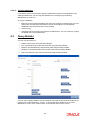
The Clause that you have constructed is displayed in the lower portion of the screen. Click the ‘Ok’ button to save the clause. The Where Criteria screen is closed and you are returned to the main Query Builder screen. 2.4.2 To view the Where Criteria SQL statement you have specified, click the Show link at the bottom of the screen. To clear the current query and enter a new one, click ‘Clear’ button. To save your query with the Where Criteria, click ‘Ok’ button. The query is saved as a user-defined query in the current database. Selecting Specific Fields for Basis Loads When you are specifying criteria for a basis load, you can specify particular fields in the selected table, and order the results by specific fields. Select the particular field for the criteria in the Fields field in the main Query Builder screen, and also select the field according to which the results must be ordered, in the Order By field in the man Query Builder screen. Information in these fields is relevant only when you are defining criteria for basis loads. You can also define Where Clauses for basis loads. 2.4.3 Fields in Custom Query Screen Table 20 Character Maximum, Alphanumeric, Mandatory Select the Table(s) on which the query is to be based. The Table list displays all the tables in the current database. Any table that you select is displayed in the Details section of the screen, in the Table box. Fields 50 Character Maximum, Alphanumeric, Mandatory Select the Table Field(s) on which the query is to be based. The Field list displays all the fields in the selected table. Any field that you select is displayed in the Details section of the screen, in the Fields box. 2.4.4 Running User-defined Query To run a user-defined query, follow the steps given below: Select the user-defined query from the list provided. The system displays the SQL of the existing query. Click the Run button to run the query. The System displays the Query Results in a tabular screen. The Results can be viewed as a Text File / Report / Graph. Note The User will not be able to perform an Aggregate Function on the following fields. Outstanding units FI Outstanding units Total Net Assets Foreign Investors Limit Unit Balance IPO Balance Blocked Units Provisional Units Minimum Balance 2-8