1
Safety Precautions
This instruction manual describes the operation and function of the KV Series PLC.
Read this manual carefully to ensure safe use and maximum performance from your
KV Series PLC.
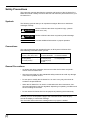
Symbols
The following symbols alert you to important messages. Be sure to read these
messages carefully.
Failure to follow instructions may lead to injury. (electric
WARNING shock, burn, etc.)
CAUTION
Note:
Failure to follow instructions may lead to product damage.
Provides additional information on proper operation.
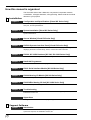
Conventions
This manual describes the operation/function of all Keyence KV Series PLC.
Note following conventions when you use.
Visual KV (Series)
KV-10xx, 16xx, 24xx, 40xx
KV-10AR/AT/DR/DT
KV-24AR/AT/DR/DT
KV-16AR/AT/DR/DT
KV-40AR/AT/DR/DT
Conventional KV (Series)
KV-300 (Series)
KV-10/80 (Series)
KV-10R(W)/T(W)
KV-24R(W)/T(W)
KV-80R(W)/T(W)
KV-300
KV-16R(W)/T(W)
KV-40R(W)/T(W)
General Precautions
•
At startup and during operation, be sure to monitor the functions and performance of the KV Sereis PLC.
•
We recommend that you take substantial safety measures to avoid any damage
in the event a problem occurs.
•
Do not open or modify the KV Series PLC or use it in any way other than described in the specifications.
•
When the KV Series PLC is used in combination with other instruments, functions and performance may be degraded, depending on operating conditions and
the surrounding environment.
•
Do not use the KV Series PLC for the purpose of protecting the human body.
Note: The built-in display may show the error message "Error 40" blinking the very
first time you turn on the power supply to the Visual KV Series. Press any key
around the display to cancel this message.
The Visual KV Series shows this message when no program is loaded.
(1)