1
6.
User settings via System-Exclusive
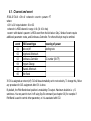
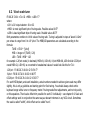
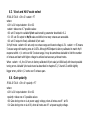
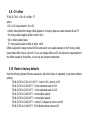
All settings described in chapter 5 are also accessible via MIDI System-Exclusive messages. But Sys-Ex
is the only way to set them separately for each CV output. The command's structure is as follows:
● F0 - Sys-Ex header
● 00 20 7A - manufacturer ID for “MIDI-hardware”
● 01 - device ID for MIDImplant
● 01-02 - CV output ID
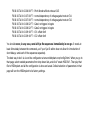
● 01-08 – command
● associated parameters (length varies for different command)
● F7 - Sys-Ex footer.
This is described in details here. All numbers are represented in hexadecimal format. You may use
any kind of Sys-Ex editor to send those commends to MIDImplant. MIDI-OX (midiox.com) or SendSX
(bome.com) are good examples.
At www.midimplant.com/config3.html you can find easy to use tool for selecting every parameter of
MIDImplant. It creates standard MIDI file, that can be played towards MIDImplant and set all desired
parameters without need for any knowledge of System Exclusive, or special editor. The file can be
transfered to MIDImplant from any sequencer as long as it has Sys-Ex transmission enabled.