1
Part 4 – Commissioning
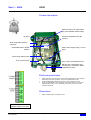
CPU configuration
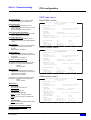
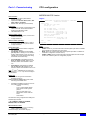
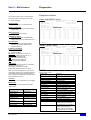
TCP/IP Parameters
Mode:
Three possibilities:
•
SCADA: G200 only communicates with a
SCADA system (the DNP 3.0 address of the
SCADA is configured in the main menu).
•
W500: G200 only communicates with a
W500 system (the DNP 3.0 address of the
W500 is configured in the main menu).
•
SCADA + W500: G200 communicates with
a SCADA system but also accepts access
from a W500 system for configuration
purpose.
Local Port:
•
Enter the port number you want G200 is
listening to incoming connection. Value is
from 1 to 65535.
Max transmission time and retry delay:
•
Maximum duration of a TCP/IP connection,
in answering mode or calling mode (alarm).
•
On time-out expiry, the TCP/IP connection is
closed.
•
Each time the G200 is receiving a request,
the timer is re-armed.
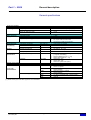
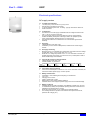
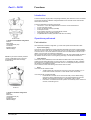
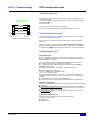
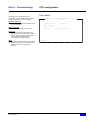
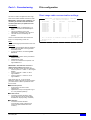
TCP/IP parameters
G200 PARAMETERS
Mode
:
Host address(0.0.0.0 if dynamic)
:
Listen mode
:
Local port(1-65535)
:
Max transmission time - Answer Mode :
- Calling Mode:
TCP connect. delay - 1st try
:
(0s = random value) - 2nd try
:
- 3rd try
:
SCADA or W500 PARAMETERS
IP address
:
Socket type
:
Remote port(1-65535)
:
SCADA
0.0.0.0
yes
20000
1mn
20s
1s
1mn
2mn
193.251.9.68
TCP
1163
Host address:
•
The address of the G200 (acting as a host
for IP) is automatically allocated.
Listen Mode:
To make G200 stay in standby to
Select yes, if you want G200 to be in listen
mode between connections due to alarms.
MERLIN GERIN - Configuration and Diagnostic - ALT+F4=Exit Escape=Exit
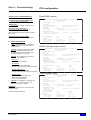
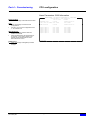
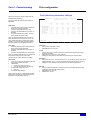
SCADA or W500 PARAMETERS :
IP address : you may enter the destination IP address of:
the SCADA system in “SCADA” mode or in “W500+ SCADA” mode
the W500 system in “W500” mode
Socket type: reserved for future use
Remote port: port number of the remote W500 system, on which it (the W500
system) is listening to incoming connection from G200 units.
.
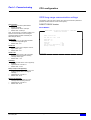
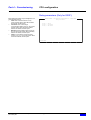
TCP/IP connect. delay:
time to send an alarm configured with "delayed"
option:
•
first attempt: adjustable from 0 to 1min.
per steps of 1s. Setting it to ‘’0’’ selects a
random time between 0 and 1 min (this is
mandatory to prevent all equipment calling
the SCADA at the same time).
•
second attempt: configurable from 0 to
5min. per steps of 1min. Setting it to ‘’0’’
selects a random time between 0 and 5 min.
•
third attempt: configurable from 0 to 10
min, in steps of 1 min. Setting it to ‘’0’’
selects a random time between 0 and 10 min
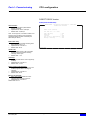
Note: The 2nd and 3rd emissions are only
used by the equipment if the preceding one
did not manage to send the frame.
Schneider Electric - NT00089EN-04 (User's manual
pour G200).doc
Easergy G200
45