1
Connectors
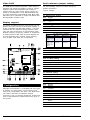
CN1
PC/104 connector
The purpose of the enclosed software drivers is to
take advantage of the extended features of the CHIPS
VGA flat-panel/CRT controller. Its capabilities include:
CN2
LCD connector
•
High performance in Microsoft Windows
JP1
CRT connector
•
Resolutions up to 800 x 600 in graphics
mode with 256 colors
•
Resolutions up to 640 x 480 in graphics
mode with 256 colors
•
132 column text mode
Adjustments
R28
+3.3 V contrast VR connect
R30
brightness VR connect
VR1
+/-VEE contrast VR connect
Installation
After all of the jumpers have been set, you can install
the PCM-3521 on your CPU card. If this is the first time
you are installing a CPU card, you should check its
jumpers before installing the PCM-3521, as they may
later be inaccessible. Next, carefully slide the pins of
the PCM-3521 into the PC/104 connector on the card.
Secure the PCM-3521 onto the card with the screw
provided.
Adjusting the VEE output
It could happen that the VEE output needs to be
adjusted to suit the Advantech LCD panel. In this
case, just power up the system and connect a
voltmeter to pin 1 (LCD VEE) and pin 39/40 (GND) of
P2. Use a screwdriver to adjust the variable rsistor
VR1 until you reach the proper VEE output for your
display.
Connectors
Attach the panel cable to the correct connector on the
PCM-3521, then connect the other end of the cable to
your display. Install the CPU card according to the
instructions given in the CPU manual. Consequently,
power up your system. Should any problems arise,
please refer to the section 'Troubleshooting'.
Display Drivers and Utilities
The Windows drivers included in this package have
several special features:
•
Pen Windows Extensions
•
Panning Drivers
•
Linear Acceleration Drivers
Hardware configuration
Some of the high-resolution drivers provided in this
package will work only in certain system configurations. If a driver does not display correctly, try the
following:
1. Change the display controller to the CRT-only
mode, rather than the flat panel or the simultaneous mode. Some high-resolution drivers wil
display properly only in the CRT mode.
2. If a high-resolution mode is not supported on your
system, try using a lower-resolution mode. For
example, if the 1024 x 768 mode will not work,
choose the 800 x 600 mode.
3. The 65510 flat-panel VGA controller supports only
those drivers that display 640 x 480 panels. Refer
to the following section on driver resolutions and
filenames for a list of the drivers that can be used
on the 65510.
4. The 65545 and 65540 flat-panel VGA controllers
support additional drivers that function with the
F65535 and F65540 only. See the following section
on driver resolutions and filenames for a list of
these drivers.
The Display Driver diskettes provided with your VGA
adapter contain all the necessary software for
installation and operation of your drivers.
The VGA adapter is based on the CHIPS VGA flatpanel/CRT controller and is fully IBM VGA compatible.
This controller offers a large set of extended functions
and high resolutions. If you intend to use the VGA
adapter in the VGA mode only, you de not need to
install any of these drivers. Since the VGA adapter is
fully compatible, it does not require any special drivers
to operate in the standard mode.
PCM-3521 User's Manual
3